ANZAC Day 2022

Today we take a moment to commemorate ANZAC day here in Australia. It is probably the one day that truly unites unites Australia. This is largely due to it harking back to a time when Australia came together as a nation for the first time. The benefit of historical hindsight may question the value of that military action all those years ago but the core values that came from that are what should be celebrated. It cemented the bond between unknown individuals who came together in truly terrifying circumstance to survive, flourish and in many ways, give birth to a nation on the back of their commitment to each other.

The actions all those years ago, across many battlefronts, brought many Australians face to face with other Australians they would have probably never met had the circumstances been different. It thrust them into life and dead experiences that many would have never expected. It thrust the average Australian into circumstances that would truly demonstrated man’s inhumanity to man. Yet, through all this adversity, Australians began to forge a bond, a concept of mateship, that lives on today.

This is something that perhaps we now need more than ever as we face an uncertain and divided world. The past few years have seen many live through life changing and unexpected circumstances that have irrevocably altered our community and the world. They have perhaps, cemented the fragility of life in people’s mind and hopefully made them appreciate how truly lucky we are every day. Our celebration today should look to the example these people provided us all those years ago.

Of course, not everyone is lucky. As with that day back in 1915, many paid the ultimate price and had their lives cut sort by simply being in the wrong place at the wrong time. A unique fact about Australian troops throughout World War One was that they were a total volunteer force. Each one, chose to be there. Many chose to remain, through the horrors of war, to be with their mates and do what they could for each other above all else. Today we also remember those in our community that continue to live and demonstrate that spirit to service.

This is the sacrifice and commitment we honour today. It is about what people do for others. It is about what people did that they thought was right. It is about what people did for what they believed was the greater good. You can judge their motives and ideals through the lens of history but you can’t question their devotion to each other and to their commitment. Today, we celebrate their devotion to each other.

Their hope, after enduring war, was that no one else would have to go through the same experience. The ‘war to end all all wars’ as it was known, sadly did not eventuate. That failure lies on the shoulders of modern society, who do not readily learn the lessons of history. Who lets their world view become full of negativity, impatience, violence and revenge all too readily. We should take a leaf from our ANZAC forebears and focus on what is truly important, our mates.

Lest We Forget

If you want to learn more about the ANZAC battlefields in northern France, visit my web site – www.anzacsinfrance.com.

Build a system to solve staff challenges

pexels-pixabay-163064

One of the major issues that will remain a challenge for most SMB IT resellers is the recruitment and retention of qualified staff. Many times I have been asked questions like – how much should I pay? Should I get a more senior person or more junior people? What skills do I need to look for when it comes to supporting the Microsoft Cloud? My response to that is to say that you are going about things the wrong way.

The challenge with staff is that they are human beings. This makes them imperfect for any task for which you employ them. Also, even if you do manage to employ the ‘prefect’ candidate, they can resign from the business at any time. Given the pace of Microsoft Cloud technologies there will always need to be further investment in skills and knowledge to remain effective. This is a hard job, as many business owners already know, but there is a far better approach in my books.

The thing that I don’t see readily implements in most businesses is a training and onboarding system. The idea is that you build a system that will produce the results or skill levels you are after. In that way, you can simply input just about any candidate at one end and out the other end will pop a highly effective and skilled member of your business.

Having a system means you don’t have to spend time looking for people with the ‘right’ technical skill level and paying them a fortune. You can in fact focus more on what is truly important when it comes to employees, attitude. As the saying goes, you can train skills but you can’t train attitude.

A good employee will also welcome a structured developed path that they can progress along. A system like this also allow the use of metrics to flag employees that are struggling and even though excelling, so they can be given more opportunities.

The biggest challenge obviously comes with building a system. Problem is that most people look at the end result, decide it is all too hard and then fall back on antiquated approaches that don’t work. The best way to start, is just to start! You don’t have to develop the prefect system immediately, you can grow into it over time. The important thing is to start and keep working on it, because as we know, the skills requirements will continue to change over time.

I wrote an article a while back:

Key skills for an IT Professional

that I would suggest is a good place to start when determining what training topics to look at. There are also many resources you can use to help people get skilled up and most are free. The secret is to set them out in a curriculum so people know what is required of them and what they need to learn. Simply leaving people to ‘learn by experience’ doesn’t cut it in this field any more. Likewise, learning on the customers’ dime is not a good business practice to do regularly.

A skilled employee has more confidence when they approach challenges and are much more likely to stay with a business that has invested in them and has a formal training system that encourages them to grow.

Best of all, because it is a system, it can be used over and over again when new employees are brought on board. This will also provide a consistency of knowledge throughout the business and if done right, promotes greater sharing of information and mentoring amoung staff. The idea is that you use the people who use the system to help build, extend and maintain it as they are best placed to do exactly that by already being part of the system. Remember, you should not see the system as limited just to the content it contains but also the people who utilise it. You want to create a system that suits a broad audience, who learn via different methods and learn at different speeds.

In short, investing your time looking for the ‘prefect’ employee is an ineffective approach to building the skills and team you need in a business. It is far better to invest in building the ‘prefect’ training system that you can have total control over, own and will give the desired output for just about any input.

CIAOPS Need to Know Microsoft 365 Webinar – April

laptop-eyes-technology-computer

Join me for the free monthly CIAOPS Need to Know webinar. Along with all the Microsoft Cloud news we’ll be taking a look at Planner.

Shortly after registering you should receive an automated email from Microsoft Teams confirming your registration, including all the event details as well as a calendar invite.

You can register for the regular monthly webinar here:

April Webinar Registrations

(If you are having issues with the above link copy and paste – https://bit.ly/n2k2204 – into your browser)

The details are:

CIAOPS Need to Know Webinar – April 2022
Friday 29th of April 2022
11.00am – 12.00am Sydney Time

All sessions are recorded and posted to the CIAOPS Academy.

The CIAOPS Need to Know Webinars are free to attend but if you want to receive the recording of the session you need to sign up as a CIAOPS patron which you can do here:

http://www.ciaopspatron.com

or purchase them individually at:

http://www.ciaopsacademy.com/

Also feel free at any stage to email me directly via director@ciaops.com with your webinar topic suggestions.

I’d also appreciate you sharing information about this webinar with anyone you feel may benefit from the session and I look forward to seeing you there.

Teams on the web failing to login

2022-04-04_12-27-42

(Be patient, the video might take a few moments to load)

I recently had an issue accessing Microsoft Teams using a web browser even after logging into Microsoft 365. I could get to just about everything else but Teams, which always threw up a login dialog as shown above.

The issue turned out to be the time of the local device which hadn’t updated for some reason after a change to daylight savings time. Thus, the local devices (Windows 11) for some reason was one hour ahead. After changing this so the workstation had the correct time, everything worked as expected.

Hopefully,this helps someone else who is searching for this strange one.

Incentivising Microsoft Teams contributions with Power Automate

One of the most important parts of technology adoption is incentivising people. One simple way to do this is to acknowledge their contributions in Microsoft Teams. I’ve spoken about this before using something like:

Custom Praise badges in Microsoft Teams

The challenge there is, that this is a manual process. How can the same be achieved the same kind of thing using automation I recently wondered?

What if you could automatically determine the number of chat messages that someone posted into Microsoft Teams, and then acknowledge the highest contributors with a custom ‘thank you’ message? Here’s how I managed to do just that using the Microsoft Graph and Power Automate.

The core information needed about messages posted in Microsoft Teams will come the Microsoft Graph, specifically:

getTeamsUserActivityUserDetail

The first step in this process will be to create an Azure AD application in the tenant, which I have detailed previously:

https://blog.ciaops.com/2019/04/17/using-interactive-powershell-to-access-the-microsoft-graph/

the credentials for this Azure AD application will then need to be uploaded into Azure Key Vault as I have covered here:

Uploading Graph credentials to Azure Key Vault

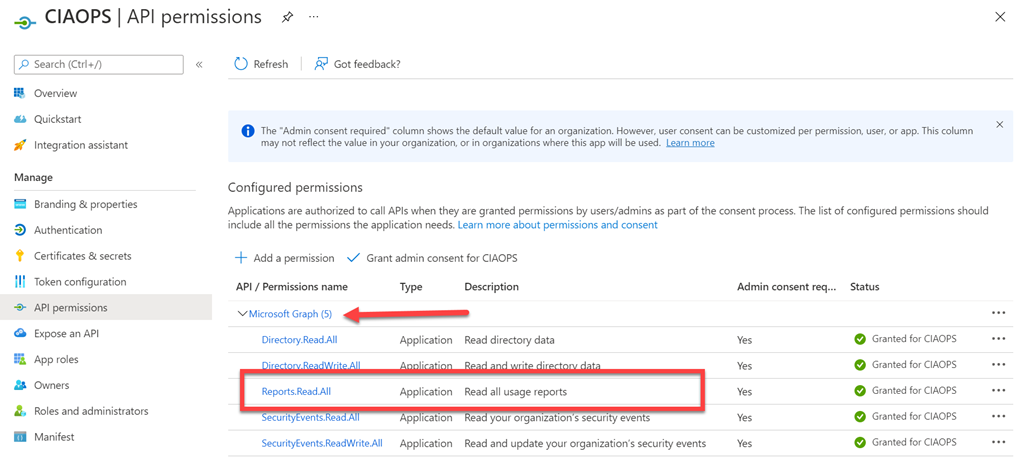
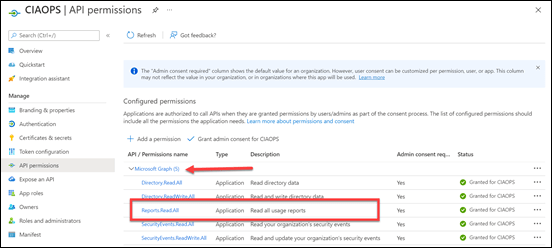
You’ll also need to set the API permissions for this application to :
image

Reports.Read.All

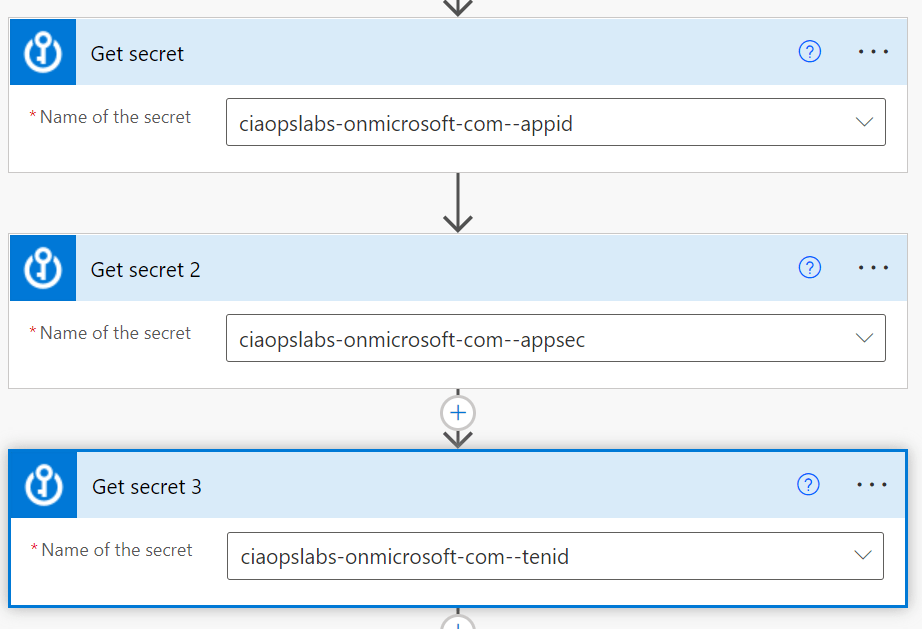
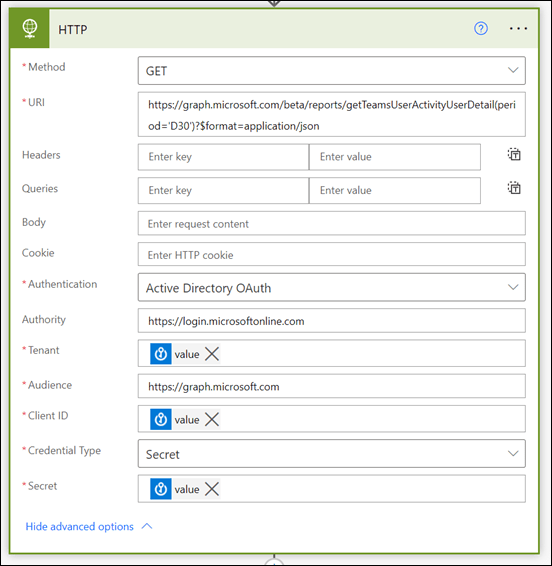
 You’ll need to trigger your Flow the way that suits you. Typically you’d schedule it to run on the first of each month. You’ll then need to use the Get secret action from the Azure Key Vault as shown above. You should also note that this is a premium connectors, so you’ll need an appropriate Power Platform license to use this.
image

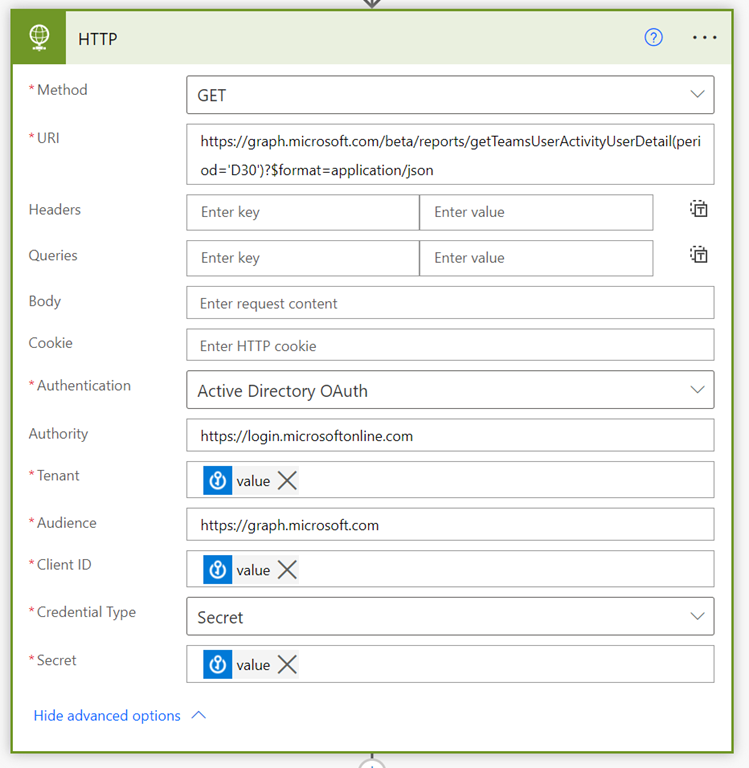
Next, will be the HTTP action that also a premium connector. The URI to use here will be:

https://graph.microsoft.com/beta/reports/getTeamsUserActivityUserDetail(period=’D30’)?$format=application/json

The D30 parameter determines how many previous days to consider. Valid options for the number of days is 7,30, 90, 180 according to the documentation.

The security parameters come from the Azure Key Vault Get secret actions.
image

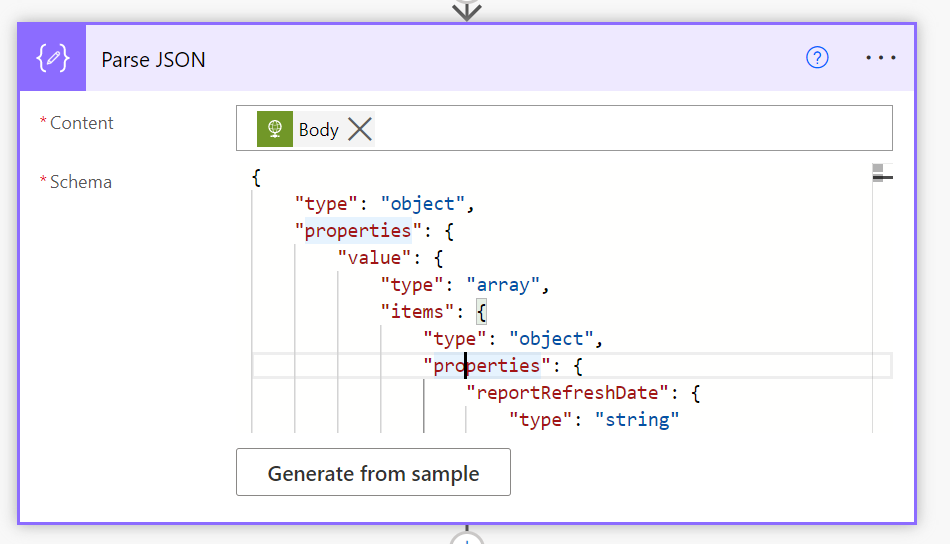
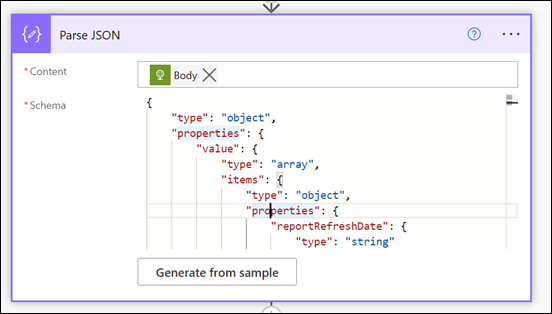
The data returned from this HTTP action will be in JSON format, so that is fed into the Parse JSON action as shown above.

One tricky things about parsing json is to get the right schema. When I first attempted this I received this error:

“message”: “Invalid type. Expected String but got Null.”,

After some digging I found that sometimes the lastactivitydate parameter returned a string or NULL value. Thus, I need to modify the original JSON for that parameter to accommodate both potential results:

“lastActivityDate”: {
     “type”: [
         “string”,
         “null”
     ]
},

Here the whole working JSON schema I used:

{
     “type”: “object”,
     “properties”: {
         “value”: {
             “type”: “array”,
             “items”: {
                 “type”: “object”,
                 “properties”: {
                     “reportRefreshDate”: {
                         “type”: “string”
                     },
                     “userId”: {
                         “type”: “string”
                     },
                     “userPrincipalName”: {
                         “type”: “string”
                     },
                     “lastActivityDate”: {
                         “type”: [
                             “string”,
                             “null”
                         ]
                     },
                     “isDeleted”: {
                         “type”: “boolean”
                     },
                     “deletedDate”: {},
                     “assignedProducts”: {
                         “type”: “array”
                     },
                     “teamChatMessageCount”: {
                         “type”: “integer”
                     },
                     “privateChatMessageCount”: {
                         “type”: “integer”
                     },
                     “callCount”: {
                         “type”: “integer”
                     },
                     “meetingCount”: {
                         “type”: “integer”
                     },
                     “meetingsOrganizedCount”: {
                         “type”: “integer”
                     },
                     “meetingsAttendedCount”: {
                         “type”: “integer”
                     },
                     “adHocMeetingsOrganizedCount”: {
                         “type”: “integer”
                     },
                     “adHocMeetingsAttendedCount”: {
                         “type”: “integer”
                     },
                     “scheduledOneTimeMeetingsOrganizedCount”: {
                         “type”: “integer”
                     },
                     “scheduledOneTimeMeetingsAttendedCount”: {
                         “type”: “integer”
                     },
                     “scheduledRecurringMeetingsOrganizedCount”: {
                         “type”: “integer”
                     },
                     “scheduledRecurringMeetingsAttendedCount”: {
                         “type”: “integer”
                     },
                     “audioDuration”: {
                         “type”: “string”
                     },
                     “videoDuration”: {
                         “type”: “string”
                     },
                     “screenShareDuration”: {
                         “type”: “string”
                     },
                     “hasOtherAction”: {
                         “type”: “boolean”
                     },
                     “urgentMessages”: {
                         “type”: “integer”
                     },
                     “postMessages”: {
                         “type”: “integer”
                     },
                     “replyMessages”: {
                         “type”: “integer”
                     },
                     “isLicensed”: {
                         “type”: “boolean”
                     },
                     “reportPeriod”: {
                         “type”: “string”
                     }
                 },
                 “required”: [
                     “reportRefreshDate”,
                     “userId”,
                     “userPrincipalName”,
                     “lastActivityDate”,
                     “isDeleted”,
                     “deletedDate”,
                     “assignedProducts”,
                     “teamChatMessageCount”,
                     “privateChatMessageCount”,
                     “callCount”,
                     “meetingCount”,
                     “meetingsOrganizedCount”,
                     “meetingsAttendedCount”,
                     “adHocMeetingsOrganizedCount”,
                     “adHocMeetingsAttendedCount”,
                     “scheduledOneTimeMeetingsOrganizedCount”,
                     “scheduledOneTimeMeetingsAttendedCount”,
                     “scheduledRecurringMeetingsOrganizedCount”,
                     “scheduledRecurringMeetingsAttendedCount”,
                     “audioDuration”,
                     “videoDuration”,
                     “screenShareDuration”,
                     “hasOtherAction”,
                     “urgentMessages”,
                     “postMessages”,
                     “replyMessages”,
                     “isLicensed”,
                     “reportPeriod”
                 ]
             }
         }
     }
}
image

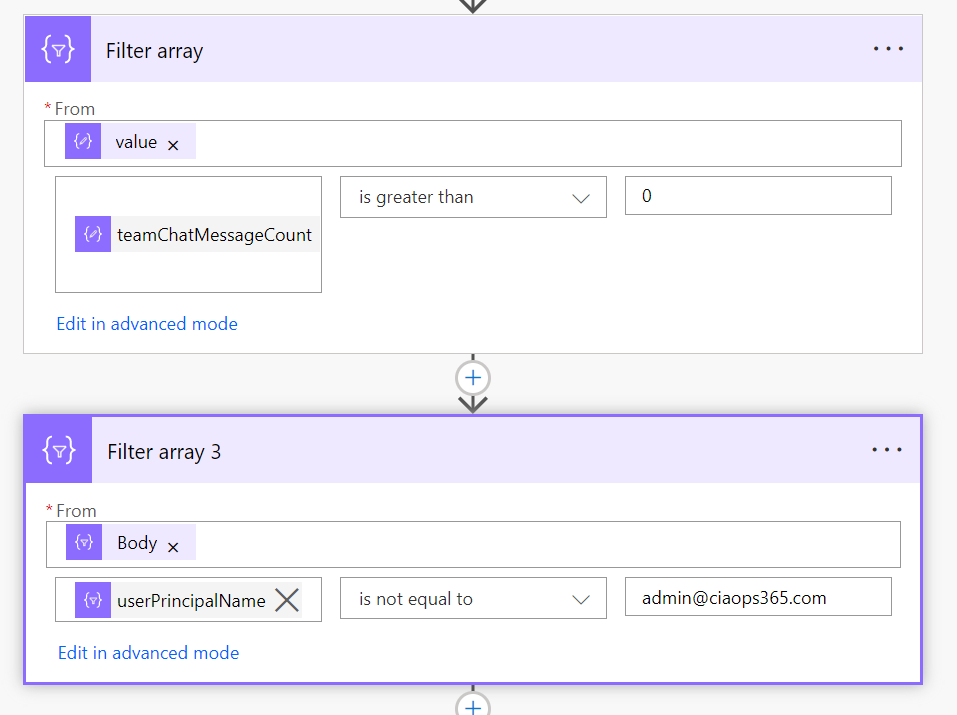
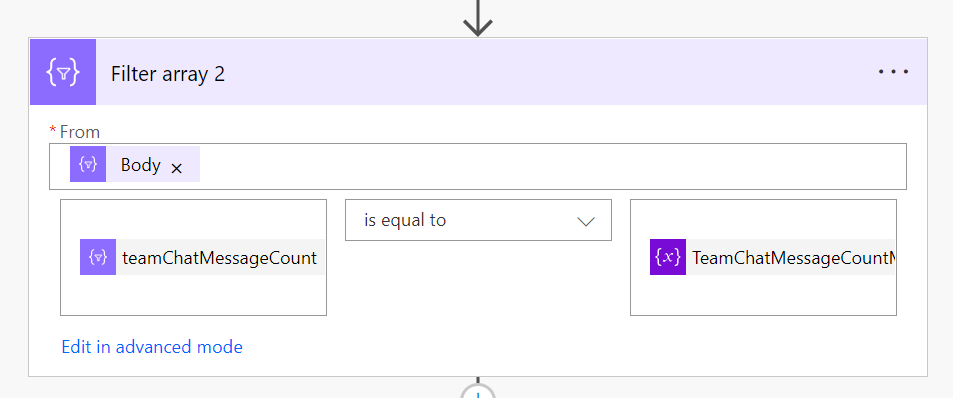
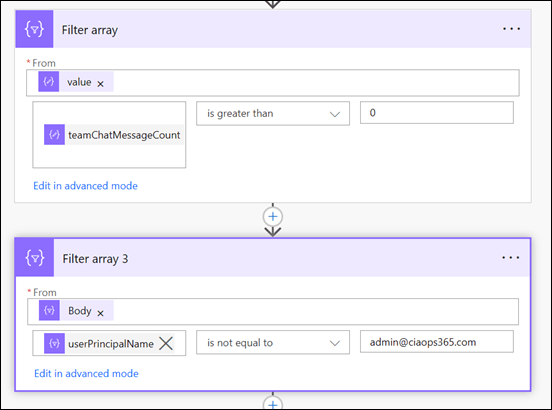
I filtered the results produced to firstly remove users with zero messages and then I removed specific users (in this case me) from the results using the two Filter action shown above.
image

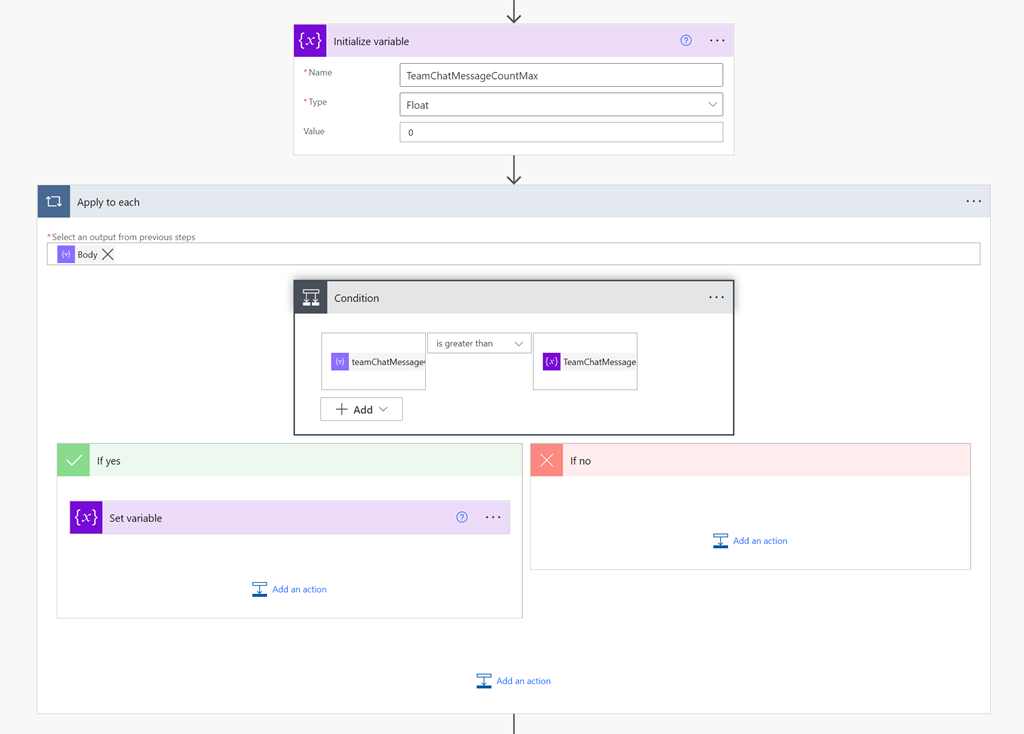
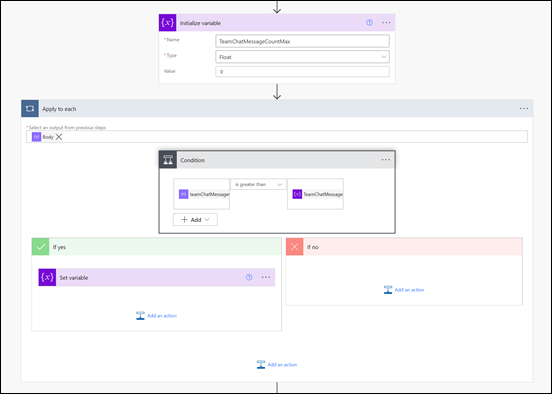
One of the limitations I found during this development process was that Flows are not very good at sorting information. It would have been nice if I could have just sorted my results from largest to smallest. I solved this but firstly creating a temporary variable into which I would store the highest number of chat messages. I then looped through all the remaining results using the Apply to Each action shown above, and set this variable to the greatest value found throughout the results.
image

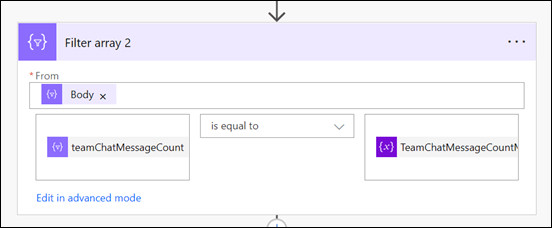
I then employed another Filter action again to remove any results that didn’t match this maximum value.

The next challenge came when considering external users, who have a UPN in the format of:

user_domain.com#EXT#tenant.onmicrosoft.com

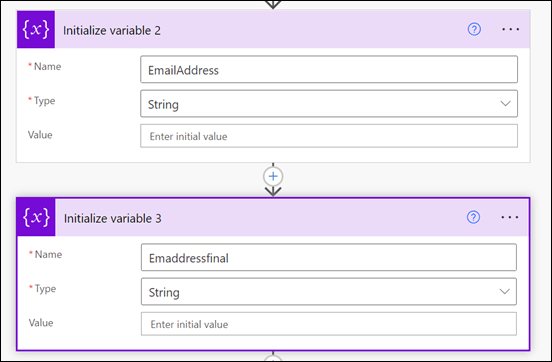
Turns out the the Power Automate lookup actions don’t seem to work using these type of UPNs, they only work with an email address apparently!
image

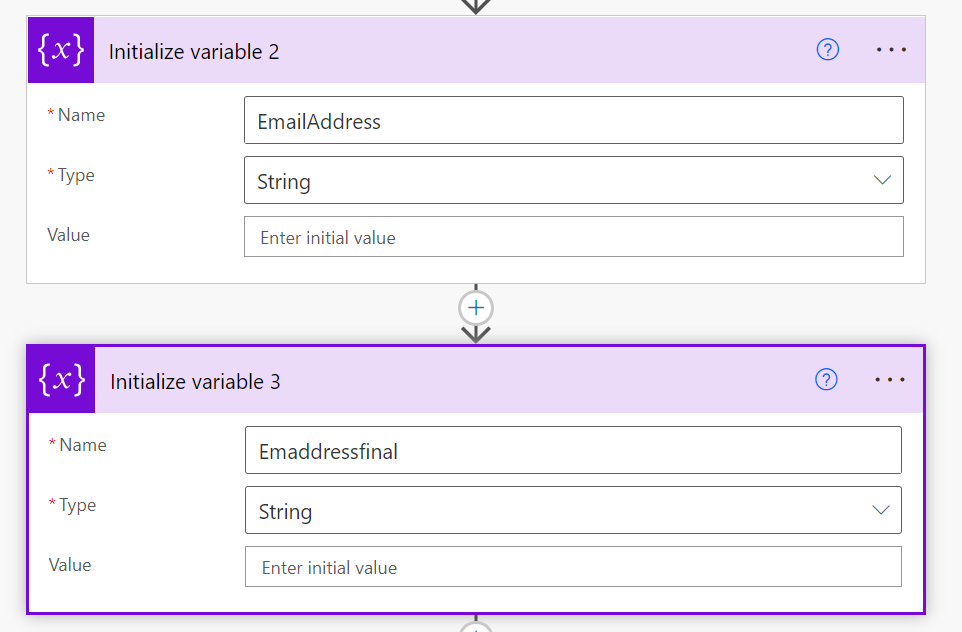
To solve this, I now created two more variables to use when extracting the external users email address.
image

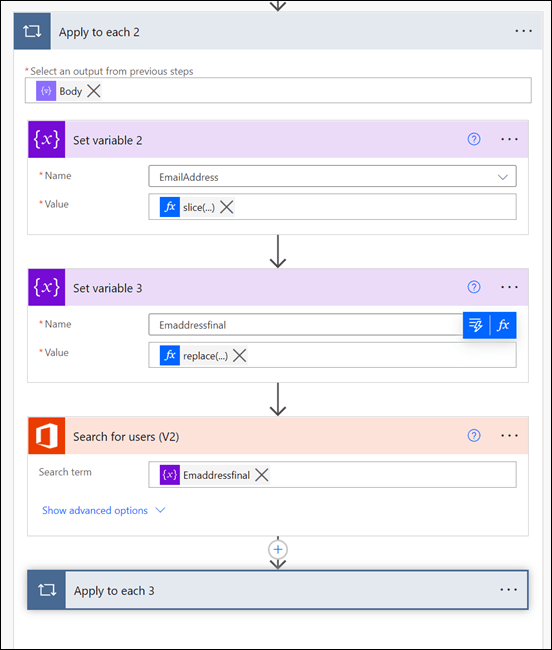
I need to extract and create a user email address before using it in the Search for users (V2) action. To do this I used two functions inside two Set variable actions. The first is:

slice(items(‘Apply_to_each_2’)?[‘userPrincipalName’],0,lastIndexOf(items(‘Apply_to_each_2’)?[‘userPrincipalName’],’#EXT’))

which removes anything from the #EXT and beyond. This typically leaves the format of:

user_domain.com

The second function is:

replace(variables(‘EmailAddress’),’_’,’@’)

that replaces the underscore character with an “at” symbol. The output after both of these functions complete is the users full email address which I can then feed into the Search for users (V2) action to locate my user(s).
image

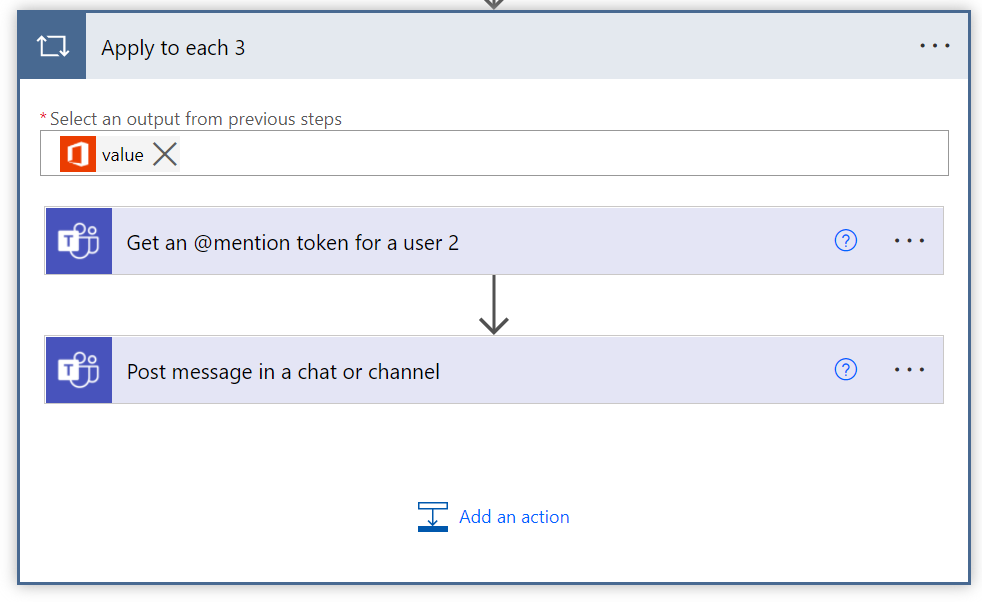
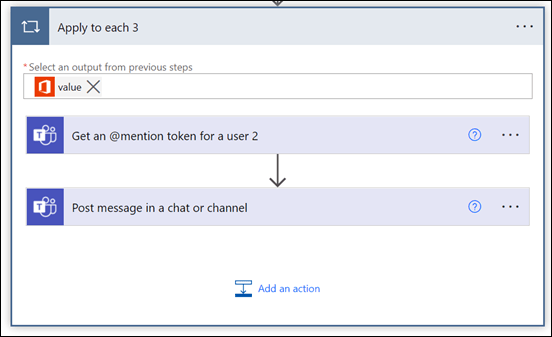
Now that I have the user information I can use it with the Get an @mention token for a user action and then post a message with that @mention and anything else into the Team to publicly recognise the user(s) using the Post message in a chat or channel action.
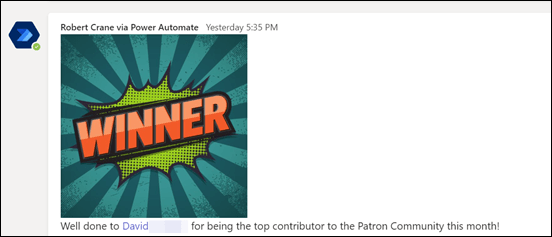
image

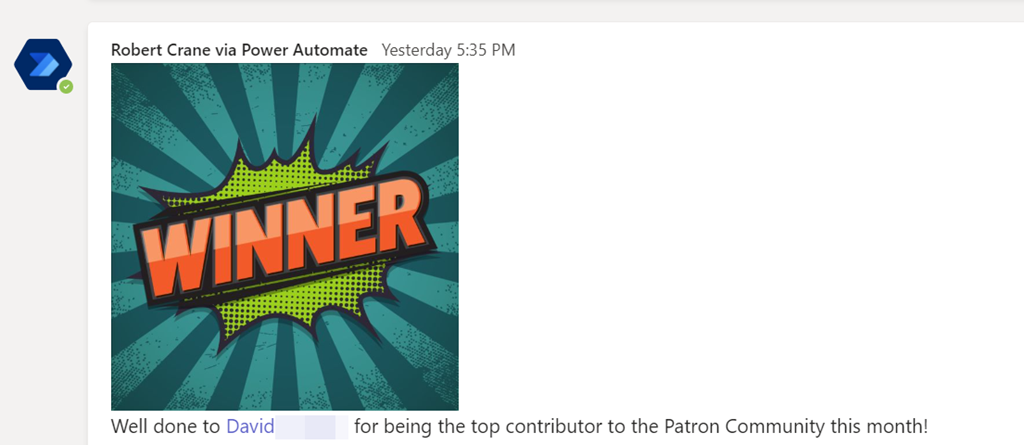
The end result is a nice message, like shown above, that acknowledges the user(s) for their contribution in the Microsoft Team. Best part is that now it is automated it’ll do all the hard work for you going forward!

The moral of the story here is that Power Automate combined with the Microsoft Graph can achieve just about anything you want. Yes, it does a little bit of setting up with an Azure AD application, Keyvault and so on but they are typically only once off. There is also some advanced techniques when it comes to the JSON parameters but once you start working with, it becomes easier. In short, none of that should put you off from what is possible with the Microsoft Cloud environment and putting the technology to work for you to give you more freedom and improve your business processes.