AI Is Starting to Feel Like the Petrol Bowser

image

I filled up the car last weekend and did that thing we all do now — glanced at the price per litre, winced a little, and worked out whether to fill the tank or just put in enough to get me through the week. It struck me, standing there, that I’ve started having the exact same conversation about AI.

For a while, AI felt free. You paid your subscription, you used it, and the meter never seemed to run. That era is ending. Token prices, usage caps, premium request limits — the cost of running AI is becoming visible, metered, and impossible to ignore. For a small business, it’s shifting from a novelty into a line item. And like petrol, it’s no longer optional. You can’t really run the business without it, but you can’t ignore what it costs either.

A running cost, not a one-off

The mistake I keep seeing is treating AI like a piece of software you buy once and forget. It isn’t. It behaves far more like fuel or electricity — something you consume, in varying amounts, every single day. Some weeks you’ll barely touch it. Other weeks, when you’re deep in a proposal or cleaning up a quarter’s worth of numbers, you’ll burn through it.

That changes how you should think about it. A running cost needs watching. It needs a budget. And it needs someone, every so often, asking the plain question: are we actually getting value for what we’re spending here?

Spend where the work actually is

Here’s where it gets interesting for a small business. You haven’t got an unlimited tank, so you have to decide where AI earns its keep. For most of the small operations I work with, the answer isn’t exotic. It’s the boring, repetitive, time-sapping work — the email triage, the first draft of a report, the summary of a long meeting nobody wants to rewatch.

That’s exactly where Copilot inside Microsoft 365 pays for itself. Asking Copilot in Outlook to clear and draft replies to a morning’s backlog saves real hours. Having it summarise a Teams meeting you missed, or pull the key figures out of an Excel workbook, turns an afternoon into a few minutes. The trick is to point your spend at the tasks that are costing you time and money today — not the shiny demos that look clever but never touch your actual week.

Economise without going without

The same way you don’t leave the car idling in the driveway, you don’t want AI burning through your allowance on low-value busywork. Be deliberate. Use the everyday Copilot features that already come with your licence before you reach for premium-priced add-ons. Give your people a quick steer on what’s worth asking and what’s just noise. And look at the bill — actually check where the consumption is going, the way you’d question a sudden jump in the power account.

None of this is about spending less for its own sake. It’s about spending on purpose.

Where I’ve landed

Petrol taught small business owners to think in terms of value per trip, not just price per litre. AI is heading the same way. The ones who do well won’t be those who spend the most or the least — they’ll be the ones who know exactly what they’re buying and why. Watch your usage, back the work that matters, and treat AI like the utility it’s quietly becoming. The meter is running now. Best to know what it’s running on.


The Clients You Need to Let Go

image

Last Saturday morning I sat down with a coffee and went through my client list properly. Not the polished version on a spreadsheet — the honest one. The list where you stop and ask yourself which names make your shoulders drop when they appear in your inbox.

Out of every hundred clients, maybe twenty fit that description. They weren’t bad people. But they were the ones who turned a thirty-minute call into ninety. The ones who treated every standard you set as optional. The ones who had a complaint queued up before they’d even tried what you suggested.

And here’s the part most MSP owners don’t want to admit out loud: those clients aren’t just slightly more work. They quietly run the place.

The Maths You’ve Been Avoiding

Sit down and add up the hours. Not the billable ones. The total ones. The Friday afternoon you spent re-explaining MFA for the fifth time. The Sunday email you answered because they wrote at 9pm and you didn’t want them to think you’d ignored them. The team meeting that ran twenty minutes long because someone needed to vent about a client who refuses to follow the playbook.

If you log it honestly for a fortnight, the pattern is uncomfortable. A small handful of clients eat a disproportionate slice of your week, your team’s morale, and your own headspace. The rest of your book — the ones who pay on time, listen to your advice, and treat your team with respect — get whatever scraps of attention are left over.

Copilot Can Show You What You Already Suspect

Here is where Microsoft 365 quietly earns its keep. Ask Copilot in Outlook to summarise the volume and tone of messages you’ve exchanged with a particular client over the last quarter. Open your Teams channels and let Copilot in Teams surface the recurring complaints by topic. Pull up the recap from your last quarterly review with that client and read it back without the emotion of being in the room.

You will see it plainly. The same three issues raised four quarters in a row. The same standards politely ignored. The same tone in every second message. Copilot isn’t telling you anything new. It’s just laying out the evidence you’ve been too busy or too loyal to read properly.

I have started doing this every quarter. It takes about twenty minutes per client, and it removes the wishful thinking. You stop asking “are they really that bad?” and start asking the more useful question: “Why am I still putting up with this?”

The Conversation Itself

When you do decide to end the relationship, do it cleanly. Refund what is fair. Offer to hand over their data in a tidy package via OneDrive. Recommend a provider who is genuinely a better fit for them — not a punishment, just a different match.

I draft the offboarding email in Word with Copilot’s help, sit on it overnight, then read it again in the morning. If it still says what needs saying, I send it. No long justification. No door left ajar. A short, professional close.

What You Get Back

The first time I did this properly, three things shifted within a month. My team felt lighter. Monday mornings stopped starting with dread. And the clients I genuinely respect — the ones who do the work, follow the advice, ask good questions — got noticeably more of me.

That last shift is the one that matters. The people paying for your best work deserve your best attention, and you simply cannot offer it while a small group is quietly running off with the fuel.

The Hiring Shift Copilot Has Quietly Forced

image

A few weeks ago I watched someone forward a Copilot-drafted email to a client without really reading it. The tone was off. A figure was wrong. The client picked it up before they did. Nobody was being lazy — they were being efficient, in the exact way we’ve all been trained to be efficient. Get the task done. Move to the next one. That small moment has stuck with me, because I think it points at something much bigger that’s quietly reshaping how small businesses need to think about the people they hire, and the behaviours they reward.

For most of my working life, businesses hired people to do things. Send the email. Build the report. Process the invoice. Update the spreadsheet. Speed and responsiveness were the metrics that mattered most. If you could turn incoming requests into completed work quickly and reliably, you were valuable. That model held up because doing the thing was the hard part, and doing it well took real skill, attention and time.

The work that used to be hard isn’t hard anymore

Copilot has quietly upended a lot of that. Drop into Outlook and you can have a draft reply in seconds. Open Word with a half-formed idea and Copilot will hand you a structured first pass before your coffee has cooled. Excel will summarise a sheet, flag the anomalies, and suggest a formula it thinks you wanted. Teams will catch you up on the meeting you missed and tell you what was decided and who owns what. Every one of those tasks used to be where someone earned their keep. Now they’re table stakes.

What’s left isn’t the doing. It’s the deciding. Was that actually the right answer? Does the draft fit the specific client we’re dealing with, or the average client Copilot has imagined? Is the figure it pulled from SharePoint the current number, or one from two restructures ago that nobody got around to archiving? Should we even send this email, or is there a phone call hiding behind it?

We’ve been training people out of asking

Here’s the part I find uncomfortable. A lot of small businesses have spent years quietly training their people out of pausing. We rewarded responsiveness over reflection. Inbox zero over inbox thoughtful. Closing tickets over questioning whether the ticket made sense in the first place. Over time, some genuinely good people got very fast at moving work between systems without really engaging with any of it.

That worked when the slow, expensive part of the job was producing the output. It doesn’t work now. The slow part is the human bit — the read, the sense-check, the quiet moment of “this doesn’t sit right with me” that keeps a business out of trouble with a client, a regulator, or its own future self.

The maths has flipped

When output was expensive, mistakes were rare almost by accident. There was friction in the system, and friction gave people time to second-guess themselves. A bad proposal took half a day to write, so it usually got read twice before it left the building. A bad proposal now takes ninety seconds, and so do the next ten after it.

The businesses that come out of this next stretch in good shape won’t be the ones with the fastest Copilot adopters. They’ll be the ones that have quietly shifted what they recognise and reward — from doing the thing, to noticing when the thing isn’t right. That’s a hiring conversation, a performance review conversation, and most of all a culture conversation. And in most of the small businesses I see day to day, it’s well overdue.

Copilot Credit Pre-Purchase Plans

Ok, deep breath before we start. In. Out. Let’s start.

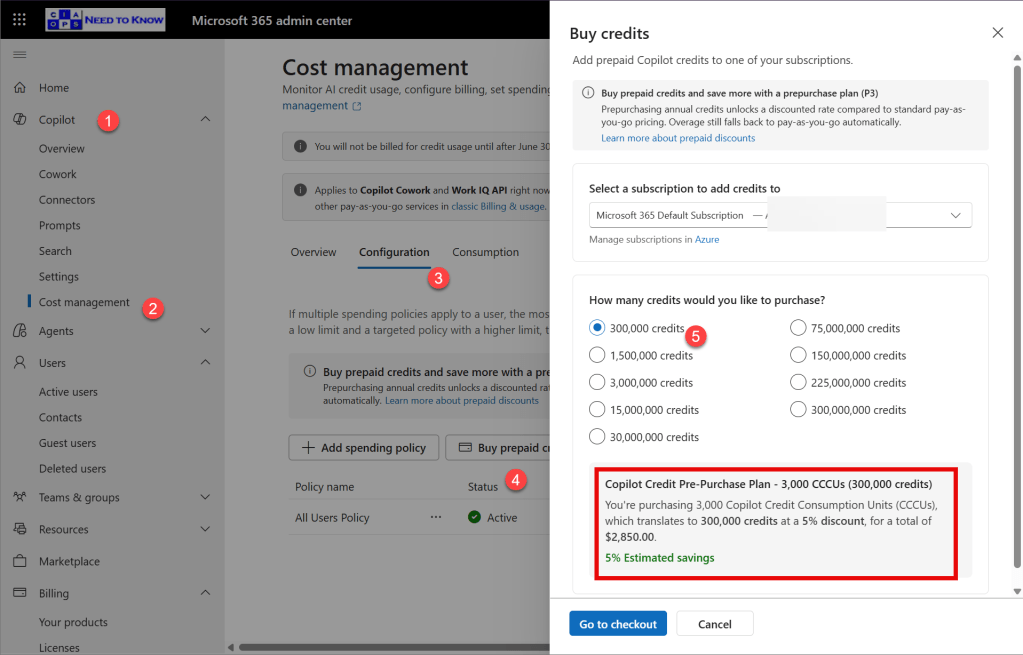
If you want to purchase Copilot Credits for use with Cowork you’’ll need access to https://admin.microsoft.com. Then you’ll need to navigate to Copilot | Cost Management | Configuration. You’ll then need to select Buy prepaid credits.  Then you need to select a Subscription, then How many credits you want from the table that displays.

Upon selection, you’ll be shown the price and then you can pay via the Checkout.

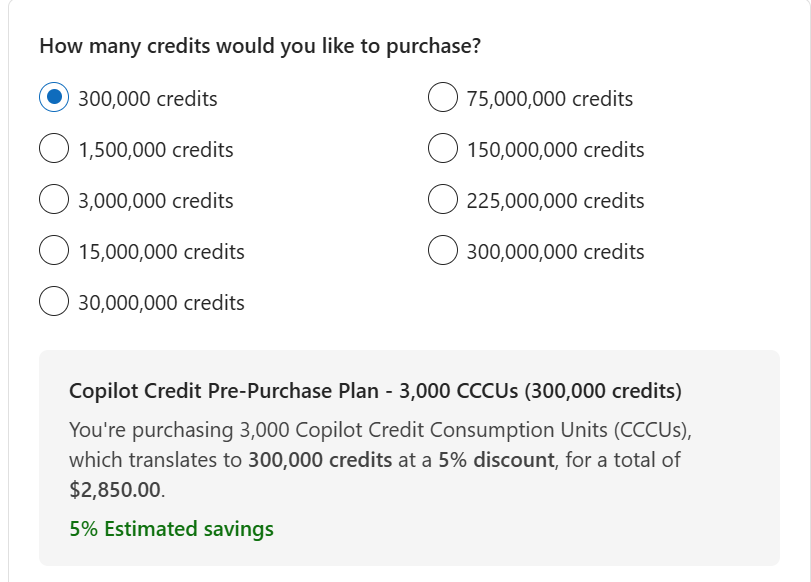
If you look closely you’ll also see this.

So, billing is measured in CCCUs. 1 x CCCU = 100 credits. CCCU means Copilot Credit Commit Unit.

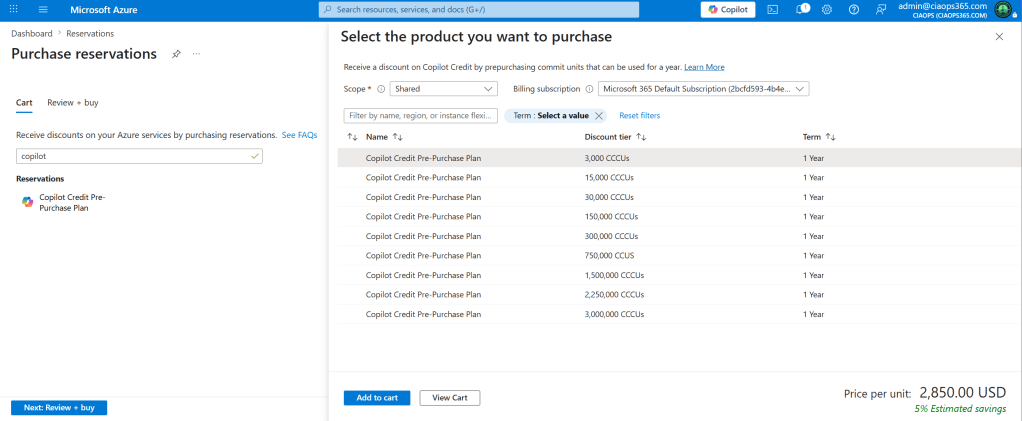
Given that this PAYG style billing is applied against an existing Azure subscription, if you go into the Azure portal and locate Reservations you find another location where you can pay:

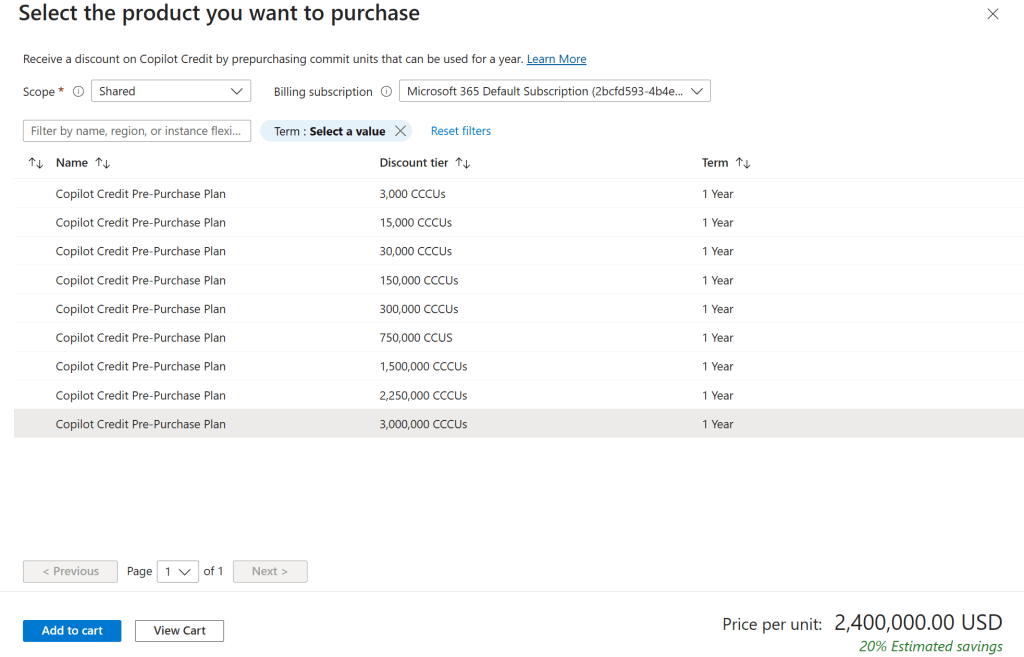
Again, here, we have Copilot Credit Pre-Purchase Plans measured in CCCUs.

At the lowest prepaid tier you get 5% discount and at the pre-paid top tier you get a 20% discount, with remaining tiers in between these two. Any overage returns to be being billed with no discount at the base rate.

If you now look at how usage is reported, you see it is reported in Copilot Credits, not CCCUs. So CCCUs appear to be a billing construct only.

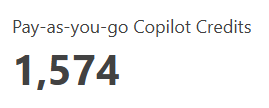
Thus, if we focus on just the Copilot Credits (not CCCUs) we get the Microsoft quoted US$0.01 per Copilot Credit. Thus, the above consumption cost becomes 1,574 x US$0.01 = US$15.74 in real money.

Thus, to enable Copilot Cowork going forward you will need:

– M365 License (e.g. M365 Business Premium)

– M365 Copilot license (to enable premium Copilot capabilities like Cowork)

– An Azure subscription for Copilot Cowork to be billed against

– Cowork consumption and billing is tenant wide, not per user

That will bill Copilot Cowork at a PAYG rate of $0.01 per Copilot Credit. A simple average would be to assume each Cowork interaction will consume around 400 credits. That is, around US$4 every time ANY user uses Cowork. This is because Cowork interactions vary on how many credits they use based on their complexity of the request and actions taken.

You can pre-purchase Copilot Cowork credits at average discounted rates starting from US$0.0095 down to $0.0080 (i.e. 5 – 20% discount) for a fixed annual commitment.

Annual pre-paid Copilot Cowork credits are measured in Copilot Credit Commit Units (CCCUs) which have the ratio of 100 credits per 1 CCCU. The entry level CCCU is 3,000 which provides 300,000 credits across all users in the tenant.

These credits can be purchased from the M365 admin portal or the Azure portal (vis Reservations).

An administrator can restrict Copilot Cowork in various ways to control costs but that is the subject for additional post.

….. and we are done. Breath. In. Out.

The Sales Process That Stopped Feeling Like Selling

image

The best sales conversations I’ve watched in the MSP world don’t feel like sales conversations at all. They feel like someone helping someone else work out what’s actually going on. There’s a diagnosis. There’s a plan. And then, at the very end, there’s a quiet question: would you like a hand putting this in place? That’s the whole thing. No closing technique. No manufactured urgency. No script that leaves either side feeling slightly off afterwards. Just a useful hour and a natural offer at the end of it.

Help is the offer

A few of my clients have built their front door around a paid consult. Someone pays a modest fee, sits down for an hour, and walks out with a real read on what’s happening inside their tenant — security gaps, licence waste, the four Copilot use cases their team would actually adopt, the Conditional Access policy that’s been quietly broken for months. The deliverable isn’t a quote. It’s clarity.

That changes the dynamic. The buyer isn’t being sold to. They’re being helped. And by the time the hour is up, they already know whether the person across the table is worth working with, because they’ve seen them work.

This is where Copilot has quietly become a useful ally in those conversations. Rather than disappearing for a week to write up findings, the consultant pulls a draft summary together in Word with Copilot during or right after the session — referencing the discovery notes, the screenshots from the tenant review, the Secure Score export. The buyer leaves with something tangible the same day. The speed is part of the help.

The invitation writes itself

Here’s the bit most MSPs still miss. When you have genuinely helped someone — when they walk out the door clearer than they walked in — you don’t need a pitch. You need one sentence. Want us to do this for you?

That sentence works because the buyer has already done the qualifying themselves. They’ve seen your thinking. They trust the diagnosis. They want the plan executed. The proposal that follows is short, because the work has been pre-sold by the consult itself.

I’ve watched clients use Copilot in Outlook to turn the same notes into the follow-up email — the recap, the recommended next steps, the link to a SharePoint page with the proposed scope. It lands inside a few hours, while the conversation is still warm. Nothing about it feels like a chase. It feels like a continuation.

Why this beats the old playbook

Free discovery calls dressed up as consults don’t fool anyone anymore. Buyers have sat through enough of them to recognise when they’re being qualified rather than helped. The free version trains people to expect a pitch at the end. The paid version trains them to expect value — and a small amount of money on the table changes how seriously both sides show up.

For MSPs trying to move up the value chain, this is a quieter, more dignified way to do it. You stop hunting. You start advising. The right buyers — the ones who want a partner rather than a price — self-select towards it. The wrong ones fall away on their own. That filtering is worth the effort by itself.

The thing I keep coming back to is how much pressure this approach takes off both sides of the table. The buyer doesn’t have to fend off a pitch. The MSP doesn’t have to manufacture one. Helping first, then inviting, with Copilot doing the heavy lifting on the write-up, turns the sales process into something that actually resembles the work itself. Which, when I think about it, is probably the point.

Copilot in Word

MAI_d023a379a3a6732e

Most people meet Copilot in Word the same way. New blank document, click the icon, type “write me a proposal,” hit Generate.

Out comes 400 words of beige. Technically correct. Completely generic. The kind of thing that could be about your business or anyone else’s.

So they shrug, decide Copilot “isn’t that good,” and go back to writing from scratch.

Here’s the thing. They weren’t using Copilot wrong. They were using the worst part of it and ignoring the best part.

A blank page is the one thing Copilot is genuinely bad at. Give it nothing and it gives you nothing — just confident, well-punctuated filler. The magic isn’t in asking it to invent. It’s in pointing it at what you already have.

What is Copilot in Word, really?

Forget the demos where someone conjures a document from a one-line prompt. That’s the party trick, not the job.

What Copilot in Word actually does well is take your material — a file, an email, a meeting, a folder — and reshape it into something new. The official term Microsoft uses is grounding. The button you press is Reference a file.

That’s the whole ballgame. You’re not asking a stranger to guess what your last client proposal looked like. You’re handing it the last one and saying “another like this.”

So the question stops being “can Copilot write?” and becomes “what do I already have that Copilot can stand on?” For most SMBs, the answer is a lot. Years of proposals, reports, policies, and SOWs sitting in OneDrive, doing nothing.

Step-by-Step: drafting from something you already have

This is the workflow I show every client. It takes about ninety seconds.

Open a new document

Start a blank document in Word, then click the Copilot icon. You’ll get the Draft with Copilot box. Don’t type your prompt yet.

Reference the file first

Click Reference a file (the paperclip), and start typing the filename. Pick the document you want Copilot to learn from — an old proposal, a strong report, a policy you’re proud of. You can attach more than one. Microsoft has the full walkthrough in Draft and add content with Copilot in Word, and the Welcome to Copilot in Word page confirms it only ever looks at the files you choose — nothing else.

Write your prompt

Now tell it what you want, and point it back at what it’s holding:

Draft a one-page proposal for Acme Pty Ltd.
Reference: /Northwind-Proposal.docx /Acme-Discovery-Notes.docx
Match the structure and tone of the Northwind proposal.
Keep it under 400 words.

Notice what’s missing? Nowhere do I explain what a proposal is. I’m not teaching Copilot to write. I’m showing it how we write and telling it to do that again.

Keep, regenerate, or bin it

Copilot drops the draft in. Keep it, Regenerate for another go, or Discard. Then you edit like a human — because you still have to.

Why this actually changes behaviour

Before: “Copilot, write me a client report.” → generic mush you rewrite anyway. After: “Copilot, write this report the way I wrote the last three.” → a first draft that already sounds like the business.

That second one is the difference between a toy and a tool.

Here’s the real win for MSPs. Grounding turns your clients’ own document history into an asset they didn’t know they had. Every good proposal becomes a template. Every solid SOP becomes a pattern. The licence they’re already paying for suddenly does something a free chatbot never can — because the free chatbot can’t see their files.

And it’s not just drafting. Flip it around and Copilot becomes a reading tool. Open a long contract, type Summarize this document, and it’ll hand back the gist with citations back to the source — chat with Copilot about your Word document covers that side. Summarize before you read. Draft from what you’ve got. Same tool, both directions.

Don’t ask Copilot to know your business. Show it.

If you’re rolling Copilot out to clients and the first thing you teach them is “type a prompt on a blank page,” you’ve handed them the weakest trick in the box and you’ll get the predictable shrug.

Teach Reference a file first. That’s where the value lives, and it’s the bit nobody stumbles onto by accident.

Reference a file isn’t there to help you write faster. It’s there to make sure what gets written already sounds like you.

The Lessons Only Show Up After You Commit

image

Someone said to me recently that the things you experience from actually going all in on something will change the way you think and the way you experience life. I sat with that for a few days, and I keep coming back to how true it is. The lessons I’ve learnt that actually shaped me — the ones I still use — never arrived from reading about them or watching someone else do it. They arrived after I committed. After I hit publish on the video. After I greenlit the project. After I said yes to the thing that might not work.

You can’t think your way to the lesson

For years I noticed a pattern in my own work. The plans that lived in a Word doc were always cleaner than the plans I actually shipped. The launches I’d rehearsed in my head were always smoother than the ones in the wild. But the rehearsal never taught me anything. The shipping did. You only find out what your audience actually wants once you put something in front of them. You only find out where the workflow breaks once a real client sits in it on a Tuesday morning.

This is where I think a tool like Copilot has quietly changed how I move. I used to delay things because the draft email wasn’t right, the outline wasn’t sharp enough, the slides weren’t worth showing yet. Now I’ll ask Copilot in Outlook to give me a first pass on a reply, sit with it for a minute, and send something that’s eighty per cent of where it needs to be. I’ll spin up a rough deck in PowerPoint with Copilot drafting from a Word doc I’ve already written, and I’ll show it to someone for feedback the same afternoon instead of next week. The point isn’t that Copilot writes the thing for me. The point is that it removes the excuse to keep polishing before I commit.

Not every bet pays off — and that’s the lesson

I’ve greenlit plenty of projects that didn’t go anywhere. Videos that landed flat. Ideas I was sure would resonate that quietly didn’t. If I’d waited for certainty on any of them, I wouldn’t have learnt what my audience actually responds to. I wouldn’t know which formats earn attention and which ones don’t. I wouldn’t have built the muscle of recovering from a miss and trying again the next week.

What I notice now in clients I work with is the same pattern. The teams that are getting real value from Microsoft 365 and Copilot aren’t the ones who ran a six-month readiness program. They’re the ones who picked a use case, tried it inside Teams or in a SharePoint workspace, watched what happened, and adjusted. They committed first and refined second. The ones still building the business case in a Loop component are usually the ones falling further behind.

The shift is in your thinking

Going all in changes you because it forces you to live with the result. You learn what works because you watched it land. You learn what doesn’t because you felt it. That kind of knowledge doesn’t come from analysis — it comes from being in the arena.

I’d rather ship something imperfect this week and know what to fix next week, than spend a month protecting an idea that never meets the world. Every meaningful jump I’ve made in my business started with that decision. Hit publish. Greenlight it. Find out.

The Audit You Keep Avoiding

image

You go through your numbers each month. You sit down with your team and review what’s working. You poke at your processes when something breaks. That’s normal business hygiene.

But there’s one thing on the books almost no one runs a proper audit on — and it’s the one most likely to be quietly costing you money.

It’s you. Specifically, your energy.

The hidden line item in your P&L

I’ve been in business long enough to notice a pattern. The weeks I sleep badly, eat rubbish, and skip my walk are the same weeks I send the email that lands the wrong way. Or I sit on a quote for three days when it should have gone out in three hours. Or I miss something obvious in a client conversation that I’d have caught when I was sharper.

None of that shows up on a balance sheet. But the cost is real. A deal that drifts. A client who feels half-listened-to. A reply that creates a problem instead of closing one.

You can’t see it in your numbers, but it’s in there. Every time.

No tactic survives a flat battery

Here’s the part people don’t want to hear: there’s no strategy, framework, or new hire that fixes a depleted owner. I see business owners trying to out-work, out-tool, or out-source their way around tiredness. It doesn’t work. The decisions still have to come through you, and the quality of those decisions tracks the quality of your sleep, your food, and your movement more closely than most of us care to admit.

And ironically, the tools we now have should make this easier, not harder. I use Copilot in Outlook to do the first pass on long replies, and Copilot in Teams to recap a meeting I half-listened to because the day got away from me. That’s not laziness — that’s protecting the limited number of sharp hours I actually have. Letting the machine do the rummaging means I get to spend my energy on the call that matters, not the inbox triage.

The same goes for the weekly running of the business. A clean Planner board, a proper SharePoint home for your documents, a few Power Automate flows handling the boring approvals — these aren’t productivity bling. They’re how you stop bleeding decision-making capacity on things that don’t deserve it.

Treat yourself like the asset you are

Run the audit on yourself the same way you’d run it on the business.

How did you sleep this week? When did you last move? What does the food in your kitchen actually look like? When was the last full day you took off — not “worked from home in a t-shirt”, but actually off?

I’m not pretending I get this right every week. I don’t. But when I notice the slide, I treat it the way I’d treat a leaking margin: stop, look at the inputs, fix what’s fixable. Block the walk in the calendar. Push the late meeting. Let Copilot draft the thing tonight so I can be in bed at a reasonable hour.

The business sits on top of you. If the foundation is shaky, nothing built on it is going to hold.

Audit the owner first.