How to remove a Win32 application using Intune

This video:

https://www.youtube.com/watch?v=Xilp56PVltI

will show you the steps to remove an Win32app from a Windows 10 desktop. It will utilise an existing Intune Application deployment policy to achieve this. It is able to do so because part of creating the initial deployment policy was the requirement to specify how to uninstall that same application. Thus, when you create an Application deployment policy in Intune you can use to add and remove that application from your environment.

Need to Know podcast–Episode 276

i speak with MVP and Digital Workplace expert Rebecca Jaskson. Rebecca is fascinated by what makes people and organisations tick. She specialises in the digital workplace, employee experience and change management. We do a  deep dive into the main collaboration tools that Microsoft provides such as SharePoint, with an especial focus on the value of the modern Intranet.

There is also a round up of the latest Microsoft Cloud news at the front of the episode.

This episode was recorded using Microsoft Teams and produced with Camtasia 2020.

Brought to you by www.ciaopspatron.com

Take a listen and let us know what you think – feedback@needtoknow.cloud

You can listen directly to this episode at:

https://ciaops.podbean.com/e/episode-276-rebecca-jackson/

Subscribe via iTunes at:

https://itunes.apple.com/au/podcast/ciaops-need-to-know-podcasts/id406891445?mt=2

The podcast is also available on Stitcher at:

http://www.stitcher.com/podcast/ciaops/need-to-know-podcast?refid=stpr

Don’t forget to give the show a rating as well as send us any feedback or suggestions you may have for the show.

Resources

Rebecca Jason – Linkedin, Twitter, Blog, Instagram

Mirosoft Ignite

AI-based Privacy Management for Microsoft 365 [VIDEO]

3 ways to support frontline workers in a hybrid world

Introducing Android™ Apps on Windows 11 to Windows Insiders

Microsoft achieves a Leader placement in Forrester Wave for XDR

Windows 11 security: Protect it all with Windows 11 chip to cloud security

Sysinternals in the Windows store

Sysmon report in virus total

Providing feedback on user reported messages

Hopefully, you are aware that Microsoft 365 provides users the ability to report a suspected email. I have spoken about this here:

Improved security is a shared responsibility

image

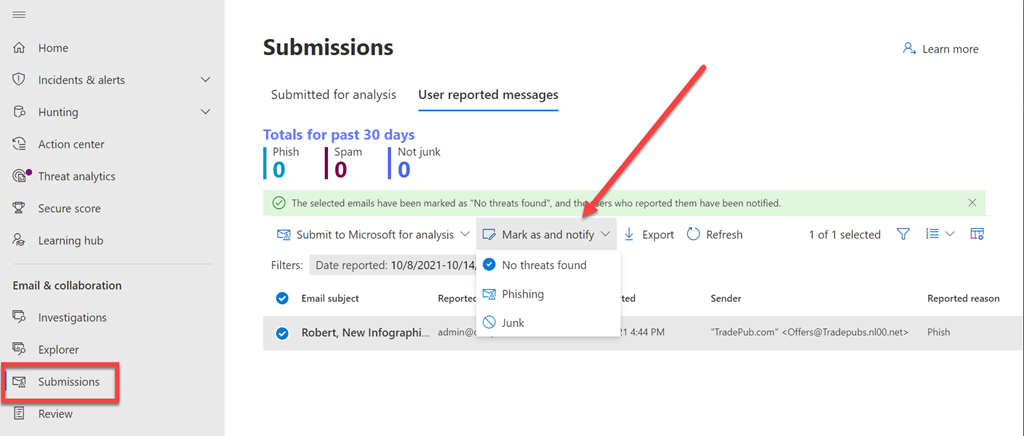
What you may not be aware of is that these submissions can viewed and action in the Microsoft Security Center:

https://security.microsoft.com

under the Submissions menu option as shown above.

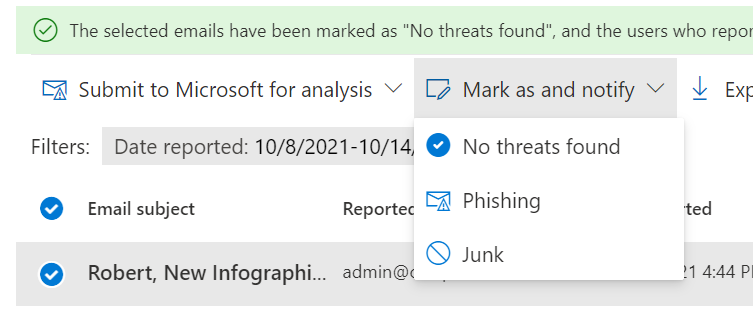
You may also not be aware that there are further actions you can take in here:

image

You can provide feedback directly to the user about their submission using the Mark as an notify option as shown above.

image

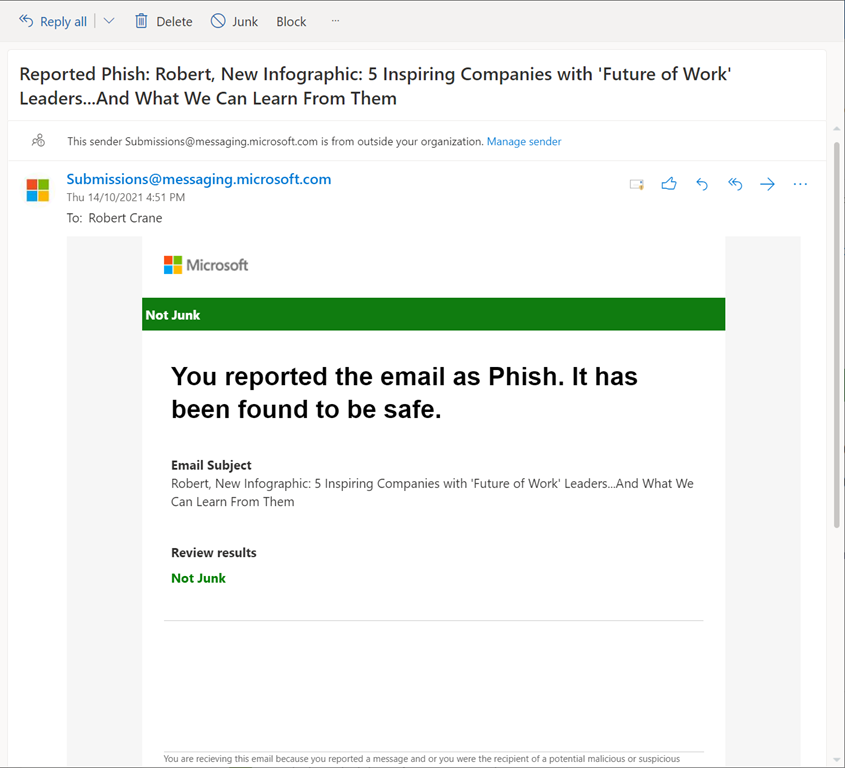
Doing so will send the user an email, like that shown above, to provide feedback about that submission for the user. Doing provides important reinforcement of users remaining vigilant as well as helping them better identify threats.

image

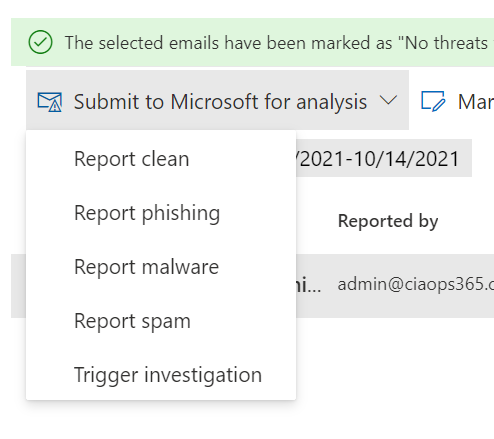
 You’ll also find actions you can take on that message that will provide feedback directly to Microsoft, as shown above.

image

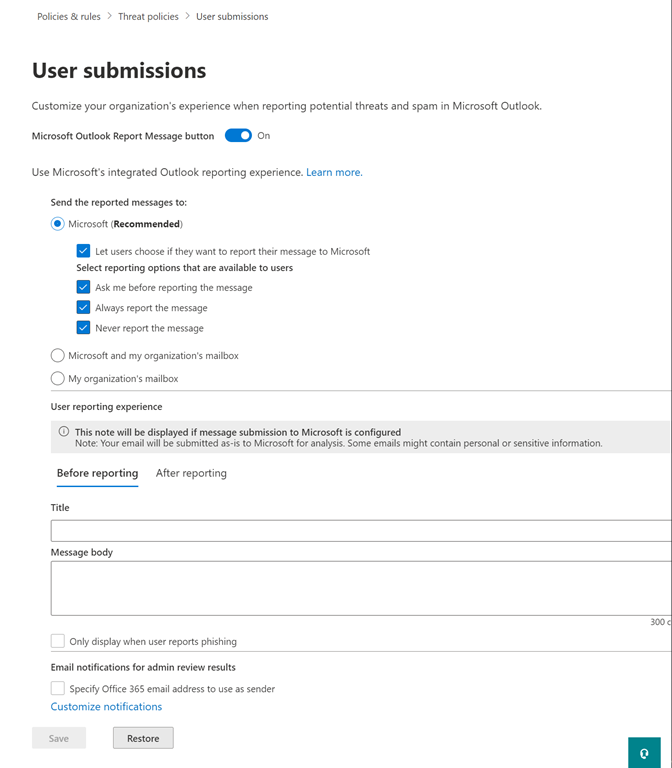
Even better, if you go into Policies & rules | Threat Policies | User submissions you are able to customise what is sent to the user, both before and after reporting as shown above.

For more information on these capabilities visit:

Admin review for reported messages

Getting users involved in security is important. Part of that is providing them feedback and recognition of their contribution, no matter how small. Using these capabilities for reported messages, you are able to do that quickly and easily.

Need to Know podcast–Episode 275

Join for an episode with MVP Rory Braybrook where we learn more about modern identities, especially Azure including B2B and B2C. Identity is so critical to everything we do in IT these days it is important to have a refresher to understand what’s what and how it can be used effectively. I’ll also bring you the latest news and updates from the Microsoft cloud world so listen in and share your feedback.

This episode was recorded using Microsoft Teams and produced with Camtasia 2020.

Brought to you by www.ciaopspatron.com

Take a listen and let us know what you think – feedback@needtoknow.cloud

You can listen directly to this episode at:

https://ciaops.podbean.com/e/episode-275-rory-braybrook/

Subscribe via iTunes at:

https://itunes.apple.com/au/podcast/ciaops-need-to-know-podcasts/id406891445?mt=2

The podcast is also available on Stitcher at:

http://www.stitcher.com/podcast/ciaops/need-to-know-podcast?refid=stpr

Don’t forget to give the show a rating as well as send us any feedback or suggestions you may have for the show.

Resources

Rory Braybrook – LinkedIn, Authory

Windows 11: A new era for the PC begins today

Welcome to the new Whiteboard

Mailbox storage limits

Microsoft Ignite

How cyberattacks are changing according to new Microsoft Digital Defense Report

Microsoft Digital Defense Report

Defending Windows Server 2012 R2 and 2016

Power Platform Community Monthly Webinar – November 2021

image

Join us for our monthly Power Platform webinar where we share the latest news and updates from the Microsoft Power Platform plus take a deeper dive into Power Virtual Agents.

You can register now via:

https://bit.ly/ppc1121

If you wish to join our community and be part of the regular discussion and participation on the Microsoft Power Platform you can join via:


CIAOPS Patron

(look for the Power Platform option here to join us).
We look forward to seeing you on the webinar.

Add TAXII threat intelligence feeds to Azure Sentinel

image

There a public threat intelligence feeds available that Azure Sentinel can take advantage of. Think of these as providing information around entities that represent threats such as compromised IP addresses, botnet domains and so on. Typically, these feeds will support the TAXII connector inside Azure Sentinel.

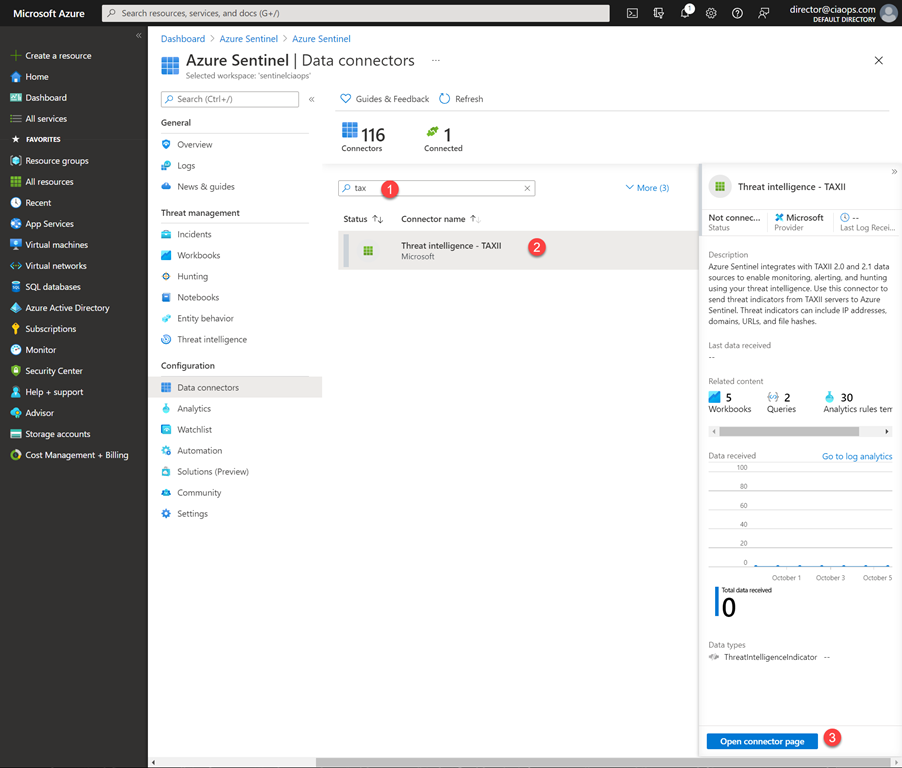
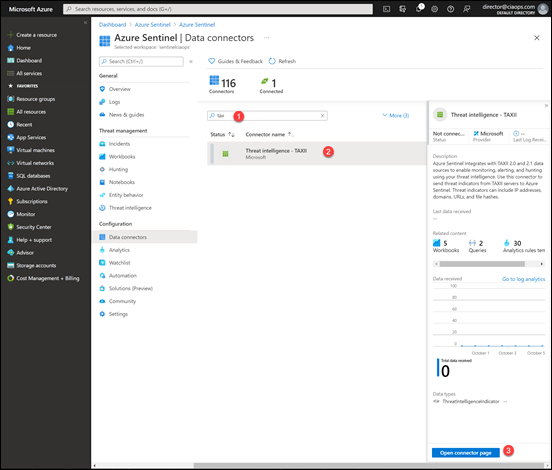
Select the Data connectors option from the Azure Sentinel menu on the left. Next search for TAXII. Finally, select Threat Intelligence as shown above, then the Open connector page in the lower right.
image

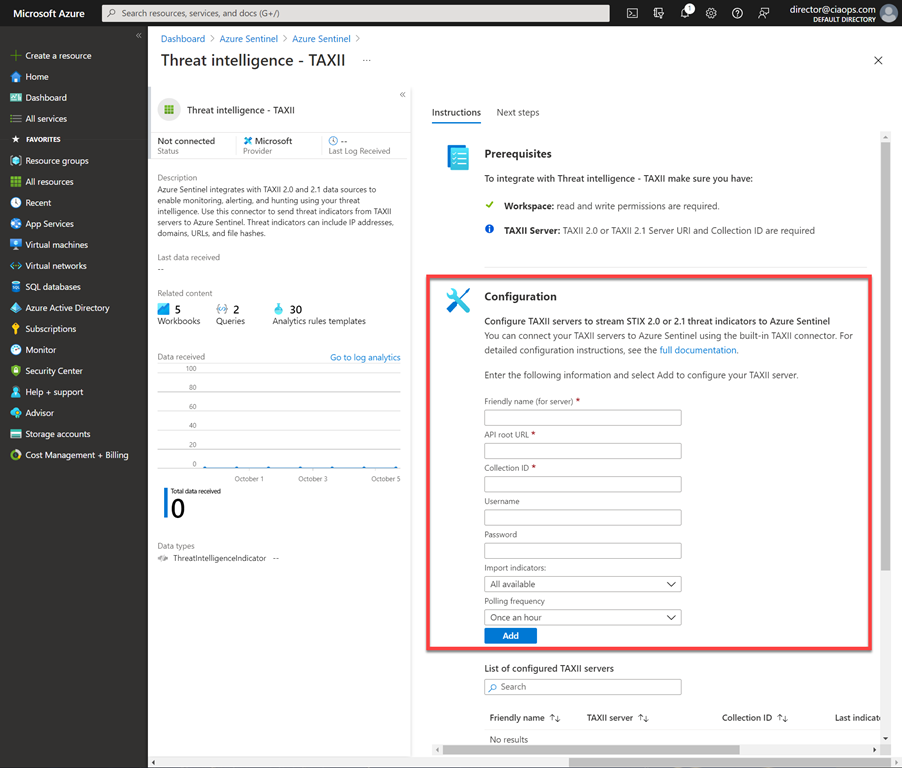
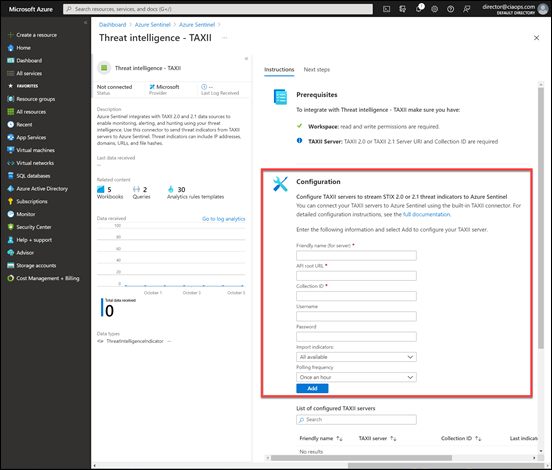
On the right hand side of the page, you see the Configuration area as shown above. Here you’ll require information on the following items:

– API root URL

– Collection ID

– Username

– Password

If you have a look at the bottom of this article:

Connect Azure Sentinel to STIX/TAXII threat intelligence feeds

you’ll find the details for the free Anomali Limo threat feed, which is:

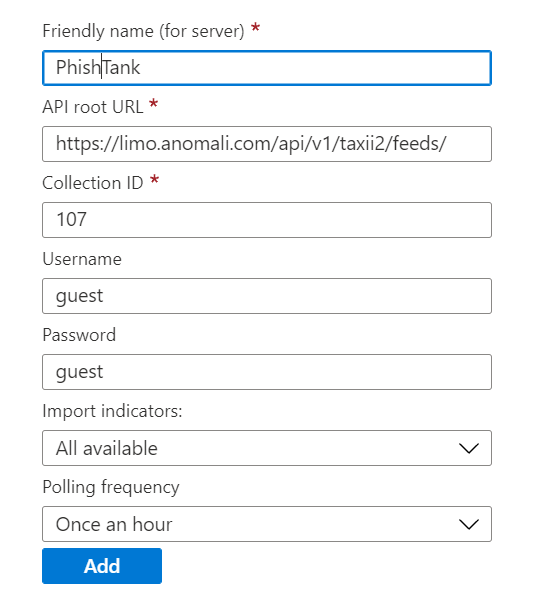
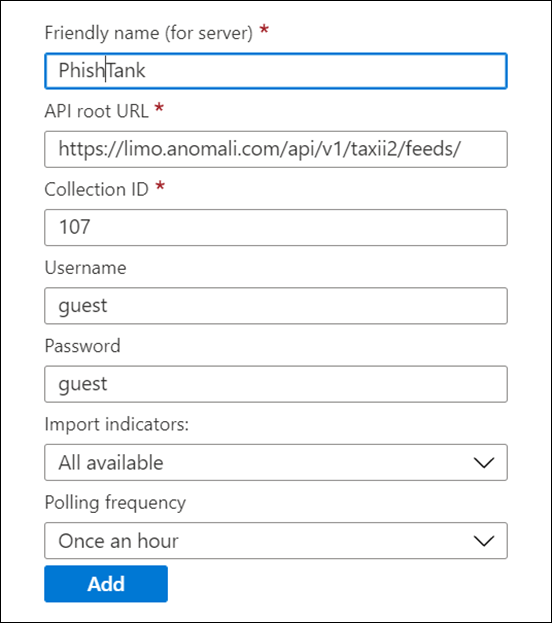
– API root URL = https://limo.anomali.com/api/v1/taxii2/feeds/

– Collection ID = see list in article (i.e. 107, 135, 136, etc)

For the username and password of all these feeds use:

guest
image

Complete the details for each Collection ID, like what is shown above. When you have completed each feed select the Add button.
image

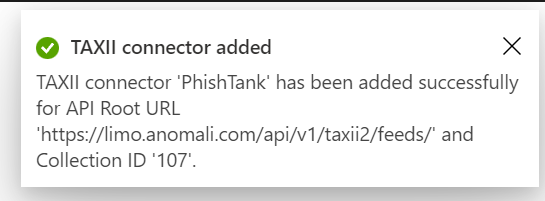
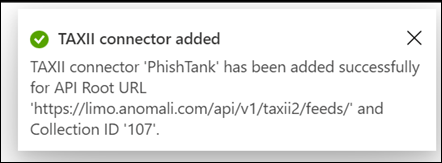
The feed will be validated and if successful, an alert will confirm this at the top of the page as shown above.

image

The entered feed will appear in a list at the bottom of the page. At this point, feed information will start flowing into your environment depending on the Polling Frequency you selected for the feed.
image

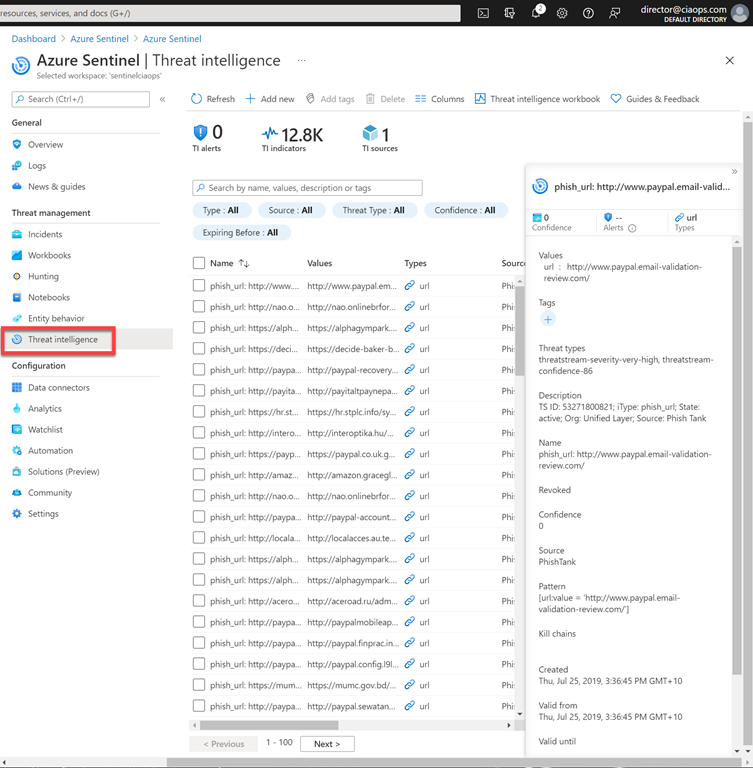
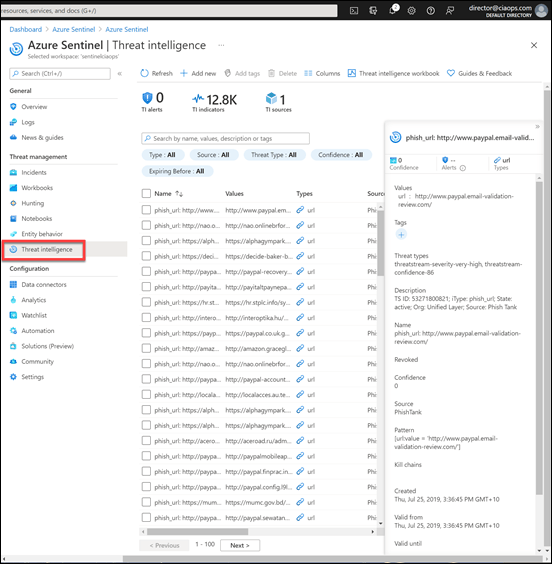
Once the feed has started to import data select the Threat intelligence from the main Sentinel menu as shown above. You should see a range of entries. These entries can now be utilised throughout your Sentinel environment. This is detailed here:

Work with threat indicators in Azure Sentinel
image

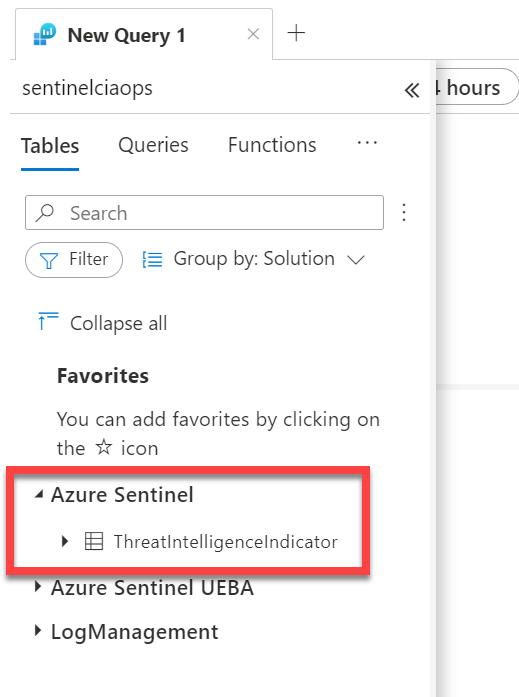
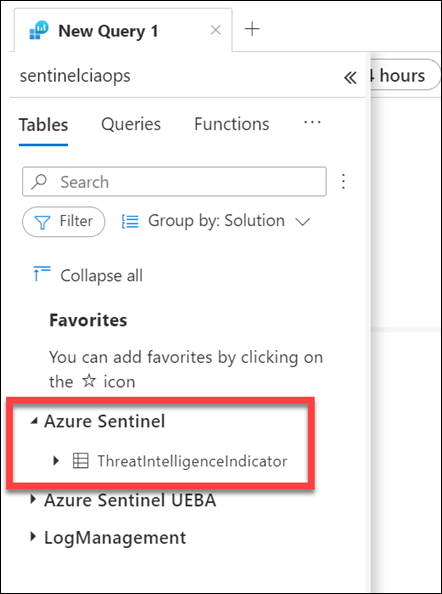
This data is stored in a table called ThreatIntelligenceIndicator as shown above, which can be used directly in hunting queries.

Keep in mind that any threat indicator data incurs an ingestion and data storage cost. However, this is not a great amount and the value they provide is well worth that minor cost. You can track threat indicator costs using workbooks that Sentinel provides. You can add more feeds if you wish and details about what is available can be found at:

Threat intelligence integration in Azure Sentinel

Having additional threat data provides more signal information for Sentinel when it examines your environment. If information from these threat indicators is detected in your environment, then alerts will be generated. For a small ingest and storage cost having these threat indicators flow into your Sentinel environment provided a huge amount of value and increase your security.