Need to Know podcast–Episode 292

The editorial for this episode is an always controversial topic on backing up Microsoft/Office 365. I am going to highlight some of the facts that, unlike what some say, Microsoft does indeed backup customer data and you’ll find all the links in the show notes.

This is the last episode before Christmas so thanks to all listeners for their support and I wish everyone a happy and safe time over the holidays. No break here, and I’ll be back with the latest news and updates again soon.

You can listen directly to this episode at:

https://ciaops.podbean.com/e/episode-292-microsoft-365-backup/

Subscribe via iTunes at:

https://itunes.apple.com/au/podcast/ciaops-need-to-know-podcasts/id406891445?mt=2

The podcast is also available on Stitcher at:

http://www.stitcher.com/podcast/ciaops/need-to-know-podcast?refid=stpr

Don’t forget to give the show a rating as well as send me any feedback or suggestions you may have for the show.

This episode was recorded using Microsoft Teams and produced with Camtasia 2022.

Brought to you by www.ciaopspatron.com

Resources

@directorcia

@directorcia@twit.social

Join my shared channel

CIAOPS merch store

Become a CIAOPS Patron

CIAOPS Blog

YouTube edition of this podcast

Use Access policies to require multiple administrative approvals

Introducing enhanced company branding for sign-in experiences in Azure AD

Office 365 company branding requirements have changed

New Admin Center Unifies Azure AD with Other Identity and Access Products

New Layout Options for OneNote on Windows are coming soon

Introducing Microsoft Teams Premium

Announcing new removable storage management features on Windows

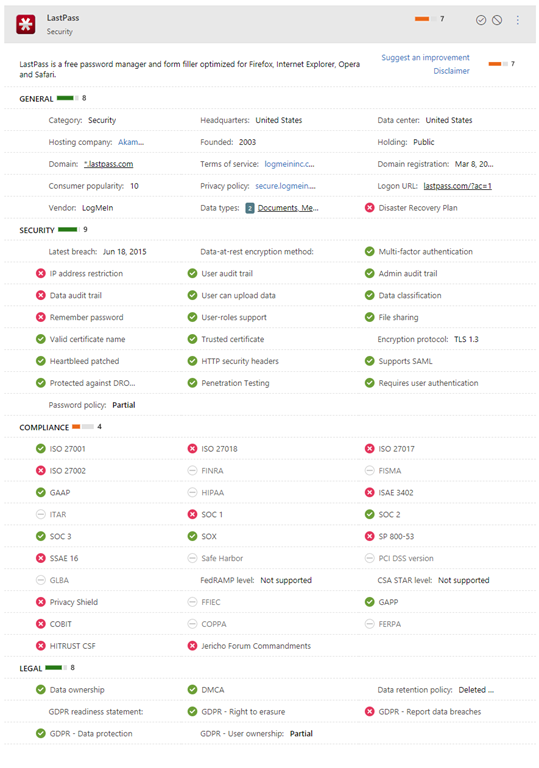
Microsoft Defender for Cloud Apps data protection series: Understand your data types

Microsoft Security Product Reviews: Give product feedback & get rewarded!

Backup

Revisiting some facts around Microsoft 365 backup

Do you need to backup Office 365?

Microsoft policy on backup (Sept 2022)

“Additionally, each service has established a set of standards for storing and backing up data, and securely deleting data upon request from the customer.”

The Essential 8 Security guidelines

Search essential 8

External email indicator needs refinement

A while back I wrote about how you can enable

Native external sender notifications in Exchange Online

which is a great security enhancement. However, now I’m beginning to see some push back from SMB customers.

Why? Well, if you take a look at my inbox you can probably see why:

image

Most of my emails comes from external contacts, and only one is internal. That means I see the word ‘External’ a hell of a lot in my inbox. Many point out that this ‘External’ tag chews up a lot of precious screen real estate as it appears as a prefix in the From field during email preview..

image

The challenge is that if you disable the external sender notification you also lose the warning “The sender user@domain.com is from outside your organization’, which is very handy.

It would be handy if we had a bit more customisation for the ‘External’ tag in the Set-ExternalInOutlook command, that would perhaps allow the tag to be disabled in the email preview but retain the warning line when an email item is full opened. I think that would work much better for SMB and many others also.

Hopefully, someone can let the appropriate people at Microsoft know that SMB users in particular are beginning to request this very important security feature be disabled to save screen real estate. That is a very bad thing I would suggest given the importance of email security, especially in SMB. However, I think Microsoft does need to look at this ‘External’ tag in light of the SMB experience, where there are more external than internal senders and screen real estate is at a premium.

Office 365 company branding requirements have changed

*** Update ***

The issue with my tenant not displaying company branding as it used to was due to a bug in the interface. Microsoft have now rectified that and I have access to company branding as I once used to.


image

It seems that the requirements to configure Office 365 company branding have changed. The official documentation is here:

https://learn.microsoft.com/en-us/azure/active-directory/fundamentals/customize-branding#license-requirements

which says:

License requirements

Adding custom branding requires one of the following licenses:

  • Azure AD Premium 1

  • Azure AD Premium 2

  • Office 365 (for Office apps)

However, I definitely know this wasn’t the case until very recently, because a tenant I have without Azure AD P1 or P2 that allowed company branding configuration and now does not. So, something has indeed changed recently and I can find no acknowledgement or documentation of that. The existing branding of the tenant remains unchanged but I can no longer make changes.

If you don’t have Azure AD P1 or P2 in your environment you can always sign up for a 30 day trial and make changes. However, after that 30 days ends you’ll need to buy a full Azure AD P1 or P2 license it seems, if you wish to modify the company branding it seems.

I would have thought that in a world where we want to make tenants more secure using something like branding to help reduce the risk of phishing attacks tricking users into putting their details into false portals, the ability to brand a tenant would be available to all licenses.

Hopefully, this is simply an over sight by Microsoft and the ability is returned. However, for now it appears they are fully enforcing the licensing when it comes to company branding and requiring an Azure AD P1 or P2 licenced user to make changes.

Microsoft 365 incident response training

pexels-pixabay-69934

In early 2023 I’ll be running an incident response training course for Microsoft 365 environments. Training will held over four consecutive weeks. Each session will be two (2) hours and run from 9am Sydney time.The dates are:

Wednesday January 11th 2023 – Before an incident. What you need to do to prepare

Wednesday January 18th 2023 – During an incident. What you need to do when an incident occurs

Wednesday January 25th 2023 – After an incident. What needs to be done after an incident has occurred

Wednesday February 1st 2023 – Lab exercises and group best practice discussions

The sessions will be recorded and other materials from the sessions (checklists, etc) will be available to attendees afterwards.

This event will be conducted remotely via Microsoft Teams.

The aim of this training is to help you better prepare for a security incident inside the Microsoft 365 environment. You’ll learn what settings you should enable and what processes you should have in place before an incident occurs. The sessions will also take you through common examples of incidents and help you understand what needs to be done when they occur and how to minimise risk and impact to a business. The sessions will also take your through the post-incident process to build confidence with what information needs to be maintained and how to prevent similar incidents re-occurring. The final session will be a group hands on lab and discussion so you can put all the skills you have learned to the test.

The price for this event will be:

Gold Enterprise Patron = Free

Gold Patron = $33 inc GST

Silver Patron = $99 inc GST

Bronze Patron = $176 inc GST

Non Patron = $399 inc GST

You can learn more about the CIAOPS Patron community at www.ciaopspatron.com.

I hope that you’ll join me in January for this event as I believe it provides some much needed training in a very important aspect of managing and securing Microsoft 365. If you are serious about security for Microsoft 365, then you need a plan and this training will aim to give you just that plus some experience to boot!

You can register you interest in attending this course here – http://bit.ly/ciaopsroi after which I’ll be in contact with you to arrange payment and get you enrolled.

As always, if you have any questions about this training please email me on – director@ciaops.com.

I hope to see you there.

Enhanced phishing protection in Windows 11 22H2

image

If you have Windows 11 22H2 and you take a look at your Windows Security settings under App & Browser control, you’ll find some new settings in Reputation-based protection as shown above.

You can read about these here:

Enhanced Phishing Protection in Microsoft Defender SmartScreen

If you want to enable these settings using an Intune Device policy you can do so using the Settings Catalog like so:

image

Remember, at the moment, you need Windows 11 22H2 to configure this.

Need to Know podcast–Episode 290

I have a few updates from the Microsoft cloud for this episode followed by a discussion about Attack Surface Reduction Rules (ASR) and their importance in reducing your risk.

You can listen directly to this episode at:

https://ciaops.podbean.com/e/episode-290-updates/

Subscribe via iTunes at:

https://itunes.apple.com/au/podcast/ciaops-need-to-know-podcasts/id406891445?mt=2

The podcast is also available on Stitcher at:

http://www.stitcher.com/podcast/ciaops/need-to-know-podcast?refid=stpr

Don’t forget to give the show a rating as well as send me any feedback or suggestions you may have for the show.

This episode was recorded using Microsoft Teams and produced with Camtasia 2022.

Brought to you by www.ciaopspatron.com

Resources

@directorcia

Join my shared channel

CIAOPS merch store

Become a CIAOPS Patron

YouTube edition of this podcast

Microsoft Outlook, your personal organizer, helps you be more productive and in control

Microsoft Digital Defense Report 2022

Investigate incidents more effectively with the new attack story view in Microsoft 365 Defender

Announcing enhanced control for configuring Firewall rules with Windows Defender

What’s New in Microsoft Teams | October 2022

New device control capabilities to manage removable storage media access in Microsoft Intune

Demystifying attack surface reduction rules – Part 1

Demystifying attack surface reduction rules – Part 2

Demystifying attack surface reduction rules – Part 3

Demystifying attack surface reduction rules – Part 4

Enable attack surface reduction rules

Check ASR Rules

Need to Know podcast–Episode 289

I look at a few deep blog posts from Ignite on Microsoft Teams and file new experiences. I also share the latest information about Windows 11 22H2 update and then spend some time talking about Conditional Access in this episode.

You can listen directly to this episode at:

https://ciaops.podbean.com/e/episode-289-updates/

Subscribe via iTunes at:

https://itunes.apple.com/au/podcast/ciaops-need-to-know-podcasts/id406891445?mt=2

The podcast is also available on Stitcher at:

http://www.stitcher.com/podcast/ciaops/need-to-know-podcast?refid=stpr

Don’t forget to give the show a rating as well as send me any feedback or suggestions you may have for the show.

This episode was recorded using Microsoft Teams and produced with Camtasia 2022.

Brought to you by www.ciaopspatron.com

Resources

@directorcia

YouTube version of this podcast

What’s New in Microsoft Teams | Microsoft Ignite 2022

Announcements for files experiences in Microsoft 365 at Microsoft Ignite

Making the everyday easier with new experiences available in Windows 11

Public Preview: Conditional Access filters for apps

Plan for Conditional access