
Tag: Security
Disable Linkedin integrations in Microsoft 365
The first place to disable Linkedin integration in Microsoft 365 is inside the Azure portal.

Navigate to Microsoft Entra ID, then select Users as shown above.

Select User settings on the left and set the Linkedin account connections to No.
Remember to Save your settings before existing this page.
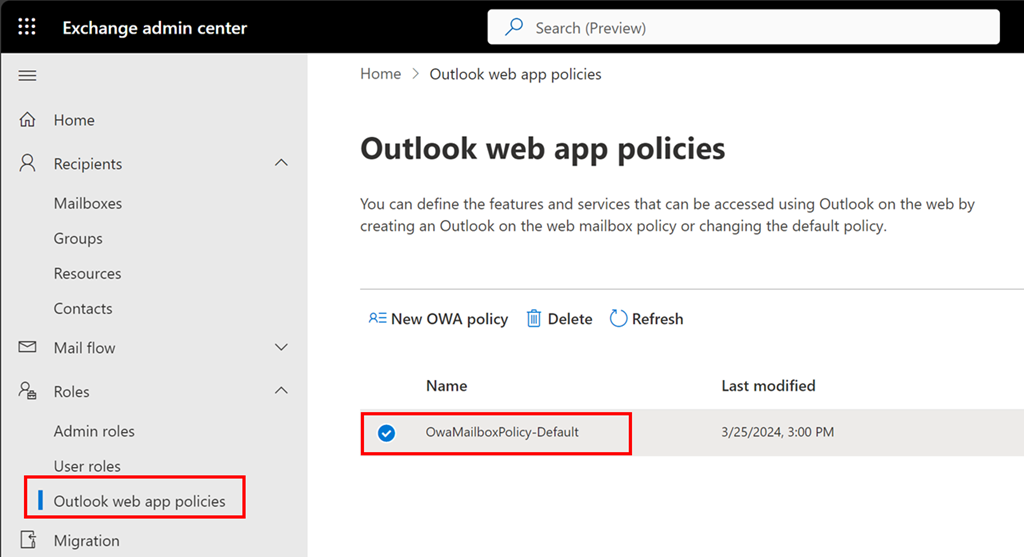
Now navigate to the Exchange Online administration portal. Expand the Roles option on the left and then select Outlook Web Apps policies.
Typically, there will only be one OWA policy as shown above. If there are more, then you will need to repeat this process with each.
Select the policy name, here OwaMailboxPolicy-Default..
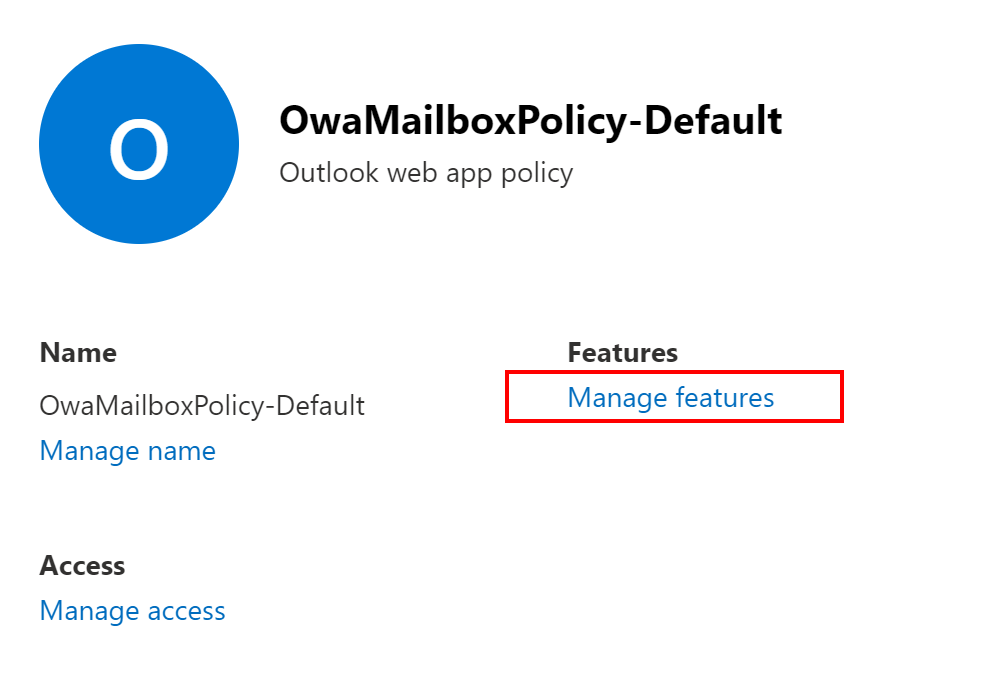
From the window that appears on the right select Manage features as shown above.

Ensure Linkedin contact sync is unselected as shown above.
Save your settings before you exit.
Set Exchange Online quarantine notification period
Many people have suspect emails sent to quarantine in Microsoft 365. This is achieved using a quarantine policy which you find at:
https://security.microsoft.com

You expand the options under Email & collaboration as shown above and select Policies and rules. On the right you select Threat policies as shown above.

If you scroll down the page a bit you’ll find Quarantine policies as shown above, which you should select.

The notification period is controlled in the GUI via the Global settings menu option as shown above.
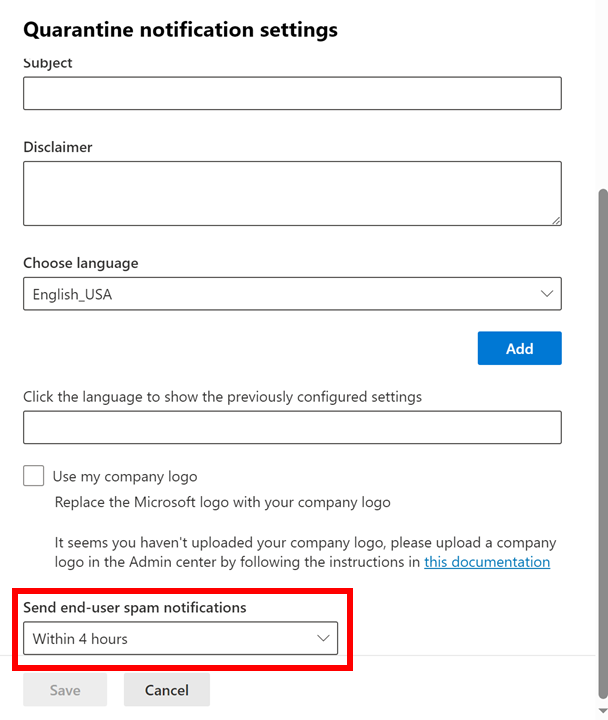
From the dialog that appears from the right, scroll down to the bottom of the page and you will find an option Send end-user spam notifications as shown above. Presently, the minimum you can configure this to is Within 4 hours.
After you make any changes here select the Save button at the very bottom to update these settings for all the quarantine policies you have.
Check mailbox auditing settings using PowerShell

An important part of good security in Microsoft 365 is to ensure you are capturing all the logs available. Exchange Online has a number of actions that can be audited and some may not be enabled in your environment. The list available and what is enabled by default can be found here:
Here is a quick script you can run to display all the audit settings for each mailbox:
Get-OrganizationConfig | Format-List AuditDisabled
$mailboxes=get-mailbox -ResultSize unlimited
foreach ($mailbox in $mailboxes) {
write-host “`nMailbox =”,$mailbox.userprincipalname
write-host (“`— Admin —“)
$mailbox | Select-Object -ExpandProperty AuditAdmin | Sort-Object
write-host (“— Delegate —“)
$mailbox | Select-Object -ExpandProperty AuditDelegate | Sort-Object
write-host (“— Owner —“)
$mailbox | Select-Object -ExpandProperty Auditowner | Sort-Object
}
Just compare the list in the link to what you have configured to ensure everything that is available to you is enabled.
To connect to Exchange online prior to running the above code you can use my script:
https://github.com/directorcia/Office365/blob/master/o365-connect-exo.ps1
July Microsoft 365 Webinar resources

The slides from this month’s webinar are available at:
If you are not a CIAOPS patron you want to view or download a full copy of the video from the session you can do so here:
http://www.ciaopsacademy.com.au/p/need-to-know-webinars
Watch out for next month’s webinar
Key Topics:
- Microsoft 365 update: Robert shared some new features and updates for Microsoft 365, such as copilot in planner, inbound SMTP Dane and DNS Secure, and guest sharing in loop. 1:51
- Defender for business overview: Robert explained the benefits and features of defender for business, a security product that is included with business premium and available as a standalone SKU. It provides enterprise-grade protection and integration with other Microsoft products for SMBs. 5:03
- Defender for business configuration: Robert demonstrated how to configure defender for business settings, onboarding, alerts, investigations, and integrations. He advised not to use the wizard and to enable all the advanced features. He also showed how to use the assets, incidents and alerts, and vulnerability management sections. 19:34
- Defender for business resources and Q&A: Robert provided some links and resources for further learning and support. He also invited the attendees to ask any questions or provide feedback. 49:11
Staged Defender updates with Intune
The direct URL is:https://www.youtube.com/watch?v=K6zMtbbHCjM
In this video I cover how to create an Endpoint Security Antivirus policy that controls updates for Defender Engine, Platform and Security Intelligence components. This is not the only way to create a staged roll out of Defender updates and I would recommend the following document from Microsoft for more information:
KQL Query to report failed login by country
If you are interested to see how many failed logins your Microsoft 365 environment has had in the past 30 days you can run the following KQL query in Sentinel:
SigninLogs
| where ResultType == 50126
| where TimeGenerated >= ago(30d)
| extend Country = tostring(LocationDetails[“countryOrRegion”])
| summarize FailedLoginsCount = count() by Country
| order by FailedLoginsCount desc
you can then make a slight change and get all the successful logins
SigninLogs
| where ResultType == 0
| where TimeGenerated >= ago(30d)
| extend Country = tostring(LocationDetails[“countryOrRegion”])
| summarize LoginsCount = count() by Country
| order by LoginsCount desc
In my case, I found that only around 1% of my total logins were failed logins and all of these came from countries outside Australia.
Here is also a visualisation of the location of failed logins by country
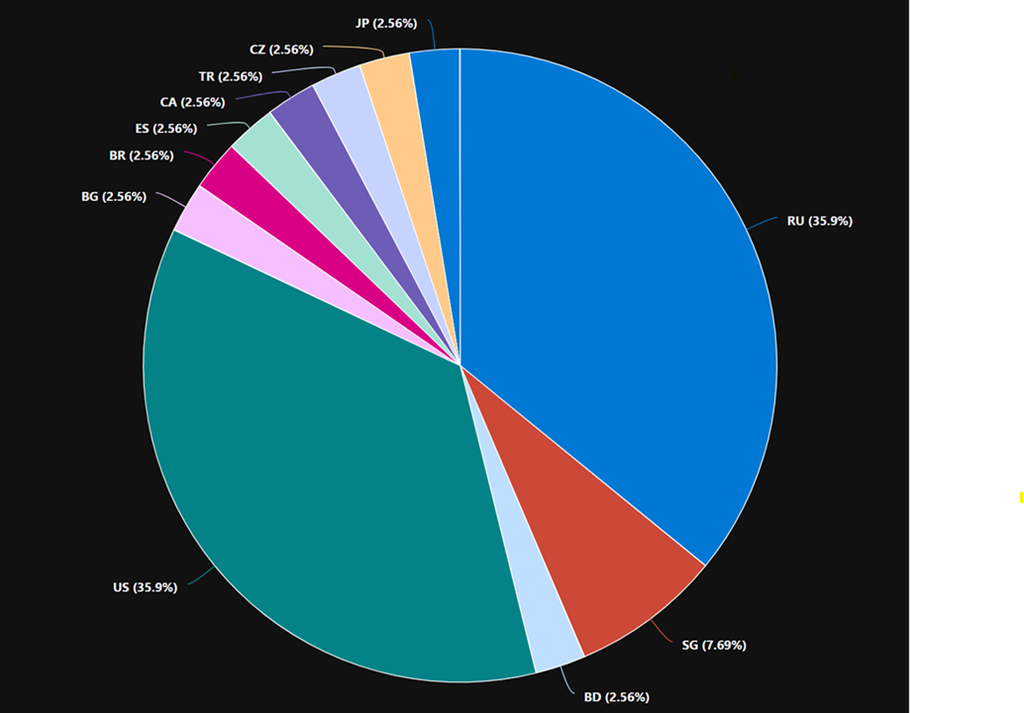
Note: if you copy and paste directly from here you will probably have the change the “ around countryorregion when you paste into your own environment as teh wrong “ gets taken across!
Connecting Defender EASM logs to Sentinel workspace
A very important security task is to ensure you are collecting all the logging data for your services and sending them to a central location for storage and analysis.
Here’s how you can send the logs from Defender EASM into Sentinel.
You’ll need to have already established both Sentinel and Defender EASM instances. Underneath Sentinel is a Log Analytics Workspace that is where all the logging data for Sentinel is accumulated. It is into this workspace that the Defender EASM logs will be sent.
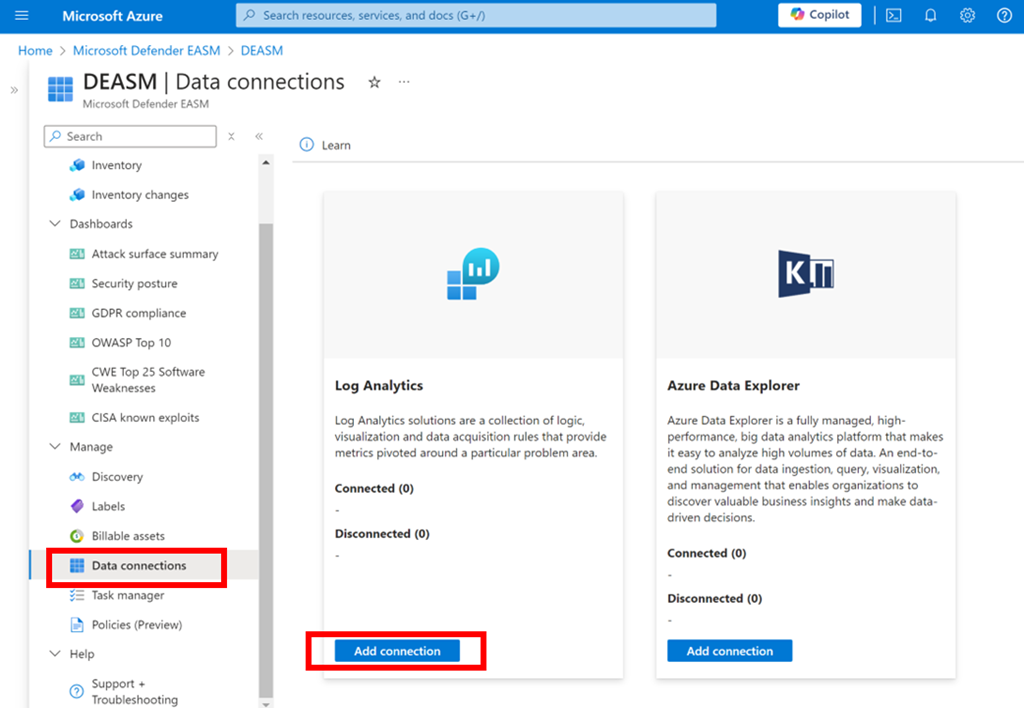
Log in to the Azure portal and navigate to Defender EASM as shown above. Select the Data connections option from the menu on the left. From the window that appears on the right select Add connection under Log Analytics as shown.
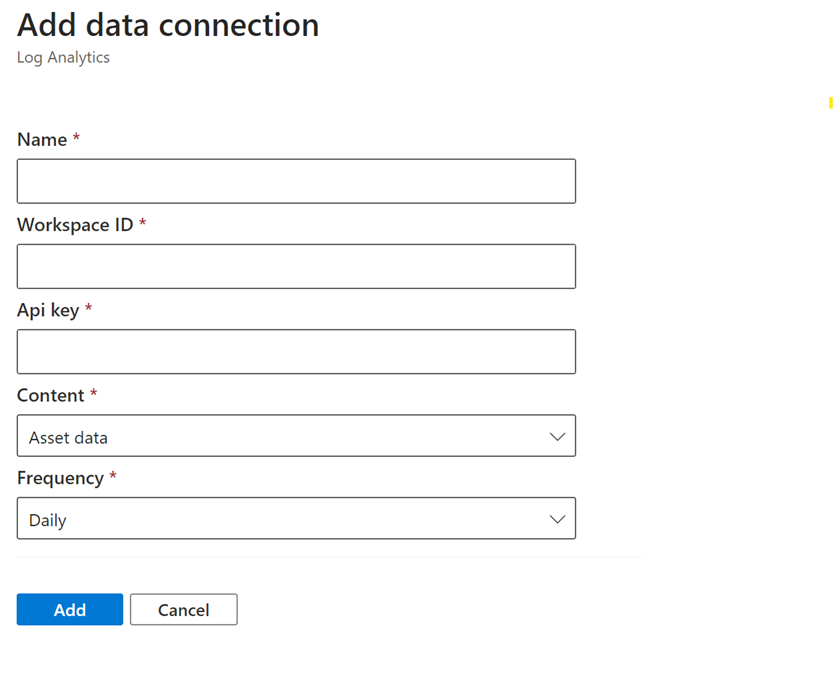
A dialog will appear from the right hand side prompting you for further information as shown above.
Open a new browser tab and navigate to Sentinel.

Select the Settings option at the bottom of the menu on the left hand side as shown above. From the windows that appears on the right select Workspace settings as shown.

In the Log analytics workspace for Sentinel select the Agents option under Settings from the menu on the left as shown.
In the window that appears on the right you will find both the Workspace ID and an API key as shown. Both of these will be required back in the Defender EASM connectors page.
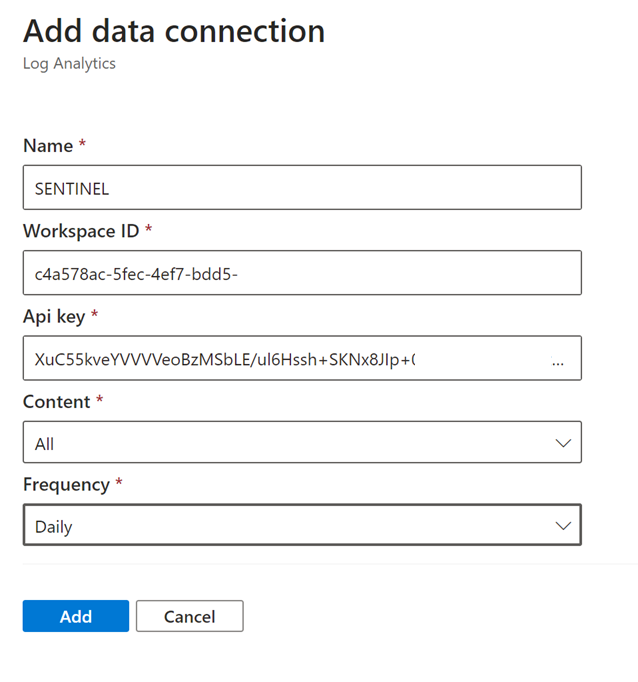
Return to the Defender EASM connectors page configuration and give this connection an appropriate Name. Enter the Workspace ID and Api key from the Sentinel Log Analytics page. Select All content and Daily for frequency.
Save these settings.
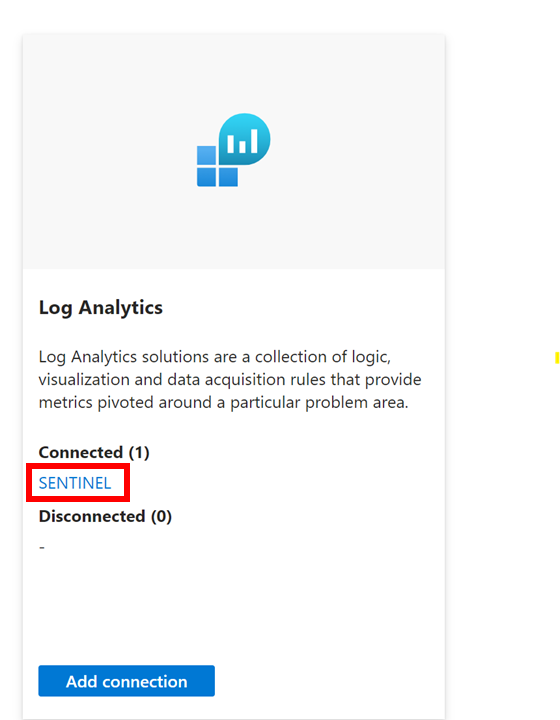
If everything is correct you should now see that the Log Analytics connexion now displays you settings under Connected as shown above.
The logs from Defender EASM will now start becoming available for you in Sentinel to use in things like KQL queries.


