One of the major challenges businesses face is how to ensure their digital information is stored in the correct location. Unless people know exactly where it needs to go it will probably end up where it isn’t supposed to be.
A smart way to approach this problem is to use automated processes governed by rules that allow people to upload information to a single location and then for it to automatically routed to the right location without them having to think about it.
SharePoint has plenty of automation features available out of the box. One of these is a feature known as Document Routing. This allows you to basically configure a number of rules so when a file is uploaded to a special ‘drop-off’ area in SharePoint it is automatically moved to other locations based on these rules.

Firstly, navigate to the SharePoint Team Site where you wish to enable this.

In the top right of the window select the COG and then Site Settings from the menu that appears.

From under the Site Actions section in the right column select Manage site features.

Locate the feature Content Organiser and ensure that it is Active as shown above.
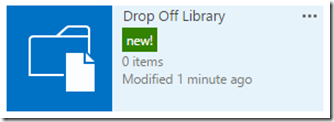
Once the Content Organizer feature is active it will automatically create a new Document Library in the Team Site called Drop Off Library as shown above.
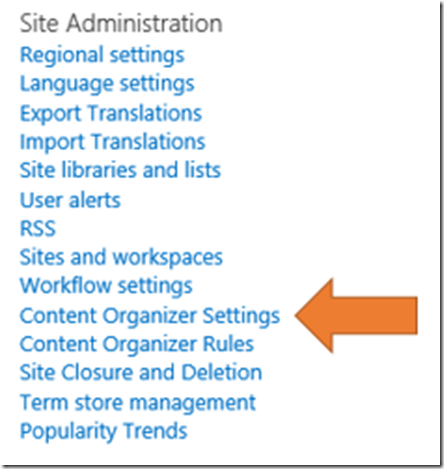
Go back to the Site Settings area in the Team Site and locate the Site Administration area options as shown above.
Here you will now see two additional options – Content Organizer Settings and Content Organizer Rules.
Select Content Organizer Rules.


You can follow through the options on the page but here, enable the ability to Send to Another Site which is not enabled by default.
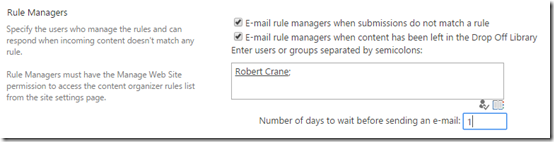
At the bottom of this page you find the ability to send email notifications when data remains in the Drop Off Library. This means that the data doesn’t match any of the in place rules and needs to be manually resolved.
Here you can nominate which users will receive email notifications of this and how many days the system will wait before notifying them.
Scroll down to the bottom of the page and save your changes.

Now select the Content Organizer Rules link. This will take you what appears to be a standard SharePoint list. Select the option new item to create a new rule to organise your data.

Give the rule a name and set the priority. Rules work based on SharePoint Content Types. In this case, because we want to route standard images, select the Document Content Types which then allows the selection of Picture for type. This means the rule will only apply to pictures uploaded to the Drop Off Library.

You now need to create a condition that will test the information uploaded. In this case the condition used will be when the Title field is set to begin with ‘Home’. Remember, that when you upload a picture file to SharePoint it will also ask you for a range of meta data (Title, Keywords, dates, etc) at the point of upload. This rule will look at that information and make routing decisions on what it finds in the ‘Title’ field.
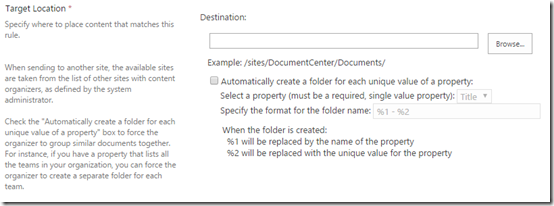
If you scroll down, you’ll find a location to specific the location where any matching documents will be moved to. Select the Browse button.

You then locate the destination in the current Team Site. In this case it will be the Picture Library ‘Pictures’.
It is important to remember that you can only send matching documents from this rule (which uses a specific Content Type) to destination locations that also include that same Content Type. In this case, the ‘Document Types’ content is being used because it contains a type ‘Pictures’ which is the same Content Type that is applied to the Picture Library ‘Pictures’. In essence, you can’t move different types of file to locations that don’t accept that style of file. For example, you can’t move documents to a Team Site Calendar.
Once you have selected the destination from the tree, scroll to the bottom of the page and select the OK button to save your changes.

That path should now appear in the Destination field as shown above.
Scroll down to the bottom of the page and save your changes.
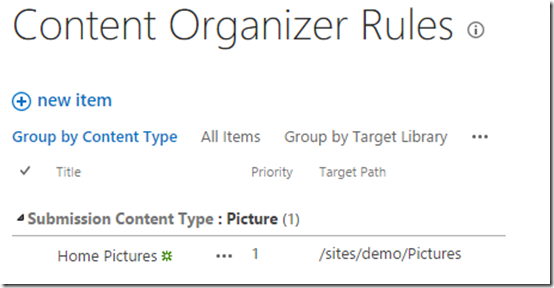
You should now be returned to the rules overview page as shown above, where the rule you just created appears.

Navigate to the Drop Off Library in the Team Site and select the option to upload a file.
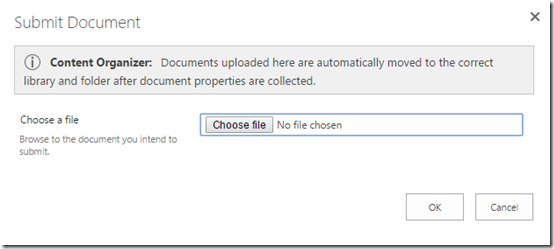
The standard upload dialog box will appear but you should now see additional text at the top indicating that the Content Organizer feature is active.
Select a file to upload using the Choose file button and then OK.

The standard file properties dialog will appear that allows you to enter additional information about the uploaded file as shown above. Again, note the additional text at the top of the window indicating that Content Organizer is in operation.

In this case, to allow the organising rules to apply, ‘Home’ is added to the Title field.
Select the Check In button in the top left to save these changes.

If all is correct, the rule previously created should now be applied and you should receive a message like that shown above indicating that the document uploaded has been successfully re-rerouted to the destination you defined in the rule. In this case the uploaded image is re-rerouted to a Picture Library called ‘Pictures’.

If you now navigate to that location, you should see the document you just uploaded.

If a document is uploaded to the Drop Off Library and it doesn’t match any of the rules in place you will see the message above. This is basically saying that the document will remain in the Drop Off Library until further action is taken by an administrator.
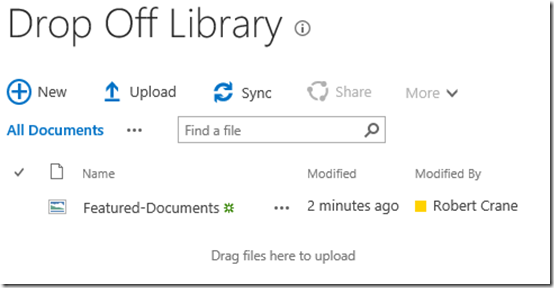
The file will remain in the Drop Off Library until it is updated so the properties match one of the rules and it can be routed.

If email notifications have been enabled, those people will receive notification that items remain in the Drop Off Library and require attention before they can re-route as shown above.
In an upcoming post I’ll cover how a document can be re-routed using a similar method to a location outside the current Team Site.
Automating standard processes and procedure is the key to being productive. SharePoint includes many automation features to make life easier and importantly more consistent. Using Drop Off Libraries is but one method and hopefully as I have been able to illustrate, it is easy to set up and use.


