Checking your environment for oversharing

Microsoft now provides the ability to check yoru environment for oversharing my running a data assessment report which you’ll find in DSPM for AI inside Microsoft Purview.

Here’s my video to get you started:

https://www.youtube.com/watch?v=aVUQ6PGnMmE

some documentation to help is here:

Get started with Data Security Posture Management

Hopefully, the reporting will become more details and allow you to take direct action on individual items that are reported. However, for now, it is a handy report to have in your bag of tricks.

New mailbox logging settings

Screenshot 2025-01-16 165155

CISA released a Microsoft Expanded Cloud Logs Implementation Playbook that I recommend Microsoft 365 administrators take a look at.

“This playbook provides an overview of the newly introduced logs in Microsoft Purview Audit (Standard), which enable organizations to conduct forensic and compliance investigations by accessing critical events, such as mail items accessed, mail items sent, and user searches in SharePoint Online and Exchange Online. In addition, the playbook also discusses significant events in other M365 services such as Teams. Lastly, administration/enabling actions and ingestion of these logs to Microsoft Sentinel and Splunk Security Information and Event Management (SIEM) systems are covered in detail.”

“Default enablement is defined at a license level. For example, Auditing (Standard or Premium) is enabled by default for E3/E5/G3/G5 licenses. Some licenses, such as M365 Business Basic, M365 Business Standard, M365 Business Premium, and trial license accounts do provide access to Audit but do not currently have auditing enabled by default. These licenses will have Audit enabled by default in the future. If you are leveraging one of these license types, the steps below can be utilized to ensure that all audit features are enabled.”

Thus, if you are using ANY Microsoft 365 license in my books you want to ensure all the logging available to you is enabled for all user, regardless of Microsoft does.

The playbook will take you what needs to be done. Most of it relates to:

Mailbox actions for user mailboxes and shared mailboxes

with the most important being around the MailItemsAccessed setting, but there are others.

The most important thing to remember is that most of these settings cannot be set in the web portal and can only be set using PowerShell commands like:

Set-Mailbox – @{Add=“SearchQueryInitiated”}

Apart from these settings the playbook has lots of additional handy information that will help with the security of your Microsoft 365 environment and this makes it a recommended read for all administrators.


Need to Know podcast–Episode 337

Welcome to 2025. Thanks so much for listening. A couple of ‘summary’ or ‘annual’ blog posts that are worth taking a look at. I also do some annual posts on my blog around what I used over the previous year if you wanted to know. I also share how I capture and work with information on a daily and the tools I use to achieve this. Let me know what works for you.

Brought to you by www.ciaopspatron.com

You can listen directly to this episode at:

https://ciaops.podbean.com/e/tools-of-the-workday/

Subscribe via iTunes at:

https://itunes.apple.com/au/podcast/ciaops-need-to-know-podcasts/id406891445?mt=2

or Spotify:

https://open.spotify.com/show/7ejj00cOuw8977GnnE2lPb

Don’t forget to give the show a rating as well as send me any feedback or suggestions you may have for the show.

Resources

@directorcia

Join my shared channel

CIAOPS merch store

Become a CIAOPS Patron

CIAOPS Blog

CIAOPS Brief

CIAOPSLabs

Support CIAOPS

The transition to the new Outlook will begin on January 1, 2025

Action Pack goes away

Microsoft OneNote, a year in review: AI innovation and enhanced creativity

Build custom email security reports and dashboards with workbooks in Microsoft Sentinel

6 AI trends you’ll see more of in 2025

CES 2025: The year of the Windows 11 PC refresh

SharePoint Roadmap Pitstop December 2024

Microsoft Entra: Top 50 features of 2024

Get ready for the new year with Microsoft 365

Pocket

CIAOPS OneNote Daybook template

CIA Brief 20250111

image

What is Microsoft Security Copilot? –

https://www.youtube.com/watch?v=xmpyimizs-s

Microsoft OneNote, a year in review: AI innovation and enhanced creativity – https://techcommunity.microsoft.com/blog/Microsoft365InsiderBlog/microsoft-onenote-a-year-in-review-ai-innovation-and-enhanced-creativity/4363833

Build custom email security reports and dashboards with workbooks in Microsoft Sentinel – https://techcommunity.microsoft.com/blog/microsoftdefenderforoffice365blog/build-custom-email-security-reports-and-dashboards-with-workbooks-in-microsoft-s/4352242

Co-author a document in Microsoft 365 –

https://www.youtube.com/watch?v=S-5UGuQnD0g

Unified coverage management across SIEM and XDR in SOC optimization –

https://techcommunity.microsoft.com/blog/microsoftsentinelblog/unified-coverage-management-across-siem-and-xdr-in-soc-optimization/4363810

Choose a breakout room as a Teams meeting participant –

https://techcommunity.microsoft.com/blog/microsoft365insiderblog/choose-a-breakout-room-as-a-teams-meeting-participant/4363955

Exciting News: Microsoft Defender for Endpoint Extends Support to ARM-Based Linux Servers –

https://techcommunity.microsoft.com/blog/microsoftdefenderatpblog/exciting-news-microsoft-defender-for-endpoint-extends-support-to-arm-based-linux/4364066

6 AI trends you’ll see more of in 2025 –

https://news.microsoft.com/source/features/ai/6-ai-trends-youll-see-more-of-in-2025/

Achieve more with AI you can trust –

https://www.youtube.com/watch?v=9mu0aXee6FE

Automate the employee identity lifecycle with Microsoft Entra ID Governance –

https://www.youtube.com/watch?v=mX-j7lC2L3A

Microsoft announces US $3bn investment over two years in India cloud and AI infrastructure to accelerate adoption of AI, skilling and innovation –

https://news.microsoft.com/en-in/microsoft-announces-us-3bn-investment-over-two-years-in-india-cloud-and-ai-infrastructure-to-accelerate-adoption-of-ai-skilling-and-innovation/

Why security teams rely on Microsoft Defender Experts for XDR for managed detection and response –

https://www.microsoft.com/en-us/security/blog/2025/01/06/why-security-teams-rely-on-microsoft-defender-experts-for-xdr-for-managed-detection-and-response/

Considerations for risk identification and prioritization in Defender for Cloud –

https://techcommunity.microsoft.com/blog/microsoftdefendercloudblog/considerations-for-risk-identification-and-prioritization-in-defender-for-cloud/4359616

CES 2025: Advancing the future of automotive and mobility –

https://www.microsoft.com/en-us/industry/blog/manufacturing-and-mobility/2025/01/07/ces-2025-advancing-the-future-of-automotive-and-mobility/

Amedisys clinicians provide better home care with mobile devices managed by Microsoft Endpoint Manager –

https://www.microsoft.com/en/customers/story/1429868843053987347-amedisys-health-provider-microsoft-endpoint-manager

Access your new apps in Microsoft 365 –

https://www.youtube.com/watch?v=s-TuVtwgKAM

CES 2025: The year of the Windows 11 PC refresh –

https://blogs.windows.com/windowsexperience/2025/01/06/ces-2025-the-year-of-the-windows-11-pc-refresh/

SharePoint Roadmap Pitstop December 2024 –

https://techcommunity.microsoft.com/blog/spblog/sharepoint-roadmap-pitstop-december-2024/4361689

Microsoft Entra: Top 50 features of 2024 –

https://techcommunity.microsoft.com/blog/identity/microsoft-entra-top-50-features-of-2024/4352584

After hours

Scott & Mark Learn To… Find Joy in Hobbies – https://www.youtube.com/watch?v=Ypcog_lv0DA

Editorial

If you found this valuable, the I’d appreciate a ‘like’ or perhaps a donation at https://ko-fi.com/ciaops. This helps me know that people enjoy what I have created and provides resources to allow me to create more content. If you have any feedback or suggestions around this, I’m all ears. You can also find me via email director@ciaops.com and on X (Twitter) at https://www.twitter.com/directorcia.

If you want to be part of a dedicated Microsoft Cloud community with information and interactions daily, then consider becoming a CIAOPS Patron – www.ciaopspatron.com.

Watch out for the next CIA Brief next week

Distributed Password cracking attempts detected by Sentinel

image

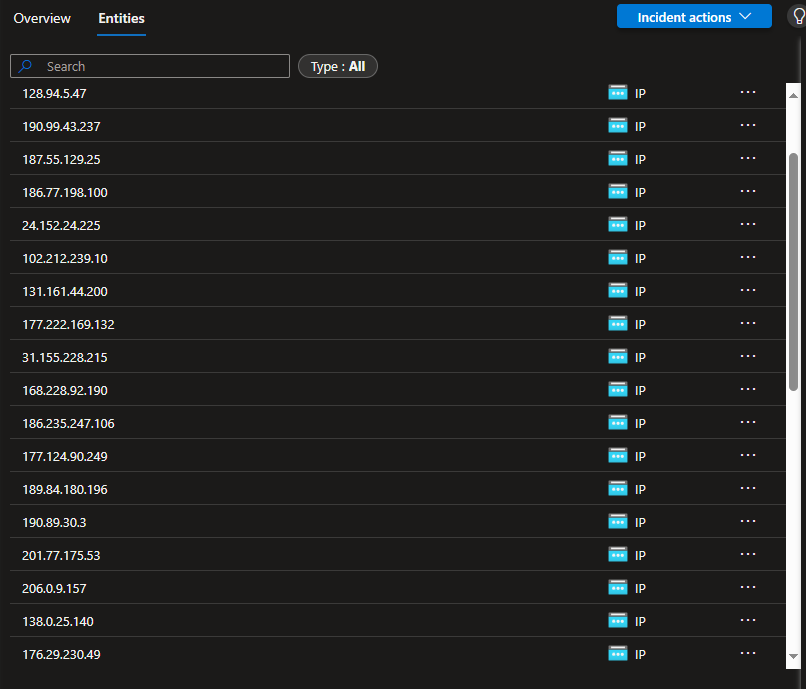
Over the past couple of days I’ve inundated with failed logins from locations all around the world. You can see a partial list of the those IPs reported in Sentinel above.

image

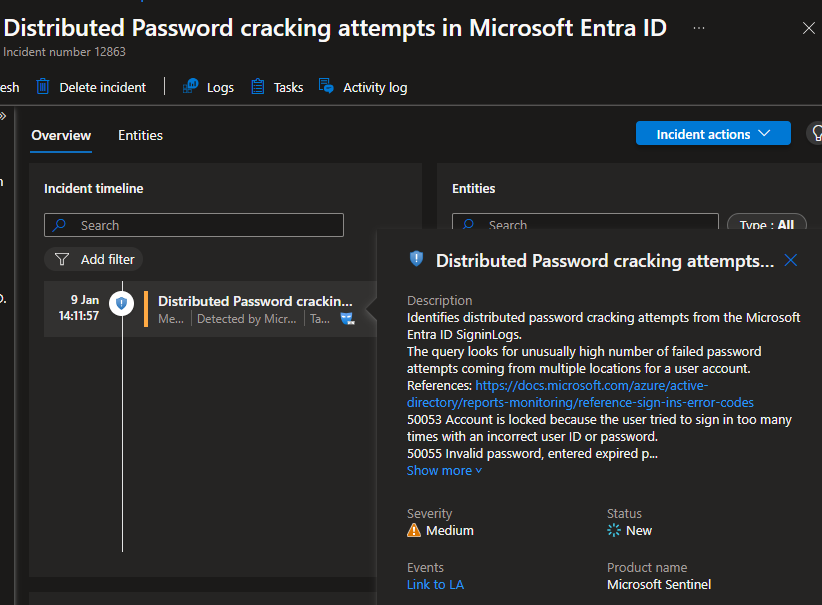
But, for the first time I also found this alert had triggered an incident in Sentinel – Distributed Password cracking attempts in Microsoft Entra ID, as seen above.

Here is the list and locations so far:

IP Address Origin (Country) Potential Organization (if identifiable)
31.141.37.30 Russia Provider: Rostelecom
38.222.57.97 United States Comcast Cable Communications
190.99.43.237 Argentina Telecom Argentina
187.55.129.25 Brazil Vivo (Telefônica Brasil)
186.77.198.100 Brazil Oi S.A.
24.152.24.225 United States Cox Communications
102.212.239.10 Uganda Uganda Telecom
131.161.44.200 United States Microsoft Corporation
177.222.169.132 Brazil TIM Brasil
31.155.228.215 Romania UPC Romania
168.228.92.190 Brazil NET Virtua
186.235.247.106 Brazil Oi S.A.
177.124.90.249 Brazil Vivo (Telefônica Brasil)
189.84.180.196 Brazil Oi S.A.
190.89.30.3 Brazil Vivo (Telefônica Brasil)
201.77.175.53 Brazil Oi S.A.
206.0.9.157 United States Comcast Cable Communications
138.0.25.140 Brazil Oi S.A.
176.29.230.49 Ukraine Ukrtelecom
191.99.34.144 Brazil Claro Brasil
87.116.135.139 France Orange S.A.
170.82.15.6 Brazil Claro Brasil
84.54.71.37 Spain Telefónica
170.231.164.96 Brazil Oi S.A.
45.231.208.166 Mexico Megacable
190.14.176.31 Colombia ETB (Empresa de Telecomunicaciones de Bogotá)
85.106.118.20 Italy TIM (Telecom Italia)
191.189.9.96 Brazil Claro Brasil
152.249.19.25 Argentina Telecom Argentina
189.34.199.125 Brazil Vivo (Telefônica Brasil)
41.225.129.174 Nigeria MTN Nigeria
85.96.249.52 Italy Vodafone Italia
197.26.214.34 South Africa MTN South Africa
187.183.41.6 Brazil Claro Brasil
177.126.234.232 Brazil Vivo (Telefônica Brasil)
149.86.137.85 United States AT&T

Always nice to have Sentinel on the job letting me know what’s going on!

My Teams Copilot can now interpret images

image

A while back, I built an agent that I published into Teams to provide answers to technical questions on the Microsoft Cloud. I have always been super impressed by the results I get from it, but now, as you see above, it can also interpret images!

image

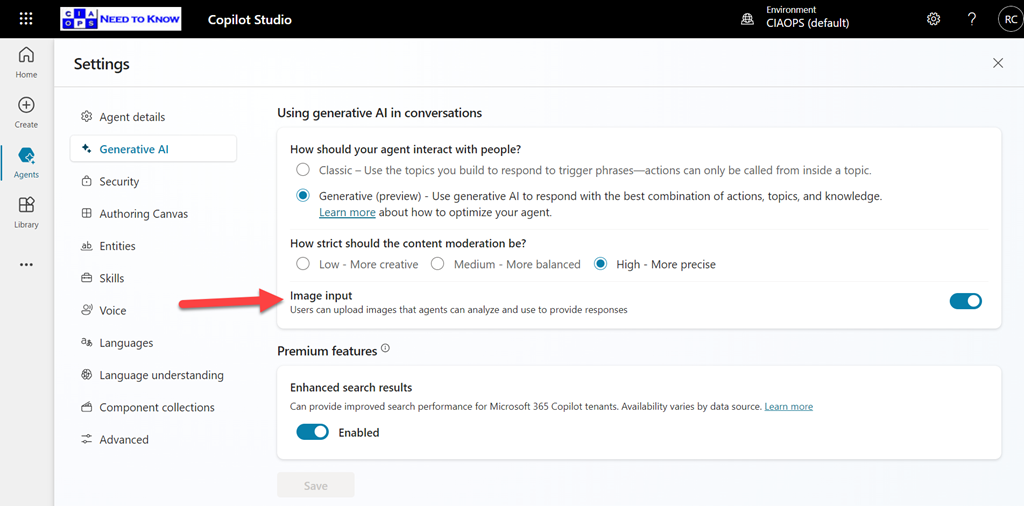
You need to enable the Image Input option in Settings for your agent as shown above, and of course, don’t forget to again publish your agent so the updates flow into Teams.

What is even more impressive, is that if you look at the error screen at the top of the page you’ll notice that it isn’t even in English and Copilot has extracted the text from the image, interpreted it and answered in English in Teams. Impressive!

Viewing Copilot prompt and responses across the organisation

image

To explore Copilot activity in your environment open:

https://purview.microsoft.com

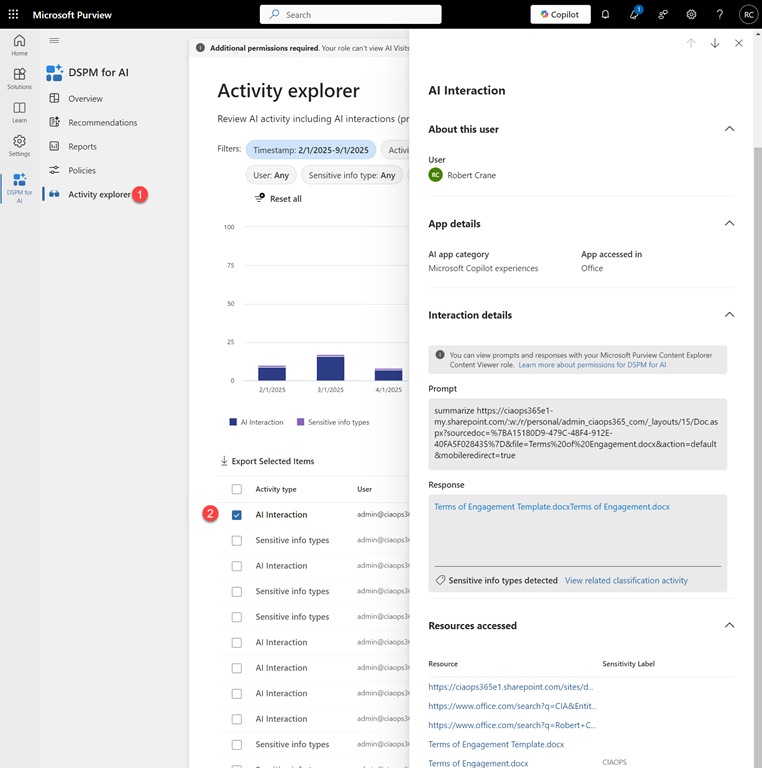
with a user with appropriate access. Select Solutions on the left and then DSPM for AI as shown above.

image

Then select Activity Explorer and from the list that appears on the right select an entry that says AI interaction as shown above.

You should now see a panel appear from the right with a range of details about that session. Towards the bottom you will find

image

both the Prompt and Response as shown above. You will also see an resources, for example files or links, used in that session.

image

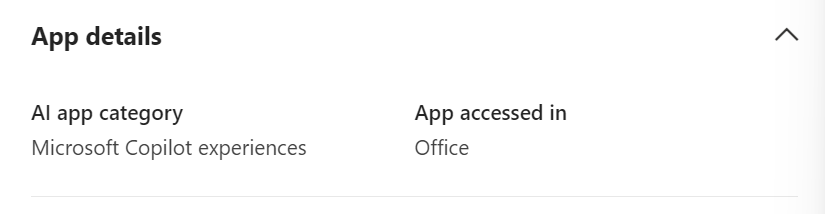
A little further up you will also find where that session took place, in this case from inside an Office app.

The Data Security Posture Security Management (DSPM) for AI has many other resources that you can also take advantage of but the above is the simplest method I’ve found to quickly see what a Microsoft 365 Copilot prompt and response in the environment was.

Updated Defender for Endpoint Security Baseline

image

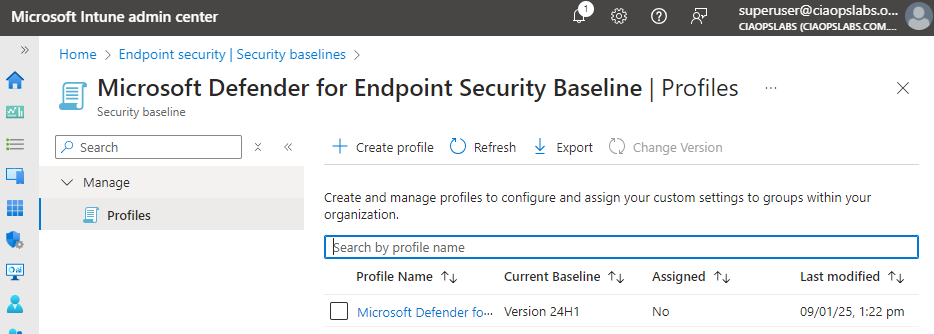
Microsoft has updated the Defender for Endpoint Security Baseline policy in Intune to Version 24H1 as shown above.

I have managed to extract my own best practice JSON configuration file for this policy and make it available at:

https://github.com/directorcia/bp/blob/main/Intune/Policies/Endpoint/Baselines/dep.json

which means you can import this directly into your environment programmatically (I used PowerShell to do exactly this).

The updates to this policy are huge! The previous version config file was about 350 lines, this new 24H1 version is now about 2,300 lines long! This indicated to me that Microsoft is moving more and more settings into theses baselines.