CIAOPS Techwerks 8–Adelaide October 24

bw-car-vehicle

I am happy to announce that Techwerks 8 will be held in Adelaide on Thursday the 24th of October. The course is limited to 15 people and you can sign up and reserve your place now! You reserve a place by completing this form:

http://bit.ly/ciaopsroi

or  sending me an email (director@ciaops.com) expressing your interest.

The content of these all day face to face workshops is driven by the attendees. That means we cover exactly what people want to see and focus on doing hands on, real world scenarios. Attendees can vote on topics they’d like to see covered prior to the day and we continue to target exactly what the small group of attendees wants to see. Thus, this is an excellent way to get really deep into the technology and have all the questions you’ve been dying to know answered. Typically, the event produces a number of best practice take aways for each attendee. A special part of this event will be sessions by MVP Amy Babinchak as well as some other surprise guests.

Recent testimonial – “I just wanted to say a big thank you to Robert for the Brisbane Techworks day. It is such a good format with each attendee asking what matters them and the whole interactive nature of the day. So much better than death by PowerPoint.” – Mike H.

The cost to attend is:


Patron Level Price Inc GST
Gold Enterprise Free
Gold $ 33
Silver $ 99
Bronze $ 176
Non Patron $ 399


The CIAOPS Techwerks events are run regularly in major Australian capital cities, so if you can’t make this one or you aren’t in Adelaide on that date, stay tuned for more details and announcements soon. If you are interested in signing up please contact me via emails (director@ciaops.com) or complete the form:

http://bit.ly/ciaopsroi

and I can let you know all the details as well as answer any questions you may have about the event.

I hope to see you there.

Need to Know podcast–Episode 210

Brenton speaks with global Azure black belt Sarah Young about the new Azure Sentinel service. Of course we also update you on all the happenings in the Microsoft Cloud and there has been plenty of late, so listen along to get all the latest and learn about Azure Sentinel.

This episode was recorded using Microsoft Teams and produced with Camtasia 2019

Take a listen and let us know what you think – feedback@needtoknow.cloud

You can listen directly to this episode at:

https://ciaops.podbean.com/e/episode-210-sarah-young/

Subscribe via iTunes at:

https://itunes.apple.com/au/podcast/ciaops-need-to-know-podcasts/id406891445?mt=2

The podcast is also available on Stitcher at:

http://www.stitcher.com/podcast/ciaops/need-to-know-podcast?refid=stpr

Don’t forget to give the show a rating as well as send us any feedback or suggestions you may have for the show.

Resources

Sarah Young

@contactbrenton

@directorcia

Faster, with a modern design, and new features – the new Outlook on the web is here

Tracking failed logins with Cloud App Security

New Azure discount for CSP partners to come live in October

OneDrive Roundup – June 2019

Announcing question and answer in Yammer

First Microsoft Cloud regions in the Middle East now available

Step 10. Detect and investigate security incidents: top 10 actions to secure your environment

All 10 steps

CIAOPS Techwerks 7–Melbourne August 16

bw-car-vehicle

I am happy to announce that Techwerks 7 will be held in Melbourne on Friday the 16th of August. The course is limited to 15 people and you can sign up and reserve your place now! You reserve a place by completing this form:

http://bit.ly/ciaopsroi

or  sending me an email (director@ciaops.com) expressing your interest.

The content of these all day face to face workshops is driven by the attendees. That means we cover exactly what people want to see and focus on doing hands on, real world scenarios. Attendees can vote on topics they’d like to see covered prior to the day and we continue to target exactly what the small group of attendees wants to see. Thus, this is an excellent way to get really deep into the technology and have all the questions you’ve been dying to know answered. Typically, the event produces a number of best practice take aways for each attendee. So far, the greatest votes are for deeper dives into Intune, security and PowerShell configuration and scripts, however that isn’t finalised until the day.

Recent testimonial – “I just wanted to say a big thank you to Robert for the Brisbane Techworks day. It is such a good format with each attendee asking what matters them and the whole interactive nature of the day. So much better than death by PowerPoint.” – Mike H.

The cost to attend is:


Patron Level Price Inc GST
Gold Enterprise Free
Gold $ 33
Silver $ 99
Bronze $ 176
Non Patron $ 399


The CIAOPS Techwerks events are run regularly in major Australian capital cities, so if you can’t make this one or you aren’t in Melbourne on that date, stay tuned for more details and announcements soon. If you are interested in signing up please contact me via emails (director@ciaops.com) or complete the form:

http://bit.ly/ciaopsroi

and I can let you know all the details as well as answer any questions you may have about the event.

I hope to see you there.

Cloud App Discovery/Security

Microsoft has a range of security options available, delivered in a variety of ways from the cloud. I’m going to focus on three items that tend to get lumped together and with which I see much confusion. These services are:

1. Azure AD Cloud App Discovery

2. Office 365 Cloud App Security

3. Microsoft Cloud App Security

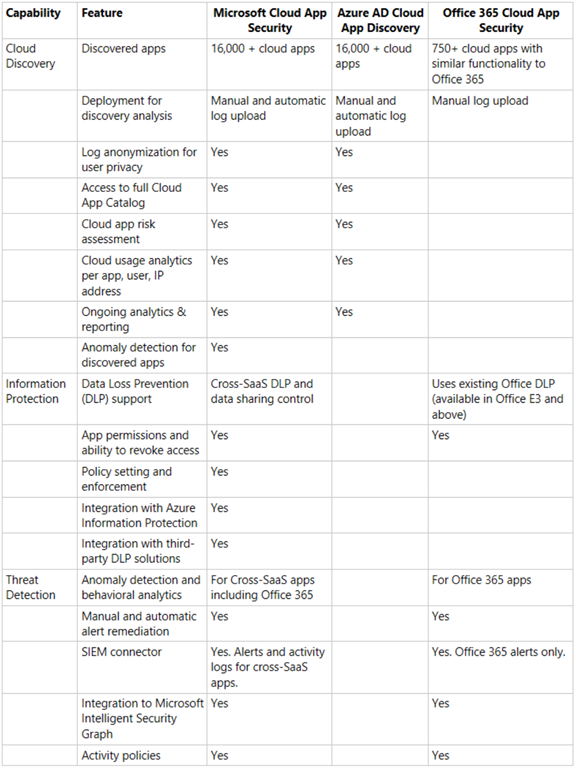
Here’s a summary of the differences between the products:
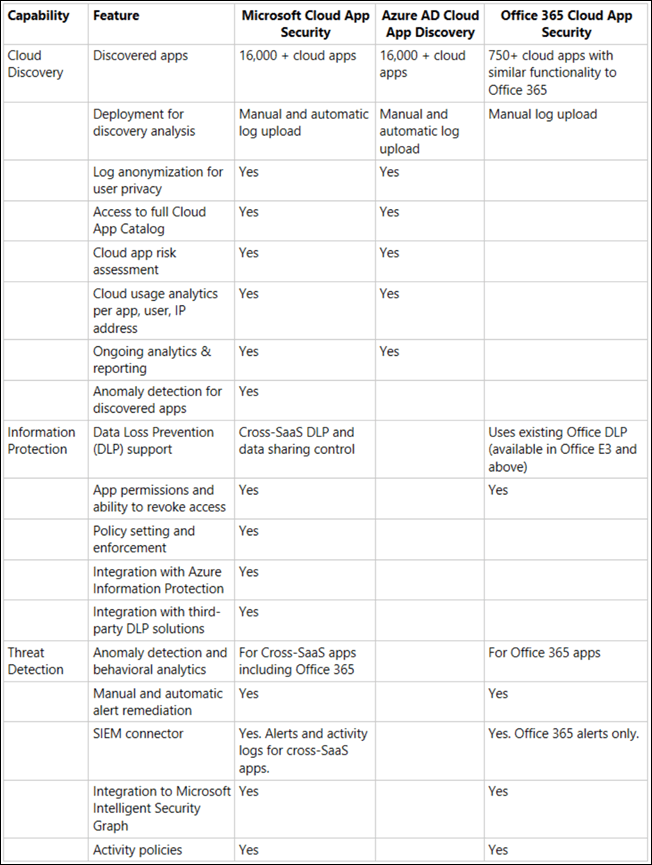
image

1. Azure AD Cloud App Discovery

This is the most basic of the three services and is only available when you purchase and license Azure AD P1, there is no stand alone version of just Azure AD Cloud App Discovery. This is a description of the product:

Azure Active Directory Premium P1 includes Azure Active Directory Cloud App Discovery at no additional cost. This feature is based on the Microsoft Cloud App Security Cloud Discovery capabilities that provide deeper visibility into cloud app usage in your organizations. Upgrade to Microsoft Cloud App Security to receive the full suite of Cloud App Security Broker (CASB) capabilities offered by Microsoft Cloud App Security.

Thus you receive Azure AD Cloud App Discovery when you purchase the following:

– Azure AD Premium P1 (stand alone)

– Azure AD premium p2 (stand alone)

– Microsoft 365 E3 (which includes Azure AD P1)

– Enterprise and Mobility Suite (EMS) E3 (which includes Azure AD P1)

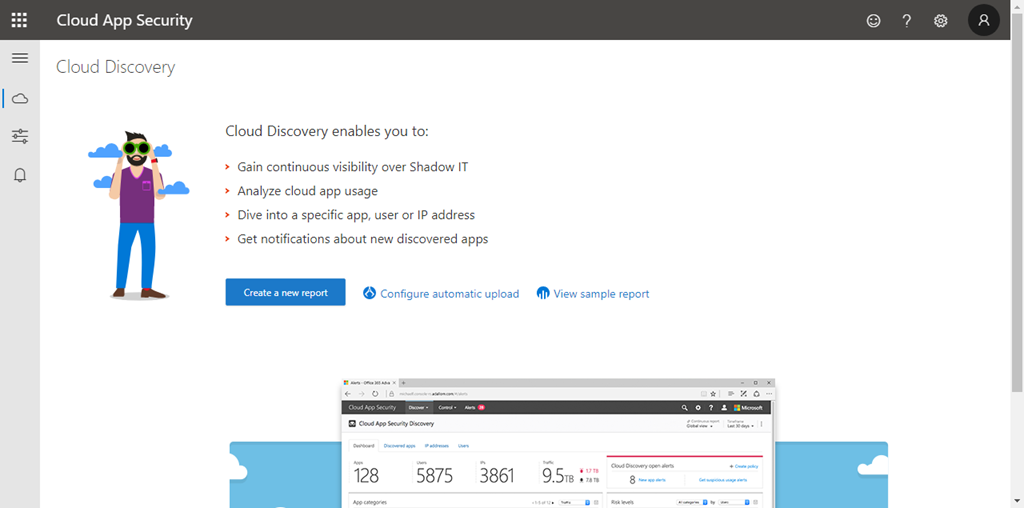
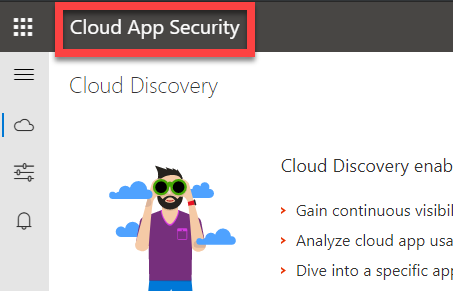
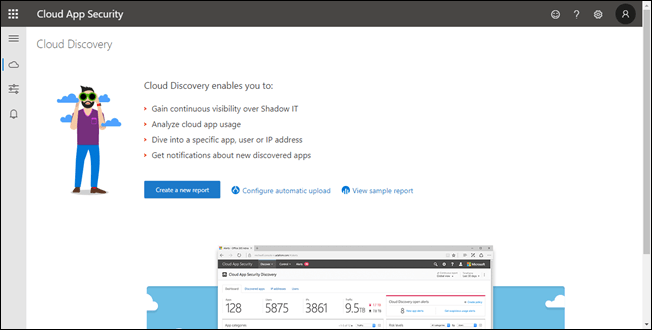
When you visit the portal you will see:
image

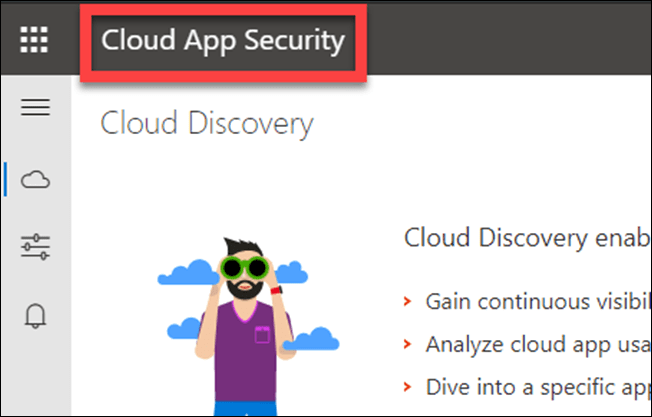
Firstly, note that the banner reads Cloud App Security like so:
image

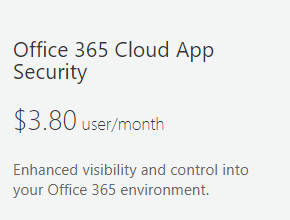
2. Office 365 Cloud App Security

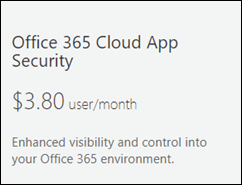
This is available as a stand alone purchase for existing Office 365 / Microsoft 365 tenants.
clip_image001

You can also get Office 365 Cloud App Security as part of:

– Office 365 E5

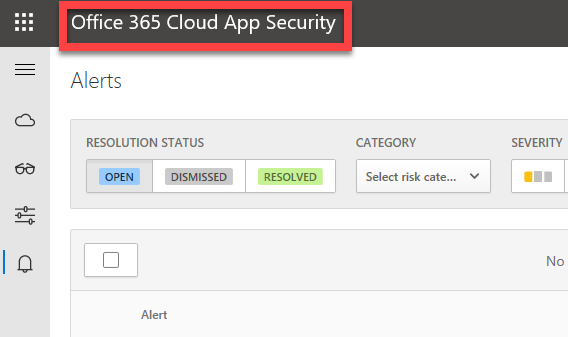
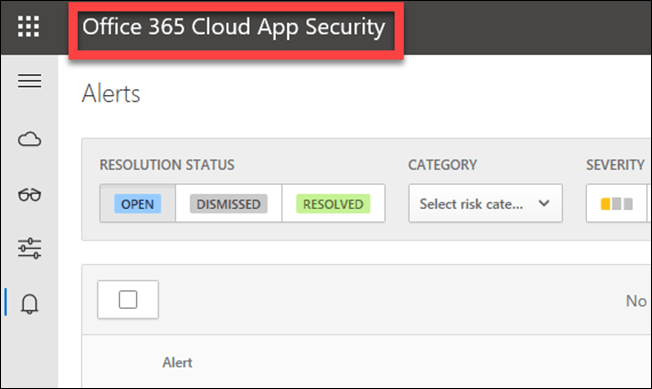
You’ll see Office 365 Cloud App Security in the top left of the portal like so:
image

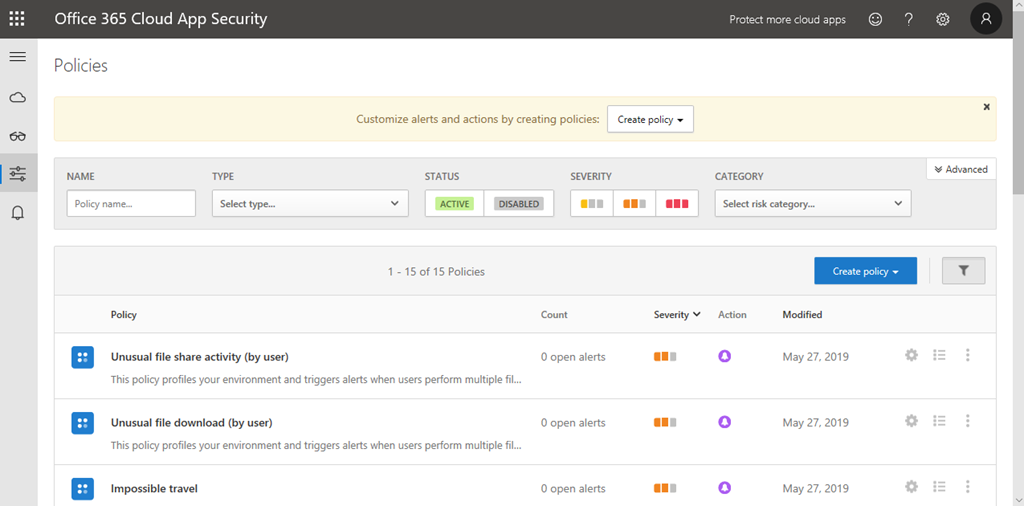
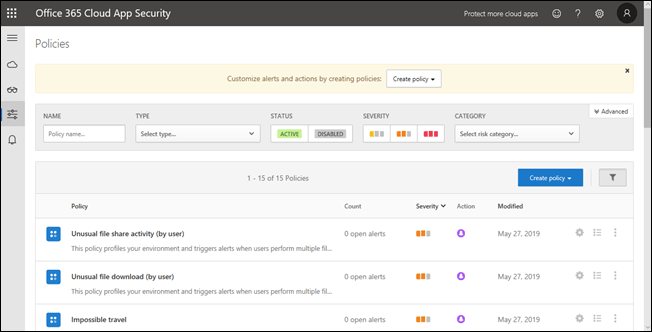
The biggest advantage I believe of Office 365 Cloud App Security over Azure AD Cloud App Discovery is the Activity policies like so:
image

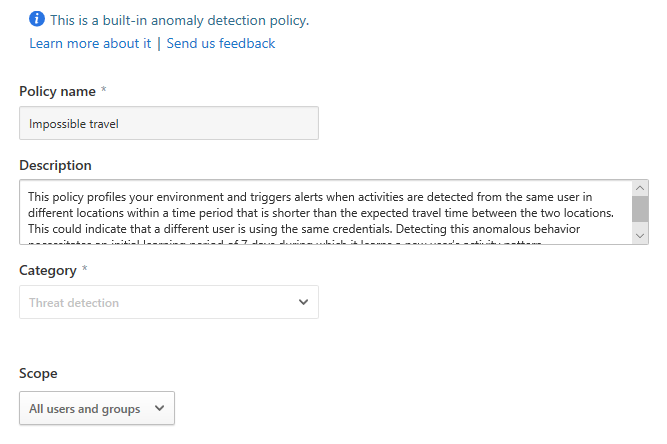
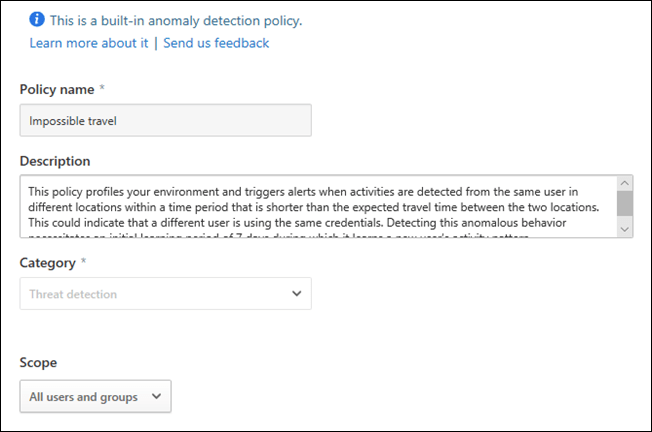
These activities includes built in anomaly detection for things like Impossible travel like so:
image

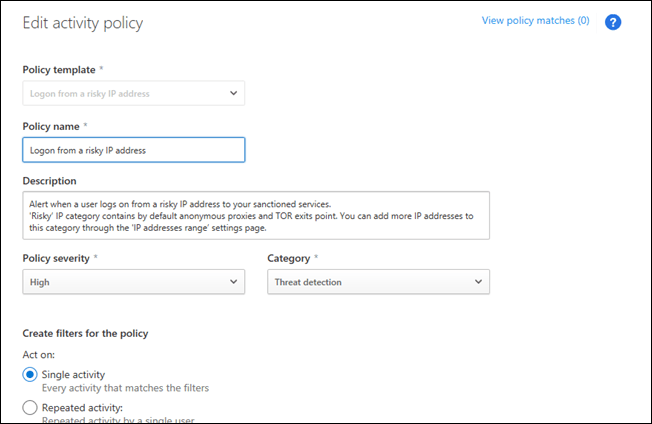
You also get a number of default activity policies like Logon from a risky IP address:
image

as well as the ability to create your own unique activity policies and alerting.

3. Microsoft Cloud App Security

This again, is available as a stand alone add-on to any Office 365 / Microsoft 365 tenant, being a tad more expensive that office 365 Cloud App Security:

clip_image001[4]

It is also available when you purchase:

– Microsoft 365 E5

– Microsoft 365 E5 Security

– Enterprise and Mobility Suite (EMS) E5

As you can see from the table at the top of this article, Microsoft Cloud App Security includes everything (plus more) that is in Azure AD Cloud App Discover and Office 365 Cloud App Security. Thus, think of Microsoft Cloud App Security as Azure AD Cloud App Discovery + Office 365 Cloud App Security.

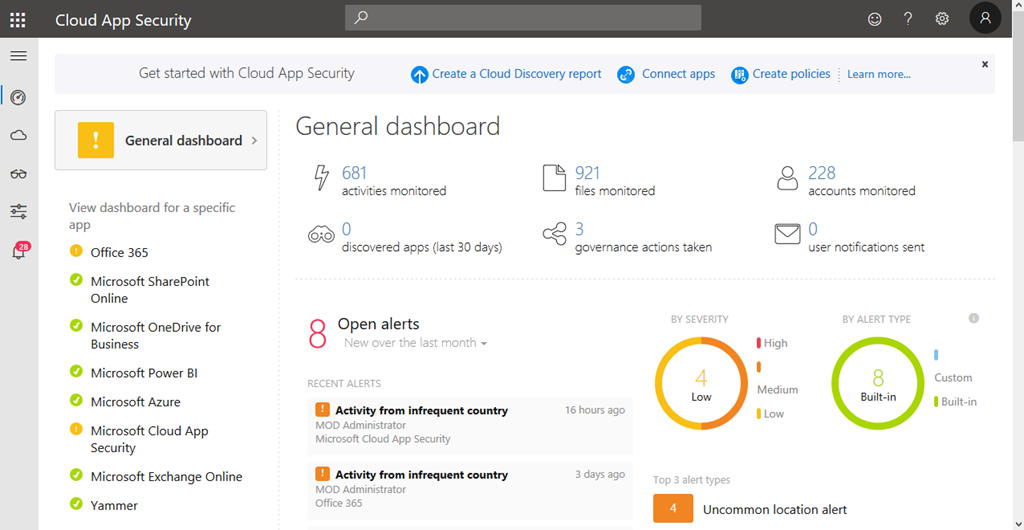
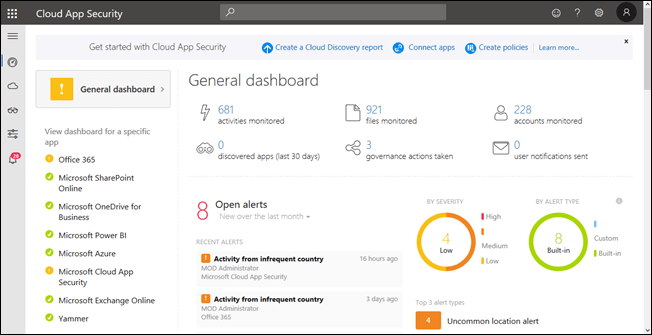
This is what you see when login to Dashboard:
image

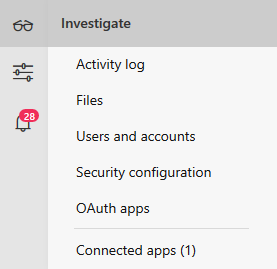
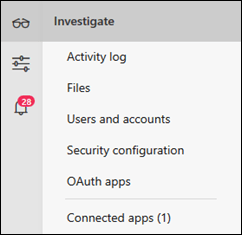
You’ll see it look very different even though the top left says “Cloud App Security” again. You get far more options that with either of the other two including more options under Investigate like so:
image

Summary

Not everything is quite as simple as I have outlined here. Deeper detail about the licensing can be found here:

https://query.prod.cms.rt.microsoft.com/cms/api/am/binary/RE2NXYO

or on:

Microsoft Cloud App Security

In my opinion Azure AD P1 is a must have for all tenants to get features like conditional access and trusted IP’s. That will give you Azure AD Cloud App Discovery. However, I’d also recommend also adding Office 365 Cloud App Security as a minimum to get access to the Activity alerts. if you want even more power then add Microsoft Cloud App Security instead.

The final question I get is whether you require a license for all users in your tenant? For that I will leave you with the official word from Microsoft on that topic which is:

“Each user must be licensed for Microsoft Cloud App Security to use or benefit from it. For customers who license a subset of users, services enforced at the tenant level are not licensed for the other users. They are not entitled to use or benefit from the service, regardless of whether the service is technically accessible.”


Microsoft Cloud URLs

apple-desk-internet-209151

I’ve started to put together a list of unique URL’s from Microsoft Cloud services such as Azure and Microsoft 365. Typically you navigate to individual services inside the main portal. However, this file I am maintaining on my Office 365 GitHub repository:

https://github.com/directorcia/Office365/blob/master/urls.txt

has a direct link to the services so you can navigate there directly.

I’ll keep adding to these over time, so ensure you check back regularly. if you know any URL’s you reckon should be included, let me know and I’ll add them.

Need to Know podcast–Episode 206

A short sharp episode focusing on the latest news and updates from Microsoft Build. Brenton and I cover off all the Microsoft Cloud news, good and bad as there is unfortunately some bad news to report in recent experiences with Azure. However, there is also lots of good news about updates to your favourite services. Tune in and give us your feedback.

This episode was recorded using Microsoft Teams

Take a listen and let us know what you think – feedback@needtoknow.cloud

You can listen directly to this episode at:

https://ciaops.podbean.com/e/episode-206-ghost-in-the-machine/

Subscribe via iTunes at:

https://itunes.apple.com/au/podcast/ciaops-need-to-know-podcasts/id406891445?mt=2

The podcast is also available on Stitcher at:

http://www.stitcher.com/podcast/ciaops/need-to-know-podcast?refid=stpr

Don’t forget to give the show a rating as well as send us any feedback or suggestions you may have for the show.

Resources

@contactbrenton

@directoria

CIAOPS Patron program

Azure cheat sheet

Azure global outage

What’s new in Microsoft 365 user management

New people centered experiences in Microsoft 365

Microsoft Edge – All the news from Build

Minimize distractions and stay focused with AI powered updates in Microsoft 365

How I protect my parents using Microsoft 365

boy-car-child-1266014

I’m sure there are many of us out there that continue to provide free unpaid support for our family members. Well, many it isn’t so much free, as a ‘barter’ arrangement in that every time I’m on site I get fed. That type of compensation may of course vary in your particular situation but many IT Pros are expected to support our own family as they use technology. That can be extremely challenging if you don’t do it right. Thanks to the tools available in the Microsoft Cloud, you can quite easily!

One of the benefit of doing security right for your family is that it is going to drastically reduce the amount of support calls you receive. So here’s some of the stuff I do:

1. Everyone has Microsoft 365 Business

This one license ensures that they have commercial grade email and the latest version of Office on their desktops. It ensures that they have both Safe Links and Safe Attachments for their mailboxes to protect against inbound malware and viruses.

2. Everyone runs the latest version of Windows 10 Professional on their desktop

Windows Home has lots of limitations and does not allow connection to Azure AD. Thus, all machines are Windows 10 Professional and all machines update automatically.

3. All machines are joined to Azure AD

I don’t want to have a traditional on premises domain controller to manage these Window 10 machine. By joining all the Windows 10 Professional workstations directly to Azure AD I get the management, security and control that I want all from the cloud.

4. All machines have Intune compliance and configuration policies applied

image

Thanks to Intune, which is part of Microsoft 365 Business, at a glance I can ensure all the machines, including my own, are compliant and configured appropriately.

5. All machines only use Windows Defender as their AV

Windows Defender is the best solution for AV in my experience. I can manage many settings thanks to Intune, although I would like some more I would admit, but I have never had an viruses or malware issues wince ditching third party AV providers a number of years ago. I am considering potentially upgrading to Windows Defender ATP but it is probably not worth the investment given the other steps I am already taking.

6. All machines are covered by Azure AD Premium P1

Azure AD Premium P1 is an add on to Microsoft 365 Business but has a number of very, very handy security features that I use to keep everyone safe.

7. Conditional access is limiting access to devices via IP address

One of the features that Azure AD Premium P1 provides is the ability to set conditional access policies. I have restricted access to my parents logins to be ONLY available on two unique IP addresses, theirs and mine. This means that if they were phished and gave up their logins a remote user would be prevented from logging in thanks to these conditional access policies as they are not connecting from these allowed IP addresses.

In my own personal cases, I also use conditional access policies but I have them set a little broader, typically limited to allowing access just from Australia. If I travel, I need to temporarily adjust the policy to accommodate where I’ll be and then set it back to just Australia when I return.

8. All POP and IMAP access has been disabled to all mailboxes

image

The most common way that random bad actors on the Internet are trying to gain access to accounts is using IMAP and POP3 as you can see from a recent log above. Conversely, all Microsoft 365 mailboxes have both POP3 and IMAP enabled for all mailboxes by default unfortunately. No user needs to access mail via old protocols and thus it is disabled across the tenant.

9. Basic authentication has been disabled on the tenant

Because I have modern devices and software connecting to my information, as I have said before:

Disable basic auth to improve Office 365 security

‘nuff said.

10. All accounts have Multi Factor enabled

All accounts have the requirement for MFA on them. Now, my parents don’t have smart phones or devices other than their PC’s, so how do they access their accounts using MFA? Well, they actually don’t! See item 11 as to how I achieve this.

11. Trusted IPs have been enabled

Once again, thanks to magic of Azure AD Premium P1, I am able to implement Trusted IPs. This means that when a login request comes from a configured Trusted IP the user will not be prompted for MFA even if the account requires it. Thus, thanks to the locations I have already set up with Conditional Access I can also use these same IP addresses to configure Trusted IPs for my parents logins. This means, that their accounts ARE protected by MFA but since they are always logging in from a single IP address that is now trusted, they WON’T be asked for MFA. This, makes it easy on them and hard on the bad guys.

12. I have Office 365 Cloud App Discovery

Again, thanks to the wonders of Azure AD P1 I have Cloud App Discovery which enables me a far more granular logging of events in my tenant. I can see exactly what my parents are actually doing.

I’ve talked about the benefits of Cloud App Security before:

A great security add on for Microsoft 365

and recommend you have it.

13. All machines use password-less Windows Hello logins

All the machines are using Windows Hello, either biometric or a PIN to access the machines. No complex passwords to remember, just a simple PIN number or just sitting in front of the machine now gives my parents access to their desktops. It couldn’t be easier and yet secure.

There are a lot more actions I take on my production tenant to ensure it is secure but the above items are the ones that most affect and protect my parents and their information. As you can see, via the implementation of Microsoft Cloud technologies I have made it both super secure and super easy for them. In most cases they don’t even realise what I’ve done, and that’s the way it should be.

Now, if I can do this for my parents, why are you not doing the same for your business users? Eh?

CIAOPS AZ-103 Online training course

ballpen-blur-close-up-1925536

From the 1st of May 2019 Microsoft is retiring both the Azure AZ-100 and AZ-101 certification exams and replacing them with a single integrated exam AZ-103. You can find out more about this exam here:

https://www.microsoft.com/en-us/learning/exam-az-103.aspx

I think that this Azure administration certification exam is something that all IT pros working with, or looking to work with Azure should complete. I have written about the benefits of certification here:

Benefits of certification

With this in mind I have now created an AZ-103 online certification preparation course you can take. It is designed to give you the knowledge to pass the AZ-103 exam, typically in a 30 – 45 day period. Note, this online course doesn’t TEACH you Azure from scratch. It helps fill in the gaps in your experience to ensure you are prepared for the exam and therefore stand the best chance of passing. It by no means guarantees you’ll pass, but I feel it does give the best preparation.

The course contains around 100 individual lessons including video tutorials and downloadable material.

You can sign up for the course here:

https://www.ciaopsacademy.com/p/microsoft-azure-administrator-az-103-exam-preparation

Watch out for more Microsoft certification preparation online courses coming to www.ciaopsacademy.com soon.