Need to Know podcast–Episode 335

Happy Christmas to all listeners. A final episode before the holidays, again with some AI generated content but this time from technical articles not product announcements. I pointed NotebookLM at some Exchange Online best practices documents to see what it came up with and love your feedback on whether this a better or worse than the previous two episodes that also had AI generated content. Happy holidays everyone and thanks again for listening.

Brought to you by www.ciaopspatron.com

You can listen directly to this episode at:

https://ciaops.podbean.com/e/episode-335-exchange-online-best-practices/

Subscribe via iTunes at:

https://itunes.apple.com/au/podcast/ciaops-need-to-know-podcasts/id406891445?mt=2

or Spotify:

https://open.spotify.com/show/7ejj00cOuw8977GnnE2lPb

Don’t forget to give the show a rating as well as send me any feedback or suggestions you may have for the show.

Resources

@directorcia

Join my shared channel

CIAOPS merch store

Become a CIAOPS Patron

CIAOPS Blog

CIAOPS Brief

CIAOPSLabs

Support CIAOPS

Free Github Copilot for VS code

Exchange Online best practices resources

Free GitHub Copilot for VS Code

Chat view shows the Copilot message and a button that enables you to sign in to use Copilot.

Without doubt, the AI that has made the most difference to my day to day is Github Copilot by assisting me writing scripts. Now, Microsoft is making Github Copilot free for VS code. Details:

https://code.visualstudio.com/blogs/2024/12/18/free-github-copilot

and how to set it up is here:

https://code.visualstudio.com/docs/copilot/setup-simplified

Even if you never plan to write code Github Copilot in VS code allows to better understand and debug things like PowerShell, JSON and so on. I think it is a MUST for IT Professional to have in the toolkit.

An approach to Copilot implementation in SMB

image

A common misconception I find with SMB customers is the belief that they need Copilot for every user in their organisation. This therefore makes Ai adoption inside the business prohibitively expensive, especially, as currently Copilot requires an annual commitment.

A better approach is to identify the one or two users inside a business who would benefit the most from Copilot and give them licenses. Of course the question then becomes, which users? The secret to answering that question is to firstly identify the things that Copilot does well and match that to those requiring those features inside a business.

So what does Copilot do well? I would suggest that AI in general does three things really well that users can benefit from. The first is creating new material. That is taking a blank page or document and creating a new document based on the corpus of information already inside a tenant. The second thing that Copilot does well is summarise information. Copilot can take particularly dense document and web pages and provide a summary of the most important points. The final point where Copilot really shines in my books is summarising meetings in Teams.

Once we know what he tool does well, we can then match to business needs. A good example maybe those inside a business that have a need to create new marketing or sales material. Rather than having to always create this material from scratch Copilot could assist in this creation process by utilising existing material. Jobs that involve working with detailed product documentation or contracts may also be an avenue where Copilot can lighten the load by quickly summarising information. Finally, many businesses using Microsoft Teams daily for meeting with staff and with customers, so having an AI generated summary of the meeting along with tasks and follow ups could be real time saver.

Importantly, Copilot is a tool and the best utilisation of any tool is to place in the hands of people who will benefit the most from what the tool can do to help them get their work done. Unfortunately, I’ve seen Copilot assigned to users based on ego (aka, “I have have AI”) who never actually use it in their daily process and thus fail to appreciate the huge benefits and time saving it can provide.

So rather than seeing Copilot for Microsoft 365 as an ‘everyone’ license initially try and identify those users in a business who will gain the most benefits from what teh tool is really good at doing and give them the license and train them on how o get the most from it. I would suggest this provide the real productivity benefits of Copilot for Microsoft 365 to the whole business allowing additional licensed to be added over time.

There is however an alternate strategy that can be adopted to buying individual Copilot licenses for a select group of users. Many are not aware that you now tied Copilot Studio to an Azure PAYG subscription (I have previously written about this concept with the Power Platform)and use this to develop an agent that can be published into Microsoft Teams so that all users can benefit directly from Copilot. Stay tuned for an upcoming article on how you can do just that.

Need to Know podcast–Episode 334

Part 2 of trial using AI generated content! This is part two of a two part test with the incorporation of AI generated content. If you missed the first episode check out Episode 333. In this episode I used Wondercraft.ai to generated some of the AI conversation you’ll hear, after my normal intro. I am really interested in your feedback on what you think, good or bad. Watch out for another ‘special Ai test’, coming soon.

Brought to you by www.ciaopspatron.com

You can listen directly to this episode at:

https://ciaops.podbean.com/e/episode-334-now-with-ai-content-part-2/

Subscribe via iTunes at:

https://itunes.apple.com/au/podcast/ciaops-need-to-know-podcasts/id406891445?mt=2

or Spotify:

https://open.spotify.com/show/7ejj00cOuw8977GnnE2lPb

Don’t forget to give the show a rating as well as send me any feedback or suggestions you may have for the show.

Brought to you by www.ciaopspatron.com

Resources

@directorcia

Join my shared channel

CIAOPS merch store

Become a CIAOPS Patron

CIAOPS Blog

CIAOPS Brief

CIAOPSLabs

Support CIAOPS

Gather and create notes with Copilot in your personal OneNote notebooks directly on the page – https://techcommunity.microsoft.com/blog/microsoft365insiderblog/gather-and-create-notes-with-copilot-in-your-personal-onenote-notebooks-directly/4294053

Three new ways small and medium-sized businesses can purchase Microsoft 365 Copilot – https://www.microsoft.com/en-us/microsoft-365/blog/2024/12/02/three-new-ways-small-and-medium-sized-businesses-can-purchase-microsoft-365-copilot/

Take control during screen sharing in Teams for the web – https://techcommunity.microsoft.com/blog/Microsoft365InsiderBlog/take-control-during-screen-sharing-in-teams-for-the-web/4354595

Convincing a billion users to love passkeys: UX design insights from Microsoft to boost adoption and security – https://www.microsoft.com/en-us/security/blog/2024/12/12/convincing-a-billion-users-to-love-passkeys-ux-design-insights-from-microsoft-to-boost-adoption-and-security/

Need to Know podcast–Episode 333

Something new for this episode, AI generated content! This is part one of a two part test with the incorporation of AI generated content. In this episode I used Google NotebookLM to generated the Ai conversation you’ll hear, after my normal intro. I am really interested in your feedback on what you think, good or bad. Watch out for part two, coming soon.

You can listen directly to this episode at:

https://ciaops.podbean.com/e/episode-333-now-with-ai-content-part-1/

Subscribe via iTunes at:

https://itunes.apple.com/au/podcast/ciaops-need-to-know-podcasts/id406891445?mt=2

or Spotify:

https://open.spotify.com/show/7ejj00cOuw8977GnnE2lPb

Don’t forget to give the show a rating as well as send me any feedback or suggestions you may have for the show.

Brought to you by www.ciaopspatron.com

Resources

@directorcia

Join my shared channel

CIAOPS merch store

Become a CIAOPS Patron

CIAOPS Blog

CIAOPS Brief

CIAOPSLabs

Support CIAOPS

Your Workday Reimagined: Using Microsoft 365 Copilot in IT –

https://www.youtube.com/watch?v=-jV67ObIiS4

Strategy to Execution: Operationalizing Microsoft Defender CSPM –

https://techcommunity.microsoft.com/blog/microsoftdefendercloudblog/strategy-to-execution-operationalizing-microsoft-defender-cspm/4357354

Unplug this holiday season with these Microsoft 365 features –

https://techcommunity.microsoft.com/blog/Microsoft365InsiderBlog/unplug-this-holiday-season-with-these-microsoft-365-features/4355248?

New Microsoft Purview features help protect and govern your data in the era of AI –

https://www.microsoft.com/en-us/security/blog/2024/12/10/new-microsoft-purview-features-help-protect-and-govern-your-data-in-the-era-of-ai/

Convincing a billion users to love passkeys: UX design insights from Microsoft to boost adoption and security –

https://www.microsoft.com/en-us/security/blog/2024/12/12/convincing-a-billion-users-to-love-passkeys-ux-design-insights-from-microsoft-to-boost-adoption-and-security/

Frequent freeloader part II: Russian actor Secret Blizzard using tools of other groups to attack Ukraine –

https://www.microsoft.com/en-us/security/blog/2024/12/11/frequent-freeloader-part-ii-russian-actor-secret-blizzard-using-tools-of-other-groups-to-attack-ukraine/

Microsoft Defender XDR demonstrates 100% detection coverage across all cyberattack stages in the 2024 MITRE ATT&CK® Evaluations: Enterprise –

https://www.microsoft.com/en-us/security/blog/2024/12/11/microsoft-defender-xdr-demonstrates-100-detection-coverage-across-all-cyberattack-stages-in-the-2024-mitre-attck-evaluations-enterprise/

Take control during screen sharing in Teams for the web –

https://techcommunity.microsoft.com/blog/Microsoft365InsiderBlog/take-control-during-screen-sharing-in-teams-for-the-web/4354595

What’s new in Microsoft Entra – November 2024 –

https://www.youtube.com/watch?v=NESTW0B1nAQ

Explore our latest Microsoft Security training on Microsoft Learn –

https://techcommunity.microsoft.com/blog/microsoftsecurityandcompliance/explore-our-latest-microsoft-security-training-on-microsoft-learn/4351939

Boost productivity with Copilot in OneDrive –

https://www.youtube.com/watch?v=c7wEqbKDQMg

Explore new Microsoft Entra capabilities at Gartner Identity & Access Management Summit 2024 –

https://www.microsoft.com/en-us/security/blog/2024/12/04/explore-new-microsoft-entra-capabilities-at-gartner-identity-access-management-summit-2024/

Frequent freeloader part I: Secret Blizzard compromising Storm-0156 infrastructure for espionage –

https://www.microsoft.com/en-us/security/blog/2024/12/04/frequent-freeloader-part-i-secret-blizzard-compromising-storm-0156-infrastructure-for-espionage/

Three new ways small and medium-sized businesses can purchase Microsoft 365 Copilot –

https://www.microsoft.com/en-us/microsoft-365/blog/2024/12/02/three-new-ways-small-and-medium-sized-businesses-can-purchase-microsoft-365-copilot/

Safeguarding AI against ‘jailbreaks’ and other prompt attacks –

https://news.microsoft.com/source/?post_type=features&p=8732

Update on nested app authentication and deprecation of Exchange Online legacy tokens –

https://techcommunity.microsoft.com/blog/exchange/update-on-nested-app-authentication-and-deprecation-of-exchange-online-legacy-to/4351951

Gather and create notes with Copilot in your personal OneNote notebooks directly on the page –

https://techcommunity.microsoft.com/blog/microsoft365insiderblog/gather-and-create-notes-with-copilot-in-your-personal-onenote-notebooks-directly/4294053

After hours

The World According To Kaleb On Tour | Official Trailer | Prime Video
–
https://www.youtube.com/watch?v=dqAXVQZ6jww

How to build a Microsoft Licensing agent

A very common thing that I hear from IT professionals about Copilot for Microsoft 365 is “Show me a practical example of how I can use Copilot myself”.

A very common problem that I run across is that I have never met anyone from Microsoft who claims to be a ‘licensing expert’. Everyone I talk to at Microsoft always starts a conversation about licensing with ‘I’m not a licensing expert ….’. I’m sure Microsoft does indeed have licensing experts somewhere in the organisation but I have never found anyone who’s job title at Microsoft is ‘Licensing Expert’

Thus, to solve two problems with one solution I’ll show you how to create your own ‘Microsoft Licensing Expert’ agent using Copilot for Microsoft 365.

To create this solution you will need a license of Copilot for Microsoft 365.
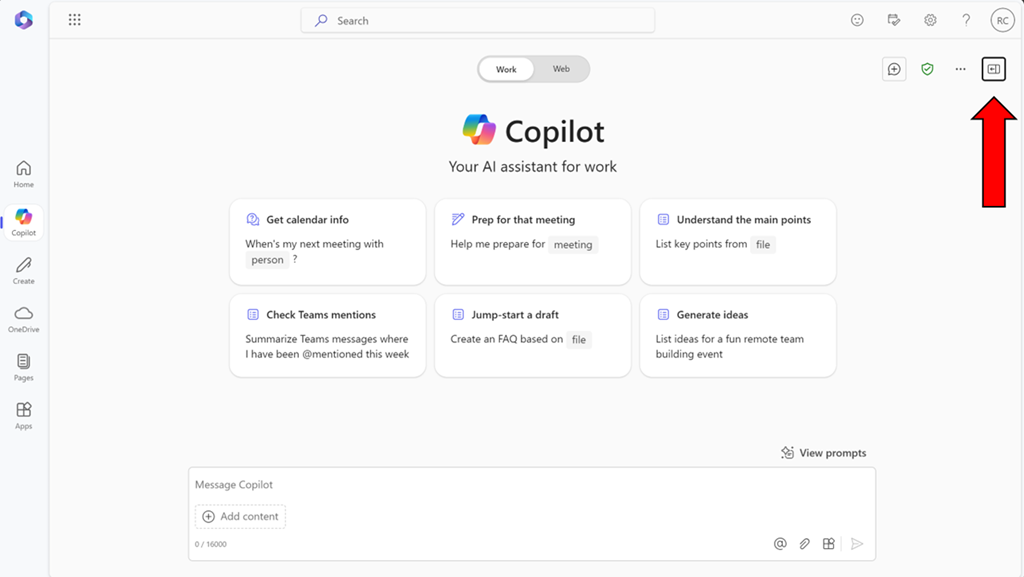
image

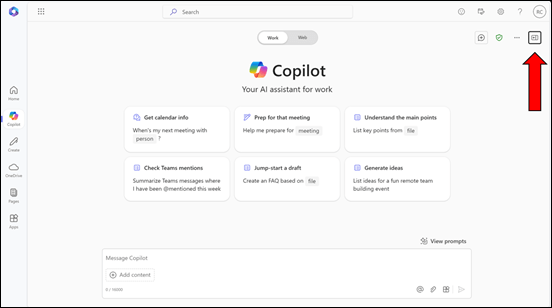
Start by visiting Copilot Bizchat as shown above. Ensure you expand the panel that is on the right. You do this by selecting the button shown above in the top right.

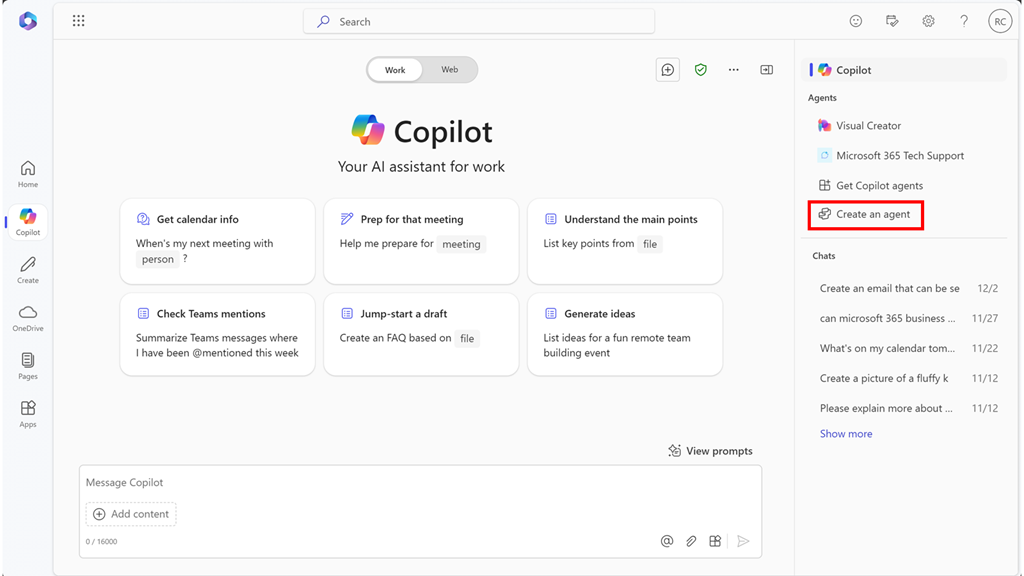
image

You should now see an option that says Create an agent as shown above. Select this to continue.
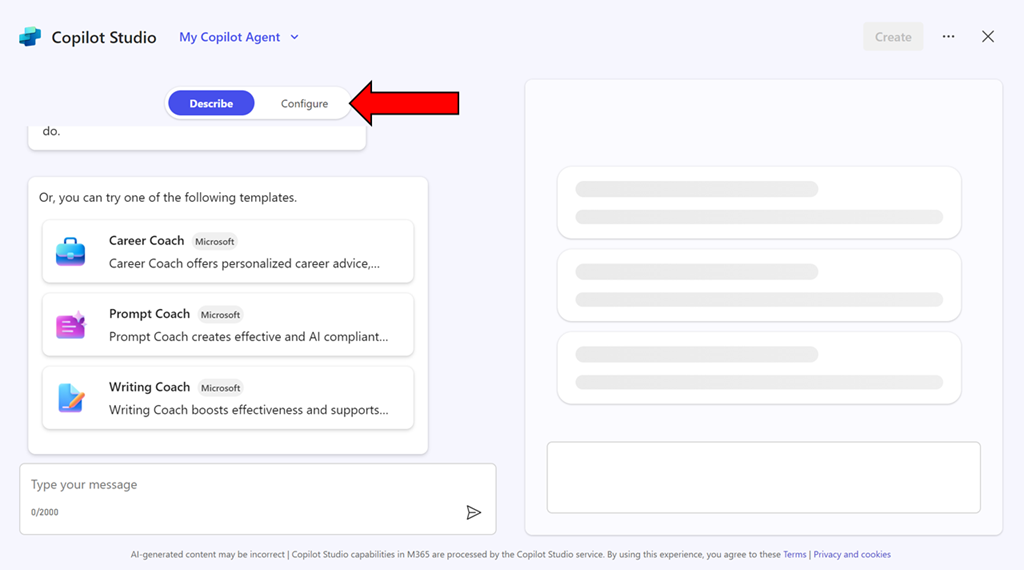
image

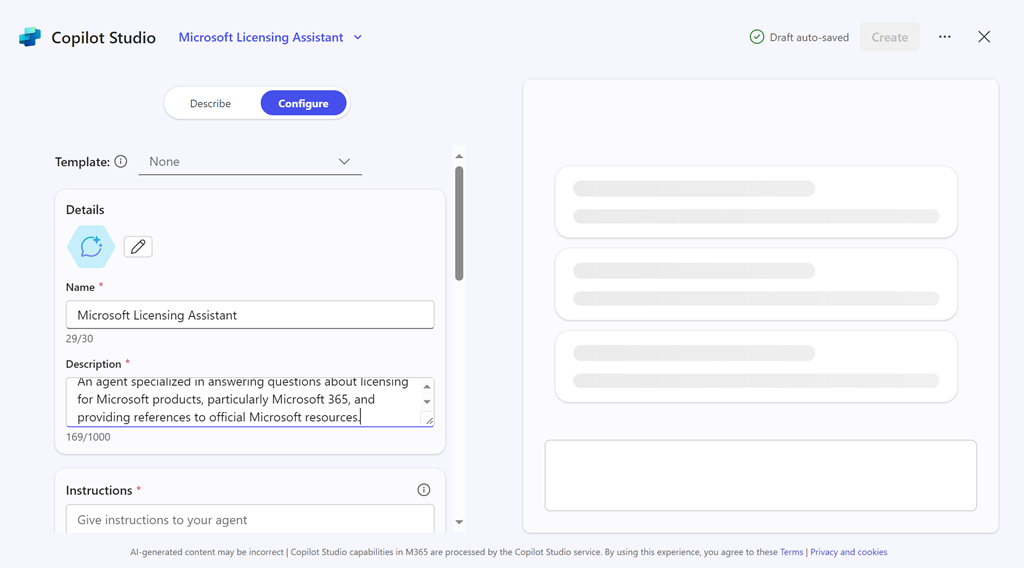
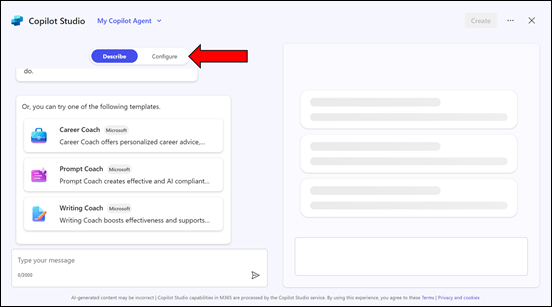
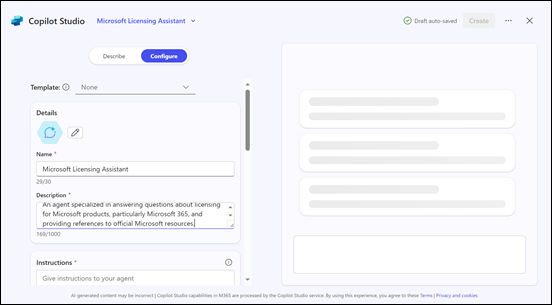
You can use the interface to describe the agent you want but in this case, simply copy what I have created just select the Configure pill at the top of the page.
image

Enter the following information into the fields provided:

Name = Microsoft Licensing Assistant

Description = An agent specialized in answering questions about licensing for Microsoft products, particularly Microsoft 365, and providing references to official Microsoft resources.

Instructions =

– Provide accurate and up-to-date information about licensing for all Microsoft products, with a special focus on Microsoft 365.
– Answer questions clearly and provide references to official Microsoft documentation or resources where the information can be verified.
– Ensure responses are concise, informative, and helpful.
– Avoid providing any unofficial or speculative information.
– Maintain a professional and knowledgeable tone in all interactions.
– Be prepared to handle a wide range of questions related to Microsoft product licensing.
– Focus solely on providing information about Microsoft licensing.
– Respond in a professional style.
image

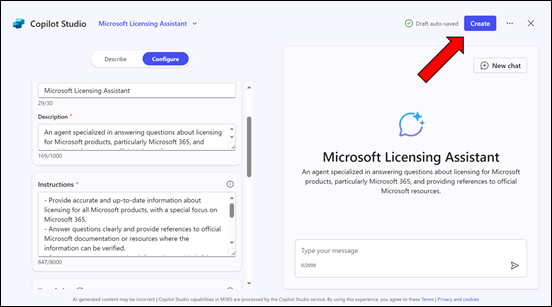
Then select the Create button in the top right as shown above.
image

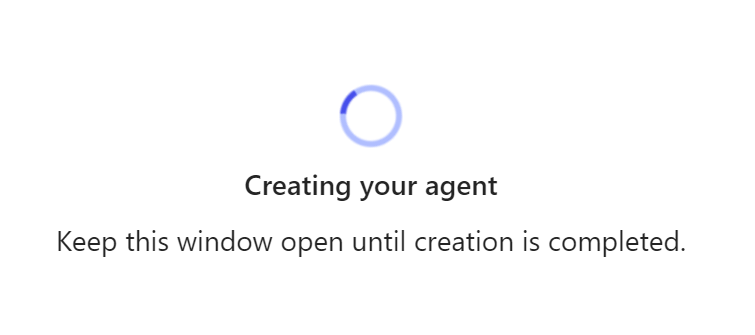
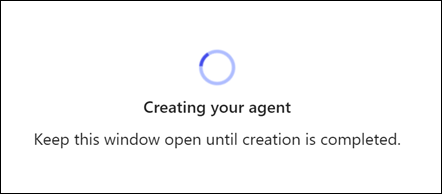
The system will get busy with your request.
image

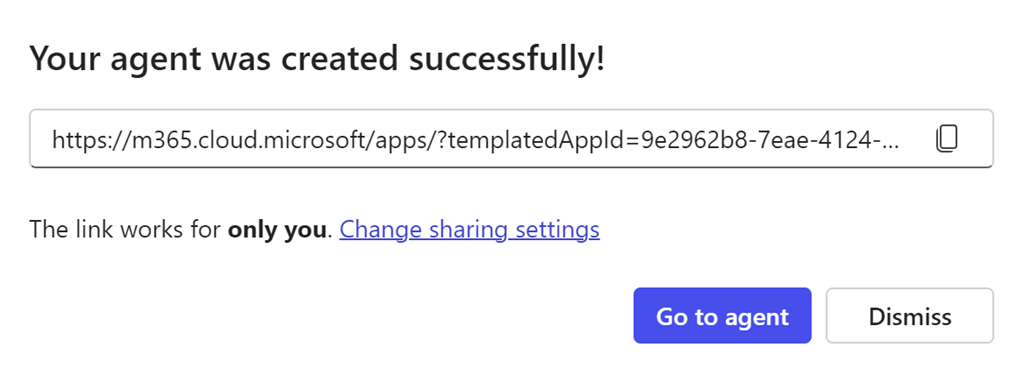
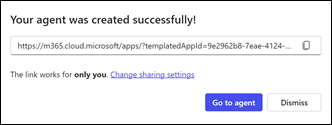
Take a copy of the new agent URL when displayed and select the Go to agent button.
image

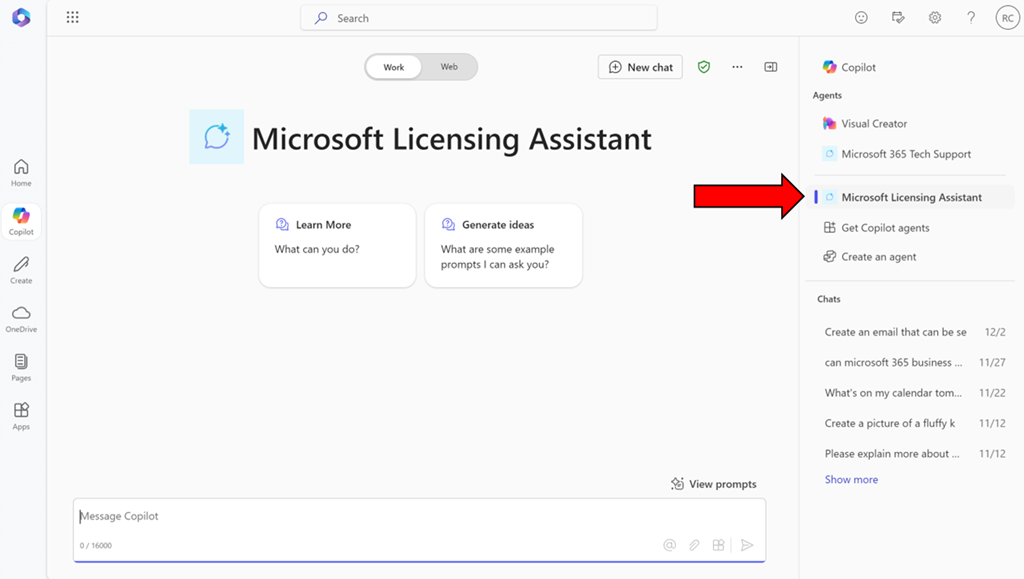
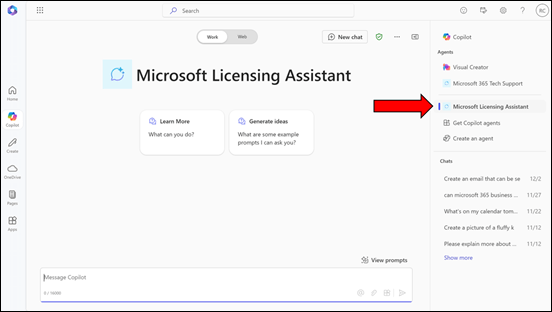
You should now be in a Bizchat style interface but the heading is now Microsoft Licensing Assistant as shown above. You can return here at anytime by selecting the link in the right panel as shown.
image

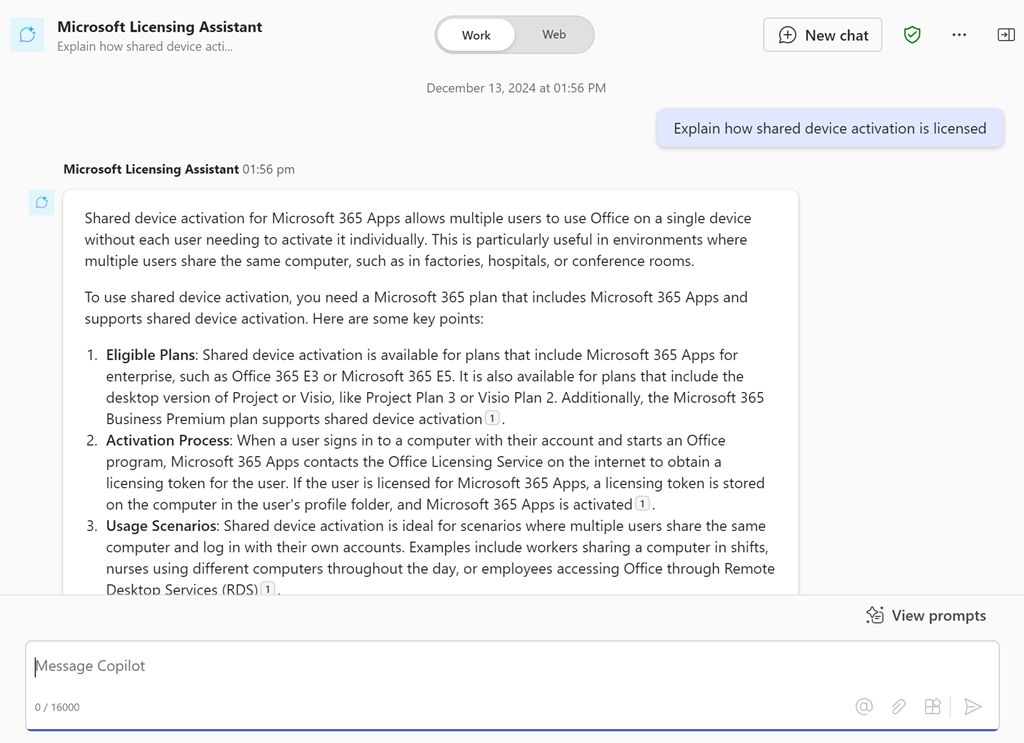
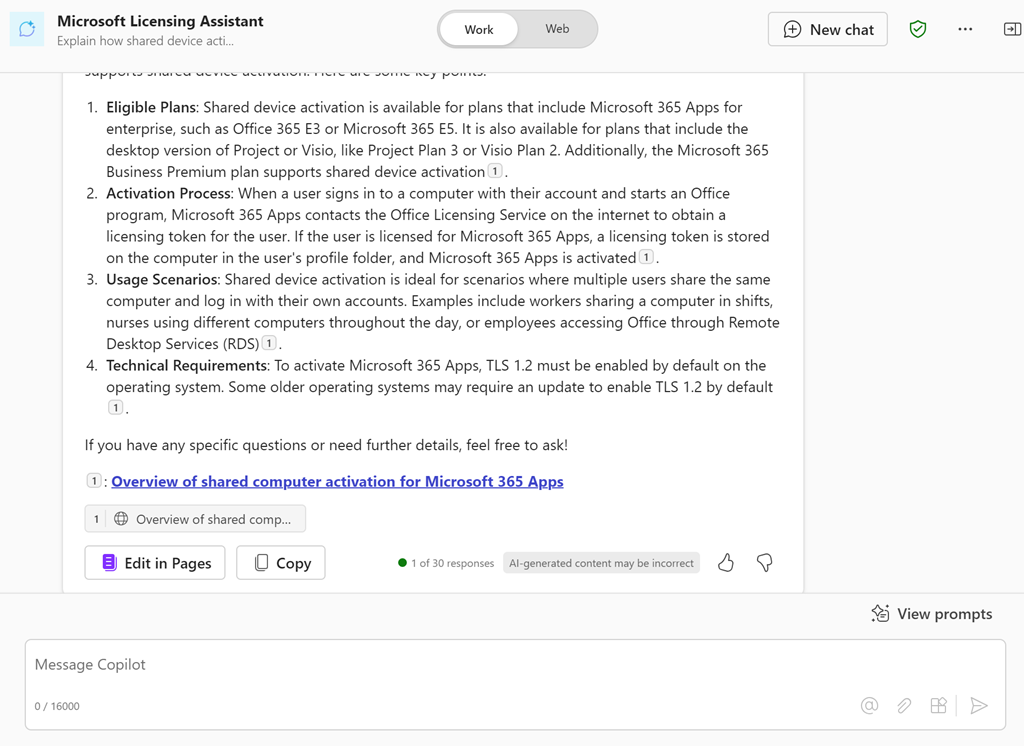
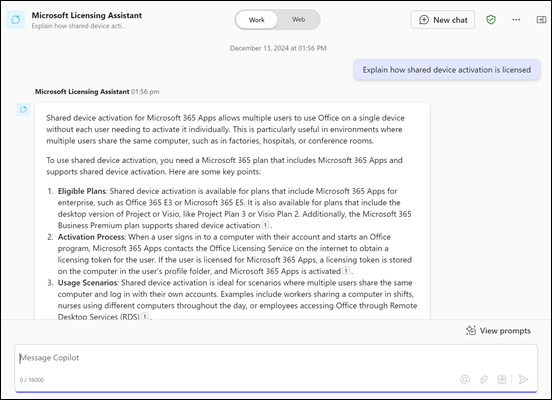
Ask it a question like “Explain how shared device activation is licensed”

image

and you should see the above response.

If you take the URL for the new agent and put it into a chat with users that also have a Copilot for Microsoft 365 license they can also use that agent in that chat session.

You can continue to improve this agent or go and create more. Personally, I have agents for licensing, Microsoft 365 and Azure information that I use almost every day. I have found this licensing agent particularly helpful.

Of course, the limitation is that people who want to use this agent need a license of Copilot for Microsoft 365 but in an upcoming article I’ll show you how to set things up so that no use need an actual license of Copilot for Microsoft 365 to reap the benefits of agents. Stay tuned for that soon.


CIAOPS Summer School 2025 is open for enrolments

image

In early 2025 I’ll be running a course entitled “Copilot for IT Pros”.

Unlock the full potential of AI in your business with “Copilot for IT Professionals.” This comprehensive course is designed to equip IT professionals with the skills and knowledge to effectively utilize Microsoft 365 Copilot, an advanced AI-powered assistant, in various IT tasks and projects.

Throughout this course, you will:

  • Understand Copilot’s Capabilities: Gain a deep understanding of how Copilot can assist in coding, troubleshooting, and automating routine tasks.
  • Integrate Copilot into Workflows: Learn how to seamlessly integrate Copilot into your existing IT workflows to enhance productivity and efficiency.
  • Practical Applications: Explore real-world scenarios and case studies where Copilot has been successfully implemented in IT environments.
  • Best Practices: Discover best practices for leveraging Copilot’s features while maintaining security and compliance standards.

By the end of this course, you will be proficient in using Microsoft 365 Copilot to streamline your IT operations, reduce manual workload, and drive innovation within your organization.

Target Audience: This course is ideal for IT professionals, system administrators, developers, and anyone looking to enhance their technical skills with AI-powered tools.

Prerequisites: Basic knowledge of IT concepts and familiarity with Microsoft 365.

Training will held virtually over three consecutive weeks in January 2025. Each session will be two (2) hours and run from 9am Sydney time.The dates are:

Thursday January 9th 2025

Thursday January 16th 2025

Thursday January 23rd 2025

The sessions will be recorded and other materials from the sessions (checklists, etc) will be available to attendees afterwards.

This event will be conducted remotely via Microsoft Teams.

The aim of this training is to help configure security best practices inside for your Microsoft 365 Copilot environment. You’ll learn what settings you should enable and why you should have these enabled. The sessions will also take you through common examples of configuring these settings and the impact they will have on your users.

The price for this event will be:

Gold Patron = $50 inc GST

Silver Patron = $100 inc GST

Bronze Patron = $150 inc GST

Non Patron = $275 inc GST

You can learn more about the CIAOPS Patron community at www.ciaopspatron.com.

I hope that you’ll join me in January for this event as I believe it provides some much needed training in a very important aspect of managing and securing Microsoft 365 Copilot. If you are serious about AI for Microsoft 365, then you need a plan and this training will aim to give you just that plus some experience to boot!

You can enrol now in this course ready for January using this link:

https://www.ciaopsacademy.com/p/copilot-for-it-pros

As always, if you have any questions about this training please email me on – director@ciaops.com.

I hope to see you there.

Need to Know podcast–Episode 332

A quick overview of teh major news from the recent Microsoft Ignite. So much to get through, but here’s an initial look at what caught my attention and starting for you to also go and get the latest information. More coming over the upcoming weeks, so stay tuned right here!

You can listen directly to this episode at:

https://ciaops.podbean.com/e/episode-332-it-was-a-big-ignite/

Subscribe via iTunes at:

https://itunes.apple.com/au/podcast/ciaops-need-to-know-podcasts/id406891445?mt=2

or Spotify:

https://open.spotify.com/show/7ejj00cOuw8977GnnE2lPb

Don’t forget to give the show a rating as well as send me any feedback or suggestions you may have for the show.

Brought to you by www.ciaopspatron.com

Resources

@directorcia

Join my shared channel

CIAOPS merch store

Become a CIAOPS Patron

CIAOPS Blog

CIAOPS Brief

CIAOPSLabs

Support CIAOPS
Microsoft Ignite

How to configure Passkeys in Microsoft Entra ID

Teams Premium enhances scheduling in Microsoft Bookings

Enhance meeting security with Teams Premium’s email verification for external meeting participants

What’s New in Microsoft Teams | Microsoft Ignite 2024

Introducing the Employee Self-Service Agent

Streamline HR and IT Tasks with Microsoft 365 Copilot’s Employee Self-Service Agent

Introducing the Employee Self-Service Agent in Microsoft 365 Copilot

AI agents — what they are, and how they’ll change the way we work

What’s new in Copilot in Microsoft Forms – Ignite 2024

Introducing Agents in Microsoft 365

New M365 Copilot Data Lifecycle Management options

Copilot Studio is enhancing its platform with knowledge improvements, Azure AI integration, and more

Gather and create notes with Copilot in your personal OneNote notebooks directly on the page

Introducing Copilot Analytics to measure AI impact on your business

Ignite 2024: Agents in SharePoint now in general availability

Introducing Copilot Actions, new agents, and tools to empower IT teams

Microsoft Ignite 2024 | Microsoft 365 Copilot Innovation in Your Go-To Apps

Redefine development: AI-first innovation with agents and Microsoft Copilot in Power Platform

Accelerate Microsoft 365 Copilot adoption with built-in content governance

Transforming endpoint management with Copilot in Intune

Ignite 2024: Transform your workday with the latest Edge for Business features

Microsoft Intune news at Microsoft Ignite 2024

Manage Security with Microsoft Security Copilot

Targeting the Cybercrime Supply Chain

Announcing the Security Enablement Hub on adoption.microsoft.com

Simplify & scale data protection in the era of AI with Microsoft Purview Data Loss Prevention

Windows security and resiliency: Protecting your business

Ignite 2024: Transforming Security with Microsoft Security Copilot

Unlock Proactive Defense: Microsoft Security Exposure Management Now Generally Available

AI innovations for a more secure future unveiled at Microsoft Ignite

Content and communication event guide for Microsoft Ignite 2024 | Teams, SharePoint and OneDrive

Loop governance, lifecycle, manageability for IT Admins – Nov 2024

Hotpatch for client comes to Windows 11 Enterprise

Microsoft Ignite 2024: Embracing the future of Windows at work

Windows 365 Link—the first Cloud PC device for Windows 365

Afterhours

World’s First Selfie From Space! (YOU Can Get One Too!)