Need to Know podcast–Episode 332

A quick overview of teh major news from the recent Microsoft Ignite. So much to get through, but here’s an initial look at what caught my attention and starting for you to also go and get the latest information. More coming over the upcoming weeks, so stay tuned right here!

You can listen directly to this episode at:

https://ciaops.podbean.com/e/episode-332-it-was-a-big-ignite/

Subscribe via iTunes at:

https://itunes.apple.com/au/podcast/ciaops-need-to-know-podcasts/id406891445?mt=2

or Spotify:

https://open.spotify.com/show/7ejj00cOuw8977GnnE2lPb

Don’t forget to give the show a rating as well as send me any feedback or suggestions you may have for the show.

Brought to you by www.ciaopspatron.com

Resources

@directorcia

Join my shared channel

CIAOPS merch store

Become a CIAOPS Patron

CIAOPS Blog

CIAOPS Brief

CIAOPSLabs

Support CIAOPS
Microsoft Ignite

How to configure Passkeys in Microsoft Entra ID

Teams Premium enhances scheduling in Microsoft Bookings

Enhance meeting security with Teams Premium’s email verification for external meeting participants

What’s New in Microsoft Teams | Microsoft Ignite 2024

Introducing the Employee Self-Service Agent

Streamline HR and IT Tasks with Microsoft 365 Copilot’s Employee Self-Service Agent

Introducing the Employee Self-Service Agent in Microsoft 365 Copilot

AI agents — what they are, and how they’ll change the way we work

What’s new in Copilot in Microsoft Forms – Ignite 2024

Introducing Agents in Microsoft 365

New M365 Copilot Data Lifecycle Management options

Copilot Studio is enhancing its platform with knowledge improvements, Azure AI integration, and more

Gather and create notes with Copilot in your personal OneNote notebooks directly on the page

Introducing Copilot Analytics to measure AI impact on your business

Ignite 2024: Agents in SharePoint now in general availability

Introducing Copilot Actions, new agents, and tools to empower IT teams

Microsoft Ignite 2024 | Microsoft 365 Copilot Innovation in Your Go-To Apps

Redefine development: AI-first innovation with agents and Microsoft Copilot in Power Platform

Accelerate Microsoft 365 Copilot adoption with built-in content governance

Transforming endpoint management with Copilot in Intune

Ignite 2024: Transform your workday with the latest Edge for Business features

Microsoft Intune news at Microsoft Ignite 2024

Manage Security with Microsoft Security Copilot

Targeting the Cybercrime Supply Chain

Announcing the Security Enablement Hub on adoption.microsoft.com

Simplify & scale data protection in the era of AI with Microsoft Purview Data Loss Prevention

Windows security and resiliency: Protecting your business

Ignite 2024: Transforming Security with Microsoft Security Copilot

Unlock Proactive Defense: Microsoft Security Exposure Management Now Generally Available

AI innovations for a more secure future unveiled at Microsoft Ignite

Content and communication event guide for Microsoft Ignite 2024 | Teams, SharePoint and OneDrive

Loop governance, lifecycle, manageability for IT Admins – Nov 2024

Hotpatch for client comes to Windows 11 Enterprise

Microsoft Ignite 2024: Embracing the future of Windows at work

Windows 365 Link—the first Cloud PC device for Windows 365

Afterhours

World’s First Selfie From Space! (YOU Can Get One Too!)

Need to Know podcast–Episode 331

Microsoft Ignite is just around the corner but still plenty of updates coming from Microsoft prior to their big tech event. Listen and stay up to date with everything that is happening in the Microsoft Cloud.

You can listen directly to this episode at:

https://ciaops.podbean.com/e/episode-331-team-chat-gets-a-make-over/

Subscribe via iTunes at:

https://itunes.apple.com/au/podcast/ciaops-need-to-know-podcasts/id406891445?mt=2

or Spotify:

https://open.spotify.com/show/7ejj00cOuw8977GnnE2lPb

Don’t forget to give the show a rating as well as send me any feedback or suggestions you may have for the show.

Brought to you by www.ciaopspatron.com

Resources

@directorcia

Join my shared channel

CIAOPS merch store

Become a CIAOPS Patron

CIAOPS Blog

CIAOPS Brief

CIAOPSLabs

Support CIAOPS

Streamline collaboration with the new chat and channels experience in Microsoft Teams

How to manage false positives – Microsoft Defender for Office 365

Get started with false negative investigations in Microsoft Defender for Office 365

How to investigate email messages in Microsoft Defender for Office 365

How to use the Alert page – Microsoft Defender XDR

Defender XDR Monthly news – November 2024

How Microsoft Defender for Office 365 innovated to address QR code phishing attacks

Skill up to strengthen your organizations cybersecurity posture

Manage Microsoft Entra ID role assignments with Microsoft Entra ID Governance

Announcing General Availability of Inbound SMTP DANE with DNSSEC for Exchange Online

Coming in December: SC-5004: Defend against cyberthreats with Microsoft Defender XDR

What’s new in Copilot Studio: November

New Copilot agents: Supercharge Microsoft 365 Copilot

A strategic approach to assessing your AI readiness

Supercharge productivity with Microsoft 365 Copilot

AI safety first: Protecting your business and empowering your people

Microsoft 365 Copilot — Small Business Guide to Set Up Copilot

Quick actions with Copilot now at your fingertips in OneNote

Stay focused in an action-packed meeting with Microsoft 365 Copilot in Teams

How to prepare for Windows 10 end of support by moving to Windows 11 today

Github Copilot updates

A year of innovation- and feedback-driven features in Microsoft Word

Updated management features roll out for Microsoft Intune Suite

Afterhours

Apple intelligence – catch up

Recent presentation resources

I recently did two presentations for which the resources can be found at:

What most IT Pros overlook when configuring Microsoft 365

Microsoft 365 has a huge range of features that are designed to help keep users safe. Many of these are not fully enabled by default and typically should be. This session will highlight what are the most common settings that IT Pros overlook when setting up security for a Microsoft 365 environment

https://bit.ly/cia-m365overlooked

and

How can IT Pros get more out of Copilot

Copilot is now a vast array of services that leverage AI to make life easier. How should and IT Pro be using these AI services from Microsoft and how do they make sense inside a business to drive value for both the customer and the IT Pro. This session is more than just looking at Microsoft 365, it considers the suite of AI that is available from Microsoft and what can be done with these services.

https://bit.ly/cia-getmorefromcopilot

Need to Know podcast–Episode 330

Microsoft announced last week new agents that can be created with Copilot studio to automate tasks using AI capabilities. Also in this episode you’ll find a great new tool from CISA called Scubagear that will allow you to check the baseline security of your Microsoft 365 environment. Plenty more updates and information from the Microsoft Cloud, so listen along.

You can listen directly to this episode at:

https://ciaops.podbean.com/e/episode-330-copilot-agents-emerge/

Subscribe via iTunes at:

https://itunes.apple.com/au/podcast/ciaops-need-to-know-podcasts/id406891445?mt=2

or Spotify:

https://open.spotify.com/show/7ejj00cOuw8977GnnE2lPb

Don’t forget to give the show a rating as well as send me any feedback or suggestions you may have for the show.

Brought to you by www.ciaopspatron.com

Resources

@directorcia

Join my shared channel

CIAOPS merch store

Become a CIAOPS Patron

CIAOPS Blog

CIAOPS Brief

CIAOPSLabs

Support CIAOPS

AI Tour Demo: Copilot Studio and Pre-built Agents

Scale your team with new autonomous agents

Unlocking autonomous agent capabilities with Microsoft Copilot Studio

Reimagine business process with Copilot and agents

Unlock Autonomous Agent Capabilities with Copilot Studio

Microsoft 365 Copilot drove up to 353% ROI for small and medium businesses—new study

Favorite Microsoft 365 Copilot Prompts

Enhancing Security with CISA’s ScubaGear Baselines for M365

Phish, Click, Breach: Hunting for a Sophisticated Cyber Attack

Microsoft Digital Defense Report 2024

New macOS vulnerability, “HM Surf”, could lead to unauthorized data access

Demystify potential data leaks with Insider Risk Management insights in Defender XDR

Increase productivity with Copilot in OneNote for iPad and Mac for commercial customers

Unleash your creativity with new pen tools in OneNote

What’s new in Microsoft Intune October 2024

Microsoft 365 Insider Handbook

Prepare now for key end of support moments in 2025

Need to Know podcast–Episode 329

It’s OneDrive’s turn in the spotlight. After a recent dedicated OneDrive event I have all the latest about updates and improvements that have been announced. Of course, there is plenty of other news also around security and Copilot as well as improvements to the new Outlook that you should check out. Thanks again for listening.

You can listen directly to this episode at:

https://ciaops.podbean.com/e/episode-329-onedrive-improvements/

Subscribe via iTunes at:

https://itunes.apple.com/au/podcast/ciaops-need-to-know-podcasts/id406891445?mt=2

or Spotify:

https://open.spotify.com/show/7ejj00cOuw8977GnnE2lPb

Don’t forget to give the show a rating as well as send me any feedback or suggestions you may have for the show.

Brought to you by www.ciaopspatron.com

Resources

@directorcia

Join my shared channel

CIAOPS merch store

Become a CIAOPS Patron

CIAOPS Blog

CIAOPS Brief

CIAOPSLabs

Support CIAOPS

Welcome to the New Era of Microsoft OneDrive: AI, Productivity, and Memories at Your Fingertips

Get to know Copilot in OneDrive

Introducing Copilot in OneDrive: Now Generally Available

What’s New In Copilot | September 2024

New Copilot enhancements help small and medium-sized businesses innovate

Introducing Copilot Labs and Copilot Vision

New experiences coming to Copilot+ PCs and Windows 11

An AI companion for everyone

Create desktop flows using the AI Recorder

Token theft protection with Microsoft Entra, Intune, Defender XDR & Windows

Use community queries to hunt more effectively across email and collaboration threats

What’s new in Microsoft Entra – September 2024

What is Microsoft Entra (and why use it)?

Research Threat intelligence Microsoft Defender XDR Business email compromise

Improved user experience for Dictate in new Outlook for Windows and Outlook for the web

Getting started with the new Outlook for Windows

Learn about the new Outlook for Windows

Level Up Your Security Skills with the New Microsoft Sentinel Ninja Training!

Microsoft Defender XDR Monthly news – October 2024

Windows 11, version 24H2 security baseline

Windows 11, version 24H2: What’s new for IT pros

Security settings management is available for multi-tenant environments in Microsoft Defender XDR

Implementing a secure by default approach with Microsoft Purview and address oversharing

Microsoft Intune support for Apple Intelligence

Microsoft is named a Leader in the 2024 Gartner® Magic Quadrant™ for Endpoint Protection Platforms

Microsoft Ignite

Need to Know podcast–Episode 328

Microsoft has announced updates to Copilot for Microsoft 365 which they are calling Wave 2. In this episode I cover off some of these changes and what I feel will be most useful for people. A number of other products from Microsoft have also become generally available so listen alone for all the new on that plus everything happening at Microsoft for SMB.

You can listen directly to this episode at:

https://ciaops.podbean.com/e/episode-328-riding-wave-2/

Subscribe via iTunes at:

https://itunes.apple.com/au/podcast/ciaops-need-to-know-podcasts/id406891445?mt=2

or Spotify:

https://open.spotify.com/show/7ejj00cOuw8977GnnE2lPb

Don’t forget to give the show a rating as well as send me any feedback or suggestions you may have for the show.

Brought to you by www.ciaopspatron.com

Resources

@directorcia

Join my shared channel

CIAOPS merch store

Become a CIAOPS Patron

CIAOPS Blog

CIAOPS Brief

CIAOPSLabs

Support CIAOPS

Microsoft 365 Copilot Wave 2: Pages, Python in Excel, and agents

The next phase of Microsoft 365 Copilot innovation

Microsoft 365 Copilot Wave 2: AI Innovations in SharePoint and OneDrive

Microsoft 365 Copilot | Copilot Pages

Announcing Copilot Pages for multiplayer collaboration

Copilot pages for IT Admins – Sep 2024 update

New Copilot enhancements help small and medium-sized businesses innovate

Microsoft 365 Copilot – Small Business Guide to Prepare your Data for Search

Update on Recall security and privacy architecture

Introducing Copilot in OneDrive: Now Generally Available

Microsoft Intune support for Apple Intelligence

Microsoft Entra Internet Access now generally available

The art and science behind Microsoft threat hunting: Part 3

Microsoft ignite

New CIAOPS Copilot for M365 course

mountains

I just completed a new “Getting Started with Copilot for Microsoft 365” online course that you can find here:

https://www.ciaopsacademy.com/p/getting-started-with-copilot-for-micrsoft-365

The course is designed for the end user who wants to better understand how Copilot for Microsoft 365 can help improve their productivity across the suite of applications that Microsoft 365 provides access to, including Word, Excel, Outlook, Teams and more. This course is not aimed at administrators but those using Microsoft 365 in their business.

This new course is also available to CIAOPS Patrons as part of their benefits, so they too can get up to speed with Copilot in Microsoft 365.

Look out for more courses coming soon from CIAOPS.

Yet another reason to love OneNote

I’m a HUGE fan of OneNote. Personally, I feel it is the one tool that makes me the most productive. As an engineer I’ve always been documenting stuff simply because I can’t remember it all. I learnt many, many years ago that writing it down and getting it out of my memory is in fact the best way to retain and use that information.

Before OneNote, like many people, I used paper to capture everything but the more I captured the more challenges that brought. Such challenges included, how do I back up these paper notes? How do I find things with paper notes? How do I store these paper notes? and so on. Enter OneNote to solve all these issues.

Thus, I have OneNote notebooks on just about everything these days. It’s a huge source of knowledge that I can access anywhere on any device. Love it. If I need to find something I just use the inbuilt search functionality and it would pop right out. Magic!

Given that I also now have Copilot for Microsoft 365, I have started to explore how these two product combined can make me more productive and I’d like to share a use case with you that has made me sit up and pay attention to what the combination of these two services can now provide.

When you become a CIAOPS Patron you get access to two extensive notebooks on Microsoft 365 and Azure. These notebooks contain my cumulative knowledge of the Microsoft Cloud and I use them pretty much every day in my work.

image

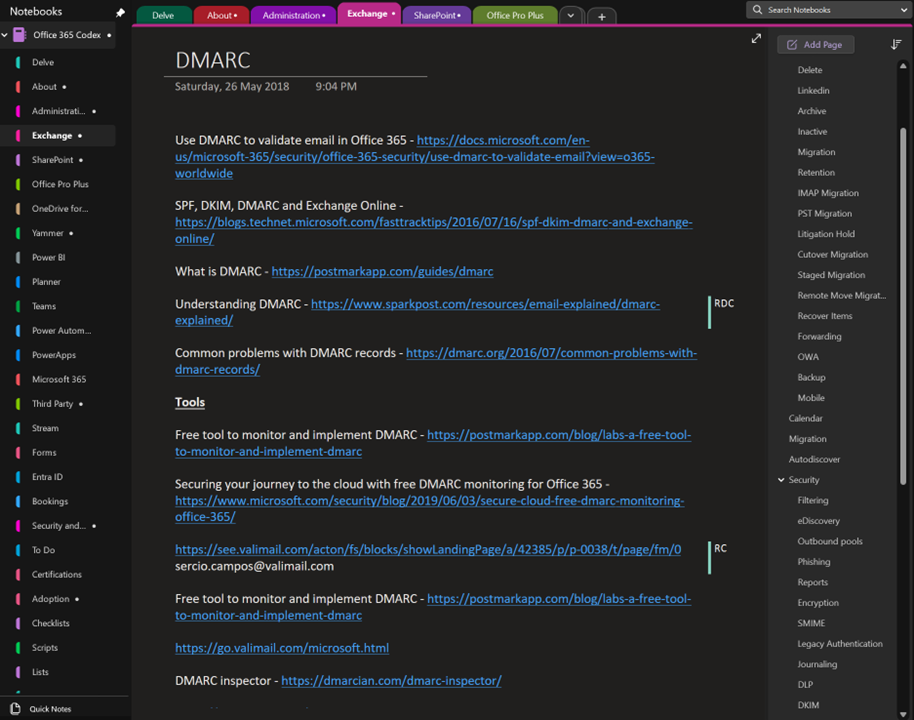
The above shows you an example page on DMARC from my Office 365 codex. The page typically contains knowledge plus links. You see on the right I have a section for every Microsoft 365 service and on the right many pages relating to that service. Here DMARC is a dedicated page in the Exchange section along with other pages such as Retention, Migration etc.

image

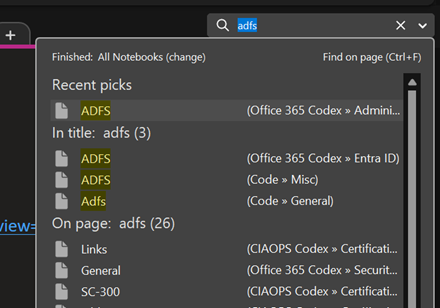
Typically, to find any information on Microsoft 365 I’d go to the top right and just use search as shown above.

image

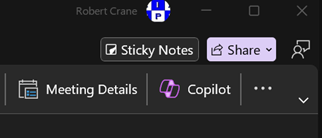
But now my desktop version of OneNote has a Copilot button as shown above. This capability doesn’t appear to be available in the web version of OneNote yet. I hope it will be soon.

image

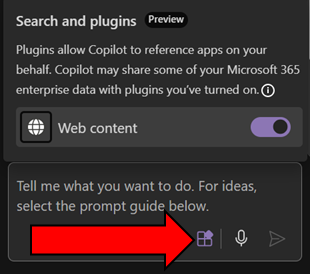
Before you go too much further make sure you select the Plugins button inside the Copilot window that appear and enable Web content as shown above. This will give you the best of both worlds with AI. It will work across you data (the notebook typically, andl in your tenant) as well as information from the web.

image

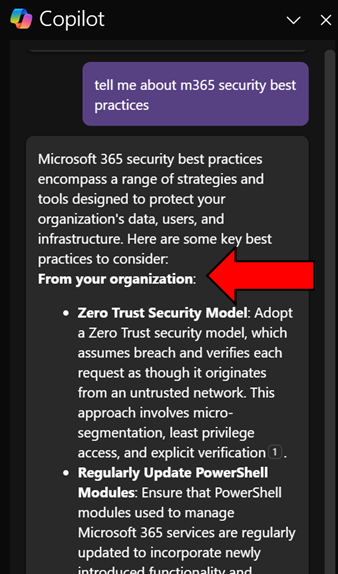
When I ask Copilot a question here you’ll see that it return information from my organization (shown above)

image

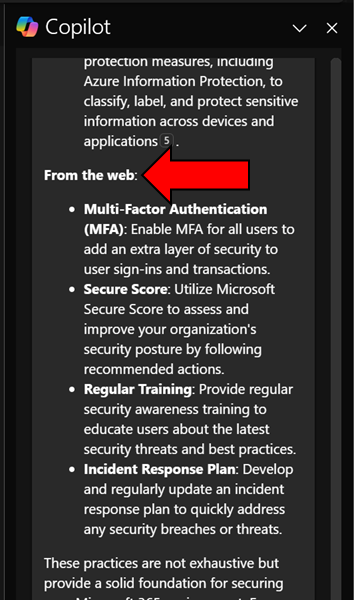
and from the web.

image

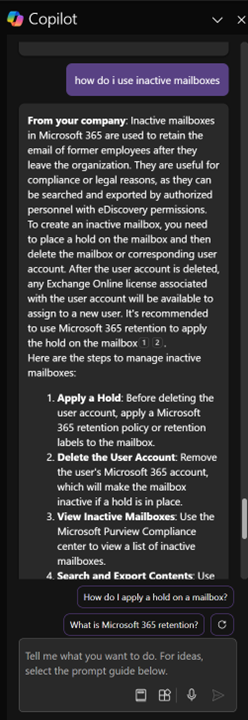
Another example is asking Copilot how to work with Exchange Online inactive mailboxes, as shown above. Again, it works with my own information and information on the web and presents in easy to digest format as well as providing me additional relevant prompts.

I have to say that this now my go to for unlocking all the knowledge I have accumulated in all my OneNote notebooks. Of course, I can probably extract something similar from other Copilot interfaces in Microsoft 365 but giving me this capability inside an application that I use more than email is a huge productivity boostt for me. Hopefully now that I have shown you what it can do for me too can go and see what Copilot for Microsoft 365 and OneNote can do for you. Let me know in the comments your use case, I’m all ears!