Create a dynamic group in Azure AD

The purpose of a dynamic group in Azure AD is to be one based on a query. This means the membership of this group is then constructed on the successful matching of that query. The use case I’m going to build here is a dynamic Azure AD group that will contain devices that I wish to retire from an Azure AD.

To use dynamic groups in your environment you are going to need to be licensed for Azure AD P1 or P2. Thankfully, if you are using Microsoft 365 Business Premium, you’ll have Azure AD P1.

The way that the machines to be retired will be identified is by their unique Device ID as it appears in Azure AD. Thus, first stop will be the Azure AD portal to record these unique Device Ids.

image

Navigate to the Azure AD portal as an administrator (https://aad.portal.azure.com) and select the Devices item on the left hand side as shown above to see all the devices your Azure AD knows about.

image

In the page that appears, select All devices on the left and then search for the device(s) you wish using the search box on the right as shown above. Here, I’m searching for the device called VPC02. Select the device name to get more information about that device.

image

On the details page for the device you should now find the unique Device ID, as shown above. You should take a copy of this as it will be needed later.

Repeat the above process to obtain the unique Device ID of all the devices in Azure AD you wish to retire.

image

Return to Azure AD portal home page and now select Groups from the menu on the left.

image

Select the option on the top right for a New group.

image

Set the group type to Security. Give the group a meaningful name (here To be retired) as well as a description. Finally, ensure that the Membership type is set to Dynamic Device, because in this case we want to query a list a devices in Azure AD.

image

At the bottom of the options, select the Add dynamic query hyperlink as shown above.

image

On this page you will build the dynamic query for the membership of the group. Here we want to query the deviceid property to see whether it equals the Device Id we obtained initially for the device(s) we wish to retire.

Each unique device will generally require its own unique query line with the And/Or set to Or for this use case.

image

Once you add the entries at the top of the page you’ll see the actual rule syntax displayed in the box below, as shown.

image

To test the query returns the expected results, select the Validate Rules (Preview) option at the top of the page as shown. Next, Add devices you wish to test the query with. In the case above, I selected a machine I knew should match (VPC02) and one that wouldn’t (WIN10ENT). These selections will be validated and results displayed.

Here, the validation returns the expected results for this use case, so I can select the Save button at the top of the page to continue.

image

In the list of Azure AD groups, you should now be able to see the one that you just created.

.image

If you now select this new group you will probably find that it doesn’t have any members as yet as seen above.

SNAGHTML7d6fd8d

Fear not. Because the group is dynamic, it will take a few moments to run the query you created and populate it with matching members. When it has done this after a short time, you will be able to find the results in the Members option on the left hand side as shown above. Check that they match the expected results.

image

At that point, the Overview page should also display the correct count of members as shown above.

You can of course edit this Azure AD Dynamic Group at any point and change the membership criteria. In the case of retired devices, we’ll need to go in again and add any new Device Id’s for devices we want retired from our environment down the track.

A dynamic group can be based on just about any criteria and you may use it to identify new devices, users in the marketing department and so on. The queries can also be quite complex and it is recommended you consult this documentation from Microsoft for more information:

Dynamic membership rules for groups in Azure AD

In this case, we can now use this dynamic group of old devices to off board them cleanly from our Microsoft 365 environment. Stay tuned for upcoming articles on how to do this.

Two easy methods of onboarding Windows 10 devices to defender for Business

I recently detailed a way to use Endpoint Manager and Intune to onboard Windows 10 devices to Microsoft Defender for Business:

Onboarding Windows 10 devices to Microsoft Defender for Business

I’ve now extended that to include this video:

https://www.youtube.com/watch?v=UM-WZjHgy88

that shows that method plus using a local script. Using a local script is a good backup method to use if you are in a hurry or have issues with a device in your environment not receiving the policy.

Onboarding Windows 10 devices to Microsoft Defender for Business

One of the big benefits of Windows 10 devices when it comes to onboarding them to Microsoft Defender for Business is that they already have the ‘client’ software installed. That being Windows Defender. All the onboarding process needs to do is connect up the ‘backend plumbing’ so that Windows 10 also sends security information to the Microsoft 365 Security portal.

The first step in this onboarding process is to ensure that your Windows 10 devices are already Azure AD joined. You’ll also need to have a license for Intune/Endpoint Manager to enable this process from a centralised location.

Next, visit the Microsoft Endpoint Manager portal at:

https://endpoint.microsoft.com

image

As shown above, here, navigate to Endpoint Security, then Microsoft Defender for Endpoint. Ensure that the option Connection status is enabled. If it isn’t then open a new browser tab and navigate to:

https://security.microsoft.com

image

You should see the screen above. Scroll down this page.

image

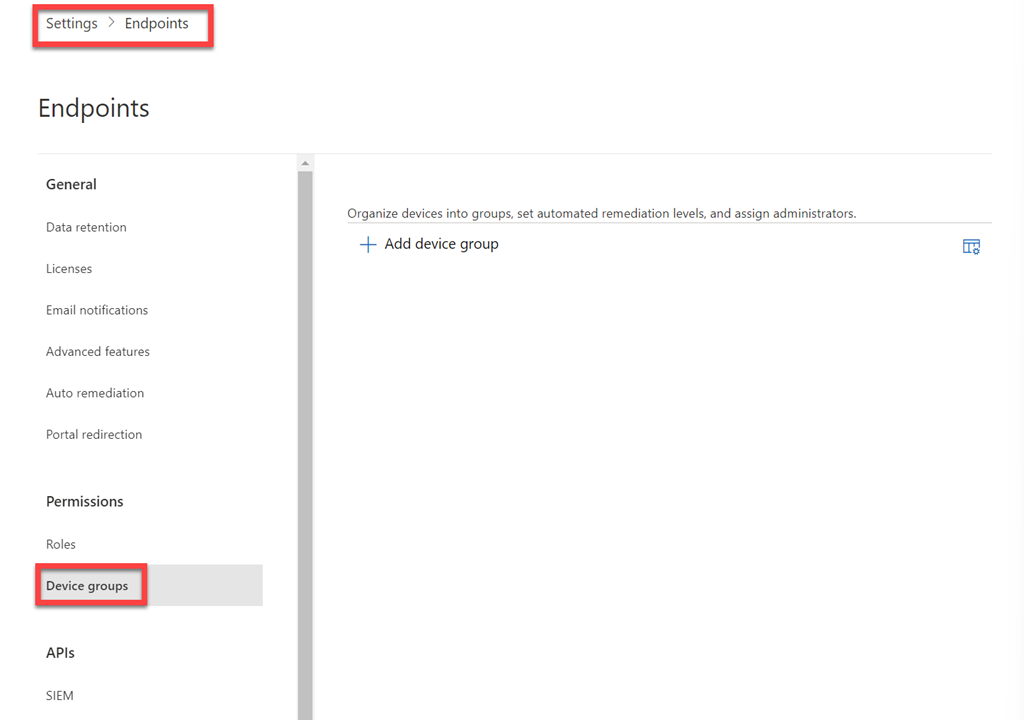
Select Settings as shown above and then Endpoints from the options that appear on the right.

image

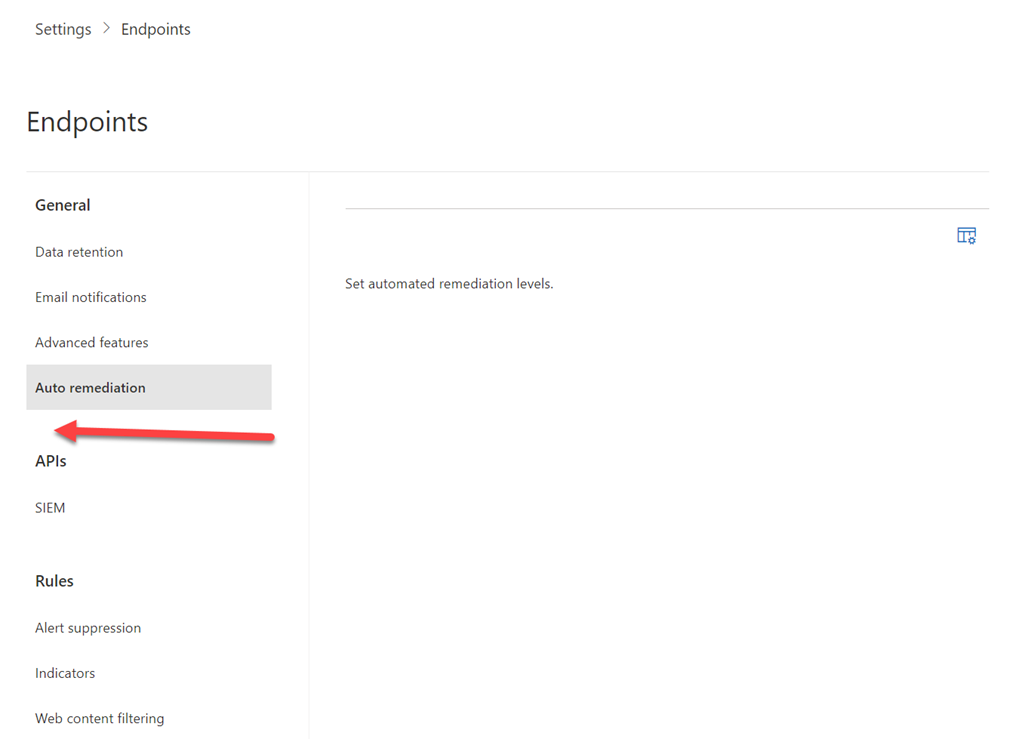
Scroll through the options presented and select Advanced features as shown. Location the Microsoft Intune connection option and set it to On. You may also want to have a look through the list of all the other available settings and also turn these on if desired.

You may need to wait a little while until connection status back in Endpoint Manager reports as being enabled.

image

You can always use the Refresh button at the top of the page, but be prepared for a short wait while the connection is made.

While you are on this Endpoint Manager page you will also probably want to turn all the settings available here.

image

Still in Endpoint Manager, you’ll now need to select Devices, then Configuration Policies, then Create profile as shown above.

image

Select Windows 10 and later for the Platform and Templates from the Profile type.

image

Scroll through the list of templates and select Microsoft Defender for Endpoint (desktop devices running Windows 10 or later).

image

Give this new policy a meaningful name and select the Next button at the bottom of the page to continue.

image

You don’t have to make any changes on the Configuration settings page but I like to Enable the option for Expedite telemetry reporting frequency. Select the Next button at bottom of the page to continue.

image

On the Assignments page you need to configure which groups this policy will include and exclude. Generally, you want to select All devices as shown above, but you can select whatever suits your configuration needs.

Continue through the remaining policy configuration pages and Create the new policy.

image

If you go back and look at the properties of the policy as shown above, you note an additional Configuration setting that wasn’t displayed when the policy was created – Microsoft Defender for configuration package type is set to Onboard. This is what effectively will onboard the Windows 10 devices for you automatically.

image

You can now use the Device Status option to monitor when this policy is applied to each device. Note that this status may take a while to change and the policy to be applied as it is dependent on when the devices ‘check in’ for policy updates.

image

Once the devices ‘check in’ and receive the policy, their status should be displayed as shown above with the Deployment status field now reporting as Succeeded.

image

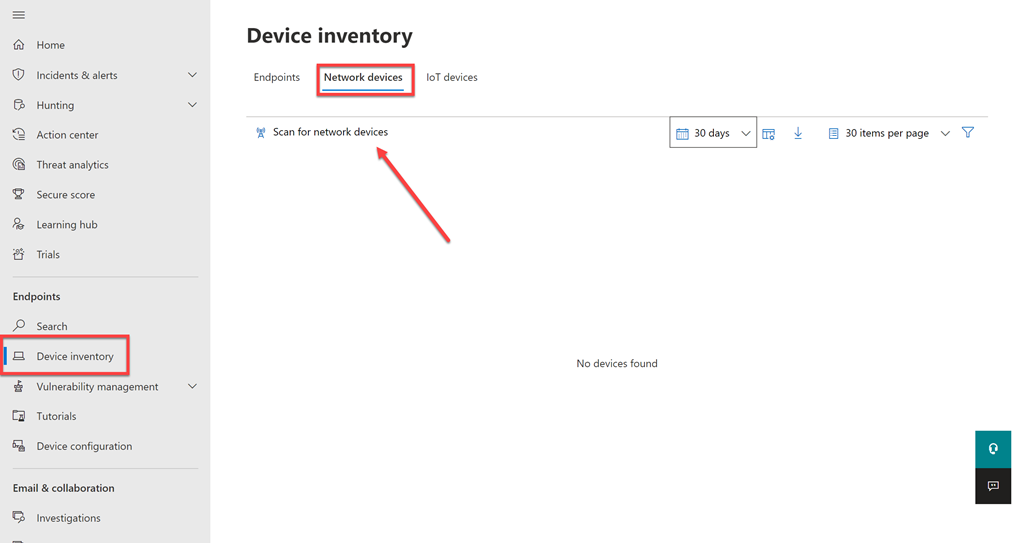
You can see which devices have been successfully onboarded to Defender for Endpoint by selecting the Device inventory option in the Microsoft 365 Security Center as shown above. Until machines have their ‘plumbing’ connected back to this console via the onboarding process they will not appear.

image

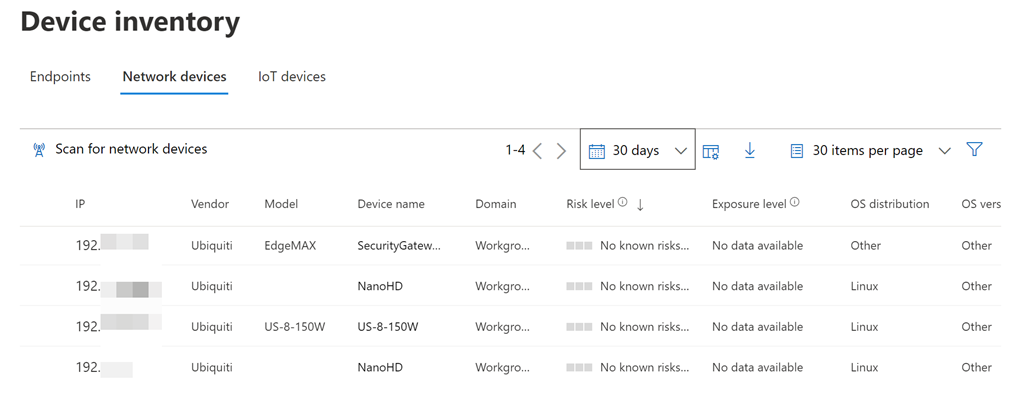
Once that onboarding process is complete on the device, it should appear in the Device inventory as shown above.

image

If you return to Endpoint Manager and scroll to the bottom of the Microsoft Defender for Endpoint screen, as shown above, you’ll see a summary of the devices onboarded.

The great thing is that you only need to do all this once, because once the Intune connection and Device configuration policy is in place, all Windows 10 machines will automatically be onboarded to Defender for Endpoint and all the options the Microsoft Security Center.

My Tech Books – 2022

Tech is as much a lifestyle choice these days as it is a career. The geeks and nerds have risen to rule the world. Don’t believe me? Ask Bill Gates and Elon Musk! Sometimes it is good to step back and take a wide look at how technology has changed the world we live in – for better and worse.

My selections below, both fiction and non fiction, I have found to be enjoyable and thought provoking in many different ways and I recommend them to everyone who is interested in tech.

Notable mentions from 2021

  • Click here to kill everyone: Security and survival in a hyper-connected world – Bruce Schneier
  • Lights out: A cyberattack, a nation unprepared, survising the aftermath – Ted Koppel
  • Spam Nation: The inside story of organized crime – from global epidemic to your front door – Brian Krebs

You can follow all the books, tech, business, non-fiction I read and want to read over at Goodreads where I have an account. You can also view my activity via:

https://www.goodreads.com/director_cia

1. Daemon – Daniel Suarez [Fiction]

A glimpse into the future of where drones and augmented reality may take us. That may not necessarily be a good place either.

2. Freedom TM – Daniel Suarez [Fiction]

A follow up to Daemon. What happens when technology dominates the world? Who benefits?

3. Ready Player One – Ernest Cline [Fiction]

Much like the Matrix. What is life like if you live inside the machine? You can be just about anyone you choose. I also love this book for all the retro technology that was part of my life. TRS-80 anyone? This book has become so popular that there is now a movie. Believe me, the book is better.

4. Sandworm: A New Era of Cyberwar and the Hunt for the Kremlin’s Most Dangerous Hackers – Andy Greenberg [Non-Fiction]

This is a great book if you are interested in IT security. It is also a very current book which makes it even more engrossing. It is easy to read and quite comprehensive in its approach, not only dealing with the technology of security attack but also the geopolitical reasons and consequences.

It reveals that shadow world of nation state cyber attacks and illustrates how they are happening today and likely to increase in the future. The connected world of the Internet has brought us many benefits but it is now increasing risks as our dependencies increase to the point that there are few manual backups that don’t depend on technology.

I think this book is a real glimpse into the future and what we may be in store for in the even of rising global conflicts. If you like tech, you’ll love this!

5. Future Crimes: Inside the Digital Underground and the Battle for our Connected World – Marc Goodman [Non-fiction]

Technology will ultimately doom us all I believe because we are building our world on stuff that unfortunately places a low regard for security and privacy. This book will show you why that is a road to ruination.

6. Countdown to Zero Day: Stuxnet and the Launch of the World’s First Digital Weapon – Kim Zetter [Non-Fiction]

If you don’t believe cyber warfare is real then read this book to understand how software is now a weapon as potentially devastating as any nuclear device.

7. Beyond Fear: Thinking Sensibly about Security in an Uncertain World – Bruce Schneier [Non-Fiction]

Security is important but it is important in context. We need to be rational when we consider our security not emotional. A great level headed approach to how we need to be secure.

8. American Kingpin: The Epic Hunt or the Criminal Mastermind Behind the Silk Road – Nick Bilton [Non-Fiction]

An amazingly detailed book on the rise and fall of Ross Ulbricht, the creator of the Silk Road web site. In here are asked to think about whether technology plays something more than a neutral role in today’s world.

9. The Cuckoos Egg – Clifford Stoll [Non-Fiction]

Before the Internet was in the public sphere it existed in the world of academia. This is the story of how one man’s search for the source of an accounting error uncovered something are more sinister.

10. This how they tell me the world ends: The cyberweapons arms race – Nicole Perlroth [Non-Fiction]

Highlights the challenges that society has created, mainly from its’ own doing and questions of how we go about fixing this so we don’t end causing infinite harm to both intended targets and unintended victims.

CIAOPS Business Dojo–December

pexels-oleg-magni-861233

In this month’s Business Dojo we take a look at create a security offering with Microsoft Sentinel. These are virtual events, hosted using Microsoft Teams, that will provide you with deep dive into a business topic from the Microsoft Cloud.

Costs:

Non CIAOPS Patrons = AU$99 inc GST

Date:

Wednesday December 22nd 0930 – 1100 Sydney AU time

If you are interested in attending please complete the expression of interest application here to be considered for the event:

https://bit.ly/patronbiz

and you’ll be sent more details.

Better passwordless logins are here

Microsoft has announced some great improvements to the Microsoft Authenticator passwordless process.

IMG_1151

One of these, as you can see above, I have already enabled on my tenant. It allows you to do number matching AND provides you the location from where you are logging in via a map.

To enable this in your tenant visit the link:

Enable additional context in the portal

This is a great enhancement for MFA with Microsoft 365. Simple and easy to use. Great work Microsoft. You can read about the other exciting announcements here:

Several Microsoft Authenticator security features are now available!

A lot of talk but little action on cyber security

pexels-gezer-amorim-2293558

I attended a recent IT Professionals User Group meeting that featured yet another presentation by yet another ‘security’ vendor. Maybe I’m missing the point of these types of presentations but I didn’t feel it moved the needle in any meaningful way when it comes to cyber security. I wish I could get that time back I’ll be honest.

I’m finding that continual disappointment a lot if I’m honest. There is lots of talk but very little meaningful action when it comes to cyber security. Most of the focus of cyber security seems to be continually placed solely on how bad things are and this is probably more to aid in selling ‘product’ than it is in really providing real meaningful solutions. That, is a bad thing.

It is unfortunate that the whole ‘cybersecurity’ space is now seen as a revenue opportunity rather than a problem to be solved. Fear is probably the cheapest and easiest method of selling something and I see it in full swing where ever I go these days. There is no doubt that fear gets people’s attention, but fear alone does not solve the problem. Fear is an emotion not an action.

Good cyber security doesn’t need more bells, whistles and bright shiny objects, it needs people to implement and adhere to best practices and star using what they have already. Rarely does adding anything ‘more’ solve a problem because typically, more is simply a way to avoid addressing the actual root cause of the problem and making hard choices that need to be made. It is merely a way to be distracted from doing the ‘hard yards’ that implementing and adhering to best practices requires.

The amount of time, money, blood, sweat, PowerPoint slides and tears I see being utterly wasted on inconsequential approaches to cyber security utterly amazes me. Just when I think it can’t get it any worse, it does. It is no co-incidence, I would suggest, that as this wasted effort increases so to does the actual damage that cyber security incidents realise. Co-incidence? I think not! Why? All talk, no action.

Yes, there is no doubt, by any measure there is an issue. However, there isn’t a need to keep telling me this over and over and over again in the vain hope that I’ll buy some quantity of your magic cyber security snake oil remedy that in all honesty will just complicate things and rarely aid in help solve the problem. Work with what you have access to first, then seek to add more. Security starts with simplicity.

If you haven’t worked it out already, people are the problem when it comes to cyber security. Simple. The methodology and the tools to solve the problem are already available. Yet they largely lie under implemented and under utilised because of the human consequence from the lure from the next bright shiny object peddled by those regurgitating familiar statistics but with different slide decks.

Perhaps it’s just the old world engineer in me, out of touch with greater humanity, and that may be true. However, it doesn’t mean I’m wrong!

Stop trying to buy your way to peak cyber security and start doing the work. It is that simple. And guess what? All the stuff you need to improve cyber security is probably already available to you and is laying around neglected. The missing key ingredient is nothing more than effort expenditure. We’ll never solve the cyber security problem without effort and I think this quote from Edison is quite apt here:

Opportunity is missed by most people because it is dressed in overalls and looks like work

I will never claim that cyber security is easy. What I will however claim, is that there is so you much you can and should be doing but you aren’t. Everyone that is. From the business owner to the IT Professional to the government and beyond, let’s focus on solving the problem rather than simply using it as a topic of conversation or a method of sales conversion. Let your actions speak louder than your words when it comes to cyber security.

Checking Microsoft 365 Email Forwarding using PowerShell

A typical tactic after a business email compromise event is the creation of email forwarding rules using any one, or more, of these methods by an attacker:

Use rules in Outlook Web App to automatically forward messages to another account

Client rules

Sweep

It is therefore good practice to regularly check and verify the email forwarding rules inside your Microsoft 365 environment.

I have created a free PowerShell script exactly for this purpose, which you can find here:

Office365/o365-exo-fwd-chk.ps1 at master · directorcia/Office365 · GitHub

and the video:

https://www.youtube.com/watch?v=Oqk_yd6U3bk&t=16s

will provide a walk through of its execution.