Techwerks 20

bw-car-vehicle

CIAOPS Techwerks returns to Melbourne CBD on Friday the 11th of August.

The course is limited to 20 people and you can sign up and reserve your place now! You reserve a place by completing this form:

http://bit.ly/ciaopsroi

or by sending me an email (director@ciaops.com) expressing your interest.

The content of these all day face to face workshops is driven by the attendees. That means we cover exactly what people want to see and focus on doing hands on, real world scenarios. Attendees can vote on topics they’d like to see covered prior to the day and we continue to target exactly what the small group of attendees wants to see. Thus, this is an excellent way to get really deep into the technology and have all the questions you’ve been dying to know answered. Typically, the event produces a number of best practice take aways for each attendee. So far, the greatest votes are for deeper dives into the Microsoft Cloud including Microsoft 365, Azure, Intune, Defender for Endpoint, security such as Azure Sentinel and PowerShell configuration and scripts, with a focus on enabling the technology in SMB businesses.

Recent testimonial – “I just wanted to say a big thank you to Robert for the Brisbane Techworks day. It is such a good format with each attendee asking what matters them and the whole interactive nature of the day. So much better than death by PowerPoint.” – Mike H.

The cost to attend is:

Gold Enterprise Patron = Free

Gold Patron = $33 inc GST

Silver Patron = $99 inc GST

Bronze Patron = $176 inc GST

Non Patron = $399 inc GST

I hope to see you there.

IoT motor connectivity

Although I had completed a project using a servo motor with the Sparkfun ThingPlus ESP32-S2 Wroom here:

New IoT device with a servo motor

turns out that to drive any motor more serious you’ll need a dedicated motor driver board and a separate power supply just for the motors. Luckily Adafruit has just such a board available:

https://core-electronics.com.au/dc-motor-stepper-featherwing-add-on-for-all-feather-boards.html

with the details here:

https://learn.adafruit.com/adafruit-stepper-dc-motor-featherwing

This board will allow you to drive up to 4 independent motors.

feather_2927-00.jpg

which you connect to M1, M2, M3 or M4 shown above.

feather_motorpower.jpg

Flipping the board over, you’ll also find the connection for the external power (5-12V DC) required to actually drive the motors. I decided to use 4 x AA batteries in a separate holder with an on/off switch:

https://core-electronics.com.au/4-x-aa-battery-holder-with-on-off-switch.html

4 x AA Battery Holder with On/Off Switch

I also got a Mini Robot Rover chassis kit:

https://littlebirdelectronics.com.au/products/mini-robot-rover-chassis-kit-2wd-with-dc-motors

Mini Robot Rover Chassis Kit - 2WD with DC Motors

that, as you can from the above, includes 2 x DC motors.

I connected these to M1 and M2 on the motor driver board, as well as also connecting up the external power for the motors.

feather_logipowr.jpg

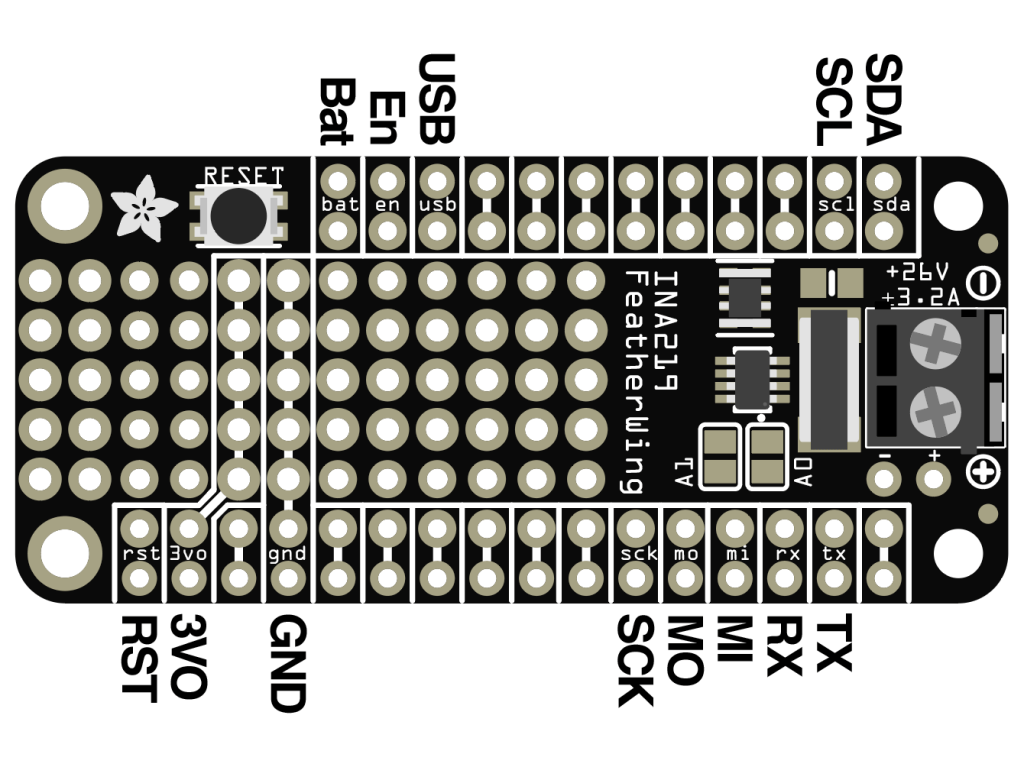
I then needed to connect 3.3V and GND to the motor driver board which are shown above and in more detail here:

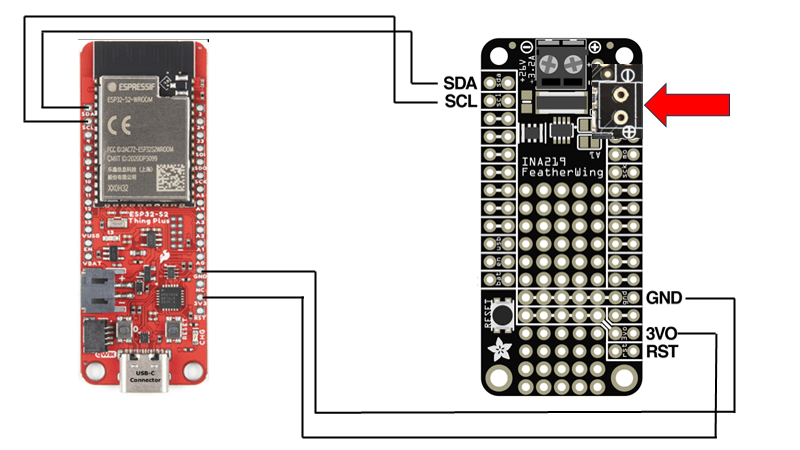
The final piece of the puzzle is to connect the SDA and SCL pins from the Sparkfun ThingPlus ESP32-S2 Wroom to the SDA and SCL pins on the motor driver so they can communicate.

To talk to the motor driver board you’ll need to use the Adafruit motor shield v2 library. I’ll cover off some of the code I’ve created in an upcoming post.

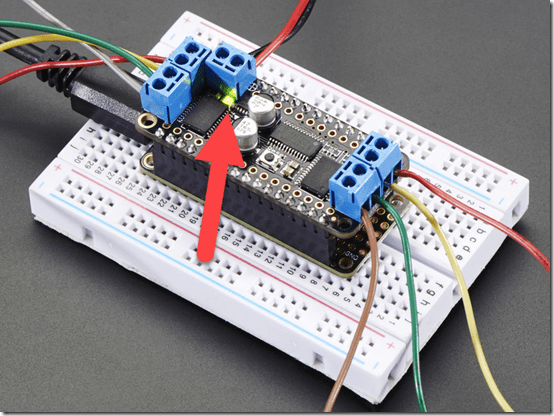
When you apply the power supply for the motors to this board a green LED is lit just under the power connector as shown above. I wasted a few hours with this until I discovered a fault solder joint that was the cause of my issues.

So my wiring looks like:

with the two motors for the drive wheels connected to M1 and M2 as mentioned above and whole thing sitting on the mini robot rover chasis.

I now have a mobile device I can command to move about the room. Next step is actually writing the code to make it work, which I’ll cover off in an upcoming post, so stay tuned. However, here’s a sneak peak of what I managed to do:

Need to Know podcast–Episode 306

Join me for an update of the Microsoft Cloud news as well as some thoughts around the features I don’t see used enough in Microsoft 365.

You can listen directly to this episode at:

https://ciaops.podbean.com/e/episode-305-logs/

Subscribe via iTunes at:

https://itunes.apple.com/au/podcast/ciaops-need-to-know-podcasts/id406891445?mt=2

The podcast is also available on Stitcher at:

http://www.stitcher.com/podcast/ciaops/need-to-know-podcast?refid=stpr

Don’t forget to give the show a rating as well as send me any feedback or suggestions you may have for the show.

This episode was recorded using Microsoft Teams and produced with Camtasia 2023.

Brought to you by www.ciaopspatron.com

Resources

@directorcia

@directorcia@twit.social

Join my shared channel

CIAOPS merch store

Become a CIAOPS Patron

CIAOPS Blog

Microsoft inspire

Microsoft Defender for Endpoint is ranked number one in market share in the IDC Worldwide Corporate Endpoint Security Market Shares report, 2022

Run a remediation script on-demand (preview)

Updated Requirements for SMTP Relay through Exchange Online

Microsoft 365 Defender news – July 2023

Microsoft Entra new feature and change announcements

Learn about Microsoft Search in Microsoft 365

What is Delve?

Scan and save with OneDrive document scanning

Microsoft Bookings

How to create a FindTime poll

Getting started with Microsoft Whiteboard

MVP 2023-24

2023-microsoft-most-valuable-professional-mvp

I can happily confirm that I have again be recognised by Microsoft again as an Most Valued Professional (MVP) in the Office 365 Apps and Services category for 2023 – 2024.

As always, I’m humbled by the recognition and thank Microsoft for awarding this to me and also making the program available. This is my 12 consecutive year as an MVP and I am very proud of that achievement, given the rapid pace of change with technology and especially the Microsoft 365 platform.

Being an MVP allows me to better share my knowledge of the M365 service with others. It provides me the ability to interact with s skilful set of peers who are also MVPs as well as with people at Microsoft directly. That is very beneficial to getting even more to grips with what M365 can do and the change it can make for businesses, especially small businesses.

I look forward to continuing to doing my best into the future around helping people understand M365 through mediums such as this blog, my podcast and YouTube channel. The core of being an MVP is that you love to help others with Microsoft technology so if you have a question, I’m all ears.

Again, I thank Microsoft for the recognition and I look forward to sharing even more going forward..


Reset SharePoint Online Document Library permissions script

A common need I see is to be able to have a Document Library in SharePoint Online be changed so that all the permissions throughout inherit from the parent as they would have by default typically. This ‘re-inheritance’ can be done manually, but once you start having a few unique permissions is a deep structure, doing so can be challenging and time consuming.

image

Unique permissions look like the example above, where you can see the standard banner that appears at the top of the page.

The answer to ‘re-inheriting’ permissions in bulk is to use PowerShell. I have created a script to do exactly this, which you can find here:

https://github.com/directorcia/Office365/blob/master/spo-doclib-reset.ps1

Before you run this script, you’ll need to connect to the Document Library you want to change using PnP.PowerShell. Luckily, I also have a script for that here:

https://github.com/directorcia/Office365/blob/master/o365-connect-pnp.ps1

As I mentioned in a recent article, you’ll need to run all of these scripts typically with PowerShell V7.

image

The connection script will allow you to select your SharePoint site as shown above.

image

The connection process will then do a web code login to the selected Document Library as shown above.

image

After the connection script has completed you should the run the reset script. When you do you’ll see a window showing you all the items you can select to reset. Pick the one you want to continue.

image

The reset script will then loop through all the items it can find and set their permission back to inheritance.

image

If the original SharePoint location is refreshed, you’ll see that all items now inherit as expected, as shown above.

This should make getting back to a know starting point with permissions in a SharePoint Online Document Libraries much easier. However, with any permission changes you need to take care and understand the ramifications of what you are doing and the impact they will have. Remember, this script resets ALL permissions for ALL items back to inheriting.

I have tested as best as I can, but if you find any issue please let me know and remember to run this in PowerShell V7!


Connect to PnP PowerShell script

The latest pnp.powershell module (V2.X and above) now won’t work with PowerShell v5. Thus, I have updated my PnP connection script:

https://github.com/directorcia/Office365/blob/master/o365-connect-pnp.ps1

to accommodate this.

Thus, if you attempt to run this script in PowerShell version 5 with the latest pnp.powershell module you will typically see:

image

and the error is:

Could not load file or assembly ‘System.Management.Automation, Version=7.2.0.0, Culture=neutral, PublicKeyToken=31bf3856ad364e35’ or one of its dependencies. The system cannot find the file specified.

However, when you run the script in PowerShell V7 you’ll see:

image

that the connection is successful.

I have also taken the opportunity to remove the dependency in the script as well on the now depreciated module MSONLINE and replaced it the Microsoft.Graph module.

This kind of signals the beginning of the end for modern cloud modules in PowerShell 5. However, some still require PowerShell 5 but I expect that to change.

In summary, the latest pnp.powershell modules require PowerShell version 7 and I have updated my connection script to accommodate this.

CIAOPS Need to Know Microsoft 365 Webinar – July

Join me for the free monthly CIAOPS Need to Know webinar. Along with all the Microsoft Cloud news we’ll be taking a look at Microsoft Flow.

Shortly after registering you should receive an automated email from Microsoft Teams confirming your registration, including all the event details as well as a calendar invite.

You can register for the regular monthly webinar here:

July Webinar Registrations

(If you are having issues with the above link copy and paste – https://bit.ly/n2k2307

The details are:

CIAOPS Need to Know Webinar – June 2023
Friday 30th of June 2023
11.00am – 12.00am Sydney Time

All sessions are recorded and posted to the CIAOPS Academy.

The CIAOPS Need to Know Webinars are free to attend but if you want to receive the recording of the session you need to sign up as a CIAOPS patron which you can do here:

http://www.ciaopspatron.com

or purchase them individually at:

http://www.ciaopsacademy.com/

Also feel free at any stage to email me directly via director@ciaops.com with your webinar topic suggestions.

I’d also appreciate you sharing information about this webinar with anyone you feel may benefit from the session and I look forward to seeing you there.