Current Windows Defender configuration using PowerShell

image

I’ve uploaded a new script:

win10-def-get.ps1

to my Github repository.

What this script will do is report back on Windows Defender versions and settings on a Windows 10 device as shown above.

The interesting thing is that to find the latest version of the released signatures from Microsoft I need to scrape the details from the page:

https://www.microsoft.com/en-us/wdsi/defenderupdates

which turns out to be somewhat imperfect because many times my local signature is more current than what is reported on the Microsoft page. Even more interesting is that it doesn’t appear that Microsoft has an API that will report these details! I find that really strange, as one would think it something simple to provide and a common request. Seems not, as I can’t find one anywhere and have to resort to this unreliable scraping method. If you know of a better way to get the latest version and signature information via PowerShell, I’d love to hear.

The idea with the script is that you can run it on your Windows 10 devices to check that everything is update to date and configured correctly. I’ll keep improving it over time, so feel free to let me know any suggestion you may have on how to improve it.
Handy Azure Sentinel workbook

image

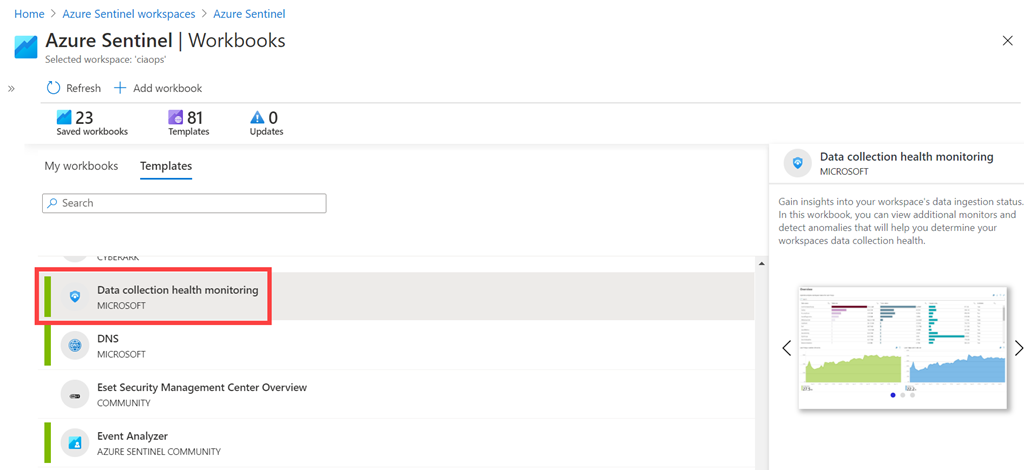
If you have a look at the available workbooks in Azure Sentinel, you should find a Data collection health monitoring workbook under Templates as shown above. It is easy to Save this to your environment (in the lower right after selecting the workbook).

image

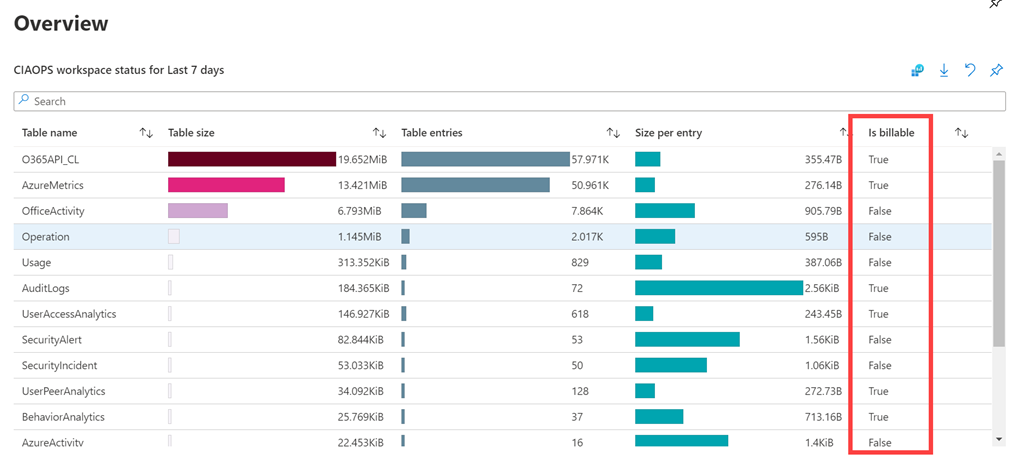
If you View the workbook. You’ll need to select the Subscription and Workspace at the top of the page. Once you have done this you should start seeing the values for your environment as shown above.

If you have a look in the Overview section and then the Is billable field as shown above. That is something that is handy to know as not all services ingested into Azure Sentinel incur a cost.

image

Pricing can be found here:

https://azure.microsoft.com/en-us/pricing/details/azure-sentinel/

If you scroll down to the bottom of the screen you see the above:

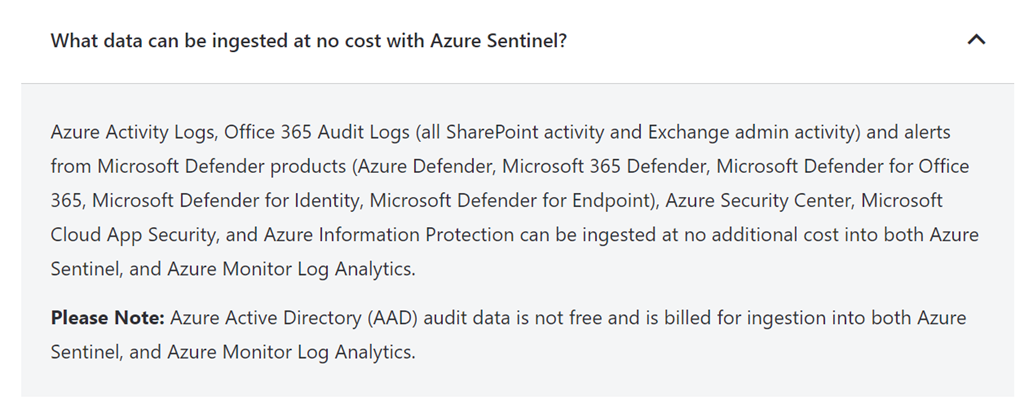
What data can be ingested at no cost with Azure Sentinel?

Azure Activity Logs, Office 365 Audit Logs (all SharePoint activity and Exchange admin activity) and alerts from Microsoft Defender products (Azure Defender, Microsoft 365 Defender, Microsoft Defender for Office 365, Microsoft Defender for Identity, Microsoft Defender for Endpoint), Azure Security Center, Microsoft Cloud App Security, and Azure Information Protection can be ingested at no additional cost into both Azure Sentinel, and Azure Monitor Log Analytics.


Please Note: Azure Active Directory (AAD) audit data is not free and is billed for ingestion into both Azure Sentinel, and Azure Monitor Log Analytics.

and

What other charges should I be aware of when using Azure Sentinel?

Any Azure services that you use in addition to Azure Sentinel are charged per their applicable pricing. For example – Log Analytics, Logic Apps, Machine Learning, etc.

For a good introduction to Sentinel have a look at my previous article:

Another great security add on for Microsoft 365

and an online course I created:

Getting started with Azure Sentinel

Using the Data collection health monitoring workbook now makes it easy to see what you are exactly you are being billed for. All you need to do is just add it to your own workbooks. Here is great video overview:

Need to Know podcast–Episode 259

FAQ podcasts are shorter and more focused on a particular topic. In this episode I speak about some automation options that are available in the Microsoft Cloud.

This episode was recorded using Microsoft Teams and produced with Camtasia 2020

Take a listen and let us know what you think – feedback@needtoknow.cloud

You can listen directly to this episode at:

https://ciaops.podbean.com/e/episode-259-baselines/

Subscribe via iTunes at:

https://itunes.apple.com/au/podcast/ciaops-need-to-know-podcasts/id406891445?mt=2

The podcast is also available on Stitcher at:

http://www.stitcher.com/podcast/ciaops/need-to-know-podcast?refid=stpr

Don’t forget to give the show a rating as well as send us any feedback or suggestions you may have for the show.

Resources

FAQ 20

@directorcia

Use security baselines to configure Windows 10 devices in Intune

Preset security policies in EOP and Microsoft Defender for Office 365

CIAOPS Patron Community

Echoes of past–We remember

The 11th hour of the 11th day of 11th month is the anniversary of the end of the “The Great War” as it was known. At that time the world was also starting to be engulfed with what would become known as the Spanish Flu. Both of these tragedies killed millions of people worldwide and left an indelible mark on history.

Over one hundred years later, the world finds itself again in the midst of geopolitical friction and a global pandemic. If there is one thing we can take from history is that humanity came through these challenges and continued. It is therefore probably never more important than now to take a moment and remember all those who died. Some did so serving their country, like the ANZAC soldiers. Others did so serving humanity, the medical staff. Yet others were simply innocent victims of these major events.

In current times, probably the most challenging period in about one hundred years, we should pause, reflect and give thanks for what we have. We should give thanks for those who sacrificed for others. We should remember all those whose lives were changed forever in ways they probably had little control over. All that lived through the horror of one hundred years ago are now gone. Their legacy is merely our memory.

Our service to them should not only be to remember their deeds and circumstances but to learn from the lessons of history and ask what can in done, no matter how small, for others and greater good. Like it or not, we are all in this together and the way that out is always via a shared experience. If history teaches us anything, solutions to problems come via the application of shared humanity not individualism. There is never a better time than now to demonstrate this.

The cessation of World War One brought an end to savage fighting and unprecedented carnage wrought on an industrial scale never seen before. It was however a time when ANZAC troops distinguished themselves and both Australia and New Zealand probably ‘arrived’ on the world stage. Their legacy lives on. Their sacrifices are not forgotten. Their courage provides us strength to face, battle and defeat our own challenges in the modern experience.

Let us therefore take a moment to pause, remember, draw strength and work together, as they did, for a better world for all.

For those interested in the accomplishments of the ANZACs in Europe during World War One, please have a look at my web site – Australian Battlefields of World War I – France

November poll

ask-blackboard-chalk-board-chalkboard-356079

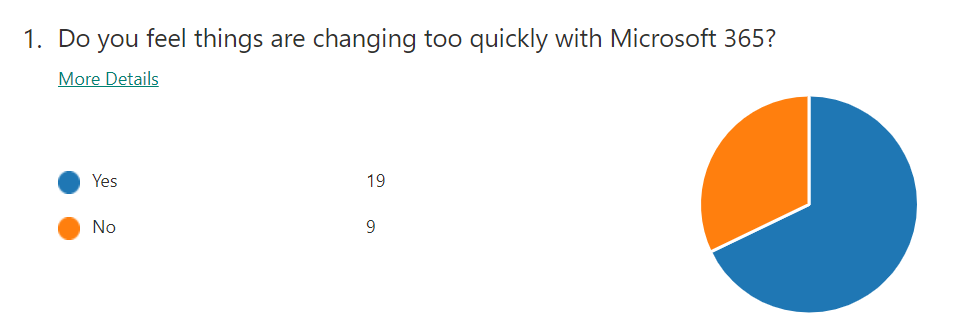
For November I’m asking people:

Are you using a third party product/service to ‘backup’ Office 365 outside of what Microsoft provides?

which I greatly appreciate you thoughts here:

http://bit.ly/ciasurvey202011

You can view the results during the month here:

http://bit.ly/ciaresults202011

and I’ll post a summary at the end of the month here on the blog.

Please feel free to share this survey with as many people as you can so we can get better idea on this question.

Integrate Office 365 with Microsoft Defender for Endpoint

One of the benefits of using security solutions in the Microsoft Cloud is that they integrate together, quickly and easily. If you are using Microsoft Defender for Endpoint then signals from this can be shared with the Microsoft 365 Threat environment.

SNAGHTML15c406c8

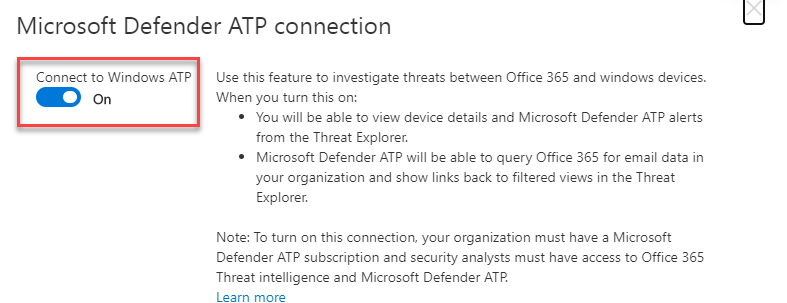
To enable this integration navigate to the Office 365 Security & Compliance portal. Expand the Threat Management option from the menu on the left. Then select Explorer from the options that appear. Finally, in the right hand pane scroll to the right until you locate the WDATP Settings hyperlink as shown above, and select it.

image

Ensure the Connect to Windows ATP is set to On, typically it is off by default.

image

In the Microsoft Defender Security center navigate to Settings. Select the Advanced features option from the menu on the left. Ensure the Office 365 Threat Intelligence connection is set to On.

Once done, your systems are integrated and will now share information between them. This will make identifying threats much easier because now:

  • You will be able to view device details and Microsoft Defender for Endpoint alerts from the Threat Explorer.

  • Microsoft Defender for Endpoint will be able to query Microsoft 365 for email data in your organization and show links back to filtered views in the Threat Explorer.

Disabling basic authentication in Microsoft 365 admin console

I’ve previously spoken about why it is important to:

Disable basic auth to improve Office 365 security

PowerShell is generally the easiest manner in which that can be done. However it is possible via the Microsoft admin portal.

image

Navigate to:

https://admin.microsoft.com/

and select Settings from the options on the left. Then select Org settings and then Modern authentication on the right as shown above.

image

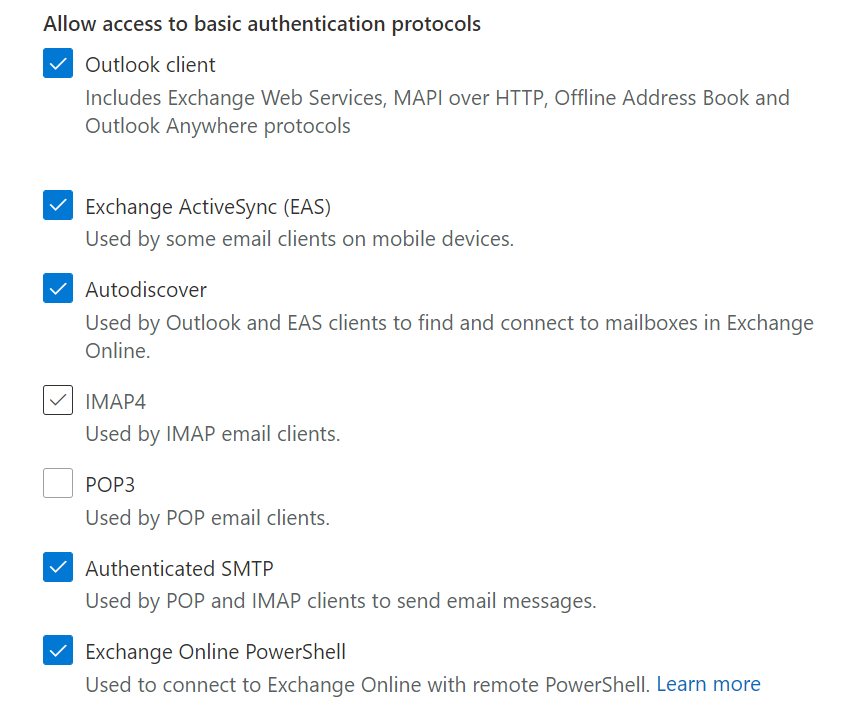
You should then see a dialog box appear like that shown above. At the bottom you will find the capability to enable or disable basic authentication.

image

If you want to disable basic authentication for the protocols listed simply unselect that option as shown above where it has been done for IMAP4 and POP3.

Before you go and disable things it is a good idea to have and see what maybe using basic authentication. You can do that by following the steps I outlined in this article:

Determining legacy authentication usage

Disabling basic authentication is a major way to improve the security of your tenant and is strongly recommended for all environments.