
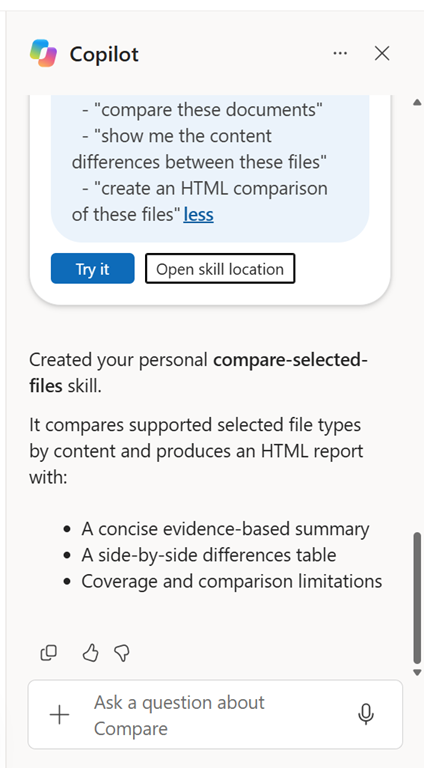
You can ask Copilot in SharePoint to create a personal skill as you see above. When you do so it is store in your OneDrive for Business.

Specifically in:
My files > Documents > Copilot > Agent Assets > Skills > <Skill name>
Interestingly, I can’t find this documented anywhere officially. All I can find is information about SharePoint site skills here (i.e. saved into a SharePoint site):
Extend Copilot in SharePoint with skills
and mentions nothing about personal SharePoint skills, just site skills per:
Skills are stored as Markdown (.md) files in the Agent Assets library on the site, under /Agent Assets/Skills/<skill-name>/SKILL.md
Such as the follow site skill in my SharePoint site:
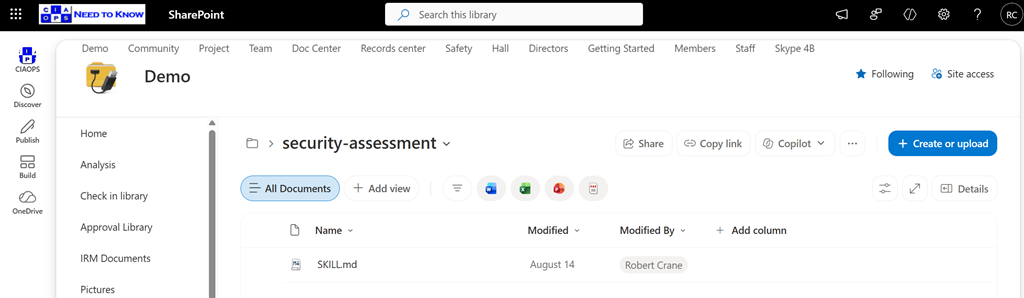
Note – “on the SITE” and there no mention in the article of ‘personal SharePoint skills’. However, as you see in my screen shots, you can definitely ask SharePoint to create a personal skill and it ends up in your OneDrive for Business.
So, the best advice is that personal skills in SharePoint are currently an ‘undocumented’ feature and should be used with caution because they may not be supported going forward. Hopefully, we’ll see official documentation on SharePoint personal skills shortly.

