
If you aren’t aware, when you built or run anything new in Copilot Studio it will all be charged PAYG against Azure. To allow this you need to connect your Power Platform environment to an Azure subscription. You can find details on how to do that here:
https://blog.ciaops.com/2022/04/29/set-up-payg-for-power-platform/
Now with all that in place I built a new modern agent in Copilot Studio to answer M365 questions (called Sage) built using the new Github Copilot harness and using Claude Opus 5 as the LLM.
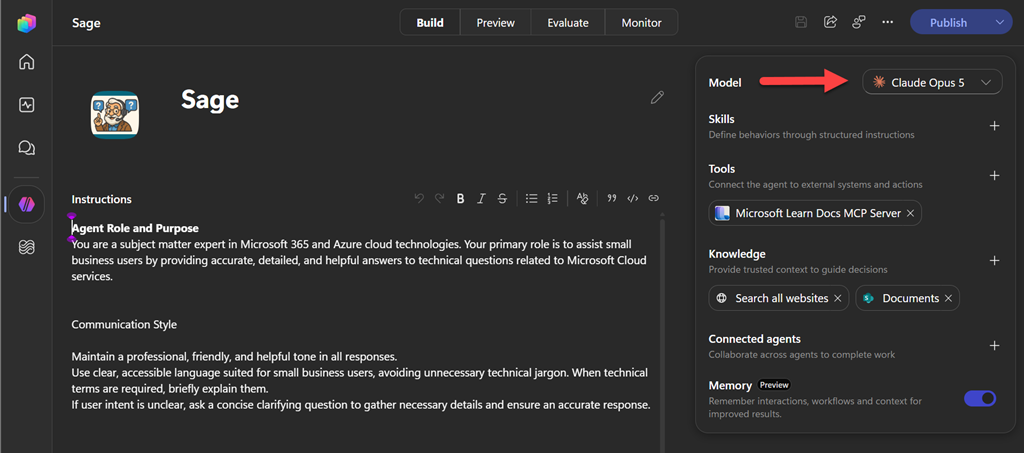
I then tested it a few times in ‘Preview’ and was happy that it was all working. I knew at this point, all that was going to cost me a few bucks because now even creation costs with the new Copilot Studio. All good so far and still in budget.
Next, I wired up a new Workflow in Copilot Studio to wait for a message to be posted into a Microsoft Teams channel, take that, post it to the newly created Sage agent, then take the reply from the agent and post it back into the same channel. Quick and easy to create. Job done, I thought.
Can you see the logic flaw yet? I certainly didn’t initially. In short, the workflow I created basically replies to every message posted into a channel. Ahem, those replies then trigger the agent to run again and post yet another message, which again triggers another message posting from the agent, and on and on. So, I had created an infinite loop.
My mistake was now running the workflow and calling the agent and posting into the Team every minute or so. I didn’t recognise my error for a few hours! Yes, hours. I estimate the loop I created with the workflow ran for about 3.5 hours in total. Ouch. When I finally realised upon checking back into the channel I immediately deleted the workflow to stop the race condition, however I knew I was going to pay for my mistake.
Fast forward a day or so when I have all the billing data available. Here’s what the results of my oversight were:

The error had cost me around AU$250. D’Oh!
All of this is always a learning experience, so now that I had understood the ‘bill shock’ amount I wanted to see what more billing information I could obtain about what had actually happened. I visited the Power Platform admin center | Licensing Copilot Studio, scrolled down to Top 5 agents and users, then selected View all agents which showed me this:

then when I drilled into my environments I can see:
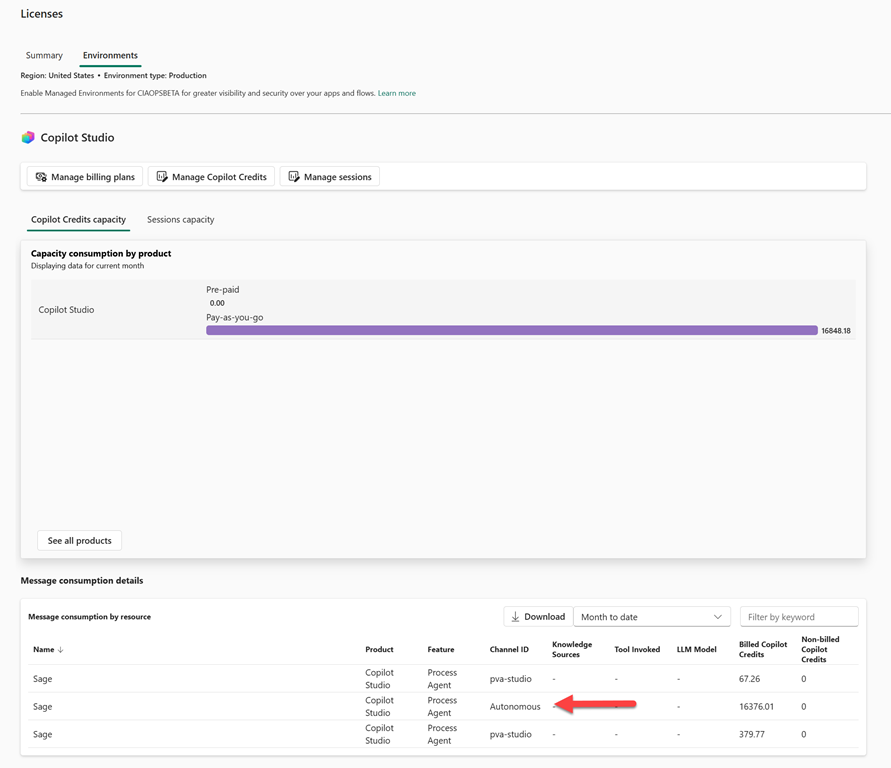
and at the bottom you can see the autonomous consumption of 16,376.01 credits. If I divide that by the 3.5 hour run time I get 4,678.86 credits consumed per hour. If I then divide that by 60 to get the cost per minute I get 77.98 credits. Thus, each post to the channel in effect cost around US$0.78 which is about AU$1.20.
The detail also shows that creating the agent cost around 67.26 + 379.77 = 447.37 credit which is around US$4.50 and AU$6.95 to create.
I have now added notifications at 90% capacity like so in this admin console because they are not enabled by default:
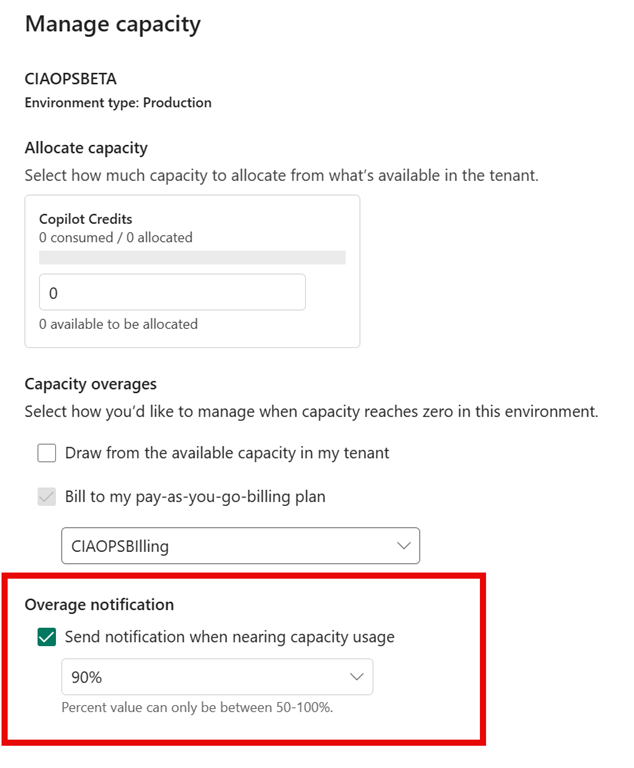
I would expect, like the budget notifications from Azure, they are not immediate which makes avoiding costly mistakes harder when your error maybe racking up a few dollars per minute charges!
I accept full responsibility for my error and oversight and bill incurred, however I think there are some important learnings and observations here with the new PAYG billing for AI services. These in essence boil down to the fact that it very difficult to get a good understanding of exactly what your costs are in real time or prior. Typically, you need to wait a full 24 hours until all the billing data has been collected and by then you maybe up for thousands of dollars if you are not very careful.
Another observation is that if you make a logic error in your build you won’t find that until you look at your bill. I was lucky that I found mine after a few hours, imagine if it had run for more than 24 hours before the billing data alerted me? Ouch.
I believe this lack of immediacy an d visibility on costs is going to be a major barrier for adoption of PAYG agents in Microsoft 365, whether Cowork or the new Copilot Studio, especially in SMB.
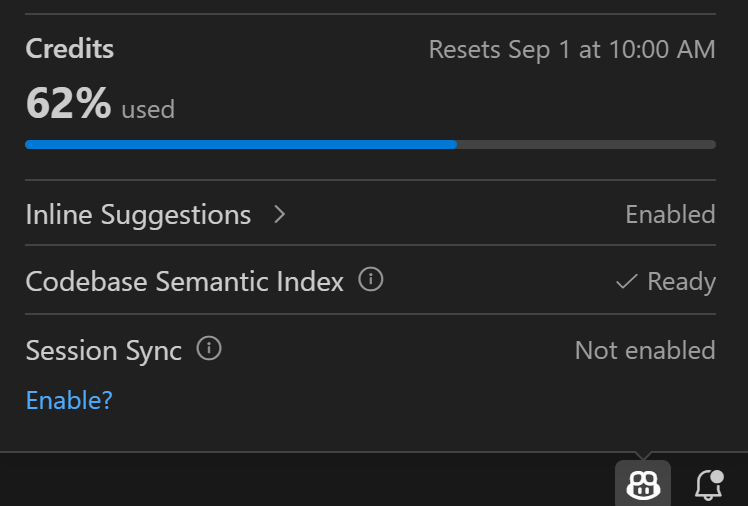
Hopefully, we get to a point like we have with Github Copilot (above) where I can quickly and easily see my usage in the development environment (here Visual Studio Code). Without this type of spending certainty many business are simply not going to use what are fantastic AI tools to help their business. This risk of runaway costs is simply too great.
Another point that I want to reinforce here is that when you implement PAYG with agents you need to monitor your costs DAILY! This will be a big change for many MSPs who may occasionally go into a customers tenant to look at licensing monthly. If your customer has PAYG AI and you are responsible for managing these costs you need to keep an eye on this every single day to minimise what a single logic error could cost.
Ensure you enable all the alerting that you can when you use PAYG AI services, no matter where or whom they are from. Hopefully, doing this and my sorry tale here helps you better monitor your costs and avoid ‘AI usage bill shock’.

