Enabling the Office 365 Adoption Power BI Content Pack

I’m a big one for driving Office 365 adoption through the complete suit of applications. I have spoken previously about developing adoption strategies:

Driving Office 365 adoption

Stop making your users feel stupid

Ownership is the key to adoption

Office 365 adoption spreadsheet

SharePoint Online migration – Start up is key

Rule of three

A very important part of any strategy is being able to measure the results of your adoption tactics. Microsoft has just made that measurement a whole lot easier with the release of the Power BI Adoption content pack for Office 365. Here’s how you enable it for your tenant.
image

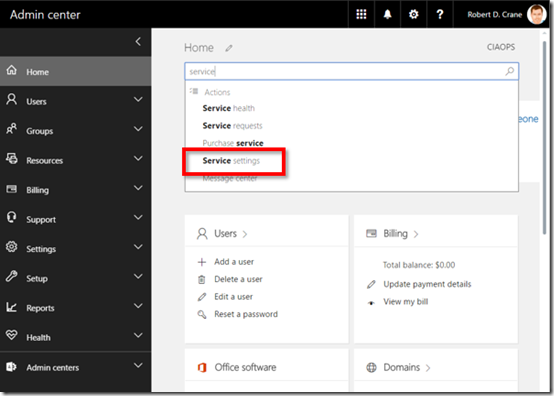
You’ll need to login to the Office 365 Admin center and locate the Service settings. The easiest way to do this is to use the Search functionality.
image

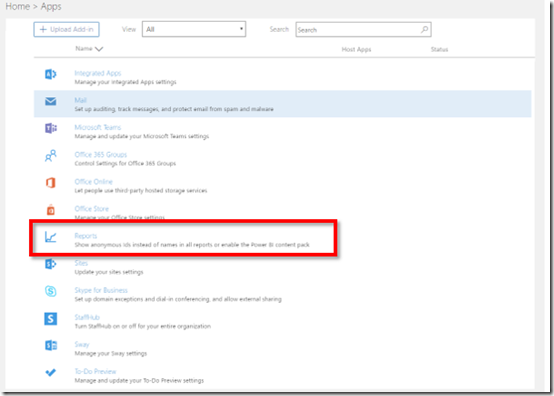
You’ll then need to locate the Reports section as highlighted above.
image

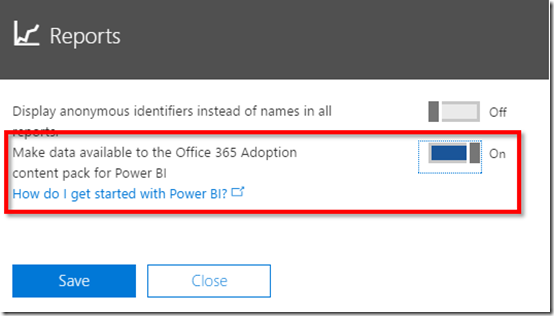
In here turn on the option to Make data available to Office 365 Adoption content pack for Power BI.

This initiates the data collection. This may take between 2 and 48 hours depending on the size of the tenant.
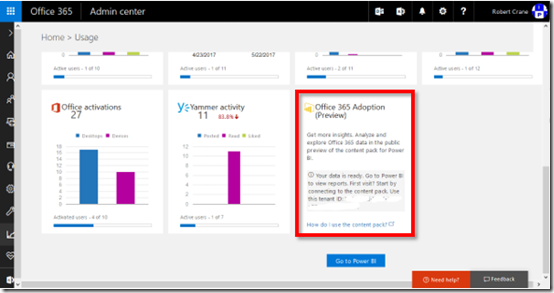
image

When the data collection has initialised you will find an additional tile in your Admin reporting area as shown above. The tile will contain your Tenant ID which you’ll need to record for the next stage.
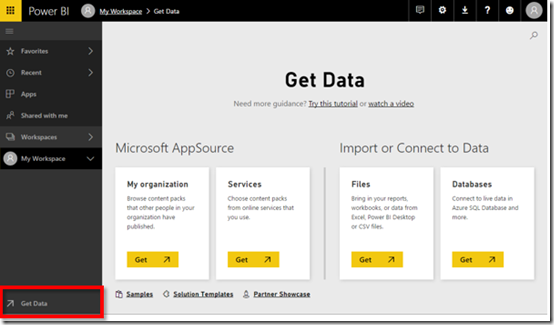
image

Next navigate to Power BI and select the Get Data option in the lower left of the screen.
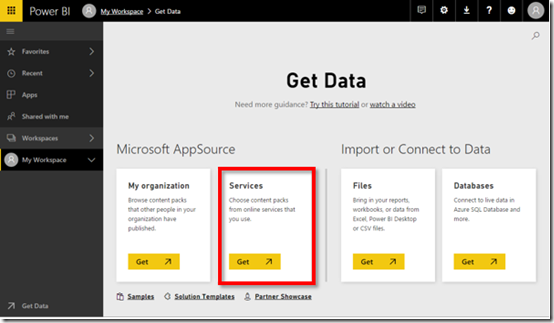
image

At the Get Data screen select Services.
image

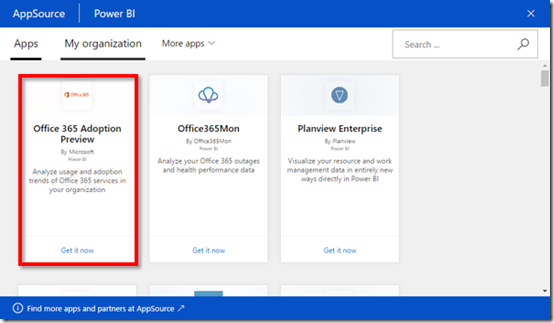
Locate the Office 365 Adoption Preview as shown above and select it.
image

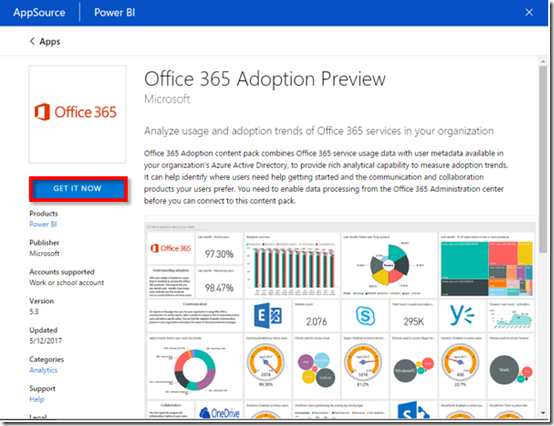
At the next screen, select the Get It Now button on the left.
image

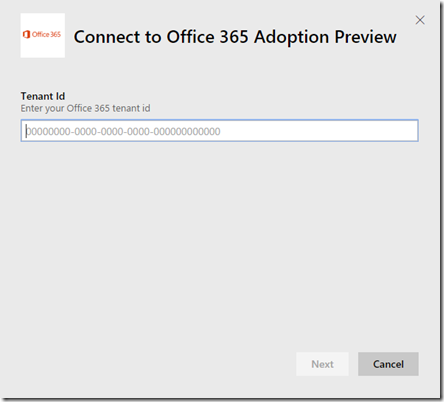
You’ll now need to enter the Tennant Id you recorded above. The other ways you can get your Office 365 Tennant Id are covered here:
https://support.office.com/en-us/article/Find-your-Office-365-tenant-ID-6891b561-a52d-4ade-9f39-b492285e2c9b

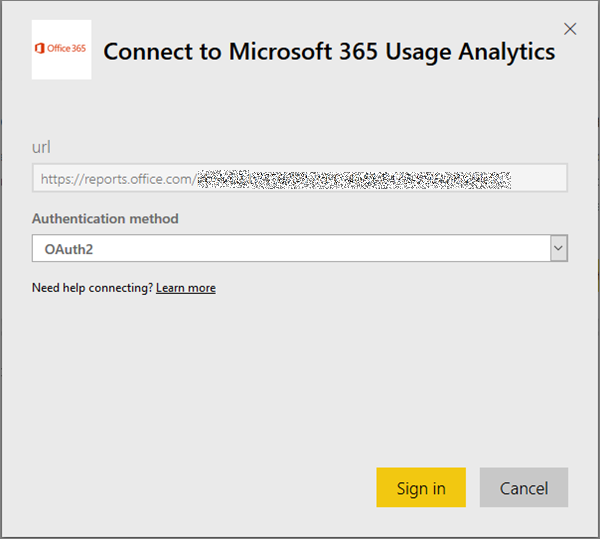
Choose oAuth2 as authentication method

You’ll then need to Sign in.

image

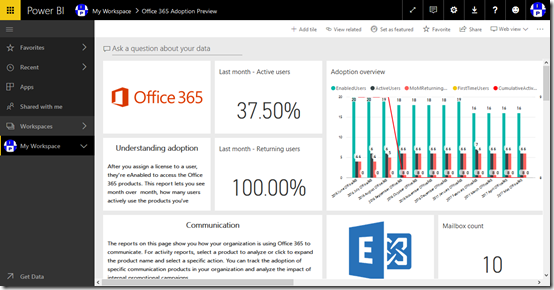
In a moment or two you should then be able to access the adoption dashboard as shown above. Now you have all the functionality of Power BI at your finger tips, directly linked to Office 365 usage data. This makes measuring Office 365 adoption much easier.

The Office 365 content pack is still in preview at this point in time but will update going forward.
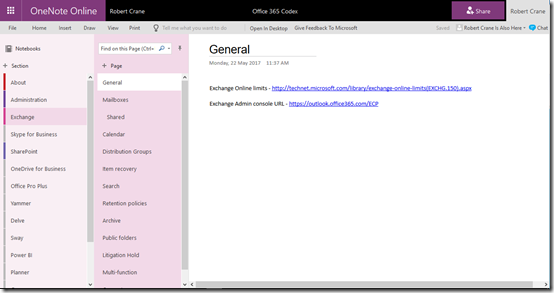
Office 365 and Azure codex available to patrons

image

The majority of my learnings end up in OneNote. As you would expect I have OneNote notebooks for just about everything including Office 365 and Azure.

Having them in OneNote means they are searchable, available on every device and I can quickly add information no matter where I am. To my mind, they are pretty much the perfect as a portable personal knowledge base.

I have now taken all my accumulated Azure and Office 365 knowledge and made them available as continually sync’ed OneNote notebooks for CIAOPS Patrons. That’s right, all you need to do to gain access to this material is sign up to be a CIAOPS Patrons for which you’ll get access to both the Office 365 and Azure notebooks (plus I few more I’m planning on releasing) as well as access to my private Facebook community to discuss everything Microsoft cloud as well as a range of discounts (starting at 25%) to my online courses and publications.

The great thing about these OneNote notebooks is that they are dynamic, in that I’ll continue to add information to them over time, posting all the stuff I’m already posted into the Facebook group, but organising it for people to locate quicker when they need to. Best of all, as long as you stay a CIAOPS Patron you’ll get access to this included for as little as US$10 per month. That’s a pretty small price to pay for the notebooks let alone everything else that comes along with being a CIAOPS Patron.

Become a CIAOPS Patron today and enjoy the benefits! You can sign up to be a CIAOPS Patron here:

https://www.ciaopsacademy.com/p/patron/

Introduction to Microsoft Flow

Microsoft Flow is way to automate your business processes. It is way that you can connect to both cloud and on premises services and trigger actions and results.

The above presentation is one that I recent provided to the SharePoint Users Group in Sydney that I re-recorded to make available publically.

If you want the slides they can be found here:

https://docs.com/d/embed/D25190739-0716-1916-3610-001758080412%7eMd4186d87-61d5-259a-4d26-00a8bd86cfff


https://doc.co/6DSLKk

Overview of Office 365 Security

I’ve just completed a roadshow focusing on the security options in Office 365. I certainly cover what is in all plans but I do focus on what is available, and should be implemented, in the advanced plans such as E3 and E5. I also cover how the security in Office 365 can be enhanced using things such as Azure AD Premium, Intune, Azure Rights Management, Enterprise Mobility Suite and more.

The presentation was given to SMB resellers so it also contains some insights from me on how IT resellers can generate revenue for their business while providing greater levels of security for their customers.

Here are the slides:

https://docs.com/d/embed/D25190796-8769-7753-8680-001215495959%7eMd4186d87-61d5-259a-4d26-00a8bd86cfff

or via:

https://doc.co/juEHXA

I’ve also added the session to my free:

Cloud Lecture Series

at the CIAOPS Academy

Need to Know podcast–Episode 153

Marc and I report on our impressions of the recent Microsoft Build conference. There are quite a few things that caught our eye that we thought we’d like to share with our audience. Everything from CosmosDB to OneDrive on Demand and a few things in between. Get the latest information about all the important stuff for IT Pros from Build along with our thoughts on why they are things that you should be paying attention to.

Take a listen and let us know what you think –feedback@needtoknow.cloud

You can listen to this episode directly at:

https://ciaops.podbean.com/e/episode-153-microsoft-build-2017/


Subscribe via iTunes at:

https://itunes.apple.com/au/podcast/ciaops-need-to-know-podcasts/id406891445?mt=2

The podcast is also available on Stitcher at:

http://www.stitcher.com/podcast/ciaops/need-to-know-podcast?refid=stpr

Don’t forget to give the show a rating as well as send us any feedback or suggestions you may have for the show.

Resources

@marckean

@directorcia

Azure news from Marc

Build Keynotes

OneDrive on demand

Windows Timeline

Cloud powered clipboard

iTunes comes to the Windows Store

Video remix

Channel 9 Xbox preview app

This episode brought to you by: https://cpem.io/tJ01Hzu2k.js

I made my own bot!

After watching the following Microsoft Mechanics video:

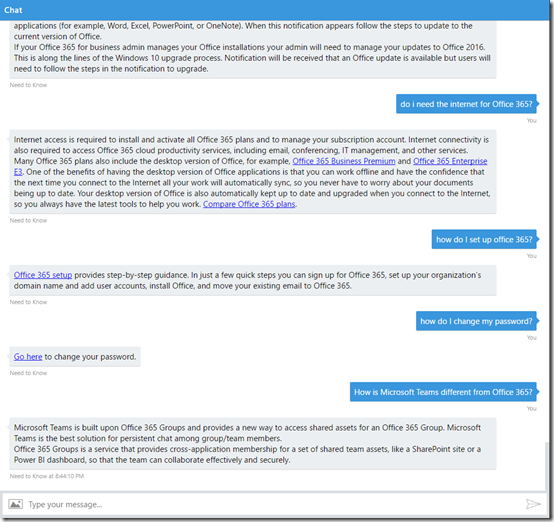
and being inspired by the information coming from Microsoft Build 2017 I decided to create my own Office 365 Q and A bot which you can see below.

image

It is actually live on the Internet right now but I’m going to do more detailed post on how easily I brought all this together when I’ve refined it just a tad more. Once that happens I’ll let you know where you can go to give it a spin and let me know what you think.

Sure, the bot currently has limitations but remember this is just the starting point! I can tell you that it only took me about 30 minutes to get it up and running. I’m keen to see where I can take this concept of an automated bot to answer your Office 365 questions but based on the knowledge based I’ve accumulated over the years. I see a lot of potential here if I can just tweak a few things to make it easy to import the information I have on hand currently.

Hopefully, if I open it up publically it can learn from user inputs and become even better at understanding the question. Again, early days, but I see this sort of things have a lot of application in a lot of businesses. That’s why I’m playing with this now. The future is here.

More soon on the new Need to Know bot from CIAOPS designed to answer your Office 365 questions.

Learning Collaboration in Office 365

people-woman-coffee-meeting2

A little while ago I announced that I’ll be conducting a new course focused on showing you the best practices when it comes to collaboration in Office 365. This will answer questions about whether you should use Microsoft Teams over Yammer, what roles Groups plays and to drive adoption for your business to ensure that everyone makes full use of the Office 365 suite they have been allocated.

You’ll find all the original information about the course here:

Understanding collaboration in Office 365 course

The course gives you the opportunity to participate in the learning live. You’ll be able to complete the hands on tutorials right there and then. You’ll get immediate feedback on what you’ve learnt and you’ll also be able to ask questions and most importantly get your questions answered right there and then. If you think this is just going to be a boring webinar style presentation, then you in for a shock as nothing could be further from the truth. This course will be more hands on than if you were sitting in a classroom!

Best of all is that all the sessions will be recorded and made available to you, along with all the training materials (notes, links, whitepapers and more) FOREVER! That’s right, you can continue to come back to the course and watch the training at your leisure. You can even download it all and watch it offline. So if you are too shy to attend the live events you’ll still get full benefit from all the material.

Those lucky enough to have signed up already have been able to take advantage of the initial substantial early bird discount, however if you missed that then you need to act now to get a $30 discount. Use the coupon code EAERLYBIRD2 at checkout or click here to have the discount automatically applied upon registration:

Understanding collaboration in Office 365 – $30 discount

Remember, you need to use the link or the coupon code to get the discount.

An additional offer is that if you are not already a CIAOPS Academy affiliate you should sign up so you can offer this course to others and receive a commission. That’s right, just refer this (or any CIAOPS Academy course) to others and you’ll receive a percentage of the course direct to you. To become an affiliate simply sign up for free at the CIAOPS Academy and then contact me (director@ciaops.com) to let me know you want to be an affiliate and I’ll send you all the details and get you signed up asap.

The count down to the course kick off on the 1st of June is on and I’d encourage you to take advantage of this discount before it expires on the 19th of May. Remember, the course includes over 5 hours of hands on training, video recordings of all sessions as well a lifetime access to all the course materials including video replays, course notes, links, white papers and more. All of which you can download and view offline.

If you want to learn how Office 365 can give your business a completive edge by being more effective and productive then sign up today to take advantage of this discount.

I’ll also point out that if you sign up as a CIAOPS Patron you’ll not only receive discounts starting at 25% on this course but you’ll also get access to my private Office 365 Facebook community where you can get your questions answered by myself and other in the community daily. For all the benefits of being a CIAOPS Patron head over to:

http://www.patreon.com/ciaops

I hope to see you on the course with me and those who have already signed up.