
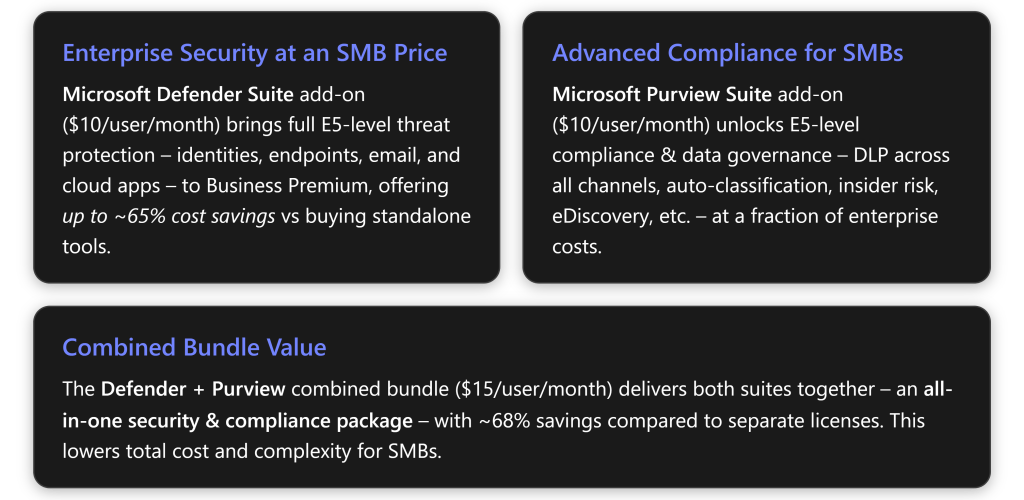
Microsoft has introduced two new add-on suites for Microsoft 365 Business Premium – the Defender Suite and the Purview Suite – to bring enterprise-grade security and compliance features to small and mid-sized businesses (SMBs) at an affordable price[1][2]. Below, we’ll break down each suite’s included services, compare them to what Business Premium already offers, and assess their value for an SMB. Real-world examples are provided to illustrate how these features can be used effectively in a small business setting.
Business Premium Baseline: What’s Included Already
Microsoft 365 Business Premium (≈$22 per user/month in the U.S. for annual subscriptions) is an SMB-focused bundle that already includes a solid foundation of productivity, security, and device management features. Key security/compliance features built into Business Premium (base license) are:
- Azure AD Premium P1 (Microsoft Entra ID P1) – gives advanced identity management like Conditional Access policies and self-service password reset[3]. (Entra ID P2 is not included in base; more on that later.)
- Microsoft Defender for Business – an endpoint security solution providing next-gen antivirus and endpoint detection and response (EDR) on PCs and mobile devices[4]. This is essentially a version of Defender for Endpoint tailored to SMBs; it includes robust malware protection and automated remediation, but lacks some advanced features like threat hunting that are in Plan 2.
- Microsoft Defender for Office 365 Plan 1 – provides email and collaboration security such as Safe Attachments and Safe Links for phishing/malware protection in Exchange, OneDrive, SharePoint, and Teams[3]. (Plan 1 is included; Plan 2 features are not.)
- Core Microsoft Purview Compliance features – Business Premium offers basic compliance tools:
- Information Protection (AIP Plan 1) for manual sensitivity labeling and encryption of documents/emails[3][3].
- Office 365 Data Loss Prevention (DLP) for Exchange Online, SharePoint, and OneDrive (but not Teams chats or device endpoints)[3][3]. This lets admins create policies to prevent sensitive info (e.g. credit card numbers) from being emailed or shared in documents.
- Basic eDiscovery and Audit – content search and ability to place simple legal holds on mailboxes, plus audit log retention for 90 days[3][3]. This covers standard needs to find information across M365 and track user activities, but without advanced analytics.
- Basic retention policies for data (manual setup of retention tags in Exchange/SharePoint)[3].
In short, Business Premium’s base license provides a “secure productivity foundation” for SMBs[3]. It has strong baseline security (device management and basic threat protection) and some compliance capabilities, sufficient for many smaller organizations’ needs. However, more advanced, enterprise-grade features – like proactive threat hunting, AI-driven identity protection, or comprehensive data governance – are not included in the base plan[3]. To get those, SMBs traditionally had to upgrade to costly Enterprise E5 licenses or layer multiple standalone products. This is where the new add-on suites come in.
Microsoft Defender Suite for Business Premium (Security Add-on)
Microsoft Defender Suite for Business Premium is a security-focused add-on that layers full E5-level threat protection onto Business Premium. Priced at $10 per user/month (U.S.), it includes five advanced security tools that were formerly found only in Microsoft 365 E5 (Security) subscriptions[2][1]:
- Microsoft Entra ID P2 (Azure AD Premium P2): Upgrades your identity management to include risk-based Conditional Access, Identity Protection, and advanced identity governance. This means the system uses Microsoft’s trillions of signals to detect and automatically block or challenge risky sign-ins (e.g. atypical locations or known breached credentials) in real time[5]. It also includes features like Privileged Identity Management (PIM) and access reviews (helping enforce least privilege by time-bound admin access). Base Business Premium has Entra ID P1, which supports Conditional Access but does not do automated risk-based policies or PIM – with P2, an SMB gets the same identity security as an enterprise[5][6]. Example: if a hacker runs a password spray attack (trying common passwords on many accounts), Entra ID P2’s Identity Protection can detect the suspicious behavior and lock out the attempts, preventing a breach without IT needing to intervene[5].
- Microsoft Defender for Endpoint Plan 2 (MDE P2): Enhances endpoint security beyond the included “Defender for Business” capabilities. With this, SMBs get industry-leading endpoint detection and response with features like threat advanced hunting, custom threat detection rules, detailed threat analytics, and up to 180 days of timeline retention for investigations[4][4]. Base Business Premium already provides next-gen antivirus and automated remediation on endpoints; the add-on unlocks advanced EDR: analysts can proactively hunt for threats using queries (KQL), detect advanced attacks, and even protect IoT devices[4][4]. It also adds capabilities like device-based Conditional Access (tying endpoint risk score to access decisions) and attack surface reduction rules. Example: With MDE P2, a small IT provider can query all devices for traces of a new ransomware indicator and quickly identify which PC is infected – something not possible with just the base antivirus alone.
- Microsoft Defender for Office 365 Plan 2: Extends email and collaboration protection with Automated investigation & response, Threat Explorer, and Attack Simulation Training[5][1]. Base Business Premium includes Plan 1 (anti-phishing, safe links, safe attachments). Plan 2 adds the ability to run realistic phishing simulation campaigns to train employees in a safe environment[5], and to automatically investigate and remediate phishing attacks (e.g. auto-quarantine all emails malware after the first alert). It also provides rich reporting (who clicked what, etc.) and tools to analyze attacks after they happen. Example: An SMB can conduct a phishing simulation for its staff – say, sending a fake “reset your password” email – using built-in templates. Those who click the dummy link are flagged for training. This proactive training (available only with Plan 2) helps reduce real-world click rates, as one construction firm found it crucial after several employees fell for actual phishing emails (a scenario where Plan 2’s training could build awareness).
- Microsoft Defender for Identity: A cloud-based tool that monitors on-premises Active Directory signals (if the business has local servers or domain controllers) to detect threats like lateral movement, DC attacks (e.g. Pass-the-Hash, Golden Ticket attacks). It’s essentially an Identity Threat Detection & Response (ITDR) sensor for your directory services[4][4]. Most small businesses with solely cloud identities might not use this, but those with hybrid setups benefit. Base Business Premium has no equivalent for on-prem AD monitoring – this is an added layer of defense against insider attacks or network intrusions targeting identity infrastructure. Example: A manufacturing SMB with a legacy AD server can catch suspicious behavior – Defender for Identity might alert if an attacker inside the network is trying to replicate domain controller credentials, giving early warning of a breach[4][4].
- Microsoft Defender for Cloud Apps (formerly MCAS): A Cloud Access Security Broker (CASB) solution that gives visibility and control over SaaS app usage[5]. It can discover shadow IT (e.g. employees using unauthorized cloud storage or AI tools), monitor data in 3rd-party cloud apps, and enforce policies (like blocking downloads or applying DLP to those apps)[5][4]. Base Business Premium does not include a CASB, so SMBs often had zero visibility into, say, an employee using personal Dropbox or ChatGPT with company data. With this add-on, SMB IT can see all cloud apps in use and set risk policies. Example: A small consulting firm discovers via Defender for Cloud Apps that several employees are uploading client data to personal Google Drive accounts – a major data risk. They use the tool to block unapproved cloud storage and coach users to use OneDrive instead[5]. It can even apply real-time controls, like blocking risky file downloads from generative AI platforms (e.g. stop users from feeding confidential info into an AI chatbot web app)[4].
How Defender Suite Differs from Business Premium Base: Essentially, Defender Suite fills all the “gaps” in Business Premium’s security:
- Identities: Base has Entra ID P1 (static policies), add-on gives P2 (adaptive risk-based policies, PIM)[5].
- Endpoints: Base has Defender for Business (EDR without advanced hunt), add-on gives full Defender for Endpoint P2[4].
- Email/Collab: Base has Defender for O365 P1, add-on gives P2 with automation & training[5].
- Cloud Apps: Base has none, add-on includes CASB[5].
- Threat Analytics: The combined XDR capability of correlating signals across identity, endpoint, email, and SaaS is realized only with the add-on. In other words, Defender Suite turns Business Premium into a unified XDR platform like an enterprise SOC would have[4][1].
Value for SMB: For $10/user, the Defender Suite is highly cost-effective. Buying these components individually would total around $30-$50+ per user (e.g. Entra P2 ~$6, Defender Endpoint P2 ~$5, Defender O365 P2 ~$6, etc.) – Microsoft cites about $47.20 if bought standalone vs $10 in the suite (≈ 68% savings)[1][1]. More importantly, SMBs face the same threats as enterprises (phishing, ransomware, credential attacks), but often lack the tools or full-time specialists. This add-on gives “big company” defenses in an integrated, easy-to-manage way[2][2]. For example, instead of juggling one vendor for email security, another for endpoint, etc., an SMB IT admin gets one unified Microsoft 365 security dashboard with all signals, making threat response faster and simpler[2].
Real-world SMB scenario: Consider a 20-person accounting firm handling sensitive financial data. With Business Premium alone, they get basic protection, but they still worry about things like business email compromise or malware sneaking in. By adding the Defender Suite, they dramatically boost their security: Defender for Office 365 P2 catches an employee’s risky click on a phishing email and automatically isolates the affected mailbox; Defender for Endpoint P2 flags and quarantines a strange PowerShell script on a PC before ransomware can execute; Entra ID P2 forces MFA re-authentication for a user sign-in coming from an unusual location (stopping a possible stolen password login)[4][4]. All these defenses work in concert, minimizing the chances of a breach that could be devastating for a small firm. Given the relatively low cost, the Defender Suite add-on often represents a very good value for SMBs that need stronger cyber defenses, especially those in sectors like finance, healthcare, or any handling sensitive data.
Microsoft Purview Suite for Business Premium (Compliance Add-on)
Microsoft Purview Suite for Business Premium is a compliance and data protection-focused add-on that brings the full range of Microsoft’s E5 compliance & information governance features to an SMB. It costs $10 per user/month and includes a comprehensive set of Microsoft Purview capabilities[1][2]. These go far beyond the base Business Premium’s limited compliance tools, enabling an SMB to protect and govern data just like an enterprise. The suite’s key components are:
- Microsoft Purview Information Protection (Premium) – Extends sensitivity labeling and data classification with auto-labeling and encryption enforcement. In Business Premium, you can manually tag documents or emails as “Confidential” and apply encryption; with the Purview add-on, you can automatically detect sensitive content (e.g. a document containing a Social Security number or client health data) and have the system label and protect it in real-time[3][3]. It also includes Microsoft Purview Message Encryption (to easily send encrypted emails externally) and Customer Key (bring your own encryption keys for M365 data)[5][5]. Example: A small law firm can configure auto-labeling so that any file containing the keyword “Attorney-Client Privilege” or any credit card number is automatically labeled “Highly Sensitive” and encrypted. Even if an employee mistakenly emails that file externally, only authorized recipients can open it thanks to the attached encryption[3][3].
- Microsoft Purview Data Loss Prevention (DLP) – Expands DLP beyond email/Documents to cover endpoints and Teams. Base Business Premium’s DLP can stop a sensitive email or document in SharePoint from being shared; the add-on enables endpoint DLP (monitoring and blocking sensitive data copied to USB drives, printed, or uploaded from a device) and extends DLP policies to Microsoft Teams chat conversations[3][3]. Example: With Purview DLP, a health clinic can ensure that staff cannot copy patient records to a USB stick or paste them into a Teams message. If someone tries to, the system will block it and log the attempt[3]. This helps prevent accidental leaks or malicious exfiltration of sensitive data (like medical info or credit card numbers), across all channels.
- Microsoft Purview Insider Risk Management – Provides tools to detect and investigate potential insider threats. It uses behavioral analytics to flag risky activities by users, such as an employee downloading unusually large amounts of data, multiple file deletions, or attempts to forward sensitive info outside[5][3]. It intentionally anonymizes user identities in its dashboard until a certain risk threshold is met (to preserve privacy)[3]. Base Business Premium has no insider risk solution. Example: An SMB in design services notices via Insider Risk Mgmt that one of their designers downloaded 500 files in a day and attempted to upload them to a personal cloud account – a red flag the person may be preparing to leave and take IP with them. The system alerts IT, who can investigate and intervene before a data theft incident occurs[5][3].
- Microsoft Purview Communication Compliance – Monitors internal communications (Teams, Exchange email, even Yammer) for policy violations like harassment, inappropriate language, or sharing of sensitive info[5][3]. In an SMB without a large HR or compliance team, this tool can automatically flag problematic communications. Base Business Premium doesn’t include this. Example: A 20-person company can set up a policy to detect harassment or discriminatory language in Teams chats. If an employee uses offensive language in a Teams channel, a compliance officer (or owner) is alerted with a snippet of the conversation[3]. This helps SMBs maintain a professional, safe work environment and meet workplace compliance standards without manually reading chats.
- Microsoft Purview Records Management & Data Lifecycle Management – Offers advanced retention and records management capabilities. While Business Premium allows basic retention policies, the Purview suite lets you classify certain content as official records, apply retention labels with event-based retention (e.g. start a 7-year retention when a project closes or an employee leaves), and require dispositions (reviews before deletion)[3][3]. Example: A small investment advisory firm is legally required to keep client communications for 7 years. With Purview, they create a retention label “Client Record – 7yr” and apply it to all client email folders. All emails are then automatically retained for 7 years (and can’t be deleted sooner), helping them comply with regulations without manual admin work[3].
- Microsoft Purview eDiscovery (Premium) – Greatly enhances the ability to respond to legal or investigative inquiries. Base Business Premium has Standard eDiscovery (basic search and hold). eDiscovery Premium offers an end-to-end workflow: case management, the ability to search across mailboxes, Teams, SharePoint with advanced filters, place content on hold, perform OCR text recognition, thread Teams chats, use relevance analytics to cull down data, and export results with auditing[3][3]. It essentially lets an SMB handle litigation-related document discovery in-house, similar to what large enterprises do. Example: A 50-person company gets an unexpected lawsuit and needs to gather all communications from certain employees over the past year. With eDiscovery Premium, their IT admin can create a case, search all email and Teams chats by keywords and date range, and quickly export the findings for legal counsel[3]. This could save significant time and outsourcing costs – bringing a capability in-house that normally only big firms have.
- Microsoft Purview Audit (Premium) – Extends the audit log capabilities by keeping audit logs for up to 1 year (or more) and logging more events (like exactly who viewed or accessed a specific document, mailbox, or item)[3]. Base audit only retains 90 days and might miss certain detailed events. Audit Premium is invaluable for forensic investigations after an incident. Example: After a suspected data leak, an SMB can use Audit (Premium) to trace back an incident – e.g. see if a particular file was accessed or exported by a user, even 8 months ago, since the logs are retained[3]. That level of detail can provide evidence for an investigation or regulatory response that wouldn’t be available with standard logs.
- Microsoft Purview Compliance Manager – While available in base in a limited form, the full suite gives the full Compliance Manager toolset: templates for various regulations (GDPR, HIPAA, ISO 27001, etc.), an assessment dashboard, and improvement actions tailored for your tenant[3]. This acts like a virtual consultant, showing where you meet or fall short of compliance requirements and suggesting steps to improve. Example: An SMB in healthcare can load the HIPAA template in Compliance Manager and instantly see a checklist of controls they should implement (e.g. enable DLP for certain data, enforce MFA, etc.)[3]. As they implement each recommendation, it checks off and improves their compliance score. This helps a small team manage complex regulations systematically.
- (New) Microsoft Purview Data Security Posture Management (DSPM) for AI – A new capability mentioned for AI oversight[5]. It helps monitor how AI applications (like Microsoft 365 Copilot or even third-party generative AI) are accessing sensitive data, with real-time alerts for risky behavior and enforcement of policies (like blocking an AI from seeing certain content)[5]. Example: If an employee tries to have an AI bot summarize a file containing customer SSNs, DSPM for AI could flag or block that operation. This is forward-looking for SMBs preparing to adopt AI responsibly.
How Purview Suite Differs from Business Premium Base: In summary, the Purview Suite unlocks all the advanced compliance features that Business Premium lacks:
- Broader DLP: from just emails/SharePoint to Teams chats and devices[3][3].
- Smarter labeling: from just manual labels to auto-classification and enforcement (with encryption, etc.)[3][3].
- Insider Risk & Comm Monitoring: none in base, fully available with suite[3][3].
- Records Management: basic retention vs advanced records declarations and event-based retention[3].
- Discovery & Audit: basic vs Premium eDiscovery and long-term audit logs[3][3].
- Compliance Manager: base access vs full templates and analytics[3].
In effect, the Purview add-on transforms Business Premium into the equivalent of Microsoft 365 E5 Compliance for an SMB[3][3].
Value for SMB: For organizations in regulated industries (financial services, healthcare, legal, government contractors, etc.), the Purview Suite provides immense value. It allows a small business to enforce data protections and privacy controls on par with a Fortune 500 company, without hiring an army of compliance staff or buying multiple solutions. At $10/user, it’s much cheaper than third-party compliance tools (which might be needed for DLP or eDiscovery if one doesn’t have this). It’s also far cheaper than upgrading to Microsoft 365 E5 (which can cost ~$57/user) just to get these features – Business Premium ($22) + Purview ($10) totals around $32, nearly half the cost of E5, with almost the same compliance benefits[1][1]. And if both security and compliance are needed, the combined bundle at $15 makes it ~$37 total, still much lower cost than enterprise plans (while staying within the 300-user SMB licensing limit)[5].
Real-world SMB scenario: Imagine a small medical clinic (50 employees) handling patient records. With Business Premium alone, they can label documents as sensitive and have some basic DLP on email, but an employee could still, say, download a bunch of patient files to a personal device undetected. After adding the Purview Suite, the clinic gains fine-grained control: endpoint DLP blocks a nurse from saving patient data to an unencrypted USB drive; auto-labeling ensures any document containing patient insurance numbers is tagged “PHI – Confidential” and encrypted; Communication Compliance flags if a staff member tries to gossip about a patient’s case in Teams (violating HIPAA privacy); Insider Risk alerts the admin that a departing employee downloaded an unusual volume of records last week[5][3]. Later, when an audit or legal inquiry comes up, they use eDiscovery Premium to quickly pull all relevant emails and Teams chats about a specific patient, instead of combing through mailboxes manually[3]. All of this significantly reduces the risk of data breaches or compliance violations that could cost the clinic fines or reputational damage. For many SMBs, especially those dealing with sensitive customer data, the Purview Suite’s capabilities offer peace of mind and concrete risk reduction that justify the cost.
Feature Comparison: Business Premium vs. Defender & Purview Add-ons
The following table compares which key features are included in Business Premium out-of-the-box versus what is added by the Defender Suite and Purview Suite add-ons:
| Feature / Capability | Business Premium (Base) | + Defender Suite Add-on | + Purview Suite Add-on |
|---|---|---|---|
| Identity Protection & Governance | Entra ID P1 – Conditional Access, basic SSPR; no risk-based policies[5]. | Entra ID P2 – Adds risk-based Conditional Access, Identity Protection (automated ML-driven risk detection) and Privileged Identity Management[5][6]. | (No change) |
| Endpoint Security (EDR) | Defender for Business – Included EDR with next-gen AV and auto-remediation; no advanced hunting[4][4]. | Defender for Endpoint Plan 2 – Full EDR suite with threat advanced hunting, custom detections, 180-day data retention, threat analytics[4][4]. | (No change) |
| Email & Office 365 Security | Defender for Office 365 Plan 1 – Safe Links, Safe Attachments, anti-phish for email/SharePoint/OneDrive/Teams[3]. | Defender for Office 365 Plan 2 – Adds Attack Simulation Training, automated investigation & response, threat trackers, rich reporting[5]. | (No change) |
| Cloud App Security (CASB) | None included (no CASB; shadow IT not visible)[5]. | Defender for Cloud Apps – Full CASB: SaaS app discovery, OAuth app control, session policies (e.g. block risky downloads)[5][4]. | (No change) |
| On-Prem Identity Threat Detection | None (no on-prem AD monitoring). | Defender for Identity – AD threat analytics (sensors for DCs to detect lateral movement, credential theft)[4][4]. | (No change) |
| Information Protection (Sensitivity Labels & Encryption) | Manual labeling & encryption (AIP Plan 1). Users can apply sensitivity labels to emails/docs and encrypt them manually[3][3]. | (No change) | Auto-labeling & advanced protection. Automatically detect sensitive content and apply labels with encryption automatically; includes Message Encryption for emails and Customer Key for BYO encryption keys[5][3]. |
| Data Loss Prevention (DLP) | Office 365 DLP for Exchange, SharePoint, OneDrive. Can detect/prevent sharing sensitive info in email and M365 documents[3][3]. No coverage of Teams or Windows endpoints. | (No change) | Advanced DLP across Exchange, SharePoint, OneDrive, Teams chats, and endpoints (Windows devices). Can block sensitive info in Teams messages or copying to USB, etc.[3][3]. |
| Insider Risk Management | Not included. | (No change) | Insider Risk Management – Detects risky user actions (mass downloads, data exfiltration indicators) with dashboards & alerts[5][3]. Privacy controls to pseudonymize user identities during investigation.[3] |
| Communication Compliance | Not included. | (No change) | Communication Compliance – Monitors internal communications (Teams, Exchange) for policy violations (e.g. harassment, inappropriate sharing) and flags them for review[5][3]. |
| Records & Data Lifecycle Mgmt | Basic retention policies for email and files (manual setup, no record declaration)[3]. | (No change) | Advanced Records Management – Classify content as records, apply retention with triggers & disposition reviews; automated lifecycle policies for regulatory compliance[3][3]. |
| eDiscovery & Legal Hold | eDiscovery (Standard) – Basic content search and ability to place holds on mailboxes/sites[3][3]. Limited features, suitable for small-scale searches. | (No change) | eDiscovery (Premium) – Full case management, legal hold across M365, Teams conversation threading, search analytics, export toolset[3][3]. Enables in-house handling of legal inquiries at enterprise scale. |
| Audit Logging | Standard Audit – 90 days log retention; basic user/activity events[3][3]. | (No change) | Audit (Premium) – 1 year (extendable) retention of detailed audit logs, including events like document read/access, item deletions, etc.[3]. Critical for forensic investigations and compliance audits. |
| Compliance Manager | Basic access – Compliance Manager with a few assessments; limited automation (mostly manual tracking)[3]. | (No change) | Full Compliance Manager – All regulatory templates (GDPR, HIPAA, ISO, etc.), automated control tracking, improvement action workflow[3]. Provides a centralized compliance dashboard for managing requirements. |
| AI Data Insights (New) | None (base has no specialized AI data governance tools). | (No change) | DSPM for AI – Monitors AI/cognitive services interactions with your data, alerting on risky prompts or data exposure via AI. Helps ensure sensitive data isn’t misused by AI like Copilot[5]. |
Table: Key feature comparison between Business Premium base, and with Defender Suite or Purview Suite add-ons enabled. (A checkmark “✔” indicates the feature is included with that plan; blank/‘no’ means it’s not included. Some base features are enhanced by the add-ons as noted.)[3][1]
Are These Add-Ons Good Value for SMBs?
Considering their breadth of features and pricing, the Defender and Purview suites offer strong value for SMBs that need advanced security or compliance:
- Cost-Effectiveness: At $10 per user each (or $15 for both), these add-ons are dramatically cheaper than upgrading to an Enterprise E5 license. For example, Business Premium + both suites = ~$37/user, whereas Microsoft 365 E5 (which includes similar security/compliance features plus other things) is ~$57/user – a significant jump[1][2]. Microsoft and partners estimate ~65–68% cost savings compared to purchasing equivalent capabilities standalone or moving to E5[1][6]. This puts enterprise-grade tools within reach of smaller budgets.
- No Paying for Unneeded Extras: Unlike a full E5 upgrade, these focused suites let an SMB pay only for security and/or compliance enhancements, without paying for other E5 features they might not use (like phone system, Power BI Pro, etc.). It’s a targeted uplift: “exactly what SMBs need to stay secure and compliant” without unnecessary extras[2].
- Integrated Simplicity: All Defender and Purview tools are part of the M365 platform, meaning one unified ecosystem instead of a patchwork of point solutions[2][1]. SMB IT teams benefit from a single pane of glass and correlated insights (e.g. a Defender alert can link directly to related user activities that Purview Audit logged)[2]. This reduces complexity and the learning curve. For a small business with perhaps one IT admin (who wears many hats), having these advanced capabilities built-in to Microsoft 365 is far easier than managing separate third-party security or compliance products.
- Improved Security Posture: The Defender Suite’s real-time detection and XDR approach can dramatically shorten response times to threats – automatically containing incidents that might otherwise go unnoticed for days[2][2]. Shorter “dwell time” means less damage if a breach occurs. In an SMB, where a single cyberattack (ransomware, business email compromise, etc.) could be devastating, this proactive defense is invaluable. Additionally, many cyber insurers now require enhanced controls (like EDR, MFA, DLP) – these suites can help meet insurance or regulatory requirements that an SMB might face[4].
- Strengthened Compliance & Client Trust: The Purview Suite helps SMBs meet data protection laws (like HIPAA for health, GDPR for any business dealing with EU data, GLBA for finance, etc.) without hiring a compliance team[2]. It can also be a selling point to clients – an SMB can demonstrate they use the same robust compliance tools as an enterprise to safeguard data. This can build trust and open doors to business that might demand certain security/compliance standards in contracts.
- Flexibility: SMBs can choose either or both suites depending on their needs. For example, a small CPA firm might adopt Purview for compliance (to protect financial data) even if they feel base security is enough, or vice versa, a tech startup might take Defender Suite for security hardening. There’s also flexibility to license only certain users if desired – e.g. give Purview Suite licenses just to legal/HR personnel for eDiscovery and communication monitoring, or Defender Suite just to IT admins and high-risk users. (Note: Microsoft does recommend a consistent deployment for security tools to be fully effective[4], but the add-ons can technically be applied per user.)
Potential Considerations: Of course, whether it’s “good value” depends on the specific SMB. For a very small business (say 5-10 users) with a tight budget and minimal sensitive data, the base Business Premium might suffice – $10/user extra might not seem worth it if they feel low-risk. However, as soon as an organization has valuable data or regulatory obligations, the cost of these add-ons is modest compared to the potential cost of a data breach, fines, or a serious cyber incident. Also, deploying these advanced tools does require some IT expertise to configure policies (e.g. writing good DLP rules or tuning insider risk thresholds) – SMBs may need a partner’s help or IT consultant to get the most out of it. But many Microsoft partners offer managed services on top of these suites to assist SMBs (as noted by providers like Chorus and others)[1][1].
Overall, Microsoft has intentionally priced and packaged Defender and Purview suites to deliver high value to SMB customers. They effectively “democratize” enterprise security and compliance, letting a 50-person or 200-person company attain nearly the same level of protection as a 5,000-person company[2][3]. For most SMBs that “face the same threats as large enterprises, but without the same resources”, these add-ons are a welcome solution[2]. In practice, they allow SMBs to level up their security and data protection posture significantly without breaking the bank – which, in today’s threat and regulatory landscape, represents a very good value.
Real-World Examples of SMBs Using Defender & Purview Features
To illustrate how features from the Defender and Purview suites can be applied effectively, let’s look at a few concrete scenarios in small or mid-sized organizations:
- Phishing and Ransomware Defense (Defender Suite): Scenario: A 100-user manufacturing company was frequently targeted by phishing emails, one of which led to a malware infection that halted production for a day. After adding the Defender Suite, they used Attack Simulation Training (Defender for O365 P2) to run quarterly fake phishing campaigns, educating employees on spotting malicious emails[5]. They also benefited from automated investigation – when an employee later clicked a real phishing link, Defender instantly quarantined the suspicious email across all mailboxes and isolated the user’s device. The attack was contained in minutes, with minimal impact. Defender for Endpoint P2’s advanced hunting then allowed their IT service provider to scour all machines for the malware’s indicators to ensure no foothold remained. This multi-layered defense, previously only feasible for enterprises, dramatically reduced successful phishing incidents at the company.
- Shadow IT Control & Data Oversharing (Defender Suite + Purview): Scenario: A 50-person marketing agency found that employees were signing up for unapproved cloud apps to share large graphics files with clients, bypassing IT policies. This posed both security and client-data privacy concerns. Using Defender for Cloud Apps (CASB) from the Defender Suite, they discovered dozens of third-party apps in use[5]. The IT manager set policies to block high-risk apps and require OAuth approval for others. At the same time, with Purview DLP, they put rules in place so that even if users tried using personal apps, any file containing client personally identifiable information would be blocked from upload[2]. In one case, Defender for Cloud Apps flagged an employee trying to use a free AI writing tool with client data; thanks to integration with Purview, a DLP policy automatically prevented the user from feeding sensitive client info into that tool[2]. The combined suites helped the agency rein in shadow IT and protect client data, all through their Microsoft 365 admin consoles.
- Insider Threat and Fraud Prevention (Purview Suite): Scenario: A small financial services firm (100 users) dealt with an incident where a departing employee attempted to take client lists and sensitive reports on their way out. Without Purview tools, this wasn’t noticed until after the data was gone. Now, with Insider Risk Management, the firm has policies to alert if someone downloads unusually large amounts of confidential data or tries to mass-delete files[3]. Recently, it flagged a middle manager who downloaded a portfolio of 200 client files in two days. Upon investigation, it turned out to be for legitimate work, and no action was taken – but the company leadership expressed relief knowing the system is actively looking for early warning signs. In another instance, Communication Compliance caught an employee in the finance department discussing “off-book accounts” in Teams with a colleague – triggering an alert to compliance officers. This led to an internal review that uncovered a potentially fraudulent activity, which they stopped early. For a firm subject to financial regulations, these kinds of internal checks were something they never imagined they could implement with a small IT team.
- Regulatory Compliance & Audit Readiness (Purview Suite): Scenario: A healthcare clinic with 30 staff must follow HIPAA regulations. They used to rely on manual policies and trust. After adopting the Purview Suite, they leveraged Compliance Manager with the HIPAA template, which gave them a clear to-do list and showed they were only ~60% compliant initially. Over a few months, they methodically raised this score by enabling various controls (DLP policies for patient data, encryption on all sensitive emails, strict retention on medical records, etc.)[3]. When an external auditor came, the clinic was able to demonstrate – using Compliance Manager’s reports – exactly what safeguards were in place and how they map to HIPAA rules. They also had Audit (Premium) logs to show detailed histories of who accessed what information when, which impressed the auditors. The clinic’s administrator noted that what used to be a nerve-wracking, costly compliance audit process became far smoother thanks to having enterprise-grade compliance tooling. They avoided potential fines and felt more confident that they weren’t inadvertently failing their legal obligations.
- Legal eDiscovery for a Small Business (Purview Suite): Scenario: A 25-person consulting company became party to a legal dispute and needed to produce all communications related to a particular project from the last year. Without eDiscovery tools, they would have had to manually search individual mailboxes and Teams chats – a time-consuming task (or hire an expensive external eDiscovery service). However, since they had the Purview add-on, their IT admin used eDiscovery Premium to create a case, search across all user data (emails, Teams, SharePoint files) with date and keyword filters, and then used the built-in relevance sorting to cull irrelevant data[3]. They placed a few mailboxes on hold to preserve data and exported a neatly organized dataset for their lawyer. What could have taken weeks manually was done in days, saving on legal fees and minimizing disruption. This level of capability, once exclusive to big companies’ legal departments, proved extremely valuable to this small firm in handling an unexpected legal challenge.
Conclusion
For small and medium businesses, the Microsoft Defender Suite and Microsoft Purview Suite add-ons represent a significant opportunity to enhance security and compliance without overspending or adding complexity. Business Premium already provides a strong base for SMB productivity and security, and with these add-ons an SMB can effectively elevate itself to E5-level protection in the areas of threat defense and data governance[3].
These suites include a rich array of services (from XDR across identities, devices, email, and cloud apps in Defender[6], to end-to-end information protection and risk management in Purview[6]) that previously were out-of-reach for many smaller organizations. Now, at roughly $10–15 per user, SMBs get access to tools that enterprise CISOs rely on, which can be a game-changer in fending off cyber threats and staying compliant with laws. The real-world examples above underscore how such capabilities can directly reduce incidents (like breaches or leaks) and empower SMBs to handle situations internally that they otherwise couldn’t.
In assessing value, it’s clear that Microsoft has targeted these suites to deliver maximum bang for the buck for SMBs: they consolidate multiple solutions into one package, leverage the existing Microsoft 365 platform (no extra infrastructure needed), and come at a price point that is justified by the risk mitigation they provide[1][2]. For most growing businesses – especially those handling sensitive customer data or operating in regulated sectors – the Defender and Purview suites are indeed worth the investment to secure their environment and protect their data. As one Microsoft partner put it, “You get an immense amount of coverage… at a heavily reduced price point. It’s offering incredible value for SMBs and offers the level of protection they’ve desperately wanted and needed for a long time.”[1][1]
Ultimately, with cyber threats rising and data regulations tightening even for smaller firms, these add-ons enable SMBs to operate with the same confidence and compliance as a larger enterprise, without having to incur an enterprise cost or complexity. In summary: Microsoft Defender Suite and Purview Suite for Business Premium equip SMBs to defend against external threats and guard against internal risks in a holistic way, making enterprise-grade security accessible and practical for businesses of any size[1][2].
References
[1] Defender and Purview add-ons for Business Premium | Chorus
[2] SMB Cybersecurity Gets a Boost with Microsoft 365 Business Premium
[3] Microsoft Purview Suite for Business Premium: Features & SMB Use Cases
[4] Microsoft 365 Announces E5 Security for Business Premium Customers as …
[5] Introducing new security and compliance add-ons for Microsoft 365 …
[6] Elevate SMB Security, Compliance & Copilot Readiness: Microsoft …






 CIAOPS