The CIAOPS Patron program is being revamped

The CIAOPS Patron program has now been operational for over a year and it is time to revamp and improve what the program offers. As such, from the 1st of September 2017 the minimum entry level will be raised from its current US$10 and the sign up process will be moved into my online academy.

There will now be three patron levels you can sign up for, bronze, silver and gold with the following benefits:

Bronze US $25 pm – http://www.ciaopsacademy.com/p/ciaops-patron-bronze/ which provides:

Silver US $50 pm- http://www.ciaopsacademy.com/p/ciaops-patron-silver/ which provides:

Gold US $100 pm – http://www.ciaopsacademy.com/p/ciaops-patron-gold/ which provides:

  • Exclusive access to my private Facebook community
  • Free access to all the recordings from the monthly CIAOPS Webinars
  • Access to my Office 365 and Azure OneNote codexes packed full of information and links
  • Access to being an affiliate and receive 25% commission on all CIAOPS Academy courses you sell
  • At the gold patron level you also get 80% discount off CIAOPS Academy courses and free access to any publication
  • a monthly one on one remote consulting session for training or problem solving

So if you wish to be grandfathered into the Bronze level at US$10 then you’ll need to sign up before the 1st of September 2017 to take advantage of this offer. You can sign up by visiting the CIAOPS Online Academy and using the code PATRONGF during checkout for the Bronze Patron offering or you can visit this link directly:

http://www.ciaopsacademy.com/p/ciaops-patron-bronze/?product_id=372657&coupon_code=PATRONGF

Don’t forget that I’m aiming to build lots more value into my patron program going forward so if you are looking for the best information around Azure and Office 365 as well as being part of a community of progressive IT Pros looking to grow and share their knowledge of the Microsoft cloud, then now is the time to sign up to get the best deal.

Here is what other community members say about the value that being a CIAOPS Patron has provided their business

“Robert is a huge credit to the SMB support community, his knowledge of the Office 365 and Azure space is unsurpassed. I wouldn’t hesitate to recommend Robert’s blog, podcast, training resources and his Patreon funded tech community.” – Nick Lloyd, Active Business Communications UK

“Staying abreast of the rapid changes in the IT industry in today’s world can be a daunting and timely exercise. Since using the resources of Robert Crane from CIAOPS we have been able to better filter out the unnecessary noise of public information and better manage our time required to keep our fingers on the pulse. Robert’s informative knowledge base and CIAOPS Academy is a MUST HAVE resource for anyone seeking to better understand the changes required today to stay on top of the IT industry.” – Craig Young, Green Data IT

“I recommend Robert Crane for the wealth of experience he brings with Office 365 and Azure, with this experience he provides a vast amount of resources for sharing and learning at various levels.” – Robert Coleiro, Computer Help Sydney

I hope that you’ll join us.

Need to Know podcast–Episode 158

An episode full of Microsoft Cloud news and what’s going on in places like the Microsoft Inspire conference currently underway in Washington DC. We cover off news on some recent layoff at Microsoft, the recent announcement of Microsoft 365 as well as plenty of what’s been happening with both Azure and Office 365. Listen in to get the latest.

Take a listen and let us know what you think – feedback@needtoknow.cloud

You can listen to this episode directly at:

https://ciaops.podbean.com/e/episode-158-cloud-news/

Subscribe via iTunes at:

https://itunes.apple.com/au/podcast/ciaops-need-to-know-podcasts/id406891445?mt=2

The podcast is also available on Stitcher at:

http://www.stitcher.com/podcast/ciaops/need-to-know-podcast?refid=stpr

Don’t forget to give the show a rating as well as send us any feedback or suggestions you may have for the show.

Resources

@marckean

@directorcia

Azure news from Marc

Introducing Microsoft 365

New apps for Office 365 Business Premium

Workplace analytics

Calendar.help

New Word and PowerPoint online viewing experience

Job cuts at Microsoft

This episode brought to you by:


https://cpem.io/tJ01Hzu2k.js

Need to Know podcast–Episode 157

Marc joins us from his deathbed as he struggles with the ‘man-flu’ to stay lucid. You’ll get to experience his flem up close and personal in this episode along with our regular cloud news. After some medication we continue our deep dive into how to migrate from on premises to Azure and Office 365. We build on our previous episode and discuss topics such as file migrations and AD integrations.

Take a listen and let us know what you think – feedback@needtoknow.cloud

You can listen to this episode directly at:

https://ciaops.podbean.com/e/episode-157-migrating-to-the-cloud-ii/

Subscribe via iTunes at:

https://itunes.apple.com/au/podcast/ciaops-need-to-know-podcasts/id406891445?mt=2

The podcast is also available on Stitcher at:

http://www.stitcher.com/podcast/ciaops/need-to-know-podcast?refid=stpr

Don’t forget to give the show a rating as well as send us any feedback or suggestions you may have for the show.

Resources

@marckean

@directorcia

Azure news from Marc

Microsoft Teams external access gets delayed

Microsoft Forms now available to commercial customers

SharePoint communication sites now rolling out

This episode brought to you by:

https://cpem.io/tJ01Hzu2k.js

Azure Backup Reports

image

One of the things that Azure Backup has been improving is the reporting it provides. A new addition is Backup Reports which you can now view in Power BI.

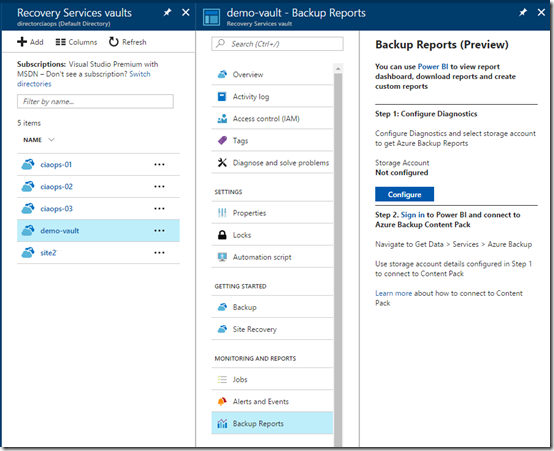
You’ll first need to go into your backup vault and select the option Backup Reports under the Monitoring and Reports section of that particular vault as shown above.

image

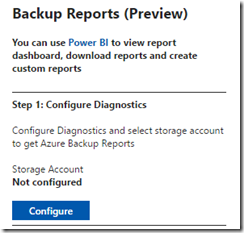
You’ll then need to select the Configure button.

image

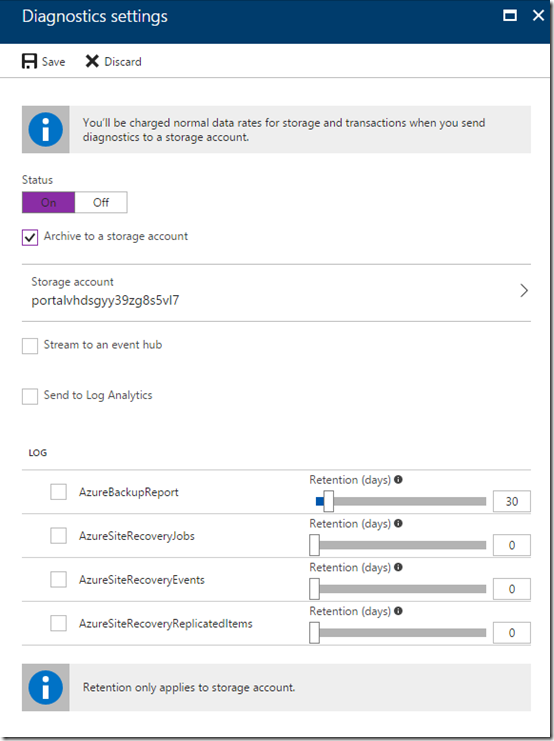
You’ll then need to change the status to On, select an existing Storage account for the logs to accrue into and select the retention period.

Once you have done all this you’ll need to save your settings.

You’ll need to wait about 24 hours for data to start accumulating into the storage account so it can be read by Power BI.

image

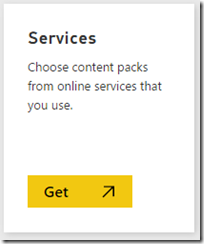
After you have waited an appropriate period of time login to your Power BI console and select the option to Get Data. Then select the Services option.

image

In this list of content pack, locate the Azure Backup as shown above. Once you select this you’ll be prompted for the Azure Storage Account name into which you selected to send the backup reports. You’ll also be asked for the Storage Account Access key.

image

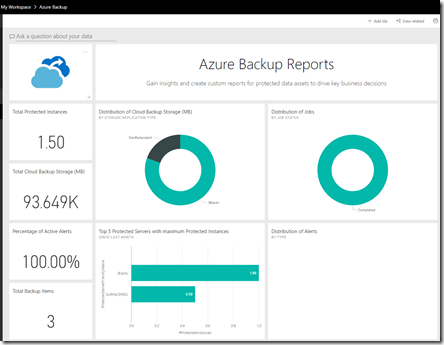
After a few moments, where your data is imported and configured, you should be able to a see a dashboard like that shown above. Remember, you’ll only see data from the point which you created the storage account to capture the logs.

image

You should also find that you have a Power BI report you can access with the tabs shown above for more detailed information.

You can now customised your reports and dashboards to display exactly the backup reporting information you wish to see. If you monitor multiple backups, for multiple different customers say, you can now construct a single location to view all of these thanks to Power BI.

Need to Know podcast–Episode 156

In this episode we talk to Tas Gray about the tools and processes he has developed to allow resellers to automate Office 365 billing. We discuss the solutions, how to set it up as well as the benefits of billing automation via CSP licensing.

Marc and I also give you the latest cloud news on Azure and Office 365 to help you stay up to date in this fast paced environment. Don’t forget to rate us and let us know your feedback.

Take a listen and let us know what you think – feedback@needtoknow.cloud

You can listen to this episode directly at:

https://ciaops.podbean.com/e/episode-156-automating-office-365-billing/

Subscribe via iTunes at:

https://itunes.apple.com/au/podcast/ciaops-need-to-know-podcasts/id406891445?mt=2

The podcast is also available on Stitcher at:

http://www.stitcher.com/podcast/ciaops/need-to-know-podcast?refid=stpr

Don’t forget to give the show a rating as well as send us any feedback or suggestions you may have for the show.

Resources

@tasgray

@marckean

@directorcia

Office 365 WHMCS

WHMCS

Azure news from Marc

Microsoft Build Australia

Amazon now a big Azure customer

Amazon vs WalMart

Microsoft Forms now available

Microsoft Stream

Microsoft Teams and Dropbox

New Azure VPN gateways

Storage service encryption for Azure managed disks

Increased Azure disk size

This episode brought to you by:


https://cpem.io/tJ01Hzu2k.js

June webinar resources

We’ve now crossed the Rubicon of 12 months of CIAOPS Need to Know webinars with the June episode. You can now download the slides from:

https://www.slideshare.net/directorcia/ciaops-need-to-know-webinar-june-2017

If you are not a CIAOPS patron you want to view or download a full copy of the video from the session you can do so here:

http://www.ciaopsacademy.com/p/june-2017-need-to-know-webinar/

I covered as much as I could on Rights Management and had some issues with buttons on the screen when sending emails but I hope that didn’t detract too much from the information presented. But, as always, there is so much more I could have done, so if you have questions let me know. Thanks everyone for attending

you can also now get access to all webinars via:

http://ciaops-academy.teachable.com/courses/need-to-know-webinars

for a nominal fee.

See you next month.

Need to Know podcast–Episode 155

We’ll apologise up front for the poor sound quality on this episode. The stars didn’t quite align for us. We’ll work to fix it for the next episode. In this episode we focus on bringing you up to date with the latest Cloud news from Microsoft. Plenty for events and updates to services like Azure and Office 365 that we cover for you. So tune in to stay up to date.

Take a listen and let us know what you think – feedback@needtoknow.cloud

You can listen to this episode directly at:

https://ciaops.podbean.com/e/episode-155-cloud-news/

Subscribe via iTunes at:

https://itunes.apple.com/au/podcast/ciaops-need-to-know-podcasts/id406891445?mt=2

The podcast is also available on Stitcher at:

http://www.stitcher.com/podcast/ciaops/need-to-know-podcast?refid=stpr

Don’t forget to give the show a rating as well as send us any feedback or suggestions you may have for the show.

Resources

@marckean

@directorcia

Azure news from Marc

Upcoming Microsoft Ignite session

Skype for Business PSTN calling in Germany and Belgium

New sharing experience for Onedrive for Business and SharePoint

Office 365 Saturday Australia

Azure AD conditional access now supports Microsoft Teams

System state backup for Azure file backup

Modern Flow Approvals

New Windows phone flow app

OneDrive support for Apple files app

This episode brought to you by:

https://cpem.io/tJ01Hzu2k.js

Lean in to the changes NOW!

I came across this video from Brad Anderson’s lunch break. In it he speaks with tech journalist Paul Thurrott. Now I am a big fan of Paul’s dry wit but also the volume of content that he produces in the Microsoft space. However, what interested me most about this interview is what you’ll find at 3 minutes and 20 seconds in. Either fast forward the above clip or click this link to go straight to that location:

https://youtu.be/Uq8LnosaxVI?t=3m20s

The advice Paul gives the IT Pro crowd is effectively that the reality is this industry is all about change and you need to keep up.

This resonated with a lot of current thinking I’ve been doing around the changes products like Microsoft Teams bring to the game. You can read about how I think products like Microsoft Teams are fundamentally changing the way people work with IT here:

The modern way of collaboration using Microsoft Teams

What concerns me is that I see customers almost immediately ‘get’ Microsoft Teams, whereas IT Pros don’t. Microsoft Teams is simply a combination of existing services from Office 365 which I outlined here:

Understanding Office 365 Groups and Teams

I find that most IT Pros either don’t know what Microsoft Teams is or they dismiss it as being merely a Slack competitor. I can only surmise that this attitude is actually rooted in the fact that most don’t have the expertise or knowledge of the base Office 365 services that Microsoft Teams in built on, such as SharePoint.

As harsh as it sounds, I firmly believe that Microsoft Teams will become in the line in the sand for those who ‘get it’ and those who don’t in the IT Pro world. This effectively means that if you don’t at least know what products like Microsoft Teams are all about then your chances of staying relevant in the new world of IT are slim.

The concept of staying current is something I’ve talked a lot about here, including:

Skill up or fade away

Why IT today is like coffee

but the article I think that crystalises it best is:

The traits of a “modern” IT professional

One of the key points in that article is a need to develop a long term learning process. But how can that be done in a world where it is so challenging to keep up? Agreed. 100%. But you know what? That challenge is never going to get easier. That challenge is always going to require work. That challenge can only be solved by implementing a system to deal with it. Simply ignoring it or complaining about it and taking no action doesn’t make it magically disappear!

I have also spoken about the

Major trends

that many haven’t also yet acknowledged. Traditional IT Pros need to be especially cognisant of the changes automation and AI are going to bring not only to business in general but also to the IT field.

My advice for some great places to start learning the Microsoft Cloud stuff for free is YouTube and the Microsoft Virtual Academy. However, I’d also point you to the recorded sessions from Microsoft Ignite 2016 as well the sessions from Microsoft Build 2017. If you wanted something with a more Australian accent try the sessions from the recent Microsoft Australia Ignite conference. All of these are available for free.

Ok, yes, I hear you. That is a lot of content. Probably more content than anyone can get through in a single lifetime. Your are looking at this with a close mind set. The fact that there is so much free content is great! The challenge is integrating that into your own learning path. That is something you alone are going to have to do. No one is going to do it for you for free unfortunately. Where do you start?

Instead of looking at the mountain of content (the destination) just look at one thing you’d like to learn (i.e. the steps). Focus on the first step. Then the second and so on. You need to take an approach that isn’t attempting to ‘boil the ocean’ here. I’ve spoken about this here:

Don’t run away, filter for value

A great method of learning that I’d advocate is to scratch your own itch by solving your own business needs with the technology. That is in fact how I initial got into Azure and I detailed that experience here:

I finally get Microsoft Azure

and here using Microsoft Flow:

Using Microsoft Flow for event confirmations

Most IT Pros have access to services like Azure and Office 365 by virtue of being Microsoft Partners. At worse, you can at least sign up for free trials. Try starting with learning about virtual machines in Azure or maybe Power BI, but don’t do it randomly. Have a system.

A great system I can recommend is to use something like OneNote to capture all your learnings. I’ve detailed here:

One of the ways I use OneNote

It doesn’t however HAVE to be OneNote, use whatever system works for you. But use a system!

Another way is to learn is to commit to a completing a certification exam. Microsoft here in Australia runs regular training courses that incorporate certifications:

Microsoft certification – The joy I get out of coming work each day

Value of certification and training to help get you there

Having a definitive end point to aim for, as well a defined limited learning scope, can be challenging but it does help you focus on the task at hand as well as giving some valuable credentials upon completion.

So in summary, as Paul says in the interview – “This industry is always about change. You cannot sit still”. Change is always challenging but if haven’t already, you don’t have a lot of time in my books, to make that change. I personally believe the knowledge gap is getting to a point where it is simply too great to overcome for many. Once that transpires, there won’t be much option, you’ll have missed the boat.

As an aside, I will also point to plenty of “stuff” I do to help educate people on the Microsoft Cloud. These offerings are available as both free and paid options. However, the two free options I have that I’ll call out for you here are:

Cloud Lecture Series

and

Free Office 365 demos

I’m also happy to help answer any questions you have or provide any advice I can (beware it will be candid and direct). However, please remember that I can’t give everything away for free, I still gotta pay the bills!