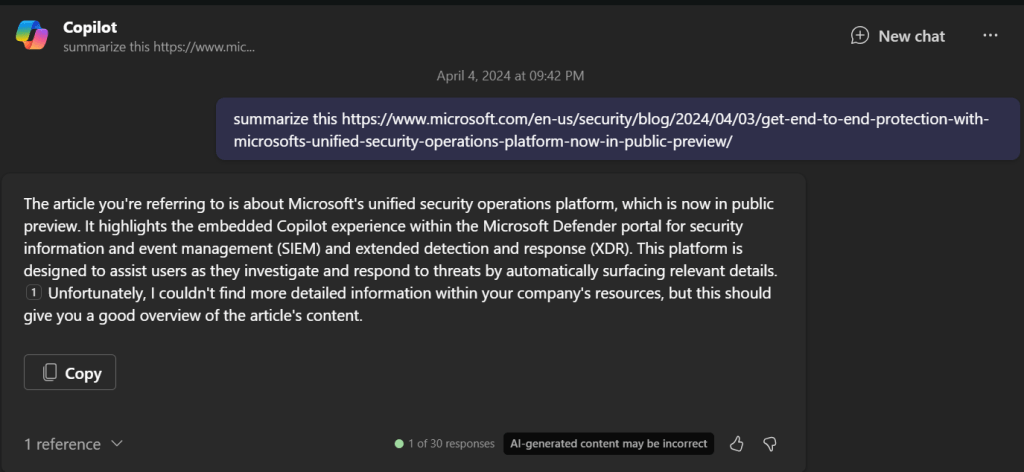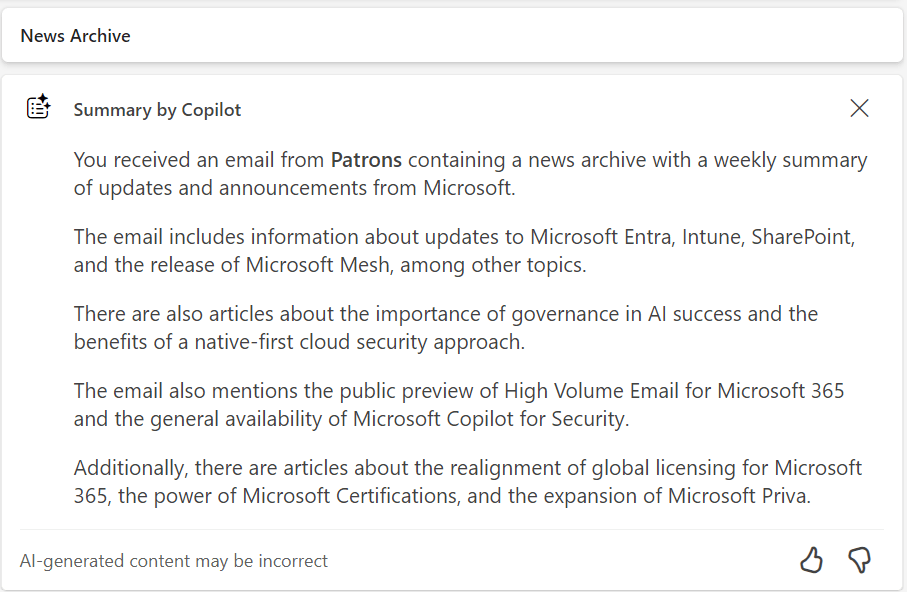
Building a Collaborative Microsoft 365 Copilot Agent: A Step-by-Step Guide

Creating a Microsoft 365 Copilot agent (a custom AI assistant within Microsoft 365 Copilot) can dramatically streamline workflows. These agents are essentially customised versions of Copilot that combine specific instructions, knowledge, and skills to perform defined tasks or scenarios[1]. The goal here is to build an agent that multiple team members can collaboratively develop and easily maintain – even if the original creator leaves the business. This report provides:

  • Step-by-step guidelines to create a Copilot agent (using no-code/low-code tools).
  • Best practices for multi-user collaboration, including managing edit permissions.
  • Documentation and version control strategies for long-term maintainability.
  • Additional tips to ensure the agent remains robust and easy to update.

Step-by-Step Guide: Creating a Microsoft 365 Copilot Agent

To build your Copilot agent without code, you will use Microsoft 365 Copilot Studio’s Agent Builder. This tool provides a guided interface to define the agent’s behavior, knowledge, and appearance. Follow these steps to create your agent:
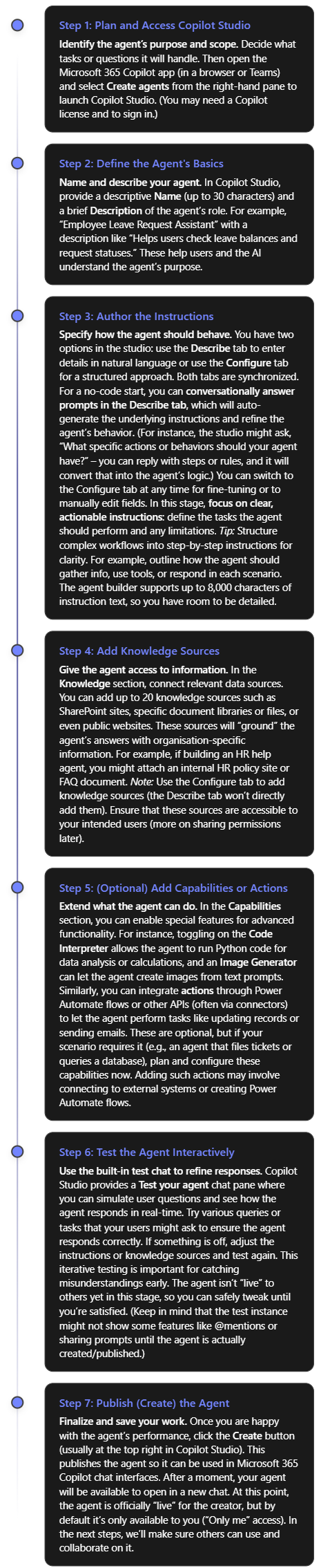
As a result of the steps above, you have a working Copilot agent with its name, description, instructions, and any connected data sources or capabilities configured. You built this agent in plain language and refined it with no code required, thanks to Copilot Studio’s declarative authoring interface[2].

Before rolling it out broadly, double-check the agent’s responses for accuracy and tone, especially if it’s using internal knowledge. Also verify that the knowledge sources cover the expected questions. (If the agent couldn’t answer a question in testing, you might need to add a missing document or adjust instructions.)

Note: Microsoft also provides pre-built templates in Copilot Studio that you can use as a starting point (for example, templates for an IT help desk bot, a sales assistant, etc.)[2]. Using a template can jump-start your project with common instructions and sample prompts already filled in, which you can then modify to suit your needs.


Collaborative Development and Access Management

One key to long-term maintainability is ensuring multiple people can access and work on the agent. You don’t want the agent tied solely to its creator. Microsoft 365 Copilot supports this through agent sharing and permission controls. Here’s how to enable collaboration and manage who can use or edit the agent:

  • Share the Agent for Co-Authoring: After creating the agent, the original author can invite colleagues as co-authors (editors). In Copilot Studio, use the Share menu on the agent and add specific users by name or email for “collaborative authoring” access[3]. (You can only add individuals for edit access, not groups, and those users must be within your organisation.) Once shared, these teammates are granted the necessary roles (Environment Maker/Bot Contributor in the underlying Power Platform environment) automatically so they can modify the agent[3]. Within a few minutes, the agent will appear in their Copilot Studio interface as well. Now your agent effectively has multiple owners — if one person leaves, others still have full editing rights.
  • Ensure Proper Permissions: When sharing for co-authoring, make sure the colleagues have appropriate permissions in the environment. Copilot Studio will handle most of this via the roles mentioned, but it’s good for an admin to know who has edit access. By design, editors can do everything the owner can: edit content, configure settings, and share the agent further. Viewers (users who are granted use but not edit rights) cannot make changes[4]. Use Editor roles for co-authors and Viewer roles for end users as needed to control access[4]. For example, you may grant your whole team viewer access to use the agent, but only a smaller group of power users get editor access to change it. (The platform currently only allows assigning Editor permission to individuals, not to a security group, for safety[4].)
  • Collaborative Editing in Real-Time: Once multiple people have edit access, Copilot Studio supports concurrent editing of the agent’s topics (the conversational flows or content nodes). The interface will show an “Editing” indicator with the co-authors’ avatars next to any topic being worked on[3]. This helps avoid stepping on each other’s toes. If two people do happen to edit the same piece at once, Copilot Studio prevents accidental overwrites by detecting the conflict and offering choices: you can discard your changes or save a copy of the topic[3]. For instance, if you and a colleague unknowingly both edited the FAQ topic, and they saved first, when you go to save, the system might tell you a newer version exists. You could then choose to keep your version as a separate copy, review differences, and merge as appropriate. This built-in change management ensures that multi-author collaboration is safe and manageable.
  • Sharing the Agent for Use: In addition to co-authors, you likely want to share the finished agent with other employees so they can use it in Copilot. You can share the agent via a link or through your tenant’s app catalog. In Copilot Studio’s share settings, choose who can chat with (use) the agent. Options include “Anyone in your organization” or specific security groups[5]. For example, you might initially share it with just the IT department group for a pilot, or with everyone if it’s broadly useful. When a user adds the shared agent, it will show up in their Microsoft 365 Copilot interface for them to interact with. Note that sharing for use does not grant edit rights – it only allows using the agent[5]. Keep the sharing scope to “Only me” if it’s a draft not ready for others, but otherwise switch it to an appropriate audience so the agent isn’t locked to one person’s account[5].
  • Manage Underlying Resources: If your agent uses additional resources like Power Automate flows (actions) or certain connectors that require separate permissions, remember to share those as well. Sharing an agent itself does not automatically share any connected flow or data source with co-authors[3]. For example, if the agent triggers a Power Automate flow to update a SharePoint list, you must go into that flow and add your colleagues as co-owners there too[3]. Otherwise, they might be able to edit the agent’s conversation, but not open or modify the flow. Similarly, ensure any SharePoint sites or files used as knowledge sources have the right sharing settings for your team. A good practice is to use common team-owned resources (not one person’s private OneDrive file) for any knowledge source, so access can be managed by the team or admins.
  • Administrative Oversight: Because these agents become part of your organisation’s tools, administrators have oversight of shared agents. In the Microsoft 365 admin center (under Integrated Apps > Shared Agents), admins can see a list of all agents that have been shared, along with their creators, status, and who they’re shared with[1]. This means if the original creator does leave the company, an admin can identify any orphaned agents and reassign ownership or manage them as needed. Admins can also block or disable an agent if it’s deemed insecure or no longer appropriate[1]. This governance is useful for ensuring continuity and compliance – your agent isn’t tied entirely to one user’s account. From a planning perspective, it’s wise to have at least two people with full access to every mission-critical agent (one primary and one backup person), plus ensure your IT admin team is aware of the agent’s existence.

By following these practices, you create a safety net around your Copilot agent. Multiple team members can improve or update it, and no single individual is irreplaceable for its maintenance. Should someone exit the team, the remaining editors (or an admin) can continue where they left off.


Documentation and Version Control Practices

Even with a collaborative platform, it’s important to document the agent’s design and maintain version control as if it were any other important piece of software. This ensures that knowledge about how the agent works is not lost and changes can be tracked over time. Here are key practices:

  • Create a Design & Usage Document: Begin a living document (e.g. in OneNote or a SharePoint wiki) that describes the agent in detail. This should include the agent’s purpose, the problems it solves, and its scope (what it will and won’t do). Document the instructions or logic you gave it – you might even copy the core parts of the agent’s instruction text into this document for reference. Also list the knowledge sources connected (e.g. “SharePoint site X – HR Policies”) and any capabilities/flows added. This way, if a new colleague takes over the agent, they can quickly understand its configuration and dependencies. Include screenshots of the agent’s setup from Copilot Studio if helpful. If the agent goes through iterations, note what changed in each version (“Changelog: e.g. Added new Q\&A section on 2025-08-16 to cover Covid policies”). This documentation will be invaluable if the original creator is not available to explain the agent’s behavior down the line.
  • Use Source Control for Agent Configuration (ALM): Treat the agent as a configurable solution that can be exported and versioned. Microsoft 365 Copilot agents built in Copilot Studio actually reside in the Power Platform environment, which means you can leverage Power Platform’s Application Lifecycle Management (ALM) features. Specifically, you can export the agent as a solution package and store that file for version control[6]. Using Copilot Studio, create a solution in the environment, add the agent to it, and export it as an unzip-able file. This exported solution contains the agent’s definition (topics, flows, etc.). You can keep these solution files in a source repository (like a GitHub or Azure DevOps repo) to track changes over time, similar to how you’d version code. Whenever you make significant updates to the agent, export an updated solution file (with a version number or date in the filename) and commit it to the repository. This provides a backup and a history. In case of any issue or if you need to restore or compare a previous version, you can import an older solution file into a sandbox environment[6]. Microsoft’s guidance explicitly supports moving agents between environments using this export/import method, which can double as a backup mechanism[6].
  • Implement CI/CD for Complex Projects (Optional): If your organisation has the capacity, you can integrate the agent development into a Continuous Integration/Continuous Deployment process. Using tools like Azure DevOps or GitHub Actions, you can automate the export/import of agent solutions between Dev, Test, and Prod environments. This kind of pipeline ensures that all changes are logged and pass through proper testing stages. Microsoft recommends maintaining healthy ALM processes with versioning and deployment automation for Copilot agents, just as you would for other software[7]. For example, you might do initial editing in a development environment, export the solution, have it reviewed in code review (even though it’s mostly configuration, you can still check the diff on the solution components), then import into a production environment for the live agent. This way, any change is traceable. While not every team will need full DevOps for a simple Copilot agent, this approach becomes crucial if your agent grows in complexity or business importance.
  • **Consider the Microsoft 365 *Agents SDK* for Code-Based Projects:** Another approach to maintainability is building the agent via code. Microsoft offers an Agents SDK that allows developers to create Copilot agents using languages like C#, JavaScript, or Python, and integrate custom AI logic (with frameworks like Semantic Kernel or LangChain)[8]. This is a more advanced route, but it has the advantage that your agent’s logic lives in code files that can be fully managed in source control. If your team has software engineers, they could use the SDK to implement the agent with standard dev practices (unit testing, code reviews, git version control, etc.). This isn’t a no-code solution, but it’s worth mentioning for completeness: a coded agent can be as collaborative and maintainable as any other software project. The SDK supports quick scaffolding of projects and deployment to Copilot, so you could even migrate a no-code agent to a coded one later if needed[8]. Only pursue this if you need functionality beyond what Copilot Studio offers or want deeper integration/testing – for most cases, the no-code approach is sufficient.
  • Keep the Documentation Updated: Whichever development path you choose, continuously update your documentation when changes occur. If a new knowledge source is added or a new capability toggled on, note it in the doc. Also record any design rationale (“We disabled the image generator on 2025-09-01 due to misuse”) so future maintainers understand past decisions. Good documentation ensures that even if original creators or key contributors leave, anyone new can come up to speed quickly by reading the material.

By maintaining both a digital paper trail (documents) and technical version control (solution exports or code repositories), you safeguard the project’s knowledge. This prevents the “single point of failure” scenario where only one person knows how the agent really works. It also makes onboarding new team members to work on the agent much easier.


Additional Tips for a Robust, Maintainable Agent

Finally, here are additional recommendations to ensure your Copilot agent remains reliable and easy to manage in the long run:

  • Define a Clear Scope and Boundaries: A common pitfall is trying to make one agent do too much. It’s often better to have a focused agent that excels at a specific set of tasks than a catch-all that becomes hard to maintain. Clearly state what user needs the agent addresses. If later you find the scope creeping beyond original intentions (for example, your HR bot is suddenly expected to handle IT helpdesk questions), consider creating a separate agent for the new domain or using multi-agent orchestration, rather than overloading one agent. This keeps each agent simpler to troubleshoot and update. Also use the agent’s instructions to explicitly guard against out-of-scope requests (e.g., instruct it to politely decline questions unrelated to its domain) so that maintenance remains focused.
  • Follow Best Practices in Instruction Design: Well-structured instructions not only help the AI give correct answers, but also make the agent’s logic easier for humans to understand later. Use clear and action-oriented language in your instructions and avoid unnecessary complexity[9]. For example, instead of a vague instruction like “help with leaves,” write a specific rule: “If user asks about leave status, retrieve their leave request record from SharePoint and display the status.” Break down the agent’s workflow into ordered steps where necessary (using bullet or numbered lists in the instructions)[9]. This modular approach (goal → action → outcome for each step) acts like commenting your code – it will be much easier for someone else to modify the behavior if they can follow a logical sequence. Additionally, include a couple of example user queries and desired responses in the instructions (few-shot examples) for clarity, especially if the agent’s task is complex. This reduces ambiguity for both the AI and future editors.
  • Test Thoroughly and Collect Feedback: Continuous testing is key to robustness. Even after deployment, encourage users (or the team internally) to provide feedback if the agent gives an incorrect or confusing response. Periodically review the agent’s performance: pose new questions to it or check logs (if available) to see how it’s handling real queries. Microsoft 365 Copilot doesn’t yet provide full conversation logs to admins, but you can glean some insight via any integrated telemetry. If you have access to Azure Application Insights or the Power Platform CoE kit, use them – Microsoft suggests integrating these to monitor usage, performance, and errors for Copilot agents[7]. For example, Application Insights can track how often certain flows are called or if errors occur, and the Power Platform Center of Excellence toolkit can inventory your agent and its usage metrics[7]. Monitoring tools help you catch issues early (like an action failing because of a permissions error) and measure the agent’s value (how often it’s used, peak times, etc.). Use this data to guide maintenance priorities.
  • Implement Governance and Compliance Checks: Since Copilot agents can access organisational data, ensure that all security and compliance requirements are met. From a maintainability perspective, this means the agent should be built in accordance with IT policies (e.g., respecting Data Loss Prevention rules, not exposing sensitive info). Work with your admin to double-check that the agent’s knowledge sources and actions comply with company policy. Also, have a plan for regular review of content – for instance, if one of the knowledge base documents the agent relies on is updated or replaced, update the agent’s knowledge source to point to the new info. Remove any knowledge source that is outdated or no longer approved. Keeping the agent’s inputs current and compliant will prevent headaches (or forced takedowns) later on.
  • Plan for Handover: Since the question specifically addresses if the original creator leaves, plan for a smooth handover. This includes everything we’ve discussed (multiple editors, documentation, version history). Additionally, consider a short training session or demo for the team members who will inherit the agent. Walk them through the agent’s flows in Copilot Studio, show how to edit a topic, how to republish updates, etc. This will give them confidence to manage it. Also, make sure the agent’s ownership is updated if needed. Currently, the original creator remains the “Owner” in the system. If that person’s account is to be deactivated, it may be wise to have an admin transfer any relevant assets or at least note that co-owners are in place. Since admins can see the creator’s name on the agent, proactively communicate to IT that the agent has co-owners who will take over maintenance. This can avoid a scenario where an admin might accidentally disable an agent assuming no one can maintain it.
  • Regular Maintenance Schedule: Treat the agent as a product that needs occasional maintenance. Every few months (or whatever cadence fits your business), review if the agent’s knowledge or instructions need updates. For example, if processes changed or new common questions have emerged, update the agent to cover them. Also verify that all co-authors still have access and that their permissions are up to date (especially if your company uses role-based access that might change with team reorgs). A little proactive upkeep will keep the agent effective and prevent it from becoming obsolete or broken without anyone noticing.

By following the above tips, your Microsoft 365 Copilot agent will be well-positioned to serve users over the long term, regardless of team changes. You’ve built it with a collaborative mindset, documented its inner workings, and set up processes to manage changes responsibly. This not only makes the agent easy to edit and enhance by multiple people, but also ensures it continues to deliver value even as your organisation evolves.


Conclusion: Building a Copilot agent that stands the test of time requires forethought in both technology and teamwork. Using Microsoft’s no-code Copilot Studio, you can quickly create a powerful assistant tailored to your needs. Equally important is opening up the project to your colleagues, setting the right permissions so it’s a shared effort. Invest in documentation and consider leveraging export/import or even coding options to keep control of the agent’s “source.” And always design with clarity and governance in mind. By doing so, you create not just a bot, but a maintainable asset for your organisation – one that any qualified team member can pick up and continue improving, long after the original creator’s tenure. With these steps and best practices, your Copilot agent will remain helpful, accurate, and up-to-date, no matter who comes or goes on the team.

References

[1] Manage shared agents for Microsoft 365 Copilot – Microsoft 365 admin

[2] Use the Copilot Studio Agent Builder to Build Agents

[3] Share agents with other users – Microsoft Copilot Studio

[4] Control how agents are shared – Microsoft Copilot Studio

[5] Publish and Manage Copilot Studio Agent Builder Agents

[6] Export and import agents using solutions – Microsoft Copilot Studio

[7] Phase 4: Testing, deployment, and launch – learn.microsoft.com

[8] Create and deploy an agent with Microsoft 365 Agents SDK

[9] Write effective instructions for declarative agents

Need to Know podcast–Episode 349

Explore the future of AI integration, Microsoft Cloud updates, and security innovations tailored for the SMB market. In this episode, we dive into the transformative role of AI MCP servers, the latest Microsoft 365 and Teams updates, and practical security and compliance strategies. Whether you’re an IT pro, business leader, or tech enthusiast, this episode delivers actionable insights and resources to stay ahead in the Microsoft ecosystem.

Brought to you by www.ciaopspatron.com

you can listen directly to this episode at:

https://ciaops.podbean.com/e/episode-349-mcp-is-for-me/

Subscribe via iTunes at:

https://itunes.apple.com/au/podcast/ciaops-need-to-know-podcasts/id406891445?mt=2

or Spotify:

https://open.spotify.com/show/7ejj00cOuw8977GnnE2lPb

Don’t forget to give the show a rating as well as send me any feedback or suggestions you may have for the show.

Resources

CIAOPS Need to Know podcast – CIAOPS – Need to Know podcasts | CIAOPS

X – https://www.twitter.com/directorcia

Join my Teams shared channel – Join my Teams Shared Channel – CIAOPS

CIAOPS Merch store – CIAOPS

Become a CIAOPS Patron – CIAOPS Patron

CIAOPS Blog – CIAOPS – Information about SharePoint, Microsoft 365, Azure, Mobility and Productivity from the Computer Information Agency

CIAOPS Brief – CIA Brief – CIAOPS

CIAOPS Labs – CIAOPS Labs – The Special Activities Division of the CIAOPS

Support CIAOPS – https://ko-fi.com/ciaops

Get your M365 questions answered via email

Show Notes

What’s new in Microsoft Entra – June 2025: Highlights include upcoming support for backing up account names in the Authenticator app using iCloud Keychain
Enhancing Defense Security with Entra ID Governance: Discusses how Entra ID Governance strengthens defense sector security
What’s New in Microsoft Teams | June 2025: Covers new Teams features and enhancements 3.
What’s new in Microsoft Intune: June 2025: Summarizes Intune updates including device management improvements
Microsoft Intune data-driven management | Device Query & Copilot: Introduces new Copilot-powered device query features

Data Breach Reporting with Microsoft Data Security Investigations: Guidance on regulatory breach reporting
Modern, unified data security in the AI era: New Microsoft Purview capabilities for AI-driven data protection
Safeguarding data with Microsoft 365 Copilot: Focuses on compliance and security in Copilot deployments
Protection Against Email Bombs: Microsoft Defender for Office 365 introduces new protections
Introducing the Microsoft 365 Copilot App Learning Series: Learning resources for Copilot adoption
Making the Most of Attack Simulation Training: Best practices for security training
Processing status pane for SharePoint Autofill: New UI enhancements for SharePoint
Introducing the New SharePoint Template Gallery: Streamlined template discovery and usage
Planning your move to Microsoft Defender portal: Transition guidance for Sentinel customers
Jasper Sleet: North Korean IT infiltration tactics: Threat intelligence update
Managing warehouse devices with Microsoft Intune: Real-world Intune use case

Integrating Microsoft Learn Docs with Copilot Studio using MCP

Techwerks 27

bw-car-vehicle

CIAOPS Techwerks face to face returns to Melbourne CBD on Thursday the 22nd of May 2025. The venue for the event will be:

Melbourne City College
Level 9, 120 Spencer St
MELBOURNE VIC 3000

The course is limited to 20 people and you can sign up and reserve your place now! You reserve a place by completing this form:

http://bit.ly/ciaopsroi

or by sending me an email (director@ciaops.com) expressing your interest.

The content of these all day face to face workshops is driven by the attendees. That means we cover exactly what people want to see and focus on doing hands on, real world scenarios. Attendees can vote on topics they’d like to see covered prior to the day and we continue to target exactly what the small group of attendees wants to see. Thus, this is an excellent way to get really deep into the technology and have all the questions you’ve been dying to know answered. Typically, the event produces a number of best practice take aways for each attendee. This event will largely focus on AI including Copilot, Agents and Agent creation, etc with a special focus on what is relevant for small business.

Recent testimonial – “I just wanted to say a big thank you to Robert for the Brisbane Techworks day. It is such a good format with each attendee asking what matters them and the whole interactive nature of the day. So much better than death by PowerPoint.” – Mike H.

The cost to attend is:

Gold Enterprise Patron = $50 ex GST

Gold Patron = $90 ex GST

Silver Patron = $180 ex GST

Bronze Patron = $360 ex GST

Non Patron = $720 ex GST

I hope to see you there.

The missed SMB AI opportunity

This is a follow to my article:

Talent versus Skill

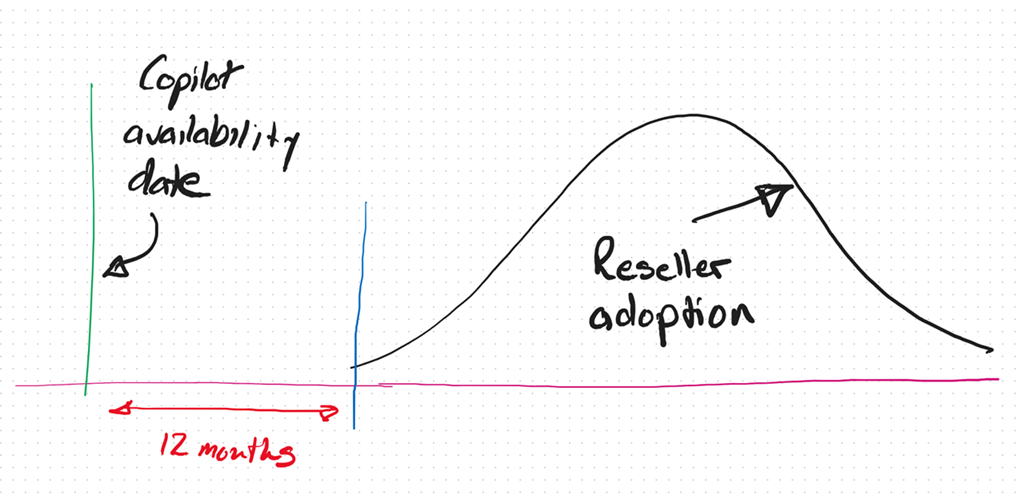
As we now approach the 12 month anniversary of when Microsoft 365 Coplot was available widely in SMB (16 January 2024), I thought I’d reflect on what I see in the market.

image

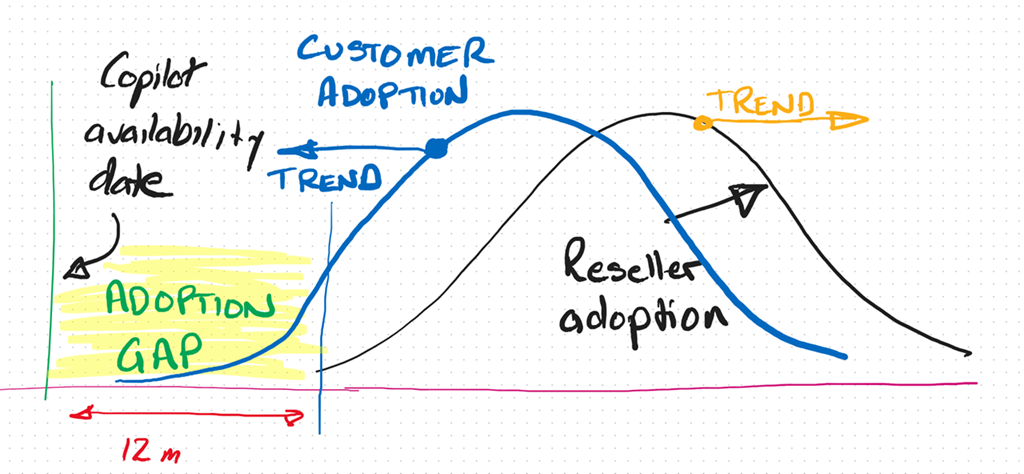
It is my experience that only now, 12 months after the release of Microsoft 365 Copilot, are the most progressive resellers and MSPs orientating themselves to understand and make AI part of their business and what they offer to their customers. This means even the most progressive are already at least 12 months behind.

As I have said previously, I see the reaction to Ai from SMB IT Professionals and MSPs much like what happened with the move to the cloud. In short, that cynicism at best and denial at worst, seems to have again reappeared.

If you simply look at the business opportunity presented by AI it is hard for me to grasp why more IT Professionals and MSPs are not taking advantage of this unique opportunity for their business.

image

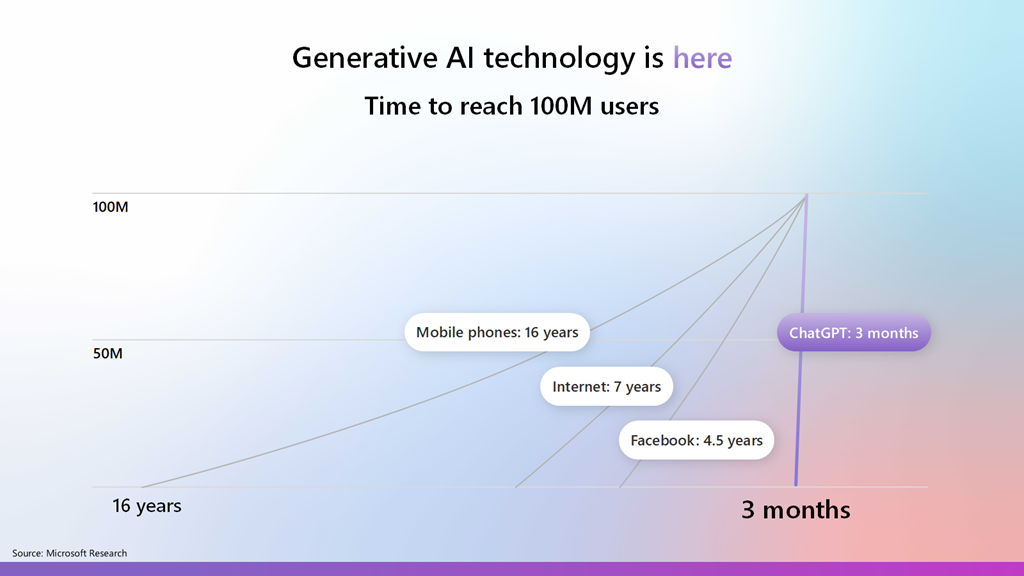
Most commentators agree that AI is one of the fastest adopted technologies in history and is now widely in use by individuals and business, because it part it is so easy to use. This explosive growth and penetration represents business opportunity that many IT Professionals and MSPs are well positioned to take advantage of, yet there seems to a hesitancy like there was moving to the cloud.

image

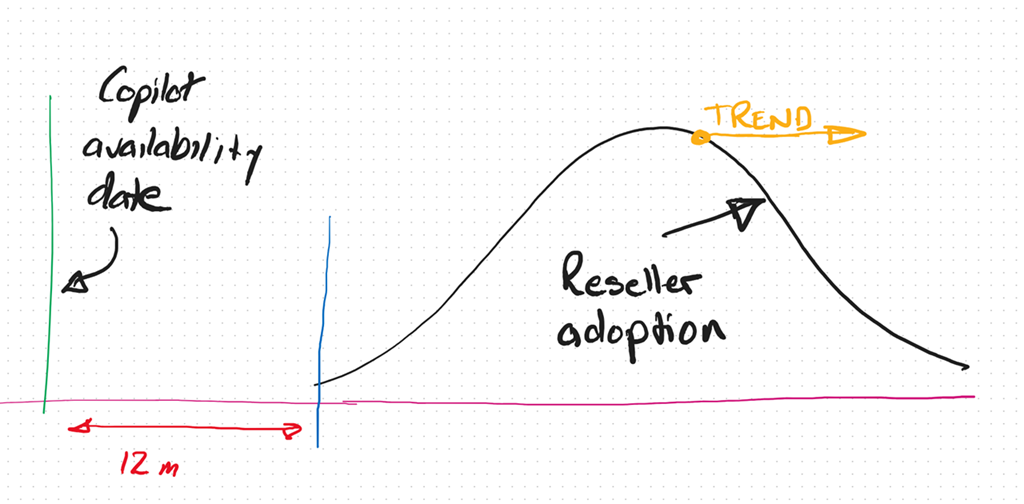
In fact, I see the IT Professional and MSP adoption curve with AI trending more and more away from adoption and integration into their businesses. To be brutally honest, the peak in that Reseller adoption curve, in my books, is at least 3 – 5 years behind already.

image

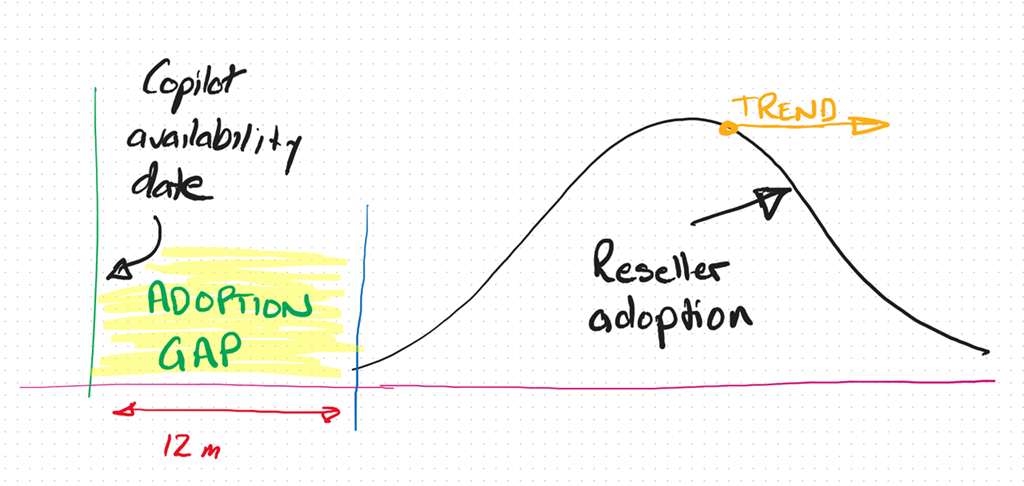
Thus, the adoption gap continues to increase. So too the opportunity.

image

Alternatively, if you look at the customer trends, you find they are adopting AI much faster and looking to integrate into their business to remain competitive. The net result is that customers and their IT providers are trending in opposite directions when it comes to adopting AI from what I see.

Any new technology requires re-tooling and an investment in knowledge. Both of these don’t magically just appear inside a business or an individual, they require a dedicated approach to integrating these as well as some work. From what I see, customers are prepared to do this work because they see the business benefits but most IT Providers don’t. To me, that represents a huge risk that many incumbent IT providers wil miss out on the opportunity that the AI wave presents. The worst case scenario is that customers will ‘do it themselves’ with any need of an IT Provider.

At its core I believe the mismatch I’m seeing is the result of the incumbent MSP model being ‘reactive’. That is, waiting until something breaks and then fix it. It is like the fire brigade that waits until the bell rings and then goes to put out the fire. I think we are shifting to work where more consideration has to be given to a proactive approach to solving business needs before they arise rather than waiting for them to happen and reacting. To many technology providers AI represents something that will ‘break’ the status quo and that is not something they desire.

A reactive business I would suggest is not appropriate in the age of AI. Why? Because Ai doesn’t break, doesn’t need configuring, doesn’t require on going maintenance, password resets, etc. The age of AI is all about software and creators not mechanics as most IT Providers are. The reality now is that you don’t need to be an ‘expert’ in your field, even when it comes technology. Many people, when augmented with Ai can perform a lot more tasks and topics than they ever could. The agent that I have built with Copilot Studio and publish into Teams to answer technical questions continues to amaze me daily with the quality of answers while reducing my need to do that manually. Why hasn’t every MSP implemented something like that in their business already? The tools are there to get more value from the knowledge in their business, make their lives easier and business more profitable.

Another factor I see is one of demographics. Most small MSPs are run by what you might euphemistically call ‘industry veterans’, meaning they have been doing what they do for a long time. This ‘time in business’ tends towards an inertia and a hesitancy to embrace or enthusiastically embrace change. The pace of technology change is increasing, not decreasing and that requires adaptation to the ever changing environment. This will always be challenging when the trend is to inertia.

A common approach with many SMB IT Providers is their belief that they have to do it all. Whether than belief comes from a desire for revenue or fear of competition, it is not something that is really possible in today’s diverse environment. Like ever other business, an IT provider runs a BUSINESS and the primary goal of any business is to make a profit to provide the freedom to grow, enjoy, help others, etc. Any business needs to make business decisions about what they do to generate revenue in their business. Sometimes, these business decisions are not easy. Generally, these decisions will also involve some form of risk. But, they need to be made for the business to succeed.

The simplest metric for making these decisions is profit. Will this decision generate my business more profit than this decision? Is the question du jour. This undoubtably means leaving somethings on the tables as well as abandoning others as time changes. To wit:

“You can’t do today’s job with yesterday’s methods and be in business tomorrow” – George W. Bush

The position that any business (or individual) is in today is a product of the choices they have made over time. Future success, thus, will also be a product of choices made now and into the future. All decisions come with a cost, the best choice for a business is the one which has the least risk and most profit opportunity?

Over many years, and having been through a few new technology cycles, I have learned that sometimes you can lead a horse to water but you can’t make them drink. Sometimes, inertia is too powerful and change doesn’t happen no matter how much you try. A better use of effort is with those that want the opportunity change brings. The good news for those select few is that, thanks to inertia, your competition is much smaller than it probably is in existing business models.

I am not suggesting that you throw the baby out with the bathwater here when it comes to AI and wholesale abandon business models that are currently profitable. What I am suggesting is to look to the future and see where the ‘ball is going’ and be there to meet it. Today, that only takes a small investment but overtime that investment will become larger and larger just to get onboard. As have highlighted with something like Bitcoin, a small investment early would today reap substantial rewards. You would never go all in, but a few hundred dollars back in the early days when most people scoffed at blockchain technology would certain see you having the last laugh now.

This AI stuff is, by all accounts, moving faster than any previous technology, which means the risks of getting left behind are much greater. It seems clear that Ai is going to have a major impact in all businesses, including small business. All businesses are looking to skilled providers to assist them with understanding and adopting AI. The good news I see for the very few SMB IT providers who ‘get’ Ai and integrating it into their business, is that there little competition now and into the foreseeable future. In an environment with increasing demand your chances of profitability are extremely high. It just takes a small amount of effort to overcome the effects of inertia and ride the coat tails of what certainly will be the next great wave in technology.

Need to Know podcast–Episode 335

Happy Christmas to all listeners. A final episode before the holidays, again with some AI generated content but this time from technical articles not product announcements. I pointed NotebookLM at some Exchange Online best practices documents to see what it came up with and love your feedback on whether this a better or worse than the previous two episodes that also had AI generated content. Happy holidays everyone and thanks again for listening.

Brought to you by www.ciaopspatron.com

You can listen directly to this episode at:

https://ciaops.podbean.com/e/episode-335-exchange-online-best-practices/

Subscribe via iTunes at:

https://itunes.apple.com/au/podcast/ciaops-need-to-know-podcasts/id406891445?mt=2

or Spotify:

https://open.spotify.com/show/7ejj00cOuw8977GnnE2lPb

Don’t forget to give the show a rating as well as send me any feedback or suggestions you may have for the show.

Resources

@directorcia

Join my shared channel

CIAOPS merch store

Become a CIAOPS Patron

CIAOPS Blog

CIAOPS Brief

CIAOPSLabs

Support CIAOPS

Free Github Copilot for VS code

Exchange Online best practices resources

Need to Know podcast–Episode 333

Something new for this episode, AI generated content! This is part one of a two part test with the incorporation of AI generated content. In this episode I used Google NotebookLM to generated the Ai conversation you’ll hear, after my normal intro. I am really interested in your feedback on what you think, good or bad. Watch out for part two, coming soon.

You can listen directly to this episode at:

https://ciaops.podbean.com/e/episode-333-now-with-ai-content-part-1/

Subscribe via iTunes at:

https://itunes.apple.com/au/podcast/ciaops-need-to-know-podcasts/id406891445?mt=2

or Spotify:

https://open.spotify.com/show/7ejj00cOuw8977GnnE2lPb

Don’t forget to give the show a rating as well as send me any feedback or suggestions you may have for the show.

Brought to you by www.ciaopspatron.com

Resources

@directorcia

Join my shared channel

CIAOPS merch store

Become a CIAOPS Patron

CIAOPS Blog

CIAOPS Brief

CIAOPSLabs

Support CIAOPS

Your Workday Reimagined: Using Microsoft 365 Copilot in IT –

https://www.youtube.com/watch?v=-jV67ObIiS4

Strategy to Execution: Operationalizing Microsoft Defender CSPM –

https://techcommunity.microsoft.com/blog/microsoftdefendercloudblog/strategy-to-execution-operationalizing-microsoft-defender-cspm/4357354

Unplug this holiday season with these Microsoft 365 features –

https://techcommunity.microsoft.com/blog/Microsoft365InsiderBlog/unplug-this-holiday-season-with-these-microsoft-365-features/4355248?

New Microsoft Purview features help protect and govern your data in the era of AI –

https://www.microsoft.com/en-us/security/blog/2024/12/10/new-microsoft-purview-features-help-protect-and-govern-your-data-in-the-era-of-ai/

Convincing a billion users to love passkeys: UX design insights from Microsoft to boost adoption and security –

https://www.microsoft.com/en-us/security/blog/2024/12/12/convincing-a-billion-users-to-love-passkeys-ux-design-insights-from-microsoft-to-boost-adoption-and-security/

Frequent freeloader part II: Russian actor Secret Blizzard using tools of other groups to attack Ukraine –

https://www.microsoft.com/en-us/security/blog/2024/12/11/frequent-freeloader-part-ii-russian-actor-secret-blizzard-using-tools-of-other-groups-to-attack-ukraine/

Microsoft Defender XDR demonstrates 100% detection coverage across all cyberattack stages in the 2024 MITRE ATT&CK® Evaluations: Enterprise –

https://www.microsoft.com/en-us/security/blog/2024/12/11/microsoft-defender-xdr-demonstrates-100-detection-coverage-across-all-cyberattack-stages-in-the-2024-mitre-attck-evaluations-enterprise/

Take control during screen sharing in Teams for the web –

https://techcommunity.microsoft.com/blog/Microsoft365InsiderBlog/take-control-during-screen-sharing-in-teams-for-the-web/4354595

What’s new in Microsoft Entra – November 2024 –

https://www.youtube.com/watch?v=NESTW0B1nAQ

Explore our latest Microsoft Security training on Microsoft Learn –

https://techcommunity.microsoft.com/blog/microsoftsecurityandcompliance/explore-our-latest-microsoft-security-training-on-microsoft-learn/4351939

Boost productivity with Copilot in OneDrive –

https://www.youtube.com/watch?v=c7wEqbKDQMg

Explore new Microsoft Entra capabilities at Gartner Identity & Access Management Summit 2024 –

https://www.microsoft.com/en-us/security/blog/2024/12/04/explore-new-microsoft-entra-capabilities-at-gartner-identity-access-management-summit-2024/

Frequent freeloader part I: Secret Blizzard compromising Storm-0156 infrastructure for espionage –

https://www.microsoft.com/en-us/security/blog/2024/12/04/frequent-freeloader-part-i-secret-blizzard-compromising-storm-0156-infrastructure-for-espionage/

Three new ways small and medium-sized businesses can purchase Microsoft 365 Copilot –

https://www.microsoft.com/en-us/microsoft-365/blog/2024/12/02/three-new-ways-small-and-medium-sized-businesses-can-purchase-microsoft-365-copilot/

Safeguarding AI against ‘jailbreaks’ and other prompt attacks –

https://news.microsoft.com/source/?post_type=features&p=8732

Update on nested app authentication and deprecation of Exchange Online legacy tokens –

https://techcommunity.microsoft.com/blog/exchange/update-on-nested-app-authentication-and-deprecation-of-exchange-online-legacy-to/4351951

Gather and create notes with Copilot in your personal OneNote notebooks directly on the page –

https://techcommunity.microsoft.com/blog/microsoft365insiderblog/gather-and-create-notes-with-copilot-in-your-personal-onenote-notebooks-directly/4294053

After hours

The World According To Kaleb On Tour | Official Trailer | Prime Video
–
https://www.youtube.com/watch?v=dqAXVQZ6jww

Copilot plugins make all the difference

image

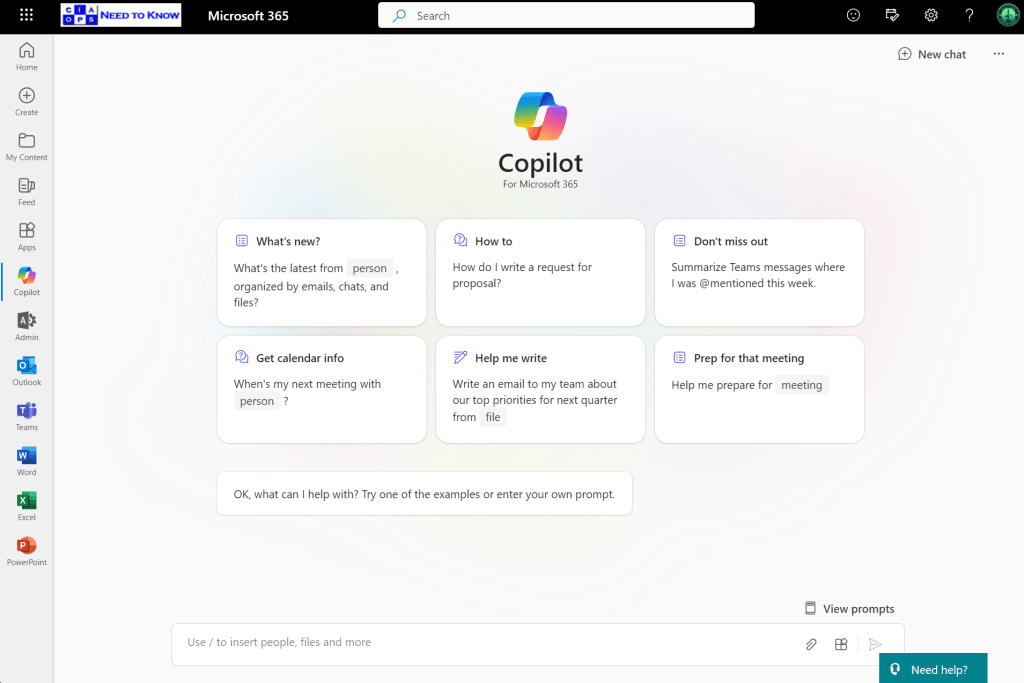
If you are using the Copilot for Microsoft 365 chat interface as shown above

image

and you ask it to reference something on the web, such as asking for a summary of a piece of legislation, you’ll probably find that it doesn’t deliver on the results expected as shown above.

image

This is because, if you want Copilot for Microsoft 365 to use content from the web you’ll need to enable a Plugin. You find these in the lower right of the screen, on the input line as shown above.

image

When you select the Plugin icon you’ll see the above dialog box appear where you can enable web content.

image

If you now run the same prompt, you’ll get a much better result as shown above.

Unfortunately, at this stage you have to enable the web content plugin each time you use Copilot for Microsoft 365. I’m still search for a way to have this enabled by default. If you do know how to do that, please let me.

Copilot for Microsoft 365 – The low down for SMB

The biggest challenge for SMB with the AI offerings from Microsoft is to determine exactly which Copilot is being talked about. This is because there is a Copilot for just about everything now. From Copilot for Github, to Copilot for Security, Copilot for the Power Platform and so on. Job number one therefore is focusing on which Copilot will provide the most benefit for the organisation.

Before you rush in purchase any Copilot ensure you understand the financial commitment required as well. For example, currently, Copilot for Microsoft 365 is an annual up front commitment of around AU$45 per month paid in advance. So even though AU$45 per month may sound enticing, the billing is actually around AU$540 up front before you even get started! The cost of various Copilot licenses vary, so it is important to determine what you need and what the cost and cashflow of this investment will be ahead of time. With Copilot for Microsoft 365 remember that once you purchase it you’ll have it for at least 12 months. You should ask yourself the question as to whether it will be used for the full period that you have paid for? If implemented inside a business correctly I feel there is little doubt that the benefits will be forthcoming but importantly, just buying and assigning the licenses to users is no guarantee of success with any Copilot.

No matter which Copilot you do focus on, that Copilot will not be an ‘everyone’ license. What that means is that not all employees of the business will gain the benefits from the license. Thus, you need to target the Copilot you want at those who will get the most from it.

In this case I’ll focus on Copilot for Microsoft 365 which is targeted at improving the productivity of knowledge workers. The best candidates for this license are those users who ‘create’ things. Think of people who create reports, create marketing material and so on. Little benefit will be had providing Copilot for Microsoft 365 to those that merely ‘process’ information. That is those say entering accounts or stock information.

It important to appreciate that Copilot for Microsoft 365 is neither The Terminator or C3PO. This is because the actual work still needs to be done by a person. Copilot for Microsoft 365 will assist in this process and make it easier and faster but it will not do the complete job end to end just yet. This means it is important to see Copilot for Microsoft 365 as an intelligent assistant that works beside the individual who has access to it, rather than a replacement for that individual.

Copilot for Microsoft 365 surfaces itself in a variety of locations in the Microsoft 365 environment. One of those is chat like so:

Here is probably the most general place you can use Copilot for Microsoft 365. Ask it any question and it will reason over your data as well as potentially from the web

Provided you enable the plugin as shown above first.

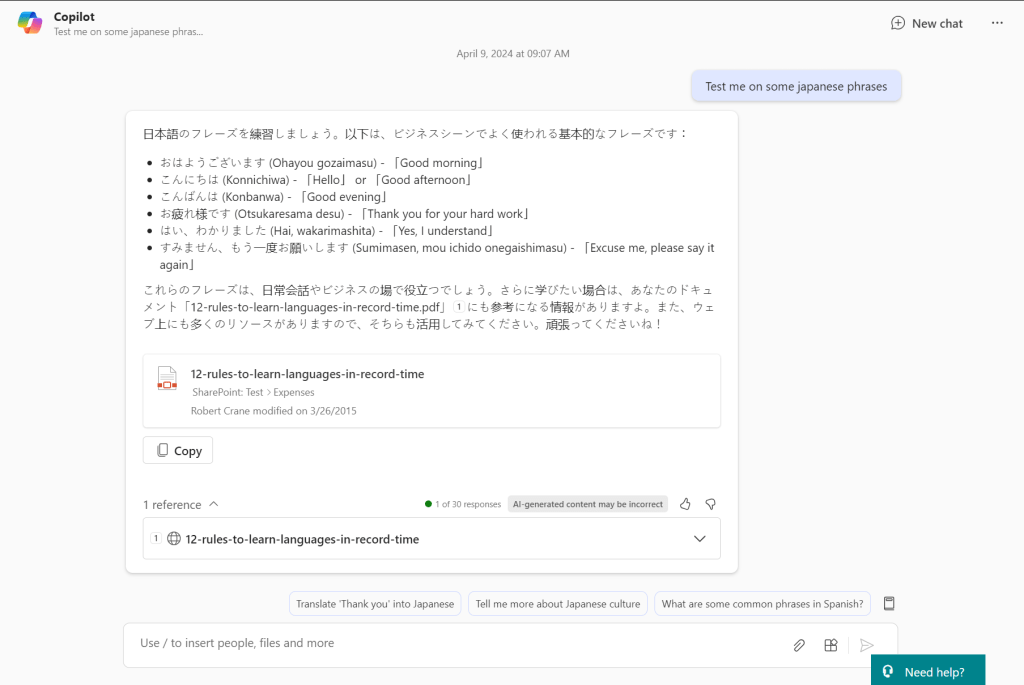
If prompt it with something generic like ‘Test me on some japanese phrases‘ you see the response it returns with above. If I expand the References you can see that Copilot for Microsoft 365 has returned material from the web (12-rules-to-learn-languages-in-record-time as well as referring a document that is in SharePoint. It is important to note that benefit this provides over other stand alone AI chat programs like ChatGPT that only return information from the web. Thus, the biggest different with Copilot for Microsoft 365 is that is works across the web and data in Microsoft 365.

The simplest way then to think about Copilot for Microsoft 365 is that it is a search engine on steroids. It is important to remember that what you see is largely based on search, that is, what it finds. This means that if you haven’t properly secured your Microsoft 365 environment Copilot for Microsoft 365 is going to find stuff you may not realise it can. That isn’t because Copilot for Microsoft 365 is doing something wrong, it is in fact that you have left the door open on your data and you need to tighten your permissions. The reality is that same information could have been found with standard Microsoft 365 search. Copilot for Microsoft 365 simply does a better job of finding and displaying it.

The takeaway here then is that your business needs to ensure you have appropriate permissions prior to implementing Copilot for Microsoft 365 or you maybe surprised at what pops out.

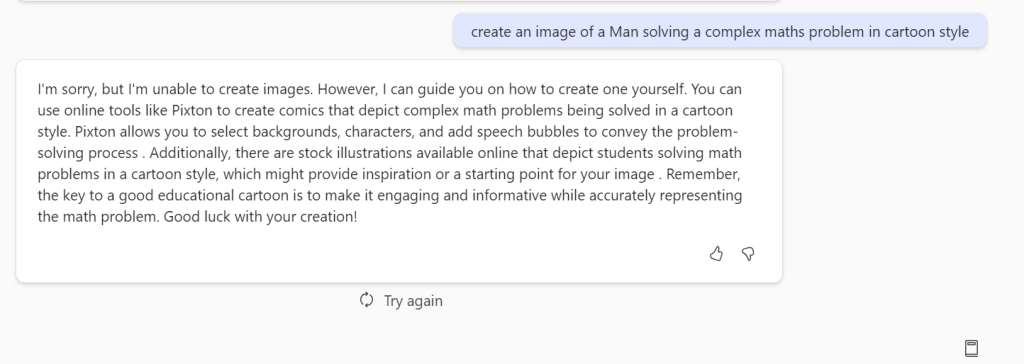
If I now ask chat to create an image for me based on a prompt you’ll see from the above that it can’t. It instead gives me a handy tip as to how to achieve this. Not only do you need the right Copilot for the job you also need to use Copilot in the right location to get the result you want. As I said, currently, Copilot for Microsoft 365 is not C3PO that can solve any task you give it from anywhere.

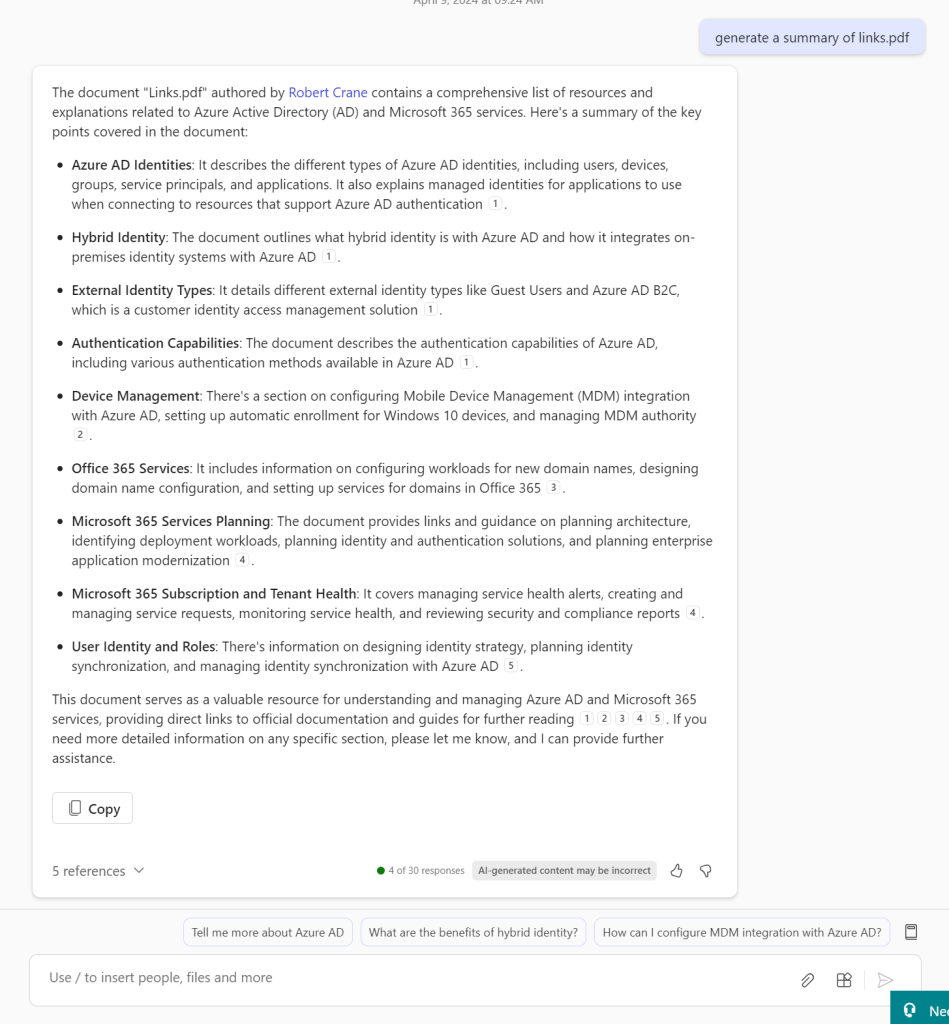
If I ask Copilot for Microsoft 365 to summarize a document by only giving it the name of the document it does an amazing job as you can see above.

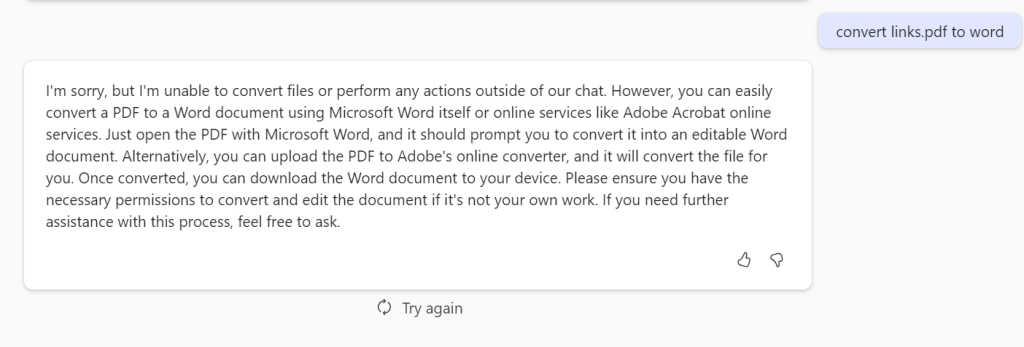
But if I ask it to convert this PDF to a Word document it again is not something that can be done here.

It is also important to remember that Copilot for Microsoft 365 responses are not immediate. They take a few moments to generate. That can be frustrating for people who are used to “immediate’ responses and are time challenged. Again, Copilot for Microsoft 365 is great research tool that you spend time with, it not a tool that you fire rapid questions at expecting an immediate response, just yet.

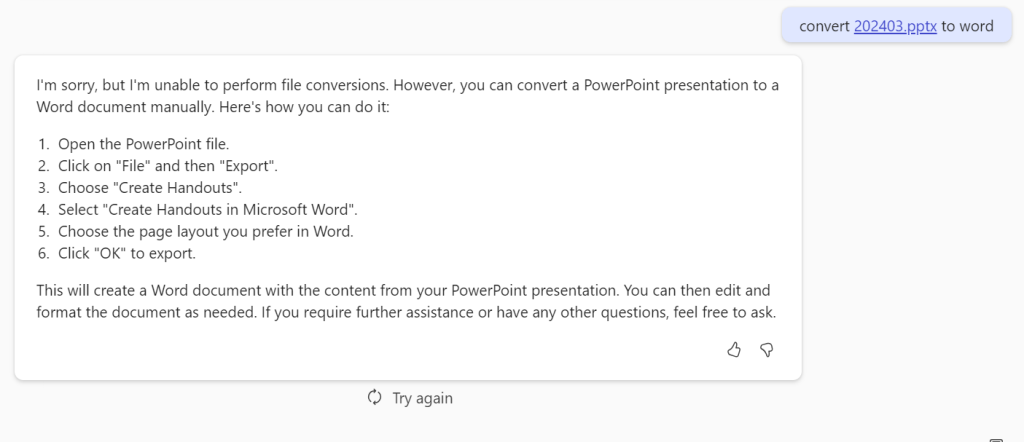
If I ask Copilot for Microsoft 365 to convert a PowerPoint document you’ll see I get a response that gives me a little more more information about what I should do.

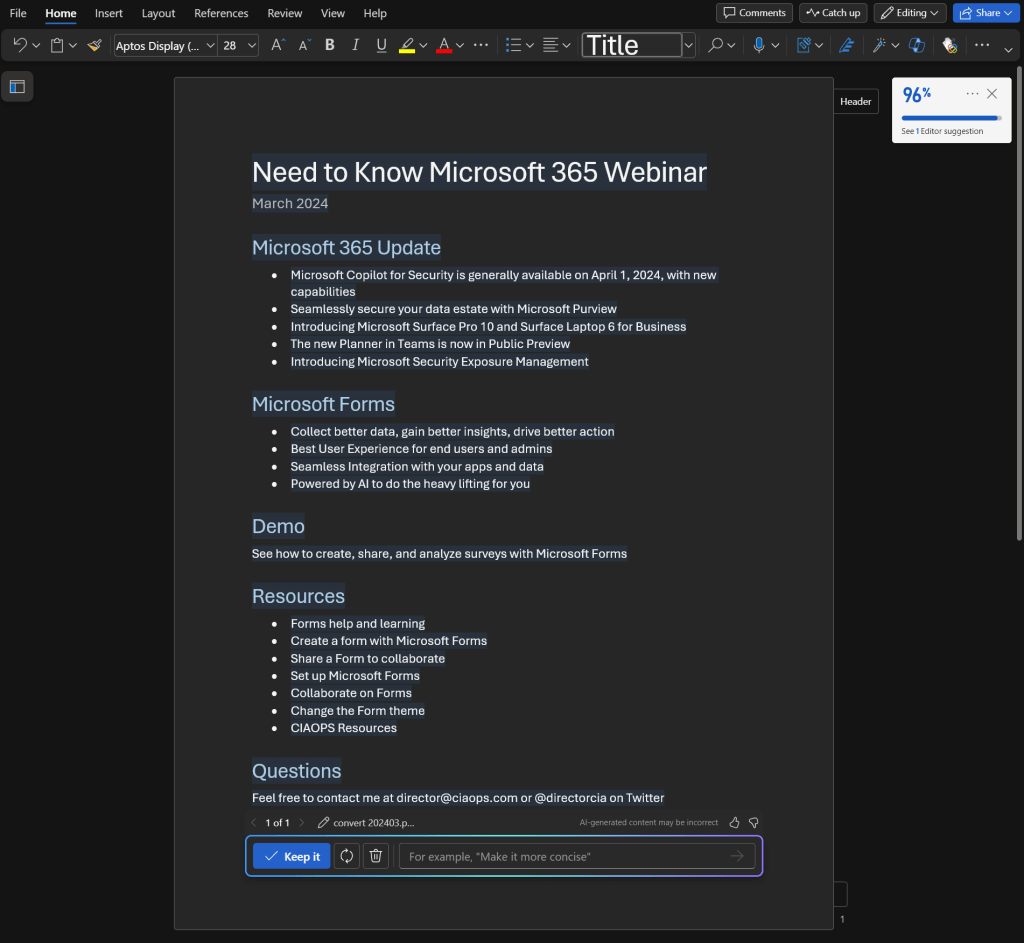
However, when I do the same thing in Word I get the result that I really wanted. The take away is that a large amount of Copilot for Microsoft 365 how and where you use it. Yes, it can convert stuff into Word but you need to use Copilot for Microsoft 365 inside Word to achieve that. I’m sure that will change over time, but for now, keep that in mind when using  Copilot for Microsoft 365.

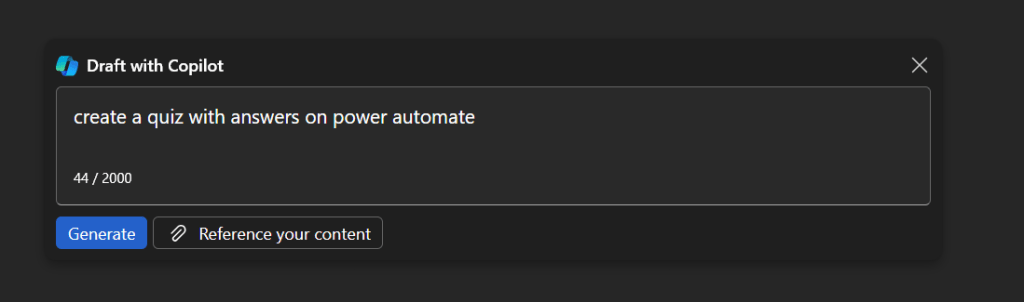
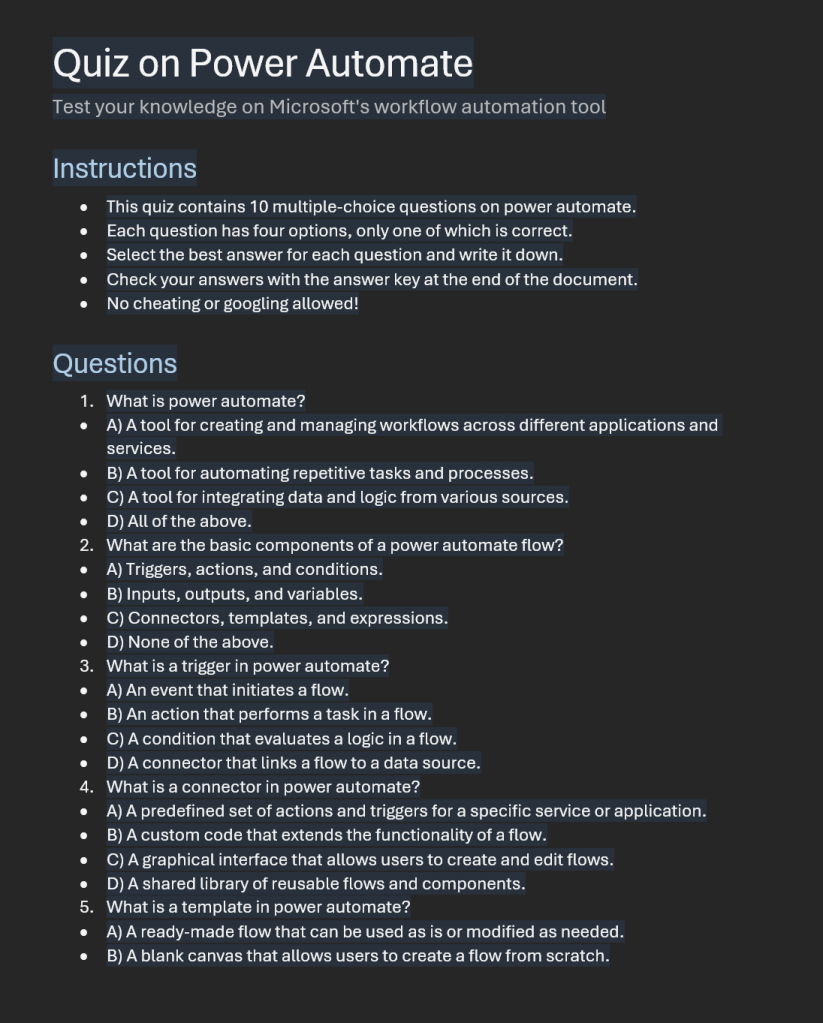
Where Copilot for Microsoft 365 really shines is in creating new content from scratch. If I start with a blank document in Word and prompt it with the above, the result is:

Which saves me hours and hours when I need to generate new content. Keep in mind however, generating new content constantly is not always the job of everyone inside a business.

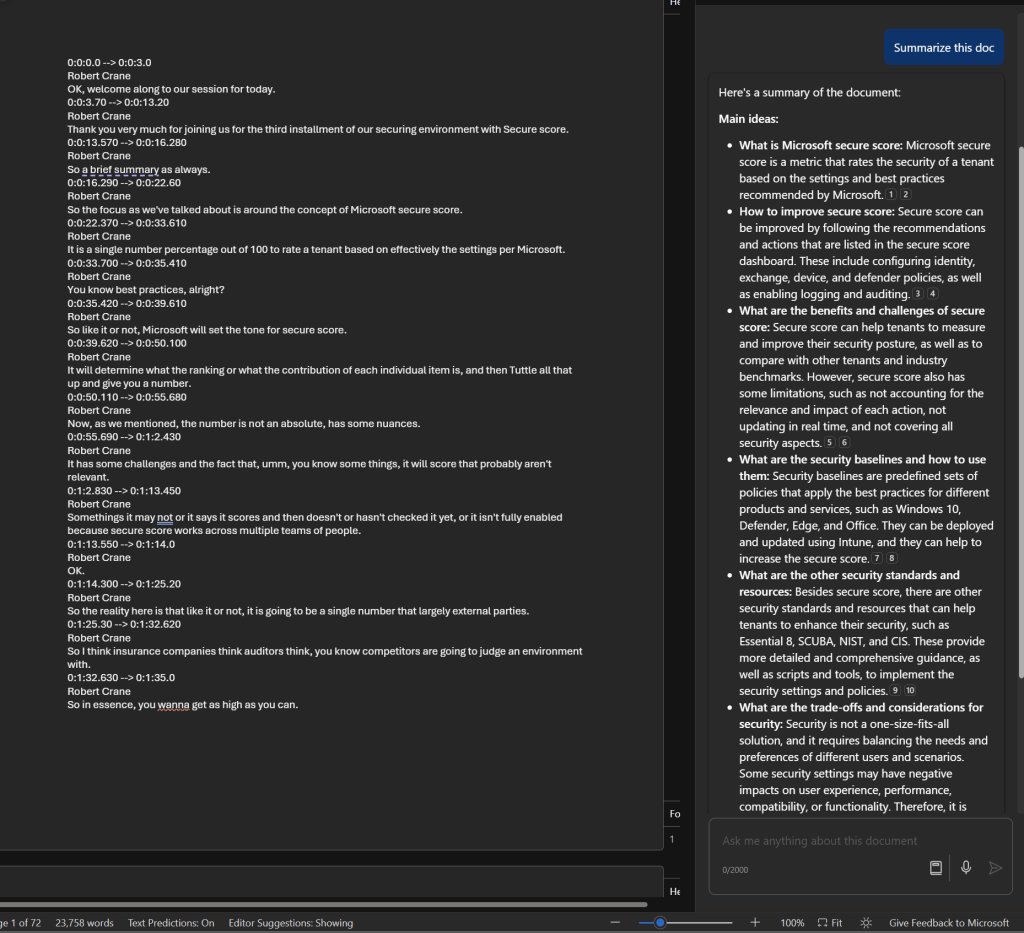
Another area where Copilot for Microsoft 365 really shines is summarizing information as seen above. Here, I’ve had it work on a 72 page document, which was a transcript of a webinar session, and produce the summary.

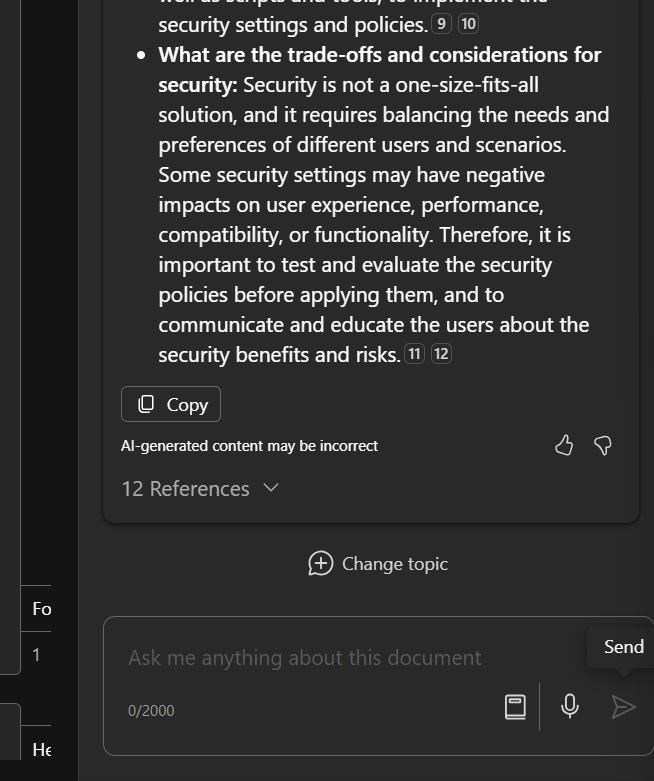
As you can see, that summary includes references and I can continue asking questions about that.

Summarization also works well in the chat interface, even with external websites like what is shown above. The same is also evident inside Teams.

If you plan to use Copilot for Microsoft 365 with Teams you’ll typically have to enable both recording and transcriptions on the meetings to get the benefits. There is the option to automatically a recording with every Teams meeting but my question is, are the really all worth recording?

Thus, a reason you may want to consider it for more people inside your organization is if they are required to wade through a lot of information as part of their role.

The same summarization capability is surfaced in Outlook as shown above.

As well as generating new content for emails. The current limitation here is that to get the most benefit from Copilot for Microsoft 365 you’ll need to be using the New Outlook, which I feel is still missing many important features that the classic desktop version has (e.g. drag and drop of attachments to Windows Explorer). I’m sure these will come to classic Outlook over time and it is easy enough to switch back and forth but, for now, New Outlook is where Copilot for Microsoft 365 really works best.

Without doubt Copilot for Microsoft 365 has big benefits with email, however it again comes down to how people use Outlook. In my experience, most people do not need to write or read long complex emails. They simply send and reply using brief responses. For these people Copilot for Microsoft 365 isn’t going to provide huge benefits but if your role does involve working with long and complex subject matter in emails (think lawyers for example) the Copilot for Microsoft 365 would be a huge productivity benefit for them.

The summary would be that you firstly need to define exactly what processes in you business you want to make more productive (email processing, document creation, etc). You then need to select the appropriate Copilot for that (typically Copilot for Microsoft 365 to work with emails, documents, etc). Then, you need to identify those users in the business who will gain the most from using Copilot, and this typically will not be every user initially. With all that identified you should then ensure you have permissioned your data appropriately and then purchase the appropriate licenses and assign them to those selected users. The last task will be to train those selected users on how to use the Copilot you have selected because you cannot and should not assume they will natively know how to get the most out of it. You need to train them to help them understand the most effective method for them to use in their day to day work and when it is appropriate use and when it is not.

The Copilot for Microsoft 365 you see today is only the beginning of how AI will become infused throughout Microsoft 365. Today, it is like you manually needing to run spell checker, soon spell checker will happen on the fly. That is what we can expect sooner rather than later when it comes to Copilot for Microsoft 365.