Distributed Password cracking attempts detected by Sentinel

image

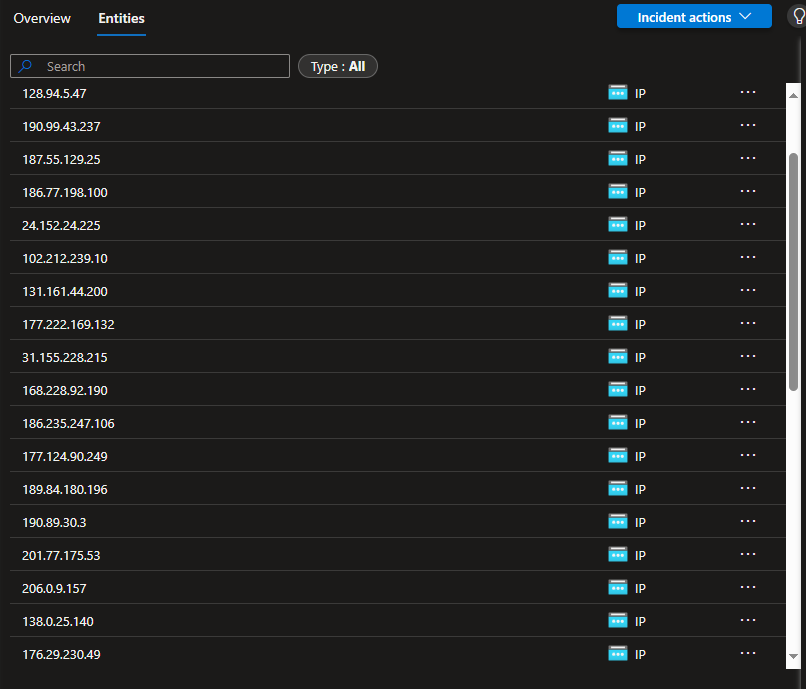
Over the past couple of days I’ve inundated with failed logins from locations all around the world. You can see a partial list of the those IPs reported in Sentinel above.

image

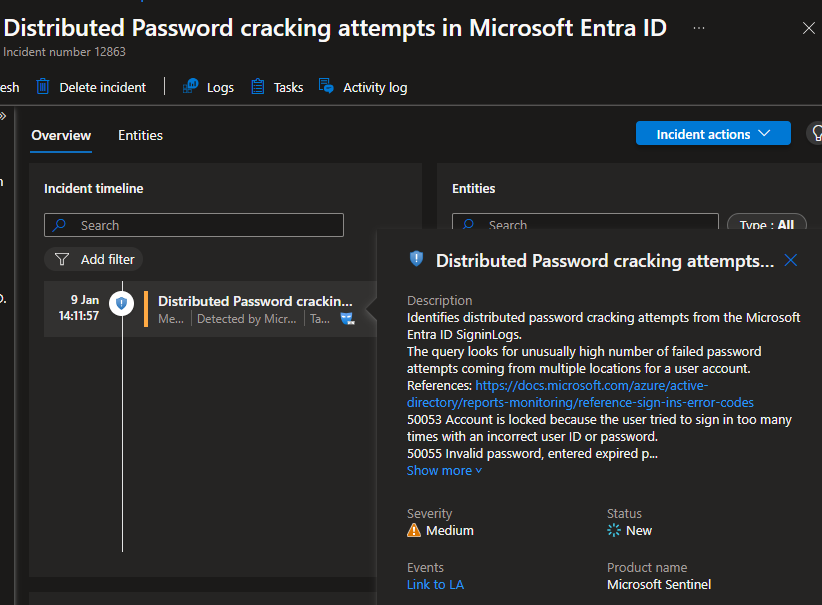
But, for the first time I also found this alert had triggered an incident in Sentinel – Distributed Password cracking attempts in Microsoft Entra ID, as seen above.

Here is the list and locations so far:

IP Address Origin (Country) Potential Organization (if identifiable)
31.141.37.30 Russia Provider: Rostelecom
38.222.57.97 United States Comcast Cable Communications
190.99.43.237 Argentina Telecom Argentina
187.55.129.25 Brazil Vivo (Telefônica Brasil)
186.77.198.100 Brazil Oi S.A.
24.152.24.225 United States Cox Communications
102.212.239.10 Uganda Uganda Telecom
131.161.44.200 United States Microsoft Corporation
177.222.169.132 Brazil TIM Brasil
31.155.228.215 Romania UPC Romania
168.228.92.190 Brazil NET Virtua
186.235.247.106 Brazil Oi S.A.
177.124.90.249 Brazil Vivo (Telefônica Brasil)
189.84.180.196 Brazil Oi S.A.
190.89.30.3 Brazil Vivo (Telefônica Brasil)
201.77.175.53 Brazil Oi S.A.
206.0.9.157 United States Comcast Cable Communications
138.0.25.140 Brazil Oi S.A.
176.29.230.49 Ukraine Ukrtelecom
191.99.34.144 Brazil Claro Brasil
87.116.135.139 France Orange S.A.
170.82.15.6 Brazil Claro Brasil
84.54.71.37 Spain Telefónica
170.231.164.96 Brazil Oi S.A.
45.231.208.166 Mexico Megacable
190.14.176.31 Colombia ETB (Empresa de Telecomunicaciones de Bogotá)
85.106.118.20 Italy TIM (Telecom Italia)
191.189.9.96 Brazil Claro Brasil
152.249.19.25 Argentina Telecom Argentina
189.34.199.125 Brazil Vivo (Telefônica Brasil)
41.225.129.174 Nigeria MTN Nigeria
85.96.249.52 Italy Vodafone Italia
197.26.214.34 South Africa MTN South Africa
187.183.41.6 Brazil Claro Brasil
177.126.234.232 Brazil Vivo (Telefônica Brasil)
149.86.137.85 United States AT&T

Always nice to have Sentinel on the job letting me know what’s going on!

My Teams Copilot can now interpret images

image

A while back, I built an agent that I published into Teams to provide answers to technical questions on the Microsoft Cloud. I have always been super impressed by the results I get from it, but now, as you see above, it can also interpret images!

image

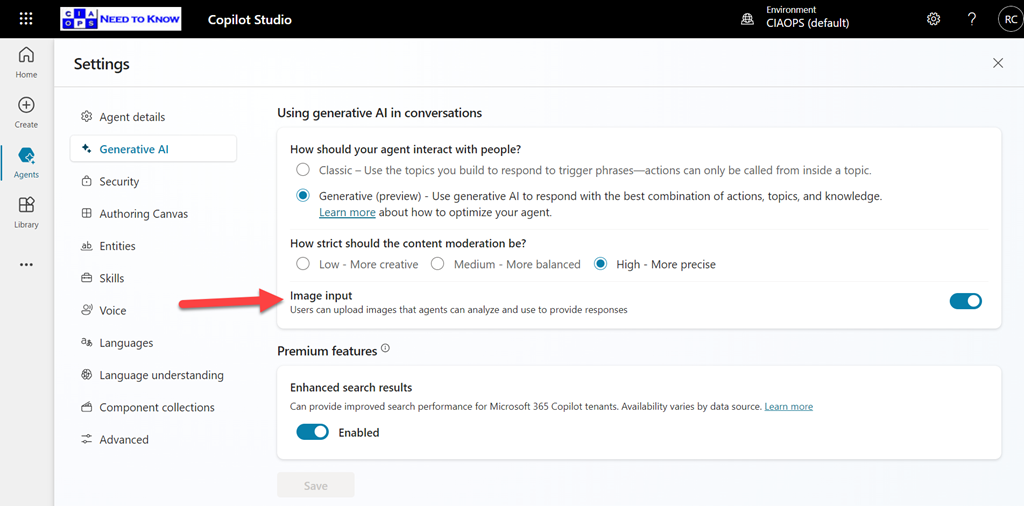
You need to enable the Image Input option in Settings for your agent as shown above, and of course, don’t forget to again publish your agent so the updates flow into Teams.

What is even more impressive, is that if you look at the error screen at the top of the page you’ll notice that it isn’t even in English and Copilot has extracted the text from the image, interpreted it and answered in English in Teams. Impressive!

Viewing Copilot prompt and responses across the organisation

image

To explore Copilot activity in your environment open:

https://purview.microsoft.com

with a user with appropriate access. Select Solutions on the left and then DSPM for AI as shown above.

image

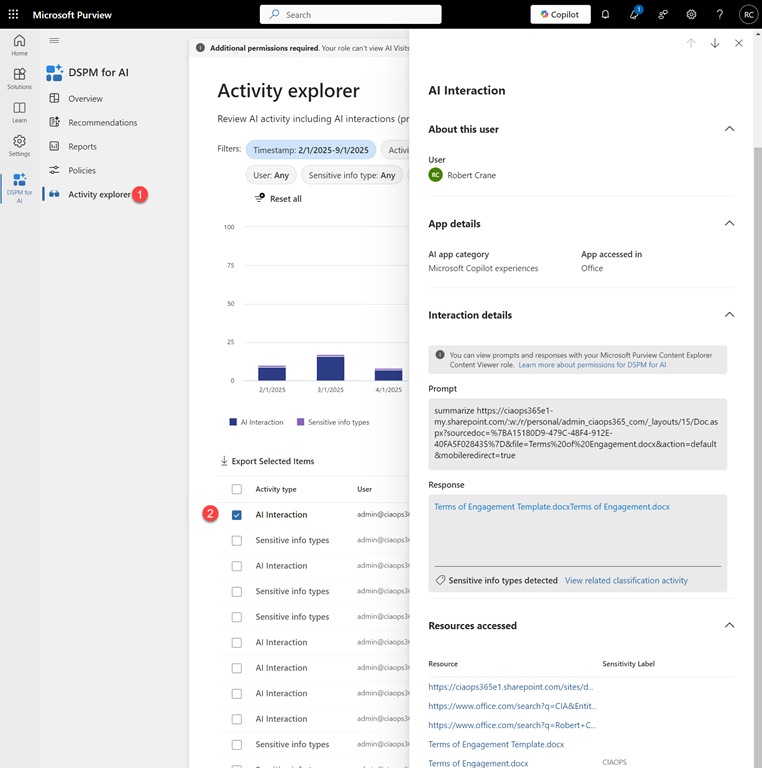
Then select Activity Explorer and from the list that appears on the right select an entry that says AI interaction as shown above.

You should now see a panel appear from the right with a range of details about that session. Towards the bottom you will find

image

both the Prompt and Response as shown above. You will also see an resources, for example files or links, used in that session.

image

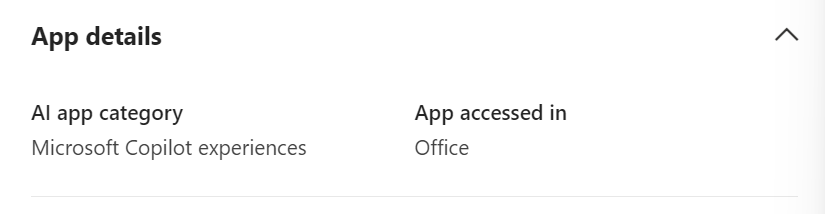
A little further up you will also find where that session took place, in this case from inside an Office app.

The Data Security Posture Security Management (DSPM) for AI has many other resources that you can also take advantage of but the above is the simplest method I’ve found to quickly see what a Microsoft 365 Copilot prompt and response in the environment was.

My podcasts 2025

desk-music-headphones-earphones

You can find the previous year’s selection here:

My podcasts 2024

I do spend a lot of time listening to podcasts, generally in between things, like travelling. However, there is a limit to how many you can consume in a week and that’s why I need to be very discerning about what I listen to.

Regulars

These podcasts are ones that I generally won’t miss an episode of.

Windows Weekly

The latest Microsoft news with some fun and entertainment along the way. Paul Thurrott’s musing make this podcast alone something worth listening to. I still miss Mary Jo Foley I will admit and the show just isn’t as good or enjoyable. I still have no interest in the whiskey part of this show, which I now just fast forward through. I still also find that the show is more ‘ranty’ than informational which can get a bit much at times.

The Tim Ferriss Show

Some really great advice, business insights and strategy. Also lots of life lessons that I have found work really well for me. A weekly must listen for me. Some, I do skip through and some can be quite tough to get through because they are so long, but a worthwhile investment of my time. I am finding these shows are getting longer and longer making them hard to squeeze in but I do try and listen to them all.

Hardcore History

These tend to be quite long, like reading a book, but a very good and very interesting. Luckily, they are not that frequent, so it can make a nice change from all the tech stuff. There hasn’t been much content here of late which is disappointing. If you love history and an interesting story, then this is the podcast for you.

The Intrazone

All the latest news and information about SharePoint, OneDrive for Business, Teams and more directly from Microsoft. Pretty short, which makes it easy to consume. Can try a bit hard to be ‘funky’ at times but good way to stay up to date with the Microsoft collaboration news.

Sync Up

A podcast focused on the Microsoft files experience around OneDrive from Microsoft. More content has dropped but they seems to spend so much time at the beginning of the ‘learning’ about the guests and what do they like etc. I’d really prefer they just get into the content. I’m here for that not, not to take a deep dive into the personalities.

Darknet Diaries

Really well produced cybersecurity focused podcast. Has a nice variety of topics and the content is good and well researched. If you enjoy the security side of IT you’ll love these episodes. Seems to me that Jack has run out of content for these for the time being. recent episode have deviated away from main theme in my opinion. Less regular episodes and the topics are becoming broader, which isn’t necessarily a bad thing but the context has changed.

No such podcast

Giving this a go as it is officially from the US National Security Agency (NSA). Has had some interesting topics but doesn’t provide much actionable knowledge down at the SMB level but I am still finding it enjoyable.

Microsoft Threat Intelligence Podcast

Has some interesting content but tried to be a too ‘whacky, zany and trendy’ at times. Rather high level security information but give good information on the whole threat landscape and interestin personalities and technologies there. Generally around 20 minutes at double speed, so easily digestible.

Once off podcasts

Think of these more of a book you’d read or a TV show you’d watch.

The Lazarus Heist

Another well produced podcast from the BBC that follows the trails of and attempt to steal and launder billions of dollars. Apparently, additional episodes are coming later this year. If you like Darknet Diaries, you’ll like this.

I churn through these mostly at 2x speed to allow me to get through as much content as possible. I do have a few other podcasts on my current podcasting app. I am always on the lookout for good podcasts business, technology, history, whatever. So if you can recommend something you like, I’m all ears. These days, if you have a topic of interested, you’ll find many podcasts you can listen to. Don’t be shy to try them and throw away ones that don’t suit you until you find what you like.

I’ve found that many podcasts have disappeared over the last year and I have been more judicious on what I spend my time listening to. It has to provide valuable information or be enjoyable to listen to and I have become much stricter on those criteria. I have a tried quite a few new podcast in the last year but none of them really stood up to my requirements.

Finally, of course, there is my own podcasting effort:

Need to Know podcast

which covers the Microsoft Cloud (typically Microsoft 365 and Azure) as well as business topics. I encourage you to have a listen and me know what you think. 2025 will be the fifteenth year that it has been available.

Hopefully, there is something of interest to you in what I listen to. Feel free to let me know as well as any recommendations you may have, as I said, I’m all ears! All of these I listen to directly on Spotify these days.

Updated Defender for Endpoint Security Baseline

image

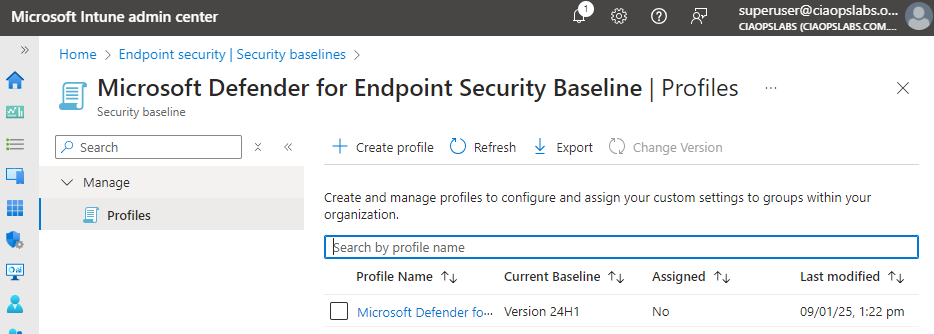
Microsoft has updated the Defender for Endpoint Security Baseline policy in Intune to Version 24H1 as shown above.

I have managed to extract my own best practice JSON configuration file for this policy and make it available at:

https://github.com/directorcia/bp/blob/main/Intune/Policies/Endpoint/Baselines/dep.json

which means you can import this directly into your environment programmatically (I used PowerShell to do exactly this).

The updates to this policy are huge! The previous version config file was about 350 lines, this new 24H1 version is now about 2,300 lines long! This indicated to me that Microsoft is moving more and more settings into theses baselines.

Configuring DLP with Microsoft 365 Copilot

Here is a video that takes you through the process of setting up a Data Loss Prevention Policy (DLP) that protects content when used in Microsoft 365 Copilot.

To achieve this you need to set up Data Labelling in your Microsoft 365 environment which is not covered in this video. Documentation from Microsoft on DLP with Microsoft 365 Copilot can be found here:

Learn about the Microsoft 365 Copilot policy location (preview)

Copilot pages missing

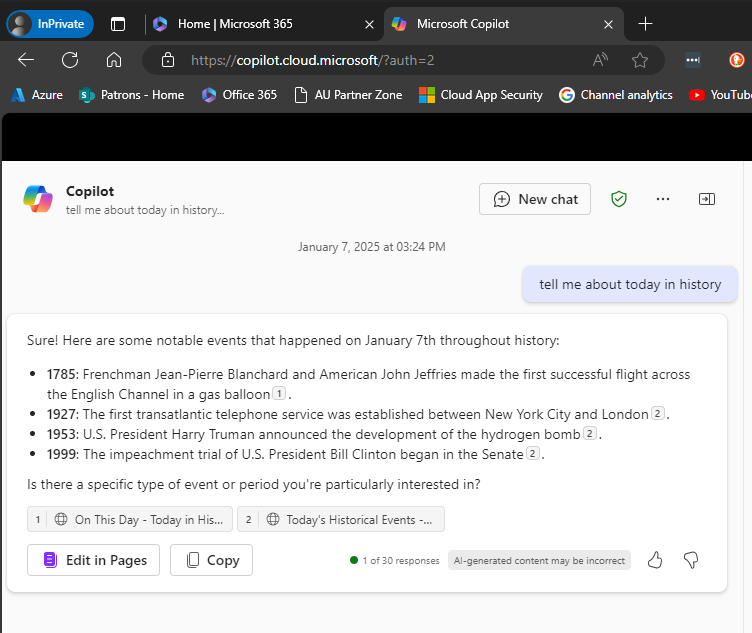
Recently, I discovered that Copilot pages were not appearing in Edge inprivate.

image

You can see the example above: Edge, inprivate and no Copilot pages.

image

It seems that a control in the Microsoft 365 administration portal (Copilot | Settings | Pin Copilot) plays a role somehow. Initially mine was set to Do not pin Microsoft Copilot to the navigation bar.

image

However, when I changed the setting to Pin Copilot to the navigation bar (recommended) and after a browser refresh or two (or close down/reopen browser), the Edit in Pages now appears within Edge inprivate as shown above.

What I also didn’t appreciate is that if you don’t have a paid version of Copilot for Microsoft 365 and simply use the free version of Copilot with your Microsoft 365 environment you can also get access to the Edit in Pages capabilities, which I thought required a fully paid Copilot for Microsoft 365. However, that doesn’t appear to be the case as the above screen shot came from a tenant with no paid Copilot for Microsoft 365 and the Edit in Pages is available, PROVIDED it seems, you turn on the pin Copilot option!

Of course, I can’t find this documented anywhere and only stumbled across it playing around. I have found the Edit in Pages button appearance to be somewhat unreliable when it did appear, but I have been turning the setting on and off to test, which have contributed to that unreliability.

After all this testing, my advice would be, based on the tests I’ve run, that even if you don’t have a pad version of Copilot for Microsoft 365 in your environment you want the option to Pin Copilot to the navigation bar enabled as I detailed above. That should allow the Edit in Pages to always appear regardless of a paid version of Copilot being in the tenant or not and regardless of browser or browser session you use.

Another observation is that with the pinned option set, the free version of Copilot returns more information as you can see when you compare the screen shots. With the pinned option enabled you get citations and hyperlinsk to the citation. Interesting.

It would be nice to know for sure if this setting does what I have found but for now you’ll have to take my word for it based on what I have found in my testing.