Office 365 Backup presentation

Here’s the slides from my short theatre presentation at Ignite Copenhagen

THR30149 – Do you need to backup Office 365?

Is there are need to backup Microsoft 365 data given the feature set in place? What exactly is provided out of the box by Microsoft and what might require the consideration of additional solutions? What are the best practices with what can be enabled in Microsoft 365 to provide maximum data protection before considering alternatives? Determining this will help you create a better and more effective policy to ensure the availability of your information in all situations. Come and learn how to better protect your data and what additional steps you can take to improve its security and reliability.

https://www.slideshare.net/directorcia/do-you-need-to-backup-office-365



Your collaboration should be wide not deep – BRK30221

Day 2 of Microsoft Ignite the Tour Sydney gave me the opportunity to present

Your collaboration should be wide not deep

and the slides are available at:

https://www.slideshare.net/directorcia/your-collaboration-should-be-wide-not-deep

I again thank Microsoft for the opportunity to speak and for everyone who attended.

We are now all done here in Sydney for 2020.

Need to Know Podcast–Episode 228

No Brenton still but that doesn’t stop me bringing you the Microsoft Cloud news. For Brenton fans you’ll still hear him with the interview of Lorenzo Coppa about Gluh that is in the second part of this episode. Some aggressive moves by Microsoft in the default browser search space so make sure you are aware of what’s happening and listening along.

This episode was recorded using Microsoft Teams and produced with Camtasia 2019

Take a listen and let us know what you think – feedback@needtoknow.cloud

You can listen directly to this episode at:

https://ciaops.podbean.com/e/episode-228-lorenzo-coppa/

Subscribe via iTunes at:

https://itunes.apple.com/au/podcast/ciaops-need-to-know-podcasts/id406891445?mt=2

The podcast is also available on Stitcher at:

http://www.stitcher.com/podcast/ciaops/need-to-know-podcast?refid=stpr

Don’t forget to give the show a rating as well as send us any feedback or suggestions you may have for the show.

Resources

@contactbrenton

@directorcia

Gluh

New Year new browser

Microsoft will be carbon neutral by 2030

Microsoft Search in Bing through Office Pro Plus

Windows 7 support end

Need to Know podcast–Episode 227

FAQ podcasts are shorter and more focused on a particular topic. In this episode I’ll talk about the recommended process for file migrations to Microsoft 365 collaboration.

Take a listen and let us know what you think – feedback@needtoknow.cloud

You can listen directly to this episode at:

https://ciaops.podbean.com/e/episode-227-wide-not-deep/

Subscribe via iTunes at:

https://itunes.apple.com/au/podcast/ciaops-need-to-know-podcasts/id406891445?mt=2

The podcast is also available on Stitcher at:

http://www.stitcher.com/podcast/ciaops/need-to-know-podcast?refid=stpr

Don’t forget to give the show a rating as well as send us any feedback or suggestions you may have for the show.

Resources

FAQ 4 – Your collaboration structure should be wide not deep

CIAOPS Patron Community

Ignite 2019 sessions on YouTube

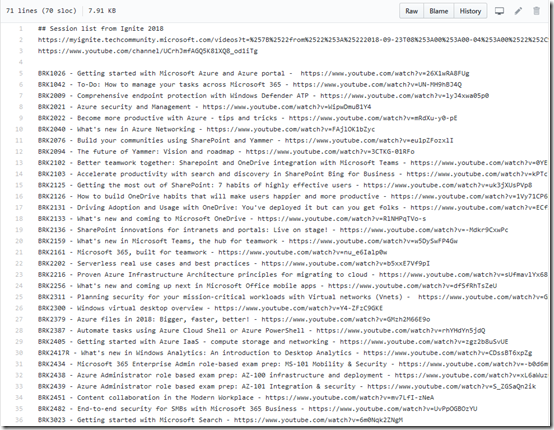
Not everyone, including me, is able to get to Microsoft Ignite for various reasons. Microsoft, to their credit, live streams and records the sessions. Eventually, these sessions make their way onto YouTube which is my preferred viewing platform. However, what is missing is a catalogue of the links to each session.

image

As in previous years:

Ignite 2017 sessions on YouTube

Ignite 2018 sessions on YouTube

I have started building this index and making it available on my GitHub:

Ignite session 2019 on YouTube

Please note, all the session are not there as yet. I add them as I discover them along the way through the year.

Of course, if you have a link to a session that I don’t have up there yet, please send it along so I can add it and we can all benefit.

Thanks again to Microsoft for doing this and uploading the sessions to YouTube. They are a great source of learning and allows people like me would couldn’t get to Ignite the ability to work through the content.

That COG is pretty handy!

image

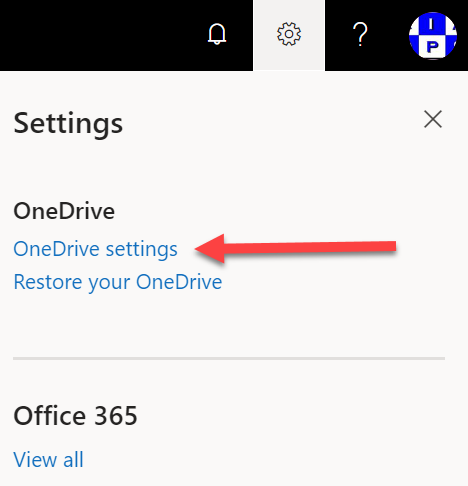
If you visit the page for your OneDrive for Business, you’ll notice a COG in the top right hand corner of the window as shown.

image

If you select that, you’ll see a menu like shown above. Select the OneDrive settings option as shown.

image

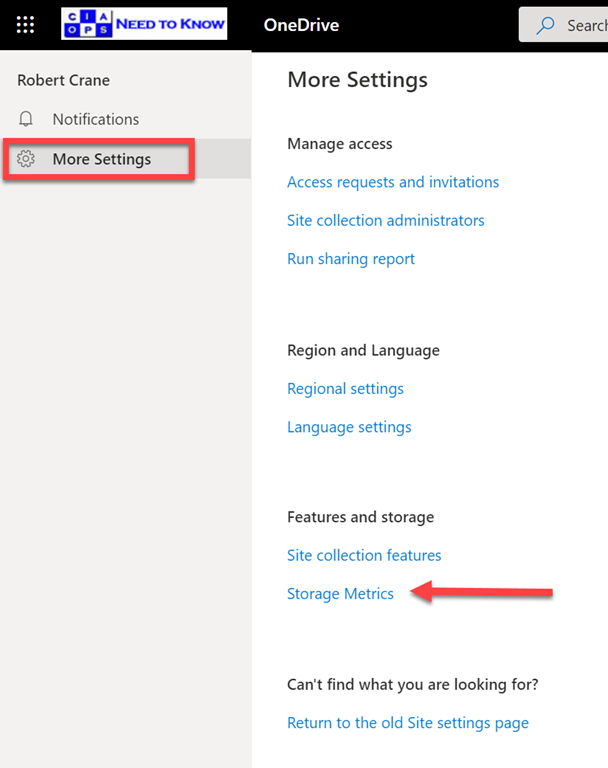
Here you’ll find a page with a whole lot more options. In this case select the option, Storage metrics as shown.

You should also note that there is a Run sharing report option as here well.

image

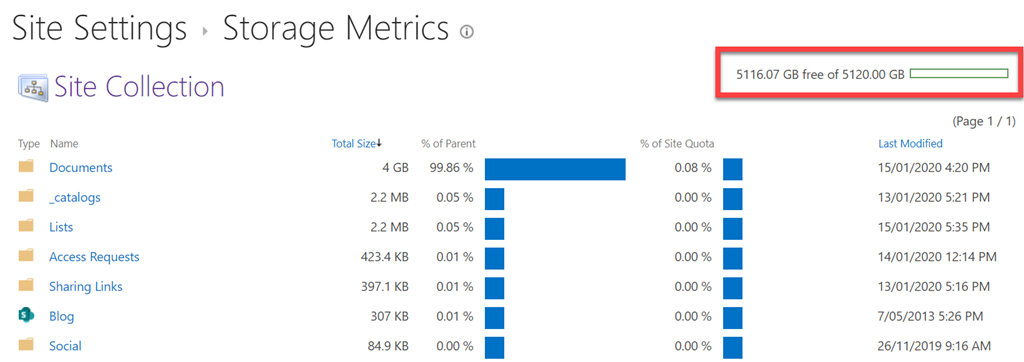
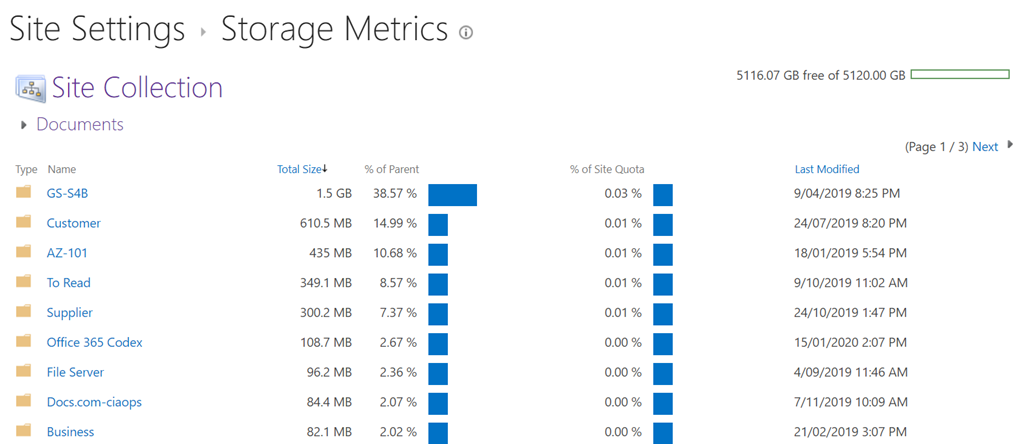
The Storage metrics option allows you to see a breakdown of the data storage in your OneDrive for Business as shown. You’ll also notice in the top right, the total and used capacity of your data.

image

You can drill further into directories by simply clicking on them. The above shows the data break down in the Documents directory below the OneDrive for Business home location.

Microsoft will also be adding more options to the COG over time so make you check there regularly.

Need to Know podcast–Episode 225

FAQ podcasts are shorter and more focused on a particular topic. In this episode I’ll talk about the recommended process for file migrations to Microsoft 365 collaboration.

Take a listen and let us know what you think – feedback@needtoknow.cloud

You can listen directly to this episode at:

https://ciaops.podbean.com/e/episode-225-process-for-file-migrations/

Subscribe via iTunes at:

https://itunes.apple.com/au/podcast/ciaops-need-to-know-podcasts/id406891445?mt=2

The podcast is also available on Stitcher at:

http://www.stitcher.com/podcast/ciaops/need-to-know-podcast?refid=stpr

Don’t forget to give the show a rating as well as send us any feedback or suggestions you may have for the show.

Resources

Process for file migrations to Microsoft 365

Need to Know podcast–Episode 223

FAQ podcasts are shorter and more focused on a particular topic. In this episode I’ll talk about my framework for file migrations to Microsoft 365 collaboration.

Take a listen and let us know what you think – feedback@needtoknow.cloud

You can listen directly to this episode at:

https://ciaops.podbean.com/e/episode-223-file-migration-framework/

Subscribe via iTunes at:

https://itunes.apple.com/au/podcast/ciaops-need-to-know-podcasts/id406891445?mt=2

The podcast is also available on Stitcher at:

http://www.stitcher.com/podcast/ciaops/need-to-know-podcast?refid=stpr

Don’t forget to give the show a rating as well as send us any feedback or suggestions you may have for the show.

Resources

A framework for file migrations to Microsoft 365