Add OneNote integration to New Outlook

The new Outlook is slowly improving.

image

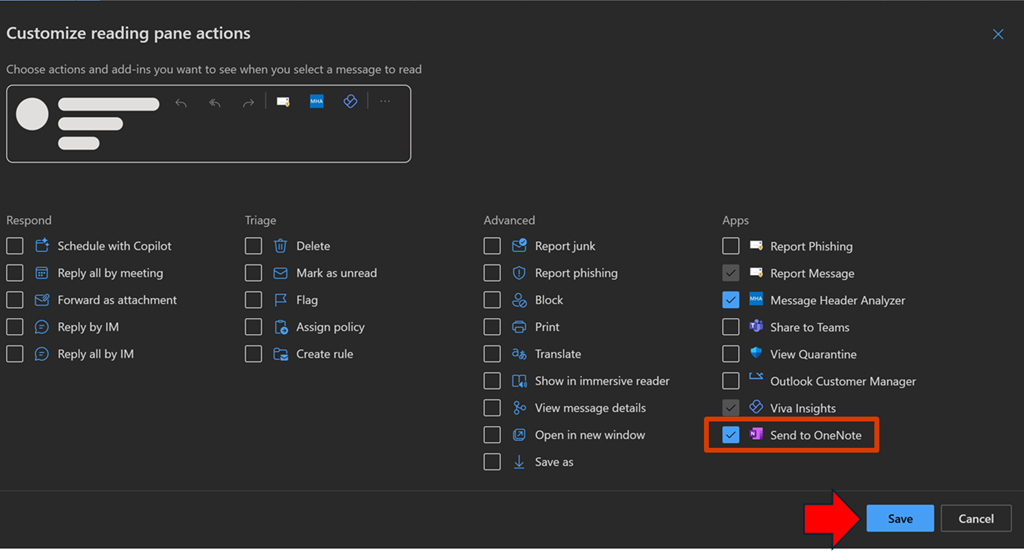
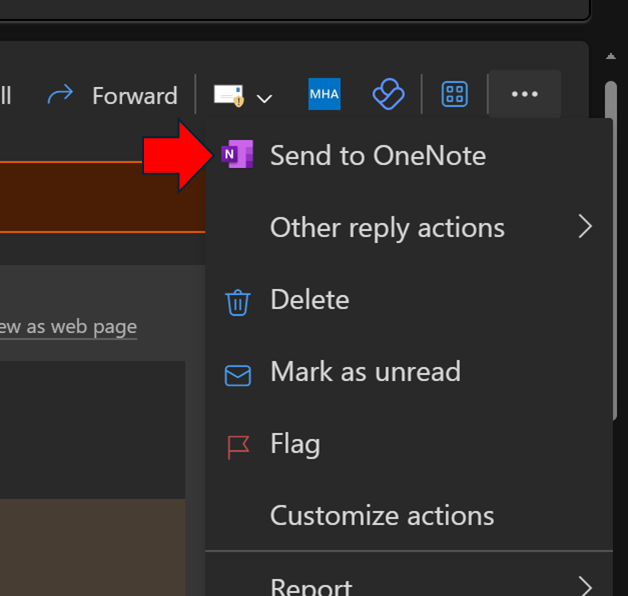
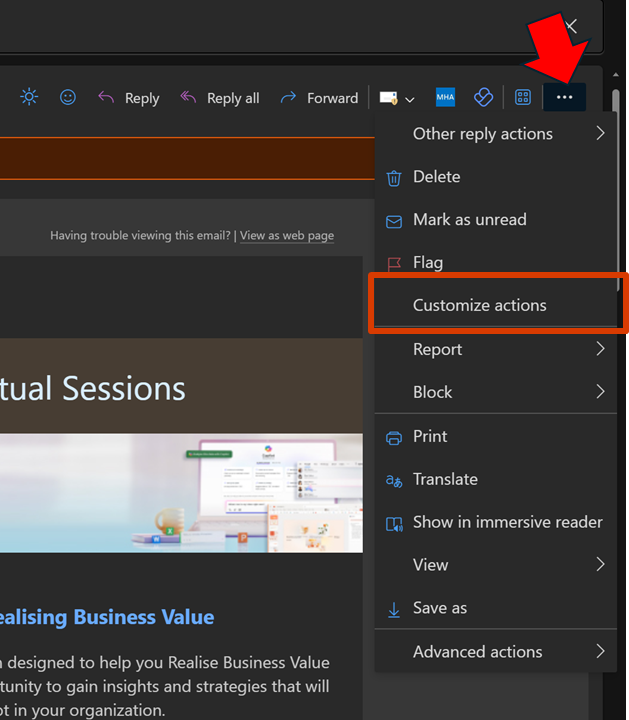
One key missing component for me was the integration with OneNote, as I like to send stuff from Outlook to OneNote. That feature is now there but simply isn’t enabled. To enable OneNote integration, open an email and select the ellipse (3 dots) as shown. From the menu that appears select Customize actions.

image

From the menu that select Send to OneNote, as shown above. Then select Save.

image

When you return to that menu for an email you should see the Send to OneNote as shown above.

image

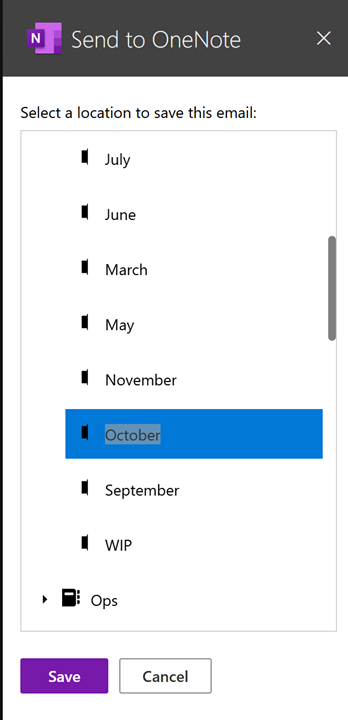
A dialog will appear on the right as shown above, allowing you to select where you wish the email saved.

Unfortunately, it only currently saves the content to a new page in the section in the notebook you nominate, not inside an existing page as used to happen in Outlook ‘classic’.

Hopefully, we’ll get the ability to send to an existing OneNote page as we used to be able to. At least I can send information to OneNote that I was unable to before I customized the actions as I have shown here.

Techwerks 23

bw-car-vehicle

CIAOPS Techwerks returns to Melbourne CBD on Friday the 15th of March 2024.

The course is limited to 20 people and you can sign up and reserve your place now! You reserve a place by completing this form:

http://bit.ly/ciaopsroi

or by sending me an email (director@ciaops.com) expressing your interest.

The content of these all day face to face workshops is driven by the attendees. That means we cover exactly what people want to see and focus on doing hands on, real world scenarios. Attendees can vote on topics they’d like to see covered prior to the day and we continue to target exactly what the small group of attendees wants to see. Thus, this is an excellent way to get really deep into the technology and have all the questions you’ve been dying to know answered. Typically, the event produces a number of best practice take aways for each attendee. So far, the greatest votes are for deeper dives into the Microsoft Cloud including Microsoft 365, Azure, Intune, Defender for Endpoint, security such as Azure Sentinel and PowerShell configuration and scripts, with a focus on enabling the technology in SMB businesses.

Recent testimonial – “I just wanted to say a big thank you to Robert for the Brisbane Techworks day. It is such a good format with each attendee asking what matters them and the whole interactive nature of the day. So much better than death by PowerPoint.” – Mike H.

The cost to attend is:

Gold Enterprise Patron = $50 ex GST

Gold Patron = $90 ex GST

Silver Patron = $180 ex GST

Bronze Patron = $360 ex GST

Non Patron = $720 ex GST

I hope to see you there.

Techwerks 21

bw-car-vehicle

CIAOPS Techwerks returns to Brisbane CBD on Thursday the 21st of September.

The course is limited to 20 people and you can sign up and reserve your place now! You reserve a place by completing this form:

http://bit.ly/ciaopsroi

or by sending me an email (director@ciaops.com) expressing your interest.

The content of these all day face to face workshops is driven by the attendees. That means we cover exactly what people want to see and focus on doing hands on, real world scenarios. Attendees can vote on topics they’d like to see covered prior to the day and we continue to target exactly what the small group of attendees wants to see. Thus, this is an excellent way to get really deep into the technology and have all the questions you’ve been dying to know answered. Typically, the event produces a number of best practice take aways for each attendee. So far, the greatest votes are for deeper dives into the Microsoft Cloud including Microsoft 365, Azure, Intune, Defender for Endpoint, security such as Azure Sentinel and PowerShell configuration and scripts, with a focus on enabling the technology in SMB businesses.

Recent testimonial – “I just wanted to say a big thank you to Robert for the Brisbane Techworks day. It is such a good format with each attendee asking what matters them and the whole interactive nature of the day. So much better than death by PowerPoint.” – Mike H.

The cost to attend is:

Gold Enterprise Patron = Free

Gold Patron = $33 inc GST

Silver Patron = $99 inc GST

Bronze Patron = $176 inc GST

Non Patron = $399 inc GST

I hope to see you there.

Reset SharePoint Online Document Library permissions script

A common need I see is to be able to have a Document Library in SharePoint Online be changed so that all the permissions throughout inherit from the parent as they would have by default typically. This ‘re-inheritance’ can be done manually, but once you start having a few unique permissions is a deep structure, doing so can be challenging and time consuming.
image

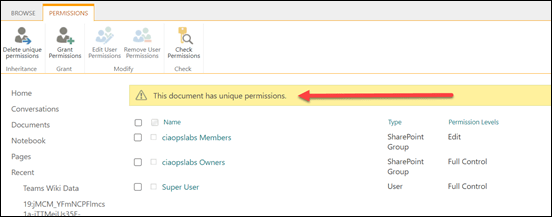
Unique permissions look like the example above, where you can see the standard banner that appears at the top of the page.

The answer to ‘re-inheriting’ permissions in bulk is to use PowerShell. I have created a script to do exactly this, which you can find here:

https://github.com/directorcia/Office365/blob/master/spo-doclib-reset.ps1

Before you run this script, you’ll need to connect to the Document Library you want to change using PnP.PowerShell. Luckily, I also have a script for that here:

https://github.com/directorcia/Office365/blob/master/o365-connect-pnp.ps1

As I mentioned in a recent article, you’ll need to run all of these scripts typically with PowerShell V7.

image

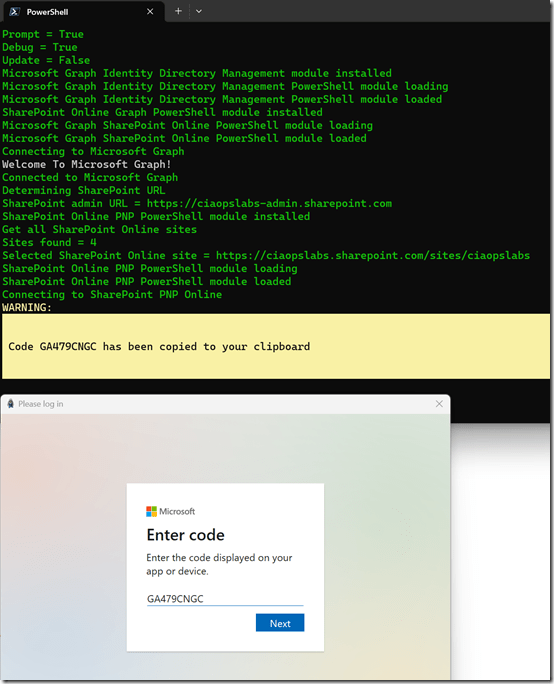
The connection script will allow you to select your SharePoint site as shown above.
image

The connection process will then do a web code login to the selected Document Library as shown above.
image

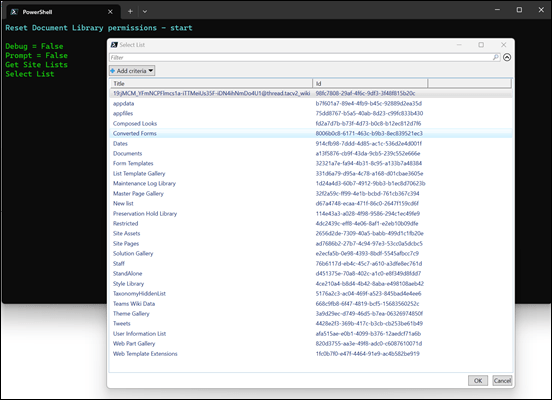
After the connection script has completed you should the run the reset script. When you do you’ll see a window showing you all the items you can select to reset. Pick the one you want to continue.
image

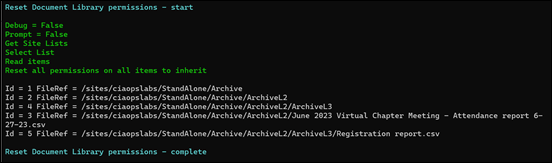
The reset script will then loop through all the items it can find and set their permission back to inheritance.
image

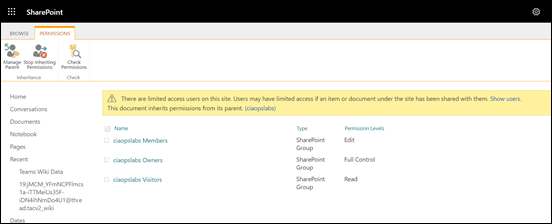
If the original SharePoint location is refreshed, you’ll see that all items now inherit as expected, as shown above.

This should make getting back to a know starting point with permissions in a SharePoint Online Document Libraries much easier. However, with any permission changes you need to take care and understand the ramifications of what you are doing and the impact they will have. Remember, this script resets ALL permissions for ALL items back to inheriting.

I have tested as best as I can, but if you find any issue please let me know and remember to run this in PowerShell V7!


Connect to PnP PowerShell script

The latest pnp.powershell module (V2.X and above) now won’t work with PowerShell v5. Thus, I have updated my PnP connection script:

https://github.com/directorcia/Office365/blob/master/o365-connect-pnp.ps1

to accommodate this.

Thus, if you attempt to run this script in PowerShell version 5 with the latest pnp.powershell module you will typically see:

image

and the error is:

Could not load file or assembly ‘System.Management.Automation, Version=7.2.0.0, Culture=neutral, PublicKeyToken=31bf3856ad364e35’ or one of its dependencies. The system cannot find the file specified.

However, when you run the script in PowerShell V7 you’ll see:

image

that the connection is successful.

I have also taken the opportunity to remove the dependency in the script as well on the now depreciated module MSONLINE and replaced it the Microsoft.Graph module.

This kind of signals the beginning of the end for modern cloud modules in PowerShell 5. However, some still require PowerShell 5 but I expect that to change.

In summary, the latest pnp.powershell modules require PowerShell version 7 and I have updated my connection script to accommodate this.

Basic event capture in Microsoft 365

If you want to be able to find out what has happened in Microsoft 365 you’ll need to ensure that you have enabled the appropriate logs as well as being able to view information there when needed. This video shows you the basic locations for logs in Microsoft 365 as well as the different services that cane be used to query and report on these. It is important to have all your logging enabled well in advance of when you’ll need it. This video should get you started.

Video link – https://www.youtube.com/watch?v=-YSHlo4Cvgo

PowerShell connection to M365 Compliance center no longer users WinRM

image

For the longest time, if you needed to connect to the Microsoft 365 Security and Compliance center with PowerShell you needed to allow WinRM to use basic authentication.

If you therefore ran my connection script:

https://github.com/directorcia/Office365/blob/master/o365-connect-sac.ps1

you’d see the above error if you didn’t have WinRM enabled for basic authentication.

Having WinRM enabled with basic authentication is not a best practice for security, and I’m happy to report that if you update you ExchangeOnlineManagement PowerShell to version 3.2.0 you’ll now no longer need WinRM at all!

image

My connection script will auto update your environment for you when it runs.

I’m glad to see this update as it means I can again connect to the Microsoft Security and Compliance center in my locked down environment.