How to remove a Win32 application using Intune

This video:

https://www.youtube.com/watch?v=Xilp56PVltI

will show you the steps to remove an Win32app from a Windows 10 desktop. It will utilise an existing Intune Application deployment policy to achieve this. It is able to do so because part of creating the initial deployment policy was the requirement to specify how to uninstall that same application. Thus, when you create an Application deployment policy in Intune you can use to add and remove that application from your environment.

Need to Know podcast–Episode 276

i speak with MVP and Digital Workplace expert Rebecca Jaskson. Rebecca is fascinated by what makes people and organisations tick. She specialises in the digital workplace, employee experience and change management. We do a  deep dive into the main collaboration tools that Microsoft provides such as SharePoint, with an especial focus on the value of the modern Intranet.

There is also a round up of the latest Microsoft Cloud news at the front of the episode.

This episode was recorded using Microsoft Teams and produced with Camtasia 2020.

Brought to you by www.ciaopspatron.com

Take a listen and let us know what you think – feedback@needtoknow.cloud

You can listen directly to this episode at:

https://ciaops.podbean.com/e/episode-276-rebecca-jackson/

Subscribe via iTunes at:

https://itunes.apple.com/au/podcast/ciaops-need-to-know-podcasts/id406891445?mt=2

The podcast is also available on Stitcher at:

http://www.stitcher.com/podcast/ciaops/need-to-know-podcast?refid=stpr

Don’t forget to give the show a rating as well as send us any feedback or suggestions you may have for the show.

Resources

Rebecca Jason – Linkedin, Twitter, Blog, Instagram

Mirosoft Ignite

AI-based Privacy Management for Microsoft 365 [VIDEO]

3 ways to support frontline workers in a hybrid world

Introducing Android™ Apps on Windows 11 to Windows Insiders

Microsoft achieves a Leader placement in Forrester Wave for XDR

Windows 11 security: Protect it all with Windows 11 chip to cloud security

Sysinternals in the Windows store

Sysmon report in virus total

Providing feedback on user reported messages

Hopefully, you are aware that Microsoft 365 provides users the ability to report a suspected email. I have spoken about this here:

Improved security is a shared responsibility

image

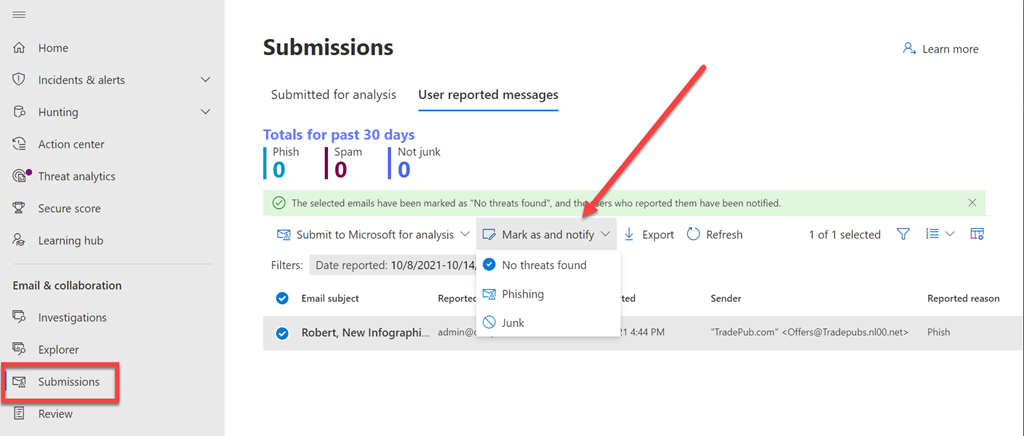
What you may not be aware of is that these submissions can viewed and action in the Microsoft Security Center:

https://security.microsoft.com

under the Submissions menu option as shown above.

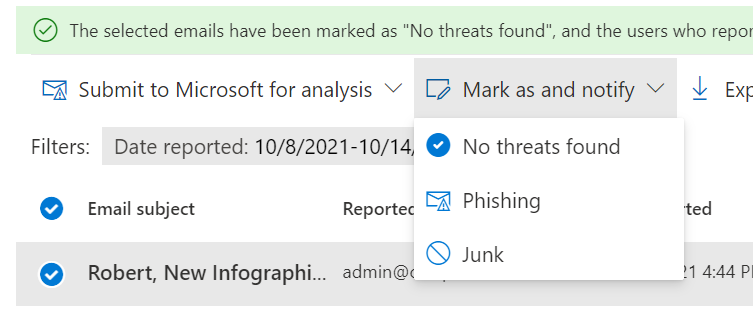
You may also not be aware that there are further actions you can take in here:

image

You can provide feedback directly to the user about their submission using the Mark as an notify option as shown above.

image

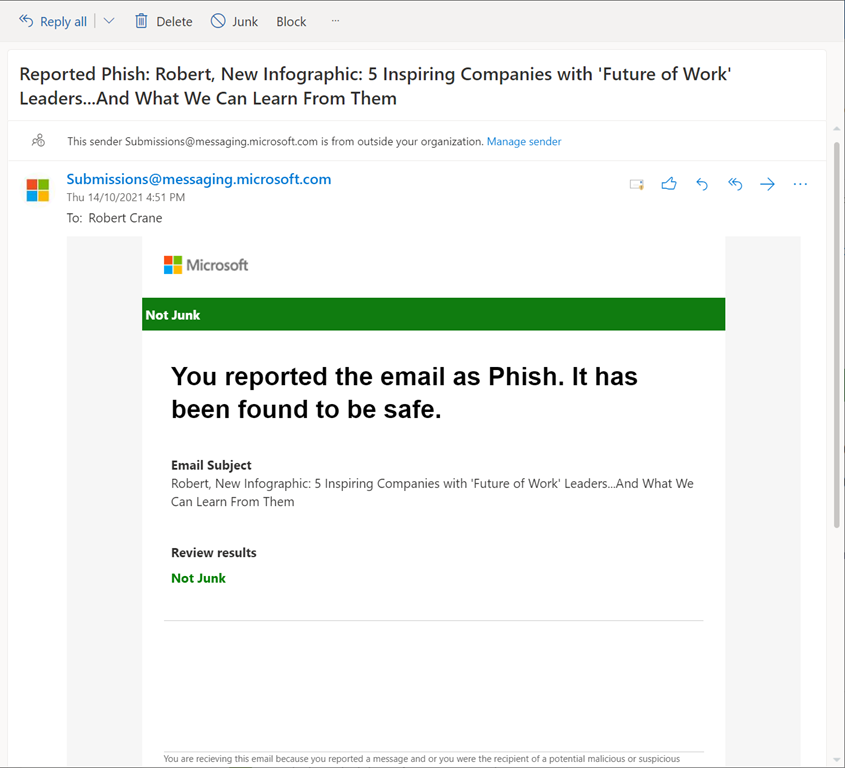
Doing so will send the user an email, like that shown above, to provide feedback about that submission for the user. Doing provides important reinforcement of users remaining vigilant as well as helping them better identify threats.

image

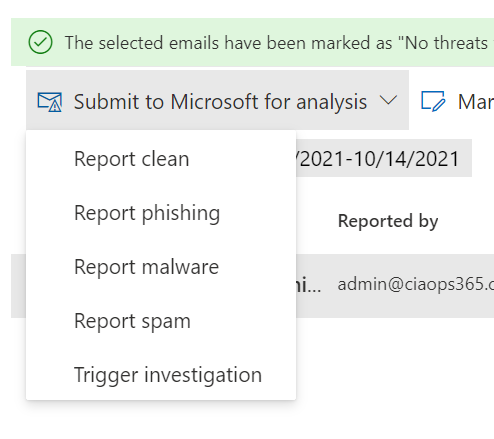
 You’ll also find actions you can take on that message that will provide feedback directly to Microsoft, as shown above.

image

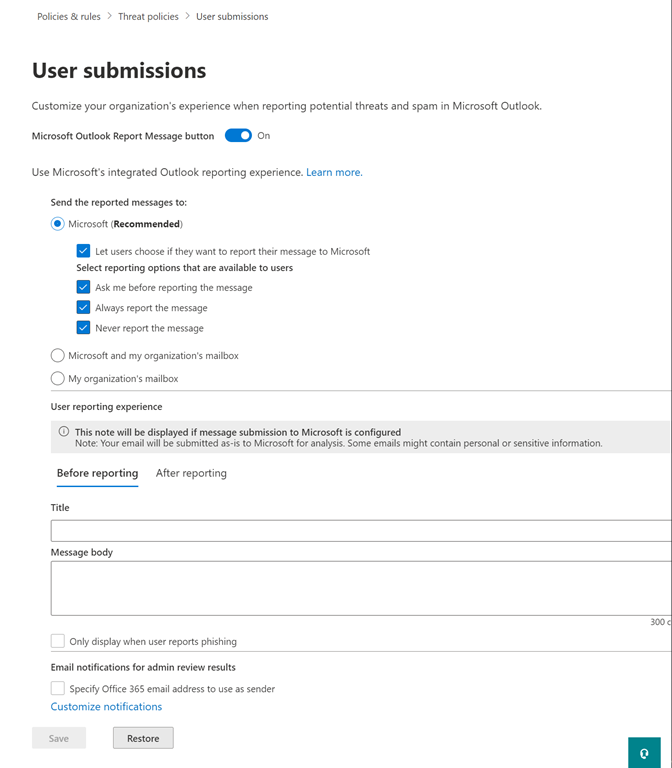
Even better, if you go into Policies & rules | Threat Policies | User submissions you are able to customise what is sent to the user, both before and after reporting as shown above.

For more information on these capabilities visit:

Admin review for reported messages

Getting users involved in security is important. Part of that is providing them feedback and recognition of their contribution, no matter how small. Using these capabilities for reported messages, you are able to do that quickly and easily.

Need to Know podcast–Episode 275

Join for an episode with MVP Rory Braybrook where we learn more about modern identities, especially Azure including B2B and B2C. Identity is so critical to everything we do in IT these days it is important to have a refresher to understand what’s what and how it can be used effectively. I’ll also bring you the latest news and updates from the Microsoft cloud world so listen in and share your feedback.

This episode was recorded using Microsoft Teams and produced with Camtasia 2020.

Brought to you by www.ciaopspatron.com

Take a listen and let us know what you think – feedback@needtoknow.cloud

You can listen directly to this episode at:

https://ciaops.podbean.com/e/episode-275-rory-braybrook/

Subscribe via iTunes at:

https://itunes.apple.com/au/podcast/ciaops-need-to-know-podcasts/id406891445?mt=2

The podcast is also available on Stitcher at:

http://www.stitcher.com/podcast/ciaops/need-to-know-podcast?refid=stpr

Don’t forget to give the show a rating as well as send us any feedback or suggestions you may have for the show.

Resources

Rory Braybrook – LinkedIn, Authory

Windows 11: A new era for the PC begins today

Welcome to the new Whiteboard

Mailbox storage limits

Microsoft Ignite

How cyberattacks are changing according to new Microsoft Digital Defense Report

Microsoft Digital Defense Report

Defending Windows Server 2012 R2 and 2016

Power Platform Community Monthly Webinar – November 2021

image

Join us for our monthly Power Platform webinar where we share the latest news and updates from the Microsoft Power Platform plus take a deeper dive into Power Virtual Agents.

You can register now via:

https://bit.ly/ppc1121

If you wish to join our community and be part of the regular discussion and participation on the Microsoft Power Platform you can join via:


CIAOPS Patron

(look for the Power Platform option here to join us).
We look forward to seeing you on the webinar.

Intelligence not Information

image

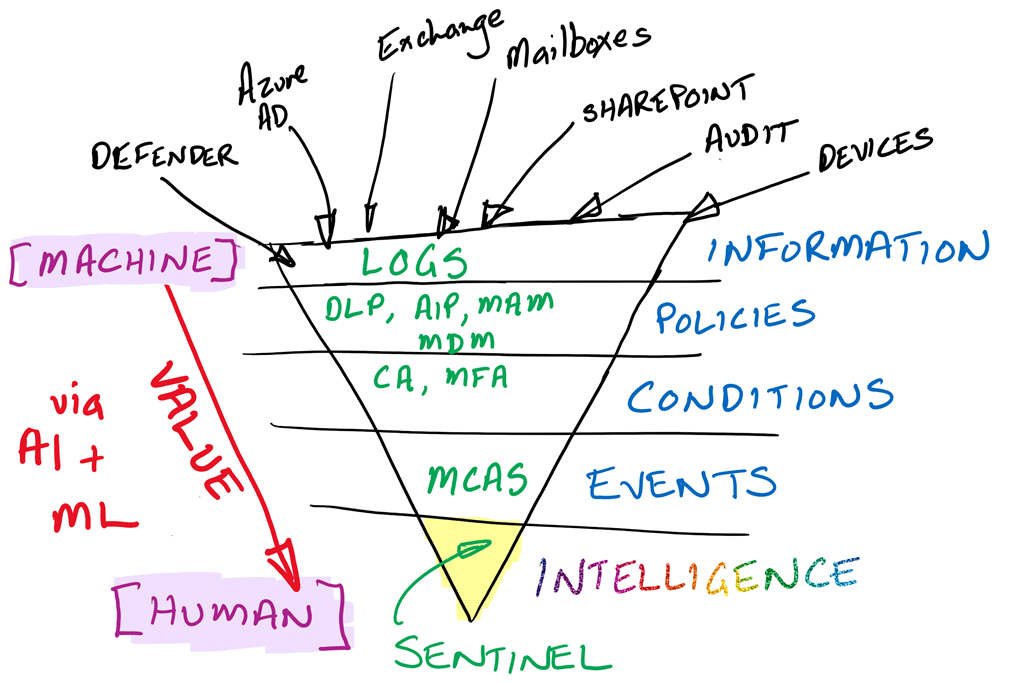
I use the above diagram to help people understand where they should be investing human capital when it comes to security. I see too many people who are responsible for security focused at the Information (top and widest) level of the above diagram.

The Information level is a constant deluge of independent and uncorrelated signals. At this level I would suggest that probably 95% or more of these signals are benign or should be ignored. Thus, if you are investing precious human capital at this level, you are wasting 95% of that or more.

The Information level in today’s security environment is where the machine (aka software) provides the greatest return on investment. This is because the machine can constantly evaluate every signal that arrives, impartially, consistently and tirelessly. It also doesn’t care that 95% of the signals it evaluates has little or no value. It can also do this 24/7/365. It will continue to do this faster and faster with the passage of time.

The Policy level can takes these raw signals and produce results to better secure the organisation. For example, a Data Loss Prevention Policy (DLP) can evaluate the usage of a document and its contents, then determine whether to allow of block access. The machine can’t create the DLP policy but it can very effectively evaluate it and take action. The human adds value to the equation by creating the policy the machine implements.

The Condition level can further use policies, like Conditional Access (CA) based on multiple signals i.e. where a device is connecting from, what information it wants access to, who the user requesting and so on to then determine whether access should be granted. Once again, the machine doesn’t craft the policy but evaluates and enforces the policy constantly. Once again, the human adds value to the equation by creating the policy the machine evaluates all the combined signals against.

Hopefully, you can see my argument here, that the further down the triangle you go, the more effectively human capital is utilised. Conversely, the further up the triangle the more efficient it is for the machine. At the Events level, services like Microsoft Cloud App Security (MCAS) align signals into a format that is much easier for a human to digest and evaluate. Here the machine looks up signals such as IP locations and usages automatically to provide even more data for human assessment.

The machine can thus digest the raw information, then use techniques such as Artificial Intelligence (AI) and Machine Learning (ML) to refine the information and make it more relevant. That is add value. This allows the human to apply what they are best at, on the highest quality information, not the lowest. The precious human analysis effort is deployed where it has the most impact, in a pool of refined and relevant information that has been culled of low quality results.

I would suggest that the relevancy of signals at the Intelligence level, using tools like Azure Sentinel, is much greater than the mere 5% I suggested as a benchmark at the Information layer. But even if it was just 5%, the value of this 5% is infinitely higher because the total value of the signals at this level is much much greater than at lower levels and there are far fewer of them to examine. If the human has the same amount of time and cognitive load to invest at any level, doing so at the Intelligence level all them to spend far more time on each individual item. Anyone who knows will tell you, when it comes to a quality output, you need to invest time.

As with unread email items in an inbox, many people love to make themselves feel important by pointing to how many emails they are receiving. The number of emails your receive or have accumulated is totally irrelevant! What is the important is the VALUE of the information, NOT the quality. So it also is with security. Overwhelming yourself with signals from many different system doesn’t align with better security. If anything, it introduces greater fatigue, distraction and inconsistency, leading to much poorer security.

We live in a world that has more information coming at it daily than there has ever been in history. Tomorrow there will be even more and so on and so on. That growth is only going to accelerate. You cannot approach this modern environment with old approaches such as drowning yourself in low value signals. There are simply too many, and at some point nothing more gets processed due to overwhelm. The smart move is to use technology efficiently. Put it to work on the repetitive and mundane work that humans are not good at or like doing even less. Move down the levels until you have systems that give you intelligence rather than swamping you in a sea of information. After all, isn’t NOT doing this just a self imposed DDOS (distributed denial or service) attack?