Microsoft 365 incident response training

pexels-pixabay-69934

In early 2023 I’ll be running an incident response training course for Microsoft 365 environments. Training will held over four consecutive weeks. Each session will be two (2) hours and run from 9am Sydney time.The dates are:

Wednesday January 11th 2023 – Before an incident. What you need to do to prepare

Wednesday January 18th 2023 – During an incident. What you need to do when an incident occurs

Wednesday January 25th 2023 – After an incident. What needs to be done after an incident has occurred

Wednesday February 1st 2023 – Lab exercises and group best practice discussions

The sessions will be recorded and other materials from the sessions (checklists, etc) will be available to attendees afterwards.

This event will be conducted remotely via Microsoft Teams.

The aim of this training is to help you better prepare for a security incident inside the Microsoft 365 environment. You’ll learn what settings you should enable and what processes you should have in place before an incident occurs. The sessions will also take you through common examples of incidents and help you understand what needs to be done when they occur and how to minimise risk and impact to a business. The sessions will also take your through the post-incident process to build confidence with what information needs to be maintained and how to prevent similar incidents re-occurring. The final session will be a group hands on lab and discussion so you can put all the skills you have learned to the test.

The price for this event will be:

Gold Enterprise Patron = Free

Gold Patron = $33 inc GST

Silver Patron = $99 inc GST

Bronze Patron = $176 inc GST

Non Patron = $399 inc GST

You can learn more about the CIAOPS Patron community at www.ciaopspatron.com.

I hope that you’ll join me in January for this event as I believe it provides some much needed training in a very important aspect of managing and securing Microsoft 365. If you are serious about security for Microsoft 365, then you need a plan and this training will aim to give you just that plus some experience to boot!

You can register you interest in attending this course here – http://bit.ly/ciaopsroi after which I’ll be in contact with you to arrange payment and get you enrolled.

As always, if you have any questions about this training please email me on – director@ciaops.com.

I hope to see you there.

Need to Know podcast–Episode 291

After Microsoft cloud news and updates I talk about the importance of OneDrive for Business as an initial step in a successful cloud migration process.

You can listen directly to this episode at:

https://ciaops.podbean.com/e/episode-291-updates/

Subscribe via iTunes at:

https://itunes.apple.com/au/podcast/ciaops-need-to-know-podcasts/id406891445?mt=2

The podcast is also available on Stitcher at:

http://www.stitcher.com/podcast/ciaops/need-to-know-podcast?refid=stpr

Don’t forget to give the show a rating as well as send me any feedback or suggestions you may have for the show.

This episode was recorded using Microsoft Teams and produced with Camtasia 2022.

Brought to you by www.ciaopspatron.com

Resources

@directorcia

@directorcia@twit.social

Join my shared channel

CIAOPS merch store

Become a CIAOPS Patron

CIAOPS Blog

YouTube edition of this podcast

ACSC Annual Cyber Threat Report, July 2021 to June 2022

ACSC Exercise in a box

Manage exclusions for Microsoft Defender for Endpoint and Microsoft Defender Antivirus

Azure AD Certificate-based Authentication (CBA) on Mobile

Introducing preview access to Microsoft Syntex document processing and more

Microsoft Teams Adoption

What’s new for Microsoft Whiteboard – November 2022

Build connections with Games for Work, a new Microsoft Teams app

Organizational messages for Windows 11 now in public preview

Easily launch an Instant Poll in Teams meetings to engage with your audience & collect feedback

A framework for file migrations to Microsoft 365

Enhanced phishing protection in Windows 11 22H2

image

If you have Windows 11 22H2 and you take a look at your Windows Security settings under App & Browser control, you’ll find some new settings in Reputation-based protection as shown above.

You can read about these here:

Enhanced Phishing Protection in Microsoft Defender SmartScreen

If you want to enable these settings using an Intune Device policy you can do so using the Settings Catalog like so:

image

Remember, at the moment, you need Windows 11 22H2 to configure this.

Need to Know podcast–Episode 290

I have a few updates from the Microsoft cloud for this episode followed by a discussion about Attack Surface Reduction Rules (ASR) and their importance in reducing your risk.

You can listen directly to this episode at:

https://ciaops.podbean.com/e/episode-290-updates/

Subscribe via iTunes at:

https://itunes.apple.com/au/podcast/ciaops-need-to-know-podcasts/id406891445?mt=2

The podcast is also available on Stitcher at:

http://www.stitcher.com/podcast/ciaops/need-to-know-podcast?refid=stpr

Don’t forget to give the show a rating as well as send me any feedback or suggestions you may have for the show.

This episode was recorded using Microsoft Teams and produced with Camtasia 2022.

Brought to you by www.ciaopspatron.com

Resources

@directorcia

Join my shared channel

CIAOPS merch store

Become a CIAOPS Patron

YouTube edition of this podcast

Microsoft Outlook, your personal organizer, helps you be more productive and in control

Microsoft Digital Defense Report 2022

Investigate incidents more effectively with the new attack story view in Microsoft 365 Defender

Announcing enhanced control for configuring Firewall rules with Windows Defender

What’s New in Microsoft Teams | October 2022

New device control capabilities to manage removable storage media access in Microsoft Intune

Demystifying attack surface reduction rules – Part 1

Demystifying attack surface reduction rules – Part 2

Demystifying attack surface reduction rules – Part 3

Demystifying attack surface reduction rules – Part 4

Enable attack surface reduction rules

Check ASR Rules

Power Automate PAYG costs

Recently, I detailed how to enable the Power Platform PAYG billing:

Power Platform PAYG configuration

I now see the following in my environment that has Flows with premium connectors:

image

which basically says:

You can use premium capabilities in this environment. It’s covered by your org’s pay-as-you-go Azure subscription.

The reason I enabled this was because I wanted access to use Premium connectors without having to pay for a higher fixed monthly license cost.

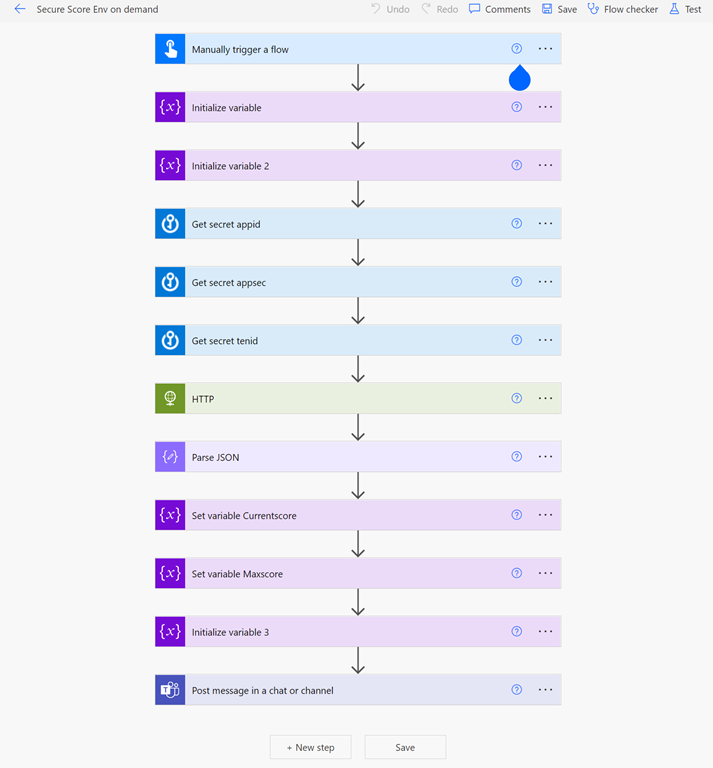
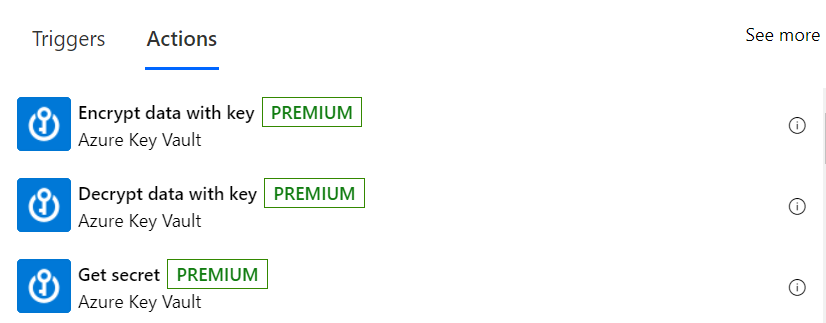
I have the following Flow in this environment that uses two premium connectors:

image

– Azure Key Vault

image

and

– HTTP

image

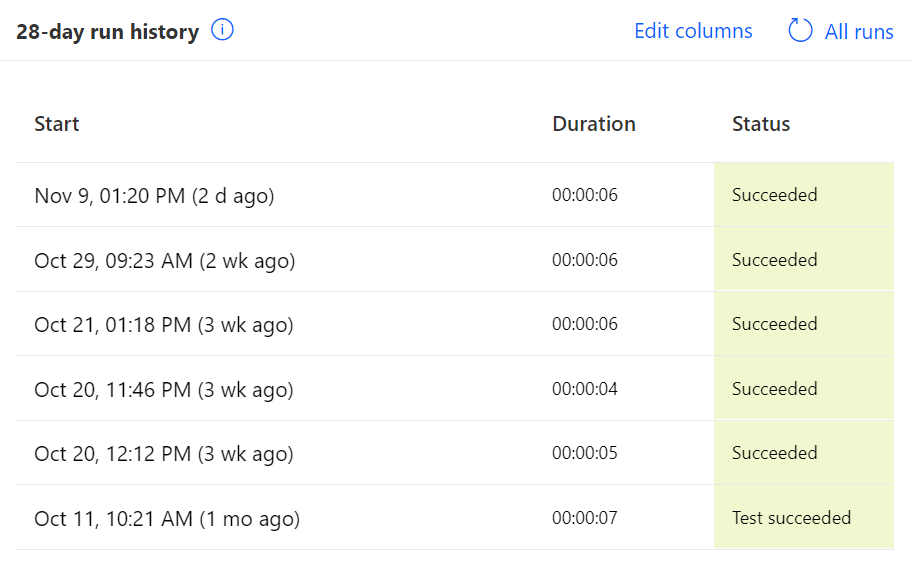
If I now look at the recent Flow runs I see six in total 1 in November and 5 in October.

image

Now looking at the Azure costs by service for November I see:

image

and for October:

image

Therefore, with 5 runs in October my average cost was $3.70 / 5 = $ 0.74 while in November, with only 1 run so far it was $0.92.

Assuming the highest run cost of $0.92 and with the execution of 4 premium connectors in the Flow (3 x Azure Key Vault and 1 x HTTP) that comes to a cost of $0.23 per premium connector.

The big benefit of the Power Platform PAYG option is that it allows quick and easy access to Premium connectors without the need to purchase a higher Power Platform license at a fixed rate per month regardless of usage. This means the PAYG option is great for testing prior to committing to a higher fixed value license or occasional use of Premium connectors. This should be really appealing to many who may only need to use a Flow with Premium connectors a few times in a month. When the PAYG billing approaches the full license cost you can always switch over.

In summary then, from what I can determine, you should allow around $0.25 per Premium connector per Flow run when calculating your PAYG costs with the Power Platform.

CIAOPS Need to Know Microsoft 365 Webinar – November

laptop-eyes-technology-computer

Join me for the free monthly CIAOPS Need to Know webinar. Along with all the Microsoft Cloud news we’ll be taking a look at Power Automate.

Shortly after registering you should receive an automated email from Microsoft Teams confirming your registration, including all the event details as well as a calendar invite.

You can register for the regular monthly webinar here:

November Webinar Registrations

(If you are having issues with the above link copy and paste – https://bit.ly/n2k2211)

The details are:

CIAOPS Need to Know Webinar – November 2022
Friday 18th of November 2022
11.00am – 12.00am Sydney Time

All sessions are recorded and posted to the CIAOPS Academy.

The CIAOPS Need to Know Webinars are free to attend but if you want to receive the recording of the session you need to sign up as a CIAOPS patron which you can do here:

http://www.ciaopspatron.com

or purchase them individually at:

http://www.ciaopsacademy.com/

Also feel free at any stage to email me directly via director@ciaops.com with your webinar topic suggestions.

I’d also appreciate you sharing information about this webinar with anyone you feel may benefit from the session and I look forward to seeing you there.

Need to Know podcast–Episode 289

I look at a few deep blog posts from Ignite on Microsoft Teams and file new experiences. I also share the latest information about Windows 11 22H2 update and then spend some time talking about Conditional Access in this episode.

You can listen directly to this episode at:

https://ciaops.podbean.com/e/episode-289-updates/

Subscribe via iTunes at:

https://itunes.apple.com/au/podcast/ciaops-need-to-know-podcasts/id406891445?mt=2

The podcast is also available on Stitcher at:

http://www.stitcher.com/podcast/ciaops/need-to-know-podcast?refid=stpr

Don’t forget to give the show a rating as well as send me any feedback or suggestions you may have for the show.

This episode was recorded using Microsoft Teams and produced with Camtasia 2022.

Brought to you by www.ciaopspatron.com

Resources

@directorcia

YouTube version of this podcast

What’s New in Microsoft Teams | Microsoft Ignite 2022

Announcements for files experiences in Microsoft 365 at Microsoft Ignite

Making the everyday easier with new experiences available in Windows 11

Public Preview: Conditional Access filters for apps

Plan for Conditional access