Don’t over look a good naming convention

pexels-george-becker-243337

If there is one piece of advice I can given when it comes to setting up policies in Microsoft 365, it is to have a good and consistent naming convention.

Microsoft 365 is full of policies, from Conditional Access, to Exchange Online to Intune and more. Having a naming convention worked about before you start creating policies is going to save you a lot of time down the track when you need to modify or troubleshoot your policies.

If you using something like Microsoft 365 Lighthouse to manage multiple tenants, then some additional thought will also need to be invested because if every tenant you manage has identically named policies then when these are rolled up into Microsoft 365 Lighthouse it is going to get confusing.

Although there is no agreed upon standard for naming conventions I’d give you these tips as general guidance:

– Short is better. i.e. ‘HR’ is far better than ‘Human Resources’

– Have the business name as a 3 letter acronym (i.e. ‘ABC’) at the beginning of the policy name if you are using Microsoft 365 Lighthouse

– Avoid special characters like @#$%, etc as well as spaces if you can. Use a ‘-‘ instead of a space and avoid using underscores (‘_’)

– Avoid upper case as well. My experience using the Microsoft Graph is that it can be very case sensitive at times. Having everything in lower case makes it much easier when you come to automating policies and the like with code such as PowerShell.

– Don’t state the obvious like starting every Microsoft Team with the full name of the business or words like ‘Project’. The shorter the name the easier it is to read and display.

– Be mindful of the names used on things like mobile devices

– Remove unnecessary policies to avoid confusion

– Avoid using names like ‘Test’, ‘Temp’, etc. if you do, remove these items when the test is complete to again avoid confusion.

– Try and make it easy for yourself and others in the future to understand and work with the names you have chosen.

The secret is to come up with a naming convention, document it and then use it everywhere. Consistency matters, because in the end it is going to be your time that gets chewed up by trying to work out what randomly named policies actually do. Take some time up front to have a convention and you’ll be rewarded with less pain later on.

Start with Intune Compliance policies

I see many people struggle to get started with Intune and Device Management in Microsoft 365. My recommendation is always to start with configuring Compliance policies. Doing so will give you:

1. A device inventory

2. A list of devices that fail to meet the minimum standards set for connection to corporate data

However, the major benefit is that, by default, Intune Compliance Policies make no change to any of the device or impact users productivity. In effect, Compliance Policies simply READ the status of a device and make NO changes.

Screenshot 2023-09-14 102330

You’ll find Compliance Policies under Devices in the Intune portal as shown above.

Typically, you’ll create at least one Compliance Policy for each different operating systems you have in your environment (i.e. for Windows, iOS, Android, etc). You can, of course, have as many different Compliance Policies as you desire, potentially targeted at different users and or devices. However, the policies you have, the more maintenance and troubleshooting will be required. It is therefore recommended to stick with a single Compliance Policy for each operating system.

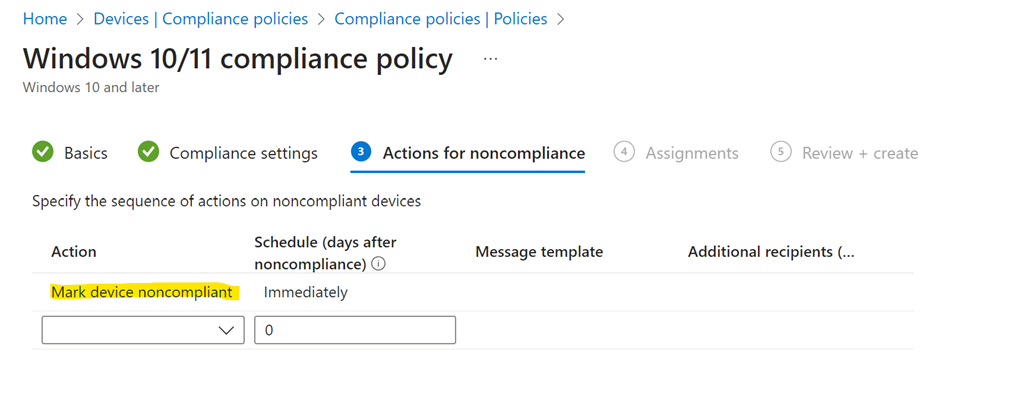
Screenshot 2023-09-14 102823

During the policy creation you’ll see a screen as shown above in which you can set actions for devices that fail compliance. You will not that, by default, the only taken is simply to mark the devices as non compliant. That is the only action take. You can add more actions if you want, but importantly, by default, the only action taken is simply to mark devices as non compliant.

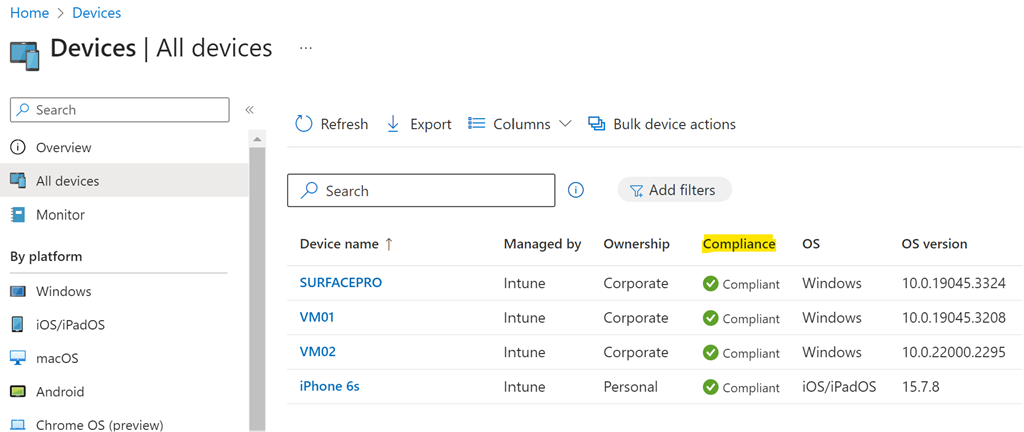
Once you have created and assigned the Compliance Policy the machines covered that policy will be evaluated and results reported back to Intune.

Screenshot 2023-09-14 103209

If devices are found that are not compliant, then you can take action to make them compliant before allowing them to access corporate data.

Above all, using compliance policies is a great way to get an inventory of all the devices in your environment and report their configuration. Of course, these Compliance Policies will continue to be evaluated regularly in case anything changes on the device.

The recommendation then is to start with Compliance Policies to take an inventory of your device fleet before proceeding further with Device management. If you want to read more about Modern Device Management then read my series of blog posts starting here:

https://blog.ciaops.com/2020/09/26/modern-device-management-with-microsoft-365-business-premium-part-1/

Need to Know podcast–Episode 310

News and updates from the Microsoft Cloud in this episode to bring you up to date. I also take a look at break glass accounts and some best practice recommendations and considerations for you about settings these up[ and ensuring they stay as secure as possible.

You can listen directly to this episode at:

https://ciaops.podbean.com/e/episode-310-breakglass/

Subscribe via iTunes at:

https://itunes.apple.com/au/podcast/ciaops-need-to-know-podcasts/id406891445?mt=2

Don’t forget to give the show a rating as well as send me any feedback or suggestions you may have for the show.

This episode was recorded using Microsoft Teams and produced with Camtasia 2023.

Brought to you by www.ciaopspatron.com

Resources

@directorcia

@directorcia@twit.social

Join my shared channel

CIAOPS merch store

Become a CIAOPS Patron

CIAOPS Blog

Microsoft announces new Copilot Copyright Commitment for customers

Results of Major Technical Investigations for Storm-0558 Key Acquisition

Conditional Access Overview and Templates are now Generally Available!

Microsoft 365 Defender Monthly news

Microsoft announces changes to Microsoft 365 and Office 365 to address European competition concerns

Learn the steps needed to protect your data and manage identity

New Microsoft 365 app enhancements to use across your devices

Microsoft Purview Data Loss Prevention: Announcing general availability of several capabilities

Security 101

Configure Just-in-Time Access to M365 Defender

What’s new in Microsoft Intune (2308) August edition

Manage emergency access accounts in Azure AD

Techwerks 21

bw-car-vehicle

CIAOPS Techwerks returns to Brisbane CBD on Thursday the 21st of September.

The course is limited to 20 people and you can sign up and reserve your place now! You reserve a place by completing this form:

http://bit.ly/ciaopsroi

or by sending me an email (director@ciaops.com) expressing your interest.

The content of these all day face to face workshops is driven by the attendees. That means we cover exactly what people want to see and focus on doing hands on, real world scenarios. Attendees can vote on topics they’d like to see covered prior to the day and we continue to target exactly what the small group of attendees wants to see. Thus, this is an excellent way to get really deep into the technology and have all the questions you’ve been dying to know answered. Typically, the event produces a number of best practice take aways for each attendee. So far, the greatest votes are for deeper dives into the Microsoft Cloud including Microsoft 365, Azure, Intune, Defender for Endpoint, security such as Azure Sentinel and PowerShell configuration and scripts, with a focus on enabling the technology in SMB businesses.

Recent testimonial – “I just wanted to say a big thank you to Robert for the Brisbane Techworks day. It is such a good format with each attendee asking what matters them and the whole interactive nature of the day. So much better than death by PowerPoint.” – Mike H.

The cost to attend is:

Gold Enterprise Patron = Free

Gold Patron = $33 inc GST

Silver Patron = $99 inc GST

Bronze Patron = $176 inc GST

Non Patron = $399 inc GST

I hope to see you there.

CIAOPS Need to Know Microsoft 365 Webinar – September

laptop-eyes-technology-computer_thumb

Join me for the free monthly CIAOPS Need to Know webinar. Along with all the Microsoft Cloud news we’ll be taking a look at Lists.

Shortly after registering you should receive an automated email from Microsoft Teams confirming your registration, including all the event details as well as a calendar invite.

You can register for the regular monthly webinar here:

September Webinar Registrations

(If you are having issues with the above link copy and paste – https://bit.ly/n2k2309

The details are:

CIAOPS Need to Know Webinar – September 2023
Friday 29th of September 2023
11.00am – 12.00am Sydney Time

All sessions are recorded and posted to the CIAOPS Academy.

The CIAOPS Need to Know Webinars are free to attend but if you want to receive the recording of the session you need to sign up as a CIAOPS patron which you can do here:

http://www.ciaopspatron.com

or purchase them individually at:

http://www.ciaopsacademy.com/

Also feel free at any stage to email me directly via director@ciaops.com with your webinar topic suggestions.

I’d also appreciate you sharing information about this webinar with anyone you feel may benefit from the session and I look forward to seeing you there.

Need to Know podcast–Episode 309

All the latest news and updates from the Microsoft Cloud with a focus on SMB. Inside this episode are also some thoughts around incident response and why you should have one and why you should be reviewing and updating it regularly.

You can listen directly to this episode at:

https://ciaops.podbean.com/e/episode-309-incident-response/

Subscribe via iTunes at:

https://itunes.apple.com/au/podcast/ciaops-need-to-know-podcasts/id406891445?mt=2

Don’t forget to give the show a rating as well as send me any feedback or suggestions you may have for the show.

This episode was recorded using Microsoft Teams and produced with Camtasia 2023.

Brought to you by www.ciaopspatron.com

Resources

@directorcia

@directorcia@twit.social

Join my shared channel

CIAOPS merch store

Become a CIAOPS Patron

CIAOPS Blog

Copilot in Teams: August 2023 Updates

Microsoft announces 2023 Surface event taking place next month in New York

Microsoft Defender data can now be hosted locally in Australia

Frontline updates in Microsoft Teams, Windows 365, Copilot & Dynamics 365 Field Service

Remote Help for Android coming soon to public preview

Day zero support for Android 14 with Microsoft Intune

SharePoint Roadmap Pitstop: July 2023

View and edit shape data in Visio for the web

Conditional Access for Protected Actions is Now Generally Available!

Intro to AI, AI for SMBs

Incident response overview

CIAOPS M365 Incident response online training course

AI is simply another IT tool

pexels-pixabay-162553

It is always interesting to see technology go through a familiar boom and bust hype cycle. The older you get, I suppose, the more you see of these. Unfortunately, I have learnt from history that when a transformational technology does appear it goes through this familiar initial hype cycle until it settles down into the background and becomes so helpful and common that we never think about it anymore.

I remember what a revelation getting hold of my first spreadsheet program and then adding a WYSIWYG editor (Lotus 1-2-3 back then). Since then, spreadsheets have become a standard tool for many things from planning to databases, to automation and even charting. They are pretty much indispensable not only for me but also to just anyone who uses any form of computer these days. Spreadsheets have truly become an integral part of most businesses today.

The challenge currently is to decipher the impact AI will have and separate reality and potential from hype. This is the confusing part for most people, even those who are in IT. Today’s landscape is dominated by fast headlines largely designed to grab attention but provide little substance or meaningful analysis. Gone are the days when something new like a spreadsheet would cause no more than a ripple in the media.

I have said previously that I don’t particularly like the way the term AI is being applied to just about everything under the sun these days. Unfortunately, that is the generic term it has been branded with and we will no doubt be stuck with. So, for now, let’s stick that. I would suggest that largely lost in all the hype today is the fact that AI is merely the latest in a long line of tools that technology has provided us. It isn’t some magical cure all product, it is simply something that needs to be wielded to reach its potential and benefit.

I think another misnomer currently doing the rounds is that AI is for everyone and that if you don’t use it regularly, you are somehow not ‘modern’. I would suggest that, yes, AI will, and actually probably already is, used by most people, but they are not even aware of that fact. It is becoming more and more baked into the services they use everyday. I think is different and more akin to people using cars without necessarily fully understanding how they operate. For most, a car is simply a transportation tool that allows them to conveniently get from one location to another. 

The current AI services that we seeing reaching market today are, I believe, largely benefit those that ‘create’ something. That is not to say those who ‘process’ information may also benefit but I believe that greater beneficiaries are those who ‘create’.

Without doubt, technology has already enabled a far greater army of ‘creators’ already. Just look to YouTube as enabler of careers that people have created just using the mechanism of video. Perhaps this is why AI is appealing to a greater audience that ever before. If you however look inside a business, AI is probably more going to benefit people who create financial report than those who do the account entry as an example.

I say all this in mind of Microsoft 365 Copilot and the recent price announcement from Microsoft of US$30 (probably AU$45) for the service. Many were surprised with that price point but I think they believed that this type of AI would be for ‘everyone’ in a business as conventional wisdom is suggesting. Instead, I would suggest, that, at least initially, Microsoft 365 Copilot is aimed at a much small population inside businesses.

This means that you should only think about Microsoft 365 Copilot as a tool for those who can benefit most from it, that is those who are largely creating information as I suggested. From my own experience as a creator, I can tell you that ChatGPT (I don’t have Microsoft 365 Copilot yet) make me far more productive. It allows me to create code. It allows me to generate content from course outlines to descriptions and marketing material. There is so many tasks that I have put it to that have saved me hours and hours. That is where the real benefit I believe lies in the here an now.

When Microsoft 365 Copilot becomes available, I will be investing in a license for myself in my business but I won’t be, at least initially, investing in it for others. Thanks to ChatGPT, I can already see the huge productivity benefits it provides as well as the ability to leverage resources that make my business more competitive and allows me to do more with less. However, AI, Microsoft 365 Copilot, ChatGPT, etc is no a panacea by any means. Can a screwdriver be used as a hammer? Sure, but it really isn’t the best tool for the job? To benefit from a car not only do you have to invest in one, you need to invest in learning how to drive it. It is the same any tool, technology based or not. Maximum benefit is only derived in learning how to use it.

I have found that, unsurprisingly, most people and businesses have heard about AI but are yet to experiment with it. They don’t know where to start. Even when Microsoft 365 Copilot becomes available, that won’t change as many won’t investment initially being sceptical and seeing price as a barrier. My suggestion is that if you look at your business and can easily identify those that ‘create’ then they should be priority candidates for AI. If enhancing their productivity by saving them at least one hour a day in their work, then they are again a good candidate for AI. These people can get started today by using ChatGPT and then look a Microsoft 365 Copilot when it becomes available broadly.

As with any technology, there will be a learning curve. Likewise, there will be a first mover advantage for those that adopt early, which is the payoff for their early investment. The secret is looking beyond the hype and recognising that AI is simply another tool, like many that have come before and like than that will come in the future. In there here and now its benefits largely get over hyped by those who probably only have cursory experience with the technology. The good news here is that taking you can start using this latest tech tool for your business today. It won’t be for everyone in your business just yet, but I’d be pretty certain that it would benefit at least one person in your business right now. If AI can indeed save even a few hours every week for that person and make them more productive, then it is worth the investment.

In short, judge the benefits of AI as any other business tool. It is something for your business, just not everyone in your business right now.