This is part of a series of articles about email security in Microsoft 365.
End to End email protection with Microsoft 365 – Part 1
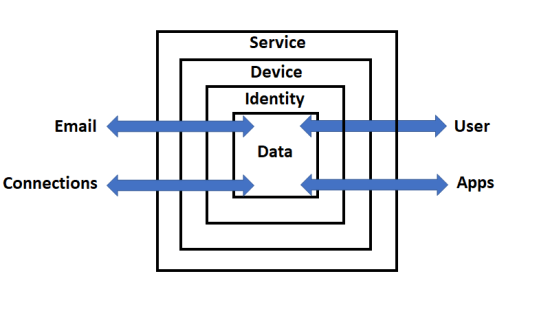
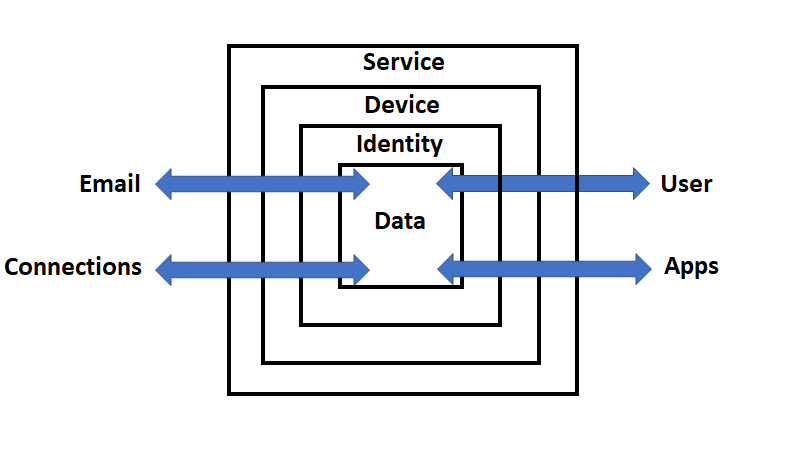
These articles are based on a model I have previously created, which you can read about here:
CIAOPS Cyber protection model
designed to help better explain expansive security included with Microsoft 365.
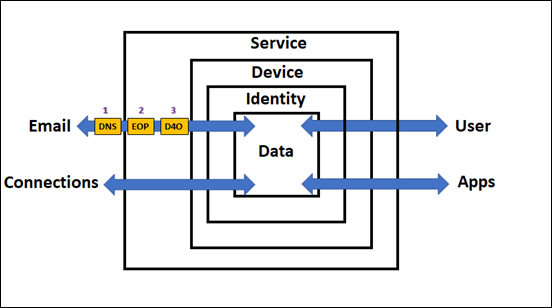
In the previous part of this series I spoke about DNS and Exchange Online Protection (EOP) and the role they play in email security as well as how to configure these in your service. I haven’t as yet spoken about the best practices settings that you should employ. The initial objective here is to help you understand the flow as well as all the security services that can be utilised in Microsoft 365 to better help you protect your data.
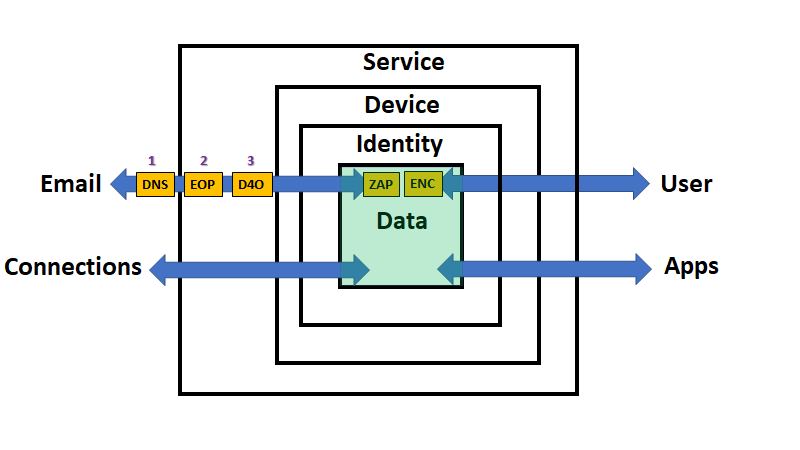
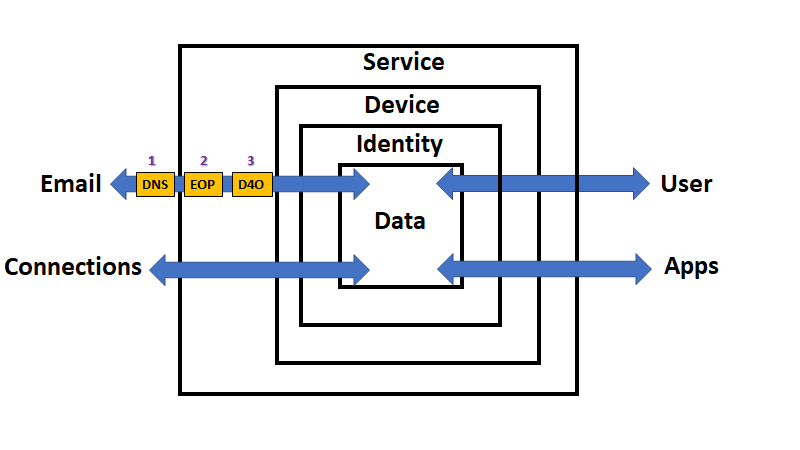
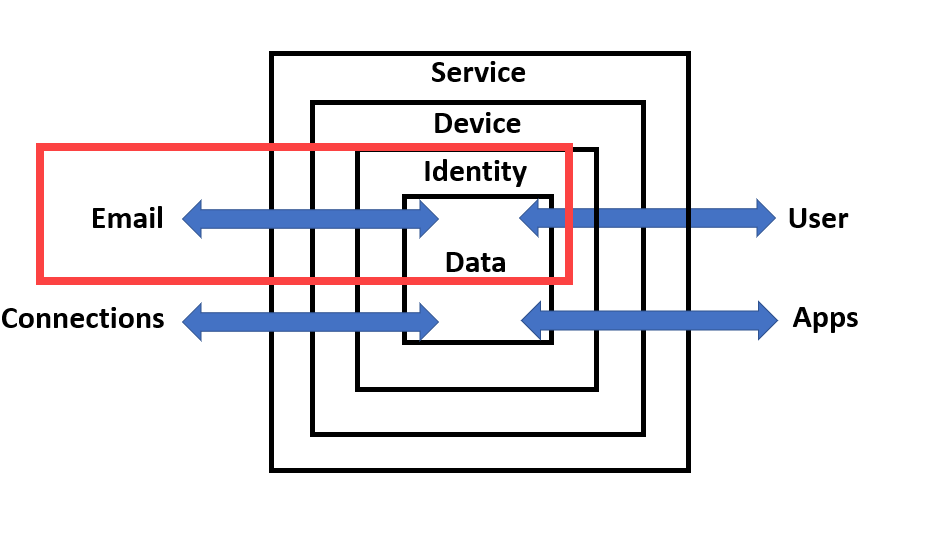
If you look at the above diagram, you’ll see that data is flowing via the email connector in and out of our Microsoft 365 environment (the ‘Service’). Through which, so far, we have talked about DNS and EOP, now it is time to move onto Defender for Office 365 (D4O). However, just before we do let, me point out somethings that you may not appreciate. Firstly, via the process far, inbound email data has not yet come to rest. That is, it hasn’t as yet been stored inside a users mailbox, it is still being ‘processed’ by the security feature set of Microsoft 365 (i.e. the ‘Service’). Secondly, and more importantly for security considerations, what we have examined so far largely only ‘scans’ the data and makes security decisions as data passed through that service. It doesn’t generally continue to protect the data once it has been processed by that service. For example, with spam filtering inbound emails are scanned by the anti spam service in EOP, appropriate action taken based on the policies in place but then the data exits the service. Once an email has exited the anti spam service in EOP it will no longer be scanned by the service. To distinguish these type of security services going forward, let’s refer to them as ‘pass through’ security services being that they only handle the data once during its transit through a connector.
So after DNS and EOP have ‘processed’ the inbound email it is time for Defender for Office 365 (D4O) to do it’s job.
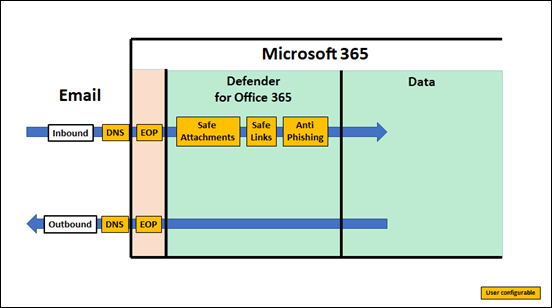
Defender for Office 365 is an add-on to existing plans like Microsoft 365 Business Basic and Business Standard but included in Microsoft Business Premium. Interestingly, it is not part of Microsoft 365 E3 but is part of Microsoft 365 E5. In short, we’ll assume the plan here is Microsoft Business Premium.
Defender for Office 365 also has two plans
Gains with Defender for Office 365, Plan 1 (to date):
Technologies include everything in EOP plus:
Safe attachments
Safe links
Microsoft Defender for Office 365 protection for workloads (ex. SharePoint Online, Teams, OneDrive for Business)
Time-of-click protection in email, Office clients, and Teams
Anti-phishing in Defender for Office 365
User and domain impersonation protection
Alerts, and SIEM integration API for alerts
SIEM integration API for detections
Real-time detections tool
URL trace
So, Microsoft Defender for Office 365 P1 expands on the prevention side of the house, and adds extra forms of detection.
Gains with Defender for Office 365, Plan 2 (to date):
Technologies include everything in EOP, and Microsoft Defender for Office 365 P1 plus:
Threat Explorer
Threat Trackers
Campaign views
Automated Investigation and Response (AIR)
AIR from Threat Explorer
AIR for compromised users
SIEM Integration API for Automated Investigations
So, Microsoft Defender for Office 365 P2 expands on the investigation and response side of the house, and adds a new hunting strength. Automation.
The above is from The Office 365 security ladder from EOP to Microsoft Defender for Office 365.
Microsoft Business Premium includes Defender for Office 365 P1, while Microsoft 365 E5 includes Defender for Office 365 P2.
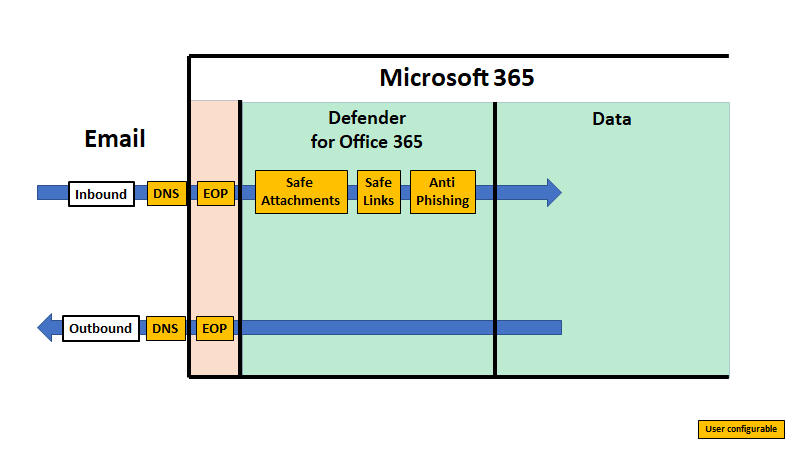
Unlike EOP, you’ll also note that Defender for Office 365 extends protection actually into the data container as well as providing initial scanning of data as it passes through the service. This effectively means that Defender for Office 365 is monitoring email data inside user email boxes and providing additional protection even after an item is delivered. This is very important to appreciate because once most emails are delivered they are generally no longer protected by scanning technologies like anti-spam policies, especially third party offerings. Therefore, a major of value of using Microsoft 365 is that it can ensure the security of data even after it has been delivered using technology like Defender for Office 365.
Another point that the above diagram illustrates is that Defender for Office 365 largely applies only to inbound email data. all the policies in Defender for Office 365 are focused at emails being delivered to, not from, mailboxes.
Finally it is also important to note that previous components in the data flow chain impact Defender for Office 365, DNS probably being the more influential. This is why it is so important to ensure that you have your DNS records (especially SPF, DKIM and DMARC) configured correctly because their impact is more than on a single service in Microsoft 365.
Defender for Office 365 is composed of three unique components:
– Safe Attachments
– Safe Links
– Anti-Phishing
Safe Attachments
As Safe Attachments in Microsoft Defender for Office 365 notes:
Safe Attachments uses a virtual environment to check attachments in email messages before they’re delivered to recipients (a process known as detonation).
In short, it will open suspect attachments in a virtual environment and check to see whether they activate any malicious activity such as encrypting data (i.e. cryptolocker attack), changing registry settings and so on.
Safe Attachments protection for email messages is controlled by Safe Attachments policies. There is no default Safe Attachments policy. Please note that, there is NO default Safe Attachments policy by default! Thus, ensure you have set one up if you are using Defender for Office 365.
Set up Safe Attachments policies in Microsoft Defender for Office 365
Safe Attachments will continue to provide protection even after the data has been delivered. This is because the maliciousness of the attachment is evaluated not only at the time the user opens it but also continually as they sit as data in users mailbox. Thus, you need to consider Safe Attachments as protection both during transit and at rest. This is generally different from the role of EOP.
I will also briefly note here that Safe Attachments protection extends beyond just emails, but I’ll cover that in a later article.
Safe Links
As Safe Links in Microsoft Defender for Office 365 notes:
Safe Links is a feature in Defender for Office 365 that provides URL scanning and rewriting of inbound email messages in mail flow, and time-of-click verification of URLs and links in email messages and other locations.
In short, it routes any link clicked on in an email through a reputation proxy to ensure that it is safe prior to proceeding. This provides protection against malicious content, downloads, phishing and more.
Safe Links settings for email messages
How Safe Links works in email messages
Safe Links can be configured to provide customised protection:
Set up Safe Links policies in Microsoft Defender for Office 365
Safe Links will continue to provide protection even after the data has been delivered. This is because the maliciousness of links is evaluated not only at the time the user clicks on them but also continually as they sit as data in users mailbox. Thus, you need to consider Safe Links as protection both during transit and at rest. This is generally different from the role of EOP.
I will also briefly note here that Safe Links protection extends beyond just emails, but I’ll cover that in a later article.
Anti-phishing
Phishing is when attackers try to trick users into providing secure details in an effort to compromise that account. A common ‘trick’ is to attempt to impersonate a ‘familiar’ email address and try to have the recipient take an action that will result in an account compromise.
Protection via Defender for Office 365 is again provided by a policy:
Exclusive settings in anti-phishing policies in Microsoft Defender for Office 365
Anti-phishing will continue to provide protection even after the data has been delivered. This is because the maliciousness of email content is evaluated not only at the time the user views them but also continually as they sit as data in users mailbox. Thus, you need to consider Anti-phishing as protection both during transit and at rest. This is generally different from the role of EOP.
In addition to the above Defender for Office 365 P1 also provides:
Threat Explorer and Real-time detections
while Defender for Office 365 P2 additionally provides:
Threat Trackers
Automated investigation and response (AIR) in Microsoft Defender for Office 365
Attack Simulator in Microsoft Defender for Office 365
Summary
Inbound email data flows into Defender for Office 365 after it has been processed by EOP. Here additional protection policies are applied. All of these policies can be configured by the user and have capabilities that extend into protecting data even after it has been delivered. This means that a major benefit of Defender for Office 365 is that it not only scans email data during inbound transit but also while it is being stored in the users mailbox over the life of that data item for both current and future threats.
It is also important to note that many of the Defender for Office 365 do not have appropriate default policies in place and it is up to the user to configure these to suit their environment.
The inbound email data has yet further protection configurations to be applied to it after being processed by Defender for Office 365 thanks to the capabilities of Microsoft 365. Please follow that process with the next article:
End to End email protection with Microsoft 365–Part 3