KQL Query to report failed login by country

If you are interested to see how many failed logins your Microsoft 365 environment has had in the past 30 days you can run the following KQL query in Sentinel:

SigninLogs
| where ResultType == 50126
| where TimeGenerated >= ago(30d)
| extend Country = tostring(LocationDetails[“countryOrRegion”])
| summarize FailedLoginsCount = count() by Country
| order by FailedLoginsCount desc

you can then make a slight change and get all the successful logins

SigninLogs
| where ResultType == 0
| where TimeGenerated >= ago(30d)
| extend Country = tostring(LocationDetails[“countryOrRegion”])
| summarize LoginsCount = count() by Country
| order by LoginsCount desc

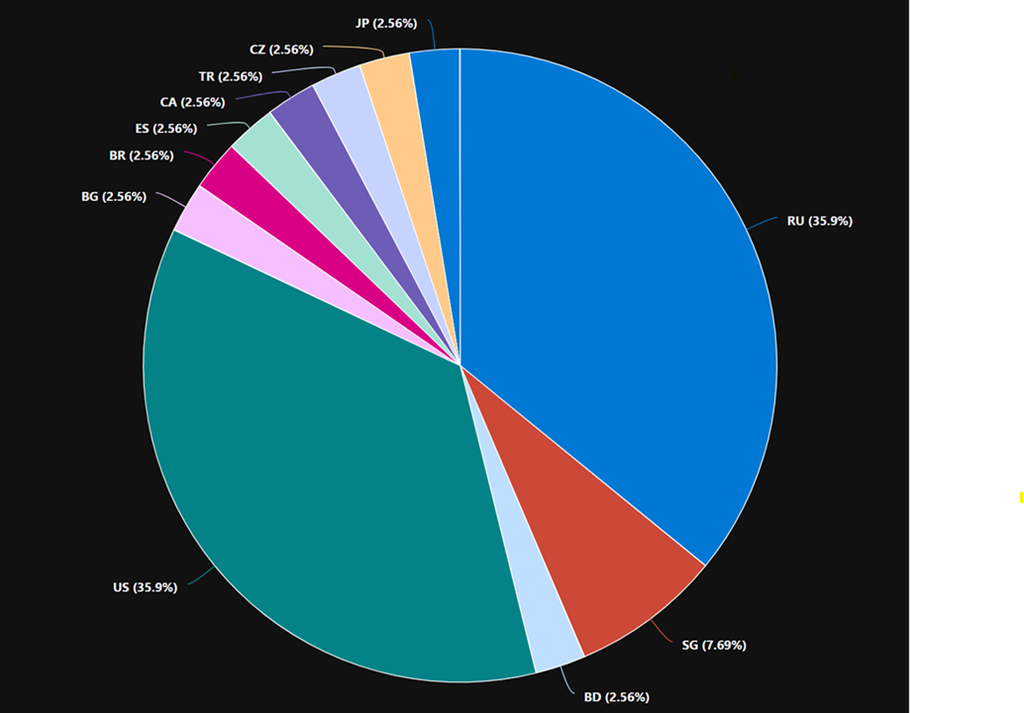
In my case, I found that only around 1% of my total logins were failed logins and all of these came from countries outside Australia.

Here is also a visualisation of the location of failed logins by country
image

Note: if you copy and paste directly from here you will probably have the change the “ around countryorregion when you paste into your own environment as teh wrong “ gets taken across!

Connecting Defender EASM logs to Sentinel workspace

A very important security task is to ensure you are collecting all the logging data for your services and sending them to a central location for storage and analysis.

Here’s how you can send the logs from Defender EASM into Sentinel.

You’ll need to have already established both Sentinel and Defender EASM instances. Underneath Sentinel is a Log Analytics Workspace that is where all the logging data for Sentinel is accumulated. It is into this workspace that the Defender EASM logs will be sent.
image

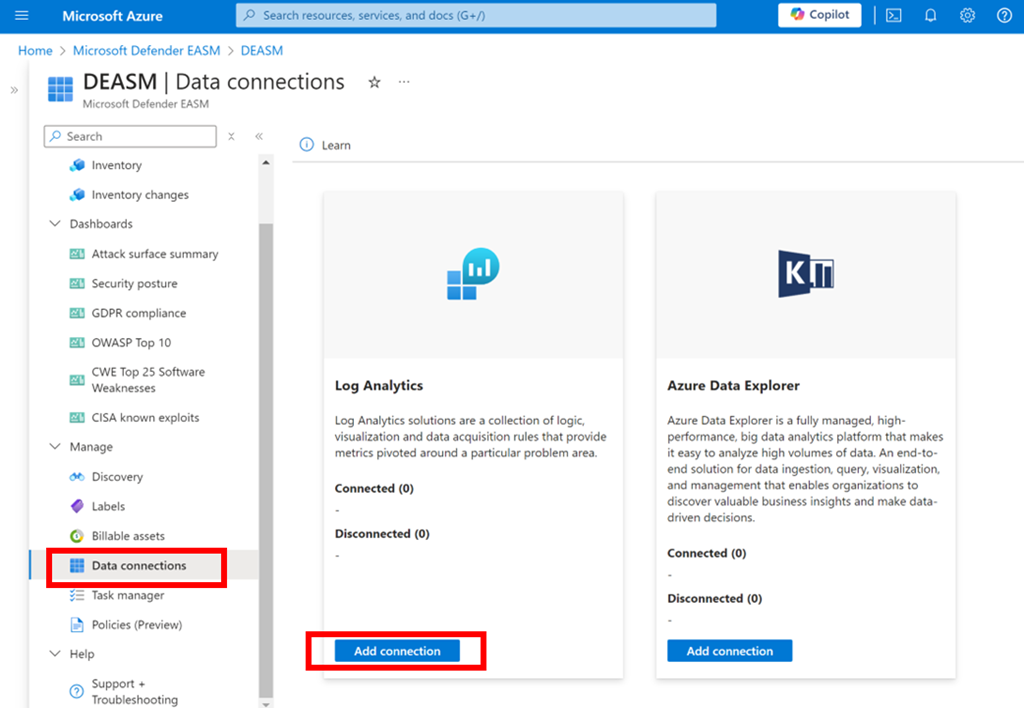
Log in to the Azure portal and navigate to Defender EASM as shown above. Select the Data connections option from the menu on the left. From the window that appears on the right select Add connection under Log Analytics as shown.
image

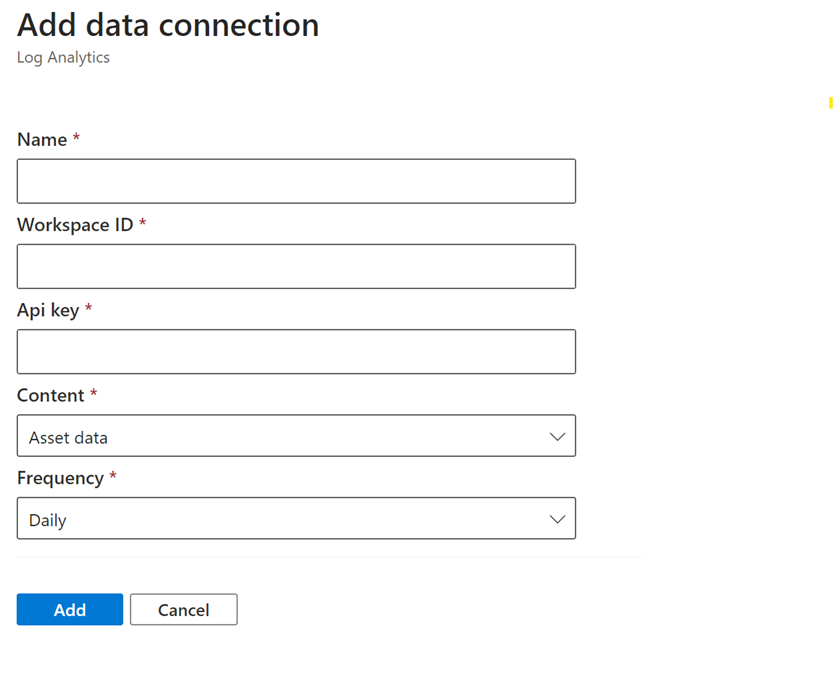
A dialog will appear from the right hand side prompting you for further information as shown above.

Open a new browser tab and navigate to Sentinel.

image

Select the Settings option at the bottom of the menu on the left hand side as shown above. From the windows that appears on the right select Workspace settings as shown.

image

In the Log analytics workspace for Sentinel select the Agents option under Settings from the menu on the left as shown.

In the window that appears on the right you will find both the Workspace ID and an API key as shown. Both of these will be required back in the Defender EASM connectors page.
image

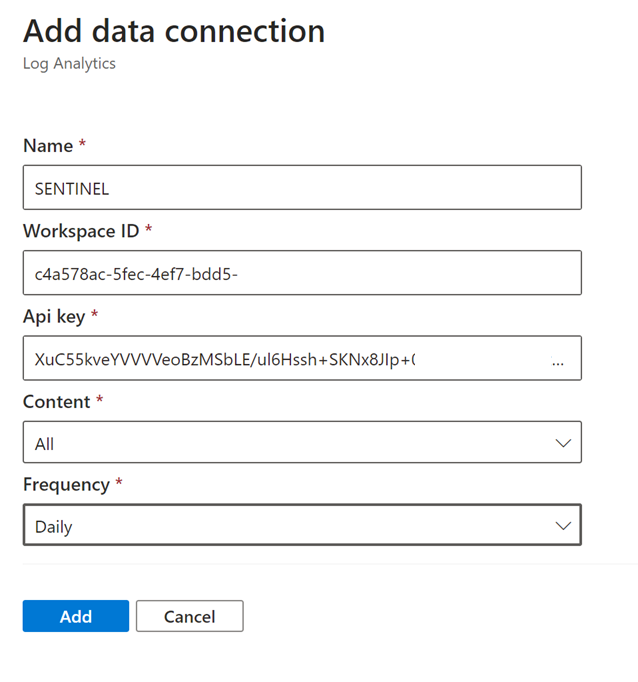
Return to the Defender EASM connectors page configuration and give this connection an appropriate Name. Enter the Workspace ID and Api key from the Sentinel Log Analytics page. Select All content and Daily for frequency.

Save these settings.
image

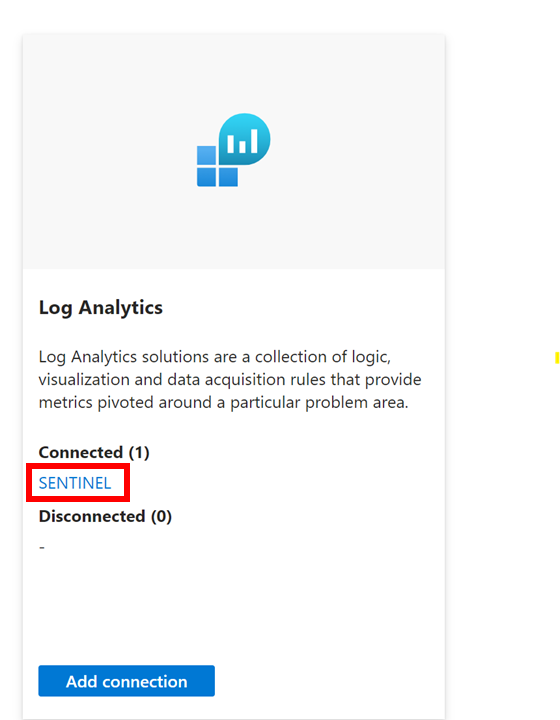
If everything is correct you should now see that the Log Analytics connexion now displays you settings under Connected as shown above.

The logs from Defender EASM will now start becoming available for you in Sentinel to use in things like KQL queries.

Need to Know podcast–Episode 321

Lots of news an updates after being a few weeks since last episode. Fear not however, they are all linked below. Plenty of really detailed and helpful articles from Microsoft of late, especially around security. All of which I highly recommend you spend time working through and implementing the recommendations. Also plenty of new features and products to cover so dive in and take a look.

You can listen directly to this episode at:

https://ciaops.podbean.com/e/episode-321-initiatives/

Subscribe via iTunes at:

https://itunes.apple.com/au/podcast/ciaops-need-to-know-podcasts/id406891445?mt=2

Don’t forget to give the show a rating as well as send me any feedback or suggestions you may have for the show.

Brought to you by www.ciaopspatron.com

Resources

@directorcia

Join my shared channel

CIAOPS merch store

Become a CIAOPS Patron

CIAOPS Blog

CIAOPS Brief

CIAOPSLabs

Support CIAOPS

Granular RBAC permissions for endpoint security workloads

How to break the token theft cyber-attack chain

Microsoft Incident Response lessons on preventing cloud identity compromise

How Copilot for Microsoft 365 Works

From pixels to presence: new features coming to Microsoft Mesh

How to unlock new experiences on your Copilot+ PC

Introduction to Cross-Tenant Mailbox Migrations

Copilot is now available in classic Outlook for Windows

Microsoft Incident Response tips for managing a mass password reset

Set default organization version limits for new document libraries and OneDrive accounts (Preview)

The guide to Microsoft Intune resources

Email Protection Basics in Microsoft 365: Bulk Email

Data security in Microsoft Copilot for Microsoft 365

Moving from AI experimentation to business breakthrough

Update on the Recall preview feature for Copilot+ PCs

Secure your business: Four ways Microsoft 365 for Business can help

The new Microsoft Planner is here! Streamline the planning, management, and execution of work

Announcing new Windows Autopilot onboarding experience for government and commercial customers

AI jailbreaks: What they are and how they can be mitigated

How Russia is trying to disrupt the 2024 Paris Olympic Games

Microsoft is again named the overall leader in the Forrester Wave for XDR

What’s New in Copilot | May 2024

Exploring Copilot for Security to Automate Incident Triage

Demystifying Microsoft Entra ID, Tenants and Azure Subscriptions

Moonstone Sleet emerges as new North Korean threat actor with new bag of tricks

Automatic attack disruption in Microsoft Defender XDR

Introducing Team Copilot

Missing devices in Windows Update for Business reports?

Defender for Cloud App connectors

An important piece of the security puzzle is to ensure everything that you have access to is enabled and configured fully. If you have any version of Defender for Cloud Apps you should verify that the signals from Microsoft 365 are feeding into Defender for Cloud Apps.

To verify or enable this connection fully navigate to:
http://security.microsoft.com

image

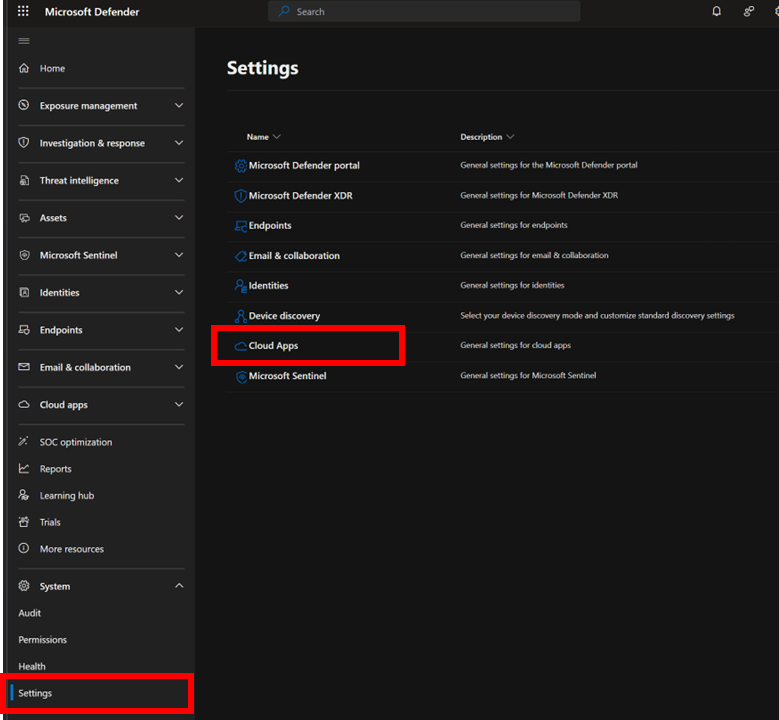
Open the Settings option from the menu on the left. From the options that appear on the right select Cloud Apps as shown above.
image

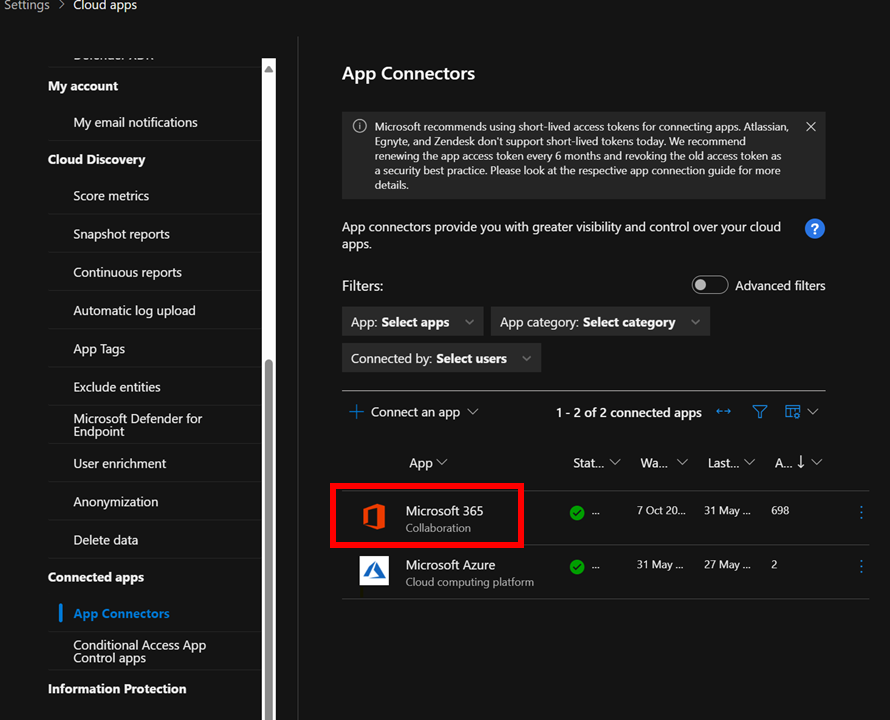
Then under the Connected Apps heading select App connectors as shown above. Ensure that connectors for Microsoft 365 and Microsoft Azure appear. If they don’t you can use the Connect an app option on the menu.
image

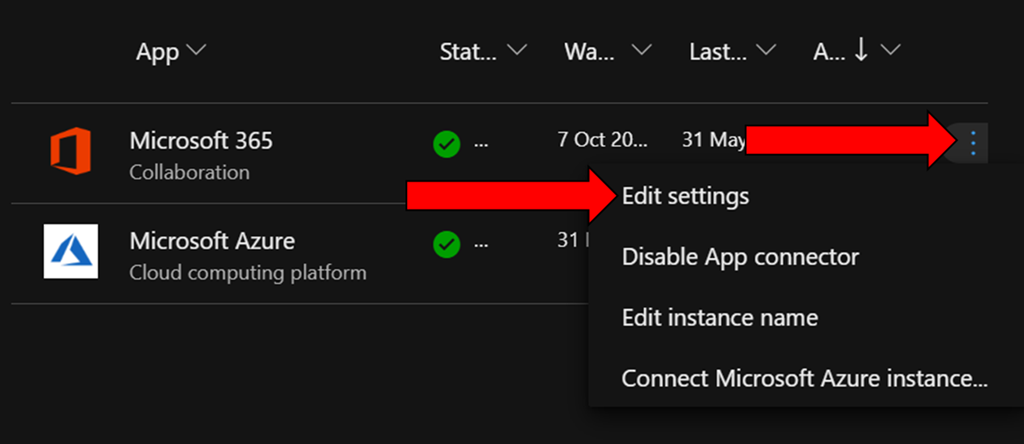
To verify the Microsoft 365 app is fully enabled locate the ellipse (three dots) on the right hand side of this connector and select it as shown above.

From the menu that appears select Edit Settings.
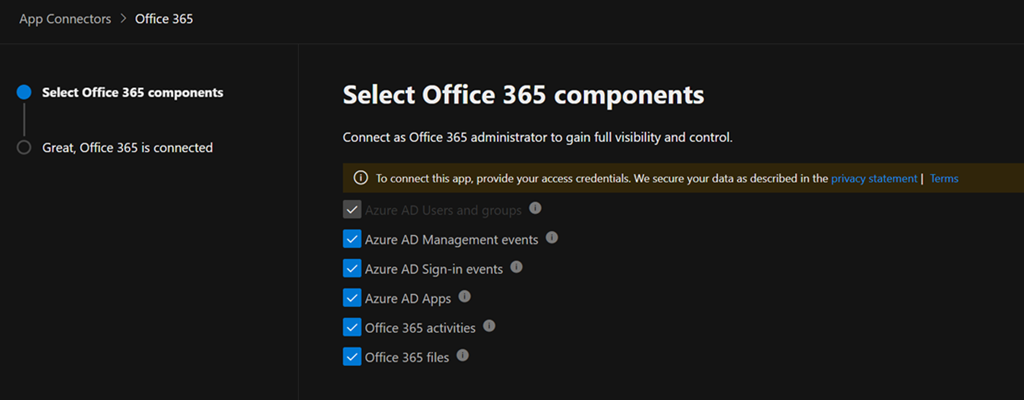
image

Ensure all the settings available to you are enabled as shown. Select the Connect to Office 365 button at the bottom of the dialog to save your settings and continue.

There is no addition cost to enabling these options and when you do you are able to monitor, audit and capture the logs for:

– Azure AD Users and Groups

– Azure AD Management events

– Azure AD Sign-in events

– Azure AD Apps

– Office 365 Activities

– Office 365 files

all thanks to Defender for Cloud apps.

Need to Know podcast–Episode 318

I’ve now had a chance to play with Copilot for Security and can recommend it but to ensure that costs don’t spiral out of control for SMB, it needs to used in an ad hoc manner. Listen along for my thoughts and a walk through of resources available for you. Also news of updates of Exchange email threshold limits being changed as well as improvements for Microsoft Mesh, Loop and more. Listen in for the latest updates.

You can listen directly to this episode at:

https://ciaops.podbean.com/e/episode-318-copilot-for-security-in-the-flesh/

Subscribe via iTunes at:

https://itunes.apple.com/au/podcast/ciaops-need-to-know-podcasts/id406891445?mt=2

Don’t forget to give the show a rating as well as send me any feedback or suggestions you may have for the show.

Brought to you by www.ciaopspatron.com

Resources

@directorcia

Join my shared channel

CIAOPS merch store

Become a CIAOPS Patron

CIAOPS Blog

CIAOPS Brief

CIAOPSLabs

Support CIAOPS

Microsoft Copilot for Security

Microsoft Copilot for Security Intune Plugin Overview

How to Become a Microsoft Copilot for Security Ninja: The Complete Level 400 Training

Copilot for Security – The low down for SMB

Public Preview: High Volume Email for Microsoft 365

Exchange Online to introduce External Recipient Rate Limit

Hunting for QR Code AiTM Phishing and User Compromise

Microsoft Mesh: A new way to connect

Realigning global licensing for Microsoft 365

Improved task list components in Loop

Bringing the latest capabilities to Copilot for Microsoft 365 customers

Updates to Clipchamp that make video editing a breeze

Introducing “What’s New” in Microsoft Entra

Summary of podcast episode straight from Copilot for Microsoft 365:

Main ideas:

  • Podcast overview: The podcast provides news and information on the Microsoft Cloud, with a special focus on the SMB market. The host, Robert Crane, invites listeners to contact him via email, blog, YouTube, or shared channel.
  • New Azure service for security analysis: Microsoft copilot for security is an Azure service that leverages AI to assist security analysts and investigators. It uses a consumption billing model and can be turned on and off as required. It also supports plugins and custom documents to extend its capabilities.
  • Public preview of high volume email feature: Microsoft 365 customers can sign up for a public preview of high volume email, which allows them to send more emails than the existing mailbox limits. This feature is useful for SMBs who need to send newsletters or marketing campaigns to their customers.
  • Detection of QR code phishing attacks: QR code phishing is a technique that uses malicious QR codes to trick users into giving away their credentials. Microsoft provides some KQL queries that can be used in Defender for endpoint and Sentinel to detect and alert on these attacks.
  • Virtual reality platform for collaboration: Microsoft Mesh is a virtual reality platform that enables users to connect and collaborate in immersive 3D spaces. It requires a Teams premium license and a compatible device. It can be used for various purposes, such as training, events, or meetings.
  • Licensing changes for Microsoft 365 in the European Economic Area: Microsoft has agreed to separate Teams from the Microsoft 365 suite in the European Economic Area, to comply with competition rules. This means that Teams will be a separate add-on that needs to be purchased separately. Existing customers are not affected by this change.

Configuring a budget for Copilot for Security

Screenshot 2024-04-16 115152

I have previously detailed how Copilot for Security is an excellent tool for SMB:

Copilot for Security – The lowdown for SMB

One of the major things that SMB need to pay very close attention to is the cost of Copilot for Security, given that it needs to be used in an ‘on-demand’ manner to be cost effective for smaller businesses. A good way to keep abreast of those costs is to use Budgets in Azure.

My recommendation is that you configure Copilot for Security in its own Azure Resource Group so that costs and permissions are easier to manage. Inside this dedicated Copilot for Security Resource Group you can attach a budget with notification. To this, navigate to the Azure Resource Group where Copilot for Security is provisioned. Locate the Budgets menu item on the left under the heading Cost Management as shown above. On the right, select +Add from the menu across the top.

Screenshot 2024-04-16 121310

Give the budget a name, a reset period (typically monthly) and date range.

Screenshot 2024-04-16 121617

If you scroll down you’ll see that you can set a budget amount. Here I’m setting the budget to $150. Select the Next button at the bottom of the page to continue.

Screenshot 2024-04-16 121946

On the next screen you can configure a threshold alert level. Here I set that to 90% of my budget. This means I’ll start getting alerts about Copilot for Security when the cost reaches around $135. You can configure multiple thresholds if you wish.

You can also have the alert take automatic action via an Action Group (say shut down the resources), but I won’t cover this here.

A little further down you can configure the email you wish to receive the notification on. You can configure multiple emails to receive notifications if you wish.

Scroll to the bottom of the page and select the Create button.

Screenshot 2024-04-16 122404

You should now see the budget you just created as shown above. You can click on the name for more details.

Screenshot 2024-04-16 122538

You can also edit and delete the configuration here if you wish.

Now, when you exceed the thresholds you set in this budget, you’ll get an email notification that your spending on Copilot for Security has reached the threshold you set.

Copilot for Security – The low down for SMB

image

The bottom line is that Copilot for Security is a very beneficial tool for SMB. The approach, as always with SMB, is going to be that it needs to used in a specific manner to unlock the best ROI for smaller businesses.

I want to make it clear that I have no special inside information about Copilot for Security in any way. Everything here my own experience, summation and projection of how Copilot for Security can work for SMB customers.

Copilot for Security is going to give SMB customers access to expertise, in an on demand capacity, that most would simply not be able to afford otherwise. It is also going to be able to provide this expertise when and where is required, without the need of employing additional skilled specialised staff. Thus, the best way to think of Copilot for Security is that, it is an on demand experienced and skilled cyber security specialist consultant that can be employed when required for around $4 per hour. I however would suggest that probably a better way to budget for Copilot in Security is to allocate around $100 per month for the capabilities that Copilot for Security can provide in an ongoing basis. At $100 per month for what can be done to improve your cybersecurity environment is a worthwhile investment for an SMB serious about security.

Importantly, you need to understand that Copilot for Security is not a stand alone service. It is a service from which you only get the most from if you already have appropriate security services and signals enabled in your environment. It is this data that feeds Copilot for Security and produces the quality analysis you desire. In short, a lack of signals will mean a lacks of results with Copilot for Security. So the starting point, before you invest a penny in Copilot for Security is to ensure you have everything turned on and enabled in your environment that can help Copilot for Security do its job.

You are also going to be get more from Copilot for Security the more Microsoft security services you have. I feel that Microsoft 365 Business Premium is the minimum license SMB should have if they are serious about cybersecurity. This is because Microsoft 365 Business Premium is going to give you important tools like Intune and EntraID P1 that help Copilot for Security really shine. However, I suggest you need to go beyond just Microsoft 365 Business Premium and look at additional services like Sentinel and Defender EASM to provide even greater benefit and more signals for Copilot for Security to work with.

The next step to implementing Copilot for Security is to ensure you have an Azure subscription enabled in your environment, because this is how Copilot for Security will be billed. Another important asset needed is a familiarity and comfort using the pricing tools that Azure provides, like budgets and assigning resources. These Azure skills are going to help ensure costs are monitored and you don’t end up with bill shock. Just adding an Azure subscription without knowing how to manage an Azure environment effectively will result in spending much more money that is necessary.

Copilot for Security works best out of the box with the Microsoft Security stack. Integrating with things like Defender for Endpoint (Business), Intune, Sentinel and the like are quite straight forward assuming they have been enabled prior to on boarding Copilot for Security. Also, given the on-demand approach that should be taken with SMB, it means the integrations with Microsoft Security services will largely automatically light up when the service is re-enabled as required. Yes, you can and will be able to integrate third party security services but these will typically require some reconfiguration after re-enabling the service, while the Microsoft stuff will typically just be enabled. This means less to do after re-enabling Copilot for Security when you need it.

Unfortunately, Copilot for Security in SMB will not be a set and forget proposition. Doing so will rack up enterprise size charges that are unsustainable for SMB. This means Copilot for Security in SMB will be a service that needs to be turned on and off as required. At the moment , there is no simple way to achieve this but there will be. I have already seen solutions with Azure Logic Apps Azure Functions, PowerShell, etc that automate this on demand process already. However, none yet are a simple button press. This means that, for the time being, some manual intervention is required every time that Copilot for Security is enabled or disabled. Yes, there is a cost to this manual switching approach but it is a small price to pay when compared to the cost of leaving Copilot for Security running 24/7.

Another important point to appreciate on billing is that the fact that even though you would only configure the smallest SCU of 1 initially, this scales on the demand placed on Copilot for Security. In my testing, when I have been placing load on Copilot for Security, say for investigating an incident, I have seen the SCU in use jump up as high as 4. This means you are actually paying 4 SCUs x $4 = $16 per hour with Copilot for Security. Now, if you are in the middle of major investigation I feel that sort of investment is more than justified but it is important to remember, in all aspects, Copilot for Security is a service based on consumption. That is, you pay for what you use, per hour. This is very different from the flat fee per month billing that Microsoft 365 uses.

The way that I see Copilot for Security being used effectively will be that it is enabled and set up in the tenant and then de-provisioned. Then once a week someone will come in, re-provision Copilot for Security, run some checks, ask some questions, for an hour or so and the de-provision the service. Where Copilot for Security will really shine for SMB will be by bringing security information from all the services together in one place and generating report and ‘plain english’ emails and communications for the management of a business. If you asks for a summary, Copilot for Security will generate one for you in a matter of moments which you can copy and paste and send on. Doing that alone will save hours when it comes to effectively monitoring a Microsoft 365 security environment.

image

The other place that I see Copilot for Security providing the business benefit in SMB will be in device management, that is, in Intune. I have been working to understand all the new settings in the updated Windows 10 Security Baseline policy and the integration with Copilot for Security has been magic. It allows me to quickly query individual settings to understand what they do rather than having to dig through granular documentation. This is a huge time saver and really helps expose the value that Intune provides because Copilot for Security can analyse, report and summarise policies as well as provide a wealth of information at your finger tips. As with most AI, the biggest benefit will come from its use with people who know the least about the service it integrates with. Intune is a great case in point here. Most IT Professionals I know have very low experience and understanding with Intune and what it can do. They are intimidated by the interface and all the settings. Copilot for Security helps overcome this and makes even a unskilled Intune operator far more effective and efficient with it. That in a nutshell is the bottom line about how SMB should look at ANY AI. It is not yet something that removes the need to do the work, it does however mean you can complete the work required without needing high levels of skill and experience with the service much faster than without it.

Another other typical place I see Copilot for Security coming into its own is during a security incident. Unfortunately, most SMBs are not prepared or experienced in dealing with a cybersecurity incident. Luckily, Copilot for Security can be called on, as needed, to provide skilled cybersecurity services. Again, Copilot for Security will not resolve or investigate the issue automatically for you, however its capabilities are going to provide the business with the skills they need to solve the issue rather than having to deploy additional human resources. Thus, when an incident is detected, Copilot for Security is provisioned to assist with the investigation. At the end of the shift, it is de-provisoned to either be used tomorrow or the next time there is an incident. Of course, the usage costs of Copilot for Security will escalate with any type of intense usage, but again having access to the capabilities of Copilot for Security in a time or need for SMB will be priceless. Most importantly, these skills can be deployed almost immediately to help resolve the issue.

We need to remember that it is still early days for Copilot for Security. That means the service will continue to improve over time. This is great for SMB because it means even while the service is de-provisioned it is improving for the next time that it is needed. Another significant different is the shift from scripts to playbooks. Without AI you largely need to use PowerShell to achieve detailed incident investigations. However, with Copilot for Security you simply ask it a number of standard questions in English to get the same result. When these standard questions are combined together you get a playbook. Thus, there will be a playbook for ransomware attack, one for business email compromise and so on. This frees the responder from having to be a PowerShell expert and have access to the right PowerShell scripts to simply running and playbook inside Copilot for Security. Many of these playbooks already exist inside Copilot for Security now and they will just keep growing. A whole community will emerge providing playbooks for Copilot for Security. Many will be incorporated directly in the product. Best of all you’ll be able to add your own based on previous situation and interactions with Copilot for Security. SMB has the most to benefit from not re-inventing the wheel and simply providing what others provide already largely for free.

There is nothing Copilot for Security does that can’t already be achieved by a skilled operator. The challenge in SMB is having access to such skilled operators and having access pretty much immediately when required. I see Copilot for Security becoming more and more integrated with the security settings we see in the Microsoft 365 security admin console. Imagine when Copilot for Security is integrated with Exchange Online threat policies and can actually adjust these automatically to make your environment more secure. I can see a day when Copilot for Security can configure a complete environment to any security framework of your choice by simply (say Essential 8) using an inbuilt playbook. The possibilities are endless and should be very exciting for those in SMB since, rarely, are their jobs to be skilled cybersecurity anaylsis and operators. Copilot for Security brings those skills down to being applied on demand, for what I would suggest is a very small investment.

In summary then, is Copilot for Security a benefit to SMB? Yes, without doubt. Does Copilot for Security need to be implemented differently in SMB? Yes, without doubt. It is all about using the tools effectively for the job and from what I see. Copilot for Security is a highly effective tool when used correctly. However, as I have talked about before, Copilot for Security has pre-requisites to make it an effective tool. The greatest of these is ensuring that signals are already in place for Copilot for Security to use. You really shouldn’t be thinking about using Copilot for Security anywhere until all that is in place purely and simply because that is what feeds Copilot for Security. Poor input leads to poor output and this Copilot for Security should not be seen as a stand alone saviour of the lack of cybersecurity skills in SMB. It should be seen as the icing on the cake of what is already a amazing stack of services from Microsoft to protect the SMB customer.
