
Microsoft introduced MAI Image 2.7 and MAI Image 2.7 Flash on 17 November 2026. I added both to the same image comparison I have been running for months: a technical cutaway illustration of a precision espresso coffee machine.
That test lives on my image comparison page. I have written about earlier rounds, including when I put the gallery on one page and when MAI Image 2.6 arrived. The page itself does not rank the models or give a score. It shows the results side by side, at the same display scale, with the date, dimensions and file details for each one. What follows is what those images actually show, plus what Microsoft has published about the new models, and what I think that means if you are choosing an image model for business work.
What Microsoft says MAI Image 2.7 is
The official product name, on Microsoft AI, is MAI Image 2.7, with a faster variant called MAI Image 2.7 Flash. I am using that capitalisation rather than the more compact “mai-image2.7” you will sometimes see in filenames.
Microsoft’s 17 November announcement, and the November 2026 model card, describe a diffusion-based model for text-to-image generation and controllable image-to-image editing. The card lists 20 billion non-embedding parameters, a 32,000-token context window, and a maximum output of 4,194,304 pixels, equivalent to 2,048 by 2,048, with either side allowed to exceed 2,048 so long as the total stays inside that limit. Training is listed as April to November 2026, and the release date on the card is 17 November 2026. An earlier Microsoft AI post, on 27 October, described a preview of the editing model, with text-to-image generation still to come. The November announcement is the one that introduces both 2.7 and 2.7 Flash together, along with Canvas, a new workspace in MAI Labs powered by the Flash model.
On availability, the announcement and the model card say you can try both models in MAI Labs, including Canvas, and that they are in public preview through Microsoft Foundry, as well as through partners including fal, Genspark, OpenRouter and Vercel. Microsoft also says the MAI Image family has been the default model family powering Bing Image Creator since the Build event in June. That is a claim about the family, not a statement I can verify that Microsoft 365 Copilot Chat or Copilot Create has already switched to 2.7. The Copilot results on my comparison page are dated 5 September 2026, before this release, so they should be read as earlier Copilot surfaces, not as 2.7.
On price, the 17 November announcement says that in public preview on Microsoft Foundry, MAI Image 2.7 costs about US$35 per 1,000 images and Flash about US$10 per 1,000 images. I am quoting those approximate figures as published. I did not find a more precise public SKU on the Azure Foundry pricing page I checked, and the Microsoft Learn article on deploying MAI image models in Foundry, when I looked on 18 November 2026, still listed models up to MAI-Image-2.6, not 2.7. Foundry preview terms also say a preview is provided without a service-level agreement and is not recommended for production workloads.
Microsoft has published its own leaderboard claims as well. As of 16 November 2026, it says MAI Image 2.7 ranks first on Artificial Analysis image editing, with a score of 1,215 Elo from 5,478 votes, four Elo ahead of GPT Image 2.6 Sunburst (max), and that it is a top-two lab on Arena for image generation and editing. Those are Microsoft’s published figures, not measurements from my espresso machine test.
What the comparison page actually shows
The gallery is a single prompt set: “Technical cutaway illustration of a precision espresso coffee machine.” The 2.7 and 2.7 Flash results were created on 18 November 2026. The other ten results were created between 4 July and 11 September 2026. Resolutions are not identical. The new flagship came out at 1,536 by 1,536 pixels. Others range from 730 by 720 up to 1,254 by 1,254. The page displays them at the same scale, but it is not a lab test with every variable locked down. It is a consistent brief, run through the models and surfaces I actually use.
The label quality is the first thing I look at, because a technical drawing is useless if you cannot read it.
MAI Image 2.5 Flash, from 4 July, still looks like a cutaway at a glance, but the callouts collapse into nonsense: garbled part names, broken dimensions, text you would never put in front of a customer. MAI Image 2.5, from 24 July, is better as a drawing and still weaker as a document. The title on that one even says “EXPRESSO.” By MAI Image 2.6 in August, and 2.6 Flash in September, the typography has settled down. Those two already produce dense, readable technical posters, with numbered callouts, materials lists, dimensions and secondary diagrams. That jump, from 2.5 Flash to 2.6, is larger than the jump from 2.6 to 2.7.
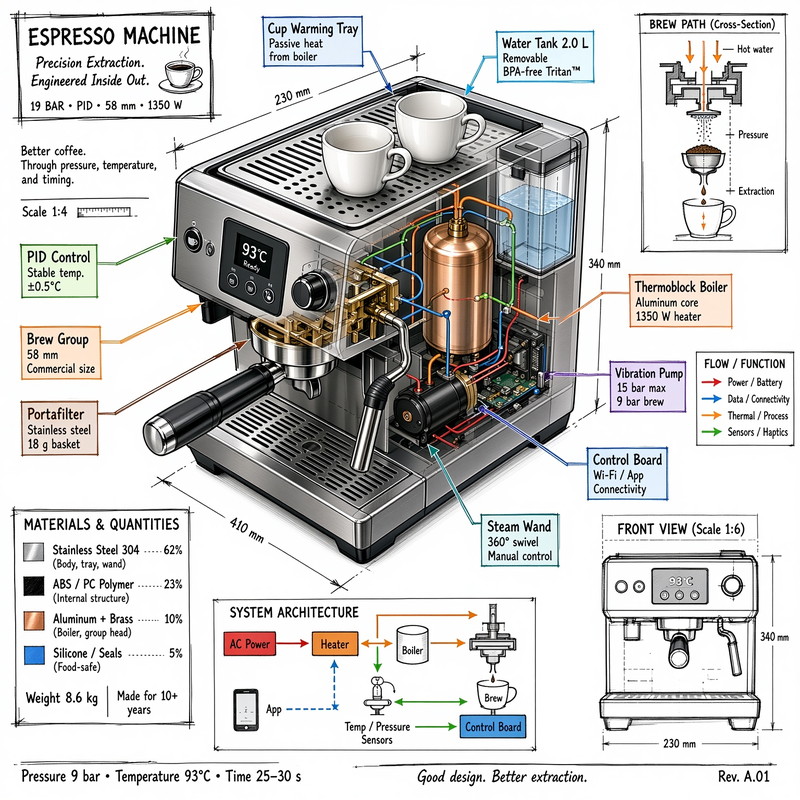
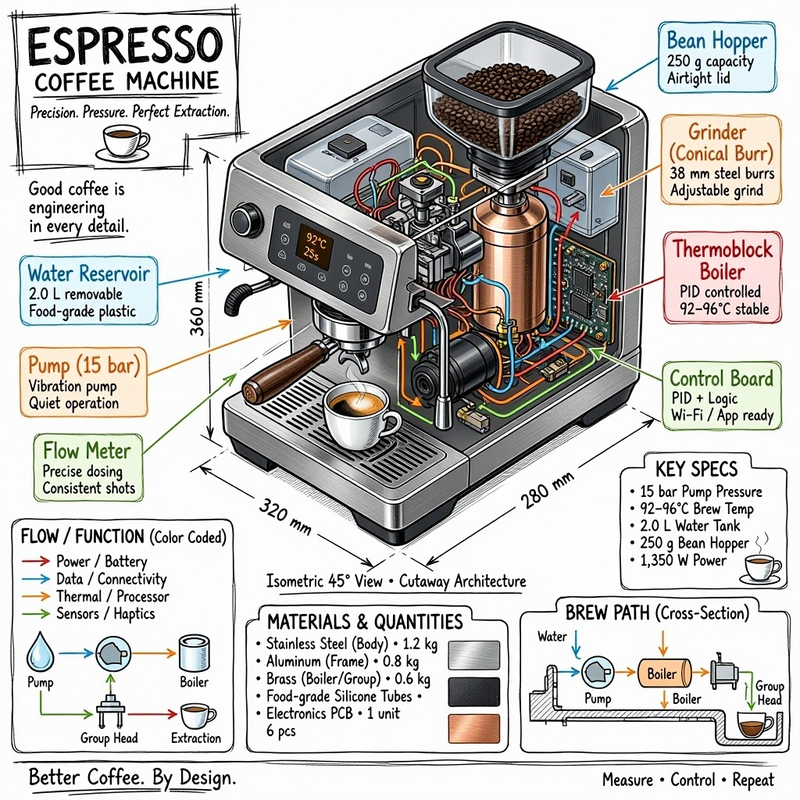
The new 2.7 result is the most crowded “manual page” in the set. It is a stainless machine in cutaway, with a copper boiler, colour-coded pipework, a 93°C display, cups on the warming tray, a brew-path sketch, a front view, a materials key and dimension lines. The text is readable. Flash, at 1,024 pixels, is in the same family: a similar poster layout, slightly less packed, and it chose a hopper-equipped machine rather than the two cups on top. Neither result is a radical break from 2.6. Both look like a firming up of the same idea, with the flagship carrying more detail at a higher resolution.
The non-Microsoft results are a reminder not to treat this as a one-horse race. The page’s Copilot Create and Copilot Chat images, both from 5 September, are already dense, usable technical posters, especially Copilot Create, with numbered callouts, a materials table and cross-sections. The PowerPoint GPT Image 2 result is very much an engineering drawing, complete with a bill of materials, though it also invents a drawing date of 18 May 2024 and a designer name. The result labelled Nano-Bananna2 is a clean product cutaway with mostly readable labels and a couple of typographic slips. Grok, from 11 September, is also a complete technical poster, mostly readable, in a taller portrait frame, with a Grok watermark and at least one typo in a heading. Claude Sonnet 5 is the outlier. The labels and boxes are tidy, but the machine itself is a grey geometric block, not a realistic espresso machine. You get the structure of a teardown and almost none of the object.
I am not going to invent a winner the page does not declare. On this one brief, the new MAI Image 2.7 models sit with the better recent results, not out on their own. The practical improvement over 2.6 is real but incremental. The improvement over mid-year 2.5 Flash is obvious. And a couple of other tools, including Copilot Create from September, already produce work you could use in a first draft of a technical figure.
What I would tell a business
If you are an MSP or an SMB picking an image model, the question is not “which one won a leaderboard.” It is where the work happens, who can use it, and whether the output is good enough for the job.
For most Microsoft 365 tenants, that job still starts in Copilot. Picture a marketing lead in PowerPoint who needs a cutaway, a product-style hero, or a simple diagram for a slide, or someone in Word or Teams who wants a visual without opening a separate design tool. I have been testing those Copilot surfaces with this same prompt for months. They are already good enough, on this brief, that I would not tell a customer to leave Microsoft 365 just to get a slightly sharper espresso machine drawing. I also would not tell them that Copilot is already running 2.7 until Microsoft says so in product.
If you need the new models themselves, the official path today is MAI Labs, including Canvas, or public preview in Microsoft Foundry, with the pricing Microsoft has published and the usual preview caveats. Foundry is the more natural fit for a controlled, identity-backed deployment. Bing Image Creator is the consumer-facing place Microsoft says already uses the MAI Image family. Those are different doors, with different governance.
I would also be careful with anything that has to be right. These models can now render a lot of text, but they still invent specifications, dates and part names. A technical figure for a customer proposal still needs a human to check the words and the numbers. The 2.5 Flash result is a useful warning from only a few months ago: a drawing can look finished and still be unusable.
My working view, from this test and from the official details, is simple. MAI Image 2.7 is a credible, cheaper-to-run option in Microsoft’s own image family, with a faster Flash variant for volume work. On my espresso machine brief, it belongs in the leading group, alongside recent 2.6 and Copilot Create results. It does not, by itself, change the advice I would give most businesses: use the image tool that already sits in the workflow you have, check the output, and only add another model when you have a job the current one cannot do.
Sources
- MAI Image 2.7 announcement, 17 November 2026
- MAI Image 2.7 model page
- MAI Image 2.7 / MAI Image 2.7 Flash model card, November 2026
- MAI Image 2.7 October preview post, 27 October 2026
- Deploy and use MAI image models in Microsoft Foundry, checked 18 November 2026
- Image comparison page

