

Microsoft published a Threat Intelligence post on threat actors using agentic AI tooling to find and abuse exposed secrets. Buried in the mitigation guidance is a concrete hunting ask: review Entra service principal and non-interactive sign-in logs for two campaign IPs, include failed attempts, and pay attention to certain secret-related sign-in errors. For an MSP with several tenants, that usually means opening a separate chat for each tenant, pasting the same ask again and again, and then trying to compare answers that arrived with different context. In the example below I used three tenant bots; the number simply matches that screenshot.
I did something simpler. I put my separate tenant bots into one Grok Bot group chat and pasted a single investigation request. CIAOPS AU, CIAOPS Labs and CIAOPS 365 each replied for the tenant they already know how to query. One prompt. Three independently scoped investigations. Comparable replies in one thread.
What the group chat screenshot shows
In the example shown below, I pasted this prompt, based on Microsoft’s detection and hunting guidance from the 5 November 2026 Microsoft Security blog:
Review Entra service principal and non-interactive sign-in logs for 199.19.77[.]84 and 199.19.77[.]18 including failed attempts. Sign-in errors AADSTS7000215 (invalid secret) or AADSTS7000222 (expired secret) indicate someone holds a credential for your app; a failure followed by a success is urgent.
That last sentence is how the Microsoft article phrases the hunting tip. It is useful as an escalation cue, but it is also easy to over-read. An invalid-secret failure means an invalid secret was presented. It does not, on its own, prove that someone holds a valid working credential. An expired-secret failure means the presented secret was rejected as expired. Microsoft Learn documents AADSTS7000215 as an invalid client secret and AADSTS7000222 as expired client secret keys; see client secret troubleshooting. Successful authentications from these IPs deserve urgent assessment even without a preceding failure. A failure followed by a success for the same relevant identity and context is also urgent. Neither pattern, and neither IP alone, proves compromise. Microsoft notes that 199.19.77[.]18 is a Tor exit node and may include unrelated activity, so an IP match is an investigation lead rather than conclusive maliciousness. Failed attempts remain reportable; they are not automatically benign.
The valuable part of the screenshot is that the bots did not just search. They qualified the prompt as they worked.
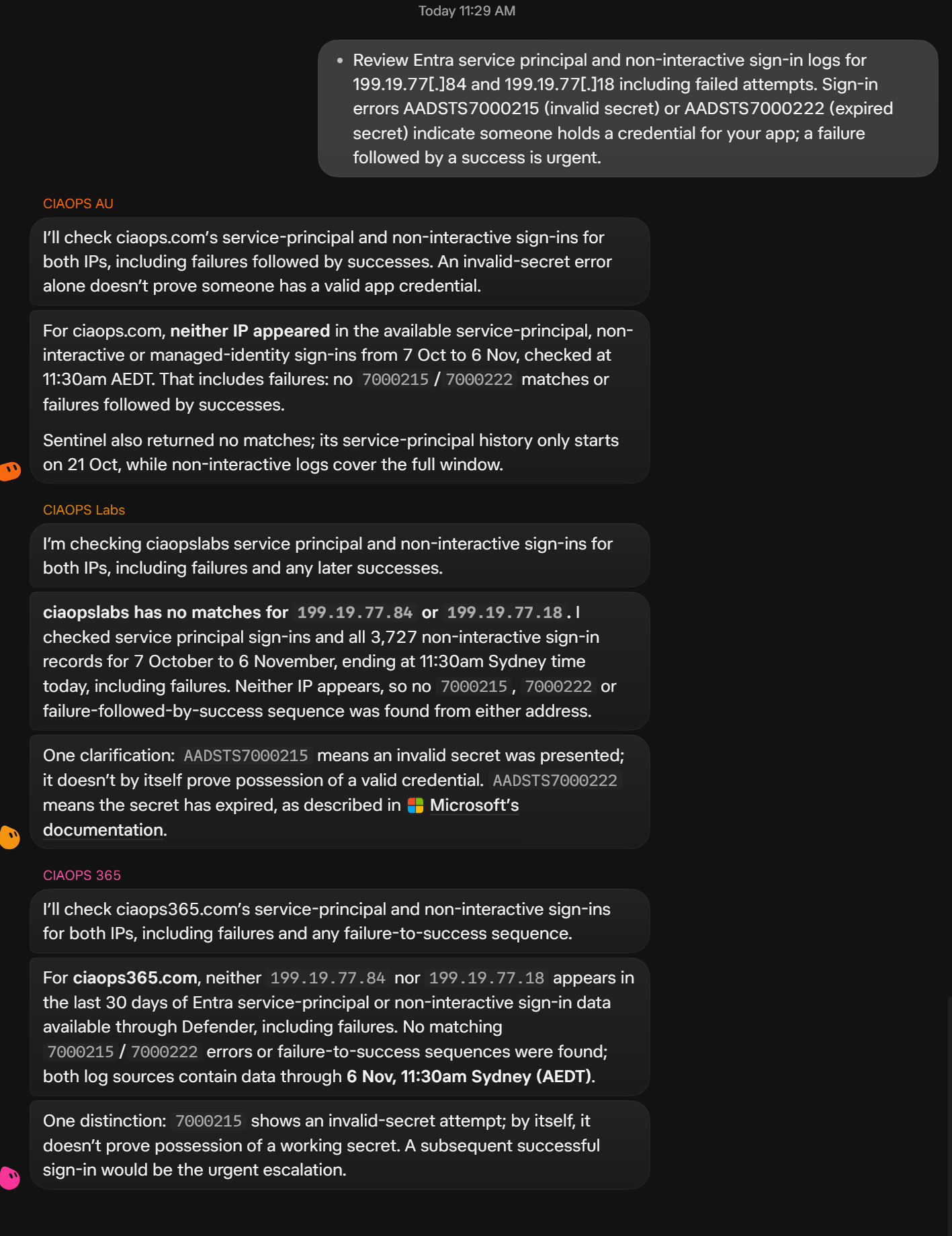
In the example shown, reported around 6 November 2026 at about 11:30 am Sydney time (AEDT):
- CIAOPS AU checked ciaops.com and reported neither IP in service-principal, non-interactive or managed-identity sign-ins for 7 Oct to 6 Nov. It found no matching 7000215 / 7000222 results or failure-followed-by-success sequences. It also noted that Microsoft Sentinel returned no matches, while its service-principal history only started on 21 Oct, whereas non-interactive coverage spanned the fuller window.
- CIAOPS Labs checked ciaopslabs and reported no matches for either IP across service principal and non-interactive sign-ins for the same window. It also clarified the error-code meanings against Microsoft documentation.
- CIAOPS 365 checked ciaops365.com through Microsoft Defender and reported neither IP in the last 30 days of available Entra data through that path, with no matching error codes or failure-to-success sequences.
Those are results reported in that chat at that time, not a fresh re-verification of the tenants as I write this, and not a claim that the tenants are clean forever. No matches in available logs is not proof of no compromise. Coverage gaps matter, which is exactly why AU calling out shorter Sentinel service-principal history is useful.
What group chat adds for MSPs
Separate chats still work. Group chat changes the operating model.
- Less repetitive prompting. You paste the intelligence once instead of rewriting or copying it into every tenant conversation.
- Consistent questions across clients. Every bot sees the same IPs, error codes, time window intent and urgency language.
- Visible source coverage differences. One tenant answers from Entra plus Sentinel, another from Defender’s available window. You see the gap in the same thread instead of discovering it days later.
- Follow-up in one place. Ask AU to explain the shorter history or query older archived data if it is already available, or ask Labs to include managed-identity logs, without losing the Labs and 365 answers.
- Checking conclusions. When one bot softens an overstated prompt and another finds a data-retention limit, you can challenge both answers in front of the whole group.
- Delegated specialists with bounded permissions. Each bot keeps its own authenticated, least-privilege connection to its tenant. The group is coordination across separately scoped bots.
Adding a bot to a group does not grant new tenant access. The queries still run through whatever authenticated connections, scripts and permissions that bot already has. If a bot cannot read service principal sign-ins in its tenant, the group chat will not invent that ability.
Prerequisites: separate, correctly scoped tenant bots
Before the group is useful, each tenant bot needs its own working, correctly scoped Microsoft 365 access. That usually means separate identities, connectors or certificate-based scripts, and clear rules about what the bot may read and what it must never change. I walked through the secure connection pattern in How to Connect Grok Bot to Microsoft 365 Securely, and the Conditional Access side of bot sign-ins in Using Grok Bot with a Conditional Access Geo-Block.
The group shares investigation context; it does not combine credentials or permissions.
How I used the group for this hunt
- Put the right bots in one group. I used a Grok Bot group chat that already contained CIAOPS AU, CIAOPS Labs and CIAOPS 365. Keep membership deliberate. A cross-client group means each participant can see the shared prompt and the other bots’ replies.
- Paste sourced intelligence once. I used the Microsoft hunting tip as the seed, then made sure each bot understood it was to investigate only its assigned tenant.
- Read the replies side by side. Look for matches, near misses, coverage windows, source differences and whether the bots corrected the prompt.
- Follow up on limitations. Where history starts later, ask the bot to explain the shorter history or query older archived data if it is already available. A prompt cannot recover unretained or uncollected data. Official Entra activity-report retention is limited in-portal unless you archive elsewhere; Free is much shorter than P1/P2, and longer retention depends on routing logs to storage or analytics. See Microsoft Entra data retention.
- Keep remediation human-led. No automatic incident closure, no secret rotation, no public posts, and no changes unless a human authorises them.
A better copyable prompt
If I were sending the same hunt again, I would tighten the wording so every bot gets the same scope and evidence bar. Something like this:
@CIAOPS AU @CIAOPS Labs @CIAOPS 365

Microsoft Threat Intelligence published hunting guidance for service-principal credential abuse activity associated with 199.19.77[.]84 and 199.19.77[.]18 (see the 5 Nov 2026 Microsoft Security blog on agentic AI tooling and exposed secrets). Addresses are defanged for display; use normal IP literals in log query filters. Do not contact the addresses.

Each of you: investigate ONLY your assigned tenant with your existing authenticated read-only access.

For the widest available lookback your sources allow, review:
- Entra service principal sign-ins
- Entra non-interactive sign-ins
- Any other related sign-in tables you can already query (for example managed identity), naming each source

Search for both IPs above. Include failed and successful attempts.

For any hits, report: timestamp, app/service principal identifiers you are allowed to show (no tenant or app GUIDs in public write-ups), IP, result/error code, resource if available, and whether a failure was followed by a success for the same relevant identity/context.

Treat AADSTS7000215 as an invalid client secret presentation, and AADSTS7000222 as an expired client secret presentation. Do not claim either code alone proves possession of a currently valid secret.

Flag successful authentications from these IPs for urgent assessment even without a preceding failure. Also treat a failure followed by a success for the same relevant identity/context as urgent. Neither that pattern nor an IP match alone proves compromise. Failed attempts remain reportable; they are not automatically benign. Still present evidence rather than a verdict. Microsoft notes 199.19.77[.]18 may be a Tor exit node with unrelated activity.

Also report, per source: earliest and latest event time available, total records scanned if known, and any coverage gaps (ingestion start date, 30-day caps, Sentinel vs portal differences). Explicitly flag query failures or inaccessible sources; do not return "no matches" when the query failed.

Do not make changes. Do not rotate secrets. Do not close incidents. Do not send email or post externally. Return evidence only.
That prompt names the bots, forces per-tenant scope, asks for failed and successful attempts, treats successful IP hits as urgent without requiring a prior failure, demands coverage metadata and honest query-failure reporting, and forbids remediation. It also keeps the credential and Tor-exit nuances honest.
Why the error-code nuance matters
Service principal sign-ins are the app-only authentications where certificates or client secrets are used. Microsoft documents that category separately from interactive and non-interactive user sign-ins; see service principal sign-ins. In a campaign like this, failed secret attempts can be noise, probing, stale automation or someone holding an old value. Successful authentications from a campaign IP are a different severity.
In the example chat, all three bots pushed back on the oversimplified “invalid secret means someone holds a credential” reading. That is exactly the behaviour I want from specialists in a group: search hard, then refuse to overclaim.
Least privilege, privacy and what group chat is not
- Least privilege still wins. Each tenant bot should only have the read permissions needed for hunts like this. Group membership is not a reason to widen Graph or Sentinel rights.
- Visibility is a design choice. In a cross-client group, every member can see the shared prompt and the replies. Do not put unrelated customer secrets, ticket notes or personal data into that room.
- Group membership does not equal unrestricted access across tenants. Each bot still only reaches what its own connections allow.
- No automatic sending or incident closure. The point of the pattern is faster, comparable investigation evidence for a human to act on.
My take
The benefit of Grok Bot group chat is not that AI suddenly understands Microsoft security better. It is that one piece of threat intelligence can be turned into several bounded tenant investigations without me re-explaining the ask each time. The bots bring their own connections, correct soft language in the prompt, and surface coverage differences that would otherwise hide in separate threads. Use that for hunting. Keep remediation, secret rotation and incident decisions with people who own the risk.

