
Copilot Agents Are the Next Real MSP Conversation

image

I’ve been having a lot of conversations lately with MSP owners who are still treating Copilot as a licence SKU to resell. They tick the box, push the price up, and wait on the renewal. Meanwhile a small group of their clients are quietly building agents in Copilot Studio and starting to ask sharper questions — questions about data, permissions, governance, and ownership. If your MSP isn’t in those conversations, somebody else is.

Agents are not “Copilot, but more.” They are a different shape of work. And they are the first part of the Copilot story where technical depth genuinely matters again.

Agents change what your clients ask you for

For two years the Copilot pitch has been “draft my email, summarise my meeting, polish my deck.” That is a user training problem dressed up as a technology problem. Agents are different. An agent is a piece of configured behaviour — a declarative agent in Microsoft 365, an agent built in Copilot Studio with actions, or a SharePoint agent grounded in a specific library — that does a specific job, with specific knowledge, for a specific group of people.

The moment a client builds one, the questions change. Which SharePoint sites is it allowed to read? What happens when somebody who shouldn’t see a document asks the agent about it? Who owns it when the person who built it leaves? These are not user questions. These are MSP questions. Nobody else in the client’s world is set up to answer them, and frankly, nobody else should be.

The technical groundwork is the billable work

Here is the part I keep flagging in peer groups. Before an agent is useful, the tenant has to be in shape. SharePoint permissions need to actually reflect reality, not the historical sediment of five years of “just give them access.” Sensitivity labels need to exist and be applied. Purview DLP policies need tuning for the way Copilot grounds answers. Entra ID app governance needs to be switched on, so a rogue agent in Copilot Studio can’t quietly start calling external connectors against a client’s data.

None of that is glamorous. All of it is billable, repeatable, and exactly the kind of work an MSP should be packaging right now. I’d rather sell a tenant readiness engagement than another round of “Copilot adoption training” that doesn’t survive contact with a real inbox.

Agents are how MSPs stop being interchangeable

The MSPs I see pulling ahead aren’t the ones with the slickest Copilot demo. They are the ones building reusable agents for their own clients — a client onboarding agent grounded in a policy library in SharePoint, a compliance Q&A agent pinned in Teams, a quoting assistant that reads the price book and drafts the response in Outlook. Each one is small. Each one is specific. Each one is harder for the next MSP down the road to replicate, because it sits inside the client’s data and inside the client’s workflow.

That is a moat. Not a big one, but a real one — and it compounds.

The watch-this-space part

I think the next twelve months are when the gap between MSPs who treat Copilot as a licence and MSPs who treat it as a platform starts to show up in client retention. Agents are the lever. The technical work to make them safe and useful is squarely in our lane. The MSPs who pick that work up early get to keep having the interesting conversations. The ones who don’t will find their clients having those conversations with somebody else.

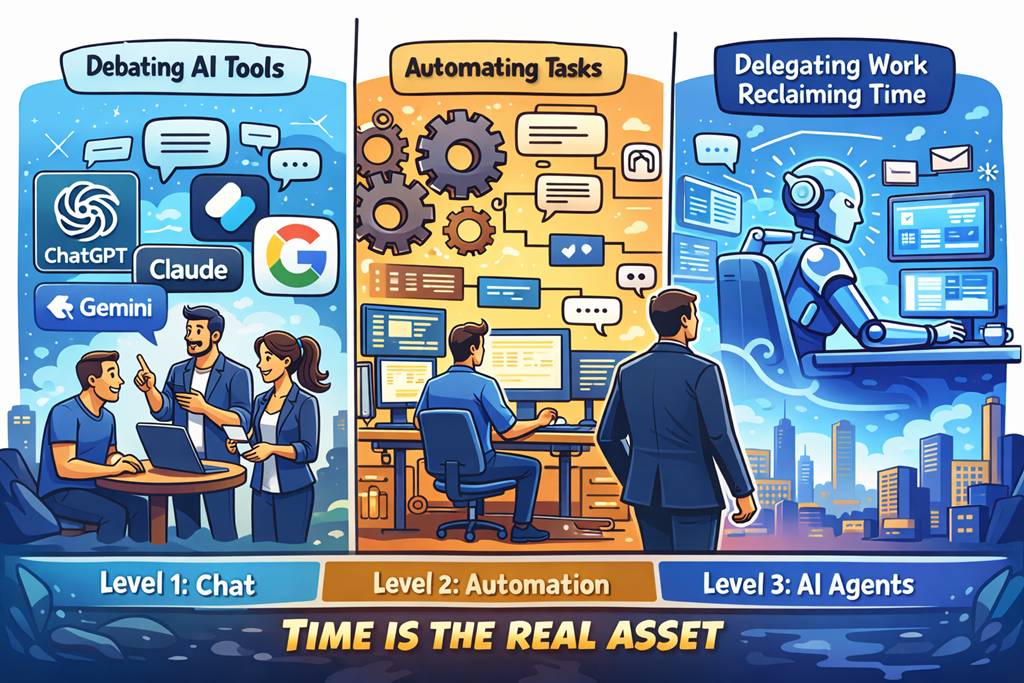
This Is the Reality Now

image

Most people are still stuck at Level 1.

They’re arguing about which AI tool is “best”.
ChatGPT vs Copilot. Claude vs Gemini. Model versions. Token limits. Benchmarks.

It’s all noise.

Because the real advantage was never the tool.

It’s how you delegate.

We’ve seen this movie before. When cloud arrived, people obsessed over which hypervisor was better instead of rethinking infrastructure. When SaaS took off, they argued about features instead of outcomes. AI is no different. The ones arguing about tools are missing the shift entirely.

Chat gives you answers.
Automation gives you leverage.
Agents give you time back.

And time is the only asset that actually matters.

Chat Is the Training Wheels

Chat-based AI is incredible. Don’t get me wrong. It’s useful, powerful, and accessible. It helps you think, draft, brainstorm, research, and unblock yourself.

But chat is still you doing the work.

You ask.
You refine.
You copy.
You paste.
You decide.

That’s not leverage. That’s assistance.

Chat is the equivalent of having a smart junior sitting next to you, waiting for instructions. Helpful? Absolutely. Transformational? Only if you stop there.

Most people do.

They feel productive because they’re faster — but they’re still the bottleneck.

Automation Is Where Leverage Starts

Automation changes the equation.

When you automate, work happens without you being present. Decisions are made based on rules. Actions trigger automatically. Systems talk to systems.

This is where output starts to scale without effort scaling with it.

But automation still has limits. It’s rigid. It does exactly what you tell it to do — no more, no less. It’s fantastic for repeatable, predictable processes, but it struggles when judgement is required.

Which brings us to the real shift.

Agents Are the Force Multiplier

Agents are where things get uncomfortable — because they replace you in the loop.

Agents don’t just answer questions.
They monitor.
They decide.
They act.
They escalate only when needed.

That’s delegation at a level most people aren’t ready for.

Instead of asking AI to help you do the work, you assign the work and walk away. You define outcomes, guardrails, and exceptions — and the agent handles the rest.

This is the difference between working with AI and working through AI.

One saves time.
The other gives it back.

Time Is the Only Asset That Matters

Money can be earned again.
Tools can be replaced.
Skills can be relearned.

Time is gone forever.

And yet most business owners, MSPs, and professionals are using AI to shave minutes instead of reclaim hours. They’re optimising tasks instead of eliminating them. They’re still “busy”, just faster at being busy.

The winners in this next phase aren’t going to be the people who know the most prompts.

They’ll be the people who know how to delegate to systems.

Who design workflows where AI works while they sleep.
Who build agents that handle the boring, repetitive, low‑value decisions.
Who spend their time on strategy, relationships, and leverage — not execution.

This Is the World We’re In Now

This isn’t future talk. It’s not hype. It’s not “someday”.

This is now.

AI isn’t just a tool you use anymore. It’s labour you can assign. And the moment you understand that, the question changes.

It’s no longer:
“Which AI should I use?”

It’s:
“What work should I never do again?”

The only real question left is whether you’re going to lean into that reality — or keep asking AI for answers while time keeps slipping through your fingers.

Because AI won’t run out of capacity.

You will.

CIAOPS Need to Know Microsoft 365 Webinar – March

laptop-eyes-technology-computer_thumb

Now in our tenth year!

Join me for the free monthly CIAOPS Need to Know webinar. Along with all the Microsoft Cloud news we’ll be taking a look at Copilot Agents.

Shortly after registering you should receive an automated email from Microsoft Teams confirming your registration, including all the event details as well as a calendar invite.

You can register for the regular monthly webinar here:

March Registrations

(If you are having issues with the above link copy and paste – https://bit.ly/n2k2603 )

The details are:

CIAOPS Need to Know Webinar – March 2026
Tuesday 31st of March 2026
11.00am – 12.00am Sydney Time

All sessions are recorded and posted to the CIAOPS Youtube channel.

Also feel free at any stage to email me directly via director@ciaops.com with your webinar topic suggestions.

I’d also appreciate you sharing information about this webinar with anyone you feel may benefit from the session and I look forward to seeing you there.

Need to Know podcast–Episode 360

In this episode I’m joined by Shervin Shaffie from Microsoft to do a deep dive into Copilot Studio. That’s the service from Microsoft that allows you to create agents in a ‘low-code’ manner right inside the M365 environment. Shervin has some great Youtube content I highly recommend and provides some great insights and tips and tricks in this episode when working with agents in Microsoft 365. I’ll also brin you up to date with the latest Microsoft Cloud news. Listen along.

Brought to you by www.ciaopspatron.com

you can listen directly to this episode at:

https://ciaops.podbean.com/e/episode-360-shervin-shaffie/

Subscribe via iTunes at:

https://itunes.apple.com/au/podcast/ciaops-need-to-know-podcasts/id406891445?mt=2

or Spotify:

https://open.spotify.com/show/7ejj00cOuw8977GnnE2lPb

Don’t forget to give the show a rating as well as send me any feedback or suggestions you may have for the show.

Resources

Explore the tools, communities, and content mentioned in this episode:

Show Notes

Shervin Shaffie – https://www.linkedin.com/in/sherv/
Principal Copilot Engineer at Microsoft
Collaboration Simplified YouTube:
https://youtube.com/@collaborationsimplified
All About AI Podcast: https://cosi.pro/aipodcast

FY26 Q2 – Press Releases – Investor Relations – Microsoft

The Microsoft Copilot Data Connector for Microsoft Sentinel is Now in Public Preview | Microsoft Community Hub

Secure Boot playbook for certificates expiring in 2026

SharePoint Showcase highlights: Copilot and agents governance and security essentials for admins

What’s New in Microsoft 365 Copilot | January 2026 | Microsoft Community Hub

Upcoming Conditional Access change: Improved enforcement for policies with resource exclusions

Copilot Agents licensing usage update


Things have changed recently when it comes to licensing Coilot Agents. Here is the latest information I can find. In short, every user that needs access to tenant information for use with Copilot, requires a license.


🔒 Confirmed Licensing Requirements

1. No Included Message Capacity with a Single M365 Copilot License

Confirmation: Correct. Your individual Microsoft 365 Copilot license does not include a pool of Copilot Studio message capacity that can be used by other users in the tenant who are unlicensed.

  • Your License Rights: Your M365 Copilot license grants you the right to:

    • Create and manage Copilot Studio agents for internal workflows at no extra charge for your own usage.

    • Access and use those agents yourself without incurring additional usage costs.

  • The Consumption: The consumption of your unlicensed colleagues is considered an organizational-level cost that must be covered by a separate organizational subscription for Copilot Studio.

2. Unlicensed Users Cannot Use Tenant-Grounded Agents Without Organizational Metering

Confirmation: Correct. Unlicensed users will not be able to use an agent that grounds its answers in shared tenant data (like SharePoint or OneDrive) unless the organization has set up a Copilot Studio billing subscription.

  • Agents that Access Tenant Data (SharePoint/OneDrive):

    • These agents access Graph-grounded data, which is considered a premium function and is billed on a metered basis (using “Copilot Credits”).

    • This metered consumption must be paid for by the organization.

  • The Required Organizational Licensing: To enable the unlicensed users to chat with your agent, the tenant administrator must set up one of the following Copilot Studio subscriptions:

    • Copilot Studio Message Pack (Pre-paid Capacity): Purchase packs of Copilot Credits (e.g., 25,000 credits per pack/month). The unlicensed users’ interactions are consumed from this central pool.

    • Copilot Studio Pay-As-You-Go (PAYG): Link a Copilot Studio environment to an Azure subscription. The interactions from the unlicensed users are billed monthly based on actual consumption (credits used) through Azure.

Official Licensing References

SharePoint / OneDrive Agent — Licensing & Usage Summary

Quick reference table describing what licenses and costs are required for users to access an agent that integrates with SharePoint or OneDrive.

Scenario User’s License Licensing Requirement to Access SharePoint/OneDrive Agent Usage Cost
Licensed User (You) Microsoft 365 Copilot (Add-on License) No additional license required. No additional charges for using the agent you created.
Unlicensed User (Colleague) Eligible M365 Plan (e.g., E3/E5) WITHOUT M365 Copilot Organizational Copilot Studio subscription (Pay‑As‑You‑Go or Message Pack) must be enabled in the tenant. Metered charges (Copilot Credits) are incurred against the organizational capacity / Azure subscription.

Key Reference: Microsoft documentation explicitly states: “If a user doesn’t have a Microsoft 365 Copilot license… if their organization enables metering through Copilot Studio, users can access agents in Copilot Chat that provide focused grounding on specific SharePoint sites, shared tenant files, or third-party data.” This confirms the unlicensed users’ access is contingent on the organizational metering being active.

Summary of Action Required

To make your agent available to your unlicensed colleagues, you need to inform your IT/licensing administrator that they must procure and enable Copilot Studio capacity (either Message Packs or Pay-As-You-Go metering) in your tenant. Your personal M365 Copilot license covers your creation and use, but not the consumption of others who are accessing premium, tenant-grounded data.

Microsoft agent usage estimator

The organizational consumption for agents created in Copilot Studio is measured in Copilot Credits.


💰 Copilot Studio Organizational Pricing (USD)

Microsoft offers two main ways for the organization to purchase the capacity consumed by unlicensed users accessing tenant-grounded data:


Copilot Credits — Pricing

Pricing Model Cost Capacity Provided Best For
Prepaid Capacity Pack USD $200.00 per month (per pack) 25,000 Copilot Credits per month (tenant-wide pool) Stable/predictable, moderate usage, budget control (lower cost per credit).
Pay-As-You-Go (PAYG) USD $0.01 per Copilot Credit No upfront commitment. Billed monthly based on actual usage. Pilots, highly variable usage, or as an overage safety net for the Prepaid Packs.

Note: All prices are Estimated Retail Price (ERP) in USD and are subject to change. Your final price will depend on your specific Microsoft agreement (e.g., Enterprise Agreement) and local currency conversion.


📊 Copilot Credit Consumption Rates

The cost is based on the complexity of the agent’s response, not just the number of messages. Since your agent uses SharePoint/OneDrive data, the key consumption rate to note is for Tenant Graph grounding.


Copilot credit consumption per agent action / scenario
Agent Action/Scenario Copilot Credits Consumed (Per Event)
Tenant Graph Grounding (Accessing SharePoint/OneDrive data) 10 Copilot Credits
Generative Answer (Using an LLM to form a non-grounded answer) 2 Copilot Credits
Classic Answer (Scripted topic response) 1 Copilot Credit
Agent Action (Invoking tools/steps, e.g., a Power Automate flow) 5 Copilot Credits

Example Cost Calculation

Let’s assume an unlicensed user asks the agent a question that requires it to search your SharePoint knowledge source (Tenant Graph Grounding) and generate a summary answer (Generative Answer)The Prepaid Pack option is more economical for this level of steady, high usage. Your IT team will need to monitor usage and choose the appropriate mix of Prepaid Packs and PAYG overage protection.

Total Credits = (Credits for Grounding) + (Credits for Generative Answer)
Total Credits = 10 + 2 = 12 Credits per conversation

If 100 unlicensed users each have 5 conversations per day:

Daily Conversations: 100 users × 5 conversations = 500
Daily Credits: 500 conversations × 12 credits/conversation = 6,000 credits

Monthly Credits (approx): 6,000 credits/day × 30 days = 180,000 credits

Monthly Cost Estimate:

Using Prepaid Packs:
180,000 credits / 25,000 credits per pack ≈ 7.2 packs
The organization would need to buy 8 packs per month.

Monthly Cost: 8 packs × $200 = USD $1,600

Using Pay-As-You-Go (PAYG):
Monthly Cost: 180,000 credits × $0.01/credit = USD $1,800

The Prepaid Pack option is more economical for this level of steady, high usage. Your IT team will need to monitor usage and choose the appropriate mix of Prepaid Packs and PAYG overage protection.

Here are the sources that were used to compile the information, each with a direct hyperlink:

  1. Copilot Studio licensing – Microsoft Learn

  2. Billing rates and management – Microsoft Copilot Studio

  3. Microsoft 365 Copilot Pricing – AI Agents | Copilot Studio

  4. Copilot Studio pricing & licensing (2025): packs and credits

  5. Copilot Credits consumption – LicenseVerse – Licensing School

  6. Get access to Copilot Studio – Microsoft Learn

  7. Manage Copilot Studio credits and capacity – Power Platform | Microsoft Learn


Unlock Anthropic AI in Microsoft Copilot: Step-by-Step Setup & Crucial Warnings!

In this video, I walk you through how to enable Anthropic’s powerful AI models—like Claude—inside Microsoft Copilot. I’ll show you exactly where to find the settings, how to activate new AI providers, and what features you unlock in Researcher and Copilot Studio. Plus, I share an important compliance warning you need to know before turning this on, so you can make informed decisions for your organization. If you want to supercharge your Copilot experience and stay ahead with the latest AI integrations, this guide is for you!

Video link = https://www.youtube.com/watch?v=Gxa9OrI6VJs

Need to Know podcast–Episode 352

In this episode of the CIAOPS “Need to Know” podcast, we dive into the latest updates across Microsoft 365, GitHub Copilot, and SMB-focused strategies for scaling IT services. From new Teams features to deep dives into DLP alerts and co-partnering models for MSPs, this episode is packed with insights for IT professionals and small business tech leaders looking to stay ahead of the curve. I also take a look at building an agent to help you work with frameworks like the ASD Blueprint for Secure Cloud.

Brought to you by www.ciaopspatron.com

you can listen directly to this episode at:

https://ciaops.podbean.com/e/episode-352-agents-to-the-rescue/

Subscribe via iTunes at:

https://itunes.apple.com/au/podcast/ciaops-need-to-know-podcasts/id406891445?mt=2

or Spotify:

https://open.spotify.com/show/7ejj00cOuw8977GnnE2lPb

Don’t forget to give the show a rating as well as send me any feedback or suggestions you may have for the show.

Resources

CIAOPS Need to Know podcast – CIAOPS – Need to Know podcasts | CIAOPS

X – https://www.twitter.com/directorcia

Join my Teams shared channel – Join my Teams Shared Channel – CIAOPS

CIAOPS Merch store – CIAOPS

Become a CIAOPS Patron – CIAOPS Patron

CIAOPS Blog – CIAOPS – Information about SharePoint, Microsoft 365, Azure, Mobility and Productivity from the Computer Information Agency

CIAOPS Brief – CIA Brief – CIAOPS

CIAOPS Labs – CIAOPS Labs – The Special Activities Division of the CIAOPS

Support CIAOPS – https://ko-fi.com/ciaops

Get your M365 questions answered via email

Microsoft 365 & GitHub Copilot Updates
GPT-5 in Microsoft 365 Copilot:
https://www.microsoft.com/en-us/microsoft-365/blog/2025/08/07/available-today-gpt-5-in-microsoft-365-copilot/

GPT-5 Public Preview for GitHub Copilot: https://github.blog/changelog/2025-08-07-openai-gpt-5-is-now-in-public-preview-for-github-copilot/

Microsoft Teams & UX Enhancements

Mic Volume Indicator in Teams: https://techcommunity.microsoft.com/blog/Microsoft365InsiderBlog/new-microphone-volume-indicator-in-teams/4442879

Pull Print in Universal Print: https://techcommunity.microsoft.com/blog/windows-itpro-blog/pull-print-is-now-available-in-universal-print/4441608

Audio Overview in Word via Copilot: https://techcommunity.microsoft.com/blog/Microsoft365InsiderBlog/listen-to-an-audio-overview-of-a-document-with-microsoft-365-copilot-in-word/4439362

Hidden OneDrive Features: https://techcommunity.microsoft.com/blog/microsoft365insiderblog/get-the-most-out-of-onedrive-with-these-little-known-features/4435197

SharePoint Header/Footer Enhancements: https://techcommunity.microsoft.com/blog/spblog/introducing-new-sharepoint-site-header–footer-enhancements/4444261

Security & Compliance

DLP Alerts Deep Dive (Part 1 & 2): https://techcommunity.microsoft.com/blog/microsoft-security-blog/deep-dive-dlp-incidents-alerts–events—part-1/4443691

https://techcommunity.microsoft.com/blog/microsoft-security-blog/deep-dive-dlp-incidents-alerts–events—part-2/4443700

Security Exposure Management Ninja Training: https://techcommunity.microsoft.com/blog/securityexposuremanagement/microsoft-security-exposure-management-ninja-training/4444285

Microsoft Entra Internet Access & Shadow AI Protection: https://techcommunity.microsoft.com/blog/microsoft-entra-blog/uncover-shadow-ai-block-threats-and-protect-data-with-microsoft-entra-internet-a/4440787

ASD Blueprint for Secure Cloud – https://blueprint.asd.gov.au/
