Trusted IPs

One of the ways that you can ease the burden of having to use MFA with every login to services like Microsoft 365 is to implement Trusted IPs for a limited set of networks. This feature is available with Azure MFA which is part of Azure AD Premium P1 and all SKUs of Microsoft 365 including Microsoft 365 Business.

You can read more about Trusted IP’s here:

https://docs.microsoft.com/en-gb/azure/active-directory/authentication/howto-mfa-mfasettings#trusted-ips

To configure Trusted IPs in your environment visit:

https://account.activedirectory.windowsazure.com/usermanagement/mfasettings.aspx

If you don’t have the appropriate license you will only see:

image

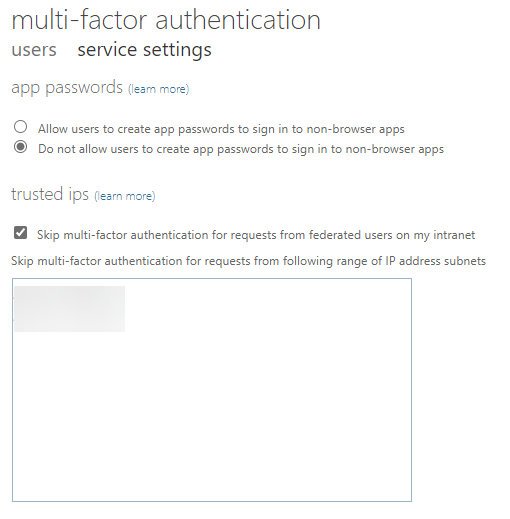
If you have the appropriate license you will see more options like so:

image

Thus, into the lower box you put the IP address range(s), behind which you do not wish to have MFA enabled. Anywhere else, it will remain enabled and required. Also don’t forget to check the option to Skip above this box.

image

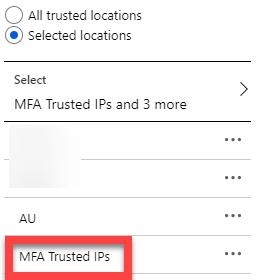
If you also look inside your Conditional Access configuration, you will now find that you also have a new Location called MFA Trusted IPs as shown above. You can thus use that as part of your Conditional Access policies if you wish which you can read more about here:

https://docs.microsoft.com/en-us/azure/active-directory/conditional-access/location-condition#trusted-ips

In summary then, Trusted IPs allow you to remove the need to use MFA when configured and are part of Azure AD Premium P1 or Microsoft 365 licenses. They are great way to remove the need for MFA for network ranges that you trust. Typically these are the IP ranges inside a businesses local network, that the business completely manages and controls.

A once in ten year opportunity

brown-hourglass-on-brown-wooden-table-1178684

There is no doubt that currently, every business and individual is headed towards some challenging times. The spread of the Corona virus will affect everyone in some way in the near future. The greatest chance of such effects will probably be economically. The slow down in key industries, including travel, transport, logistics, supply, just to name a few will be huge. These impacts will flow onto businesses, both large and small, and finally down to individuals. In short, it seems pretty assured that it won’t be long before we are officially in recession.

Economic downturns are nothing new however. That happen with surprising consistency and regularity. Here’s a brief history recap:

2020 – Corona Virus

2008 – GFC

2000 – Dot Com bubble burst

1997 – Asian financial crisis

1990 – Currency crisis and the Australian recession ‘we had to have’

1987 – Black Monday stock market crash

and so on.

If you look closely a these events you’ll see that are typically spaced around 10 years apart. Not always. Sometimes longer. Sometime shorter but I reckon it is a pretty safe bet to say that we live in times of a 10 year financial cycle from bust to boom.

Theories on such cycles have been establish by everyone from Kondratiev to Ray Dalio and are worth taking a look at. No one theory contains all the answers, but inside most is a piece of the puzzle for those willing to look.

The worrying thing is that we really haven’t fully recovered from the last downturn thanks to GFC even though we have enjoyed record low interest rates. The problem is now that the next economic shock is here and governments no longer have interest rates as a tool to “stimulate” the economy. It would seem that the only way they have left to make money ‘cheaper’ is to print more of it (known as qualitative easing). Many will debate the ability of such an approach to stimulate the economy, and I will leave you to do your own research on that, however my expectation is that such an approach largely benefits the few well off while disadvantaging the majority who see the purchasing power of their savings fall as government printed money (with no backing but merely what the government says it’s worth) floods the economy.

As bad as things look to be shaping up, there is something positive to remember here. Every threat also brings opportunity. However, opportunities are only available to those who position themselves to take advantage of them early. Thus, what I’m saying is that you should be preparing NOW if you want to firstly ride out the coming storm and secondly, if you want to take advantage of the opportunities that will arise because of it. Remember, the Bible tells us that Noah built the Ark BEFORE it rained!

In technology terms, many large business like Microsoft are now touting tools like Microsoft 365 and Teams as ways to work from home and limit the spread of the Corona Virus. Cleverly, they are also offering these tools for free:

Microsoft commitment to customers during COVID-19

This is a very smart move, because as bad as the situation may appear at the moment, it will not last forever. Just like the GF, Dot Com bubble and so on also didn’t last forever. Yes, there was a pull back, but once the threat had passed the economy continued to grow and the business environment did so as well. Chances are that it will be exactly the same this time as well. We just don’t know how long the downturn will last as yet. However, helping people and business today is going to get them on board with what you offer, from which they are unlikely to change as times improve. It also positions you as a ‘helper’ not a ‘panicer’.

What transpires in the short term with Corona Virus will determine the extent of the challenge we all face. That remains the unknown. That’s why now is the time to ensure you have your house in order and you make sure you are prepared for the downturn that is coming. Then and only then can you look externally for the many, many opportunities that will present themselves going forward both personally and professionally.

In short, right now is the unique opportunity in time to set yourself and your business up for the next 10 year up swing that will inevitably follow the current short term outlook. The smart player looks where the ball is going, not where it currently is!

Secure logging with Microsoft 365 presentation

Here’s the slides from my longer presentation today at Ignite Copenhagen

Securely logging to Microsoft 365

Getting access to your information in Microsoft 365 starts with logging in but is it secure as it could be? Understanding security options at the point of entry like MFA, Legacy Authentication and Conditional Access on all devices is critical to keeping information protected as it is not only you that is trying to log into your account these days! Learn what security technologies you can add at login and the best practices approaches to configuring and monitoring these. Security starts  at the doorway to Microsoft 365 and simple configurations can greatly reduce your risks of unauthorised access. Come and learn what can be done.

https://www.slideshare.net/directorcia/securely-logging-to-microsoft-365

Office 365 Backup presentation

Here’s the slides from my short theatre presentation at Ignite Copenhagen

THR30149 – Do you need to backup Office 365?

Is there are need to backup Microsoft 365 data given the feature set in place? What exactly is provided out of the box by Microsoft and what might require the consideration of additional solutions? What are the best practices with what can be enabled in Microsoft 365 to provide maximum data protection before considering alternatives? Determining this will help you create a better and more effective policy to ensure the availability of your information in all situations. Come and learn how to better protect your data and what additional steps you can take to improve its security and reliability.

https://www.slideshare.net/directorcia/do-you-need-to-backup-office-365


Need to Know podcast–Episode 231

FAQ podcasts are shorter and more focused on a particular topic. In this episode I’ll talk about the different Advanced Threat protection (ATP) offerings that Microsoft has.

This episode was recorded using Microsoft Teams and produced with Camtasia 2019

Take a listen and let us know what you think – feedback@needtoknow.cloud

You can listen directly to this episode at:

https://ciaops.podbean.com/e/episode-231-all-the-atps/

Subscribe via iTunes at:

https://itunes.apple.com/au/podcast/ciaops-need-to-know-podcasts/id406891445?mt=2

The podcast is also available on Stitcher at:

http://www.stitcher.com/podcast/ciaops/need-to-know-podcast?refid=stpr

Don’t forget to give the show a rating as well as send us any feedback or suggestions you may have for the show.

Resources

Office 365 ATP

Defender ATP

Azure ATP

Microsoft Defender App Guard issue

**** Update **** – Solution is here – Resolving Windows Application Guard issues

This article is bit different from most others. In this post I’ll be sharing a current issues I have with Defender Application Guard. If you have some suggestions of any additional troubleshooting, I’d love to hear, because currently, I’m not having much luck finding a solution.

image

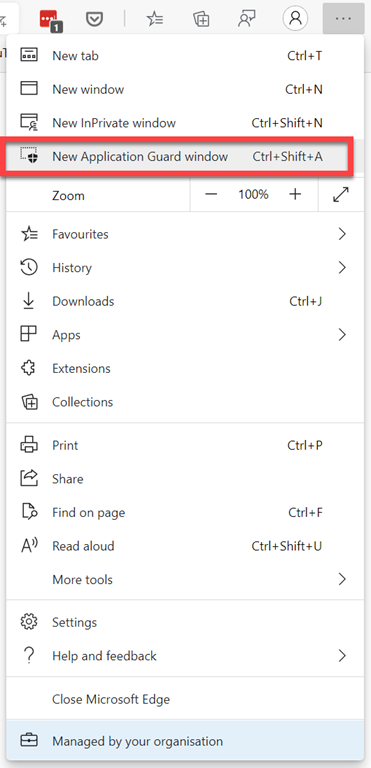
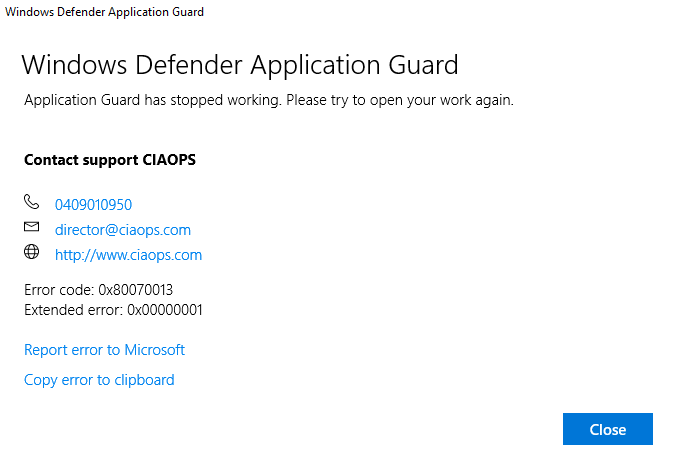
The issue is that if I go into the new Edge browser and select a New Application Guard Window, I end up with:

image

WDAG Report – Container: Error: 0x80070013, Ext error: 0x00000001; RDP: Error: 0x00000000, Ext error: 0x00000000 Location: 0x00000000

I have tried the wdagtool command line tool with the following result:

image

I have also run a:

sfc /scannow

across my machine with no integrity issues.

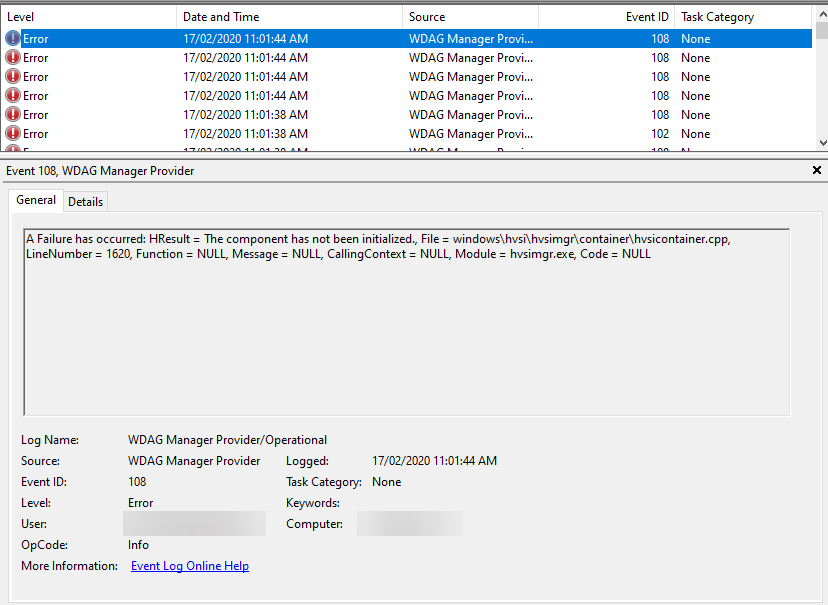
If I dig into Event viewer | Application and services log | Microsoft  | Windows | WDAG-Manager, I see:

image

A Failure has occurred: HResult = The media is write protected., File = windows\hvsi\hvsimgr\container\hvsicontainer.cpp, LineNumber = 769, Function = NULL, Message = NULL, CallingContext = NULL, Module = hvsimgr.exe, Code = NULL

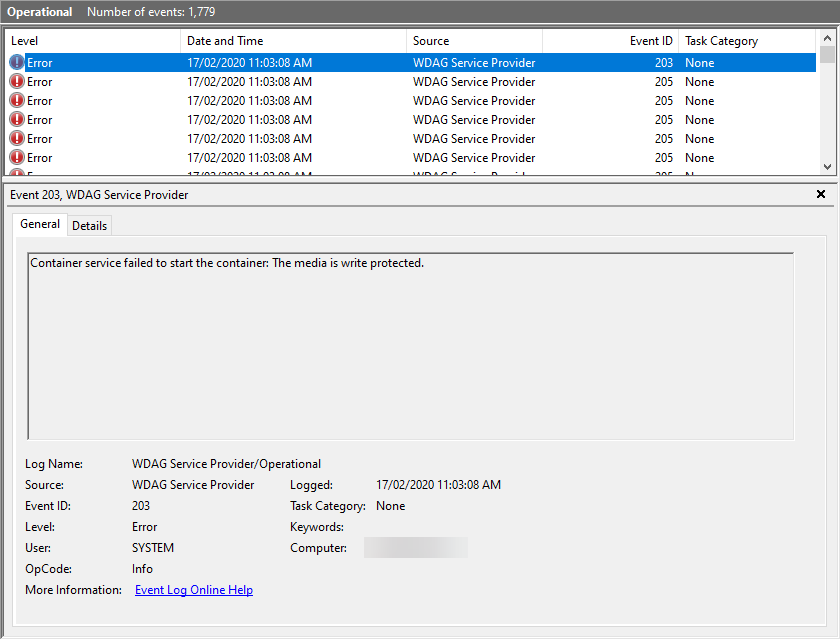
and in Event viewer | Application and services log | Microsoft  | Windows | WDAG-Service, I see:

image

Container service failed to start the container: The media is write protected.

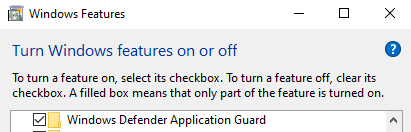
I have the App Guard Service enabled in my Windows Features  as well.

image

I have tried:

  • Re-installing Windows
  • Re-running Windows install again
  • Removing all App Guard components, rebooting, reinstalling all the components again and rebooting
  • Installing Hyper V service
  • Installing Sandboxing Service

I am still trying to resolve this issue, and have tried quite a few knowledgeable people who haven’t had much luck either. So, if you have any suggestion of what may help, please let me know.

Your collaboration should be wide not deep – BRK30221

Day 2 of Microsoft Ignite the Tour Sydney gave me the opportunity to present

Your collaboration should be wide not deep

and the slides are available at:

https://www.slideshare.net/directorcia/your-collaboration-should-be-wide-not-deep

I again thank Microsoft for the opportunity to speak and for everyone who attended.

We are now all done here in Sydney for 2020.