Need to Know podcast–Episode 226

Although Brenton is still on holidays you’ll hear him interview Michelle Price from AustCyber in this episode, along with a few updates from the Microsoft Cloud from me.

This episode was recorded using Microsoft Teams and produced with Camtasia 2019

Take a listen and let us know what you think – feedback@needtoknow.cloud

You can listen directly to this episode at:

https://ciaops.podbean.com/e/episode-226-michelle-price/

Subscribe via iTunes at:

https://itunes.apple.com/au/podcast/ciaops-need-to-know-podcasts/id406891445?mt=2

The podcast is also available on Stitcher at:

http://www.stitcher.com/podcast/ciaops/need-to-know-podcast?refid=stpr

Don’t forget to give the show a rating as well as send us any feedback or suggestions you may have for the show.

Resources

Michelle Price

@contactbrenton

@directorcia

Introducing security defaults

Office What’s New Management Preview Updates Now Available

8 new ways to empower Firstline Workers and transform the way they work with Microsoft 365

Announcing Office Scripts (Preview)

Updated Microsoft Online Services Terms are available to our customers around the world

My podcasts – 2020

desk-music-headphones-earphones

Seems like I neglected to post my podcast preferences last year. You can find the previous selection here:

My podcasts 2018

I do spend a lot of time listening to podcasts, generally in between things, like travelling. However, there is a limit to how many you can consume in a week and that’s why I need to be very discerning about what I listen to.

Regulars

These podcasts are ones that I generally won’t miss an episode of.

Windows Weekly

The latest Microsoft news with some fun and entertainment along the way. Paul Thurrott’s musing make this podcast alone something worth listening to.

The Tim Ferriss Show

Some really great advice, business insights and strategy. Also lots of life lessons that I have found work really well for me. A weekly must listen for me.

Hardcore History

These tend to be quite long, like reading a book, but a very good and very interesting. Luckily, they are not that frequent, so it can make a nice change from all the tech stuff

The Intrazone

All the latest news and information about SharePoint, OneDrive for Business, Teams and more directly from Microsoft.

Currently evaluating

These podcasts I listen to frequently, but maybe not every episode. Some of these may eventually get cut from the roster. Anything here has to provide real business value for it to remain long term.

The Message Center Show

What has appeared in the Microsoft 365 message center. Many just for change notifications.

Microsoft Cloud Show

Tends to be somewhat developer focused but there is handy information here, once you get past some of the other stuff.

Microsoft Cloud IT Pro podcast

More for IT Pros and somewhat random in its content. Another podcast in which you have to get past stuff to get to the information.

O365Eh!

A rather Teams centric podcast, however it is short so a quick listen. Still not sure if it has long term value in my ears.

If I have time

There are simply not enough hours in a day to get through everything. These are great podcasts but I simply don’t have the time to listen to them regularly unfortunately.

Jocko Podcast

Probably too hard core for most. For me it is a great mix of military history and business mindset training. If you have a ‘fanatical’ tendency then give this one a listen.

The Kevin Rose Show

A bit like the Tim Ferriss podcast. Plenty of interesting and different stuff that always makes you think. Somewhat irregular episodes but I am still enjoying what I’m hearing.

Business wars

Interesting to get the story behind major business rivalries. More a ‘stage production’ than a podcast. Very enjoyable if you have the time.

Behind the Tech

Hosted by Microsoft’s Chief Technology Officer, Kevin Scott, it has lots of interesting guests and topics.


I churn through these mostly at 2x speed to allow me to get through as much content as possible. I do have a few other podcasts on my current podcasting app but I think they’ll soon be getting the cut. I am always on the lookout for good podcasts business, technology, history, whatever. So if you can recommend something you like, I’m all ears.

Finally, of course, there is my own podcasting effort:

Need to Know podcast

which covers the Microsoft Cloud (typically Office 365 and Azure) as well as business topics. I encourage you to have a listen and me know what you think. 2020 will be the tenth year that it has been available, which is a bit of milestone I must admit. Recently, I’ve started doing shorter, more focused FAQ episodes as well as the standard long form interview.

Hopefully, there is something of interest to you in what I listen to. Feel free to let me know as well as any recommendations you may have, as I said, I’m all ears!

My Tech Books – 2020

Tech is as much a lifestyle choice these days as it is a career. The geeks and nerds have risen to rule the world. Don’t believe me? Ask Bill Gates! Sometimes it is good to step back and take a wide look at how technology has changed the world we live in – for better and worse. My selection below I have found to be enjoyable and thought provoking in many different ways and I recommend them to everyone who is interested in tech.

There hasn’t been an change to this since last year. Good tech books are hard to come by it seems!

You can follow all the books, tech, business, non-fiction I read and want to read over at Goodreads where I have an account. You can also view my activity via:

https://www.goodreads.com/director_cia


1. Daemon – Daniel Suarez [Fiction]

A glimpse into the future of where drones and augmented reality may take us. That may not necessarily be a good place either.

2. Freedom TM – Daniel Suarez [Fiction]

A follow up to Daemon. What happens when technology dominates the world? Who benefits?

3. Ready Player One – Ernest Cline [Fiction]

Much like the Matrix. What is life like if you live inside the machine? You can be just about anyone you choose. I also love this book for all the retro technology that was part of my life. TRS-80 anyone? This book has become so popular that there is now a movie. Believe me, the book is better.

4. Future Crimes: Inside the Digital Underground and the Battle for our Connected World – Marc Goodman [Non-fiction]

Technology will ultimately doom us all I believe because we are building our world on stuff that unfortunately places a low regard for security and privacy. This book will show you why that is a road to ruination.

5. Countdown to Zero Day: Stuxnet and the Launch of the World’s First Digital Weapon – Kim Zetter [Non-Fiction]

If you don’t believe cyber warfare is real then read this book to understand how software is now a weapon as potentially devastating as any nuclear device.

6. Beyond Fear: Thinking Sensibly about Security in an Uncertain World – Bruce Schneier [Non-Fiction]

Security is important but it is important in context. We need to be rational when we consider our security not emotional. A great level headed approach to how we need to be secure.

7. American Kingpin: The Epic Hunt or the Criminal Mastermind Behind the Silk Road – Nick Bilton [Non-Fiction]

An amazingly detailed book on the rise and fall of Ross Ulbricht, the creator of the Silk Road web site. In here are asked to think about whether technology plays something more than a neutral role in today’s world.

8. The Cuckoos Egg – Clifford Stoll [Non-Fiction]

Before the Internet was in the public sphere it existed in the world of academia. This is the story of how one man’s search for the source of an accounting error uncovered something are more sinister.

9. Takedown – John Markoff and Tsutomu Shimomura [Non-Fiction]

The pursuit and eventual capture of notorious hacker Kevin Mitnick makes for great reading.

10. Hackers: Heroes of the Computer Revolution – Steven Levy [Non-Fiction]

Ah, the good ole days when it was more about proving how smart you were than trying to actually cause harm. If you think hacking is something new, then you’re in for a surprise with this book

Moving to the Cloud–Part 3

This is part 3 of a multi part examination of moving to the Microsoft cloud. If you missed the first episode, you’ll find it here:

Moving to the Cloud  – Part 1

which covered off setting up a site to site VPN to Azure and

Moving to the Cloud – Part 2

which looked at creating traditional ‘dive mapped’ storage as PaaS.

It is now time to consider identity. We need to know where a user’s identity will live in this new environment because there are a few options. Traditionally, a user’s identity has lived on premises in a local domain controller (DC) inside an Active Directory (AD). With the advent of the cloud we now have Azure Active Directory (AAD) as an option as well. It is important here to remember that Azure Active Directory (AAD) is NOT identical to on premises Active Directory (AD) per:

image

What this means is that native Azure AD (AAD) can’t do some things that on premises Active Directory (AD) can do. Much of that is legacy services like Group Policy and machine joins, etc. You’ll see that Windows 10 machines can be joined to Azure AD (AAD) directly but legacy systems, like Windows 7, 8 and Windows Servers can’t be directly joined to AAD. That’s right. As we stand today, even the latest Windows Server cannot be directly joined to AAD like it can be joined to an AD on premises.

Thus, if you have legacy services and devices as well as Windows Servers you want to remain as part of your environment, you are going to need to select an identity model here that supports traditional domain joins. I will also point out that, as of today (changing in the future), if you want to implement Windows Virtual Desktop (WVD), you will also need a traditional AD to join those machines to. However, if you have no devices that require legacy services, for example if your environment is totally Windows 10 pro based with no servers (on prem or in Azure IaaS), then all you will need is Azure AD.

Thus, not every one can jump directly to AAD immediately. Most will have to transition through some form of hybrid arrangement that supports both AAD and AD in the interim. However, most transitions are ultimately aimed at eliminating on premises infrastructure to limit costs such as patching and updating things like physical servers. This will be what we are aiming for in this scenario.

In a migration from a traditional on premises environment with a domain controller (DC) and AD we now have a number of options when it comes to identity in the cloud.

1. You can maintain the on premises domain controller and AD, while using Azure AD Connect to synchronise (i.e. copy) the user’s identity to the AAD. It is important to note here that the identity in Azure is a COPY and the primary identity remains on premises in the local AD. This is still the case if you implement things like password write back that are part of Azure AD P1 and Microsoft 365 Business. Having the user’s primary identity still on premises means this is where you need to go to make changes and updates.

2. You can swing the domain controller from on premises to Azure IaaS. This basically means setting up a new VM in the Azure VNET that has been created already, joining it to the existing on premises domain across the VPN, then using DCPromo to make it a domain controller. To make it the ‘primary’ domain controller, you swing across the domain infrastructure roles via the following in PowerShell:

Move-ADDirectoryServerOperationMasterRole -Identity “Target-DC” -OperationMasterRole SchemaMaster,RIDMaster,InfrastructureMaster,DomainNamingMaster,PDCEmulator

and then DCPromo the original on premises domain controller out and then remove it altogether. This way you now have your Domain Controller and AD on the VM in Azure IaaS working with machines in the Azure VNET and on premises thanks to the site to site VPN established earlier (told you it would be handy!). In essence, this is like picking up the domain controller hardware and moving it to a new location. Nothing else changes. The workstations remain on the same domain, group policy is unaffected, etc, etc. The downside is that you still need to continue to patch and update the new domain controller VM in Azure but the maintenance and flexibility is superior now it is in Azure IaaS.

3. You replace the on premises domain with Azure AD Domain Services. Think of this like a cloud domain controller as a service. It is a Domain Controller as PaaS. This means that when you use Azure AD Domain Services Microsoft will spin up two load balanced domain controller VMs and connect this directly to AAD so the users there now appear in the PaaS domain controllers. Using Azure AD Domain Services removes the burden of you having to patch, update, scale, etc domain controllers for your environment. It also gives you a traditional AD environment you can now connect things like servers to. However, there are some trade offs. When you use Azure AD Domain Services you must start a new domain. This means you can’t swing an existing domain across onto it, like you can in step 2 above. This means detaching and reattaching all your legacy devices, like servers, from the original to new domain. You also get limited functionality with traditional AD services like Group Policy. You should see Azure AD Domain Services as a transitionary step, not an end point.

With all that in mind, you need to make a decision on what works best for your environment, now and in the future. Considering that most environments I see want to eliminate the on premises domain controller hardware as soon as possible and not replicate this going forward. That desire therefore means a migration to PaaS using Azure AD Domain Services.

The first step in this process then is going to be to ensure that all your users are in Azure AD. The assumption here is that you have already set up your Microsoft 365 environment and the users are configured in Azure AD. If you retaining an on premises domain controller you’ll need to have set up Azure AD Connect to copy the user identities to Azure AD. Azure AD is where Azure AD Domain Services will draw it’s identities when it is installed, so the users need to be there first. Once the users appear in Azure AD, next step will be to set up Azure AD Domain Services. You can kind of think of a traditional on premises domain controller as somewhat being equivalent to Azure AD combined with Azure AD Domain Services.

Setting up Azure AD Domain Services is done via the Azure portal.
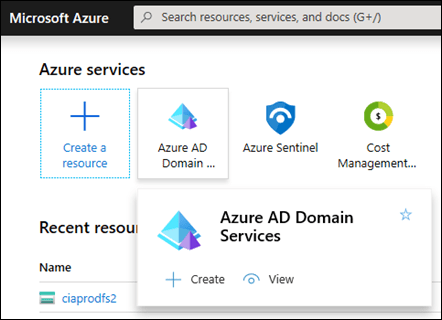
image

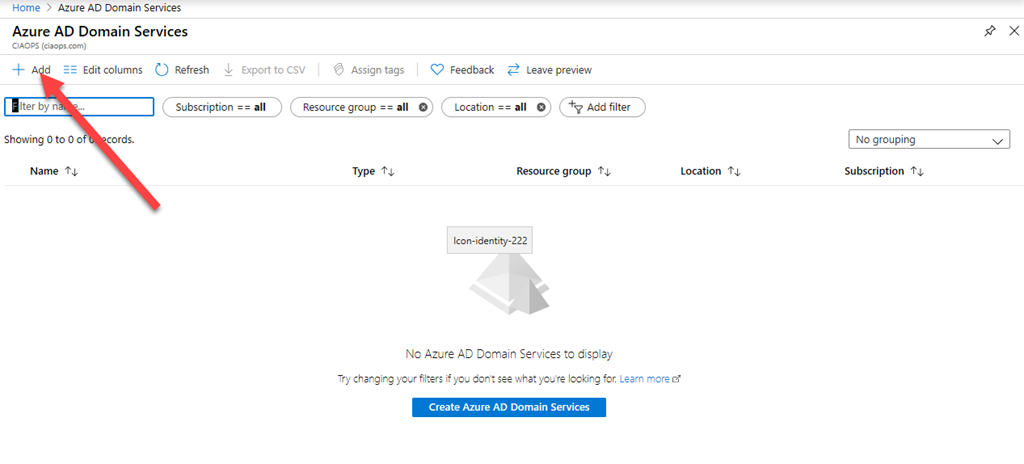
Login as a global administrator and locate Azure AD Domain Services and select that.
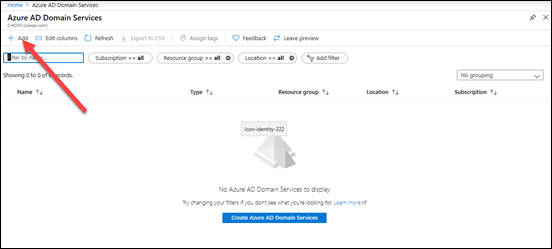
image

You’ll most likely find that no services are as yet configured. Select the Add option from the menu across the top as shown above.
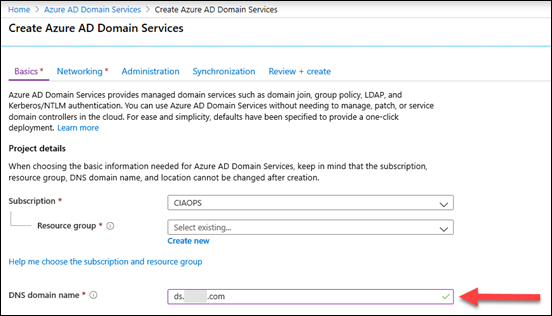
image

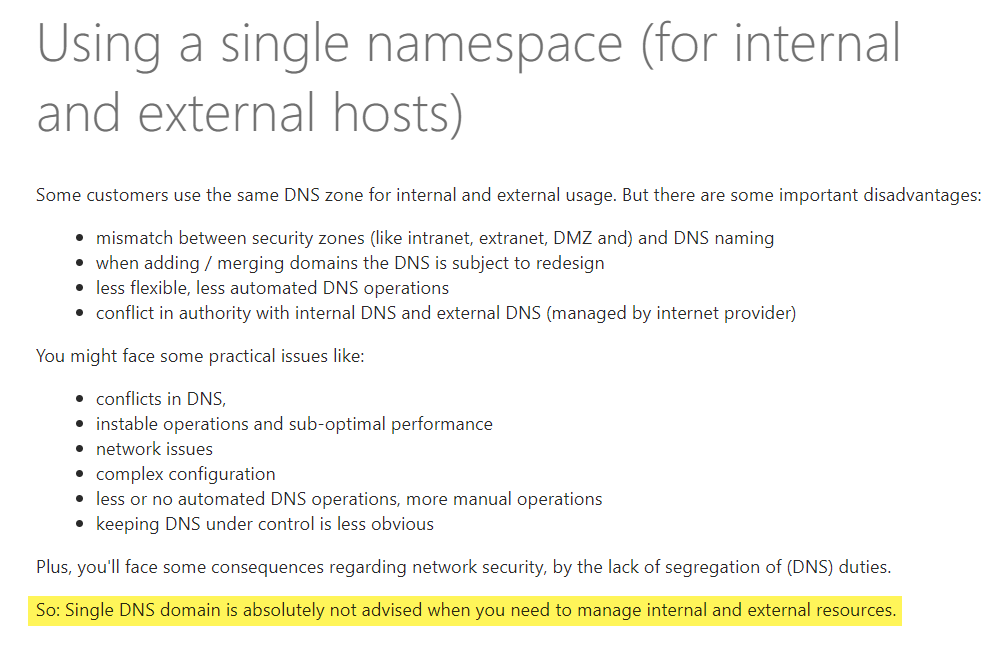
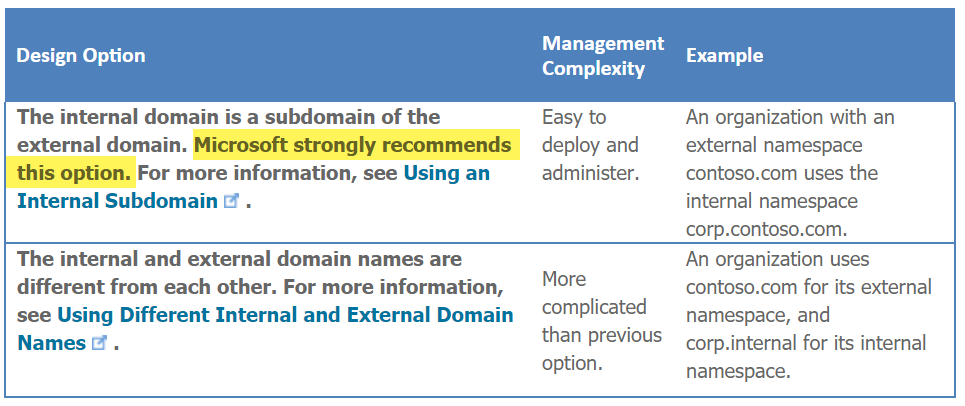
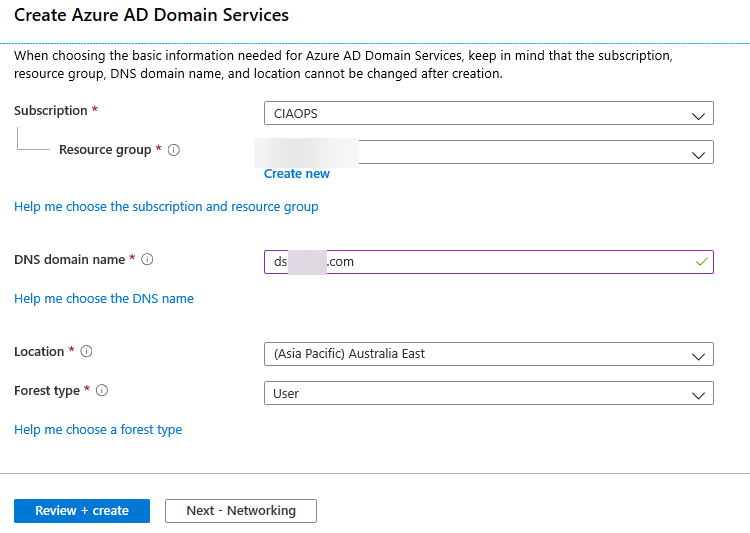
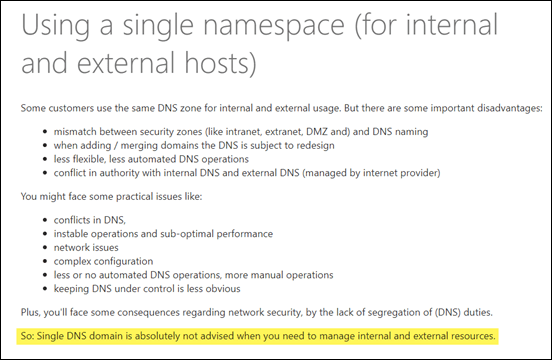
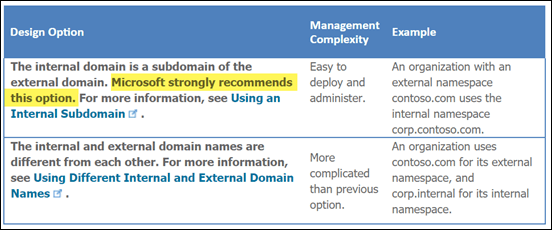
You then need to complete the details. Here we face an interesting question, what should we call this new ‘traditional’ managed domain we are about to create with Azure AD Domain Services? Should it be the same as what is being used in Azure AD already?
image

image

How you configure this is totally up to you. There is guidance, as shown above, which can be found at:

Active Directory: Best Practices for Internal Domain and Network Names

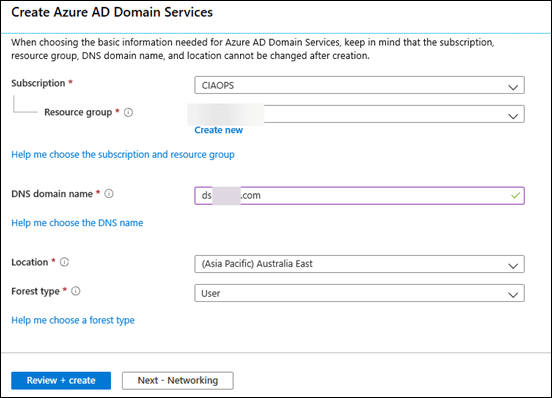
In this case I have decided to go for a sub-domain, as recommended, and prefix the new Azure AD Domain Services with the letter ‘ds’ i.e. ds.domain.com.
image

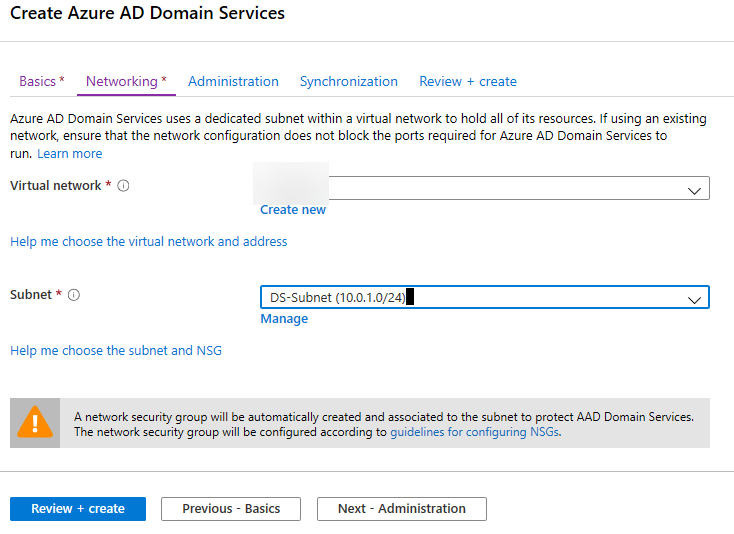
With all the options completed, select Next – Networking to continue.

image

Unfortunately, you can’t configure Azure AD Domain Services on the same subnet that has service endpoints as you can see above. You’ll see this if you configured your Azure storage to use private endpoints as we have, which has been previously recommended.

If so, then you can select the Manage link below this box and simply add a new subnet to your Azure VNET and then use that to connect Azure AD Domain Services to.

image

Before you continue to Administration, ensure that you are adding Azure AD Domain Services to your existing Azure VNET as the default is to create a new VNET, which is NOT what you want here. You want to connect it to an existing VNET you have established previously.

When you have selected your existing Azure VNET and a suitable subnet, select the Next – Administration button to continue.
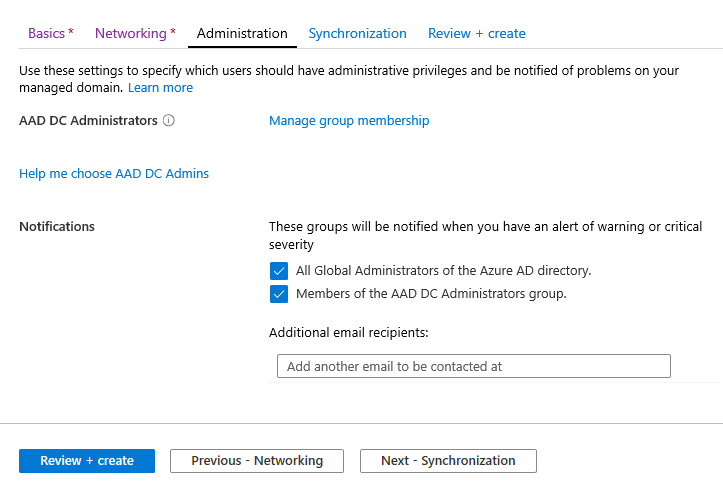
image

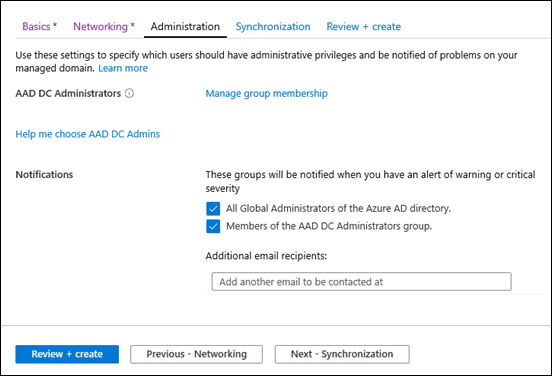
Here you’ll need to decide which users will be administrators for the domain.  So from the documentation:

What can an AAD DC Admin do?

Only Microsoft has domain admin and enterprise rights on the managed domain. AAD DC Admins can do the following:

  • Admins can use remote desktop to connect remotely to domain-joined machines

  • Admins can join computers to the domain

  • Admins are in the administration group on each domain-joined machine

Considerations for the AAD DC Administrators group

  • Pick group members for the AAD DC Administrators group that have these needs:

    • Users that need special administrative permissions and are joined to the domain

    • Users that need to join computers to the domain
  • Do not change the name of the AAD DC Administrators group. This will cause all AAD DC Admins to lose their privileges.

The default will be your global administrators and members of a special group called AAD DC Administrators, that will be created. So, you can simple add any Azure AD user to this group and they will have admin privileges in the  Azure AD Domain Services environment going forward.

You can of course configure these permissions any way you wish but generally the defaults are fine so select the Next – Synchronization button to continue.
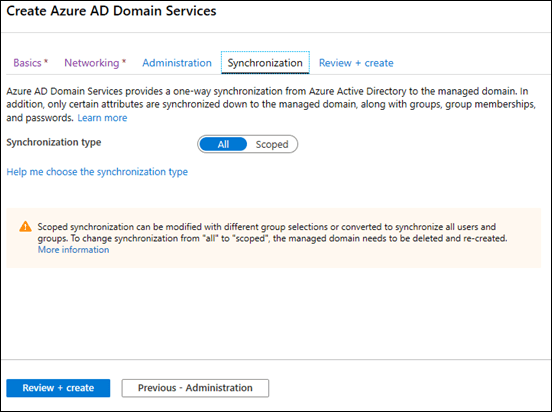
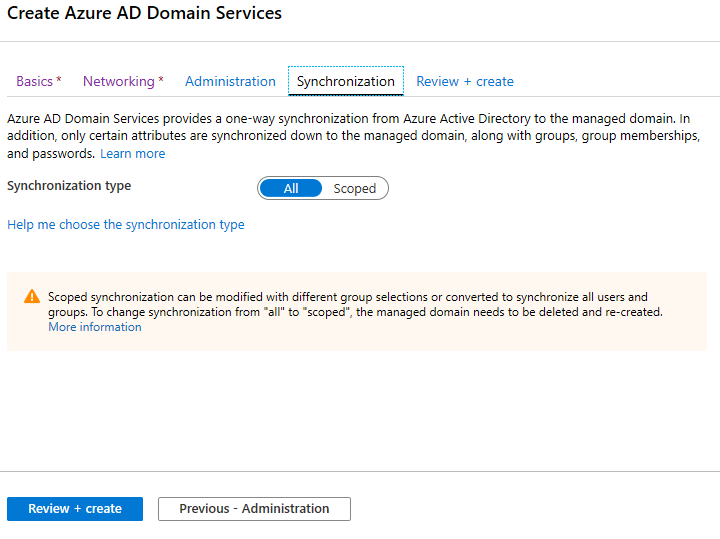
image

The final question is whether you wish to have all or a subset of your Azure AD users synchronised into the Azure AD Domain Service environment. In most cases, you’ll want all users, so ensure that option is select and press the Review + create button to continue.
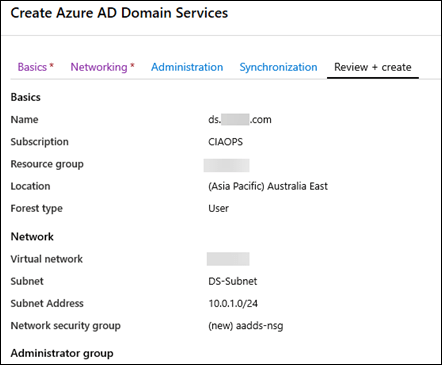
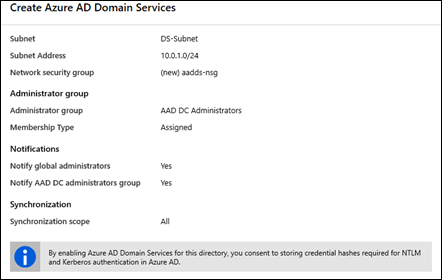
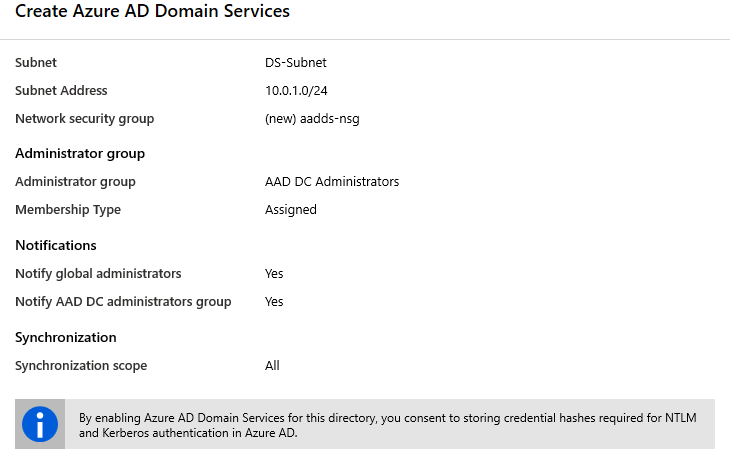
image
image

You should now see all your settings and importantly, note the box at the bottom about consenting to store NTLM and Kerberos authentication in Azure AD. This is because these older protocols have potential security concerns and having them stored in a place other than a  domain controller is something you need to be aware of. Generally, there won’t be any issues, but make sure you are aware of what that last box means for your security posture.

Press the Create button when complete.
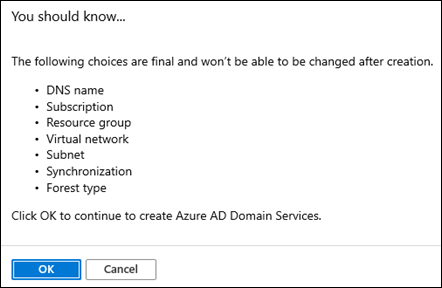
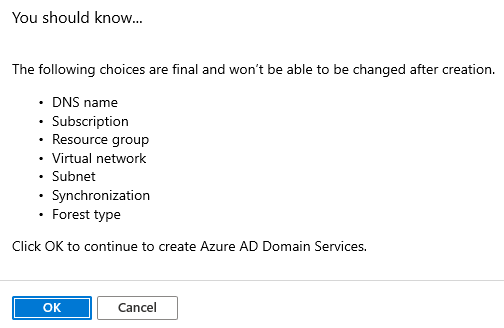
image

You’ll then receive the above warning about what configurations options can’t be changed after the fact. Once you have reviewed this and you wish to proceed, select the OK button.

Your deployment into Azure will then commence. This process should generally take around 1 hour (60 minutes).
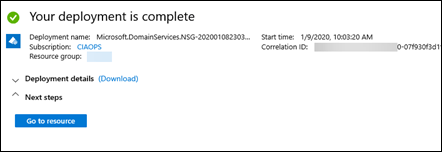
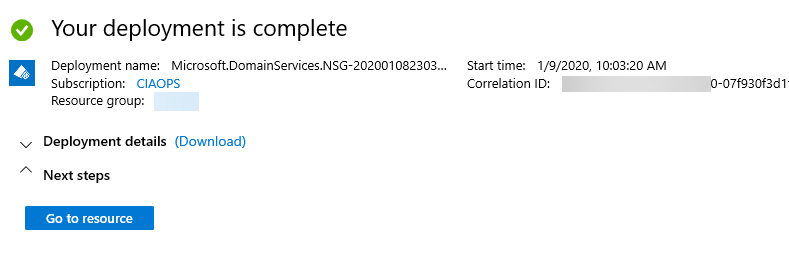
image

You should see the above message when complete and if you select Go to resource you’ll see:
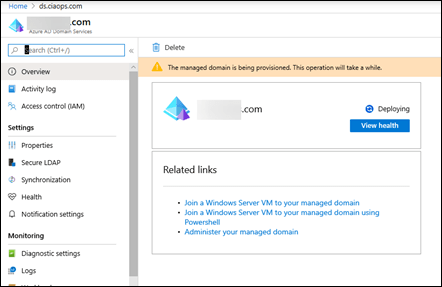
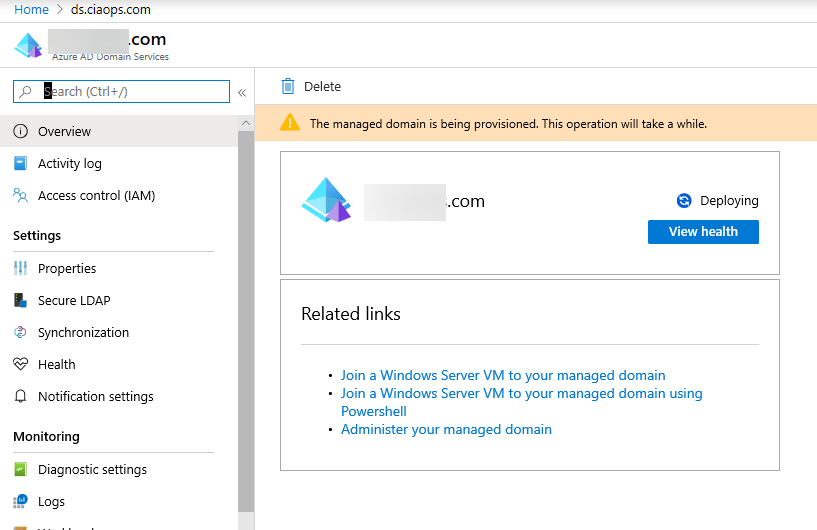
image

You’ll note that it still says Deploying here, so you’ll need to wait a little longer until that process is complete.
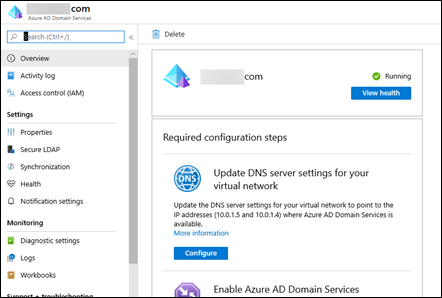
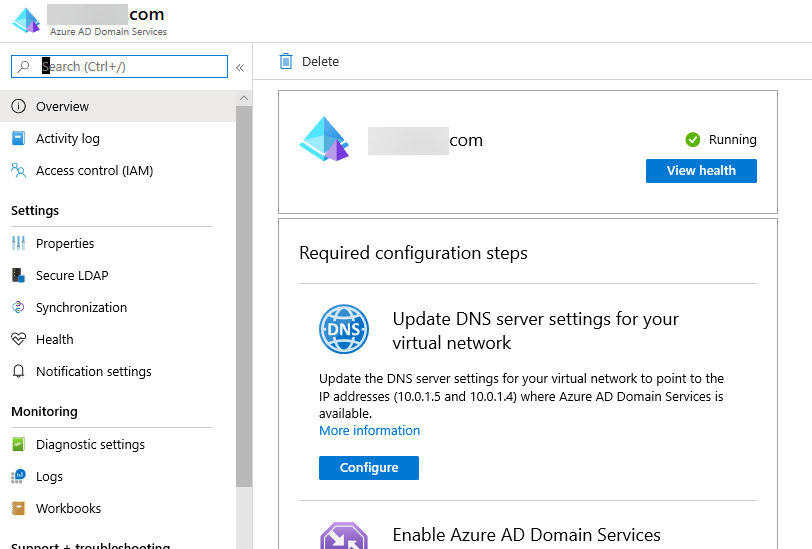
image

In about another 15 minutes you should see that the domain is fully deployed as shown above. Here you will note that two domain controllers have automatically been allocated. In this case they are 10.0.1.5 and 10.0.1.6 on the subnet into which Azure AD Domain Services was deployed. You can select from a number menu options on the left but the service is pretty basic. Most times you’ll only need to look at the Activity log here from now on.

Can you actually manage the domain controllers like you can on premises? Yes, somewhat. To do that you’ll need to download and install the:

Remote Server Administration Tools for Windows 10

on a Windows 10 workstation that can access these domain controllers.
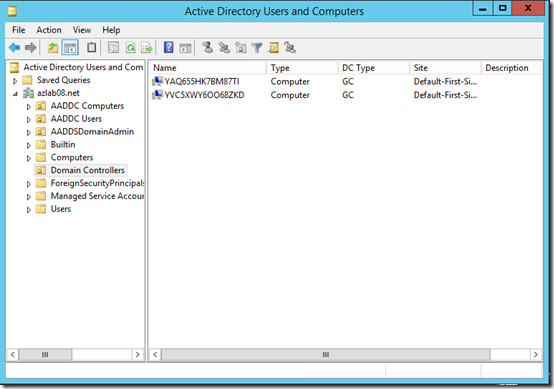
image

You can then use that to view your domain in the ‘traditional way’ as shown above.

Thus, with Azure AD Domain Services deployed, you have a ‘traditional’ domain but without infrastructure and with your Azure AD users in there as well.

The summary of the options around identity here are thus:

1. Primary = local AD, Secondary = none (which can be linked to Azure via a VPN)

2. Primary = Azure AD, Secondary = none (no on premises infrastructure like servers to worry about)

3. Primary = local AD, Secondary = Azure AD (thanks to Azure AD Connect, but need a VPN again to connect to Azure IaaS)

4. Primary = Azure AD, Secondary = Azure AD Domain Services (which can be linked backed to on premises via a VPN)

In this case, we’ll be going with Option 4. You can see however that a VPN is going to be required for options 1, 3 and 4. That’s why one of the first steps in this series was to set one up.

With all that now configured, let’s now look at the costs involved. The costs here will vary on what identity solution you select. If you stay with an on premises domain controller only, you will need to have site to site VPN to resources in Azure. The costing for this has been covered previously:

Moving to the Cloud  – Part 1

and equates to around AU$36 per month with less than 5GB of traffic inbound to Azure. Azure AD Connect software you use to synchronise user identities to Azure AD is free.

If you move the domain controller to a virtual machine in Azure, there will be the cost of that virtual machine (compute + disk storage). The cost will therefore vary greatly on what VM type you select. I’ll be covering more about VM options in this migration in an upcoming article, but for now let’s keep it simple and say we use a A2v2 Standard VM (4GB RAM, 20GB HDD) for a single role as just a domain controller. The cost for that is around AU$76 per month. If you also still have on premises infrastructure, like Windows Servers, that need access to the domain, then you’ll also need a site to site VPN to communicate with the domain controller VM in Azure IaaS. Thus, to move the domain controller to Azure IaaS and still allow access to on premises infrastructure the cost would be around AU$112 (Azure VM + VPN). Of course, if you can migrate all your on premises server infrastructure to Azure IaaS, you probably wouldn’t need the VPN but there would then be the costs of the additional infrastructure in Azure. Balanced against this cost in Azure IaaS is the saving in local hardware, power, etc.

Again, let’s keep it simple for now and say we want to maintain on premise infrastructure but have a dedicate domain controller in the Azure IaaS so the one on premises can be de-commissioned. That means the costs would be AU$112 per month for a domain controller in Azure IaaS and a VPN back to on premises.

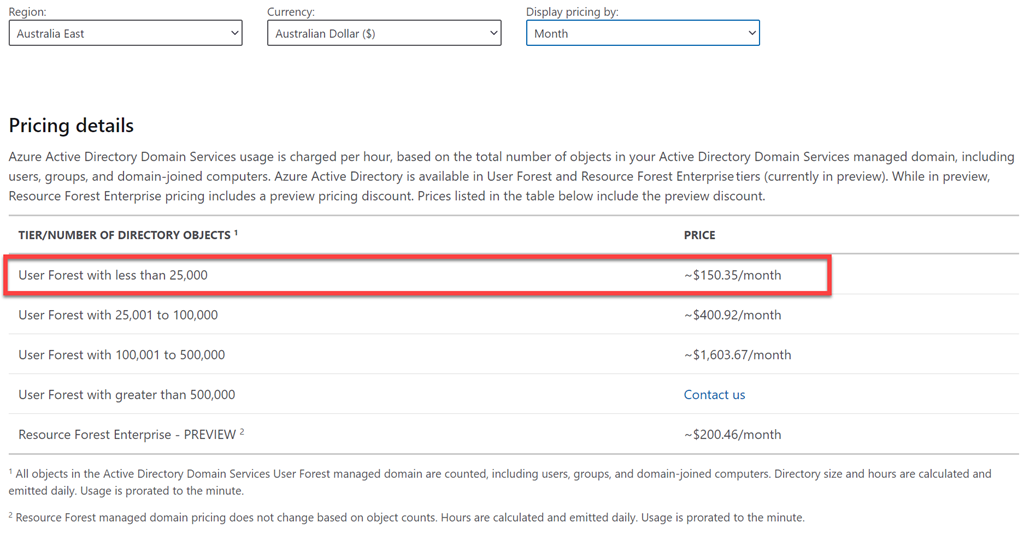
Finally, the last identity option is if we wanted to use the Azure PaaS service, Azure AD Domain Services, which means no infrastructure at all but also means we need to start with a new ‘clean’ domain separate from the existing on premises one. The costs of this Azure PaaS service can be found at:

Azure Active Directory Domain Services pricing

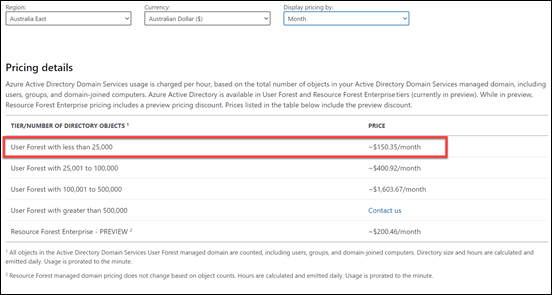
which reveals:
image

For smaller directories (<25,000 objects) the cost is going to be AU$150 per month flat. Remember, here when equating costs, there are no VMs to backup or operating systems to patch because it is PaaS. This is a domain controller as a service and Microsoft will take care of all the infrastructure “stuff” for you as part of that service. Of course, if you need on premises infrastructure to access Azure AD Domain Services, you’ll again need a site to site VPN to get there. If all your infrastructure is cloud based, then no site to site VPN is required. However, in this scenario, we still want access to on premises infrastructure so the costs would be AU$186 per month (Azure AD Domain Services + VPN).

In summary then, the configuration options/costs will be:

Option 1. Retain on premises AD = AU$36

Option 2. Move domain controller to Azure IaaS = AU$112 (estimated typical cost)

Option 3. Migrate domain controller to Azure PaaS = AU$186 per month

Going forward we’ll be selecting Option 3, because we are aiming to minimise the amount of infrastructure to be maintained and we want to move to PaaS as soon as possible. That means the total cost of the migration so far is:

1. Site to Site VPN = AU$36

2. Storage = AU$107

3. Identity (PaaS) = AU$150

Total maximum infrastructure cost to date = AU$293 per month

This means we have:

1. Eliminated the old on premises domain controller (hardware, patching, backup, power, etc costs)

2. Can connect to on premises infrastructure to Azure AD (via Azure AD Domain Services and the VPN)

3. Have mapped tiered storage locations for things like archiving, profiles, etc that are PaaS

4. We can now build out a Windows Virtual Desktop environment

The next item that we’ll focus on is setting up a Windows Virtual Desktop environment as we now have all the components in place to achieve that.


Need to Know podcast–Episode 225

FAQ podcasts are shorter and more focused on a particular topic. In this episode I’ll talk about the recommended process for file migrations to Microsoft 365 collaboration.

Take a listen and let us know what you think – feedback@needtoknow.cloud

You can listen directly to this episode at:

https://ciaops.podbean.com/e/episode-225-process-for-file-migrations/

Subscribe via iTunes at:

https://itunes.apple.com/au/podcast/ciaops-need-to-know-podcasts/id406891445?mt=2

The podcast is also available on Stitcher at:

http://www.stitcher.com/podcast/ciaops/need-to-know-podcast?refid=stpr

Don’t forget to give the show a rating as well as send us any feedback or suggestions you may have for the show.

Resources

Process for file migrations to Microsoft 365

My Business Books – 2020

Not a lot has changed on this since last year which you can check out at:

My Business Books – 2019

I spent more time last year reading biographies of people like Douglas MacArthur and Winston Churchill that I did with business books. Worthwhile business books are become harder and harder to find these days in my opinion. All have something to offer but few have more than one concept or some really novel ground breaking idea in my opinion. I still have lots of business books to get through but I can say that I’m busting to read any on that list at this stage.

You can follow all the books I read and want to read over at Goodreads where I have an account. You can also view my activity via:

https://www.goodreads.com/director_cia

or just follow me on Facebook:

www.facebook.com/ciaops

Here’s my current top business books in order:

1. The Art of War – Sun Tzu

The all time classic on strategy. As relevant today as it ever was. A very short read but very deep.

2. The Millionaire Fastlane – M.J. DeMarco

I love the brutal honesty of this book. It doesn’t mince words about what it takes to shift from a pay check to actually living the life you want.

3. The Tipping Point – Malcolm Gladwell

The world is all about not what you know but who you know. This book explains exactly how this works and how to use it to your advantage.

4. The Four Hour Work Week – Tim Ferriss

Many people believe this book is about shirking responsibility. It is in fact a blueprint for how to free up your time to do things you want and enjoy. It will challenge the way you look at your career.

5. Secrets of the Millionaire Mind: Mastering the Inner Game of Wealth – T. Harv Eker

The successful are defined by a different mindset. This mindset can be learned. It can be trained. This is a great book to show you how to do just that.

6. Talent is over rated: What Really Separates World-Class Performers from Everyone Else – Geoff Colvin

Demonstrates that the best comes from implementing a system. Having a system allows you to focus on the right thing and do that work that is required. If you want to take yourself to an elite level, beyond just good, then read this book.

7. Book Yourself Solid: The Fastest, Easiest, and Most Reliable System for Getting More Clients Than You Can Handle Even If You Hate Marketing and Selling – Michael Port, Tim Sanders

You can’t survive in business without a steady flow of customers. Selling to people is the wrong approach, you instead need to attract them to your business. This book helps you achieve exactly that.

8. Profit First: A Simple System To Transform Any Business From A Cash-Eating Monster To A Money-Making Machine – Mike Michalowicz

Business is about making a profit. This then gives you the freedom to do what you want with that profit. This book helps you focus on profit and setting up systems to make the most of the profit you generate.

9. Barking Up the Wrong Tree – Eric Barker

Conventional wisdom does not always apply and in some case can actually be detrimental. Challenging what is taken for granted should be in the play book of everyone who wants to achieve at the highest level. Important lessons can be learned in the strangest places and form the strangest people. Have an open mind and you might be surprised at what you have believed to be bad in fact turns out to get just what you need.

10. Unbeatable Mind: Forge Resiliency and Mental Toughness to Succeed at an Elite Level – Mark Divine

Another mindset book. Business is not always going to be easy or take the intended route. This is when you need to have the determination to see your plans through to success. This book shows you how to develop the mental toughness to make this happen.

11. The E-Myth – Michael Gerber

The classic on ‘procedurising’ your business and creating a structure that doesn’t need you to survive. The simple secrets inside this book can transform any business from hardship to joy.

12. Tools of Titans – Tim Ferriss

There are few books that take the learnings for so many exceptional people and puts them at your fingertips. This is one such book that packs a lot of business and life learnings between the covers.

13. Predictably irrational: The Hidden Forces that Shape our Decisions – Dan Ariley

Although we like to think logic and rationality rule our world emotion is by far the more powerful influence. Understand this in the context of business and you are well on your way to understanding why people make the decisions they do and how to best profit from them.

14. Extreme Ownership – Jocko Willink and Lief Babin

Moving beyond blame is tough. This book illustrates the ownership of the problem and the environment is a key to success in the military or in business. It is a path few will elect to take voluntarily, however more may do so after reading this.

15. Peak Performance: Elevate your game, avoid burnout and thrive with the science of success – Brad Stulberg

Success is largely about developing a winning system. This book show you how to approach that pragmatically. If you want to see results use this book to help you build the system.

16. Blink: The Power of Thinking Without Thinking – Malcolm Gladwell

The older you get the more experience you get. This experience is aggregated in your ‘gut feel’. Trusting your ‘gut’ may not appear rational but this book will help you understand why it is in fact your best option in many cases.

17. The Now Habit: A Strategic Program for Overcoming Procrastination and Enjoying Guilt-Free Play – Neil A. Fiore

Plenty of great productivity learnings in here that help you take action. It shows you how to focus on the right stuff in the right priority. Even if you are not a major procrastinator there is plenty in this book that you can take away.

18. The One Thing – Gary Keller

Multi-tasking is a myth. Focus is the key to success to bringing all your resources to bear in unison makes a hell of a lot of difference. Most people can’t do it, so those that can stand a much greater chance of success.

19 Deep Work – Cal Newport

Distractions are wasted energy and time that you’ll never get back. You’d be amazed at how distracting the modern world is. If you can minimise these distractions you can focus more and be far more productive.

I’ve decided to spend more time with Audible books this year to help me get through more content. I can listen at increased speeds to get through more content and I can also listen in more locations with Audible books. I still enjoy reading ‘old style’ on my Kindle but there seem to be so many things that get in the way. Even if I am tired and worn down, listening to Audible is easy to do and generally more relaxing. I am hoping to churn through a lot more books this year in that way.

Let me know what you think. Do these work for you? What’s your top business reads? I’d love to hear.

CIAOPS Need to Know Microsoft 365 Webinar–January

laptop-eyes-technology-computer

We are back for a new decade! Yes, it is 2020 and Microsoft 365 webinars continue. This month I’m going to take a look of the some less common services of Microsoft 365 including Forms, To-Do, Whiteboard, Kaizala and more. I’ll have the  the latest Microsoft Cloud updates plus open Q and A as well. Start your year and decade off with a BANG!

You can register for the regular monthly webinar here:

January Webinar Registrations

The details are:

CIAOPS Need to Know Webinar – January 2020
Thursday 30th of January 2020
10.30am – 11.30am Sydney Time

All sessions are recorded and posted to the CIAOPS Academy.

The CIAOPS Need to Know Webinars are free to attend but if you want to receive the recording of the session you need to sign up as a CIAOPS patron which you can do here:

http://www.ciaopspatron.com

or purchase them individually at:

http://www.ciaopsacademy.com/

Also feel free at any stage to email me directly via director@ciaops.com with your webinar topic suggestions.

I’d also appreciate you sharing information about this webinar with anyone you feel may benefit from the session and I look forward to seeing you there.