

Enabling Windows Attack Surface Reduction (ASR) rules is **highly effective** in preventing a Windows device from many common types of malware and attack techniques. It’s a crucial component of a defense-in-depth strategy.
However, it’s not a silver bullet and its effectiveness depends on several factors.
Here’s a breakdown of its effectiveness:
How ASR Works and Why It’s Effective:
-
Targets Common Attack Vectors: ASR rules are specifically designed to block behaviors commonly used by malware to infect machines and execute malicious code. This includes:
- Office Application Abuse: Blocking Office apps from creating executable content, injecting into other processes, creating child processes, or running macros deemed malicious.
- Script-Based Attacks: Blocking obfuscated scripts (JavaScript, VBScript, PowerShell), or scripts that download/run payloads.
- Email-Based Threats: Blocking executable content from email clients and webmail.
- Exploitation Techniques: Preventing credential stealing (e.g., from LSASS), process hollowing, or unsigned/untrusted executables from running from USB drives.
- Ransomware Behaviors: Some rules can help mitigate common ransomware tactics.
- Office Application Abuse: Blocking Office apps from creating executable content, injecting into other processes, creating child processes, or running macros deemed malicious.
-
Pre-Execution and Early-Execution Prevention: Many ASR rules intervene before malware fully executes or early in its execution chain, stopping the attack before significant damage occurs. This is more proactive than relying solely on detection of already-running malware.
-
Reduces Reliance on Signatures: While traditional AV relies heavily on signatures for known malware, ASR focuses on behaviors. This makes it more effective against new or polymorphic malware that might not have a signature yet.
-
Complements Antivirus: ASR works alongside Microsoft Defender Antivirus (or other AV solutions) and Endpoint Detection and Response (EDR) solutions like Microsoft Defender for Endpoint. It adds an extra layer of proactive defense.
Factors Influencing Effectiveness:
-
Which Rules Are Enabled: There are many ASR rules. Not all may be suitable for every environment. Enabling more relevant rules increases protection. Some key high-impact rules include:
- Block Office applications from creating child processes.
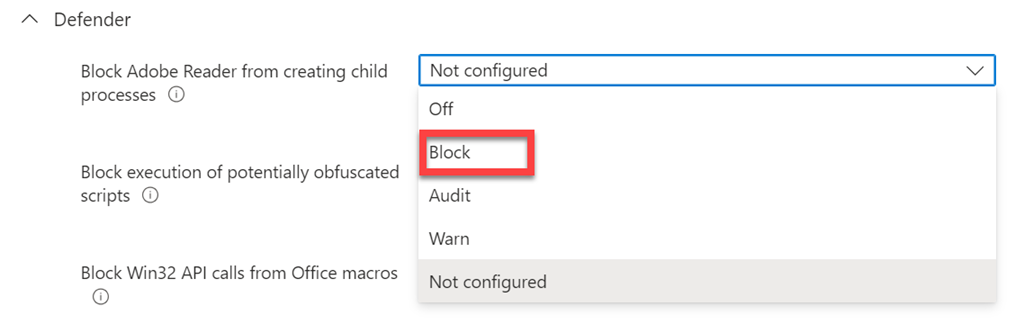
- Block Adobe Reader from creating child processes.
- Block execution of potentially obfuscated scripts.
- Block credential stealing from the Windows local security authority subsystem (lsass.exe).
- Block executable content from email client and webmail.
- Block Office applications from creating child processes.
-
Mode of Operation (Audit vs. Block):
- Audit Mode: Logs what would have been blocked. Essential for testing and identifying potential legitimate application conflicts (false positives) before enabling block mode. Provides visibility but no active prevention.
- Block Mode: Actively prevents the flagged behaviors. This is where the true preventative power lies.
- Audit Mode: Logs what would have been blocked. Essential for testing and identifying potential legitimate application conflicts (false positives) before enabling block mode. Provides visibility but no active prevention.
-
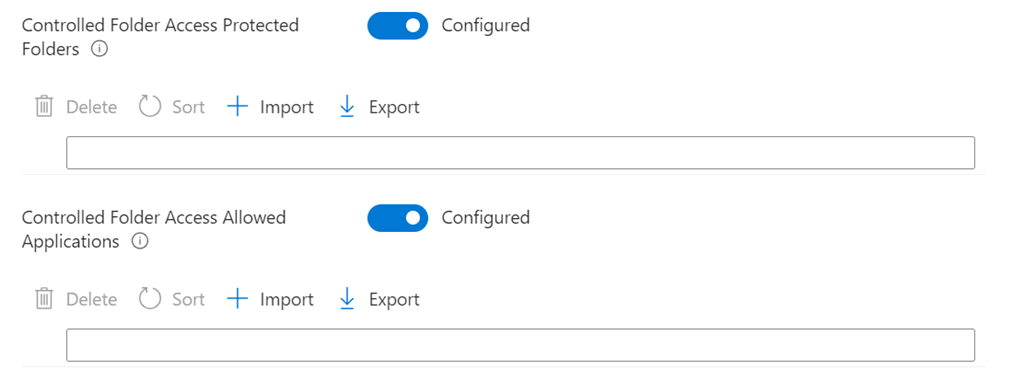
Exclusions: Properly configured exclusions are necessary for legitimate applications that might otherwise trigger ASR rules. Overly broad exclusions can reduce effectiveness.
-
Configuration and Management: Consistent deployment and management (e.g., via Group Policy, Intune, MEMCM) ensure all devices are protected.
-
Attacker Sophistication: While ASR stops many common TTPs (Tactics, Techniques, and Procedures), highly sophisticated attackers might find novel ways to bypass specific rules or use techniques not covered by ASR.
-
Keeping Systems Updated: Microsoft continually updates ASR rules and the underlying Defender platform to address new threats and improve detection logic.
Limitations:
- False Positives: The primary challenge. Some legitimate applications, especially older or custom-developed ones, might exhibit behaviors that trigger ASR rules. Thorough testing in audit mode is crucial.
- Not a Complete Solution: ASR doesn’t cover every conceivable attack vector. It won’t stop zero-day exploits against unpatched vulnerabilities if the exploit doesn’t trigger a specific ASR rule behavior.
- User Experience: If not carefully tuned, blocking legitimate actions can frustrate users.
Conclusion:
Enabling Windows Attack Surface Reduction rules is a very effective proactive measure to significantly reduce the likelihood of malware infection from common attack vectors. It raises the bar for attackers, forcing them to use less common or more sophisticated techniques.
For maximum effectiveness:
- Start in Audit Mode: Understand the impact on your environment.
- Gradually Enable Rules in Block Mode: Prioritize rules that block high-risk behaviors with low potential for false positives first.
- Monitor and Tune: Continuously review ASR logs and adjust exclusions as needed.
- Use in Conjunction with Other Security Layers: ASR should be part of a comprehensive security strategy that includes antivirus, EDR, firewalls, patching, and user education.
When implemented thoughtfully, ASR is a powerful, built-in tool that provides a substantial boost to Windows endpoint security.






 CIAOPS