Bye bye docs.com

image

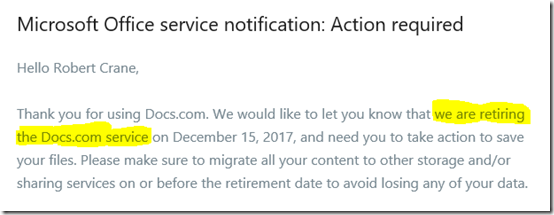
Received the above from Microsoft today. Unfortunately, docs.com is going away. Damm and blast, I really liked docs.com and I put a lot of stuff up there over the years. However, I understand that Microsoft wants to consolidate entities and having less means you can focus on making the alternate better.

The other good thing is that Microsoft has provided a really option to migrate everything across to my OneDrive for Business, including all the statistics, which I was impressed with. I have completed and when you do use the migration Microsoft provides you docs.com account becomes read only, which means you can’t upload of change anything any more.

So, fear not, I have copies of the documents that were in docs.com and now it looks like I need to re-activate my Slideshare account and move everything up there.

Stay tuned for details for details of when I have moved the material across. Until then you can still access my docs.com/ciaops but you won’t see any more information go there. It will now all be at:

https://www.slideshare.net/directorcia

Ask what others can’t do

pexels-photo-260024

The shift from traditional on premises to technologies like cloud has created significant disruption in the market. Such disruption extends through the entire chain and also includes IT resellers who have traditionally made their revenue by selling physical devices like servers.

The move to the cloud has meant that many IT resellers are receiving significantly less revenue and thus need to look elsewhere to generate additional income. Most turned to email migrations as way to keep the dollars flowing. Unfortunately, that opportunity quickly became commoditised and in fact also declines as more organisations move to the cloud. Unfortunately for IT resellers, the email migration to the cloud is probably the last email migration they will do for a customer.

So now it is back to square one for IT resellers looking for revenue. Unfortunately, most are looking for additional opportunities in the wrong way I believe. Most now look for something they ‘want’ to do rather than looking for what nobody else can do.

The problem with doing what you ‘want’ to do is that based on your history, associations, experience you are most likely going to choose something your peers are also going to ‘want’ to do. Why? Because they are just like you and thus make similar choices. That simply lands us back in a world like the traditional box moving or email migrations, with many people are doing the same thing. The result? A commodity market where it is hard to make a decent profit.

Instead, I would suggest, you need to look out at the market and find what others are not doing or don’t want to do and fill that void. Profitability, in the SMB space, really doesn’t come from doing what everyone else does. It comes from being a specialist, from being a unique provider that remains largely unchallenged in the market.

Chances are that if you do something no one else can do you’ll need to improve your skills and incorporate new knowledge but the ROI you’ll receive doing that will be significantly higher. It simply supply and demand economics. You can charge more if there are less suppliers in the market.

So get known for something else that no else is known for. Be the go to person for that specific technology or technique. Don’t simply travel with the pack and do what everyone else does. That is lazy and the results you receive will be less than stellar for exactly that reason. Success doesn’t arrive or appear, it is earned. It is on the other side of hard work, persistence and discipline. The good thing is that success is definitely on the other side of those attributes and the sooner you start, the sooner you’ll arrive there.

So remember, to ensure future profitability and relevance, don’t ask what you ‘want’ to do, find what nobody else can do and then go do exactly that. That is your guarantee of success, mark my words.

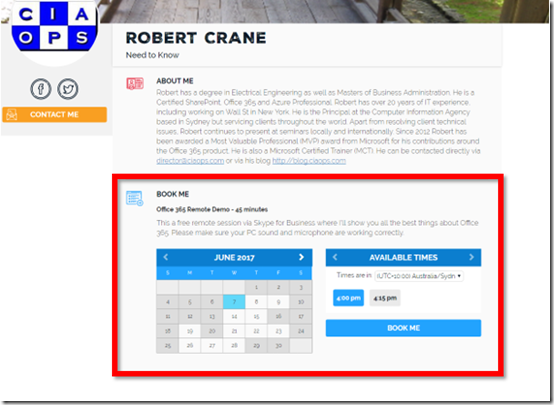
Book me for a free Office 365 demo

If you would like me to give you or your customers a free remote 45 minute demonstration of the power of Office 365 then please use the following URL to make an appointment:

image

http://bit.ly/ciaopsbooking

Once booked I’ll provide you with a Skype for Business meeting link you can use to view my screen. You’ll need to ensure you sound and microphone are working beforehand to get the most from the demonstration. You also won’t need to have Skype for Business on your desktop, you can connect just using a browser.

You’re probably asking why would I do this for free and without obligation? Obviously, I’m keen to spruik my knowledge and services but more than that, I want to understand the questions people have about Office 365. I want to understand what solutions they need so I can improve my offerings and knowledge of the product. Finally, I also want to see Office 365 demo’ed correctly. I want to ensure that people know ALL the features that are available rather than just one or two.

So, if you are looking to understand what Office 365 has to offer please book me for a free and non obligation remote demo using the URL:

http://bit.ly/ciaopsbooking

This offer is not limited to just Australian businesses and customers. I’m happy to present in any time zone provided you can live with accent!

CIAOPS online course catalogue promotion

pexels-photo-264943

Here’s a special offer on the Complete Course Catalogue for my online training academy you can find at:

www.ciaopsacademy.com

The Complete Course Catalogue is an annual subscription that gives you access to every course I have created (including courses on Azure, Office 365, Yammer, SharePoint and more) and will create. Thus, if you sign up today you get access to the 25+ courses I have already created PLUS you’ll also get access to all the new courses I have in the works for 2017-18.

So the deal, until July 1 and for a strictly limited number of takers, is:

$100 discount off the first year’s subscription (making it US$499)

– a 1 hour remote consulting call with me that you can use for training, business mentoring or the like ($300 value)

– access to the private CIAOPS Facebook tech community to discuss and ask your questions in and share with other members ($120 value), including access to my Office 365 and Azure codexes.

– free Getting Started With Skype for Business eBook ($10 value)

– free Beyond the Basics with SharePoint Online eBook ($10 value)

That’s over $450 in value plus what you’ll get from the online courses that include video lessons, downloadable notes, links and more.

As I said, this offer is strictly limited until the 1st of July 2017 or until sold out, so don’t delay. Sign up today to take advantage of this strictly limited learning opportunity.

To take advantage of this deal use the code EOFY17 at checkout or click this link:

http://www.ciaopsacademy.com/p/complete-catalogue/?product_id=153214&coupon_code=EOFY17

I look forward to seeing you in the CIAOPS Academy and Facebook Tech group.

Need to Know podcast–Episode 154

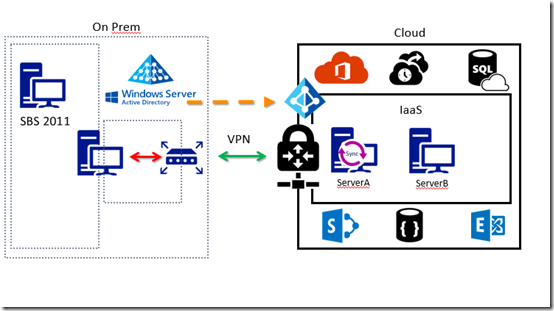
We again cover off the latest Microsoft Cloud news for you and then we dive into a real world migration scenario. We spend our time discussing the best way to move a legacy server environment like Microsoft Small Business Server (SBS) to Azure and Office 365. There isn’t a single path along this journey so we need to consider many things. That’s why this topic is going to run into a few episodes no doubt, but here’s the first one to get you started.

Take a listen and let us know what you think –feedback@needtoknow.cloud

You can listen to this episode directly at:

https://ciaops.podbean.com/e/episode-154-migrating-to-the-cloud/

Resources

@marckean

@directorcia

CIAOPS SBS to Azure course

Azure news from Marc

New Planner app on iOS

SharePoint and OneDrive updates

New SharePoint Communication sites

Migrate Azure Recovery Vaults

This episode is brought to you by:


https://cpem.io/tJ01Hzu2k.js

CIAOPS Need to Know Webinar–June 2017

laptop-eyes-technology-computer

We are half way through 2017 already! Wow, where did the time go? Good news is that the CIAOPS Need to Know webinar is back again with a focus on some little known functionality in Office 365. For June, aside from the usual news and update we are doing to do a deep dive into information rights management (IRM) in Office 365. IRM provides you the ability to protect your document no matter where they are shared on the Internet. It allows you to effectively embed permissions inside your documents. This is a great way to protect your intellectual property and you’ll see how to do this if you attend the webinar.

You can register for free at:

June Webinar Registrations

The details are:

CIAOPS Need to Know Webinar – June 2017
Thursday 22nd of June 2017
11am – 12am Sydney Time

All sessions are recorded and posted to the CIAOPS Academy.

There of course will also be open Q and A so make sure you bring your questions for me and I’ll do my best to answer them.

The CIAOPS Need to Know Webinars are free to attend but if you want to receive the recording of the session you need to sign up as a CIAOPS patron (for only USD$10 per month) which you can do here:

https://www.patreon.com/ciaops

or purchase them individually at:

http://www.ciaopsacademy.com/

Also feel free at any stage to email me directly via director@ciaops.com with your webinar topic suggestions.

I’d also appreciate you sharing information about this webinar with anyone you feel may benefit from the session.

Embedding a OneDrive for Business file anonymously

OneDrive for Business gives you the ability to share files with others quickly and easily. You can even share files with others so that anyone can view them without needing a login. This is known as anonymous sharing.
clip_image002

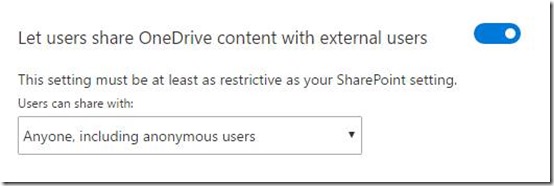
To share anonymously, firstly ensure that you have enabled your users to share OneDrive content with external users as shown above. You’ll find that setting at:

https://admin.onedrive.com/?v=SharingSettings

which you need to access as a global administrator.
image

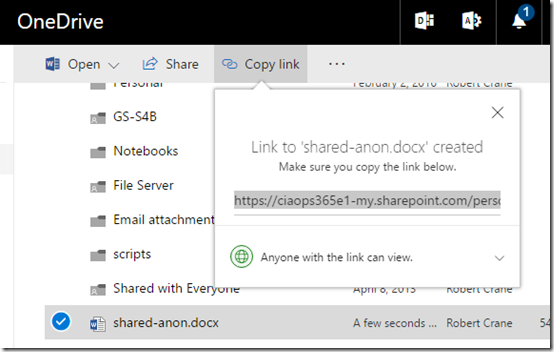
Next, select the file you want to share in OneDrive and then select Copy link from the menu across the top. Set the desired permissions. I’d generally recommend you set these to read only.

Copy the link which should look like:

https://ciaops365e1-my.sharepoint.com/personal/admin_ciaops365_com/_layouts/15/guestaccess.aspx?docid=0b35508db56c24e4293bb50e33391c1b0&authkey=AXr72CMhu3Pqd8d6jUwjkpE
image

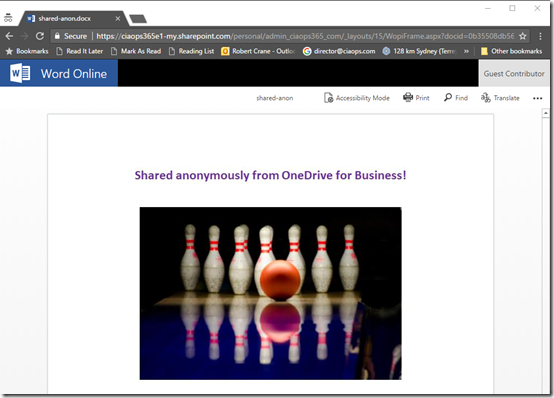
If you now plug that into another browser or an ‘in-private’ browser session the file contents should be display as shown above.

If the document doesn’t appear or you are prompted to login then you need to double check your document sharing.

However, let’s now say you want to embed this document into a public web page.
image

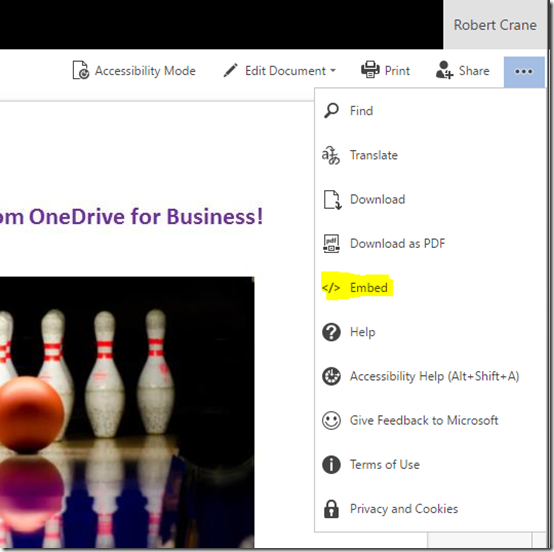
If you return to the source document in OneDrive for Business and view that document is a browser by clicking on it, the document should display. If you you select the three dots at the right a menu should appear as shown above. From that menu, select the Embed option
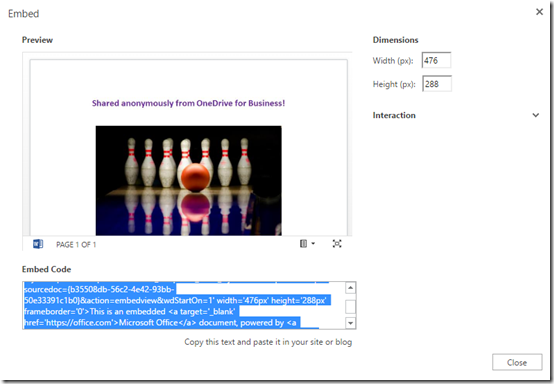
image

You should now see an embed dialog like that shown above. You will notice that the embed is also listed.
image

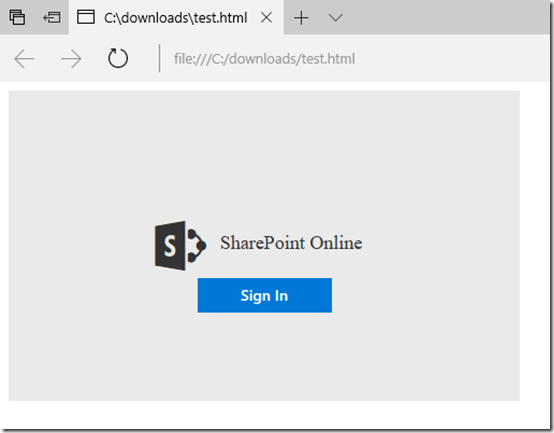
However, if you copy and paste that code you end up with a web page like that shown above that asks for a login.

From what I can determine the embed code provided is only for embedding inside something like a Team Site in Office 365. The embed code is not for use with anonymous external users. That is, it won’t work for public viewing on the Internet.

However, the native embed codes appears as:

image

If you replace:

image

with the actual sharing link you received originally, the embed code then looks like:

image

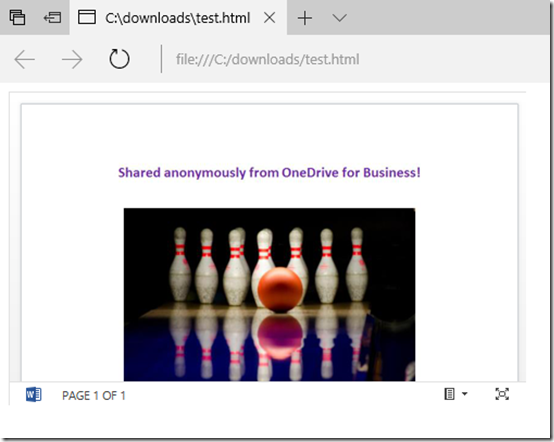
If you now use that edited embed code in a a public web page, that page should now appear with the embedded file item from OneDrive for Business like so:
image

So the trick when it comes to embedding anonymous document from OneDrive for Business is to change the embed code to include the URL of the external sharing link you received when you shared the file with everyone.

Not as nice as other applications can embed anonymous documents, but then really, Office 365 isn’t really aimed at sharing information anonymously now is it? I’m also pretty sure Microsoft have this anonymous embedding feature on the roadmap but my guess is that it doesn’t have a high priority at this stage.

I have embedded that file below to confirm that doing so anonymously is possible:

https://ciaops365e1-my.sharepoint.com/personal/admin_ciaops365_com/_layouts/15/guestaccess.aspx?docid=0b35508db56c24e4293bb50e33391c1b0&authkey=AXr72CMhu3Pqd8d6jUwjkpE&action=embedview&wdStartOn=1

SBS to Azure online training course

image

I know there are a lot of Microsoft Small Business Servers (SBS) still out there in the wild. Unfortunately, they are becoming rather long in the tooth and harder to support and maintain.

Migrating all the functions that SBS provided can be a challenge not to mention confusing in today’s world of cloud. For that reason I’ve put together this online training course:

SBS to Azure

It’s aim is to show you the basics of connecting an SBS (or any legacy on premises) environment to the Microsoft cloud.

The course will step you through the process of linking your existing on premises network to Azure via a site to site VPN. It will show you how to create Azure virtual networks and virtual machines. You’ll then see how to use these to easily extend your on premises environment.

The course will show you how to set up Azure AD Connect to sync your on premises users to Azure and Office 365 while also taking advantage of Azure DNS. There is even a dash of PowerShell thrown in for good measure.

Unfortunately, there is not a single button that will migrate your SBS environment to the cloud, however this course aims to give you a much better understanding of how to tackle that tasks as well the concrete steps you need to take when doing a migration.

There are over 12 lessons with over 2 hours of interactive video training and resources. If you visit the course today you can access a free preview of the first lesson which is an overview.

I will continue to improve the course material over time but I certainly hope that you’ll consider it if you are looking to moving SBS to the Microsoft cloud.