My Gear 2020

You can take a look back at last year’s gear here:

My Gear 2019

there were/are some major changes happening with my assortment.

Pixel XL phone – In the last few months of the year, this phone died. Basically it would no longer charge no matter what I attempted to do to it. I managed to do a factory reset before it totally died and now won’t even power on. Purchased May 2017, died November 2019

Pixel 4 XL phone – My new ‘Google’ phone. This as a ‘secondary’ or backup phone. It has all the Microsoft apps installed on it and is connected to my Microsoft 365 production account. Most importantly, it has the Microsoft Authenticator app for MFA access. I was pretty much able to restore everything from the dead Pixel XL to here, without too much trouble.

I have shifted my major day to day on a device to being an iPhone XS Max now for no other real reason than wanting to experience the iPhone ecosystem for a period. I don’t use the Pixel 4 XL much but I think that has more options that I have found on the iPhone.

Summary – Old Pixel died, new 4XL model replacement

Lumia 950 XL –  To quote last year’s blog post

“So sometime this year it will be bye, bye Windows phone and hello iPhone (as well as bye, bye many dollars unfortunately at the same time).”

Summary – Retired. Replaced by iPhone X Pro.

iPhone XS Max – I decided to replace the Lumia 950XL with a iPhone 10 XS Max to get the iPhone ecosystem experience. I have this phone on a plan that includes unlimited data in Australia as well as some every generous overseas data limits as well. In all honest, I bought the unlimited data plan more than the phone.

The iPhone X has done the job for me so far. The main trick I learned is that to directly tether to a PC using a USB cable, you need the right (read Apple) cable. On the plus side, I will say that the batter life is really good in my experience. I don’t like the Apple podcasts app at all. Not nearly as good as Podcast Addict on Android, which you can’t get on the iPhone. If someone has a good podcasting app for iOS, I’m ALL ears! Apps like Waze aren’t as full featured on iOS as on Android in my experience and I gotta say that iOS has had lots of and lots of updates since I got this device. See, it isn’t just Windows PC’s people!

The iPhone again, runs all the Microsoft apps for business as well as a few key personal apps.

Summary – Using but not loving the experience. It is all becoming a bit ‘meh?’ now. It is a device that does a job. No more, no less in my opinion. If I really had to choose, I think I prefer the Pixel 4 XL overall but for now I’m sticking with the iPhone X as my primary phone

Surface Pro 3 – This device was ‘retired’ from the job of travelling PC in favour of the Surface 4, which in turn was replaced by a Surface Pro 6. Basically, the hand me down process if you follow. The Surface Pro 3 continues to work fine and functions as a Microsoft Teams ‘phone’ tablet on my desktop. Basically, it is now a device I use for making and receiving calls.

Surface Pro 4 – After deciding on a new Surface Pro 6 as my main machine, I ‘downgrade’ the existing main desktop, which was the Surface Pro 4, to the role the Surface Pro 3 played. That being a travelling machine for demos and remote work. Basically, the hand me down process as I said.

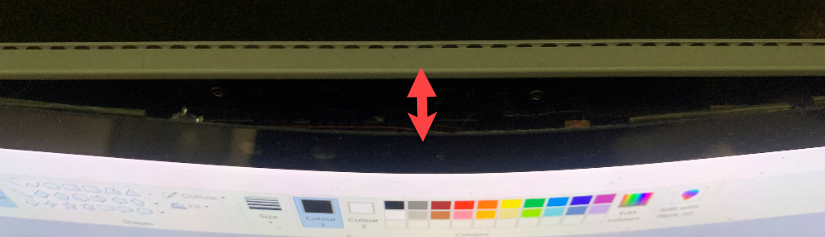
Unfortunately, the Surface Pro 4 has now started to fall apart as you can see below:
image

Yes that is the front of the screen pulling away from the back case. The case has also started to bulge at the rear, which I believe is an issue with the battery. The screen also has some ‘burn’ style markings on it that also indicates something is wrong there. In short, it is still working, but no longer fit for travel. Thus, it will need to be thrown out and replaced with something else.As I don’t want to go back to the Surface Pro 3 as a travelling PC. I think a Surface Pro 7 may be in my immediate future??

Summary – Had a hard and productive life but is now dying. Considering a Surface Pro 7 as a replacement. Purchased December 2016. Died December 2019.

iPad – Bottom of the range iPad (WiFi only) and an Apple pencil. The Apple pencil is a tad cumbersome and I would prefer something about half the size. I like that it is re-chargable, which the Surface pens aren’t, but that isn’t a huge issue. The Apple pencil does write well but I see no real difference to a Surface pen in that respect but the Surface pen wins on form factor if I was to make an ergonomic choice.

I’m now using this new iPad for anything to do with writing, business and personal. It travels with me, and I use it for both business and personal Tasks (such as watching movies).

I am considering maybe an iPad mini to see if the smaller form factor is a benefit. It is also handy that the iPad mini supports the Apple Pencil which I do use regularly. Starting at AU$599, it is still somewhat expensive to justify in light of the fact that I am more than happy with the current iPad I have. Maybe a bargain will come my way in 2020?

Summary – Basic iPad is now a central part of my daily routine. Considering an iPad mini if a bargain arises.

Ubiquiti – I left my old consumer router in place but disabled the WiFi access point and simply use it as a pass through now. I then connected it to the Security Gateway, connected everything else up behind the gateway and then configured it all from a web interface. Very, very impressed with the results. Super simple install. Easy to update the devices and great metrics on usage, devices and so on. Highly recommended.

One of the items that I am considering for 2020 (still) will be a Ubiquiti camera like this:

G3 micro

Again, not really a must have but I can see benefits of having one of these device to monitor things when I’m not there.

In theory, the Australian high speed National Broadband Network (NBN) was supposed to be rolled out to my location in December 2018 and (unsurprisingly, it wasn’t). Thus, I’m stull stuck on ADSL at the moment. The NBN roll out is planned for my address in June 2020 (yeah right). So, I currently have no other option but to wait. I get so frustrated with upload speeds (thanks to ADSL 2) that I now use my iPhone unlimited data plan to do my large upload, which are infinitely faster. The biggest limitation I face in my business today is the lack of a decent, fast Internet connection. It makes Australia the laughing stock of the developed world in my opinion. Let’s see what 2020 brings on the broadband front but I ain’t holding my breath!

I also now have a Site to Site VPN between my Ubiquiti Security Gateway and Azure, which took a little setting up due to my double NAT configuration, but all working well now!

Summary – Very happy with  Ubiquiti gear, with potentially a camera to be added. Awaiting roll out of NBN to complete project.

Docking station – 2019 also saw me upgrade my desktop docking station to:

Kensington SD7000 Surface Pro Docking Station

It is a really neat device, that suits most modern Surface Pro devices. It is slim, compact and now all me to have 3 external monitors off the one Surface devices (as you can never have enough screen now can you eh?). I can plug in all my devices, microphones, phones, etc to it and all the cables are hidden at the back. I also like that you can adjust the screen up and down, a bit like a Surface Studio.

The original Kensington SD3500v has now moved to work with the travelling PC when it is running in my office and that is also working well, making it a truly ‘plug and play’ experience when I get back from road trips.

Summary – Loving the new Kensington DV7000 and the old Kensington SD3500v is still in service and performing well.

WD Sentinel DX4000 – The plan was, with the NBN roll out I could all the data on this device to Azure and retain the same functionality. Unfortunately, high speed broadband is yet to some my way so this upgrade has been put on hold for now. I have set up a Site to Site VPN from my on premises environment to Azure and started shifting some of the data there, and I will do more in 2020. I’ll also be shifting some of the data into Microsoft 365 as well.

I really want to maintain some form of hybrid configuration just for experiences sake. That is , so I know how it needs to be configured and managed. However, over 202 I’m going to ensure that I have nothing of production value on this box so that it cane be retired at any point. Just frustrating that without enough bandwidth, it can’t happen sooner.

Summary – on the back burner to upgrade or replace. Awaiting broadband upgrade to move to Azure.

Personal fitness device – After the FitBit died last year, I was considering the the Oura ring, which I really like all the metrics around it. The challenge is I need to get my finger measured to find the right size. Oura does ship a sizing kit that allows you to check the size using plastic mock ups before you confirm but you still need to purchase the whole unit first.

Being a few hundred US$ doesn’t make this item cheap. Being that I also REALLY don’t need this item I’ve still in the due diligence phase, making sure that it is the best investment for my money as I know there are other devices out there. So again, probably something I’ll get in 2019 but no real rush as yet and as yet I’m not 100% sold given the cost.

Summary – Still deciding on suitable replacement and whether it is worth the investment.

Amazon Kindle – In use every day, no change. One of the best devices I have ever invested in.

Xbox One S – Still use it to watch YouTube, Netflix and Amazon video but now playing more games thanks to the release of the latest Call of Duty game.

Summary – Now mainly used for Call of Duty.

My major hardware investments in 2019 where a new iPhone, Surface Pro 6 and Pixel 4XL. I’ll definitely be needing a new travelling PC (looking like a Surface Pro 7) and maybe a few other ‘nice to have’s’ in 2020 depending on how things go. Let’s see.

My Stuff 2020

This post is my annual post aimed at bringing the links to everything I have out there on the Internet together into a single place. Here we go.

About me

Social Media

Free Stuff

Regular technical and business information, tutorials, walk throughs, learnings, upcoming courses and more.

Here you’ll find currently almost 200 videos full of tutorials on SharePoint, Office 365, Azure and technology.

Presentations and whitepapers for free download.

Documentation for older versions of SharePoint on premises, especially the free versions and those that came with SBS.

Cloud lecture series is a set of free tutorials, training session and so on that I have provided over the years:

I have number of free GitHub repositories that include things like PowerShell scripts, pricing calculators, reference documents, helpful links and more. You will find all these at:

With almost 240 episodes and now entering it’s 10th year my podcast focuses on providing you news and updates from the Microsoft Cloud around Office 365 and Azure.

You can subscribe using iTunes or Stitcher.

After the course complete this morphs into my Office 365 newsletter.

CIAOPS Yammer network is place you can visit to get answers on everything Microsoft Cloud all in one Yammer network:

Need to Know webinars are held monthly and announced on my blog but you can always register and get the details for the next one here:

Commercial stuff

This stuff helps pay for free stuff above so I appreciate your support for my paid work.

Access to the private CIAOPS community for technical support, product discounts and access to the best Office 365 and Azure information

For end user focused training on Office 365 services and applications:

Lots of courses on Office 365, PowerShell, Azure, SharePoint and the like.

Designed to help technology companies become cloud service providers

General Interest

This accounts sends a tweet to commemorate a significant dates from the Australian battles in France during World War 1.

I’m a big believer in supporting those who want to build their own business but just need a leg up to get started. Kiva is simply and easy way to provide this and I recommend this to everyone.

In 2019 I read over 20 books. That means I do a lot of reading on a variety of topics and with Goodreads you can follow along with the books I’m reading as well as those that I add to my bookshelf. I’ll have an upcoming post on my recommended reads, so watch out for that post coming soon.

Need to Know podcast–Episode 224

Our last episode for 2019. Thanks for all your support. Before Brenton speaks with Patrick Gray from the Risky Business podcast, I share my thoughts on technology for 2020. Firstly, I give you my wishes for Microsoft 365 Business. Then, I highlight what I believe is the specific Microsoft Cloud tech you should be paying attention to in 2020. Finally, I talk about some general tech trends to pay attention to and break down for your business for the new year. let us know your thoughts for 2020 via our various feedback options.

Take a listen and let us know what you think – feedback@needtoknow.cloud

You can listen directly to this episode at:

https://ciaops.podbean.com/e/episode-224-patrick-gray/

Subscribe via iTunes at:

https://itunes.apple.com/au/podcast/ciaops-need-to-know-podcasts/id406891445?mt=2

The podcast is also available on Stitcher at:

http://www.stitcher.com/podcast/ciaops/need-to-know-podcast?refid=stpr

Don’t forget to give the show a rating as well as send us any feedback or suggestions you may have for the show.

Resources

Risky Business

@riskybusiness

@contactbrenton

@diirectorcia

Need to Know podcast–Episode 223

FAQ podcasts are shorter and more focused on a particular topic. In this episode I’ll talk about my framework for file migrations to Microsoft 365 collaboration.

Take a listen and let us know what you think – feedback@needtoknow.cloud

You can listen directly to this episode at:

https://ciaops.podbean.com/e/episode-223-file-migration-framework/

Subscribe via iTunes at:

https://itunes.apple.com/au/podcast/ciaops-need-to-know-podcasts/id406891445?mt=2

The podcast is also available on Stitcher at:

http://www.stitcher.com/podcast/ciaops/need-to-know-podcast?refid=stpr

Don’t forget to give the show a rating as well as send us any feedback or suggestions you may have for the show.

Resources

A framework for file migrations to Microsoft 365

Need to Know podcast–Episode 222

I’m joined by Stephen Rose, Senior Product Marketing Manager for Microsoft 365, to speak about everything Microsoft 365. Stephen explains what the products is all about, how it can help businesses and the direction that the technology is taking off the back of many announcements from Ignite. Of course, Brenton is also here and we bring you up to date on all the latest Microsoft Cloud news before some of us head off for a Christmas break. Fear not! The episodes will continue even in the face of absenteeism. All the best to all our loyal listeners for the holidays season. We appreciate your support and look forward to providing you more information in 2020.

This episode was recorded using Microsoft Teams and produced with Camtasia 2019

Take a listen and let us know what you think – feedback@needtoknow.cloud

You can listen directly to this episode at:

https://ciaops.podbean.com/e/episode-222-stephen-rose/

Subscribe via iTunes at:

https://itunes.apple.com/au/podcast/ciaops-need-to-know-podcasts/id406891445?mt=2

The podcast is also available on Stitcher at:

http://www.stitcher.com/podcast/ciaops/need-to-know-podcast?refid=stpr

Don’t forget to give the show a rating as well as send us any feedback or suggestions you may have for the show.

Resources

@stephenlrose

@contactbrenton

@directorcia

Stephens’ presentation from Ignite 2019 around adoption

CIAOPS Patron Community

Ignite the Tour Sydney

CIAOPS Techwerks 10

Microsoft Teams now available on Linux

Microsoft Integrated Threat Protection

Campaign views in Office 365 ATP

Windows VM now support Azure AD authentication

Native support for WebAuthn and FIDO for iOS

Preview of Azure spot machines

What’s new in Microsoft Forms

Beazley Breach insights

Blocking macros with Intune

Licensing guidance

Need to Know podcast–Episode 221

I thought I’d try something different on the podcast. Of late, the podcast length has been growing simply due to the amount of content. I appreciate that this becomes harder and harder to digest all this in a single sitting. Thus, I’ve decided to try some shorter podcast episodes ,stripped back and focused on just one topic. I’m calling these episodes “FAQs”. The idea is to cover a single topic in more depth in 15 – 30 minutes.

I have a few ideas of what to cover for these FAQs but I’d love to hear from you as to what topics you’d want to hear covered in more depth. I’d also like to hear whether this is a good idea or not? If so, I’ll keep doing them. If not, then I won’t bother. So please provide me your input either on Twitter or via email (director@ciaops.com). I look forward to hearing from people.

The existing podcast episode will continue as normal but I’m interested to see whether there is demand for these deeper more focused FAQ episodes?

Take a listen and let us know what you think – feedback@needtoknow.cloud

You can listen directly to this episode at:

https://ciaops.podbean.com/e/episode-221-data-discovery-done-right/

Subscribe via iTunes at:

https://itunes.apple.com/au/podcast/ciaops-need-to-know-podcasts/id406891445?mt=2

The podcast is also available on Stitcher at:

http://www.stitcher.com/podcast/ciaops/need-to-know-podcast?refid=stpr

Don’t forget to give the show a rating as well as send us any feedback or suggestions you may have for the show.

Resources

Data Discovery Done Right

Azure file storage private endpoints

I’ve previously detailed how to create an Azure SMB File Share:

Creating an Azure SMB file share

as a way to create a ‘cloud USB’ drive that you can map to just about any desktop quickly and easily. All of this is accomplished securely but many remain hesitant to do this across the Internet directly. Luckily, there is now an option to map this SMB share to an IP address inside an Azure VNet to restrict access if desired.

image

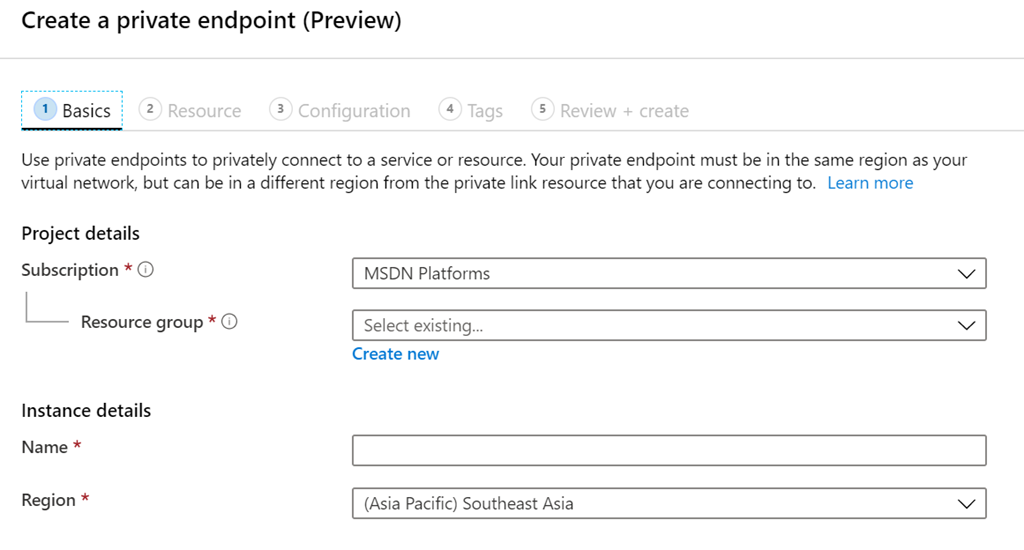
Before you set this up you will need to have an existing Azure Vnet created as well as a paid Azure subscription. You can add a Private Endpoint to an existing Azure storage account or create one at the same time you create a new Azure Storage account. In this case, I’m going to an existing account.

In the Azure portal search for “private link”, which should then take you to the Private Link Center as shown above. Select the Add button on the right.

image

You’ll need to select a Resource Group as well as a Name as shown above.

image

You’ll then to select the Azure Storage account and the file option to connect to an existing SMB file share as shown above.

image

Next, you’ll need to connect to an existing Vnet and if you want to access the resource privately by a name, then you’ll need to integrate it with a private DNS zone, which will also be set up for you as part of this process.

image

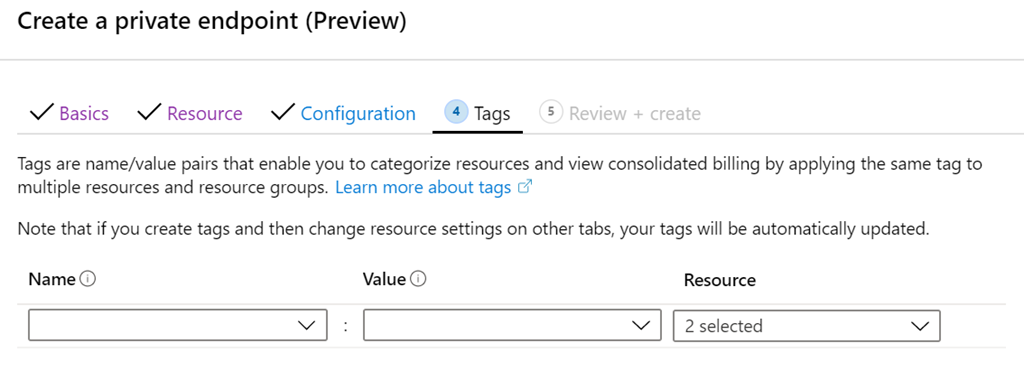
You can then add tags. Note – when I created mine, if I assigned tags here I couldn’t create the Private Endpoint, which appears to be a bug. So, if for some reason you find the same issue, create the Private Endpoint without tags and then add them later.

With all that done, select the Create button to finish the configuration on the Review + Create page.

image

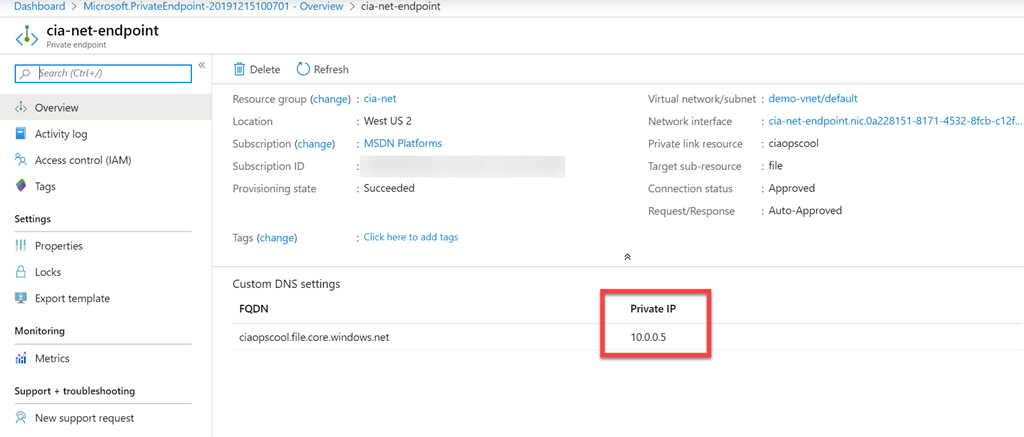
When the set up process is complete you’ll now see your endpoint as shown above with an allocated IP address on the Vnet you selected.

image

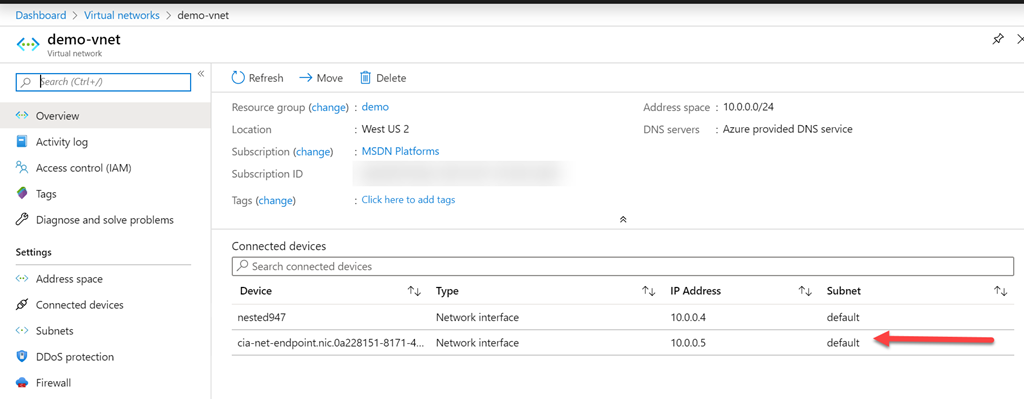
If you then look at your Vnet, as shown above, you will see that the Storage Account is seen as a connected device.

SNAGHTMLc990f5b

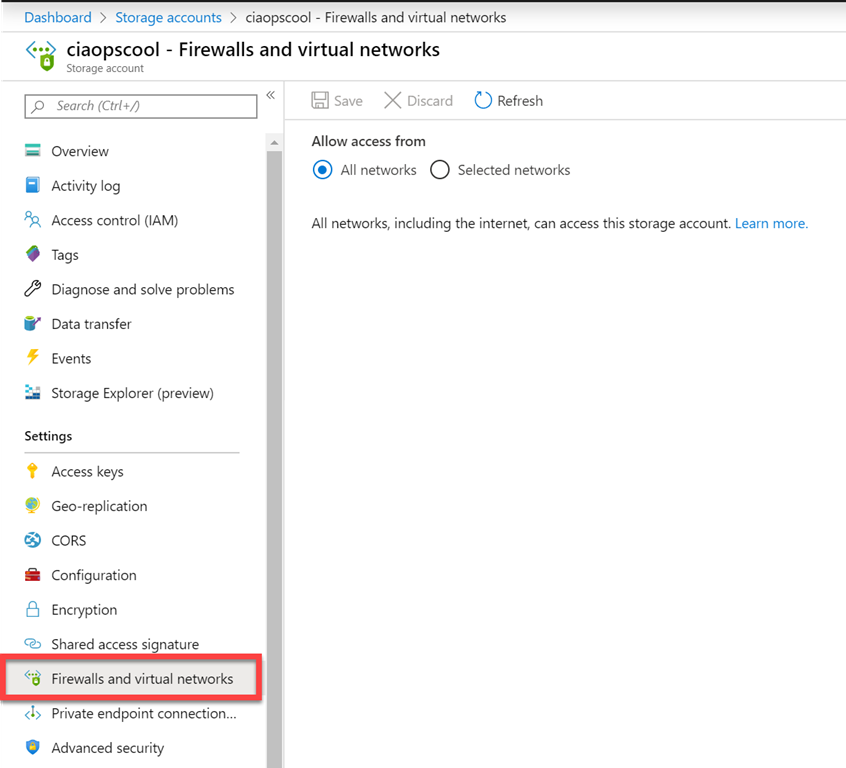
If you now visit the Storage Account and select Firewalls and virtual networks as shown above, you can configure what networks can access this new Private Endpoint.

Leaving the option set to All networks means that you can still map to that SMB share directly across the Internet, which you may want.

image

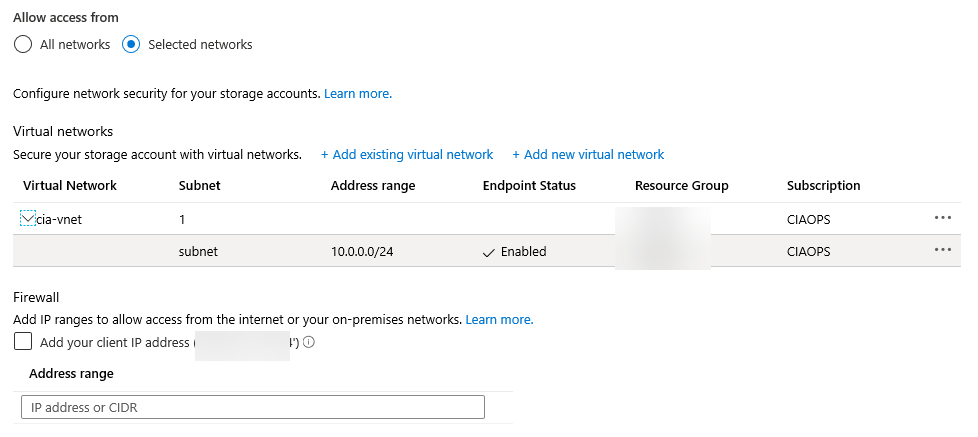
However, in the above case, I have selected to restrict the access to the Vnet only.

image

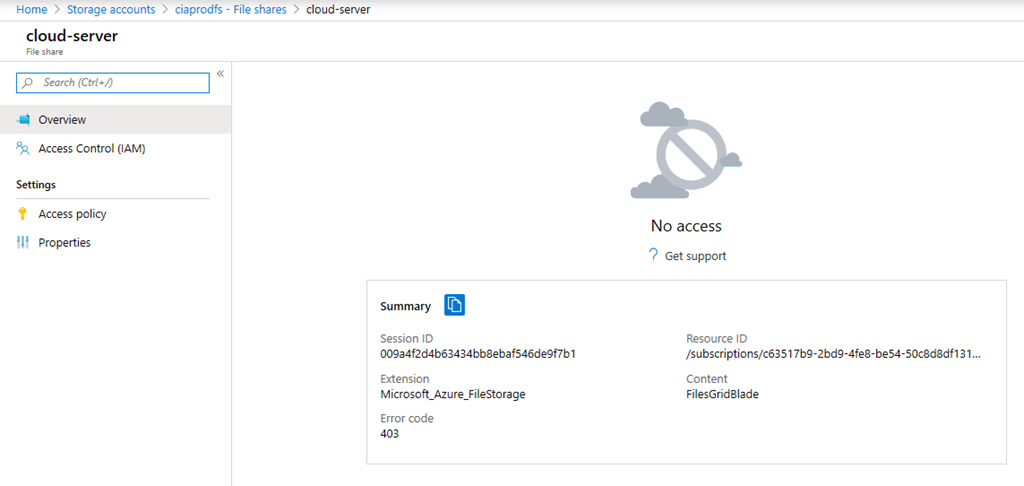
Doing so means that the ONLY way I can now access that SMB Share is via the selected Vnet. I can’t get to it using the Azure portal on my remote desktop machine as shown above.

image

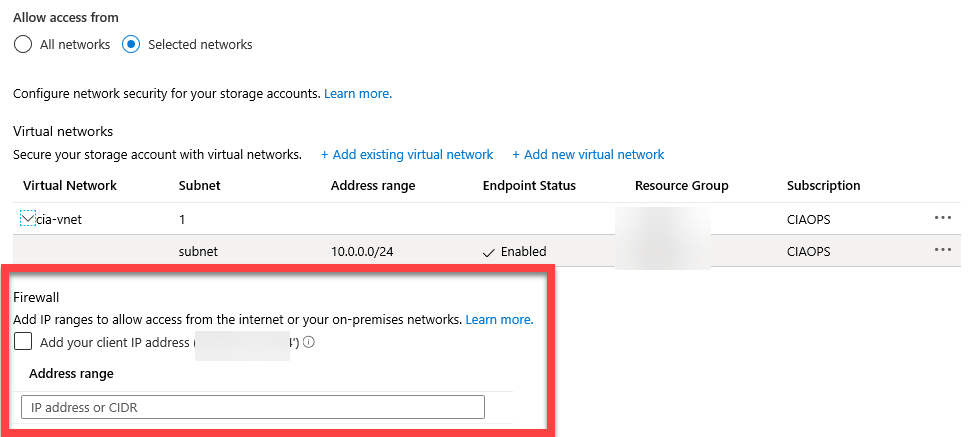
If I wanted to access this from a remote location, outside the Vnet across the Internet, I could add those details below. However, I have chosen not to do this.

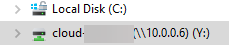
My Azure SMB File share now has a dedicated IP address that is restricted to access via an Azure Vnet, how do I work with this share directly on premises? Easy. I set up an Azure Site to Site VPN to that same Vnet and now I can access that Azure SMB File share from my local machines by mapping to something like the IP address.

image

Thus, the only way that Azure SMB file share can be access is across a Site to Site VPN, making even more secure.

image

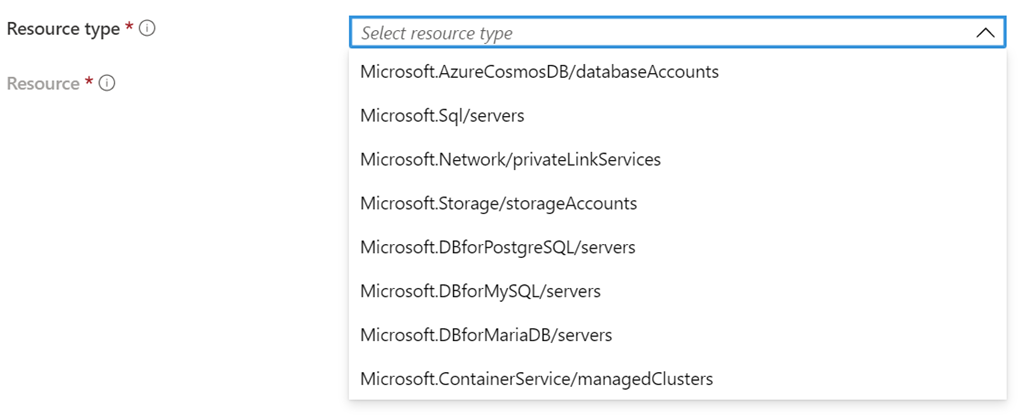
Private Endpoints support connection to a number of PaaS Azure services as shown above. This is handy as it allows you to connected you Azure IaaS services (like VMs) directly to Azure PaaS (like storage) quickly and easily as shown. What’s the benefit? Remember, IaaS is typically billed on time used, while PaaS is billed on resource consumption. Thus, why should I pay for a VM to store my data and pay the time it runs (typically 24/7), plus disk storage where I could use Azure Storage and most be billed just for the data capacity?

PaaS is the future and has many benefits over IaaS. You should be looking to shift as much of you infrastructure to PaaS to take advantage of things like reduce maintenance, cost savings, etc. Private Endpoints is an easy way to start doing just that. For more information on Azure Private Endpoint visit:

What is Azure Private Endpoint?