Need to Know podcast–Episode 262

Security is big this week and you’ll get it all here. Our cloud news will provide you with all the latest information you’ll need to understand the Solar Winds attack. in this episode we also speak with Daniel Chronlund around Conditional Access. Daniel shares his extensive knowledge around this service and how it can improve your security posture. He also has some great scripts available on his Github repository, so check them out!

I take this opportunity to wish listeners happy holidays. Stay safe and thanks for all your support in 2020. Onwards to 2021 we go, hi ho, hi ho.

This episode was recorded using Microsoft Teams and produced with Camtasia 2020.

Take a listen and let us know what you think – feedback@needtoknow.cloud

You can listen directly to this episode at:

https://ciaops.podbean.com/e/episode-262-daniel-chronlund/

Subscribe via iTunes at:

https://itunes.apple.com/au/podcast/ciaops-need-to-know-podcasts/id406891445?mt=2

The podcast is also available on Stitcher at:

http://www.stitcher.com/podcast/ciaops/need-to-know-podcast?refid=stpr

Don’t forget to give the show a rating as well as send us any feedback or suggestions you may have for the show.

Resources

@danielchronlund

Daniel’s blog

Daniel’s GitHub

@directorcia

A moment of reckoning: the need for a strong and global cybersecurity response

Analyzing Solorigate, the compromised DLL file that started a sophisticated cyberattack, and how Microsoft Defender helps protect

SolarWinds Post-Compromise Hunting with Azure Sentinel

Ensuring customers are protected from Solorigate

Microsoft Defender for Office 365 investigation improvements coming soon

A “quick wins” approach to securing Azure Active Directory and Office 365 and improving your security posture

4 ways Microsoft 365 is improving the experience for Mac users

Sleeping Tabs in Microsoft Edge: Delivering better browser performance

Guest Access in Yammer using Azure AD B2B is now in preview!

Stay current with in-demand skills through free certification renewals

Microsoft Clarity | Free behavioral analytics product for website managers

CIAOPS Patron community

End to End email protection with Microsoft 365–Part 1

image

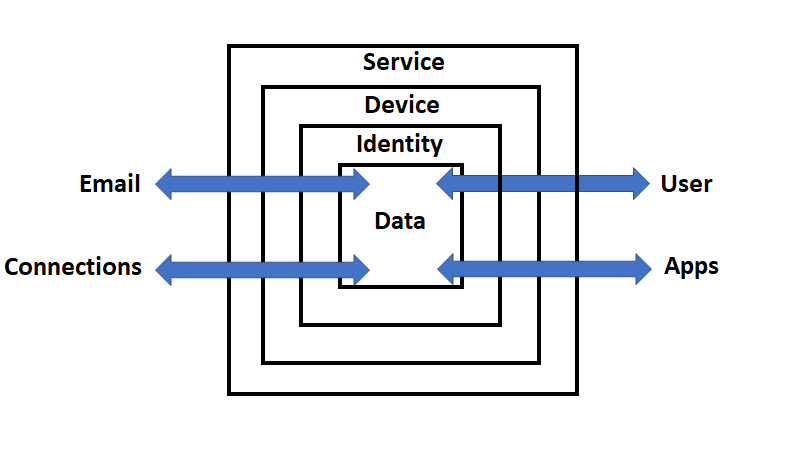
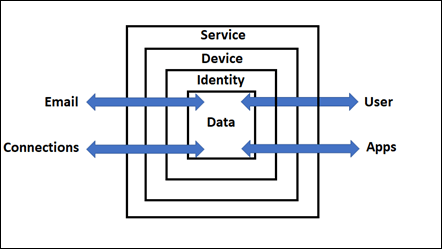
I’ve talked about the

CIAOPS Cyber protection model

before and you can see it above.
image

Now it is time to start applying it directly to Microsoft 365 to help understand the security Microsoft 365 provides and what can be configured to provide enhanced security.
image

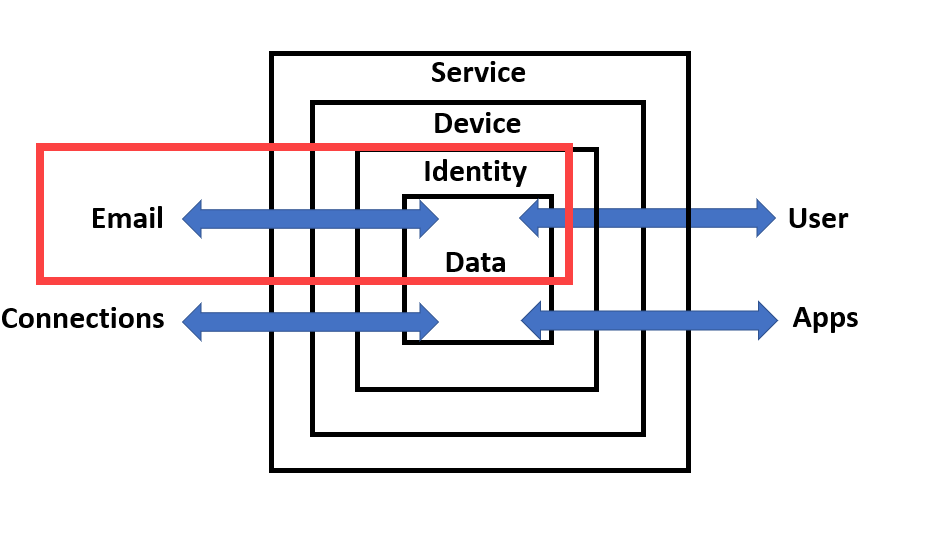
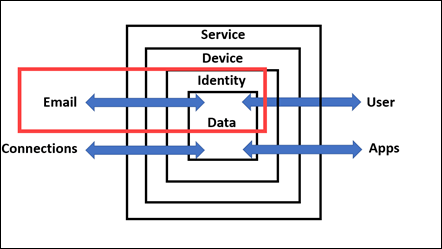
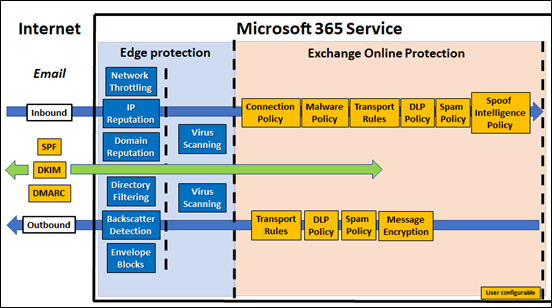
I’ve therefore started by breaking the Email connector from my model into two components, Inbound and Outbound, as shown above. The left hand side (outside the box) is the Internet, while inside the box on the right hand side, is Microsoft 365.

Outside the box, on the Internet, there are three user configurable items: SPF, DKIM and DMARC. You’ll see arrow from these three items away and further into the Internet as well as back into the Microsoft 365 service. This is because these three DNS records will affect both sent and received emails and should be considered the first item on your email security check list. Some articles that may help on this include:

SPF, DKIM, DMARC and Exchange Online

Set up SPF to help prevent spoofing

Support for validation of DKIM signed messages

Use DKIM to validate outbound email sent from your custom domain

Use DMARC to validate email

When others send email to Microsoft 365, the following articles may help:

Sending mail to Microsoft 365

Services for non-customers sending mail to Microsoft 365

Inbound email is received into Microsoft 365 via Exchange Online. A component of this service is Exchange Online Protection (EOP).

Exchange Online Protection overview

EOP features

Inbound emails

The first stage of a message progressing through Exchange Online Protection is for it to traverse the Edge Protections as shown above. These are basically policies and configuration managed and maintained by Microsoft. A user is unable to alter them but information about these can be found at:

Use Directory Based Edge Blocking to reject messages sent to invalid recipients

Backscatter in EOP

How EOP validates the From address to prevent phishing

It is important to note that DNS records like SPF play an important role in helping secure email data, which is why it is important to configure them.

How Microsoft 365 uses Sender Policy Framework (SPF) to prevent spoofing

After the Edge Protection phase is complete, any inbound email is then sent to Exchange Online Protection (EOP) for further processing. It is here that there are many policies and settings that can be configured by the user. The sequence in which these take place can be found here:

Order and precedence of email protection

Generally, first to be processed is the Connection filtering.

Configure connection filtering

Then Malware filtering.

Configure anti-malware policies in EOP

Then Transport rules.

Mail flow rules (transport rules) in Exchange Online

Next are any Data Loss Prevention (DLP) policies.

Data Loss prevention

Spam filtering follows.

Anti-spam protection in EOP

Configure anti-spam policies in EOP

Anti-spam message headers in Microsoft 365

Bulk complaint level (BCL) in Exchange Online Protection EOP

Finally inbound email will be checked for phishing and spoofing.

Anti-phishing policies in Microsoft 365

Configure spoof intelligence policy

After all these the inbound email will continue to be processed by any additional protection options and features like Defender for Office 365 which will be covered in an upcoming article, so don’t think that email protection stops with EOP, it continues with Defender for Office 365 right through to the email app on the device which will all be covered in upcoming articles.

Outbound emails

If we now turn our attention to outbound emails and work from right to left, along the bottom arrow, we see that the email has a lot less policies to travel through. The main one is the Outbound spam filter.

Configure outbound spam filtering in EOP

However, it will also go through the DLP policy:

Data Loss prevention

and then Transport rules:

Mail flow rules (transport rules) in Exchange Online

You can also use

Message Encryption

if you wish to protect the contents of emails sent from Microsoft 365.

Summary

Remember, what is covered here is only the first part of the full range of protection capabilities that Microsoft 365 provides for emails. You will also see that a significant amount of these capabilities provide the ability of customisation. For the items that are user configurable in the diagram, a good rule of thumb is to implement and configure from left to right, top to bottom. Once you have all that done, then you can move onto the next stage which will be covered in the next article on this topic.

End to End email protection with Microsoft 365 – Part 2

Need to Know podcast–Episode 261

This episode was recorded using Microsoft Teams and produced with Camtasia 2020

Take a listen and let us know what you think – feedback@needtoknow.cloud

You can listen directly to this episode at:

https://ciaops.podbean.com/e/episode-261-mark-oshea/

Subscribe via iTunes at:

https://itunes.apple.com/au/podcast/ciaops-need-to-know-podcasts/id406891445?mt=2

The podcast is also available on Stitcher at:

http://www.stitcher.com/podcast/ciaops/need-to-know-podcast?refid=stpr

Don’t forget to give the show a rating as well as send us any feedback or suggestions you may have for the show.

Resources

I speak with a returning guest Mark O’Shea around the changes we’ve seen recently in Microsoft 365, especially around device management and Microsoft Endpoint Manager. The whole device deployment and management landscape is changing fast. It all used to be about Intune but now the focus is really Endpoint Manager and Mark helps us understand the why’s and what fors.

I’ve also got a swag of Microsoft Cloud news to share with you to bring up to date with the latest happenings.

As always, thanks for being a subscriber and don’t hesitate to share what I do with others.

This episode was recorded using Microsoft Teams and produced with Camtasia 2020

Resources

@intunedin

Intunedin.net

@directorcia

What’s New with Microsoft 365 | November 2020 [VIDEO]

What’s New in Microsoft Teams | November 2020

Teams Breakout rooms go GA

Microsoft Edge v.88: Deprecate support for FTP protocol

Microsoft Edge v.88: Adobe Flash support will be removed

Microsoft Edge v.88: Alerts if your passwords are found in an online leak

Add to OneDrive is generally available

Introducing the SharePoint Success Site – Drive adoption and get the most out of SharePoint

Threat actor leverages coin miner techniques to stay under the radar – here’s how to spot them

New datacenters for Sweden, Denmark, and Chile

CIAOPS Patron community

Azure AD Sign-in error code look up

image

When you are looking at various entries in the Azure AD logs you will find, under the Basic Info tab, a Sign-in error code and directly below that a Failure reason field as shown above.

image

The above, shows you these fields in more detail.

You may not be aware but if you navigate to the web site:

https://login.microsoftonline.com/error

image

and plug in the Sign-in error code from the event, you should see information like that shown above. Most of it should match what the Failure reason field says. There can however, also be additional information in there that may help you when it comes to troubleshooting these events.


A little bit more security

Security is never an absolute and is largely about defence in depth. That is, adding more layers of protection. With this in mind, I was recently made aware of this little gem that can help provide just a little more protection for inbound emails, especially against inbound malicious attachments.

image

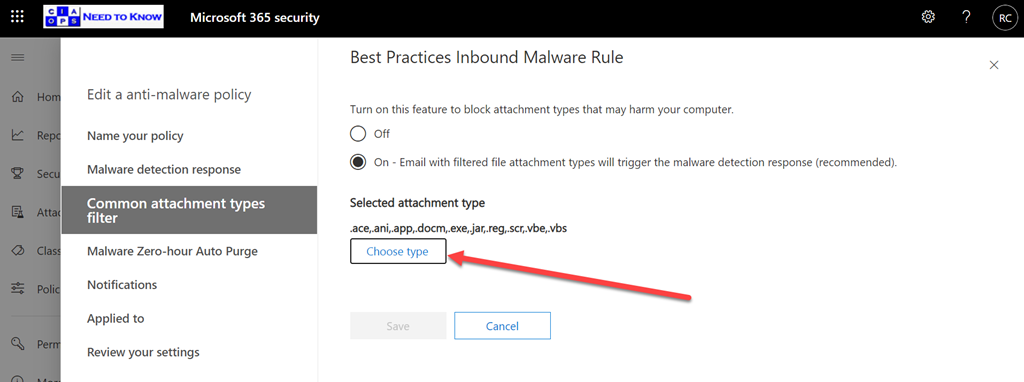
Exchange Online has a Malware policy that you can configure. You’ll find it in the Microsoft 365 security center under policies. When you edit that policy, as shown above, you’ll see an option for Common attachment types filter. You should ensure that this is set to On. If so, you can then select the Choose type button to select which attachment types will be blocked.

image

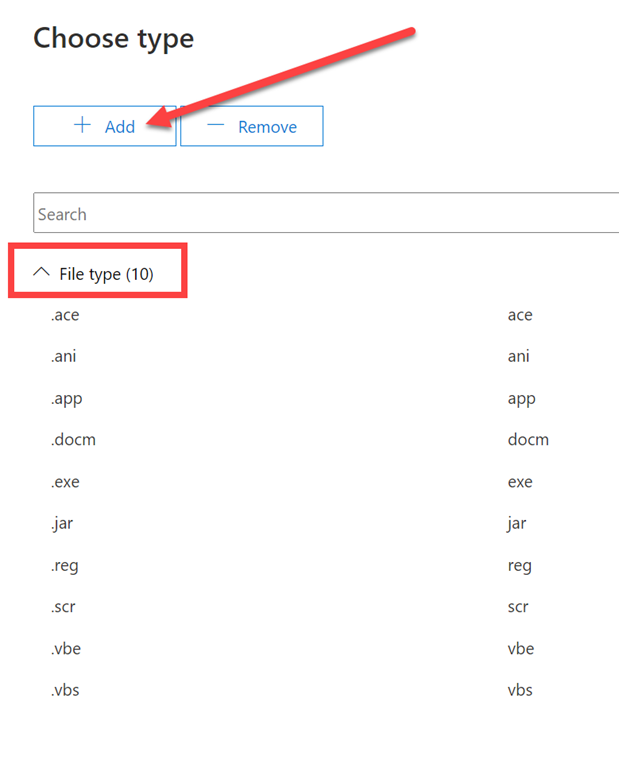
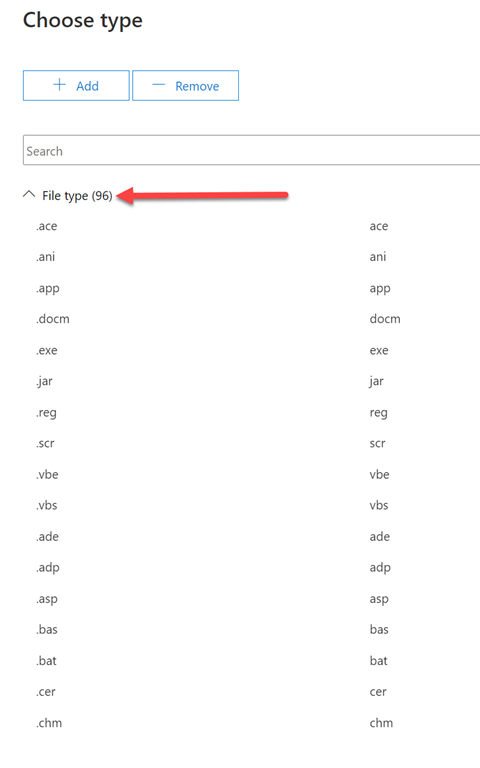
You’ll see there are about ten default file types that will be blocked. What you may not be aware of is that if you press the Add button at the top of the page, as shown above,

image

There are an additional 86 file types that Microsoft allows you to directly add.

image

Just select them all and Add them.

image

You should then see a total of 96 file types listed in the policy as shown.

I was a little puzzled why Microsoft wouldn’t have added more of the 86 optional files types to the standard 10? Most of the option 86 seem to be developer focused so maybe that is why? Many of the optional 86 are quite antiquated but that doesn’t mean they couldn’t be used somehow to compromise an environment. Thus, it is therefore probably a very good idea to block all these 86 option file types on top of the default 10 it seems.

I also had a quick look at what all these filetype typically refer to and provide this summary for you:

– ade https://www.file-extensions.org/gadget-file-extension

– adp https://www.file-extensions.org/adp-file-extension

– asp https://www.file-extensions.org/asp-file-extension

– bas https://www.file-extensions.org/bas-file-extension

– bat https://www.file-extensions.org/bat-file-extension

– cer https://www.file-extensions.org/cer-file-extension-internet-security-certificate

– chm https://www.file-extensions.org/chm-file-extension

– cmd https://www.file-extensions.org/cmd-file-extension

– com https://www.file-extensions.org/com-file-extension

– cpl https://www.file-extensions.org/cpl-file-extension

– crt https://www.file-extensions.org/crt-file-extension

– csh https://www.file-extensions.org/csh-file-extension-csh-script

– der https://www.file-extensions.org/der-file-extension

– dll https://www.file-extensions.org/dll-file-extension

– dos https://www.file-extensions.org/dos-file-extension

– fxp https://www.file-extensions.org/fxp-file-extension-adobe-flash-builder-project

– gadget https://www.file-extensions.org/gadget-file-extension

– hlp https://www.file-extensions.org/hlp-file-extension

– Hta https://www.file-extensions.org/hta-file-extension

– Inf https://www.file-extensions.org/inf-file-extension

– Ins https://www.file-extensions.org/ins-file-extension

– Isp https://www.file-extensions.org/lsp-file-extension-autolisp-language-source-code

– Its https://www.file-extensions.org/its-file-extension-internet-document

– js https://www.file-extensions.org/js-file-extension

– Jse https://www.file-extensions.org/jse-file-extension

– Ksh https://www.file-extensions.org/ksh-file-extension

– Lnk https://www.file-extensions.org/lnk-file-extension

– mad https://www.file-extensions.org/mad-file-extension

– maf https://www.file-extensions.org/maf-file-extension

– mag https://www.file-extensions.org/mag-file-extension-microsoft-access-diagram-shortcut

– mam https://www.file-extensions.org/mam-file-extension

– maq https://www.file-extensions.org/maq-file-extension

– mar https://www.file-extensions.org/mar-file-extension

– mas https://www.file-extensions.org/mas-file-extension

– mat https://www.file-extensions.org/mat-file-extension

– mau https://www.file-extensions.org/mau-file-extension

– mav https://www.file-extensions.org/mav-file-extension

– maw https://www.file-extensions.org/maw-file-extension

– mda https://www.file-extensions.org/mda-file-extension

– mdb https://www.file-extensions.org/mdb-file-extension

– mde https://www.file-extensions.org/mde-file-extension

– mdt https://www.file-extensions.org/mdt-file-extension

– mdw https://www.file-extensions.org/mdw-file-extension

– mdz https://www.file-extensions.org/mdz-file-extension

– msc https://www.file-extensions.org/msc-file-extension

– msh https://www.file-extensions.org/msh-file-extension

– msh1 https://www.file-extensions.org/msh1-file-extension

– msh1xml https://www.file-extensions.org/msh1xml-file-extension

– msh2 https://www.file-extensions.org/msh2-file-extension

– msh2xml https://www.file-extensions.org/msh2xml-file-extension

– mshxml https://www.file-extensions.org/mshxml-file-extension

– msi https://www.file-extensions.org/msi-file-extension

– msp https://www.file-extensions.org/msp-file-extension

– mst https://www.file-extensions.org/msstyles-file-extension

– obj https://www.file-extensions.org/obj-file-extension-microsoft-visual-studio-object

– ops https://www.file-extensions.org/oxps-file-extension

– os2 https://www.file-extensions.org/os2-file-extension

– pcd https://www.file-extensions.org/pcd-file-extension-microsoft-visual-test-data

– pif https://www.file-extensions.org/pif-file-extension

– plg https://www.file-extensions.org/plg-file-extension

– prf https://www.file-extensions.org/prf-file-extension-microsoft-outlook-profile

– prg https://www.file-extensions.org/prg-file-extension-program

– ps1 https://www.file-extensions.org/ps1-file-extension

– ps1xml https://www.file-extensions.org/ps1xml-file-extension

– ps2 https://www.file-extensions.org/ps2-file-extension

– ps2xml https://www.file-extensions.org/ps2xml-file-extension

– psc1 https://www.file-extensions.org/psc1-file-extension

– psc2 https://www.file-extensions.org/psc2-file-extension

– pst https://www.file-extensions.org/pst-file-extension

– rar https://www.file-extensions.org/library-ms-file-extension

– scf https://www.file-extensions.org/scf-file-extension

– sct https://www.file-extensions.org/sct-file-extension

– shb https://www.file-extensions.org/shb-file-extension

– shs https://www.file-extensions.org/shs-file-extension-microsoft-windows-shell-scrap-object

– tmp https://www.file-extensions.org/tmp-file-extension

– url https://www.file-extensions.org/url-file-extension

– vb https://www.file-extensions.org/vb-file-extension

– vsmacros https://www.file-extensions.org/vsmacros-file-extension

– vsw – https://www.file-extensions.org/vsw-file-extension

– vxd – https://www.file-extensions.org/vxd-file-extension

– w16 – https://www.file-extensions.org/w16-file-extension

– ws – https://www.file-extensions.org/ws-file-extension

– wsc – https://www.file-extensions.org/wsc-file-extension

– wsf – https://www.file-extensions.org/wsf-file-extension

– wsh – https://www.file-extensions.org/wsh-file-extension

– xnk – https://www.file-extensions.org/xnk-file-extension

Thus, I’d recommend you update your Exchange Online policy to include the complete of file types that Microsoft provides protection for, even if most aren’t enabled.

December poll

ask-blackboard-chalk-board-chalkboard-356079

For December I’m asking people:

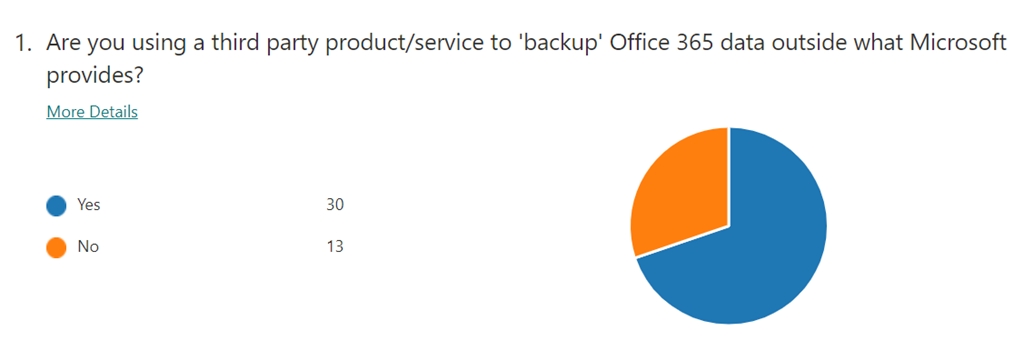
What methods are your accounts using as their primary method of multi-factor (MFA) verification?

which I greatly appreciate you thoughts here:

https://bit.ly/ciasurvey202012

You can view the results during the month here:

https://bit.ly/ciaresults202012

and I’ll post a summary at the end of the month here on the blog.

Please feel free to share this survey with as many people as you can so we can get better idea on this question.

CIAOPS Need to Know Microsoft 365 Webinar–December

laptop-eyes-technology-computer

To round off 2020 we’ll take a look at Power BI this month. Power BI is really amazing tool for visualising data and who doesn’t want to visualise their data? Come along and learn what Power BI is and how to start using it in your business. There is also plenty of news that I’ll cover as well as open Q and A for any questions you may have.

You can register for the regular monthly webinar here:

December Webinar Registrations

The details are:

CIAOPS Need to Know Webinar – December 2020
Wednesday 23rd of December 2020
11.00am – 12.00am Sydney Time

All sessions are recorded and posted to the CIAOPS Academy.

The CIAOPS Need to Know Webinars are free to attend but if you want to receive the recording of the session you need to sign up as a CIAOPS patron which you can do here:

http://www.ciaopspatron.com

or purchase them individually at:

http://www.ciaopsacademy.com/

Also feel free at any stage to email me directly via director@ciaops.com with your webinar topic suggestions.

I’d also appreciate you sharing information about this webinar with anyone you feel may benefit from the session and I look forward to seeing you there.