Create a Dataverse database in Microsoft Teams

What I want to achieve in this process is to create a single Microsoft Dataverse database inside a Microsoft Teams and allow a basic Power Automate to add data to it.

image

Firstly, navigate to a Microsoft Team in the environment (here Automation), and select the + (plus) icon along the menu on the right as shown above.

image

In the list of options that appears, search for, and select Power Apps as shown above.

image

The first interesting thing, once you do that, is you typically can only select from pre-existing Power Apps that are listed in the dialog. However, there is an option create an app in Power Apps that you can select towards the bottom of the dialog as shown above.
image

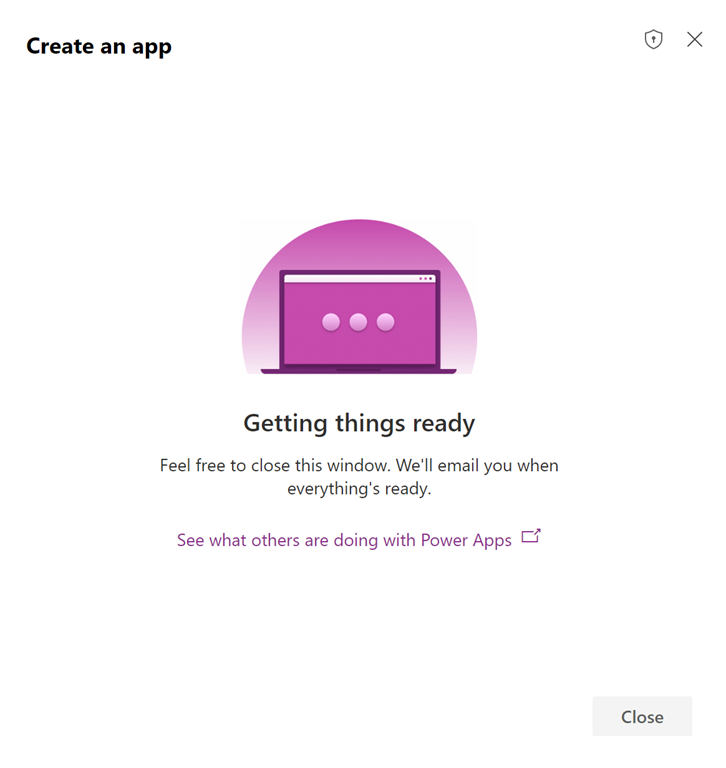
You should then see the dialog display, like the one above, telling you to wait while things get set up.
image

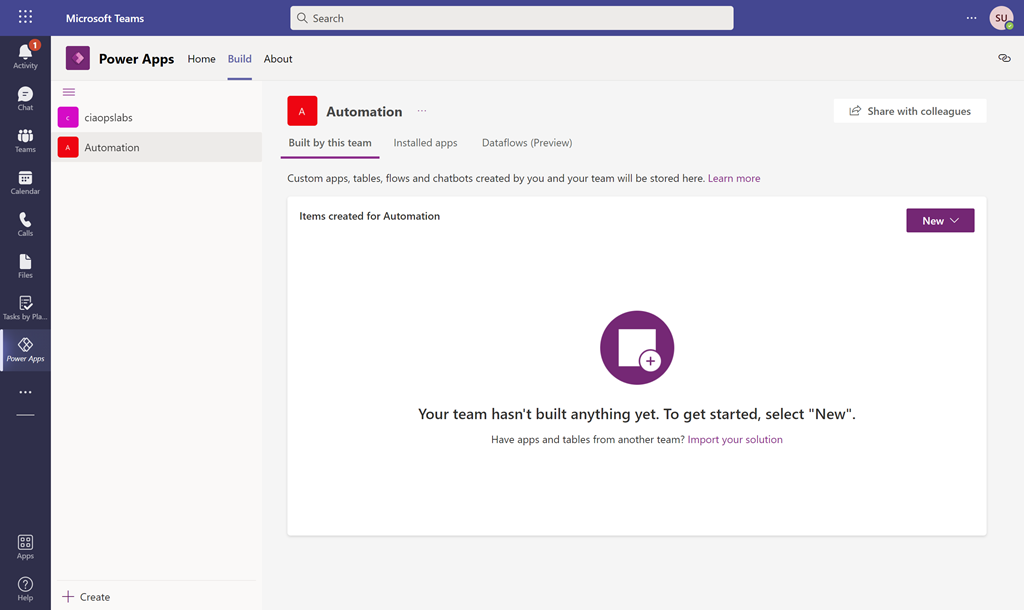
If this process gets hung up after a minute or two, just refresh the page in your browser. You should now see something like that shown above with a list of the Microsoft Teams on the left. If you select the Microsoft Team you want to put the Dataverse database into (here Automation) you should see that nothing is built yet in the information area on the right.

image

Select the New button on the right and then App from the options that appear as shown above.
image

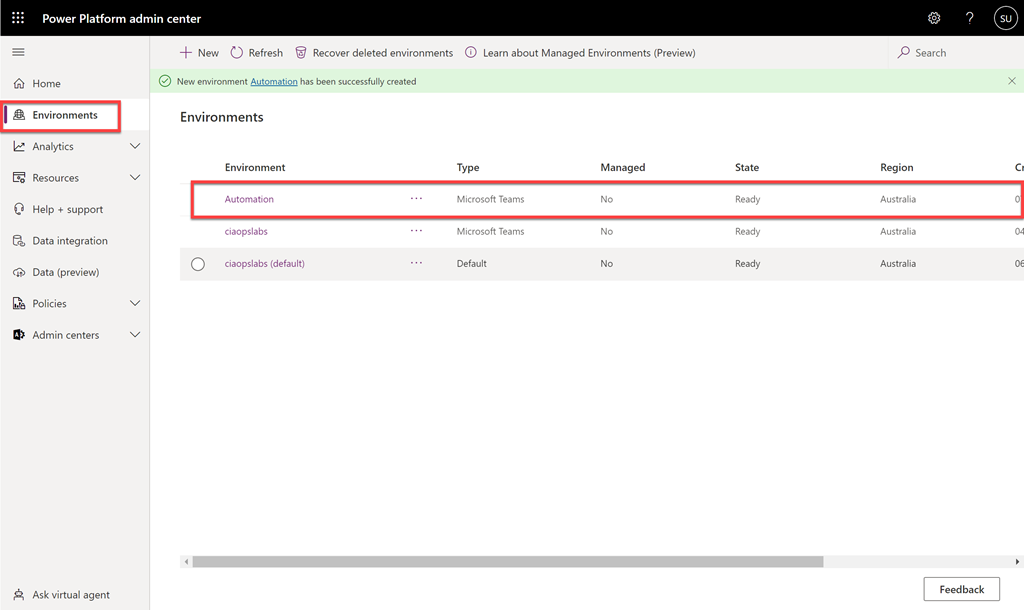
If you take a quick peek at the Power Platform admin center, in a new browser tab, and then Environments from the menu on the left or use the direct link:

https://admin.powerplatform.microsoft.com/environments

You’ll see that a new Power Platform environment has been created matching the name of the Microsoft Team (here Automation).

As the Microsoft documentation on Power Platform environments says:

https://docs.microsoft.com/en-us/power-platform/admin/environments-overview

A Power Platform environment is a space to store, manage, and share your organization’s business data, apps, chatbots, and flows. It also serves as a container to separate apps that might have different roles, security requirements, or target audiences.

In essence, think of an environment as a container to store things you create in the Power Platform. When you create a Power Platform App inside a Microsoft Team, it creates them in a unique container.
image

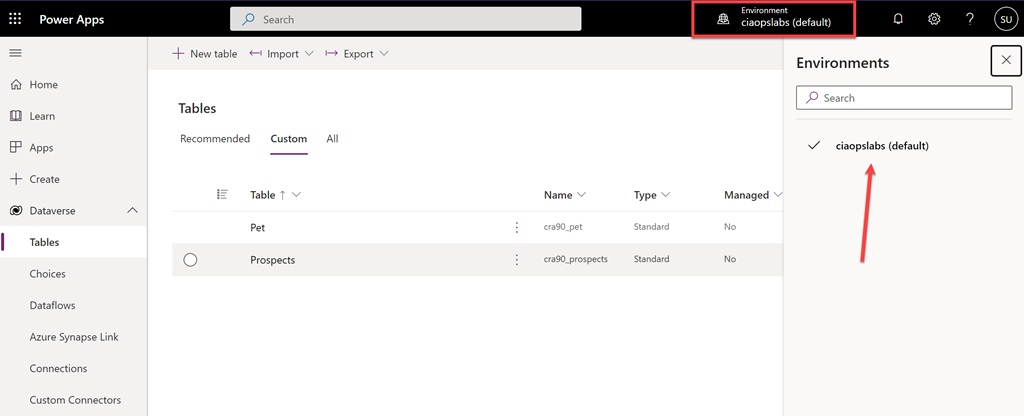
The idea is that you should be able to easily switch between environments. However, if you navigate to the Power Platform service directly at:

https://make.powerapps.com/

You are not able to see the environment just created in Microsoft Teams as shown above for some reason. It seems the only environments you can see here are those created directly in the Power Apps make portal.
image

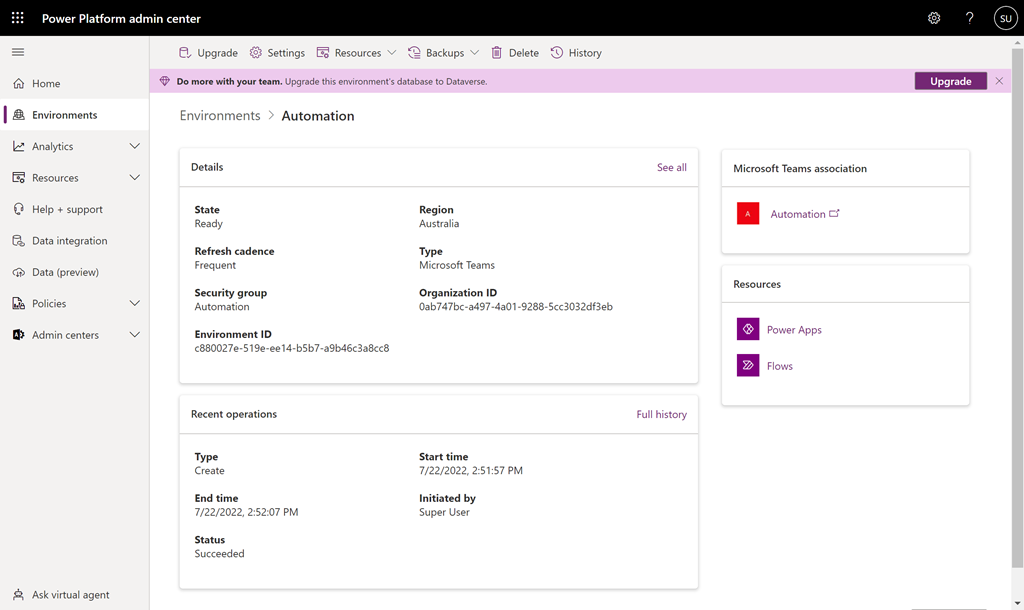
You can drill into the new Teams environment you just created in the Power Platform admin center by selecting it from the list. Information about the environment will be displayed as shown above.
image

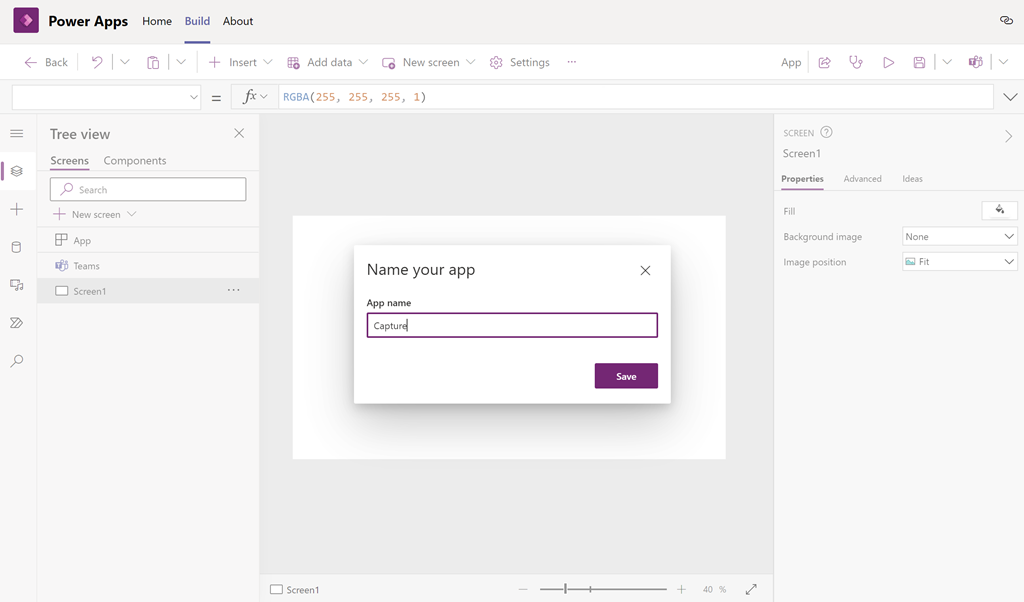
If you return to your app creation process inside the Microsoft Team, you’ll now need to give your app a name (here Capture)

image

Typically, you build a full app here but for now all we want to create is a single database, so select the Data icon on the left (cylinder) as shown and then select the Create new table button to the right of it.
image

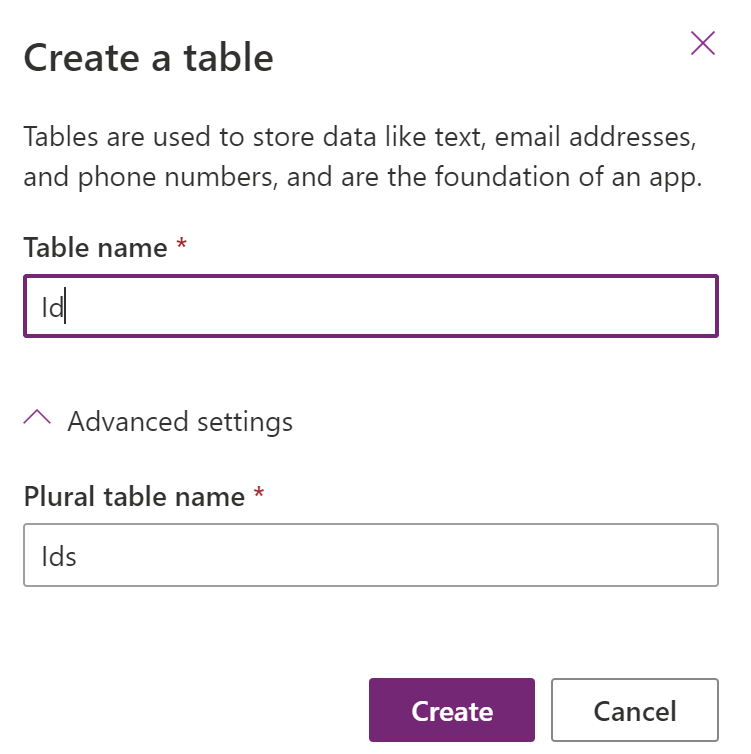
You’ll then be asked to give the table a name (here Id). If you open the Advanced settings option at the bottom of the dialog, you’ll see that there are not many additional options to select from.

Select the Create button to continue.
image

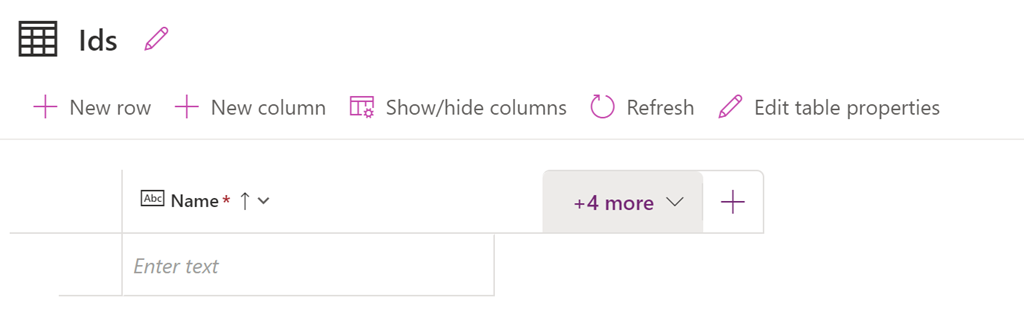
You should now see the table displayed as shown above. You’ll also notice that there is already a column called Name created. This is a bit like when you create a new SharePoint list and get a single column created for you as well.
image

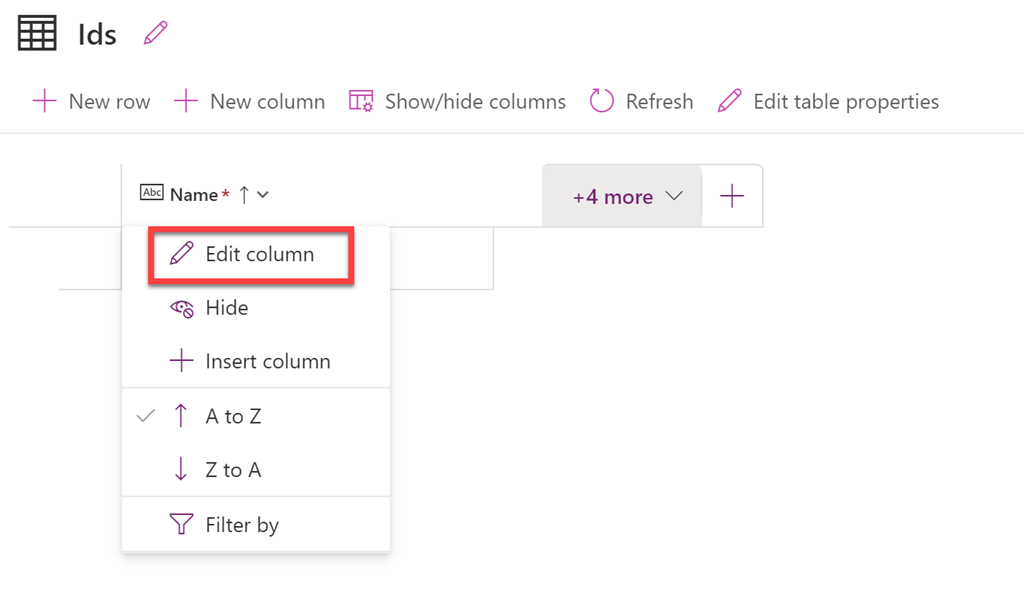
If you try and edit this initial column by selecting the header and then the Edit column option from the menu that appears above,
image

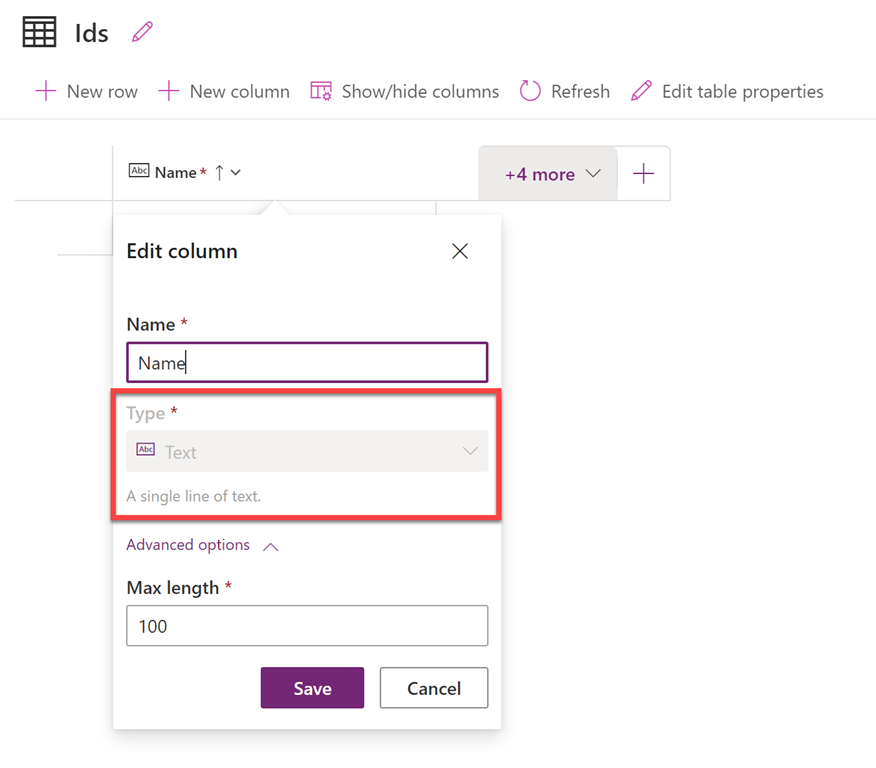
you’ll find there are not a lot of options available. This maybe limiting or just annoying as it is in SharePoint, but for now just leave that column in place. You’ll just need to remember to put some data in it as it is a required field.
image

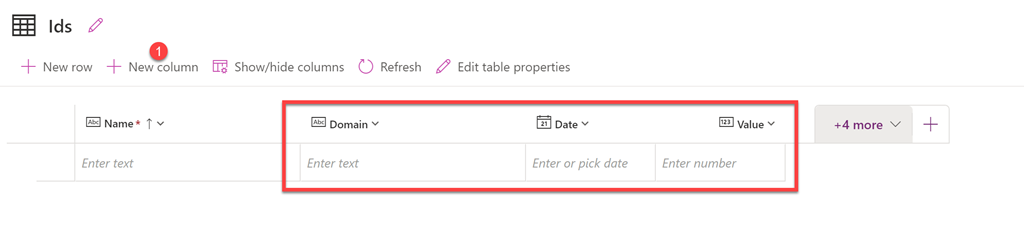
You can then add any addition columns you require. Here I’ve added the columns Domain, Date and Value. These are the fields I want to populate with custom data.

image

If I return to the previous screen you should now see the Dataverse database listed as shown above.
image

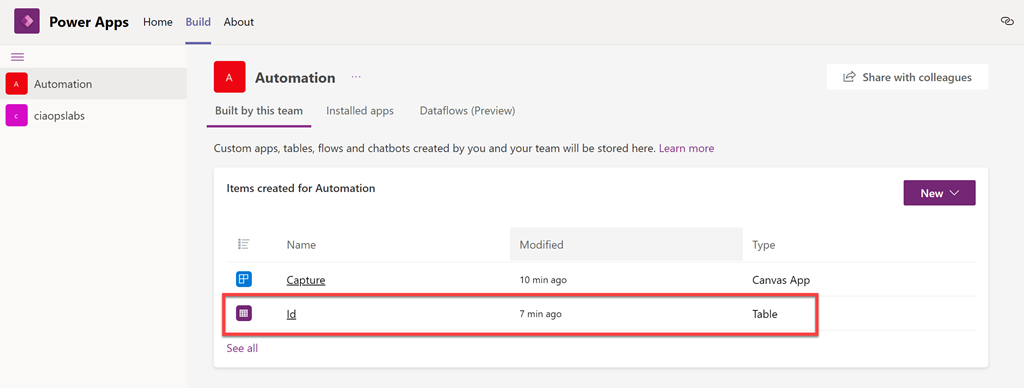
Returning to the Build page in Power Apps in Microsoft Teams, and selecting the Microsoft Team (here Automation), you should now see some entries in the Items created for Automation list on the right. Here, you should also see the database just created as noted above.
image

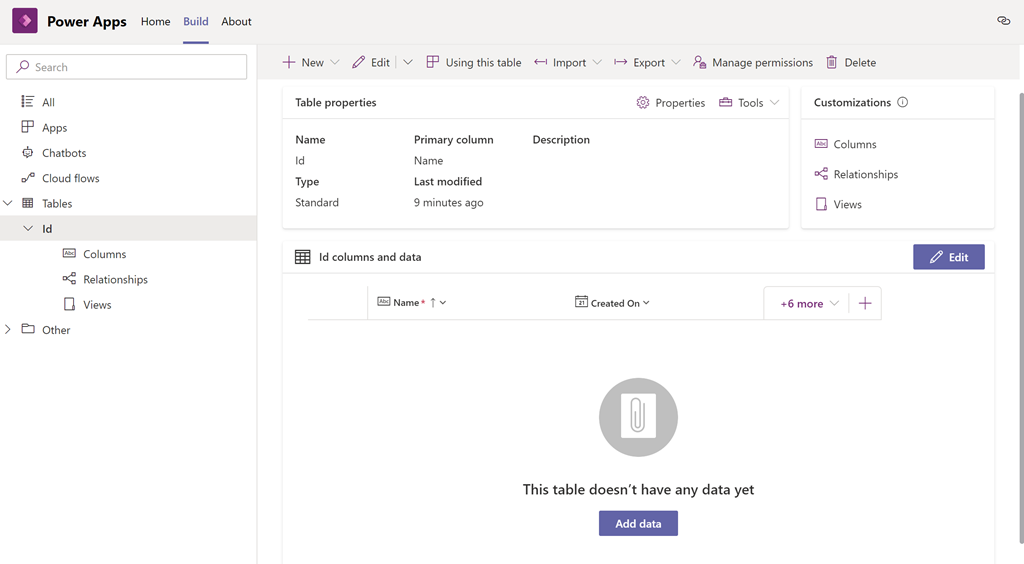
If you select the database directly from this screen you can drill in and see the table and any entries as shown above. No data appears in the table yet as none has been added.
image

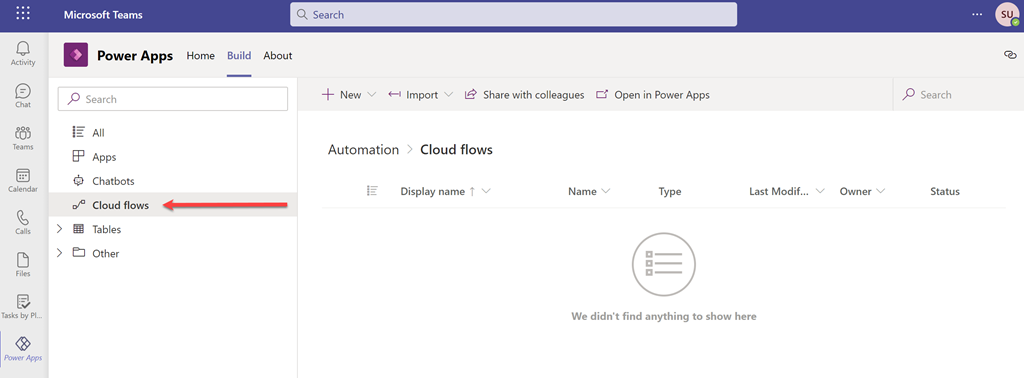
The way to get data into the database here will be via a very basic Power Automate Flow. It is a good practice to create this also inside the same Power Platform environment in which the Dataverse database was just created. Do this via the Cloud Flows option on the left as shown above.
image

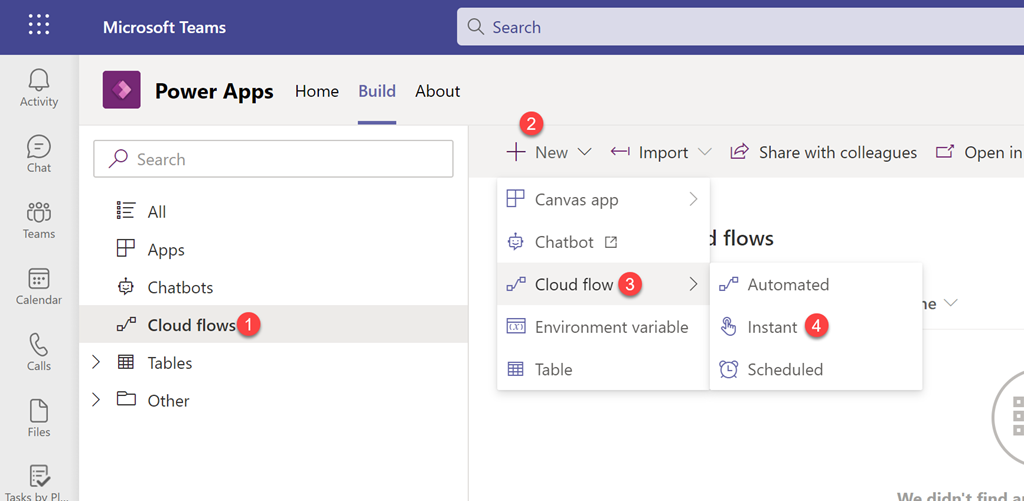
To create a Flow, select Cloud Flows, then from the menu at the top on the right select the + New button. From the options that appear select Cloud Flows then type of Flow desired (here an Instant Flow).

image

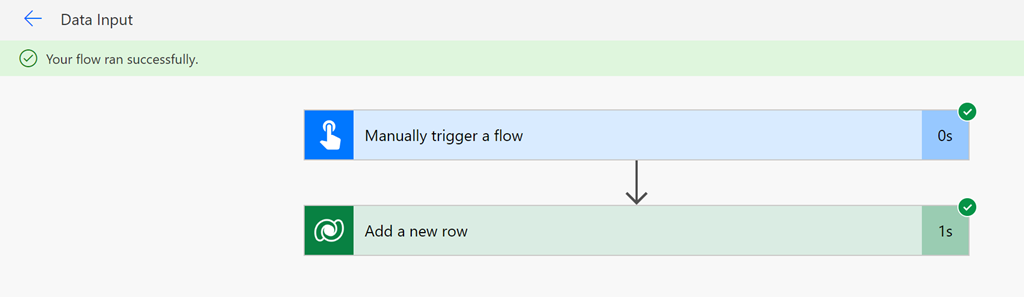
The process for creating a Flow is the same as if you were creating a stand alone Flow via the Power Automate service. In this case, simply add the Dataverse Add a new row action as shown above. Configure this action to connect to the Dataverse database created earlier (Ids), then add some random text for the required default Name field (Hello), then data for Date, Domain and Value as shown above.

Save and Run the Flow.
image

If everything is correct, the Flow should run without errors as shown above.

image

If you then look at the details of the database you should see that it now has data inside it as shown above.

image

You could also create a Flow directly from the Power Automate service, but remember to switch to the new Microsoft Teams environment that was created by adding a Power Automate app to the Microsoft Team before creating the Flow.
image

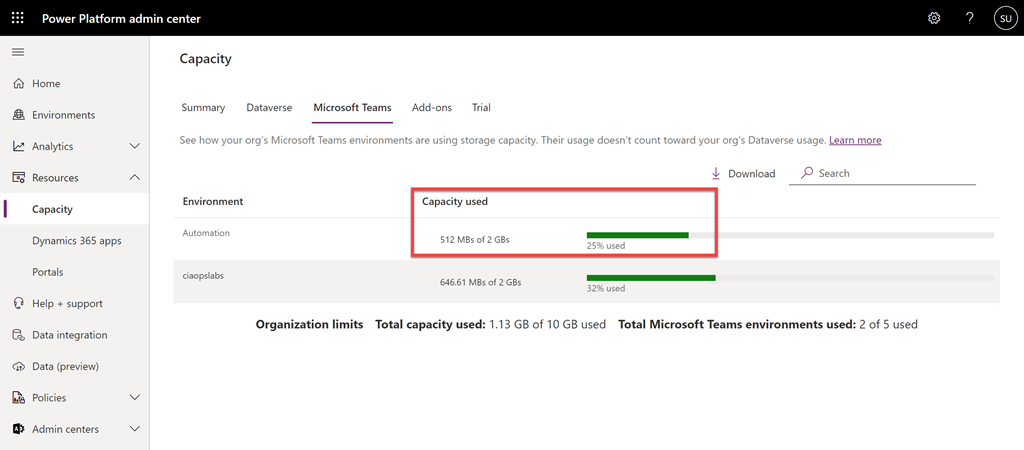
The final interesting item here is to look at the capacity of the new database in the Power Platform admin center where you’ll find that, although you have a total size of 2GB, about 25% has already been consumed by the system.

For more information about the Dataverse for Teams consult the Microsoft documentation here:
About the Microsoft Dataverse for Teams environment

Get your Azure invoice emailed to you

image

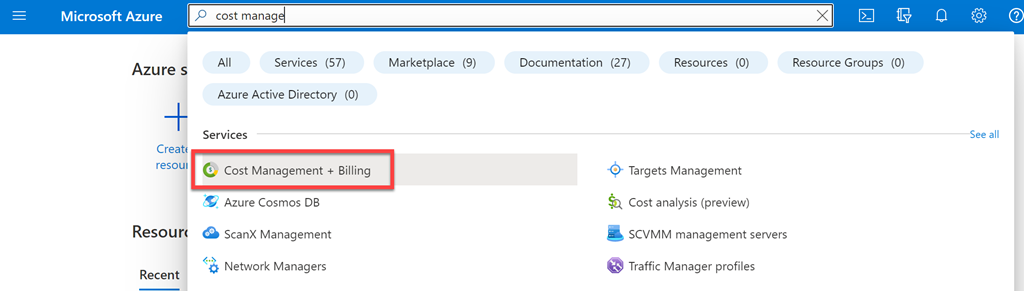
If you need a copy of the Azure invoice emailed to you then you can configure that inside your Azure portal be navigating firstly to the Cost Management + Billing.

image

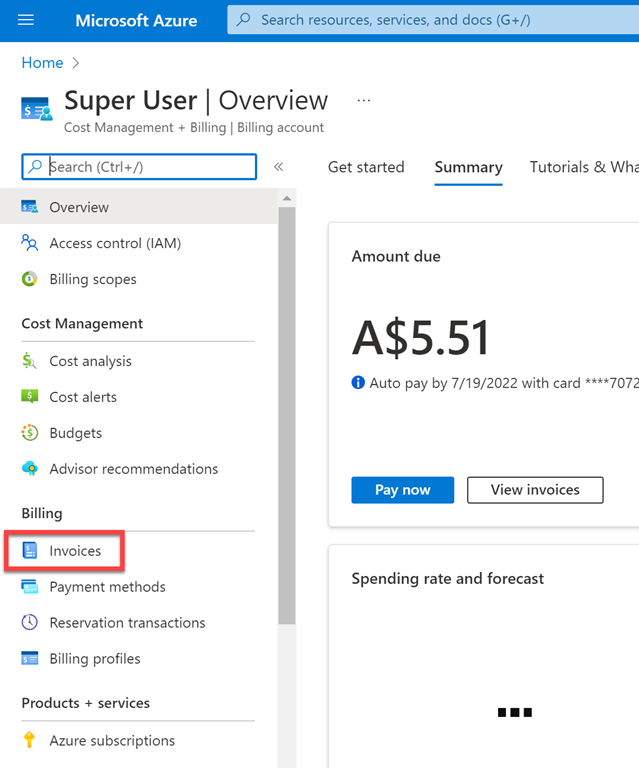
Then select Invoices from the menu on the left.

image

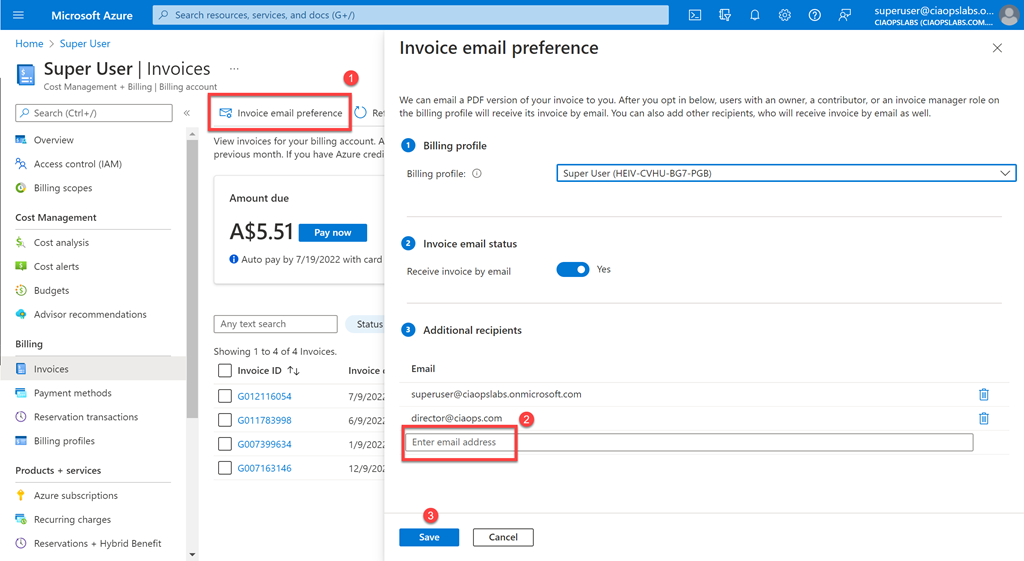
Finally, select Invoice email preferences from the menu on the right then enter the desired email address on the right in the dialog that appears. Remember to save your changes and from now on that email address will receive a copy of your Azure invoice monthly.

Techwers 16

image

I am happy to announce that Techwerks 16 will be held in Brisbane CBD on Thursday August 18th 2022.


The course is limited to 30 people and you can sign up and reserve your place now! You reserve a place by completing this form:


http://bit.ly/ciaopsroi


or by sending me an email (director@ciaops.com) expressing your interest.


The content of these all day face to face workshops is driven by the attendees. That means we cover exactly what people want to see and focus on doing hands on, real world scenarios. Attendees can vote on topics they’d like to see covered prior to the day and we continue to target exactly what the small group of attendees wants to see. Thus, this is an excellent way to get really deep into the technology and have all the questions you’ve been dying to know answered. Typically, the event produces a number of best practice take aways for each attendee. So far, the greatest votes are for deeper dives into the Microsoft Cloud including Microsoft 365, Azure, Intune, Defender for Endpoint, security such as Azure Sentinel and PowerShell configuration and scripts, with a focus on enabling the technology in SMB businesses.


Recent testimonial – “I just wanted to say a big thank you to Robert for the Brisbane Techworks day. It is such a good format with each attendee asking what matters them and the whole interactive nature of the day. So much better than death by PowerPoint.” – Mike H.


The cost to attend in Brisbane is:


Gold Enterprise Patron = Free


Gold Patron = $33 inc GST


Silver Patron = $99 inc GST


Bronze Patron = $176 inc GST


Non Patron = $399 inc GST


I hope to also have a streaming option available as well. The costs for this will be:


Gold Enterprise Patron = Free


Gold Patron = Free


Silver Patron = Free


Bronze Patron = $33 inc GST


Non Patron = $99 inc GST


CIAOPS Patron information can be found here – www.ciaopspatron.com

I hope to see you there.

Defender for Endpoint device execution restrictions

This is a video run through of the recent articles I wrote:

Microsoft Defender for Endpoint device isolation

Microsoft Defender for Endpoint restrict app execution

This video will show you how to both isolate a device and restrict app execution on a device. Both of these are great ways to respond to a suspected device security threat and limit security breeches while still allowing remote troubleshooting.

Microsoft Defender for Endpoint Restrict app execution

In a recent blog I looked at how Microsoft Defender for Endpoint can allow an administrator to restrict a device from communicating with everything except the Defender for Endpoint admin console. You’ll find that post here:

Microsoft Defender for Endpoint device isolation

Isolating a device is a pretty drastic measure, however Defender for Endpoint does have another device restriction option that is probably less intrusive known as Restrict app execution.

What Restrict app execution does is that it present applications that are not signed by Microsoft from running.

image

To Restrict app execution on a device firstly navigate to:

https://security.microsoft.com

and select the Device inventory from the options on the left. This will display a list of all the devices that Defender for Endpoint knows about. Select the device you wish to isolate from the list. In the top right hand side should appear an option Restrict app execution as shown above.

image

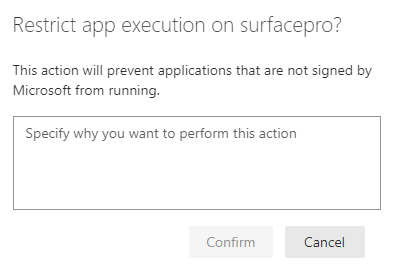
Once you select this option you’ll need to provide a reason for this restriction and press the Confirm button. This action will be logged in the admin console for later reference.

image

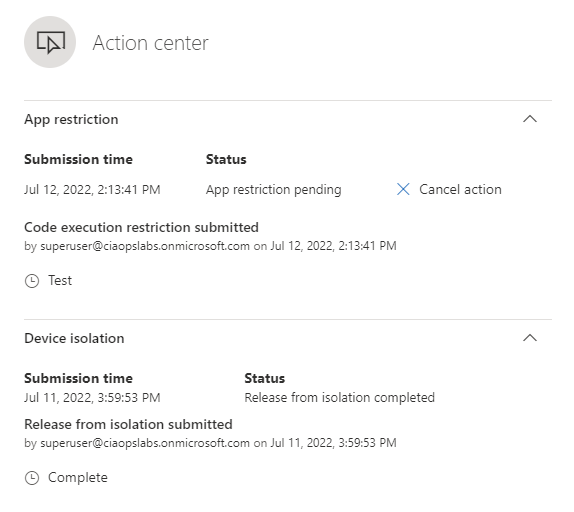
You will see the action item display as shown above. You can also cancel if required here.

On the device, in a matter of moments, a message will now appear:

Screenshot 2022-07-12 141355

and if a non Microsoft application is run you’ll see:

image

putty.exe

image

Brave browser

This process is using Windows Defender Application Control (WDAC) that I have spoken about before:

Windows Defender Application Control (WDAC) basics

which you can apply yourself via a policy, but in this case, it is being applied on the fly, which is impressive!

To remove this device restriction, all you need to do is select

image

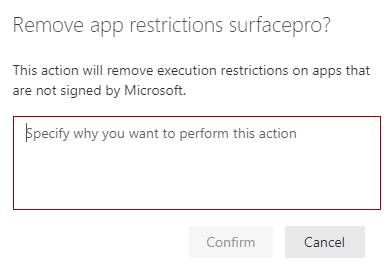
the Remove app restriction which can be again found in the top right of the device page.

image

You’ll again be prompted to enter a reason for removing the restriction and then you’ll need to select the Confirm button.

image

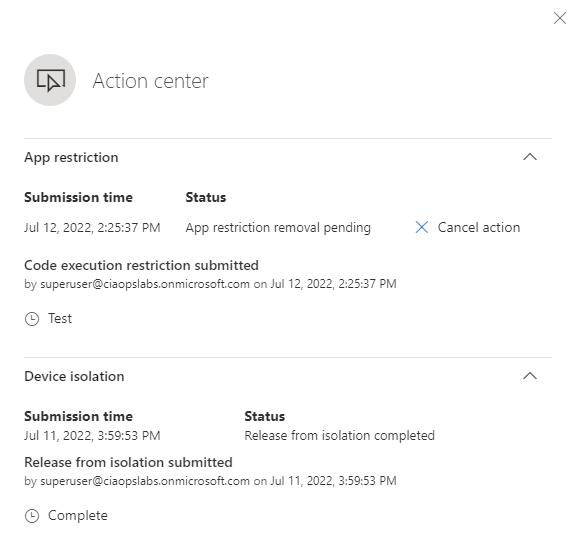
The Action center confirmation will then appear as shown above and in a very short period of time the restriction will be removed from the device.

image

These confirmation can be found in the Action center option on the left hand side menu under the Actions & submissions item as shown above.

This is handy option in Defender for Endpoint for isolating a possible security issue on a device while minimising the impact to the user. Of course, smart attackers will use Microsoft tools located on the device, such as PowerShell to compromise machines to avoid this restriction. However, typically, they will also need to run a non-Microsoft application somewhere along the line which this technique will block.

For more information about Microsoft Defender Restrict app execution see the Microsoft documentation here:

Take response on a device

and remember that Restrict app execution is another feature that can be used with Defender for Endpoint when responding to security threats on devices.

Microsoft Defender for Endpoint device isolation

Let’s say that you have device that you believe has a security threat serious enough that it should be ‘unplugged’ from the network. Doing so physically makes it hard to troubleshoot any incident unless you are in front of that machine. However, Defender for Endpoint allows you to isolate the machine from the network while still remaining connected to the Defender for Endpoint console.

image

To initiate the device isolation navigate to:

https://security.microsoft.com

and select the Device inventory option from the menu on the left hand side. That should show you a list of all devices that Defender for Endpoint knows about. Select the device you wish to isolate from the list that appears.

In the top right side of the device page you will find the option to Isolate a device. If you can’t see that option check the ellipse (three dots). Select the ellipse to display the menu shown above. In that menu should be an option Isolate device, which you should select.

image

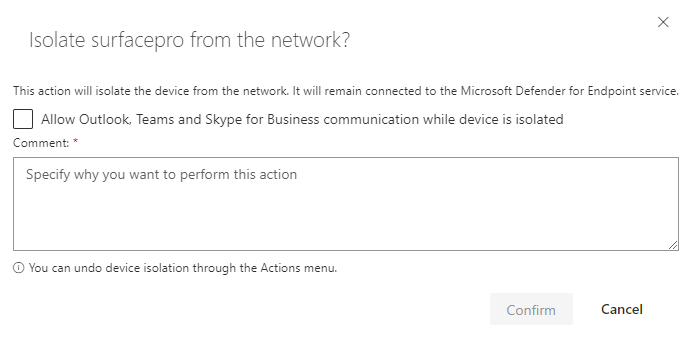
You’ll now see a dialog appear as shown above asking you to confirm that you wish to isolate the selected device. You also have the option here to allow Outlook, Teams and Skype for Business while device is isolated if desired. You’ll also need to enter a reason for isolating the device. When all that is done, select the Confirm button.

image

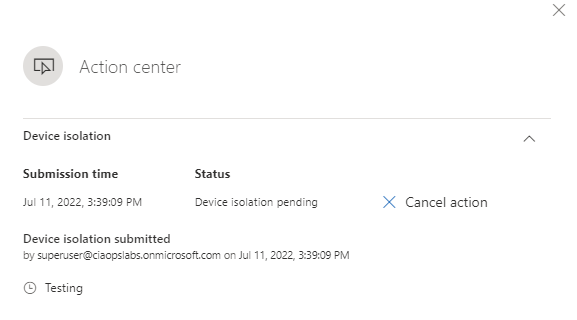
You should now see the action confirmed in the security console as shown above. You also have the ability to cancel this if needed here.

clip_image002

Almost immediately, the device being isolated will warn the current use that isolation is taking place and the network is disabled as shown above. At that point the user will no longer be able to navigate beyond their current machine (i.e. no browsing Internet or local LAN, no printing and no emails). More importantly, any other covert sessions will also be blocked preventing a security threat from spreading.

image

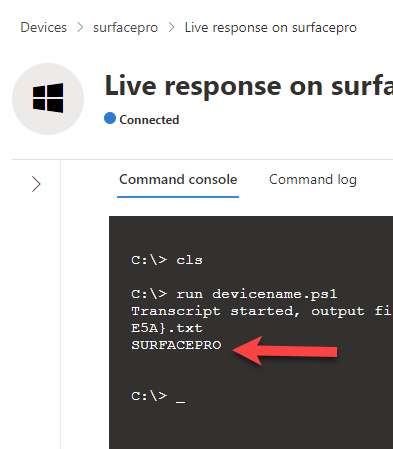
As an administrator you will however be able to launch a Live response session in the Defender console, as shown above, to triage the device and run PowerShell scripts if needed.

image

If you now look in the menu in the top right of this device when you have completed your work, you will see an option Release from isolation as shown above, for that device.

image

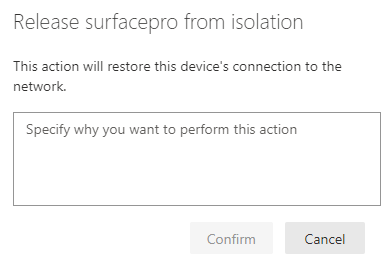
You will once again need to provide a reason why this device is being released from insolation and then select the Confirm button to complete the process.

image

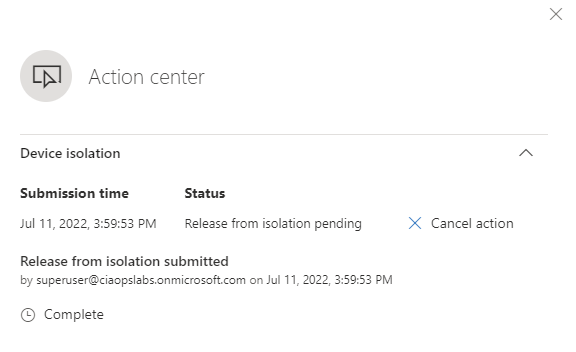
The Action center will appear again as the isolation is removed. You again, have the option to cancel this if you wish.

image

The history of the actions taken to isolate and release the device can be found in the Action center menu option under the Actions & submissions heading on the left in the Microsoft Security center.

Defender for Endpoint allow you to quickly and easily isolate a suspected device from all network connections but allow it to remain connected to the Defender console for remote troubleshooting. If you want to read more about this process then consult the Microsoft documentation here:
Isolate devices from the network

MVP 2022-23

image

I am once again happy to report that I have been renewed as an MVP for 2022-23. This is now my 11th year as an MVP and I am honoured to have been recognised.

Many people are not aware that the MVP award is annual. It isn’t something you ‘apply’ for, it is given is recognition of the work you do from the community around a Microsoft product or service in the previous year. For me, that is Microsoft 365. Thus, to continue to be recognised as an MVP you need to make relevant community contributions annually.

As always, I take this opportunity to thank Microsoft for this award. I have made so many great contacts there that help me every day in all sorts of ways. I am truly grateful for their assistance. Of course I also thank other members of the MVP community who also help me everyday by providing information that I simply couldn’t find elsewhere. Their real world application and implementation of Microsoft technologies is amazing! Finally, there is community of people using and implementing Microsoft cloud technologies that continue to provide real world questions that challenge me to assist and find solutions for. For all these people I also say thanks because this is where the rubber hits the road.

Hopefully, as we move to a world that is more open, it will be possible to once again travel and catch up with all these marvellous people face to face and strengthen the bonds that we have and share yet more information that I can then provide to my community, again face to face I hope.

Again I say thanks for the recognition and being award as an MVP for another year and I’m ready to continue to share my learnings and knowledge with the community at large.

Bad guys keep winning (Part VI)

pexels-kat-wilcox-923681

I’m super angry about this, so be prepared for a bit of a rant. I’m posting this in the hope that it maybe found by others who maybe concerned about a recent call they received from the “Security Department of VISA and Mastercard” detailing fraud on their banking accounts.

My senior parents received a call from “Neil Spence” from the “Security Department of VISA and Mastercard” claiming there had been some potential fraudulent transactions from eBay and Amazon on an account. The total of these was around $400. He then asked whether they wanted them investigated and stopped. Of course they said “Yes please”. He then said he would transfer them to their bank to speak with someone to take action and block these transactions. During this process he provided a call back number 1800 829 403 (which turns out to be the number for the Australian Government Department of Aged Care Fraud hotline which is nothing to do with VISA. I also called and determined there is no “Neil Spence” their either) and a reference number SIP5010.

Now the ‘helpful’ person at ‘the bank’ they were transferred to, got them to provide all the account details (account number and balances) and made a great show of saying that this isn’t a scam because they were not being asked for the PIN to any accounts. The ‘bank’ said it would investigate.

A few days later the ‘bank’ called back and said they had identified that fraud had indeed taken place but by an employee of the ‘bank’ at the local branch they use. The ‘bank’ then said they wanted the help of my parents by catching the employee in act of conducting this fraud. To do this, my parents needed to go the bank immediately and make a cash withdrawal of just over $8,000 and then wait for more instructions. They were however told not to mention this at the bank branch otherwise it would tip off the investigation and allow the perpetrator to get away scott-free!

At this point it was determined that it was a scam but here’s where it gets interesting for me. Even though I was confident that no money was missing I thought it best to call the bank. That process took me down a rabbit hole of pushing numbers on a phone routing system, entering account details, trying to work out how to enter an alpha numeric password via tones, etc. My parents had no hope negotiating that.

When I did eventually get through, I was on hold for more than 20 minutes with no idea of how much longer I’d be, so I hung up and called the Police on a general number. That too went to hold and again I gave up after 20 or so minutes of no reply and no idea of wait numbers.

Here’s why the scammers win. They target people of an older generation who are less comfortable with the modern method of banking (Internet and phone). They also target them because they tend to not question authority. They then establish trust and get the target to ‘help’ them catch the bad actors, that makes the target feel guilty that they should help catch the alleged perpetrator. All this ends up doing is draining money from their accounts and sending it to the scammers all the while making people like my parents less trusting of their local branch staff, which is exactly the people they should be going to. There is no doubt, these scammers know their game.

At this stage it seems like the initial attempt at obtaining funds has been thwarted but given account details were shared unwittingly, we’ll need to be extra vigilant and potentially cancel all the credit cards which will be a very painful process. Very. So this issue is not over by any means and at the very least my parents will probably continue to receive more called from the ‘bank’ and I expected these to become more hostile when they don’t comply.

What has truly made me angry is just how hard it is for people of my parents generation to get help on these matters. Luckily, I was able to provide an external perspective as well as do some investigation of my own. What would of happened if I wasn’t available to assist? Most likely, the scammers would have continued to fleece my parents for large of money over a few weeks.

No wonder the bad guys (and gals) keep winning if the responses I got from the authorities trying to report this is anything to go by. Where is the protection for our societies most vulnerable? As I have said many, many times cybersecurity is largely an illusion, especially when enacted by big institutions. It seems like it is you against some very clever and motivated scammers and if you are the right target, then you really don’t stand much of a chance. From where I sit, there is lots of talk but the problem is not getting any better. Just look at the news and amounts people are scammed out of regularly. Why is there not better protection? People have a right to not have their hard earned money fleeced from them when they are with a large institution that makes all these noises about being cybersecurity-aware and investing billions in protecting customer. Unless you fit their customer profile seems like you are on your own to me!

A sad state of affairs were we are all reduced to looking after ourselves. But what about those who are unable to do this? Do we just let them get fleeced? As I said, I’m angry that it is victim who pays and hope this information is of value to someone else and prevents them from being fleeced or put through this drama.