Review – Spigen SGP Neo Hybrid for Google Nexus 5

Full disclosure – the review unit was supplied by Mobilezap. You can find this device and others at the Mobilezap category page at:
http://www.mobilezap.com.au/34604/google/nexus-5/cases.htm

This is a pretty handy cover for the Nexus 5 in my books. It basically comes in two pieces as you can see above. This first is the case which the phone fits into snuggly. The second is a band that fit around the border to hold it in place, which is easy to attach. The case even has rails to ensure the band fits correctly and stays in place.

It is hard to even notice the cover when it is place. It adds very little bulk or weight to the phone and protects it very well. All the guide holes align perfectly and the surface makes the phone nice and grippy.
I like simple covers like these because they protect the phone while not making any more cumbersome to use. Certainly would recommend this case to all Nexus 5 users.

Last chance for Cloud Business Blueprint discount

Cloud Business Blueprint


A few weeks back I let you know about signing up to my new project www.cloudbusinessblueprint.com. We opened the doors on the private members site on Friday night and by Saturday all the Foundation spots where taken.

Many people contacted us saying that this was the ONLY weekend that they didn’t check their emails and they were very disappointed to miss out. Thus, after discussions with my business partner Nigel Moore, we have decided to make a similar once off offer.

Until Wednesday 5pm Australian eastern standard time (GMT+11) you can get membership for AUD $37 per month (plus GST for AU people), if you use the code:

CBB-LAUNCH-EXTRAS

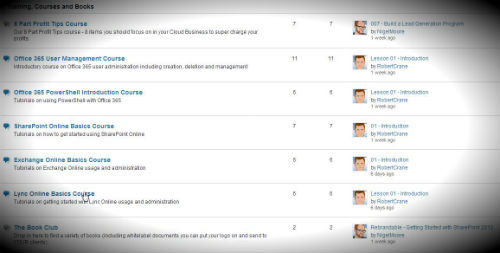
Right now in the community, you already have access to a half dozen training courses along with some templates and eBooks and that’s growing rapidly.

Image

So, if you’re keen to jump on board, head on over now to www.cloudbusinessblueprint.com/members-sign-up – the coupon code for the $37 pricing is CBB-LAUNCH-EXTRAS

Just to make sure you don’t miss out on this one (as we definitely won’t be offering any more discounts on membership).

After that membership will be locked and staying at $47 for the time being.

Cloud Business Podcast–Episode 4

The Cloud Business Podcast - Opportunity in the Cloud is only a Click Away with Robert Crane and Nigel Moore

http://www.cloudbusinessblueprint.com/podcast/episode-004-white-label-cloud/

iTunes – https://itunes.apple.com/au/podcast/cloud-business-podcast-opportunity/id742109989

This podcast discussed the benefits and challenges of white labelling cloud offerings. It looks at the challenges of incorporating public and private cloud offerings in an effort to generate profit and develop a long term strategy. We however also cover the huge opportunities in niches that are not currently adequately covered by resellers and why focusing on commissions is a losing game. Some of these opportunities come from businesses like:

As well as some nice solutions like:

We answer the question about how to make product offerings easier for clients as well as wrap up some of the latest goings on at Cloud Business Blueprint

We’d love to hear feedback, so please leave your comments below and don’t forget to rate us on iTunes. This will help us grow our listener base which will encourage us to add more value and help us to bring on some fantastic guests.

Meet the New Windows


It is very unfortunate that Windows 8 has received a lot of negative press, mainly from those who have never used it! Yep, it works better on a touch device which are not that common yet but if you simply press the Windows Key you end up at the desktop. How hard is that?
Windows 8 is certainly a major departure in terms of interface from what most people are used to but anyone who has ever used a tablet or a smart phone should be able to adapt pretty quickly, so I can’t see why some people moan so much?? Are they not using a smart phone? I doubt it. Most of the negativity seems to be coming from those ‘old school’ users who don’t want to learn anything new. However, any new interface always elicits cries of angst. What happened to the day when we couldn’t wait for something new? Have people really become that staid now days?
The secret to success with Windows 8 is to spend some time acclimatizing yourself to the new stuff. It doesn’t take long, 10 – 15 minutes is enough for most people to get up to speed and be more productive than they were with previous operating systems. It would have been great if Windows 8 did include its own usage tutorial but it doesn’t and that has counted against it when it comes to adoption.
A little bit of digging around the Microsoft site reveals a wonderful training document on Windows 8.
Windows 8 End User Training brochure
I’d recommend that any Windows 8 user download and work their way through the document as it covers a huge amount of the new features in Windows 8. In many cases, once you become familiar with these features you’ll really appreciate how much better than can make your technology experience.
Even if you aren’t currently using Windows 8 it is probably worthwhile downloading and going through the document or at least keeping it handy as chances are, one day you’ll be using Windows 8!
Before you write Windows 8 off and consign yourself back to your 1980’s machine, go through the Windows 8 End User Training brochure and then use Windows 8 for yourself. I’m pretty sure you’ll find a whole new world with a bit of knowledge under your belt.

CIAOPS December Virtual Tech Meeting–Resources

Thanks to Boon Tee for his presentation at the meeting. Here is a recording of that presentation for anyone who missed it.

Here also is the list of resources mentioned in the news section:

Amazon workspaces – https://aws.amazon.com/workspaces/

Office 365 admin app – http://www.windowsphone.com/en-au/store/app/office-365-admin/76f9b288-37bc-4d75-8164-16d1df0447a2

Ingress – http://www.ingress.com

Office 365 Power BI – https://blog.ciaops.com/2013/11/office-365-power-bi.html

Office 365 message encryption – http://blogs.office.com/b/office365tech/archive/2013/11/21/introducing-office-365-message-encryption-send-encrypted-emails-to-anyone.aspx

Cloud Business Blueprint – http://www.cloudbusinessblueprint.com/

I hope you can join us at our next planned meeting in February. Keep an eye out for registration details here in the coming weeks.

CIAOPS Virtual Technology Meeting–December

The final CIAOPS Virtual Technology meeting 2013 will be held on Wednesday December the 4th at 4pm Sydney time. You can register for free now at:
https://ciaops1213.eventbrite.com.au
This meeting will feature a presentation by Windows Server MVP Boon Tee focused on connecting on premise servers to Office 365. Here, in broad strokes is what Boon will be covering:
1. Integrating Office 365  into the network.

a. WS2012E R2 features
b. How it fits together
c. Using ProPlus
d. Migration

– i. From SBS
– ii. From POP3/iMAP
– iii. MigrationWiz

2. Bug check

a. Essentials only DC or integration will break.
b. Unscheduled Server Backup after reboot
c. GPO setup
d. Licensing

The meeting will the usual swag of news, information and discussion so I hope that you’ll come along and join with us for this last meeting before Christmas and let me know what you’d like to see in the coming year.
I hope to see you there.

Enable Yammer integration in Office 365

A while back Microsoft bought Yammer and since then has been working hard to integrate it into Office 365. If you have an Enterprise Office 365 plan you should now have the ability to enable this integration.

Here’s a brief outline of how to complete this integration.

image

Login to your Office 365 portal as an administrator. At the bottom of the second column on this page you should see Included services. Select this.

image

That will now display the above option to the right. Select the link – Yes, activate Yammer Enterprise for my network.

image

You’ll then be taken to a screen where you can select which domain you wish to activate that on from the pull down list at the top of the screen.

Then select the Activate Yammer Enterprise button below.

image

The configuration will now commence. As noted this process could take 1 to 30 minutes to complete.

Look out for future post of the Yammer integration with Office 365 as I think this is another HUGE opportunity with the product.

Adding additional SharePoint storage for Office 365 P plans

All SharePoint Online plans provide the ability to add additional storage. In the Small Business plans this can be a little hard to locate. Here’s a quick overview of what you need to do.

clip_image001

Login to your Office 365 tenant as an administrator and select Manage and purchase licenses from under the licenses heading at the bottom of the page.

clip_image002

Click on purchase services at the top of the page and then Add under your Small Business plan on the right under the price.

clip_image003

Select optional add-ons item under user license at $XX.XX

clip_image004

Add your storage and complete the purchase.

Now you should be able to assign additional storage to your SharePoint Online site in the Small Business plans.

Adding space is slightly different for M and E plans and I’ll cover that in an upcoming post. Also, the story is a little different for plan in Australia so beware.