CIA Brief 240127

image

Sulava improves productivity and reaches more customers with Teams Premium –

https://www.youtube.com/watch?v=vYsKMnt9U8U

What’s new in Microsoft Intune January 2024 –

https://techcommunity.microsoft.com/t5/microsoft-intune-blog/what-s-new-in-microsoft-intune-january-2024/ba-p/4036593

How to join immersive spaces –

https://www.youtube.com/watch?v=FN83rjhd-3g

Bring virtual connections to life with Microsoft Mesh, now generally available in Microsoft Teams –

https://www.microsoft.com/en-us/microsoft-365/blog/2024/01/24/bring-virtual-connections-to-life-with-microsoft-mesh-now-generally-available-in-microsoft-teams/

Meet your AI assistant for education: Microsoft Copilot –

https://www.youtube.com/watch?v=K5z6t9gSO4E

What’s new in the Microsoft 365 app on the web and for Windows –

https://insider.microsoft365.com/en-us/blog/whats-new-in-the-microsoft-365-app-december-2023

How to explore immersive spaces –

https://www.youtube.com/watch?v=esBzumV_59Q

Easily control audio and video settings in Teams meetings –

https://insider.microsoft365.com/en-us/blog/easily-control-audio-and-video-settings-in-teams-meetings

Feature Deep Dive: Open in App –

https://techcommunity.microsoft.com/t5/microsoft-onedrive-blog/feature-deep-dive-open-in-app/ba-p/4034738

Microsoft Entra user and admin access controls to prepare for Copilot –

https://techcommunity.microsoft.com/t5/microsoft-mechanics-blog/microsoft-entra-user-and-admin-access-controls-to-prepare-for/ba-p/4034067

Vulnerable Components Inventory now in public preview –

https://techcommunity.microsoft.com/t5/microsoft-defender-vulnerability/vulnerable-components-inventory-now-in-public-preview/ba-p/4035357

After hours

Why work doesn’t happen at work –

https://www.youtube.com/watch?v=5XD2kNopsUs

Editorial

If you found this valuable, the I’d appreciate a ‘like’ or perhaps a donation at https://ko-fi.com/ciaops. This helps me know that people enjoy what I have created and provides resources to allow me to create more content. If you have any feedback or suggestions around this, I’m all ears. You can also find me via email director@ciaops.com and on X (Twitter) at https://www.twitter.com/directorcia.

If you want to be part of a dedicated Microsoft Cloud community with information and interactions daily, then consider becoming a CIAOPS Patron – www.ciaopspatron.com.

Watch out for the next CIA Brief next week.

Microsoft 365 Backup pricing

image

I recently detailed how to

Set up Microsoft 365 backup

I thought it was about time to take a look at the cost of Microsoft 365 Backup to see how it compares to other offerings.

The interesting thing is that billing is a little different from other third party solution. Microsoft 365 Backup is based on storage not on users. This makes direct comparison hard, so let me just focus on Microsoft 365 Backup is billed for now.

If you take a look at the Microsoft 365 Backup site you’ll see that at this point in time the service is billed at US$0.15 per GB per month. That is no matter what the data is whether, SharePoint, Exchange, OneDrive for Business. Data is data and the backup cost is per GB per month.

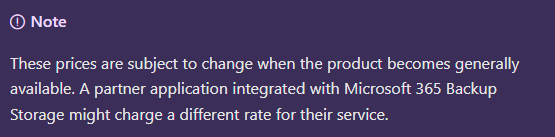
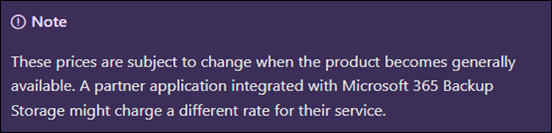
You’ll find this from Microsoft:

Pricing model for Microsoft 365 Backup (Preview)

in which you need to note:
image

there is also a Microsoft 365 Backup pricing spreadsheet here:

https://aka.ms/M365BackupCalculator

but bottom line is to add up all your data storage and multiple by US$0.15, right? Not so quick. Per the documentation:

The size of protected content is equal to the cumulative size of the mailboxes being protected plus the size of the SharePoint sites and OneDrive accounts being protected (that is, the size of the live OneDrive accounts and SharePoint sites as display in the live sites’ usage reports) plus the size of any deleted/versioned content held for restore during the protection period.

Let’s say that I have 1,024GB (1TB) of total data I wanted backed up across SharePoint, Exchange and ODFB. That is relatively easy to determine via the usage reporting tools in Microsoft 365. Where it becomes more challenging is determining the deleted data capacity.What exactly is that?

After some digging, in essence, deleted data is data that has been purged from the service. For example, deleted data is data that was backed up in the SharePoint Online recycle bin that has now expired the standard retention period of 93 days and is no longer in SharePoint Online. Thus, deleted data, is largely, data that no longer resides in the service but has been backed up inside the service at some stage. Ok, but how will I know what that is? That’s a challenge. I can’t find an easy way of determining that. Maybe we’ll see that soon in Microsoft 365 Backup as I think we need to have it, otherwise knowing the costs becomes challenging.

For now, let’s say that the deleted data is exactly the same as my source data inside the services currently being backed up. Thus, if I have 1TB of live data to be backed up, let’s assume the total amount being sent to Microsoft 365 Backup is 2TB. Thus, the cost of this would be:

2,048 GB x US$0.15 = US$307.20 per month

If I assume say 30 users in that tenant of that size then I get roughly US$10 per month per user. I’m taking this as the high end benchmark for SMB in terms of tenant size. I’m just trying to get an average benchmark price with these numbers. That figure is around US$10 per user per month for Microsoft 365 Backup (with plenty of assumptions I admit, but you got to start somewhere)

I appreciate this is all very subjective but upon first glimpse, but looking at a few example tenants around the place and doing the same sort of calculations, I found that, at the very least, Microsoft 365 Backup seems to be comparable to the pricing of third party products on a purely economic basis, which I found interesting.

Of course, price isn’t the only measure of product value and the more live and deleted data you have as well as the longer you retain that data the more expensive it becomes with Microsoft 365 Backup. However, interestingly, Microsoft 365 Backup is pretty cost effective for smaller environments, that is, typically those in SMB. The challenge is that most competitive products are a flat fee per month per user (like a Microsoft 365 Business Premium license is), whereas Microsoft 365 Backup is a consumption based (Azure) fee (i.e. you pay for what you use). That leads to variable costs which many people don’t favour. But, remember with Microsoft 365 Backup your overall backup cost could be much lower as well. It all depends on what you use.

It is still early days for Microsoft 365 Backup and I remind you that it is still in preview at the moment. I’ll take a look a feature comparisons to third party services in an upcoming article but I found it interesting that Microsoft 365 Backup has taken a different approach to pricing that could work well in SMB, but I’ll take a closer look at the feature set in an upcoming article and hopefully present a better picture of how you should be considering Microsoft 365 Backup.

For me, that fact that it generally seems to be price competitive in SMB environments is a plus (aka in the ballpark). Not definitive, I grant you to replace what might be in place with other solutions from third parties, but still it is a good start in the comparison journey.

I’ll have more to share soon on what I’ve found and how I believe Microsoft 365 Backup can work in SMB.

Techwerks 23

bw-car-vehicle

CIAOPS Techwerks returns to Melbourne CBD on Friday the 15th of March 2024.

The course is limited to 20 people and you can sign up and reserve your place now! You reserve a place by completing this form:

http://bit.ly/ciaopsroi

or by sending me an email (director@ciaops.com) expressing your interest.

The content of these all day face to face workshops is driven by the attendees. That means we cover exactly what people want to see and focus on doing hands on, real world scenarios. Attendees can vote on topics they’d like to see covered prior to the day and we continue to target exactly what the small group of attendees wants to see. Thus, this is an excellent way to get really deep into the technology and have all the questions you’ve been dying to know answered. Typically, the event produces a number of best practice take aways for each attendee. So far, the greatest votes are for deeper dives into the Microsoft Cloud including Microsoft 365, Azure, Intune, Defender for Endpoint, security such as Azure Sentinel and PowerShell configuration and scripts, with a focus on enabling the technology in SMB businesses.

Recent testimonial – “I just wanted to say a big thank you to Robert for the Brisbane Techworks day. It is such a good format with each attendee asking what matters them and the whole interactive nature of the day. So much better than death by PowerPoint.” – Mike H.

The cost to attend is:

Gold Enterprise Patron = $50 ex GST

Gold Patron = $90 ex GST

Silver Patron = $180 ex GST

Bronze Patron = $360 ex GST

Non Patron = $720 ex GST

I hope to see you there.

Secure more with Secure Score in M365 online course

Designer

The live course Secure more with Secure Score in Microsoft 365 over the past four weeks has now completed. All materials, including recordings of each session are now available on demand.

I think this course does provide a good overview of suitable best practices across the Microsoft 365 environment. You’ll get the most from this course if you are a CIAOPS Patron, thanks to all the Patron script that are part of the subscription. As CIAOPS Patron you’ll also get a sizable discount via a coupon code discount.

The aim of this training is to help configure security best practices inside your Microsoft 365 environment. You’ll learn what settings you should enable and why you should have these enabled. The sessions will also take you through common examples of configuring these settings and the impact they will have on your users. The course covers identities using EntraID, securing emails, devices as well as data using information protection services all included in Microsoft 365.

Watch out for more online courses from CIAOPS coming soon.

I’ve moved sec-test

show a man moving a lot of files that are contaminated and need special care to move them

It was bound to happen sooner or later, my security testing PowerShell script called sec-test.ps1 is being detected as malware on local machines.

Thus, I have relocated it from more common Office365 repo into the less common examples repo here;

https://github.com/directorcia/examples/blob/main/sec-test.ps1

which contains a range of security testing files that typically get detected as malicious and is generally not recommended to sync locally.

Thus, you can sync the Office365 repo down to your desktop to do all the Microsoft 365 PowerShell connecting and use the utilities there without something in there being detected as malware.

Need to Know podcast–Episode 313

The big news is that Copilot for Microsoft 365 is now available in SMB. There are also some additional Copilot options available as well. I cover all this plus provide some information around getting Copilot on your desktop apps as well as other news and updates from the Microsoft Cloud. Tune in and catch up.

You can listen directly to this episode at:

https://ciaops.podbean.com/e/episode-313-copilot-amongst-us/

Subscribe via iTunes at:

https://itunes.apple.com/au/podcast/ciaops-need-to-know-podcasts/id406891445?mt=2

Don’t forget to give the show a rating as well as send me any feedback or suggestions you may have for the show.

Brought to you by www.ciaopspatron.com

Resources

@directorcia

Join my shared channel

CIAOPS merch store

Become a CIAOPS Patron

CIAOPS Blog

CIAOPS Brief

Support CIAOPS

Bringing the full power of Copilot to more people and businesses

Microsoft Copilot for Microsoft 365

Microsoft 365 Copilot video play list

Copilot for Microsoft 365 for small and medium businesses

Introducing Microsoft Copilot App

Introducing Copilot Pro: Supercharge your Creativity and Productivity

Microsoft’s new Copilot Pro brings AI-powered Office features to the rest of us

Adding Copilot button to desktop applications

Set up Microsoft 365 backup

Microsoft Entra’s Top 50 Features of 2023

Protect faster with Microsoft Defender XDR’s latest UX enhancements

New Microsoft Incident Response guides help security teams analyze suspicious activity

Introducing SharePoint Premium for Information Workers

Employee quick setup

Introducing the new PowerShell Module for Microsoft Defender for Identity

Visualize Entra Sign-in Logs using an Interactive Map

Train your users to be more resilient against QR code phishing

Introducing Automatic File and URL (Detonation) Analysis

CIA Brief 240120

image

How to get started with AI for industry and business leaders –

https://www.microsoft.com/en-us/microsoft-cloud/blog/2023/12/19/how-to-get-started-with-ai-for-industry-and-business-leaders/

Microsoft Entra’s Top 50 Features of 2023 –

https://techcommunity.microsoft.com/t5/microsoft-entra-blog/microsoft-entra-s-top-50-features-of-2023/ba-p/3796392

Protect faster with Microsoft Defender XDR’s latest UX enhancements –

https://techcommunity.microsoft.com/t5/microsoft-defender-xdr-blog/protect-faster-with-microsoft-defender-xdr-s-latest-ux/ba-p/4027497

Westpac transforms IT and enables secure, inclusive, flexible work with Windows 11 Enterprise and Autopatch –

https://customers.microsoft.com/en-us/story/1683252944405589807-westpac-banking-capital-markets

How AI can help you banish bad meetings –

https://news.microsoft.com/how-ai-can-help-you-banish-bad-meetings/

New Microsoft Incident Response guides help security teams analyze suspicious activity –

https://www.microsoft.com/en-us/security/blog/2024/01/17/new-microsoft-incident-response-guides-help-security-teams-analyze-suspicious-activity/

Introducing SharePoint Premium for Information Workers –

https://www.youtube.com/watch?v=RfkGr7Pse3A

Copilot in Viva Engage is now in Public Preview –

https://techcommunity.microsoft.com/t5/viva-engage-blog/copilot-in-viva-engage-is-now-in-public-preview/ba-p/4031051

Employee quick setup –

https://www.youtube.com/watch?v=XV6ciESunUw

Building your own copilot – yes, but how? (Part 1 of 2) –

https://techcommunity.microsoft.com/t5/educator-developer-blog/building-your-own-copilot-yes-but-how-part-1-of-2/ba-p/4029571

Introducing the new PowerShell Module for Microsoft Defender for Identity –

https://techcommunity.microsoft.com/t5/microsoft-defender-xdr-blog/introducing-the-new-powershell-module-for-microsoft-defender-for/ba-p/4028734

Visualize Entra Sign-in Logs using an Interactive Map –

https://techcommunity.microsoft.com/t5/microsoft-entra-blog/visualize-entra-sign-in-logs-using-an-interactive-map/ba-p/4013853

Train your users to be more resilient against QR code phishing –

https://techcommunity.microsoft.com/t5/microsoft-defender-for-office/train-your-users-to-be-more-resilient-against-qr-code-phishing/ba-p/4022667

Microsoft Copilot for Microsoft 365 –

https://www.microsoft.com/en-us/microsoft-365/business/copilot-for-microsoft-365

Microsoft 365 Copilot video play list –

https://www.youtube.com/playlist?list=PLXPr7gfUMmKxDKxah3zpG4NhhDj-2lAvc

Copilot for Microsoft 365 for small and medium businesses –

https://adoption-dev.azurewebsites.net/en-us/copilot/smb/

Bringing the full power of Copilot to more people and businesses –

https://blogs.microsoft.com/blog/2024/01/15/bringing-the-full-power-of-copilot-to-more-people-and-businesses/

Introducing Microsoft Copilot App –

https://www.youtube.com/watch?v=nKcyU8hh14Q

Introducing Copilot Pro: Supercharge your Creativity and Productivity –

https://www.youtube.com/watch?v=8QXS-boCQZI

Microsoft’s new Copilot Pro brings AI-powered Office features to the rest of us –

https://www.theverge.com/2024/1/15/24038711/microsoft-copilot-pro-office-ai-apps

Microsoft unlocks Copilot AI inside Office apps for all businesses –

https://www.theverge.com/2024/1/15/24038726/microsoft-copilot-microsoft-365-business-launch-availability

Introducing Automatic File and URL (Detonation) Analysis –

https://techcommunity.microsoft.com/t5/microsoft-defender-threat/introducing-automatic-file-and-url-detonation-analysis/ba-p/4000489

After hours

A Guided Tour of Apple Vision Pro –

https://www.youtube.com/watch?v=Vb0dG-2huJE

Editorial

If you found this valuable, the I’d appreciate a ‘like’ or perhaps a donation at https://ko-fi.com/ciaops. This helps me know that people enjoy what I have created and provides resources to allow me to create more content. If you have any feedback or suggestions around this, I’m all ears. You can also find me via email director@ciaops.com and on X (Twitter) at https://www.twitter.com/directorcia.

If you want to be part of a dedicated Microsoft Cloud community with information and interactions daily, then consider becoming a CIAOPS Patron – www.ciaopspatron.com.

Watch out for the next CIA Brief next week.

Set up Microsoft 365 backup

image

The first step you’ll need to take is to:

Enable Microsoft Syntex PAYG

this is how the Microsoft 365 backup service will be billed. That will be basically via Azure and you’ll only pay for what your need.

image

You’ll then have to go backup into the Use content AI with Microsoft Syntex area again, which is where you established the billing. Here you need to select Manage Microsoft Syntex as shown above.

image

A dialog will appear from the right. In the list that appears, select Backup as shown above.

image

Select the Turn on button at the bottom of the page.

image

You should see a warning, like shown above that Microsoft Backup is about to be enabled. Select Save to continue.

image

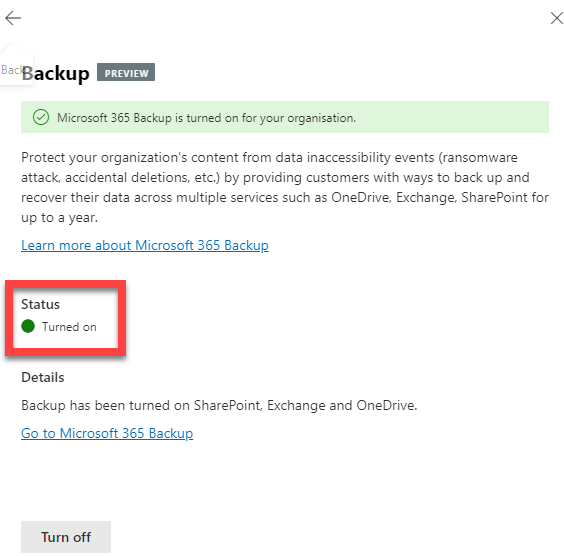
There will now be a confirmation that the Microsoft 365 Backup service is Turned on (enabled) as shown above. You’ll also notice the Turn off button at the bottom of the page if you wish to return and disable Microsoft 365 Backup.

image

If you select the link Go to Microsoft 365 Backup you’ll be taken to the area to actually operate the service which looks like:

image

You’ll see that you can also navigate to this area via the Microsoft 365 admin center | Settings | Microsoft 365 Backup options on the menu on the left as shown above.

Stay tuned for upcoming posts on running Microsoft 365 Backup and the costs associated.