Stop Optimising the Marketing and Start Designing the Experience

image

When businesses look for growth, the first instinct is usually to focus on marketing. Better campaigns. More content. Smarter advertising. More leads.

I get it. Marketing is visible. It’s measurable. It feels like progress.

But the more I work with Microsoft 365 Copilot and watch how organisations are adopting AI, the more I think the bigger opportunity sits somewhere else entirely.

The opportunity is in the experience.

Most businesses spend a lot of energy trying to attract new customers, yet leave many of their day-to-day interactions to chance. The welcome email gets written once and forgotten. Sales conversations follow whatever path the presenter chooses on the day. Meeting follow-ups vary depending on how busy people are. Customer interactions become inconsistent because everyone is moving too fast.

The result isn’t usually catastrophic. It’s just forgettable.

That’s where I believe Copilot can have a much bigger impact than many people realise.

When people talk about Microsoft 365 Copilot, they often focus on productivity gains. Saving time in Outlook. Creating documents faster in Word. Summarising meetings in Teams.

Those are valuable benefits, but I think they’re only the starting point.

The real value appears when organisations use that saved time and improved consistency to deliberately design better experiences.

I encourage businesses to walk through their customer journey from beginning to end.

What happens after the first enquiry arrives?

What does the first response look like?

What information does the customer receive?

What happens after the sales call?

What happens after the workshop?

What happens after the project goes live?

Every one of those touchpoints creates an impression. Every one contributes to the story a customer eventually tells someone else.

Copilot gives organisations the ability to think more intentionally about those moments.

Instead of rushing through administrative work, teams can spend more time refining communications. Instead of producing meeting notes hours later, summaries and action items can be delivered while conversations are still fresh. Instead of every proposal sounding slightly different, organisations can build a consistent voice across the business.

I’ve seen businesses use Copilot to create follow-up material that customers genuinely find useful rather than simply ticking a box. I’ve watched teams capture discussions more accurately, identify commitments more clearly, and reduce the chances that important details disappear into someone’s notebook.

None of that feels particularly dramatic.

Yet that’s often where the biggest improvements happen.

Customers rarely remember that you used the latest technology.

They remember how easy you made things.

They remember whether you followed through.

They remember whether interactions felt organised, professional, and considered.

That’s the theatre many businesses overlook.

Not theatre in the sense of being artificial. Theatre in the sense of carefully designing moments that leave a positive impression.

A prompt response that references the conversation accurately.

A meeting recap that makes the next step obvious.

A proposal that addresses real business outcomes rather than generic marketing language.

A workshop where participants feel heard because insights are captured and reflected back immediately.

These experiences don’t happen by accident. They happen because somebody took the time to design them.

What excites me about Microsoft 365 Copilot is that it creates space for exactly that kind of thinking.

When less energy is spent on repetitive work, more energy can be invested in improving quality, clarity, and consistency. The conversation shifts from “How do we get through today’s workload?” to “How do we create a better experience?”

That’s a far more interesting question.

As AI becomes increasingly common, simply using the technology won’t be a differentiator. Everyone will have access to similar tools.

What will differentiate organisations is how they apply those tools to create experiences that people remember.

So instead of only looking at your marketing funnel, take a walk through your entire business.

Look at every email.

Every meeting.

Every document.

Every customer interaction.

Then ask yourself a simple question:

Which of these moments deserves a little more attention?

My experience is that the organisations getting the most value from Copilot aren’t just working faster. They’re using the opportunity to make every interaction a little better.

And that’s a story customers are far more likely to tell.

More Consumption Doesn’t Mean More Progress

image

I had a conversation last week that’s stuck with me. Someone was telling me, with real pride, how productive their week had been. They’d cleared every email, sat through nine meetings, skimmed four reports and watched a couple of webinars. By Friday they were wrung out. So I asked the obvious question: what actually changed because of all that? There was a long pause. The honest answer was, not much. They’d taken in a mountain of information and moved almost nothing forward.

That gap — between taking things in and actually getting somewhere — is something I keep coming back to.

Busy is not the same as moving

It has never been easier to consume. Open Outlook and Copilot will boil a forty-message thread down to a few lines before you’ve read the subject. Miss a Teams meeting and the recap is sitting there waiting for you. Ask Copilot in Word to turn a thirty-page document into five points and it’s done in seconds. All of it genuinely useful. But here’s the trap I keep watching people fall into: they mistake the speed of consuming for the act of progressing.

Reading a summary feels like work. It isn’t. It’s the warm-up to work. That summary only earns its place if it leads to a decision, a reply, a change of plan — something that wasn’t true before you read it.

The point of a summary is what you do next

When I use Copilot to catch up on a noisy channel, the value was never the recap itself. It’s the one thing the recap surfaces — the client still waiting on an answer, the date that quietly moved, the call only I can make. If I read the summary and slide straight into the next one, I’ve consumed, but I haven’t progressed a single step.

So I’ve started asking Copilot a different kind of question. Not “summarise this thread,” but “what here needs a decision from me?” In Outlook, instead of “what’s in my inbox,” I’ll ask what’s waiting on a reply from me specifically. It’s a small change in wording, but it shifts Copilot from a faster way to take things in into a prompt to actually act.

More input, fewer outcomes

The real risk in all this capability is sheer volume. Because we can now process more, we start to feel we should. More reports, more recaps, more dashboards, more catch-ups. But a business doesn’t run on how much its people have read this week. It runs on what they decided, finished and delivered.

I’d rather end a week having genuinely moved three things forward than having consumed everything that landed on my desk. Copilot is brilliant at clearing the path — pulling the signal out of a crowded SharePoint site, drafting a first version in Word, getting the numbers into shape in Excel. But once the path is clear, walking down it is still on me.

The tools will keep getting faster at feeding us information, and that’s not the part I’m watching. I’m watching whether all that speed actually changes what we do — or whether we just get very good at staying busy. Consumption is effortless now. Progress still needs a decision, and that’s the one thing no tool will make for you.

Comparing LLMs in Copilot services–Round 1 – Chat

image

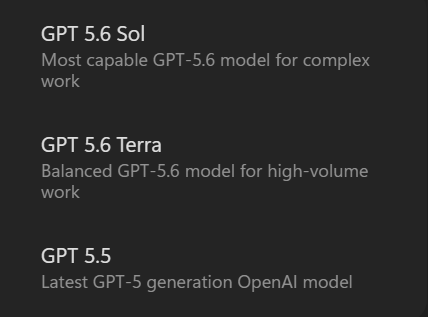
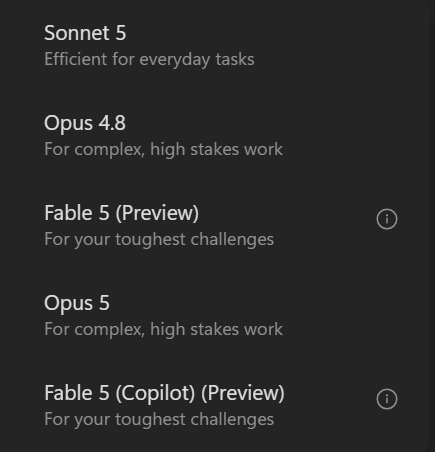
Inspired by the recent soccer world cup, I have decided to create a Copilot LLM output comparison challenge.

The plan is to use the same prompt with all examples of different services in Copilot and then different models available in each service. After that, the idea is them to compare the winner of each round to determine the overall winner and to continue to do this on a regular basis as new models and services are added over time.

Thus, the methodology is to use the same complex prompt to generate the result from the model (a report) and then use a standard prompt to evaluate all the results to determine a winner. The easiest comparison method is to use Copilot in SharePoint but the aim will also to be to compare using other models as well. 

So, for round 1 I’m going to compare all the models available in Copilot chat. Comparison generated by Copilot for SharePoint.

Rather than try and fit the reports here I will upload them to my Github repository here in markdown format:

https://github.com/directorcia/general/tree/master/Copilot/Comparisons

Comparative Assessment – Live Writer Paste

This first report is now directly available at:

https://github.com/directorcia/general/blob/master/Copilot/Comparisons/20260630-Chat.md

The results where (out of 10):

1. Opus – 9.51

2. Sonnet – 9.45

3. GPT 5.6 Thinking – 8.76

4. GPT 5.5 Quick – 7.69

5. Auto – 6.93

So, the winner for Round 1 – Copilot Chat = Opus.

Onto Round 2


How SharePoint environments can be improved for Copilot results

image

The short answer is this:

Copilot results are only as good as the SharePoint environment underneath them. If your SharePoint is messy, overshared, full of duplicate files, stale content, and inconsistent naming, Copilot will surface messy, duplicate, stale content. If SharePoint is well-structured, governed, and maintained, Copilot becomes dramatically more useful.

From everything I’ve seen in SMB environments, improving SharePoint for Copilot usually delivers a bigger productivity gain than buying additional AI licences.

1. Fix permissions and oversharing first

This is the most important step.

Copilot doesn’t magically know what information is important. It relies on Microsoft Graph and existing permissions. If users can access content they shouldn’t, Copilot can discover and surface that content.

Common problems

  • Everyone has access to everything

  • Legacy project sites never cleaned up

  • Anonymous sharing links still active

  • “Everyone except external users” permissions

  • Former employees still own sites

What to do

  • Review site permissions

  • Remove unnecessary access

  • Review sharing links

  • Remove broad access groups

  • Identify inactive sites

  • Implement site lifecycle management

SharePoint Advanced Management and Data Access Governance reports were specifically highlighted as ways to identify oversharing risks before Copilot rollout.


2. Create a proper information architecture

Many organisations have:

Documents
├── New Folder
├── Old Stuff
├── Final
├── Final V2
├── Copy of Final
└── Misc

Copilot struggles because the business itself has no structure.

Instead build:

Finance Hub
├── Budget Planning
├── Forecasting
├── Reporting
└── Policies

Sales Hub
├── Proposals
├── Customers
├── Pricing
└── Marketing

The clearer the structure, the easier it is for:

  • SharePoint Search

  • Microsoft Search

  • Copilot Chat

  • SharePoint Agents

  • Copilot Agents

to locate relevant content.


3. Improve file naming standards

Copilot does read document content, but filenames still matter.

Bad:

Proposal.docx
Proposal New.docx
Proposal Final.docx
Proposal Final Final.docx

Good:

CustomerName-Proposal-2026-07.docx
CustomerName-SOW-v1.docx
CustomerName-SOW-Approved.docx

In one of your SharePoint discussions, naming conventions were specifically called out as something that should be standardised across the site.


4. Use metadata instead of folders where possible

Metadata is one of the biggest Copilot improvements available.

Rather than:

Projects
 ├── Sydney
 ├── Melbourne
 ├── Brisbane

Use columns such as:

Column
Value

Client
ABC

Region
Sydney

Project Type
Migration

Status
Active

This gives Copilot richer context when searching and grounding answers.

Instead of finding a file based only on its location, Copilot can reason over:

  • client

  • project type

  • status

  • department

  • business owner


5. Remove stale content

One major challenge is outdated content appearing in search results.

Microsoft now provides features that recommend:

  • demoting inactive pages

  • identifying content gaps

  • fixing broken links

to improve discoverability and Copilot relevance.

Ask yourself:

  • Is this document still current?

  • Is there a newer version?

  • Does anyone own it?

  • Should it be archived?

A common issue is Copilot finding a policy from 2019 while a better one exists from 2026.


6. Identify authoritative sources

One of the newest improvements is the ability to mark SharePoint sites as authoritative.

Examples:

  • HR

  • Finance

  • Legal

  • Corporate Communications

Content from these sites can be prioritised in Copilot Search and Copilot Chat results.

For example:

Site
Why make it authoritative?

HR
Official policies

Finance
Budgets and governance

Legal
Contracts

Company Communications
Executive announcements

This helps reduce contradictory responses.


7. Apply sensitivity labels

Copilot respects sensitivity labels and information protection controls.

Typical labels:

  • Public

  • Internal

  • Confidential

  • Highly Confidential

Benefits include:

  • Better governance

  • Controlled sharing

  • AI visibility controls

  • Better compliance outcomes


8. Improve search quality

Copilot depends heavily on Microsoft Search.

Poor search equals poor Copilot.

Things that help:

Create quality pages

Instead of storing everything in Word documents:

  • Create SharePoint pages

  • Add summaries

  • Add FAQs

  • Add ownership information
Add page owners

Every key page should have:

  • business owner

  • review date

  • contact person
Use meaningful titles

Bad:

Welcome
General Information
Policies

Good:

Employee Leave Policy
Expense Claim Procedure
Remote Work Guidelines


9. Build hub sites

Hub sites create logical business groupings.

Example:

Corporate Hub
 ├── HR
 ├── Finance
 ├── Operations
 └── IT

Customer Hub
 ├── Sales
 ├── Marketing
 └── Service

Hub sites improve navigation, search context and content relevance for Copilot.


10. Create SharePoint agents for specialised knowledge

Where a user only needs answers from a particular area, create a SharePoint Agent.

Examples:

  • HR Agent

  • Policy Agent

  • Finance Agent

  • Project Agent

These agents ground themselves on specific SharePoint locations and often produce more accurate answers than tenant-wide searches.


11. Add more organisational context

Copilot works best when content explains:

  • who owns it

  • what it is for

  • where it applies

  • when it was reviewed

Bad document:

Procedure.docx

Good document:

Financial Approval Process
Owner: Finance
Review Date: July 2026
Applies To: Australia Operations

The extra context significantly improves grounding quality.


12. Measure and improve continuously

The best Copilot environments are not set-and-forget.

Establish a quarterly process:

Review
  • Oversharing

  • Inactive sites

  • Broken links

  • Orphaned content
Clean up
  • Duplicate files

  • Old projects

  • Stale policies
Improve
  • Metadata

  • Authority sites

  • Labels

  • Search experience

Data Access Governance reports and Content Management assessments are specifically designed for this ongoing process.

My practical SMB recommendation

If I were preparing a tenant for Copilot today, I’d prioritise:

  1. Permission cleanup

  2. Oversharing remediation

  3. Sensitivity labels

  4. Review inactive sites

  5. Standard naming conventions

  6. Create hub sites

  7. Add metadata

  8. Designate authoritative sites

  9. Build targeted SharePoint agents

  10. Quarterly governance review

In most SMB tenants, doing just those ten things improves Copilot results more than any prompt engineering or user training because you’re improving the quality of the information Copilot can see and trust.

You Always Get the Next Move

image

I had a conversation recently with someone who runs a small business, and somewhere in it he said, almost in passing, “I feel like everything’s just happening to me.” His inbox, his clients, his suppliers, the latest pricing change from a vendor — all of it landing on him like weather. He wasn’t lazy and he wasn’t short on ability. But somewhere along the way he’d started to believe the events of his day were the ones in charge, and he was only along for the ride.

That belief — that the world acts on you, rather than you acting on the world — is the most expensive idea a person can carry. And I’ve come to think the most important quality anyone can develop is its opposite: the quiet conviction that you have power. Not power over other people, or over outcomes, or over the economy. Power in the plainest sense of the word — the ability to act.

Here’s the part that’s easy to miss. No matter what is going on around you, you still get to decide what you do next. That’s the whole thing. Circumstances can narrow your options, sometimes brutally, but they never remove the choice entirely. There is always a next action, and you are the one who chooses it.

The wheel is closer than it feels

Most of the people I work with aren’t short on skill. They’re short on the sense that they’re driving. The day arrives as a flood and they meet it by reacting — answering whatever shouts loudest, putting out whatever’s burning. By five o’clock they’ve been busy for nine hours and couldn’t tell you what they actually decided. Reacting feels like working, but it isn’t the same as choosing.

I notice this most clearly in the morning, in front of a full inbox. Two hundred messages can feel like two hundred small demands, each one acting on you. But that feeling is a story, not a fact. The moment I ask Copilot in Outlook to summarise a long thread and tell me what genuinely needs me, the pile stops being weather and starts being a list — and a list is something you work through on your terms. The tool didn’t hand me more hours. It handed back the moment of choice.

Tools can’t give you agency, but they can return it

This is where I think the conversation about AI usually goes wrong. People talk about it as something that will do the work for them, as if the goal is to act less. I see it the other way around. The value of Copilot catching me up on a meeting I missed in Teams, or pulling the three figures I need out of a forty-page document in Word, isn’t that I get to disappear. It’s that the noise stops dictating my next move and I get to.

Agency was always mine. What gets in the way is the volume — the sheer weight of information and obligation that makes it feel like there’s no room to decide anything. Clear some of that weight and the choice that was there all along becomes visible again. You stop being a passenger in your own day.

So I’d offer this, for whatever it’s worth. When the next thing lands on you and the old feeling rises — this is just happening to me — pause on it. It almost never is. You still have the next move. You always do. Everything that matters tends to follow from remembering that.

The Recurring Problem: A Managed Services Story–Chapter 2

Previously –  https://blog.ciaops.com/2026/07/26/the-recurring-problem-a-managed-services-story-chapter-1/

image

The first sign was so small that nobody flagged it as a sign at all. In the second quarter of 2023, Priya noticed that ticket volume was up 22 percent year over year, but billable project revenue — the stuff that actually moved the profit needle — was flat. She mentioned it in a leadership meeting almost as an aside.

“We’re doing more work for the same money,” she said. “I don’t love that trend line.”

“Clients are just using more stuff,” Marcus said. “More cloud apps, more devices, more everything. It’s not a red flag, it’s a growth signal.”

Dave agreed with Marcus, because Dave usually agreed with Marcus, and because the alternative explanation — that the fundamental economics of the business were quietly eroding — wasn’t one he particularly wanted to entertain over lunch.

image

The second sign was harder to wave away. In August, Bridgepoint lost a competitive bid for a fifty-user logistics company to a firm nobody on the leadership team had heard of, a two-year-old outfit calling itself Sentio Cyber, operating out of what appeared to be a single shared office suite in Charlotte. Sentio’s pitch, as far as Marcus could reconstruct it from the prospect’s polite rejection email, was startlingly simple: a flat monthly fee that included twenty-four-seven security monitoring, an AI-driven help desk that resolved routine tickets in minutes instead of hours, and a guarantee — an actual contractual guarantee — of a four-hour response time on anything security-related, backed by an insurance-style penalty clause if they missed it.

“They’re a five-person company promising an SLA we can barely hit with forty-one people,” Marcus said, half-laughing, in the debrief. “It’s not sustainable. They’ll collapse the first time they get three ransomware calls in the same week.”

He wasn’t entirely wrong. But he also wasn’t entirely right, and in the meantime, Bridgepoint had lost the account.

image

The third sign arrived in October, and this one Dave couldn’t laugh off, because it showed up in the form of Denise Okafor’s voice on the phone, tighter than he’d ever heard it. Denise was the CFO of Lakeside Medical Group, a nine-location physical therapy and outpatient practice that had been a Bridgepoint client since 2018 and, at just under $640,000 a year, was Bridgepoint’s second-largest account.

“We had a laptop stolen from the Millbrook office on Friday,” Denise said. “Nobody called us until Monday morning, because apparently the ticket sat in a queue over the weekend. Dave, that laptop had patient records on it. We are now looking at a HIPAA breach notification, and I need to understand, in writing, what your security stack actually does, because right now I genuinely don’t know, and neither does our compliance auditor, and he is asking me very pointed questions I can’t answer.”

image

Dave promised a full incident report within twenty-four hours. It took Priya’s team most of three days to reconstruct what had actually happened, because the honest answer was uncomfortable: Bridgepoint’s after-hours monitoring caught the anomaly, generated an alert, and the alert sat in a shared inbox until a technician came in Monday and saw it. There was no automated escalation. There was no weekend on-call rotation with real teeth. There was Jordan, and two other senior techs, and a rotating list of who was supposed to be reachable, which in practice meant whoever hadn’t turned their phone to Do Not Disturb.

Lakeside didn’t fire Bridgepoint that week. But Denise asked, pointedly, whether Bridgepoint had a healthcare-specific compliance program, a documented incident response plan mapped to HIPAA’s Security Rule, and a named security lead she could speak to directly. Dave did not have satisfying answers to any of those questions, and he knew it while he was giving them.

image

When the Business Can See Itself

image

I’ve been thinking about what management does in a business that no longer works in one building, on one floor, during one neat block of time.

For a long time, the manager was the routing table. They knew who was doing what, which customer was unhappy, which project was drifting, which person was overloaded, and which promise had been made in some meeting three weeks ago. Not perfectly, but well enough to keep the place moving.

That made sense when work was hard to see unless someone told you about it. In a distributed business, that assumption breaks.

The work is already leaving tracks

Most modern work now happens inside systems. A decision is made in Teams. A client concern turns up in Outlook. A draft sits in Word. A spreadsheet in Excel tells part of the story. A task appears in Planner. A policy is updated in SharePoint. None of those items explains the business by itself. Together, they show a pattern.

The mistake I see is treating those signals as separate piles of information. Email over here. Meetings over there. Documents somewhere else. Then we ask managers to join the dots manually and call that leadership.

That is becoming a poor use of judgement.

With Microsoft 365 Copilot, the interesting shift is not simply that someone can summarise a meeting or draft a reply faster. The bigger change is that the organisation starts to build a current picture of itself from the work already happening. Not a quarterly report. Not a dashboard that goes stale after publication. A live operating view drawn from the flow of the business.

Management changes when context is shared

I am not suggesting managers disappear. That is too simplistic. What changes is the kind of work they should be doing.

If Copilot can help surface the commitments from recent Teams meetings, unresolved customer emails in Outlook, and documents sitting untouched in SharePoint, then the manager’s job is less about chasing status and more about asking better questions.

Why is this decision waiting? Why are three people circling the same problem? Why is the client hearing one thing in email and another thing in the project plan? Why is the hard work always landing on the same person?

That is where human judgement matters. Not in carrying every detail in your head, but in interpreting what the picture means and deciding what to do next.

This matters for remote and hybrid teams. In an office, people used proximity as a crude form of awareness. You overheard something. You noticed who kept getting interrupted. You saw who was staying late. It was imperfect and often unfair, but it gave managers signals.

Digital work produces different signals. They are quieter and scattered. But they can also be more consistent if you have the discipline to organise them properly.

The hierarchy stops being the memory

The old model depended on layers of people carrying context upwards and downwards. That creates delay. It also creates distortion. By the time a problem reaches the right person, it has usually been softened, simplified, or stripped of the uncomfortable details.

AI changes that. Used carefully, Copilot can help leaders inspect the work itself. Not to micromanage people. Not to spy. To understand the shape of the business before the monthly meeting turns into archaeology.

That will make some organisations uncomfortable, because it exposes a simple truth: many businesses do not have a management problem as much as they have a visibility problem.

The organisations that benefit most from AI will not be the ones that generate the most content. They will be the ones that use it to see clearly, decide earlier, and stop pretending that hierarchy is the only way context moves.

That is the real shift I am watching.