Issues with Microsoft Defender on iOS

I’m having issues with Microsoft Defender for iOS that I’m sharing here in case this may benefit others.

I think the root cause of the issue is that I have an EntraID account (production) and a Microsoft account (consumer) that are identical. One suggested solution is simply to rename the consumer account but I’d prefer not to do that if it can be avoided.

Here’s what typically happens:

image

My iOS device has Intune Company Portal App installed and I install Microsoft Defender manually from the iOS store. When I run Microsoft Defender I’m greeted by the screen above, which in this case only shows my consumer account.

image

The only option available is to sign up for a trial. This indicates that it doesn’t accept my production account which includes a license of Defender for Endpoint.

In other cases, I’ve see both my production and consumer account listed but it never seems to accept my production account when my consumer account is also present.

Interestingly, I get different results depending on whether I use an iPad or a iPhone.

On my iPad, I noted that I had both my production and consumer credentials in the Microsoft Authenticator app. I removed all the credentials so there was none. I reboot device, added ONLY my production credentials to the Microsoft Authenticator and then I was able to login to Microsoft Defender with my production account. Interestingly, this worked for a few days and then I had to repeat the process to get Microsoft Defender on my iPad logged back into my production credentials again.

The story is a little different on my iPhone. I didn’t want to remove my Microsoft Authenticator app but I did remove my consumer credentials from the Authenticator app, leaving just my production credential there. Even after a few reboots, I still wasn’t able to login to Microsoft Defender with my production account. Instead I logged into Microsoft Defender using a demo M365 E5 account I had. That allowed access and Defender was working.

A few days later, on my iPhone, Defender was asking for a login. I was now able to login with my production account and enable Defender correctly. However, I do notice that when I run Defender on the iPhone I see it switch out to Microsoft Authenticator and then switch back, as though it is checking my account. Since I have just managed to get Defender logged in on my iPhone with my production account I’ll need to see whether it ‘sticks’ or whether it prompts me to login again in the future.

In summary, as I said initially, the root of these issue come down to the fact that I have the same consumer and production identity and it seems Defender on iOS can’t differentiate. It also seems that Defender on iOS also interacts with Microsoft Authenticator in some way, also in different ways on an iPhone and iPad.

I’ll post more when I have done further testing.
Using Sentinel to determine application usage

examinatyion using a magnifying glass

In recent article:

Block applications on Windows devices using Intune

I outlined how to prevent an application from running on a Windows device. It would be nice to know how many people are running this application prior to it being blocked (and even before). You can achieve this using Sentinel.

Many don’t appreciate

The extra value that Microsoft Defender provides

apart from security. In a nutshell, Defender for Endpoint sends signals from devices into the Microsoft cloud that something like Sentinel can take advantage of. This is something that can be taken advantage of to see application usage.

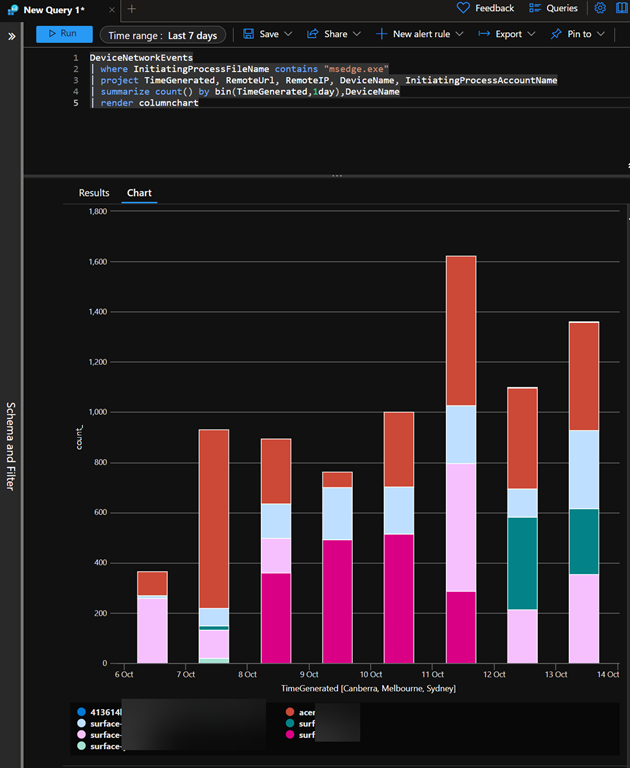
DeviceNetworkEvents
| where InitiatingProcessFileName contains “msedge.exe”
| project TimeGenerated, RemoteUrl, RemoteIP, DeviceName, InitiatingProcessAccountName
| summarize count() by bin(TimeGenerated,1day),DeviceName
| render columnchart

an example of this is the above KQL query, which when run provides an output like:

image

The result is basically a bar graph, over whatever time you specify, of how many times an application has been used. This is a great indicative way to get a feel for how often a device is running a particular application (here msedge.exe). The different bar colours show each particular device and each bar height represents the total usage of that application for one day.

The great thing is that you can further customize and enhance this query to suit your needs to product the output your require. You can then take that query and embed it into a Sentinel workbook so that it is available as part of a dashboard.

There is just so much that you can do and all it takes is becoming familiar with the tools Microsoft provides in your environment.


Techwerks 21

bw-car-vehicle

CIAOPS Techwerks returns to Brisbane CBD on Thursday the 21st of September.

The course is limited to 20 people and you can sign up and reserve your place now! You reserve a place by completing this form:

http://bit.ly/ciaopsroi

or by sending me an email (director@ciaops.com) expressing your interest.

The content of these all day face to face workshops is driven by the attendees. That means we cover exactly what people want to see and focus on doing hands on, real world scenarios. Attendees can vote on topics they’d like to see covered prior to the day and we continue to target exactly what the small group of attendees wants to see. Thus, this is an excellent way to get really deep into the technology and have all the questions you’ve been dying to know answered. Typically, the event produces a number of best practice take aways for each attendee. So far, the greatest votes are for deeper dives into the Microsoft Cloud including Microsoft 365, Azure, Intune, Defender for Endpoint, security such as Azure Sentinel and PowerShell configuration and scripts, with a focus on enabling the technology in SMB businesses.

Recent testimonial – “I just wanted to say a big thank you to Robert for the Brisbane Techworks day. It is such a good format with each attendee asking what matters them and the whole interactive nature of the day. So much better than death by PowerPoint.” – Mike H.

The cost to attend is:

Gold Enterprise Patron = Free

Gold Patron = $33 inc GST

Silver Patron = $99 inc GST

Bronze Patron = $176 inc GST

Non Patron = $399 inc GST

I hope to see you there.

Using the Defender for Endpoint API and PowerShell (Updated)

A while back I wrote this post:

Using the Defender for Endpoint API and PowerShell

Problem is, the script that I developed:

https://github.com/directorcia/Office365/blob/master/endpoint-api-svbm.ps1

now doesn’t seem to bring back any results!

image

It used the following API:

https://api.securitycenter.microsoft.com/api/machines/SoftwareVulnerabilitiesByMachine

which isn’t generating any data or any errors!

image

The above returned results shows a good status but the value of data is empty.

So for now I’ll have to assume that this API is unavailable. No fear I’ve developed a new script:

https://github.com/directorcia/Office365/blob/master/mde-vul-get.ps1

image

image

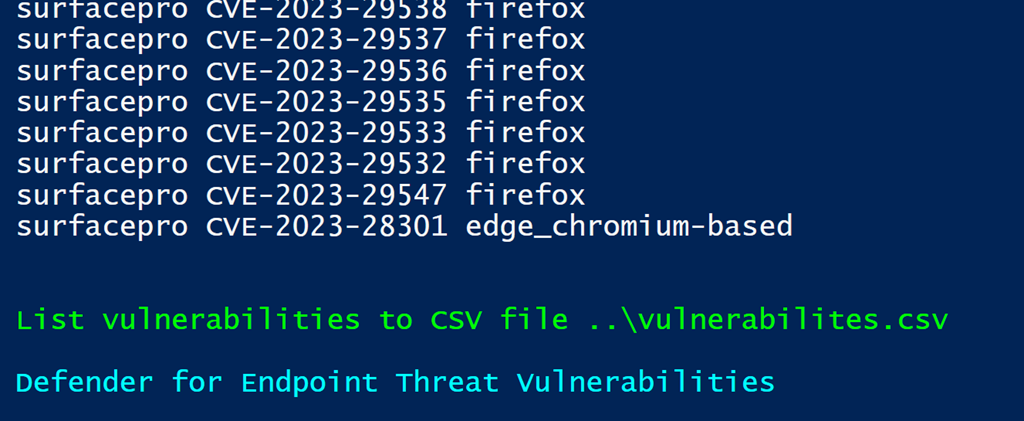
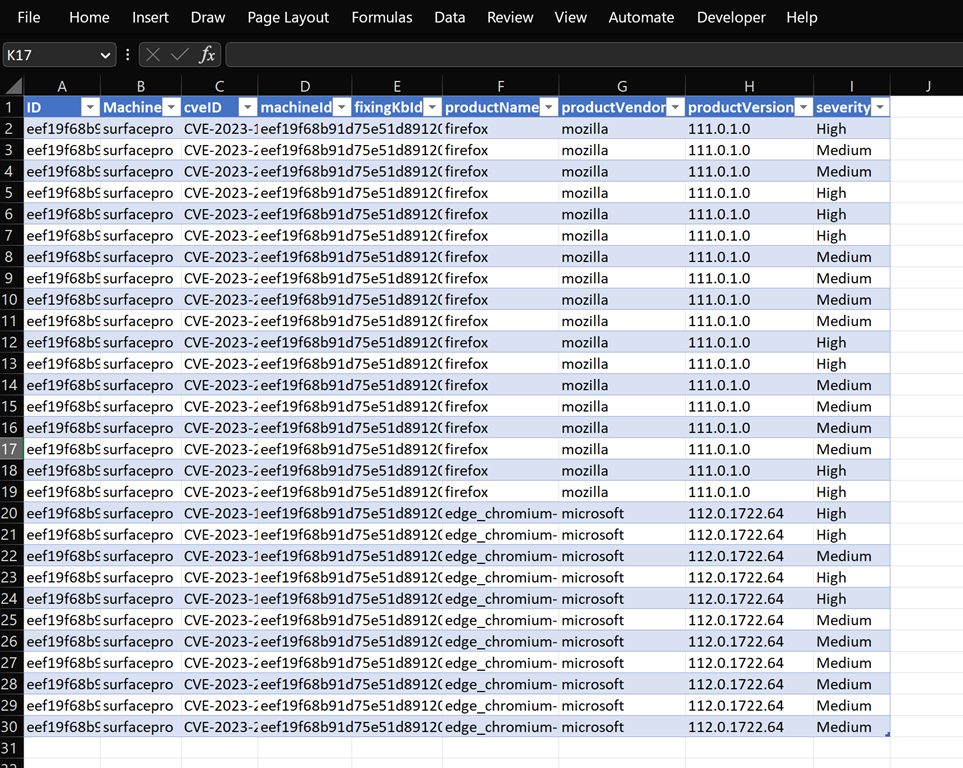
which will not only list out the vulnerabilities but also export to a CSV file.

image

That allows you to sort and filter the results any way you wish.

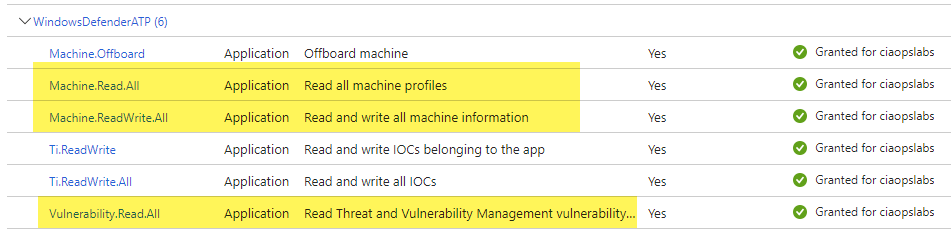
To get the script working you still need the following API permissions for your Azure AD App with the WindowsDefenderATP API:

Application permissions = Vulnerability.Read.All

Application permissions = Machine.Read.All, Machine.ReadWrite.All

like so:

image

You also need to ensure you change the Azure AD App information in the script to match your own:

image

If you want to export more information you should be able to easily modify the script which firstly get the machine info and then the vulnerabilities on each.

Hopefully, this give people what they need until the original API comes back on line.

Microsoft Defender for Endpoint: The Ultimate Solution for Endpoint Security

In today’s digital world, endpoint security is more important than ever. With the rise of cyberattacks and malware, it’s essential to have a robust security solution in place to protect your business from potential threats. One of the best options available is Microsoft Defender for Endpoint. In this blog post, we’ll take a look at the benefits of using Microsoft Defender for Endpoint to secure your business.

  1. Real-time protection: Microsoft Defender for Endpoint provides real-time protection against malware and other threats. It uses advanced threat intelligence to detect and block malicious activity, keeping your business safe from harm.

  2. Cloud-based: Microsoft Defender for Endpoint is a cloud-based solution, which means it can be accessed from anywhere with an internet connection. This makes it easy to manage and monitor your security, even when you’re on the go.

  3. Easy to use: The user interface of Microsoft Defender for Endpoint is simple and easy to navigate. This makes it easy for even the most non-technical users to manage and monitor their security.

  4. Automated security: Microsoft Defender for Endpoint automates many of the security processes, such as malware scanning and vulnerability assessments. This helps to reduce the risk of human error and ensures your security is always up-to-date.

  5. Integration with other Microsoft products: Microsoft Defender for Endpoint integrates seamlessly with other Microsoft products, such as Office 365 and Azure. This allows for a more comprehensive security solution, as well as improved collaboration and productivity.

  6. Advanced threat protection: Microsoft Defender for Endpoint offers advanced threat protection, including behavioral-based detection, machine learning, and ransomware protection. This provides an extra layer of security to keep your business safe from even the most sophisticated attacks.

  7. Compliance and regulatory standards : Microsoft Defender for Endpoint can help you meet compliance and regulatory standards, such as HIPAA and PCI-DSS. This can help to reduce the risk of fines and reputational damage caused by non-compliance.

In conclusion, Microsoft Defender for Endpoint is an excellent security solution that offers real-time protection, cloud-based management, easy usability, automation, integration with other Microsoft products, advanced threat protection and compliance and regulatory standards. It is essential for any business looking to secure their endpoints. By using Microsoft Defender for Endpoint, you can rest assured that your business is protected from potential threats and that you are meeting compliance standards.

———————————————————————————————

If you have read this far, then you’ll really know that this post is about ChatGPT rather than Microsoft Defender for Endpoint.

This is what I asked ChatGPT to do:

write a blog post on the benefits of Microsoft defender for endpoint

Now it can also generate code as well like the response to:

create a powershell script to connect to Exchange online

to which it gave me:

Here is a basic PowerShell script that can be used to connect to Exchange Online:

$UserCredential = Get-Credential $Session = New-PSSession -ConfigurationName Microsoft.Exchange -ConnectionUri https://outlook.office365.com/powershell-liveid/ -Credential $UserCredential -Authentication Basic -AllowRedirection Import-PSSession $Session

This script will prompt the user to enter their Exchange Online credentials, and then create a new PowerShell session using those credentials. It will then import the session, allowing you to run Exchange Online cmdlets. You can then run command specific to your needs like, getting mails, setting mailbox etc.

It is important to note that in order to run this script, you will need to have the Exchange Online PowerShell module installed on your machine. Also, make sure that you have the necessary permissions to access the Exchange Online instance.

Of course none of these answers are ‘prefect’, however they are surprisingly good and will be for many a great time saver. If you ask people what the toughest part of any process is, most will say that just getting started is. So using ChatGPT to at least handle this task should make it far easier to kick off any process. Best of all? You can do that today!

The interesting thing for me is that at the moment ChatGPT is just a stand alone chat style question and answer application. However, what happens when it starts being integrated with other service via API calls? What happens when the power of ChatGPT increases and improves.

If you have been at this IT ‘stuff’ for a long as I have you’ve seen many ‘revolutions’ and ‘this changes everything’ moments, many of which didn’t pan out. If nothing else, I think ChatGPT has lifted consciousness about AI and what it can potentially do to the wider population audience (i.e. muggels). What happens after that is the interesting part. Will that ‘enlightenment’  kick ChatGPT to the next level or will fade back into the shadows to be reborn again in the future? Only time will tell.

However, I think that if you are interested in seeing where ChatGPT could go then start using as I have and exploring the possibilities. I can honestly say it has helped me commercially (this blog post is a good example, even the part ChatGPT didn’t write for me). The best way to sum it up at this stage is:

We always overestimate the change that will occur in the next two years and underestimate the change that will occur in the next ten. Don’t let yourself be lulled into inaction. – Bill Gates

Who knows? In a short while maybe I can automate ChatGPT to do all my blog posts and you’d never be the wiser!

Blocking web sites with Defender for Cloud Apps

Link to video = https://www.youtube.com/watch?v=CQOcUrS93FA

Thanks to the integration between Microsoft Edge browser, Cloud Apps Discovery (which is part of Defender for Cloud Apps) and Defender for Endpoint you can quickly and easily block most web based applications. In the example I prevent Facebook access on a Windows 11 device using the Edge browser. It is important to note that this blocking capability currently won’t work with third party browsers, however there are other ways of blocking sites with these browsers using other methods that are not covered in this video.

[CORRECTION] – Please note that in the video I may have indicated that this is possible with Microsoft 365 Business Premium. By default, it is not. Apologies for the confusion I may have caused here

Defender for Endpoint device execution restrictions

This is a video run through of the recent articles I wrote:

Microsoft Defender for Endpoint device isolation

Microsoft Defender for Endpoint restrict app execution

This video will show you how to both isolate a device and restrict app execution on a device. Both of these are great ways to respond to a suspected device security threat and limit security breeches while still allowing remote troubleshooting.