Enabling Microsoft Syntex PAYG

There are lots of great new features coming to Microsoft Syntex (or SharePoint Premium) and many of these can be used in a PAYG manner tied to an Azure subscription. This is much like the Power Platform PAYG configuration I have detailed previously.

Before you configure anything in Microsoft 365, you’ll need an Azure subscription to bill against that is in the same tenant as Microsoft 365. I would also suggest you create a new unique Resource Group which you can target for Syntex PAYG services. This will make it much easier to determine the costs of the Syntex services that you consume. I’m not going to cover how to add a resource group to Azure here, but make sure you have the subscription in place before proceeding.

image

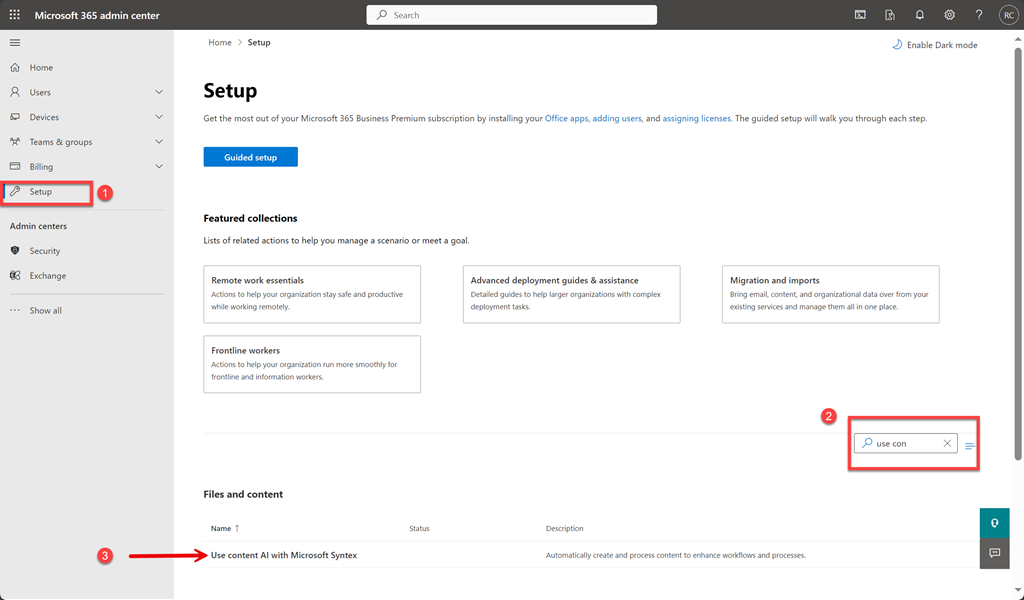
To enable Syntex PAYG you need to login to the Microsoft 365 portal as an administrator and navigate to the Admin center as shown above. Select Setup from the menu on the left. On the right enter “use con” into the search box as shown in step two above. This will filter out all the other options except the one you want which is:

Use content AI with Microsoft Syntex

as shown in step 3 above. Select this.

image

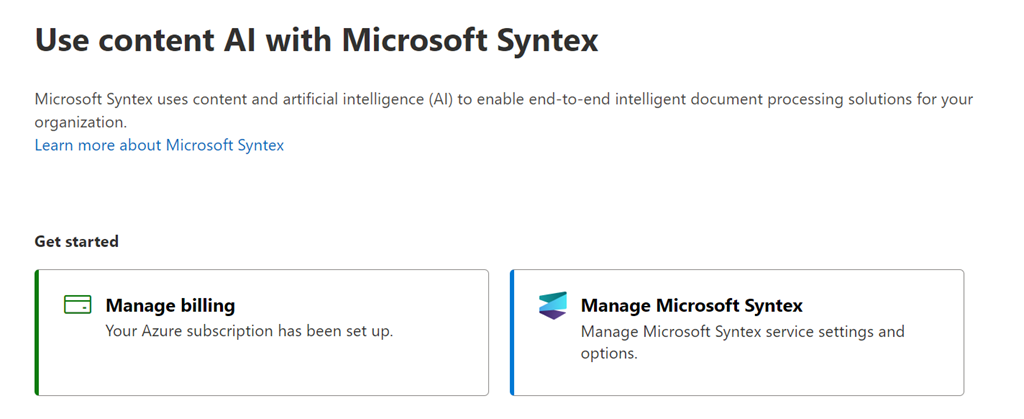
You should see the screen shown above. If you have not yet configured the PAYG billing for Syntex the only option available will be the Set up billing option on the left, as shown, which you should select.

image

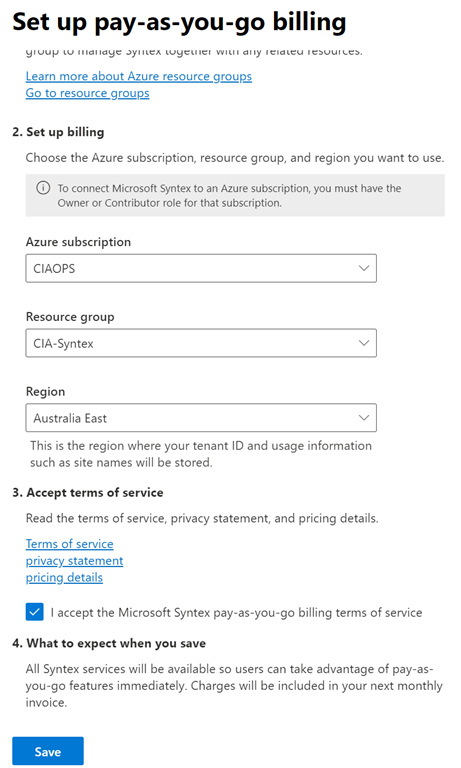
A dialog will appear from the right hand side with a number of options as shown above. Here you’ll need to select your Azure information from the drop down menus presented.

image

When you have completed all the fields (including the Resource Group which I suggest you create just for this purpose), select the I accept Microsoft pay-as-you-go billing terms of service. Finally, select the Save button at the bottom of the dialog.

image

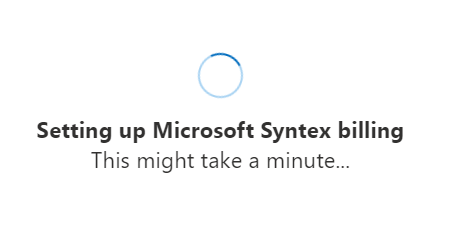
The system will then display the above screen for a few minutes (be patient, it takes a little while to fully configure).

image

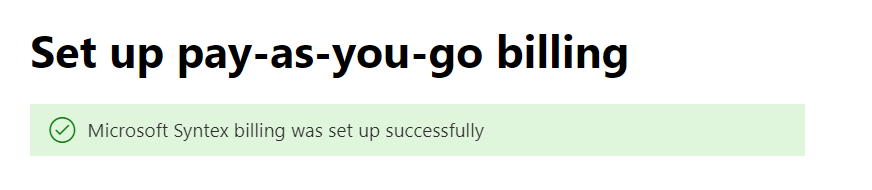
All going well, you should receive a confirmation of success at the top of the page as shown above. You can now close this dialog.

image

With the billing complete you should now be able to select the Manage Microsoft Syntex option on the right as shown above.

image

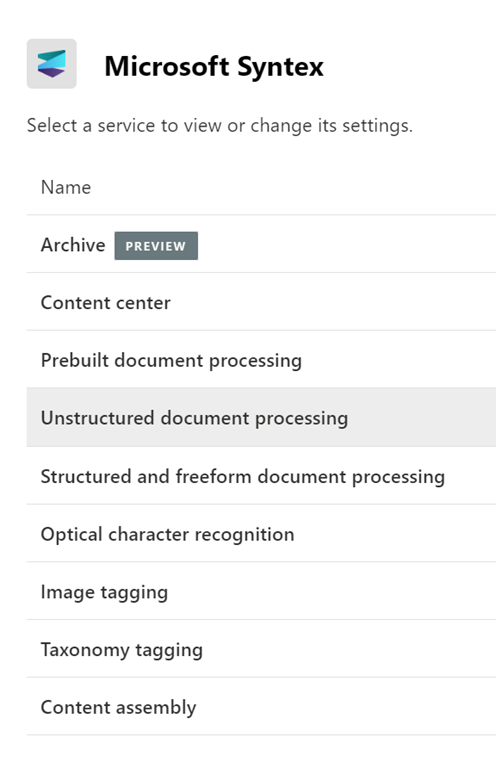
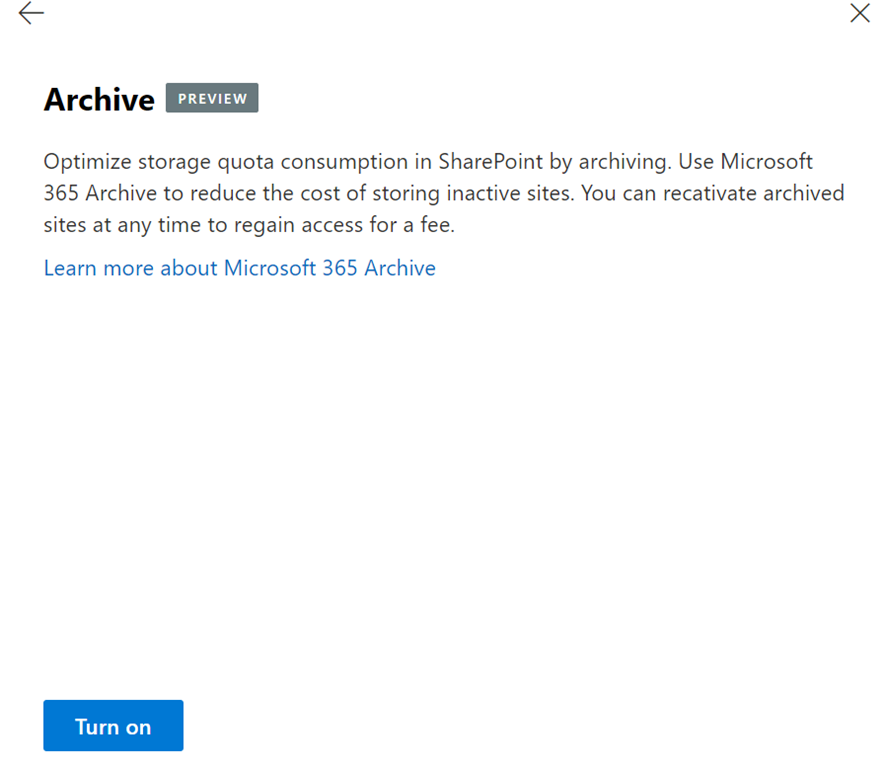
You should now see the current list of services that can be utilised with Syntex PAYG. More will be added over time, so don’t forget to check back regularly. To configure any of these simply select that service.

image

In this case, the Archive option was selected and you can see the Turn on button on the bottom of the dialog you would need to select to enable SharePoint Site archiving in your Microsoft 365 tenant. There are more configuration steps required to enable the service and all this really does is bill the service in a PAYG manner to your Azure subscription.

You can now close out of all these windows and leave everything turned off for now, ready for when you do want to start using those capabilities. There will be no costs until you actually start using these services (i.e. PAYG. Don’t use, don’t pay!)

It is really good that these advanced options are being made available in a PAYG manner, allowing greater access to such capabilities, without necessarily having to pay high monthly fees with a lock in contract. A very SMB friendly option in my opinion!

I look forward to seeing more services appear here for Syntex which I can star using, including eSignatures which is coming real soon. Stay tuned.

CIA Brief 231217

image

Investigating malicious OAuth applications using the Unified Audit Log –

https://techcommunity.microsoft.com/t5/microsoft-security-experts-blog/investigating-malicious-oauth-applications-using-the-unified/ba-p/4007172

Patching Perforce perforations: Critical RCE vulnerability discovered in Perforce Helix Core Server –

https://www.microsoft.com/en-us/security/blog/2023/12/15/patching-perforce-perforations-critical-rce-vulnerability-discovered-in-perforce-helix-core-server/

Advancing Cybersecurity: The Latest enhancement in Phishing-Resistant Authentication –

https://techcommunity.microsoft.com/t5/microsoft-entra-blog/advancing-cybersecurity-the-latest-enhancement-in-phishing/ba-p/2365681

Get started with Microsoft 365 for business –

https://www.youtube.com/watch?v=mWutD2Zb1Zk

Copilot for Microsoft 365 | Work On –

https://www.youtube.com/watch?v=0QEL9Y3Udvc

Satya Nadella 2023: Year of AI –

https://www.youtube.com/watch?v=Vu6Wq8lLUN0

Microsoft Cloud for Sovereignty now generally available, opening new pathways for government innovation –

https://blogs.microsoft.com/blog/2023/12/14/microsoft-cloud-for-sovereignty-now-generally-available-opening-new-pathways-for-government-innovation/

Introducing New Features of Microsoft Entra Permissions Management –

https://techcommunity.microsoft.com/t5/microsoft-entra-blog/introducing-new-features-of-microsoft-entra-permissions/ba-p/2466925

Announcing updates to Copilot for Microsoft 365 availability –

https://techcommunity.microsoft.com/t5/copilot-for-microsoft-365/announcing-updates-to-copilot-for-microsoft-365-availability/ba-p/4007075

Microsoft Sentinel – SOAR through the SIEM, begin with the basics –

https://techcommunity.microsoft.com/t5/fasttrack-for-azure/microsoft-sentinel-soar-through-the-siem-begin-with-the-basics/ba-p/3990142

Disrupting the gateway services to cybercrime –

https://blogs.microsoft.com/on-the-issues/2023/12/13/cybercrime-cybersecurity-storm-1152-fraudulent-accounts/

Protect your organizations against QR code phishing with Defender for Office 365 –

https://techcommunity.microsoft.com/t5/microsoft-defender-for-office/protect-your-organizations-against-qr-code-phishing-with/ba-p/4007041

Strengthening identity protection in the face of highly sophisticated attacks –

https://techcommunity.microsoft.com/t5/security-compliance-and-identity/strengthening-identity-protection-in-the-face-of-highly/ba-p/4006009

Threat actors misuse OAuth applications to automate financially driven attacks –

https://www.microsoft.com/en-us/security/blog/2023/12/12/threat-actors-misuse-oauth-applications-to-automate-financially-driven-attacks/

New Microsoft Incident Response team guide shares best practices for security teams and leaders –

https://www.microsoft.com/en-us/security/blog/2023/12/11/new-microsoft-incident-response-team-guide-shares-best-practices-for-security-teams-and-leaders/

Microsoft Defender XDR unified role-based access control (RBAC) model is now generally available –

https://techcommunity.microsoft.com/t5/microsoft-defender-xdr-blog/microsoft-defender-xdr-unified-role-based-access-control-rbac/ba-p/3993793

Staged rollout management for Graph connectors is generally available –

https://techcommunity.microsoft.com/t5/microsoft-search-blog/staged-rollout-management-for-graph-connectors-is-generally/ba-p/3998367

After hours

MInesweeper the movie –

https://www.youtube.com/watch?v=LHY8NKj3RKs

Editorial

If you found this valuable, the I’d appreciate a ‘like’. This helps me know that people enjoy what I have created. If you have any feedback or suggestions around this, I’m all ears. You can also find me via email director@ciaops.com and on X (Twitter) at https://www.twitter.com/directorcia.

I’m running a session on Microsoft Copilot in a few weeks. Read more and sign up for free here – https://blog.ciaops.com/2023/12/04/ciaops-need-to-know-microsoft-365-webinar-december-5/

Also, I’m doing a summer camp deep dive into Microsoft 365 Secure Score. You can read more and sign up here – https://blog.ciaops.com/2023/12/11/ciaops-summer-school-is-open-for-enrolments/

If you want to be part of a dedicated Microsoft Cloud community with information and interactions daily, then consider becoming a CIAOPS Patron – www.ciaopspatron.com.

Watch out for the next CIA Brief next week.

CIA Brief 231209

Vulnerability discovery and remediation | Microsoft 365 Defender –

https://www.youtube.com/watch?v=nm3l3mqwQ3w

Copilot in Teams | Get caught up quickly –

https://www.youtube.com/watch?v=QlXLVgrc3BM

Star Blizzard increases sophistication and evasion in ongoing attacks –

https://www.microsoft.com/en-us/security/blog/2023/12/07/star-blizzard-increases-sophistication-and-evasion-in-ongoing-attacks/

Microsoft Entra Private Access protections for on-premises & private cloud network resources –

https://techcommunity.microsoft.com/t5/microsoft-mechanics-blog/microsoft-entra-private-access-protections-for-on-premises-amp/ba-p/4002913

New Microsoft Purview features use AI to help secure and govern all your data –

https://www.microsoft.com/en-us/security/blog/2023/12/07/new-microsoft-purview-features-use-ai-to-help-secure-and-govern-all-your-data/

Managing alerts | Microsoft 365 Defender –

https://www.youtube.com/watch?v=G1650fI_l_k

Get More Together: Work on your own time with Microsoft Teams –

https://www.youtube.com/watch?v=SzybsMWMdyQ

Microsoft Security Copilot drives new product integrations at Microsoft Ignite to empower security and IT teams –

https://www.microsoft.com/en-us/security/blog/2023/12/06/microsoft-security-copilot-drives-new-product-integrations-at-microsoft-ignite-to-empower-security-and-it-teams/

Clipchamp & Designer | Visual Content Creation –

https://www.youtube.com/watch?v=Y_Hm1_lxng4

Get Started With Clipchamp –

https://www.youtube.com/watch?v=tOTiTUZSmaM

3 reasons why now is the time to go cloud native for device management –

https://www.microsoft.com/en-us/microsoft-365/blog/2023/12/05/3-reasons-why-now-is-the-time-to-go-cloud-native-for-device-management/

Microsoft Incident Response lessons on preventing cloud identity compromise –

https://www.microsoft.com/en-us/security/blog/2023/12/05/microsoft-incident-response-lessons-on-preventing-cloud-identity-compromise/

Introducing Deep Search –

https://blogs.bing.com/search-quality-insights/december-2023/Introducing-Deep-Search

Plan for Windows 10 EOS with Windows 11, Windows 365, and ESU –

https://techcommunity.microsoft.com/t5/windows-it-pro-blog/plan-for-windows-10-eos-with-windows-11-windows-365-and-esu/ba-p/4000414

Microsoft 365 Chat | Develop new content with Copilot –

https://www.youtube.com/watch?v=51ZKBxuOA-0

Protecting credentials against social engineering: Cyberattack Series –

https://www.microsoft.com/en-us/security/blog/2023/12/04/protecting-credentials-against-social-engineering-cyberattack-series/

What’s New and What’s Coming to OneNote on Windows –

https://techcommunity.microsoft.com/t5/microsoft-365-blog/what-s-new-and-what-s-coming-to-onenote-on-windows/ba-p/3966645

Security Copilot mechanics –

https://www.youtube.com/watch?v=kGoYDEulis0

Using Power Automate | Microsoft 365 Defender –

https://www.youtube.com/watch?v=JOoKDOa3w9k

After hours

[HOONIGAN] Ken Block’s Electrikhana TWO: One More Playground; Mexico City in the Audi S1 Hoonitron –

https://www.youtube.com/watch?v=U4FAqwkn-pc

Editorial

If you found this valuable, the I’d appreciate a ‘like’. This helps me know that people enjoy what I have created. If you have any feedback or suggestions around this, I’m all ears. You can also find me via email director@ciaops.com and on X (Twitter) at https://www.twitter.com/directorcia.

If you want to be part of a dedicated Microsoft Cloud community with information and interactions daily, then consider becoming a CIAOPS Patron – www.ciaopspatron.com.

Watch out for the next CIA Brief next week.

CIA Brief 231201

Monthly Defender news – December 2023 –

https://techcommunity.microsoft.com/t5/microsoft-defender-xdr-blog/monthly-news-december-2023/ba-p/3998431

Connect to the Microsoft Copilot Dashboard (Preview) –

https://learn.microsoft.com/en-us/viva/insights/org-team-insights/copilot-dashboard

The Twelve Days of Blog-mas: No.3 – Windows Local Admin Password Solution (LAPS) –

https://techcommunity.microsoft.com/t5/core-infrastructure-and-security/the-twelve-days-of-blog-mas-no-3-windows-local-admin-password/ba-p/3992457

What’s new in Microsoft Entra –

https://techcommunity.microsoft.com/t5/microsoft-entra-azure-ad-blog/what-s-new-in-microsoft-entra/ba-p/3796394

Windows Events, how to collect them in Sentinel and which way is preferred to detect Incidents. –

https://techcommunity.microsoft.com/t5/fasttrack-for-azure/windows-events-how-to-collect-them-in-sentinel-and-which-way-is/ba-p/3997342

Identifying Adversary-in-the-Middle (AiTM) Phishing Attacks through 3rd-Party Network Detection –

https://techcommunity.microsoft.com/t5/microsoft-sentinel-blog/identifying-adversary-in-the-middle-aitm-phishing-attacks/ba-p/3991358

Defender EASM – Performing a Successful Proof of Concept (PoC) –

https://techcommunity.microsoft.com/t5/microsoft-defender-external/defender-easm-performing-a-successful-proof-of-concept-poc/ba-p/3994862

Microsoft Loop: Transforming the way we work together  –

https://insider.microsoft365.com/en-us/blog/microsoft-loop-transforming-the-way-we-work-together

Microsoft Sentinel: Public preview of Microsoft Defender for Cloud to Defender XDR integration –

https://techcommunity.microsoft.com/t5/microsoft-sentinel-blog/microsoft-sentinel-public-preview-of-microsoft-defender-for/ba-p/3992792

The new Forms app is here! –

https://techcommunity.microsoft.com/t5/microsoft-forms-blog/the-new-forms-app-is-here/ba-p/3981387

Essential Eight Maturity Model Update –

https://www.cyber.gov.au/about-us/view-all-content/news-and-media/november-2023-essential-eight-maturity-model-update

After hours

Tesla Cybertruck vs Porsche 911 Drag Race at Cybertruck Delivery Event – https://www.youtube.com/watch?v=1Xsdf51DJSw

Editorial

If you found this valuable, the I’d appreciate a ‘like’. This helps me know that people enjoy what I have created. If you have any feedback or suggestions around this, I’m all ears. You can also find me via email director@ciaops.com and on X (Twitter) at https://www.twitter.com/directorcia.

If you want to be part of a dedicated Microsoft Cloud community with information and interactions daily, then consider becoming a CIAOPS Patron – www.ciaopspatron.com.

Watch out for the next CIA Brief next week.

CIA Brief 231126

Defender for Cloud unified Vulnerability Assessment powered by Defender Vulnerability Management –

https://techcommunity.microsoft.com/t5/microsoft-defender-for-cloud/defender-for-cloud-unified-vulnerability-assessment-powered-by/ba-p/3990112

Diamond Sleet supply chain compromise distributes a modified CyberLink installer –

https://www.microsoft.com/en-us/security/blog/2023/11/22/diamond-sleet-supply-chain-compromise-distributes-a-modified-cyberlink-installer/

Get email notifications for any actions in Defender XDR –

https://techcommunity.microsoft.com/t5/microsoft-defender-xdr-blog/get-email-notifications-for-any-actions-in-defender-xdr/ba-p/3976330

Elevating Cybersecurity Intelligence with Microsoft Sentinel’s Enrichment Widgets –

https://techcommunity.microsoft.com/t5/microsoft-sentinel-blog/elevating-cybersecurity-intelligence-with-microsoft-sentinel-s/ba-p/3985255

BlueHat playlist –

https://www.youtube.com/playlist?list=PLXkmvDo4MfutylXJNJ6gth_qIEwJdeWz7

Microsoft Defender XDR, Security Copilot & Microsoft Sentinel now in one portal –

https://techcommunity.microsoft.com/t5/microsoft-mechanics-blog/microsoft-defender-xdr-security-copilot-amp-microsoft-sentinel/ba-p/3989312

Orca 2: Teaching Small Language Models How to Reason –

https://www.microsoft.com/en-us/research/blog/orca-2-teaching-small-language-models-how-to-reason/

Social engineering attacks lure Indian users to install Android banking trojans –

https://www.microsoft.com/en-us/security/blog/2023/11/20/social-engineering-attacks-lure-indian-users-to-install-android-banking-trojans/

Copilot coming to Windows 10 –

https://techcommunity.microsoft.com/t5/windows-it-pro-blog/copilot-coming-to-windows-10/ba-p/3984070

Triage incidents based on enrichment from threat intelligence –

https://learn.microsoft.com/en-us/security-copilot/triage-alert-with-enriched-threat-intel

What’s new in Microsoft Intune (2311) November edition –

https://techcommunity.microsoft.com/t5/microsoft-intune-blog/what-s-new-in-microsoft-intune-2311-november-edition/ba-p/3986487

Identity at Microsoft Ignite: Securing access in the era of AI –

https://techcommunity.microsoft.com/t5/microsoft-entra-azure-ad-blog/identity-at-microsoft-ignite-securing-access-in-the-era-of-ai/ba-p/2747279

Introducing MDTI Free Experience for Microsoft Defender XDR –

https://techcommunity.microsoft.com/t5/microsoft-defender-threat/introducing-mdti-free-experience-for-microsoft-defender-xdr/ba-p/3976635

Microsoft Mesh –

https://www.youtube.com/watch?v=_0InCXA13L8

Our vision to bring Microsoft Copilot to everyone, and more –

https://blogs.bing.com/search/november-2023/our-vision-to-bring-microsoft-copilot-to-everyone-and-more

Ignite News: Augment your EDR with deception tactics to catch adversaries early –

https://techcommunity.microsoft.com/t5/microsoft-defender-for-endpoint/ignite-news-augment-your-edr-with-deception-tactics-to-catch/ba-p/3982253

Microsoft Security Copilot and NIST 800-171 –

https://techcommunity.microsoft.com/t5/public-sector-blog/microsoft-security-copilot-and-nist-800-171/ba-p/3984053

After hours

Octopus vs Underwater Maze – https://www.youtube.com/watch?v=7__r4FVj-EI

Editorial

If you found this valuable, the I’d appreciate a ‘like’. This helps me know that people enjoy what I have created. If you have any feedback or suggestions around this, I’m all ears. You can also find me via email director@ciaops.com and on X (Twitter) at https://www.twitter.com/directorcia.

Watch out for the next CIA Brief next week.

CIA Brief – 231118

Our vision to bring Microsoft Copilot to everyone, and more –

https://blogs.bing.com/search/november-2023/our-vision-to-bring-microsoft-copilot-to-everyone-and-more

Ignite News: Augment your EDR with deception tactics to catch adversaries early –

https://techcommunity.microsoft.com/t5/microsoft-defender-for-endpoint/ignite-news-augment-your-edr-with-deception-tactics-to-catch/ba-p/3982253

Microsoft Security Copilot and NIST 800-171 –

https://techcommunity.microsoft.com/t5/public-sector-blog/microsoft-security-copilot-and-nist-800-171/ba-p/3984053

Power Apps accelerates the shift toward modern, AI-infused apps with governance at scale –

https://powerapps.microsoft.com/en-us/blog/power-apps-accelerates-the-shift-toward-modern-ai-infused-apps-with-governance-at-scale/

Microsoft Defender XDR, Security Copilot & Microsoft Sentinel now in one portal –

https://www.youtube.com/watch?v=snV2joMnSlc&t=1s

What’s new with Windows at Microsoft Ignite 2023! –

https://techcommunity.microsoft.com/t5/windows-it-pro-blog/what-s-new-with-windows-at-microsoft-ignite-2023/ba-p/3980507

Microsoft Backup in public preview –

https://learn.microsoft.com/en-us/microsoft-365/syntex/backup/backup-overview

Simplify IT management with Microsoft Copilot for Azure – save time and get answers fast –

https://techcommunity.microsoft.com/t5/azure-infrastructure-blog/simplify-it-management-with-microsoft-copilot-for-azure-save/ba-p/3981106

Universal Print makes cloud printing truly “universal” –

https://techcommunity.microsoft.com/t5/windows-it-pro-blog/universal-print-makes-cloud-printing-truly-universal/ba-p/3982872

Microsoft Archive available in preview –

https://learn.microsoft.com/en-us/microsoft-365/syntex/archive/archive-overview

Meet the new Microsoft Planner –

https://www.youtube.com/watch?v=jwGQPWAihjQ

Copilot Studios | Explained by Microsoft –

https://www.youtube.com/watch?v=06D4G2K9UFs

Microsoft Stream: The Future of Video in Microsoft 365 –

https://www.youtube.com/watch?v=XxuVc9ji3as

Microsoft Loop: built for the new way of work, generally available to Microsoft 365 work accounts –

https://techcommunity.microsoft.com/t5/microsoft-365-blog/microsoft-loop-built-for-the-new-way-of-work-generally-available/ba-p/3982247

Microsoft Intune introduces Security Copilot-embedded experience –

https://techcommunity.microsoft.com/t5/microsoft-intune-blog/microsoft-intune-introduces-security-copilot-embedded-experience/ba-p/3982632

Announcing Microsoft Copilot Studio: Customize Copilot for Microsoft 365 and build your own standalone copilots –

https://www.microsoft.com/en-us/microsoft-365/blog/2023/11/15/announcing-microsoft-copilot-studio-customize-copilot-for-microsoft-365-and-build-your-own-standalone-copilots/

Microsoft Stream: The Future of Video in Microsoft 365 –

https://techcommunity.microsoft.com/t5/microsoft-stream-blog/microsoft-stream-the-future-of-video-in-microsoft-365/ba-p/3969156

Announcing Windows 365 GPU-enabled Cloud PC public preview –

https://techcommunity.microsoft.com/t5/windows-it-pro-blog/announcing-windows-365-gpu-enabled-cloud-pc-public-preview/ba-p/3982952

Introducing Microsoft Copilot Studio and new features in Copilot for Microsoft 365 –

https://www.microsoft.com/en-us/microsoft-365/blog/2023/11/15/introducing-microsoft-copilot-studio-and-new-features-in-copilot-for-microsoft-365/

Microsoft unveils expansion of AI for security and security for AI at Microsoft Ignite –

https://www.microsoft.com/en-us/security/blog/2023/11/15/microsoft-unveils-expansion-of-ai-for-security-and-security-for-ai-at-microsoft-ignite/

Microsoft Cloud PKI launches as a new addition to the Microsoft Intune Suite –

https://techcommunity.microsoft.com/t5/microsoft-intune-blog/microsoft-cloud-pki-launches-as-a-new-addition-to-the-microsoft/ba-p/3982830

Announcing Microsoft Intune Advanced Analytics –

https://techcommunity.microsoft.com/t5/microsoft-intune-blog/announcing-microsoft-intune-advanced-analytics/ba-p/3982742

Microsoft Ignite 2023: AI transformation and the technology driving change –

https://blogs.microsoft.com/blog/2023/11/15/microsoft-ignite-2023-ai-transformation-and-the-technology-driving-change/

Tailor Windows Update for Business reports with Power BI –

https://techcommunity.microsoft.com/t5/windows-it-pro-blog/tailor-windows-update-for-business-reports-with-power-bi/ba-p/3978975

Ten things you need to know before buying Microsoft 365 Copilot –

https://www.directionsonmicrosoft.com/blog/ten-things-you-need-to-know-before-buying-microsoft-365-copilot/

Microsoft could be bringing its AI Copilot to billions of Windows 10 users –

https://www.tomsguide.com/news/microsoft-could-be-bringing-its-ai-copilot-to-billions-of-windows-10-users

After hours

Candy Thieves vs Rigged Candy Bowl – https://www.youtube.com/watch?v=Zb01RStdzEs

Editorial

There is still more Microsoft Ignite goodness to digest, so be prepared for lots of links in the CIA Brief next week as well!

If you found this valuable, the I’d appreciate a ‘like’. This helps me know that people enjoy what I have created. If you have any feedback or suggestions around this, I’m all ears. You can also find me via email director@ciaops.com and on X (Twitter) at https://www.twitter.com/directorcia.

Watch out for the next CIA Brief next week.

Accessing Azure Key Vault via Power Automate

In a previous article:

Adding a secret to an Azure Key Vault

I showed how a secure credential could be saved to an Azure Key Vault and then retrieved either from the browser, or PowerShell. You can however, also retrieve a secret using Power Automate.

image

You can see I have the same ‘super secret’ password stored in the Azure Key Vault above.

The Azure Key Vault connector in Power Automate is a premium connector which means you’ll either need an advanced Power Platform license or you’ll need to set up a

Power Platform PAYG configuration

which is probably the more cost effective approach.

image

You’ll firstly need to login to your Power Platform environment and select Connectors from the menu on the left as shown above. In here look for the Azure Key Vault connector. If it is not there select the +New connector from the menu at the top.

image

Search for key vault in the top right and then select Azure Key Vault as shown above. You will note that this connector is a Premium connector as highlighted earlier.

image

Enter the vault name and select Create.

image

You should now see the connector displayed in the list as shown above.

image

If you select this connector you will see additional information and the connection Status as well. Icons on the menu bar at the top that allow you to maintain this connector if needed.

image

Create a new flow and add a new step. Search for key vault as shown and select Get Secret as the action below as shown above.

image

If you pull down the Name of the secret field you should see your secret name previously created in the Azure Key Vault as shown above, which you can select.

image

Complete your flow. Here I’m just going to output the value of the secret (i.e. the password) to a Microsoft Team channel.

image

If you now run the flow you see that it succeeds.

image

You should also see the output of the secret (i.e. here the password) stored in the Azure Key Vault displayed as shown above.

Another advantage of using an Azure Key Vault is that you can use it a variety of tools such as PowerShell and Power Automate as I have shown here. This means that the credentials stay secure and can still be accessed via your automation process.

Adding a secret to an Azure Key Vault

An Azure Key Vault is a great location for storing credential securely. In a recent article I cover how to:

Create a new Azure Key Vault

next, I want to cover how you can actually put credentials in there.

image

Step one is to navigate the Azure Key Vault you have created, and select the Secrets option from the menu on the left as shown above. From the menu on the right select +Generate/Import as shown.

image

Simply complete the fields as shown and select the Create button at the bottom of the window.

You will note that your secret (say a password) has a Name and potentially an activation and expiration date if desired. You can also enable or disable if desired.

image

You should now see that the secret has been created as shown above. To view the details simply click on the secret.

image

Here you’ll now see all the details about the secret. The good thing about information about an Azure Key Vault credential is that you can easily update it if required and previous versions will be retained. You can also control access to this individual secret via the Access control (IAM) on the menu on the left hand side.

If you now select the Current version displayed in the middle of the page you will get more details like so:

image

Here, you can update the settings for secret as well as reveal what the secret is by selecting the Show Secret Value button as shown.

image

You see the super secret password shown above.

One of the main reasons reasons for using an Azure Key Vault is that we can access this information also programmatically, for example by using PowerShell.

image

If I connect to Azure using the Azure PowerShell module with a user that has rights to access the vault and secret, I can run a command like:

get-azkeyvaultsecret -vaultname “vaultname” -name “secretname”

and the results will be shown above. But how do I get to the actual secret?

image

Basically, you repeat the previous command but this time assign it to a variable and add the –asplaintext option, like shown above. The command would look like:

$pwd = get-azkeyvaultsecret -vaultname “vaultname” -name “secretname” –asplaintext

Now the secret value (say password) is in the variable $pwd for use in my code.

PowerShell is not the only method you can use to obtain what is in an Azure Key Vault. You can use something like Power Automate and Flow, which I’ll cover off in an upcoming articles. However, PowerShell allows just about any function with vaults including creating, reading, deleting, updating and so on. Thus, using an Azure Key Vault provides a secure yet flexible method of storing credentials you want to protect as well as make potentially portable (i.e. you can use them anywhere on any device that runs PowerShell and connect to the internet).

So an Azure Key Vault provides secure storage for credentials that you can easily access programmatically using something like PowerShell and Power Automate. What can now be achieved with this? Stay tuned to find out more.