Need to Know podcast–Episode 329

It’s OneDrive’s turn in the spotlight. After a recent dedicated OneDrive event I have all the latest about updates and improvements that have been announced. Of course, there is plenty of other news also around security and Copilot as well as improvements to the new Outlook that you should check out. Thanks again for listening.

You can listen directly to this episode at:

https://ciaops.podbean.com/e/episode-329-onedrive-improvements/

Subscribe via iTunes at:

https://itunes.apple.com/au/podcast/ciaops-need-to-know-podcasts/id406891445?mt=2

or Spotify:

https://open.spotify.com/show/7ejj00cOuw8977GnnE2lPb

Don’t forget to give the show a rating as well as send me any feedback or suggestions you may have for the show.

Brought to you by www.ciaopspatron.com

Resources

@directorcia

Join my shared channel

CIAOPS merch store

Become a CIAOPS Patron

CIAOPS Blog

CIAOPS Brief

CIAOPSLabs

Support CIAOPS

Welcome to the New Era of Microsoft OneDrive: AI, Productivity, and Memories at Your Fingertips

Get to know Copilot in OneDrive

Introducing Copilot in OneDrive: Now Generally Available

What’s New In Copilot | September 2024

New Copilot enhancements help small and medium-sized businesses innovate

Introducing Copilot Labs and Copilot Vision

New experiences coming to Copilot+ PCs and Windows 11

An AI companion for everyone

Create desktop flows using the AI Recorder

Token theft protection with Microsoft Entra, Intune, Defender XDR & Windows

Use community queries to hunt more effectively across email and collaboration threats

What’s new in Microsoft Entra – September 2024

What is Microsoft Entra (and why use it)?

Research Threat intelligence Microsoft Defender XDR Business email compromise

Improved user experience for Dictate in new Outlook for Windows and Outlook for the web

Getting started with the new Outlook for Windows

Learn about the new Outlook for Windows

Level Up Your Security Skills with the New Microsoft Sentinel Ninja Training!

Microsoft Defender XDR Monthly news – October 2024

Windows 11, version 24H2 security baseline

Windows 11, version 24H2: What’s new for IT pros

Security settings management is available for multi-tenant environments in Microsoft Defender XDR

Implementing a secure by default approach with Microsoft Purview and address oversharing

Microsoft Intune support for Apple Intelligence

Microsoft is named a Leader in the 2024 Gartner® Magic Quadrant™ for Endpoint Protection Platforms

Microsoft Ignite

Need to Know podcast–Episode 328

Microsoft has announced updates to Copilot for Microsoft 365 which they are calling Wave 2. In this episode I cover off some of these changes and what I feel will be most useful for people. A number of other products from Microsoft have also become generally available so listen alone for all the new on that plus everything happening at Microsoft for SMB.

You can listen directly to this episode at:

https://ciaops.podbean.com/e/episode-328-riding-wave-2/

Subscribe via iTunes at:

https://itunes.apple.com/au/podcast/ciaops-need-to-know-podcasts/id406891445?mt=2

or Spotify:

https://open.spotify.com/show/7ejj00cOuw8977GnnE2lPb

Don’t forget to give the show a rating as well as send me any feedback or suggestions you may have for the show.

Brought to you by www.ciaopspatron.com

Resources

@directorcia

Join my shared channel

CIAOPS merch store

Become a CIAOPS Patron

CIAOPS Blog

CIAOPS Brief

CIAOPSLabs

Support CIAOPS

Microsoft 365 Copilot Wave 2: Pages, Python in Excel, and agents

The next phase of Microsoft 365 Copilot innovation

Microsoft 365 Copilot Wave 2: AI Innovations in SharePoint and OneDrive

Microsoft 365 Copilot | Copilot Pages

Announcing Copilot Pages for multiplayer collaboration

Copilot pages for IT Admins – Sep 2024 update

New Copilot enhancements help small and medium-sized businesses innovate

Microsoft 365 Copilot – Small Business Guide to Prepare your Data for Search

Update on Recall security and privacy architecture

Introducing Copilot in OneDrive: Now Generally Available

Microsoft Intune support for Apple Intelligence

Microsoft Entra Internet Access now generally available

The art and science behind Microsoft threat hunting: Part 3

Microsoft ignite

New CIAOPS Copilot for M365 course

mountains

I just completed a new “Getting Started with Copilot for Microsoft 365” online course that you can find here:

https://www.ciaopsacademy.com/p/getting-started-with-copilot-for-micrsoft-365

The course is designed for the end user who wants to better understand how Copilot for Microsoft 365 can help improve their productivity across the suite of applications that Microsoft 365 provides access to, including Word, Excel, Outlook, Teams and more. This course is not aimed at administrators but those using Microsoft 365 in their business.

This new course is also available to CIAOPS Patrons as part of their benefits, so they too can get up to speed with Copilot in Microsoft 365.

Look out for more courses coming soon from CIAOPS.

Yet another reason to love OneNote

I’m a HUGE fan of OneNote. Personally, I feel it is the one tool that makes me the most productive. As an engineer I’ve always been documenting stuff simply because I can’t remember it all. I learnt many, many years ago that writing it down and getting it out of my memory is in fact the best way to retain and use that information.

Before OneNote, like many people, I used paper to capture everything but the more I captured the more challenges that brought. Such challenges included, how do I back up these paper notes? How do I find things with paper notes? How do I store these paper notes? and so on. Enter OneNote to solve all these issues.

Thus, I have OneNote notebooks on just about everything these days. It’s a huge source of knowledge that I can access anywhere on any device. Love it. If I need to find something I just use the inbuilt search functionality and it would pop right out. Magic!

Given that I also now have Copilot for Microsoft 365, I have started to explore how these two product combined can make me more productive and I’d like to share a use case with you that has made me sit up and pay attention to what the combination of these two services can now provide.

When you become a CIAOPS Patron you get access to two extensive notebooks on Microsoft 365 and Azure. These notebooks contain my cumulative knowledge of the Microsoft Cloud and I use them pretty much every day in my work.

image

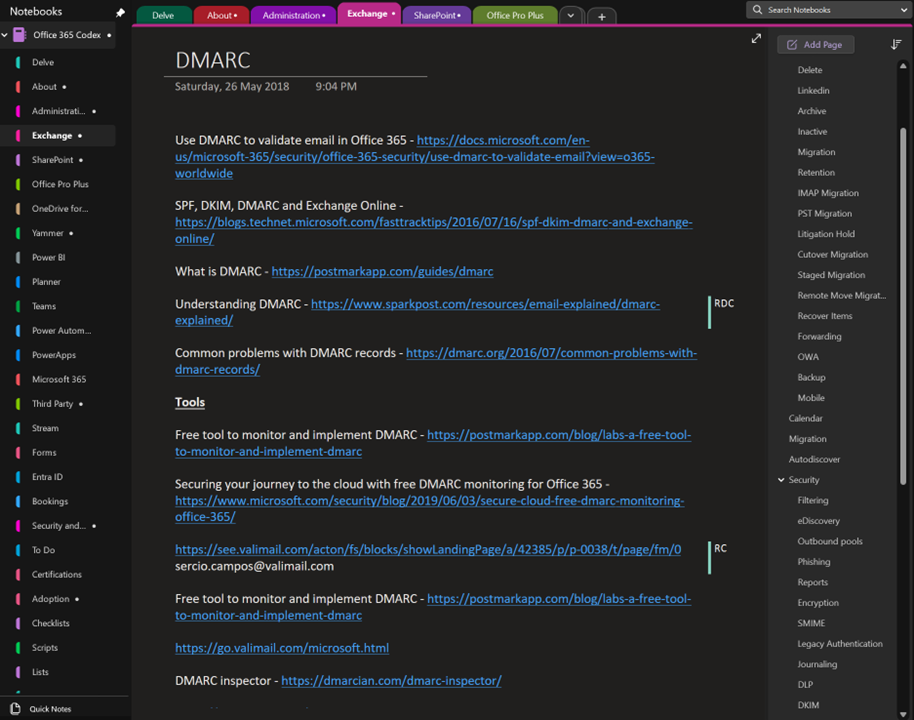
The above shows you an example page on DMARC from my Office 365 codex. The page typically contains knowledge plus links. You see on the right I have a section for every Microsoft 365 service and on the right many pages relating to that service. Here DMARC is a dedicated page in the Exchange section along with other pages such as Retention, Migration etc.

image

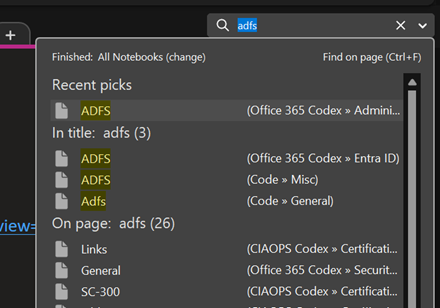
Typically, to find any information on Microsoft 365 I’d go to the top right and just use search as shown above.

image

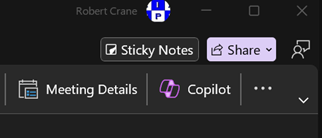
But now my desktop version of OneNote has a Copilot button as shown above. This capability doesn’t appear to be available in the web version of OneNote yet. I hope it will be soon.

image

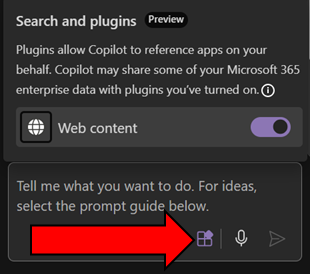
Before you go too much further make sure you select the Plugins button inside the Copilot window that appear and enable Web content as shown above. This will give you the best of both worlds with AI. It will work across you data (the notebook typically, andl in your tenant) as well as information from the web.

image

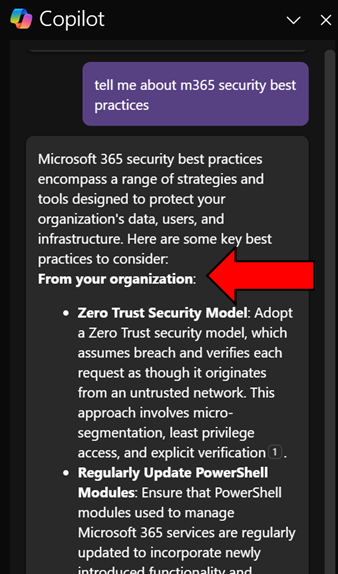
When I ask Copilot a question here you’ll see that it return information from my organization (shown above)

image

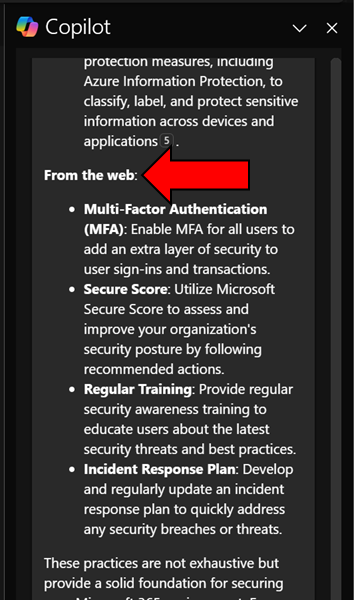
and from the web.

image

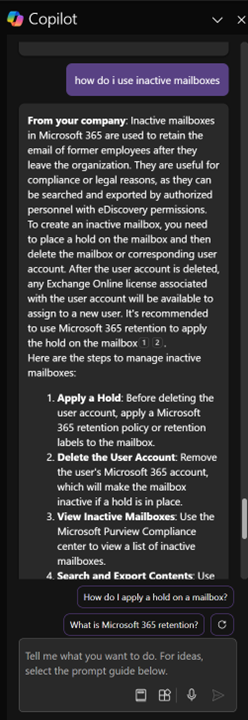
Another example is asking Copilot how to work with Exchange Online inactive mailboxes, as shown above. Again, it works with my own information and information on the web and presents in easy to digest format as well as providing me additional relevant prompts.

I have to say that this now my go to for unlocking all the knowledge I have accumulated in all my OneNote notebooks. Of course, I can probably extract something similar from other Copilot interfaces in Microsoft 365 but giving me this capability inside an application that I use more than email is a huge productivity boostt for me. Hopefully now that I have shown you what it can do for me too can go and see what Copilot for Microsoft 365 and OneNote can do for you. Let me know in the comments your use case, I’m all ears!

Need to Know podcast–Episode 321

Lots of news an updates after being a few weeks since last episode. Fear not however, they are all linked below. Plenty of really detailed and helpful articles from Microsoft of late, especially around security. All of which I highly recommend you spend time working through and implementing the recommendations. Also plenty of new features and products to cover so dive in and take a look.

You can listen directly to this episode at:

https://ciaops.podbean.com/e/episode-321-initiatives/

Subscribe via iTunes at:

https://itunes.apple.com/au/podcast/ciaops-need-to-know-podcasts/id406891445?mt=2

Don’t forget to give the show a rating as well as send me any feedback or suggestions you may have for the show.

Brought to you by www.ciaopspatron.com

Resources

@directorcia

Join my shared channel

CIAOPS merch store

Become a CIAOPS Patron

CIAOPS Blog

CIAOPS Brief

CIAOPSLabs

Support CIAOPS

Granular RBAC permissions for endpoint security workloads

How to break the token theft cyber-attack chain

Microsoft Incident Response lessons on preventing cloud identity compromise

How Copilot for Microsoft 365 Works

From pixels to presence: new features coming to Microsoft Mesh

How to unlock new experiences on your Copilot+ PC

Introduction to Cross-Tenant Mailbox Migrations

Copilot is now available in classic Outlook for Windows

Microsoft Incident Response tips for managing a mass password reset

Set default organization version limits for new document libraries and OneDrive accounts (Preview)

The guide to Microsoft Intune resources

Email Protection Basics in Microsoft 365: Bulk Email

Data security in Microsoft Copilot for Microsoft 365

Moving from AI experimentation to business breakthrough

Update on the Recall preview feature for Copilot+ PCs

Secure your business: Four ways Microsoft 365 for Business can help

The new Microsoft Planner is here! Streamline the planning, management, and execution of work

Announcing new Windows Autopilot onboarding experience for government and commercial customers

AI jailbreaks: What they are and how they can be mitigated

How Russia is trying to disrupt the 2024 Paris Olympic Games

Microsoft is again named the overall leader in the Forrester Wave for XDR

What’s New in Copilot | May 2024

Exploring Copilot for Security to Automate Incident Triage

Demystifying Microsoft Entra ID, Tenants and Azure Subscriptions

Moonstone Sleet emerges as new North Korean threat actor with new bag of tricks

Automatic attack disruption in Microsoft Defender XDR

Introducing Team Copilot

Missing devices in Windows Update for Business reports?

Need to Know podcast–Episode 320

I’ve now had a chance to play with Copilot for Security and can recommend it but to ensure that costs don’t spiral out of control for SMB, it needs to used in an ad hoc manner. Listen along for my thoughts and a walk through of resources available for you. Also news of updates of Exchange email threshold limits being changed as well as improvements for Microsoft Mesh, Loop and more. Listen in for the latest updates.

You can listen directly to this episode at:

https://ciaops.podbean.com/e/episode-320-build-is-now-done/

Subscribe via iTunes at:

https://itunes.apple.com/au/podcast/ciaops-need-to-know-podcasts/id406891445?mt=2

Don’t forget to give the show a rating as well as send me any feedback or suggestions you may have for the show.

Brought to you by www.ciaopspatron.com

Resources

@directorcia

Join my shared channel

CIAOPS merch store

Become a CIAOPS Patron

CIAOPS Blog

CIAOPS Brief

CIAOPSLabs

Support CIAOPS

Microsoft Build 2024 book of news

Build presentation keynote

New agent capabilities in Microsoft Copilot unlock business value

Introducing Team Copilot

Microsoft Copilot Studio: Building copilots with agent capabilities

New Windows 11 security features are designed for hybrid work

Introducing Copilot+ PCs

You’re wrong about Windows Recall — How Microsoft keeps your data safe on Copilot+ PCs

Microsoft Edge for Business: Revolutionizing your business with AI, security and productivity

Demystifying Microsoft Entra ID, Tenants and Azure Subscriptions

Windows deployment with the next generation of Windows Autopilot

Summary of podcast episode straight from Copilot for Microsoft 365:

Key Topics:
  • Microsoft Build 2024: Robert highlighted the new AI features and capabilities announced at the developer conference, such as Copilot Studio, Teams Copilot, and GPT-4O. 2:23

  • Windows 11 security updates: Robert explained some of the new security features in Windows 11, such as Smart App Control, Vulnerability Driver Protection, and Credential Guard. 9:39

  • Copilot Plus PCs: Robert shared his thoughts on the new PC form factor with an NPU and Windows Recall, and asked for feedback from anyone who has bought or considered buying one. 13:38

  • Edge browser: Robert recommended using Edge for better security and productivity, and pointed out some of the AI features in the browser. 15:56

  • Azure tenants and subscriptions: Robert suggested reading a blog post that clarifies the concepts of Azure tenants, Entra ID, and subscriptions. 16:41

  • Windows Autopilot: Robert mentioned the benefits of using Windows Autopilot for hands-off deployment of Windows devices, and shared a link to an article that details the new features in the next generation of Autopilot. 17:28