Entra Global Secure Access client for iOS now in preview

In it’s simplest form, think of Entra Global Secure Access as a full time secure VPN to resources like Microsoft 365 services such as SharePoint, Exchange, Teams, etc as well as to on premises resources and finally to Internet web sites.

Entra Global Secure Access does this on iOS via a Microsoft Defender app on the device and configuration via Intune. You can now try this out by following:

Global Secure Access client for iOS (preview)

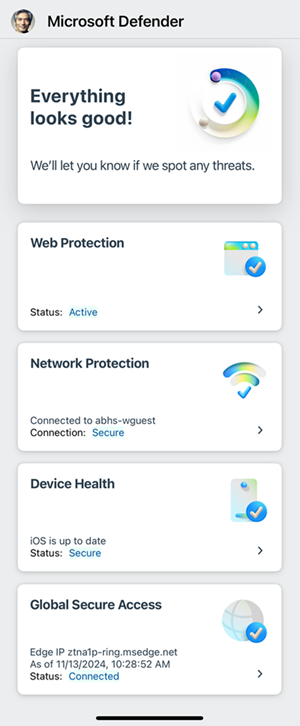
The Entra Global Secure Access service requires a paid subscription as well as Entra ID P1 or P2 (i.e. it is Microsoft 365 Business Premium compatible). When you have enabled the client you will see in Defender:

Screenshot of the iOS Microsoft Defender dashboard.

Unfortunately, the preview as yet doesn’t support the Internet traffic forwarding, which other clients do. Hopefully, that is not far away as that will really make this a killer product in my books.

I have been using Entra Global Secure access on all my Windows and Android devices for quite a while now without issues and look forward to seeing the iOS client fully mature.

CIA Brief 20241124

image

Microsoft shares latest intelligence on North Korean and Chinese threat actors at CYBERWARCON –

https://www.microsoft.com/en-us/security/blog/2024/11/22/microsoft-shares-latest-intelligence-on-north-korean-and-chinese-threat-actors-at-cyberwarcon/

Microsoft 365 Copilot | Introducing the Employee Self-Service Agent –

https://www.youtube.com/watch?v=fCBnbBcQ72U

Streamline HR and IT Tasks with Microsoft 365 Copilot’s Employee Self-Service Agent –

https://www.youtube.com/watch?v=3cPYtPAxmgo

Transforming endpoint management with Copilot in Intune –

https://techcommunity.microsoft.com/blog/microsoftendpointmanagerblog/transforming-endpoint-management-with-copilot-in-intune/4303870

Agents in SharePoint –

https://www.youtube.com/watch?v=-aUlLWeLYZM

AI agents — what they are, and how they’ll change the way we work –

https://news.microsoft.com/source/features/ai/ai-agents-what-they-are-and-how-theyll-change-the-way-we-work/?ocid=msftnews_x

Gather and create notes with Copilot in your personal OneNote notebooks directly on the page –

https://techcommunity.microsoft.com/blog/microsoft365insiderblog/gather-and-create-notes-with-copilot-in-your-personal-onenote-notebooks-directly/4294053

Targeting the Cybercrime Supply Chain –

https://blogs.microsoft.com/on-the-issues/2024/11/21/targeting-the-cybercrime-supply-chain/

What’s New in Microsoft Teams | Microsoft Ignite 2024 –

https://techcommunity.microsoft.com/blog/microsoftteamsblog/what%E2%80%99s-new-in-microsoft-teams–microsoft-ignite-2024/4287538#community-4287538-chat

Announcing the Security Enablement Hub on adoption.microsoft.com –

https://techcommunity.microsoft.com/blog/microsoftsecurityandcompliance/announcing-the-security-enablement-hub-on-adoption-microsoft-com/4303470

Simplify & scale data protection in the era of AI with Microsoft Purview Data Loss Prevention –

https://techcommunity.microsoft.com/blog/microsoftsecurityandcompliance/simplify–scale-data-protection-in-the-era-of-ai-with-microsoft-purview-data-los/4297106

What’s new in Copilot in Microsoft Forms – Ignite 2024 –

https://techcommunity.microsoft.com/blog/MicrosoftFormsBlog/what%E2%80%99s-new-in-copilot-in-microsoft-forms-%E2%80%93-ignite-2024/4303638

Introducing Agents in Microsoft 365 –

https://www.youtube.com/watch?v=EVEcjH90YXo

Windows 365 Frontline shared mode now in public preview –

https://techcommunity.microsoft.com/blog/windows-itpro-blog/windows-365-frontline-shared-mode-now-in-public-preview/4300922

New M365 Copilot Data Lifecycle Management options –

https://techcommunity.microsoft.com/blog/microsoftsecurityandcompliance/new-m365-copilot-data-lifecycle-management-options/4304636

Content and communication event guide for Microsoft Ignite 2024 | Teams, SharePoint and OneDrive –

https://techcommunity.microsoft.com/blog/spblog/content-and-communication-event-guide-for-microsoft-ignite-2024–teams-sharepoin/4287360

Ignite 2024: Transform your workday with the latest Edge for Business features –

https://blogs.windows.com/msedgedev/2024/11/19/microsoft-edge-for-business-transform-your-workday-ignite-2024/

Control volume ratio setting when using language interpretation in Teams meetings –

https://techcommunity.microsoft.com/blog/microsoft365insiderblog/control-volume-ratio-setting-when-using-language-interpretation-in-teams-meeting/4292219

Windows security and resiliency: Protecting your business –

https://blogs.windows.com/windowsexperience/2024/11/19/windows-security-and-resiliency-protecting-your-business/

Ignite 2024: Transforming Security with Microsoft Security Copilot –

https://techcommunity.microsoft.com/blog/securitycopilotblog/ignite-2024-transforming-security-with-microsoft-security-copilot/4298845/

Unlock Proactive Defense: Microsoft Security Exposure Management Now Generally Available –

https://techcommunity.microsoft.com/blog/microsoftsecurityandcompliance/unlock-proactive-defense-microsoft-security-exposure-management-now-generally-av/4303219

Introducing the Employee Self-Service Agent in Microsoft 365 Copilot –

https://techcommunity.microsoft.com/blog/microsoft365copilotblog/introducing-the-employee-self-service-agent-in-microsoft-365-copilot/4297037

Hotpatch for client comes to Windows 11 Enterprise –

https://techcommunity.microsoft.com/blog/windows-itpro-blog/hotpatch-for-client-comes-to-windows-11-enterprise/4302717

Copilot Studio is enhancing its platform with knowledge improvements, Azure AI integration, and more –

https://www.microsoft.com/en-us/microsoft-copilot/blog/copilot-studio/copilot-studio-is-enhancing-its-platform-with-knowledge-improvements-azure-ai-integration-and-more/

Microsoft Ignite 2024: Embracing the future of Windows at work –

https://blogs.windows.com/windowsexperience/2024/11/19/microsoft-ignite-2024-embracing-the-future-of-windows-at-work/

Introducing Copilot Analytics to measure AI impact on your business –

https://techcommunity.microsoft.com/blog/microsoftvivablog/introducing-copilot-analytics-to-measure-ai-impact-on-your-business/4301717

Ignite 2024: Agents in SharePoint now in general availability –

https://techcommunity.microsoft.com/blog/Microsoft365CopilotBlog/ignite-2024-agents-in-sharepoint-now-in-general-availability/4298746

Microsoft Ignite 2024 | Microsoft 365 Copilot Innovation in Your Go-To Apps –

https://techcommunity.microsoft.com/blog/microsoft365copilotblog/microsoft-ignite-2024–microsoft-365-copilot-innovation-in-your-go-to-apps/4298780

Microsoft Intune news at Microsoft Ignite 2024 –

https://techcommunity.microsoft.com/blog/microsoftendpointmanagerblog/microsoft-intune-news-at-microsoft-ignite-2024/4303712

Windows 365 Link—the first Cloud PC device for Windows 365 –

https://techcommunity.microsoft.com/blog/windows-itpro-blog/windows-365-link%E2%80%94the-first-cloud-pc-device-for-windows-365/4302687

Redefine development: AI-first innovation with agents and Microsoft Copilot in Power Platform –

https://www.microsoft.com/en-us/power-platform/blog/2024/11/19/redefine-development-ai-first-innovation-with-agents-and-microsoft-copilot-in-power-platform/

Accelerate Microsoft 365 Copilot adoption with built-in content governance –

https://techcommunity.microsoft.com/blog/microsoft365copilotblog/accelerate-microsoft-365-copilot-adoption-with-built-in-content-governance/4298951

AI innovations for a more secure future unveiled at Microsoft Ignite –

https://www.microsoft.com/en-us/security/blog/2024/11/19/ai-innovations-for-a-more-secure-future-unveiled-at-microsoft-ignite/

Introducing Copilot Actions, new agents, and tools to empower IT teams –

https://www.microsoft.com/en-us/microsoft-365/blog/2024/11/19/introducing-copilot-actions-new-agents-and-tools-to-empower-it-teams/

How to share your screen during a Teams meeting | Microsoft –

https://www.youtube.com/watch?v=dwo0qI5ahnM

Mia Labs secures generative AI innovations with Microsoft Defender for Cloud –

https://www.youtube.com/watch?v=tMhkbdjpsNo

Loop governance, lifecycle, manageability for IT Admins – Nov 2024 –

https://techcommunity.microsoft.com/blog/microsoft_365blog/loop-governance-lifecycle-manageability-for-it-admins-%E2%80%93-nov-2024/4237591

After hours

Lasers vs Lightning- Which Is More Powerful?  – https://www.youtube.com/watch?v=h5Zwg3Ag-bE

Editorial

If you found this valuable, the I’d appreciate a ‘like’ or perhaps a donation at https://ko-fi.com/ciaops. This helps me know that people enjoy what I have created and provides resources to allow me to create more content. If you have any feedback or suggestions around this, I’m all ears. You can also find me via email director@ciaops.com and on X (Twitter) at https://www.twitter.com/directorcia.

If you want to be part of a dedicated Microsoft Cloud community with information and interactions daily, then consider becoming a CIAOPS Patron – www.ciaopspatron.com.

Watch out for the next CIA Brief next week

CIA Brief 20241116

image

Microsoft Copilot for Security Flight School –

https://learn.microsoft.com/en-us/shows/microsoft-copilot-for-security-flight-school/

Using AI to innovate across an interconnected economy in the UAE | Cloud Cultures by Microsoft Azure –

https://www.youtube.com/watch?v=Nz6cKOGYErA

Microsoft 365 Insider round-up November 2024 –

https://www.linkedin.com/pulse/november-2024-microsoft-365-insider-awj4c/

From questions to discoveries: NASA’s new Earth Copilot brings Microsoft AI capabilities to democratize access to complex data –

https://blogs.microsoft.com/blog/2024/11/14/from-questions-to-discoveries-nasas-new-earth-copilot-brings-microsoft-ai-capabilities-to-democratize-access-to-complex-data/

What is Microsoft Defender XDR? –

https://www.youtube.com/watch?v=eyKXWlZQ8JA

Enhancing Threat Hunting with Microsoft Defender Experts Plugin –

https://techcommunity.microsoft.com/blog/microsoftsecurityexperts/enhancing-threat-hunting-with-microsoft-defender-experts-plugin/4296085

From prevention to recovery: Microsoft Unified’s holistic cybersecurity approach –

https://techcommunity.microsoft.com/blog/microsoftsecurityexperts/from-prevention-to-recovery-microsoft-unified%E2%80%99s-holistic-cybersecurity-approach/4295823

Brainstorm and collaborate with Microsoft 365 Copilot in Loop –

https://www.youtube.com/watch?v=8hyPBMA2HCg

Microsoft Defender Experts Plugin for Copilot for Security –

https://github.com/Azure/Copilot-For-Security/tree/main/Plugins/Community%20Based%20Plugins/Microsoft%20Security%20Experts/Microsoft%20Defender%20Experts%20Plugin

Discover our latest Microsoft Security training on Microsoft Learn –

https://techcommunity.microsoft.com/blog/microsoftlearnblog/discover-our-latest-microsoft-security-training-on-microsoft-learn/3644511

Microsoft Security Copilot Achieves SOC 2 Certification –

https://techcommunity.microsoft.com/blog/securitycopilotblog/microsoft-security-copilot-achieves-soc-2-certification/4295363

Professional Direct for Microsoft 365 –

https://www.youtube.com/watch?v=x1yru_DWUTA

How to manage incidents – Microsoft Defender XDR –

https://www.youtube.com/watch?v=pSHAANTfIm0

Workers in all kinds of roles and industries count on Copilot to do more — in less time –

https://news.microsoft.com/source/?post_type=features&p=8580?ocid=FY25_soc_omc_br_x_EndUsers

Create targeted attack simulation training campaigns with dynamic groups –

https://techcommunity.microsoft.com/blog/microsoftdefenderforoffice365blog/create-targeted-attack-simulation-training-campaigns-with-dynamic-groups/4287637

Zero Trust Workshop: Advance your knowledge with an online resource –

https://www.microsoft.com/en-us/security/blog/2024/11/06/zero-trust-workshop-advance-your-knowledge-with-an-online-resource/

Start learning how Copilot can help you by watching Microsoft Copilot for Security Flight School –

https://techcommunity.microsoft.com/blog/microsoftsecurityandcompliance/start-learning-how-copilot-can-help-you-by-watching-microsoft-copilot-for-securi/4288426

Introducing Themes by Copilot in Outlook –

https://techcommunity.microsoft.com/blog/microsoft365copilotblog/introducing-themes-by-copilot-in-outlook/4287302

Get the ideas flowing with Microsoft 365 Copilot in Whiteboard –

https://www.youtube.com/watch?v=iT0i3rluRTM

The world’s first 3D replica of St. Peter’s Basilica, made with Microsoft AI –

https://www.youtube.com/watch?v=5dQI_TXYJbU

Recent widgets for Word, Excel, and PowerPoint for Mac –

https://techcommunity.microsoft.com/blog/microsoft365insiderblog/recent-widgets-for-word-excel-and-powerpoint-for-mac/4289476

Getting Started with GitHub Copilot for Azure –

https://techcommunity.microsoft.com/blog/educatordeveloperblog/getting-started-with-github-copilot-for-azure/4290334

Automatically aggregate Teams meeting content in a Loop workspace –

https://techcommunity.microsoft.com/blog/microsoft365insiderblog/automatically-aggregate-teams-meeting-content-in-a-loop-workspace/4287319

After hours

AI doesn’t stand a chance against actors, or Shakespeare: Ben Affleck – https://www.youtube.com/watch?v=ypURoMU3P3U

Editorial

If you found this valuable, the I’d appreciate a ‘like’ or perhaps a donation at https://ko-fi.com/ciaops. This helps me know that people enjoy what I have created and provides resources to allow me to create more content. If you have any feedback or suggestions around this, I’m all ears. You can also find me via email director@ciaops.com and on X (Twitter) at https://www.twitter.com/directorcia.

If you want to be part of a dedicated Microsoft Cloud community with information and interactions daily, then consider becoming a CIAOPS Patron – www.ciaopspatron.com.

Watch out for the next CIA Brief next week
Remembrance action

It is once again Remembrance day. The 11th of November. Over 110 years since the beginning of the war that we remember coming to an end on this date. Although the growth in the reverence of remembrance is always a positive thing to witness, perhaps the core reason of why we should actually remember are being lost.

One would suggest that the reason that we enshrine remembrance day is to ensure that we learn from the tragedy of the past and the waste of human life over simple failures of diplomacy and tolerance. We have lost that generation that could readily remind us of the true impact of such events and the misplaced belief that such conflicts are ‘glorious’ in victory.

Alas, we seem to be deaf to the message from our past. We seem to failing to work together for the benefit of all. Instead, we seem to accept a world today that is probably more embroiled in conflicts that it has been for a long time. Unfortunately, unless we are directly affected, we tend to turn a blind eye and hope that it will all go away and never come knocking.

In truth, our guiding voice should be our ancestors who experienced the horrors of war and survived to warn us that there is nothing glorious about war. There is nothing glorious about the countless war graves. Any rational modern human being has an innate fear of dying, yet also seem to be unwilling to reduce such risk by taking positive steps to mitigating conflict wherever it is present.

Remembrance should not be a simple act once a year. To truly take part it needs to become part of our everyday. It needs to be reflected with everyone we deal with on a daily basis, especially those we may not always agree with. Our judgement will be made on how we treat others, not on how we remember history.

Our reverence for remembrance should be rooted in the present. It should however also show in our actions with others, both friend and foe. Only by de-escalating conflicts with understand and tolerance can we ever hope to avoid the terrible tragedy that humanity seems to too often readily fall into. It is up to us to avoid such tragedies that the past reminds us regularly are still close at hand.

History reminds how easily things can get out of control and how many innocent lives can be lost for little consequence. We have the power to choose what the outcome will be. How are you exercising your choice? 

Lest We Forget.

If you are interested in the history of the ANZAC battlefields of World War One visit my site – http://www.anzacsinfrance.com/

Need to Know podcast–Episode 331

Microsoft Ignite is just around the corner but still plenty of updates coming from Microsoft prior to their big tech event. Listen and stay up to date with everything that is happening in the Microsoft Cloud.

You can listen directly to this episode at:

https://ciaops.podbean.com/e/episode-331-team-chat-gets-a-make-over/

Subscribe via iTunes at:

https://itunes.apple.com/au/podcast/ciaops-need-to-know-podcasts/id406891445?mt=2

or Spotify:

https://open.spotify.com/show/7ejj00cOuw8977GnnE2lPb

Don’t forget to give the show a rating as well as send me any feedback or suggestions you may have for the show.

Brought to you by www.ciaopspatron.com

Resources

@directorcia

Join my shared channel

CIAOPS merch store

Become a CIAOPS Patron

CIAOPS Blog

CIAOPS Brief

CIAOPSLabs

Support CIAOPS

Streamline collaboration with the new chat and channels experience in Microsoft Teams

How to manage false positives – Microsoft Defender for Office 365

Get started with false negative investigations in Microsoft Defender for Office 365

How to investigate email messages in Microsoft Defender for Office 365

How to use the Alert page – Microsoft Defender XDR

Defender XDR Monthly news – November 2024

How Microsoft Defender for Office 365 innovated to address QR code phishing attacks

Skill up to strengthen your organizations cybersecurity posture

Manage Microsoft Entra ID role assignments with Microsoft Entra ID Governance

Announcing General Availability of Inbound SMTP DANE with DNSSEC for Exchange Online

Coming in December: SC-5004: Defend against cyberthreats with Microsoft Defender XDR

What’s new in Copilot Studio: November

New Copilot agents: Supercharge Microsoft 365 Copilot

A strategic approach to assessing your AI readiness

Supercharge productivity with Microsoft 365 Copilot

AI safety first: Protecting your business and empowering your people

Microsoft 365 Copilot — Small Business Guide to Set Up Copilot

Quick actions with Copilot now at your fingertips in OneNote

Stay focused in an action-packed meeting with Microsoft 365 Copilot in Teams

How to prepare for Windows 10 end of support by moving to Windows 11 today

Github Copilot updates

A year of innovation- and feedback-driven features in Microsoft Word

Updated management features roll out for Microsoft Intune Suite

Afterhours

Apple intelligence – catch up

CIA Brief 20241109

image

How to manage false positives – Microsoft Defender for Office 365 –

https://www.youtube.com/watch?v=yuduVj6wvsw

What’s new in Copilot Studio: November –

https://www.microsoft.com/en-us/microsoft-copilot/blog/copilot-studio/whats-new-in-copilot-studio-november/

A strategic approach to assessing your AI readiness –

https://www.microsoft.com/en-us/microsoft-cloud/blog/2024/11/06/a-strategic-approach-to-assessing-your-ai-readiness/

Welcome Guide for Microsoft 365 –

https://www.youtube.com/watch?v=8rOpWvtxeh0

Introducing Exchange Online Delicensing Resiliency to protect against unintended delicensing actions –

https://techcommunity.microsoft.com/blog/exchange/introducing-exchange-online-delicensing-resiliency-to-protect-against-unintended/4082759

Microsoft 365 Copilot delivers productivity gains with Australian public servants –

https://news.microsoft.com/en-au/features/microsoft-365-copilot-delivers-productivity-gains-with-australian-public-servants/

Get started with false negative investigations in Microsoft Defender for Office 365 –

https://www.youtube.com/watch?v=sFMAI8MeDKQ

Transform ideas into impactful presentations with Microsoft 365 Copilot in PowerPoint –

https://www.youtube.com/watch?v=URejjkO-JC8

Defender XDR Monthly news – November 2024 –

https://techcommunity.microsoft.com/t5/microsoft-defender-xdr-blog/monthly-news-november-2024/ba-p/4286159

How Microsoft Defender for Office 365 innovated to address QR code phishing attacks –

https://www.microsoft.com/en-us/security/blog/2024/11/04/how-microsoft-defender-for-office-365-innovated-to-address-qr-code-phishing-attacks/

Supercharge productivity with Microsoft 365 Copilot –

https://www.youtube.com/watch?v=OMJo7BpTzmM

How to prepare for Windows 10 end of support by moving to Windows 11 today –

https://blogs.windows.com/windowsexperience/2024/10/31/how-to-prepare-for-windows-10-end-of-support-by-moving-to-windows-11-today/

After hours

Polaris Dawn – https://www.youtube.com/watch?v=MaJmUUtr2SI

Editorial

If you found this valuable, the I’d appreciate a ‘like’ or perhaps a donation at https://ko-fi.com/ciaops. This helps me know that people enjoy what I have created and provides resources to allow me to create more content. If you have any feedback or suggestions around this, I’m all ears. You can also find me via email director@ciaops.com and on X (Twitter) at https://www.twitter.com/directorcia.

If you want to be part of a dedicated Microsoft Cloud community with information and interactions daily, then consider becoming a CIAOPS Patron – www.ciaopspatron.com.

Watch out for the next CIA Brief next week

New Secure Score report script

I have created a new script that uses the modern Microsoft Graph method to report all the Secure Score items and rather than me explaining what the script does I’ll turn it over to Github Copilot.

<Enter Github Copilot>

This PowerShell script, mggraph-ssdescpt-get.ps1, is designed to interact with the Microsoft Graph API to retrieve and display secure score results. Here’s a step-by-step explanation of its operation and function:

  1. Start Transcript:

    start-transcript “..\mggraph-ssdescpt-get.txt”

    This line starts recording all commands and their output to a transcript file.

  2. Check Microsoft Graph Connection:

    try {

        $context = get-mgcontext -ErrorAction Stop

    }

    catch {

        write-host -foregroundcolor $errormessagecolor “Not connected to Microsoft Graph. Please connect to Microsoft Graph first using connect-mggraph`n”

    if ($prompt) {stop-transcript}

    exit

    }

    if (-not $context) {

        write-host -foregroundcolor $errormessagecolor “Not connected to Microsoft Graph. Please connect to Microsoft Graph first using connect-mggraph`n”

    if ($prompt) {stop-transcript}

    exit

    }

    write-host -foregroundcolor $processmessagecolor “Connected to Microsoft Graph”

    write-host ”  – Connected account =”,$context.Account,”`n”

    if ($prompt) { pause }

    This block checks if the Microsoft Graph module is installed and if the user is connected to Microsoft Graph. If not, it prompts the user to connect and exits the script.

  3. Set API Endpoint and Method:

    $uri = “https://graph.microsoft.com/beta/security/securescores&#8221;

    $method = “GET”

    write-host -foregroundcolor $processmessagecolor “Run Graph API Query”

    The script sets the URI for the Microsoft Graph API endpoint to retrieve secure scores and specifies the HTTP method as GET.

  4. Invoke API Request:

    $query = Invoke-MgGraphRequest -Uri $URI -method $method -ErrorAction Stop

    This line sends a request to the Microsoft Graph API to get secure score results.

  5. Process and Display Results:

    $names = $query.value[0].controlscores          # get the most current secure score results

    $item = 0

    write-host -foregroundcolor $processmessagecolor “Display results`n”

    foreach ($control in $names) {

        $item++

        write-host -foregroundcolor green -BackgroundColor Black “`n*** Item”, $item, “***”

        write-host “Control Category     : “, $control.controlCategory

        write-host “Control Name         : “, $control.controlName

        write-host “Control Score        : “, $control.Score

        write-host “Control Description  : “, $control.Description

        write-host “Control On           : “, $control.on

        write-host “Implementation status: “, $control.implementationstatus

        write-host “Score in percentage  : “, $control.scoreinpercentage

        write-host “Last synced          : “, $control.lastsynced

        write-host “`n”

    if ($prompt) { pause }

    }

    The script extracts the secure score results from the API response and iterates through each control score, displaying detailed information about each control.

  6. Complete Script:

    write-host -foregroundcolor $systemmessagecolor “`nScript Completed`n”

    if ($prompt) {stop-transcript}

    Finally, the script indicates completion and stops the transcript if the $prompt variable is set.

In summary, this script connects to Microsoft Graph, retrieves secure score data, and displays detailed information about each control score in the console.

Output

image

use the –prompt command line option to pause output.

CIAOPS Brief 20241102

image

How to investigate email messages in Microsoft Defender for Office 365 –

https://www.youtube.com/watch?v=5hA7VfaMvqs

New Copilot agents: Supercharge Microsoft 365 Copilot –

https://techcommunity.microsoft.com/t5/microsoft-365-copilot/new-copilot-agents-supercharge-microsoft-365-copilot/ba-p/4266995

Microsoft builds first datacenters with wood to slash carbon emissions –

https://news.microsoft.com/source/features/sustainability/microsoft-builds-first-datacenters-with-wood-to-slash-carbon-emissions/

Github Copilot updates –

https://t.co/79ZZFQss4o

A year of innovation- and feedback-driven features in Microsoft Word –

https://techcommunity.microsoft.com/t5/microsoft-365-insider-blog/a-year-of-innovation-and-feedback-driven-features-in-microsoft/ba-p/4282272

AI safety first: Protecting your business and empowering your people –

https://www.microsoft.com/en-us/microsoft-cloud/blog/2024/10/31/ai-safety-first-protecting-your-business-and-empowering-your-people/

Chinese threat actor Storm-0940 uses credentials from password spray attacks from a covert network –

https://www.microsoft.com/en-us/security/blog/2024/10/31/chinese-threat-actor-storm-0940-uses-credentials-from-password-spray-attacks-from-a-covert-network/

Microsoft now a Leader in three major analyst reports for SIEM –

https://techcommunity.microsoft.com/t5/security-compliance-and-identity/microsoft-now-a-leader-in-three-major-analyst-reports-for-siem/ba-p/4278853

How Copilots are helping customers and partners drive pragmatic innovation to achieve business results that matter –

https://blogs.microsoft.com/blog/2024/10/29/how-copilots-are-helping-customers-and-partners-drive-pragmatic-innovation-to-achieve-business-results-that-matter/

Updated management features roll out for Microsoft Intune Suite –

https://techcommunity.microsoft.com/t5/microsoft-intune-blog/updated-management-features-roll-out-for-microsoft-intune-suite/ba-p/4279721

Responsible AI Mitigation Layers –

https://techcommunity.microsoft.com/t5/microsoft-developer-community/responsible-ai-mitigation-layers/ba-p/4281878

Refreshing the Meeting Details experience in OneNote for Mac and iPad –

https://techcommunity.microsoft.com/t5/microsoft-365-insider-blog/refreshing-the-meeting-details-experience-in-onenote-for-mac-and/ba-p/4282286

Skill up to strengthen your organizations cybersecurity posture –

https://techcommunity.microsoft.com/t5/microsoft-learn-blog/skill-up-to-strengthen-your-organizations-cybersecurity-posture/ba-p/4090397

Smart card redirection support for YubiKeys in Windows App on iOS –

https://techcommunity.microsoft.com/t5/windows-it-pro-blog/smart-card-redirection-support-for-yubikeys-in-windows-app-on/ba-p/4281574

Midnight Blizzard conducts large-scale spear-phishing campaign using RDP files –

https://www.microsoft.com/en-us/security/blog/2024/10/29/midnight-blizzard-conducts-large-scale-spear-phishing-campaign-using-rdp-files/

Microsoft 365 Copilot — Small Business Guide to Set Up Copilot –

https://officegarageitpro.medium.com/microsoft-365-copilot-small-business-guide-to-set-up-copilot-e56d8e1c24a5

Quick actions with Copilot now at your fingertips in OneNote –

https://techcommunity.microsoft.com/t5/microsoft-365-insider-blog/quick-actions-with-copilot-now-at-your-fingertips-in-onenote/ba-p/4278675

How to use the Alert page – Microsoft Defender XDR –

https://www.youtube.com/watch?v=cR9AVR548Ls

Stay focused in an action-packed meeting with Microsoft 365 Copilot in Teams –

https://www.youtube.com/watch?v=4AqLS8NWJZw

Manage Microsoft Entra ID role assignments with Microsoft Entra ID Governance –

https://techcommunity.microsoft.com/t5/microsoft-entra-blog/manage-microsoft-entra-id-role-assignments-with-microsoft-entra/ba-p/4120307

Announcing General Availability of Inbound SMTP DANE with DNSSEC for Exchange Online –

https://techcommunity.microsoft.com/t5/exchange-team-blog/announcing-general-availability-of-inbound-smtp-dane-with-dnssec/ba-p/4281292

Coming in December: SC-5004: Defend against cyberthreats with Microsoft Defender XDR –

https://techcommunity.microsoft.com/t5/ilt-communications-blog/coming-in-december-sc-5004-defend-against-cyberthreats-with/ba-p/4281365

Streamline collaboration with the new chat and channels experience in Microsoft Teams –

https://www.microsoft.com/en-us/microsoft-365/blog/2024/10/28/streamline-collaboration-with-the-new-chat-and-channels-experience-in-microsoft-teams/

Need to Know podcast–Episode 330 –

https://blog.ciaops.com/2024/10/28/need-to-know-podcast-episode-330/

After hours

Introducing ChatGPT search – https://openai.com/index/introducing-chatgpt-search/

Editorial

If you found this valuable, the I’d appreciate a ‘like’ or perhaps a donation at https://ko-fi.com/ciaops. This helps me know that people enjoy what I have created and provides resources to allow me to create more content. If you have any feedback or suggestions around this, I’m all ears. You can also find me via email director@ciaops.com and on X (Twitter) at https://www.twitter.com/directorcia.

If you want to be part of a dedicated Microsoft Cloud community with information and interactions daily, then consider becoming a CIAOPS Patron – www.ciaopspatron.com.

Watch out for the next CIA Brief next week
