CIA Brief 240120

image

How to get started with AI for industry and business leaders –

https://www.microsoft.com/en-us/microsoft-cloud/blog/2023/12/19/how-to-get-started-with-ai-for-industry-and-business-leaders/

Microsoft Entra’s Top 50 Features of 2023 –

https://techcommunity.microsoft.com/t5/microsoft-entra-blog/microsoft-entra-s-top-50-features-of-2023/ba-p/3796392

Protect faster with Microsoft Defender XDR’s latest UX enhancements –

https://techcommunity.microsoft.com/t5/microsoft-defender-xdr-blog/protect-faster-with-microsoft-defender-xdr-s-latest-ux/ba-p/4027497

Westpac transforms IT and enables secure, inclusive, flexible work with Windows 11 Enterprise and Autopatch –

https://customers.microsoft.com/en-us/story/1683252944405589807-westpac-banking-capital-markets

How AI can help you banish bad meetings –

https://news.microsoft.com/how-ai-can-help-you-banish-bad-meetings/

New Microsoft Incident Response guides help security teams analyze suspicious activity –

https://www.microsoft.com/en-us/security/blog/2024/01/17/new-microsoft-incident-response-guides-help-security-teams-analyze-suspicious-activity/

Introducing SharePoint Premium for Information Workers –

https://www.youtube.com/watch?v=RfkGr7Pse3A

Copilot in Viva Engage is now in Public Preview –

https://techcommunity.microsoft.com/t5/viva-engage-blog/copilot-in-viva-engage-is-now-in-public-preview/ba-p/4031051

Employee quick setup –

https://www.youtube.com/watch?v=XV6ciESunUw

Building your own copilot – yes, but how? (Part 1 of 2) –

https://techcommunity.microsoft.com/t5/educator-developer-blog/building-your-own-copilot-yes-but-how-part-1-of-2/ba-p/4029571

Introducing the new PowerShell Module for Microsoft Defender for Identity –

https://techcommunity.microsoft.com/t5/microsoft-defender-xdr-blog/introducing-the-new-powershell-module-for-microsoft-defender-for/ba-p/4028734

Visualize Entra Sign-in Logs using an Interactive Map –

https://techcommunity.microsoft.com/t5/microsoft-entra-blog/visualize-entra-sign-in-logs-using-an-interactive-map/ba-p/4013853

Train your users to be more resilient against QR code phishing –

https://techcommunity.microsoft.com/t5/microsoft-defender-for-office/train-your-users-to-be-more-resilient-against-qr-code-phishing/ba-p/4022667

Microsoft Copilot for Microsoft 365 –

https://www.microsoft.com/en-us/microsoft-365/business/copilot-for-microsoft-365

Microsoft 365 Copilot video play list –

https://www.youtube.com/playlist?list=PLXPr7gfUMmKxDKxah3zpG4NhhDj-2lAvc

Copilot for Microsoft 365 for small and medium businesses –

https://adoption-dev.azurewebsites.net/en-us/copilot/smb/

Bringing the full power of Copilot to more people and businesses –

https://blogs.microsoft.com/blog/2024/01/15/bringing-the-full-power-of-copilot-to-more-people-and-businesses/

Introducing Microsoft Copilot App –

https://www.youtube.com/watch?v=nKcyU8hh14Q

Introducing Copilot Pro: Supercharge your Creativity and Productivity –

https://www.youtube.com/watch?v=8QXS-boCQZI

Microsoft’s new Copilot Pro brings AI-powered Office features to the rest of us –

https://www.theverge.com/2024/1/15/24038711/microsoft-copilot-pro-office-ai-apps

Microsoft unlocks Copilot AI inside Office apps for all businesses –

https://www.theverge.com/2024/1/15/24038726/microsoft-copilot-microsoft-365-business-launch-availability

Introducing Automatic File and URL (Detonation) Analysis –

https://techcommunity.microsoft.com/t5/microsoft-defender-threat/introducing-automatic-file-and-url-detonation-analysis/ba-p/4000489

After hours

A Guided Tour of Apple Vision Pro –

https://www.youtube.com/watch?v=Vb0dG-2huJE

Editorial

If you found this valuable, the I’d appreciate a ‘like’ or perhaps a donation at https://ko-fi.com/ciaops. This helps me know that people enjoy what I have created and provides resources to allow me to create more content. If you have any feedback or suggestions around this, I’m all ears. You can also find me via email director@ciaops.com and on X (Twitter) at https://www.twitter.com/directorcia.

If you want to be part of a dedicated Microsoft Cloud community with information and interactions daily, then consider becoming a CIAOPS Patron – www.ciaopspatron.com.

Watch out for the next CIA Brief next week.

Set up Microsoft 365 backup

image

The first step you’ll need to take is to:

Enable Microsoft Syntex PAYG

this is how the Microsoft 365 backup service will be billed. That will be basically via Azure and you’ll only pay for what your need.

image

You’ll then have to go backup into the Use content AI with Microsoft Syntex area again, which is where you established the billing. Here you need to select Manage Microsoft Syntex as shown above.

image

A dialog will appear from the right. In the list that appears, select Backup as shown above.

image

Select the Turn on button at the bottom of the page.

image

You should see a warning, like shown above that Microsoft Backup is about to be enabled. Select Save to continue.

image

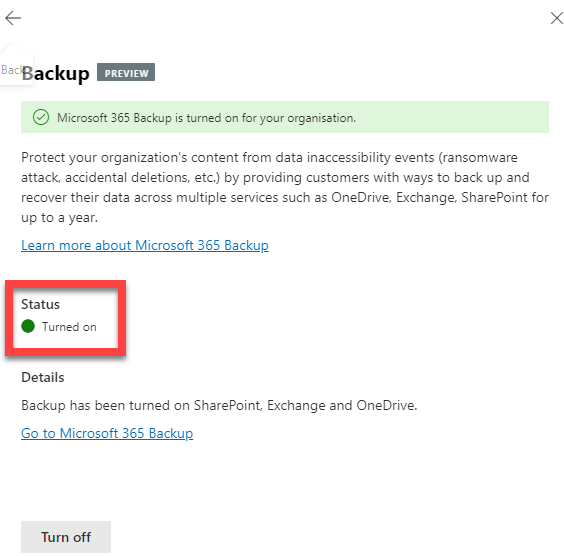
There will now be a confirmation that the Microsoft 365 Backup service is Turned on (enabled) as shown above. You’ll also notice the Turn off button at the bottom of the page if you wish to return and disable Microsoft 365 Backup.

image

If you select the link Go to Microsoft 365 Backup you’ll be taken to the area to actually operate the service which looks like:

image

You’ll see that you can also navigate to this area via the Microsoft 365 admin center | Settings | Microsoft 365 Backup options on the menu on the left as shown above.

Stay tuned for upcoming posts on running Microsoft 365 Backup and the costs associated.

Adding Copilot button to desktop applications

Microsoft has just made Copilot for Microsoft 365 available for SMB customers:

Bringing the full power of Copilot to more people and businesses

So I went and signed up to get a look. Bottom line at the moment is that, yes you can buy a single license for a tenant with Business Premium but you need to pay for 12 months up front. Here in Australia than means around $600 inc GST upfront for a minimum 12 months. I have no doubt that I will get value but as yet there is no month by month option.

image

When I open my Microsoft 365 portal now I see a new Copilot icon as shown on the left.

image

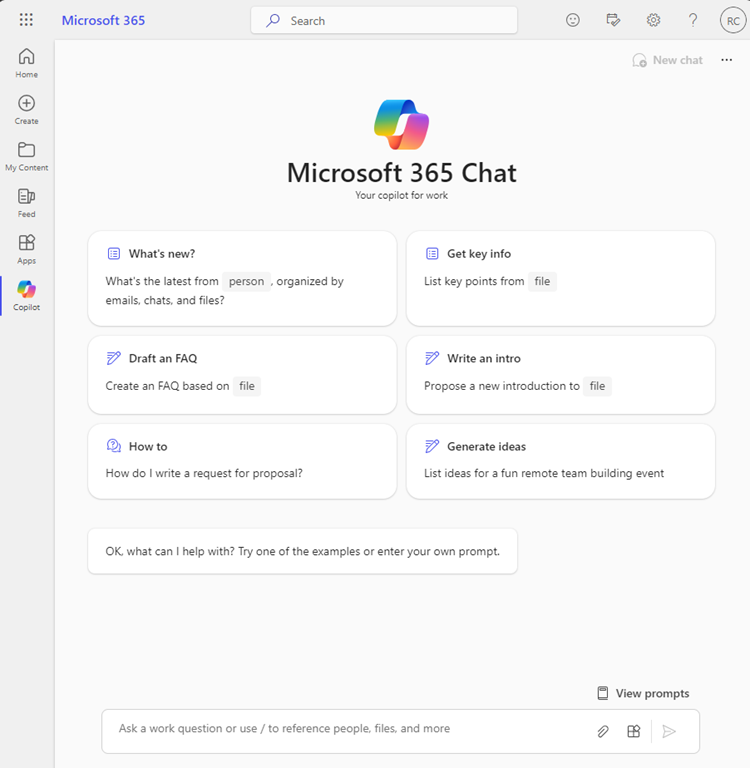
When I select that icon, I am taken to a ChatGPT like screen as shown above that allows me to interact with my data in Microsoft 365 as expected.

image

If I open Word, Excel, Powerpoint, etc on the web I see a Copilot button in the ribbon as shown above.

image

However, I can’t see the expected Copilot button in any of desktop applications, like Word shown above.

This video from MVP Shane Young:

https://www.youtube.com/watch?v=KROOEdZXvoY

provided all the answers.

To see the Copilot button in Word, Excel, PowerPoint, OneNote (but not Outlook or Teams) you need to

image

go into each application individually (yes all of them one by one at this stage). Select File from the menu.

image

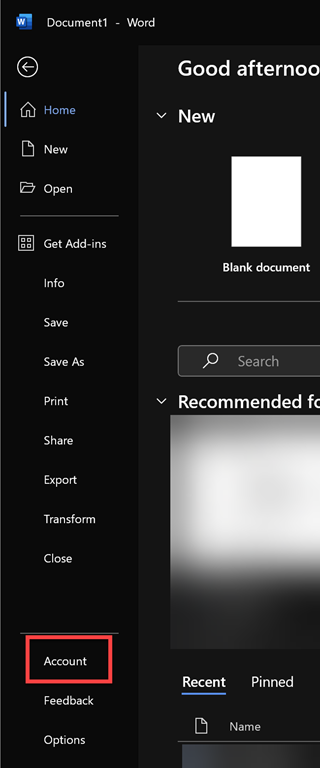
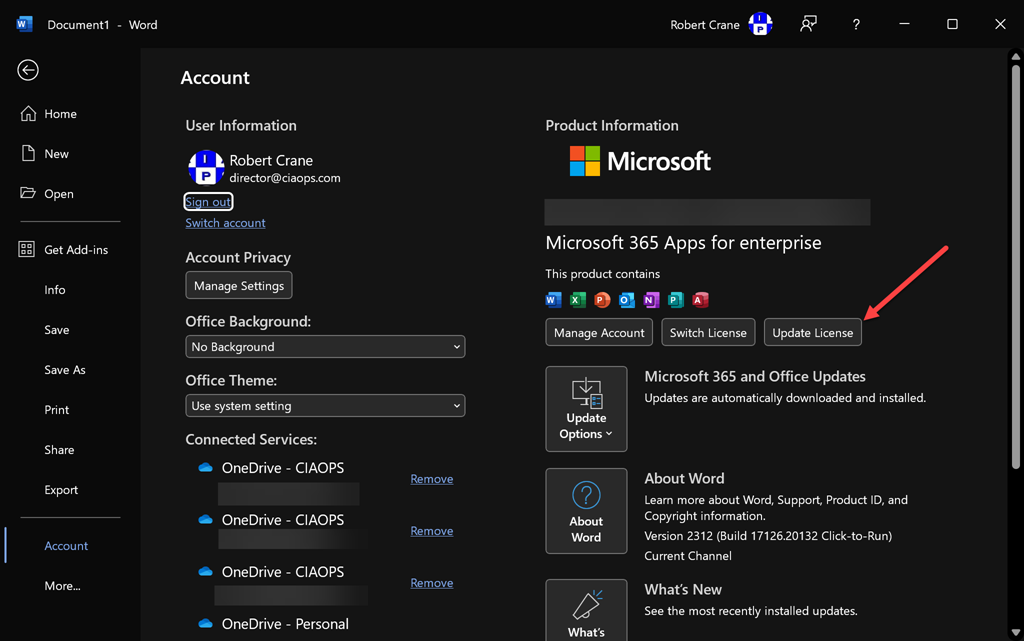
Then select Account from the option on the left.

image

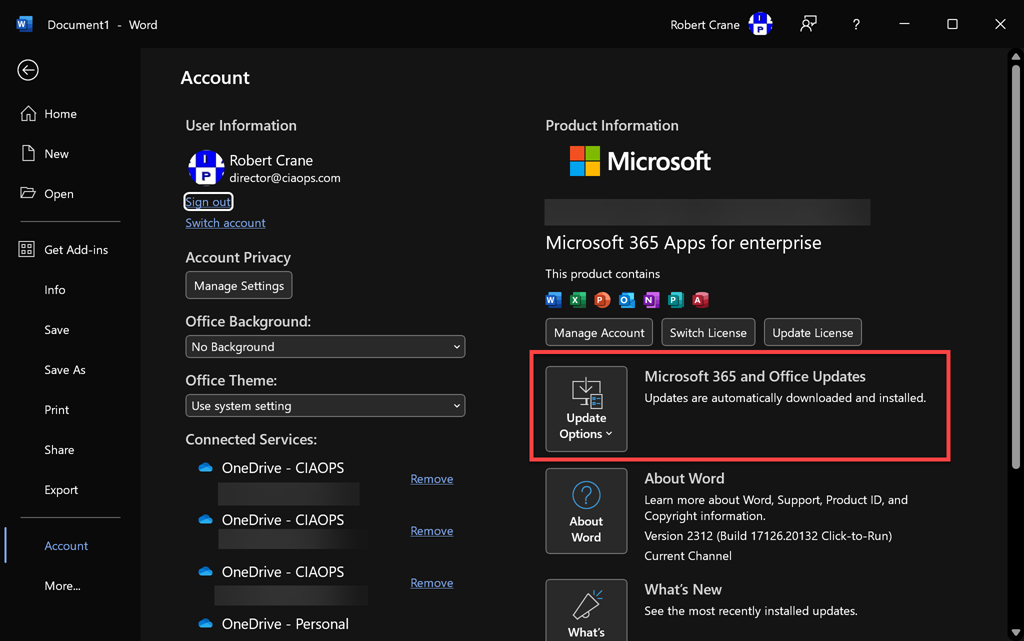
On the right, I’d suggest that ensure your application is up to date first by selecting the Update Options button as shown above.

image

Now select the the Update License button as shown.

image

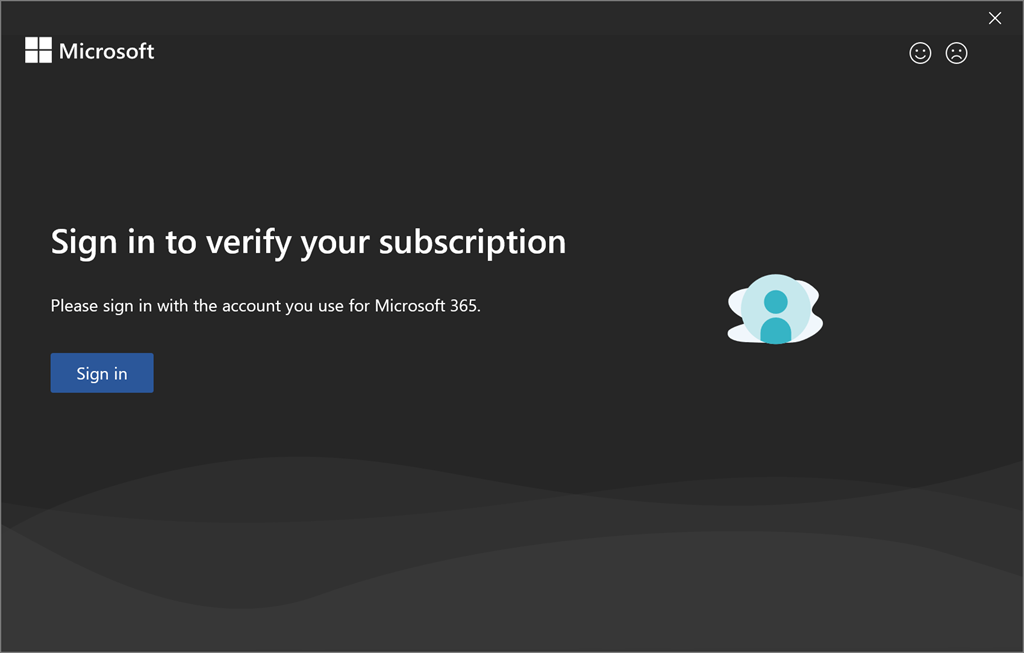
You’ll see the above dialog appear. Select Sign in and sign in using the account that has been assigned a Copilot for Microsoft 365 License.

image

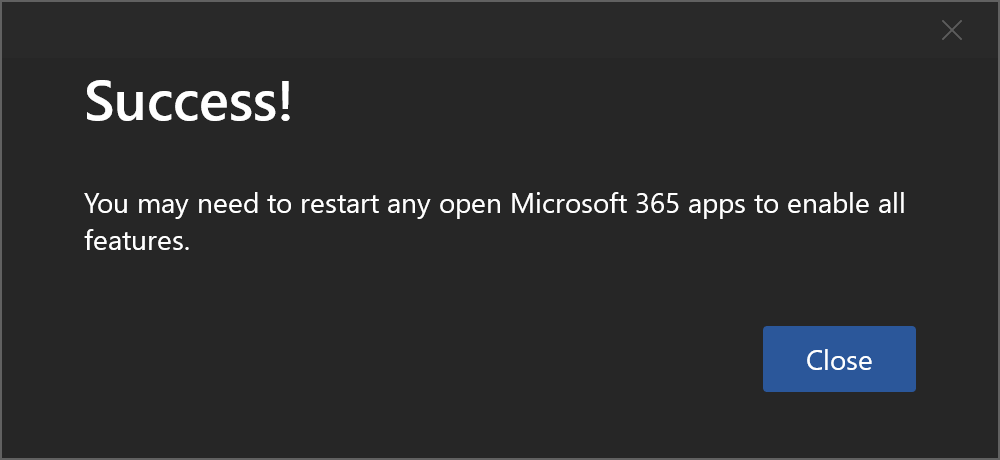
You should see the above message indicating the process is complete. Select Close.

Now, Close and re-open the application.

image

Now the Copilot button should be visible and because this is Word you will also see the Draft with Copilot dialog as shown above confirming everything is enabled.

Remember, you’ll need to do this individually for each desktop application: Word, Excel, PowerPoint, OneNote following the same process.

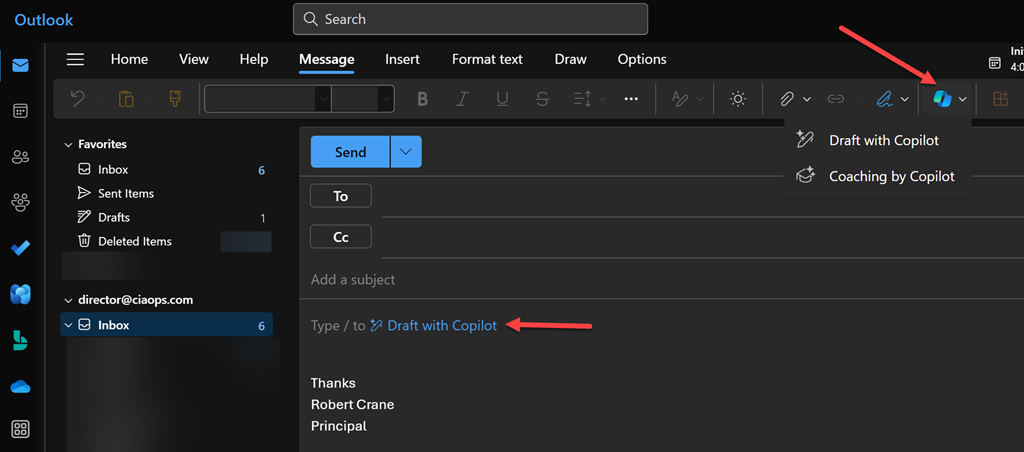
Things are bit different for Outlook and Teams.

image

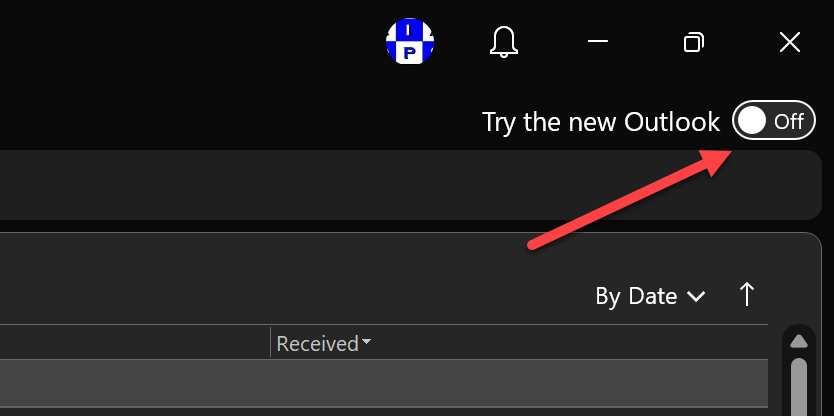
For Outlook you’ll need to switch over to the New Outlook by toggling the option in the top right corner of Outlook on the desktop as shown above.

image

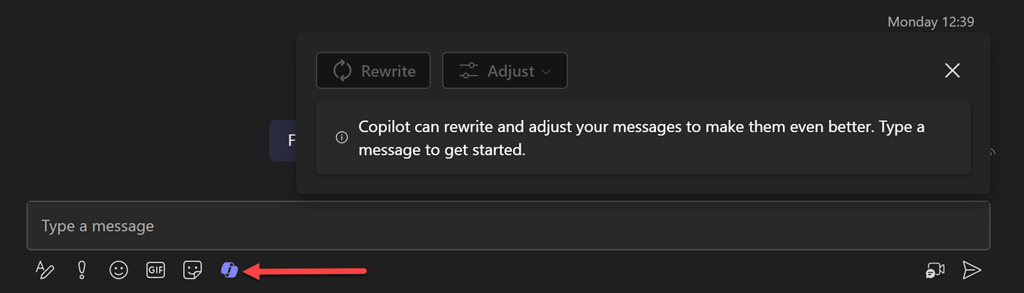
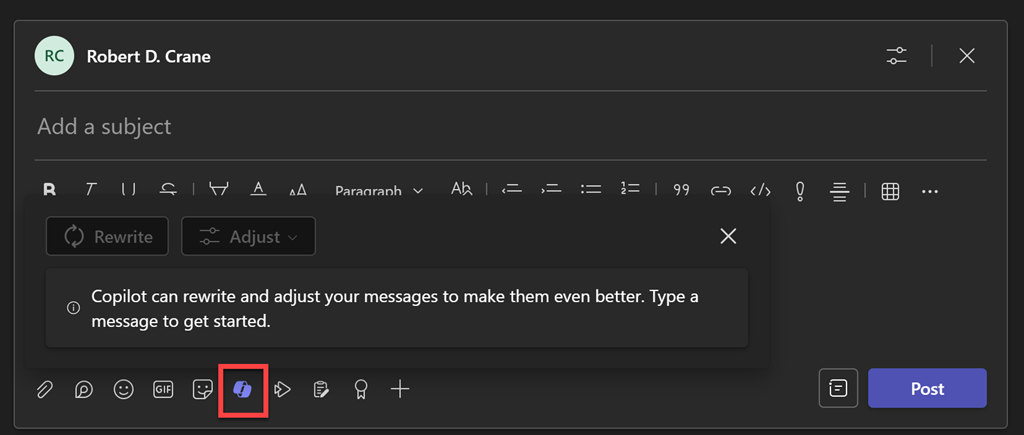
As for Teams, you’ll just need to Sign Out and then Sign in with the account that has Copilot assigned.

image

image

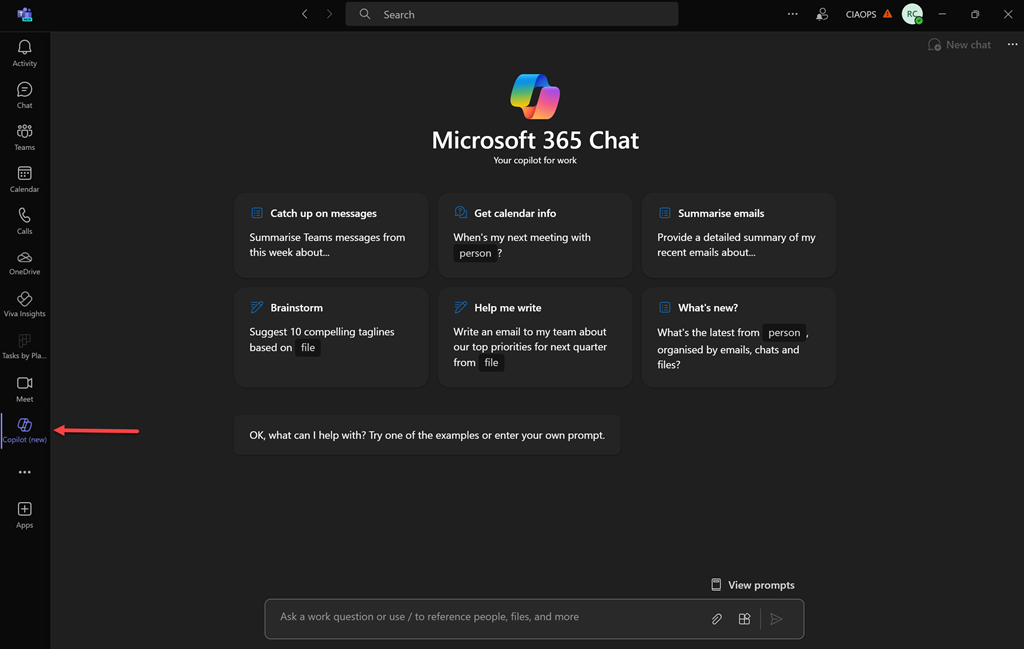
you can also add the Copilot app on the left menu bar.

image

which will allow you access to the original ChatGPT style interface:

image

Don’t forget you can pin this ‘app’ to menu bar as well by right clicking on it.

All this an it is only day one with Copilot for Microsoft 365. Much to come. Stay tuned.

CIA Brief 240113

image

Intune iOS/iPadOS Management In a Nutshell –

https://techcommunity.microsoft.com/t5/core-infrastructure-and-security/intune-ios-ipados-management-in-a-nutshell/ba-p/4015363

Introducing SharePoint Premium for IT Admins –

https://www.youtube.com/watch?v=HnqZYx_7tZA

Make any space a smart workplace with Microsoft Teams –

https://www.youtube.com/watch?v=Io4jXTtW5B4

Introducing Automatic File and URL (Detonation) Analysis –

https://techcommunity.microsoft.com/t5/microsoft-defender-threat/introducing-automatic-file-and-url-detonation-analysis/ba-p/4000489

Microsoft is named a Leader in the 2023 Gartner® Magic Quadrant™ for Endpoint Protection Platforms –

https://www.microsoft.com/en-us/security/blog/2024/01/12/microsoft-is-named-a-leader-in-the-2023-gartner-magic-quadrant-for-endpoint-protection-platforms/

Welcome to Business Assist –

https://www.youtube.com/watch?v=IFC0TTGMaRk

Microsoft Teams, the smart workplace for your frontline workers –

https://www.youtube.com/watch?v=YdWn5ShOqo8

Microsoft briefly overtakes Apple as world’s most valuable company –

https://www.reuters.com/technology/microsoft-overtakes-apple-worlds-most-valuable-company-2024-01-11/

New Windows 365 Boot and Switch features in public preview –

https://techcommunity.microsoft.com/t5/windows-it-pro-blog/new-windows-365-boot-and-switch-features-in-public-preview/ba-p/4027398

Experience Defender Experts above the fold –

https://techcommunity.microsoft.com/t5/microsoft-security-experts-blog/experience-defender-experts-above-the-fold/ba-p/4026320

Monthly news – January 2024 –

https://techcommunity.microsoft.com/t5/microsoft-defender-xdr-blog/monthly-news-january-2024/ba-p/4025630

SharePoint Premium and Content Management: 2023 in Review and What’s Next in 2024 –

https://techcommunity.microsoft.com/t5/sharepoint-premium-blog/sharepoint-premium-and-content-management-2023-in-review-and/ba-p/4024391

Microsoft 365 Admin Monthly Digest – Jan 2024 –

https://techcommunity.microsoft.com/t5/microsoft-365-blog/microsoft-365-admin-monthly-digest-jan-2024/ba-p/4024956

Become a Microsoft Unified SOC Platform Ninja –

https://techcommunity.microsoft.com/t5/microsoft-sentinel-blog/become-a-microsoft-unified-soc-platform-ninja/ba-p/4014565

Microsoft, Palo Alto and other security leaders make 2024 AI security predictions –

https://www.sdxcentral.com/articles/feature/microsoft-palo-alto-and-other-security-leaders-make-2024-ai-security-predictions/2024/01/

How Microsoft Copilot for Microsoft 365 works –

https://www.youtube.com/watch?v=XJsf0Tpz0ho&list=PLXtHYVsvn_b_t2dNsM86jUHpzlL0RlCF8

Onboarding Intune Managed iOS User Enrollment Devices to Microsoft Defender for Endpoint –

https://techcommunity.microsoft.com/t5/core-infrastructure-and-security/onboarding-intune-managed-ios-user-enrollment-devices-to/ba-p/4020858

Build customer relationships with Microsoft 365 for business –

https://www.youtube.com/watch?v=UtZ5hOxU3Z8

Stand out from the competition with Microsoft 365 for business –

https://www.youtube.com/watch?v=EaL1YUUQIUs

After hours

My kinda Copilot –

https://www.youtube.com/watch?v=NI_BCS-Wisk

Editorial

If you found this valuable, the I’d appreciate a ‘like’ or perhaps a donation at https://ko-fi.com/ciaops. This helps me know that people enjoy what I have created and provides resources to allow me to create more content. If you have any feedback or suggestions around this, I’m all ears. You can also find me via email director@ciaops.com and on X (Twitter) at https://www.twitter.com/directorcia.

If you want to be part of a dedicated Microsoft Cloud community with information and interactions daily, then consider becoming a CIAOPS Patron – www.ciaopspatron.com.

Watch out for the next CIA Brief next week.

My Tech Books – 2024

Tech is as much a lifestyle choice these days as it is a career. The geeks and nerds have risen to rule the world. Don’t believe me? Ask Bill Gates and Elon Musk! Sometimes it is good to step back and take a wide look at how technology has changed the world we live in – for better and worse.

To see my list from last year visit – My Tech Books 2023

My selections below, both fiction and non fiction, I have found to be enjoyable and thought provoking in many different ways and I recommend them to everyone who is interested in tech.

Mentions from 2022

Doom Guy: Life in First Person – John Romero

Pegasus: How a spy in your pocket threatens the End of privacy, dignity and democracy – Laurent Richard

Tracers in the Dark: The global hunt for the Crime Lords of Cryptocurrency – Andy Greenberg

You can follow all the books, tech, business, non-fiction, etc that I read over at Goodreads. You can view my activity here:

https://www.goodreads.com/director_cia

1. Daemon – Daniel Suarez [Fiction]

A glimpse into the future of where drones and augmented reality may take us. That may not necessarily be a good place either.

2. Freedom TM – Daniel Suarez [Fiction]

A follow up to Daemon. What happens when technology dominates the world? Who benefits?

3. Ready Player One – Ernest Cline [Fiction]

Much like the Matrix. What is life like if you live inside the machine? You can be just about anyone you choose. I also love this book for all the retro technology that was part of my life. TRS-80 anyone? This book has become so popular that there is now a movie. Believe me, the book is better.

4. Sandworm: A New Era of Cyberwar and the Hunt for the Kremlin’s Most Dangerous Hackers – Andy Greenberg [Non-Fiction]

This is a great book if you are interested in IT security. It is also a very current book which makes it even more engrossing. It is easy to read and quite comprehensive in its approach, not only dealing with the technology of security attack but also the geopolitical reasons and consequences.

It reveals that shadow world of nation state cyber attacks and illustrates how they are happening today and likely to increase in the future. The connected world of the Internet has brought us many benefits but it is now increasing risks as our dependencies increase to the point that there are few manual backups that don’t depend on technology.

I think this book is a real glimpse into the future and what we may be in store for in the even of rising global conflicts. If you like tech, you’ll love this!

5. Future Crimes: Inside the Digital Underground and the Battle for our Connected World – Marc Goodman [Non-fiction]

Technology will ultimately doom us all I believe because we are building our world on stuff that unfortunately places a low regard for security and privacy. This book will show you why that is a road to ruination.

6. Countdown to Zero Day: Stuxnet and the Launch of the World’s First Digital Weapon – Kim Zetter [Non-Fiction]

If you don’t believe cyber warfare is real then read this book to understand how software is now a weapon as potentially devastating as any nuclear device.

7. Beyond Fear: Thinking Sensibly about Security in an Uncertain World – Bruce Schneier [Non-Fiction]

Security is important but it is important in context. We need to be rational when we consider our security not emotional. A great level headed approach to how we need to be secure.

8. American Kingpin: The Epic Hunt or the Criminal Mastermind Behind the Silk Road – Nick Bilton [Non-Fiction]

An amazingly detailed book on the rise and fall of Ross Ulbricht, the creator of the Silk Road web site. In here are asked to think about whether technology plays something more than a neutral role in today’s world.

9. The Cuckoos Egg – Clifford Stoll [Non-Fiction]

Before the Internet was in the public sphere it existed in the world of academia. This is the story of how one man’s search for the source of an accounting error uncovered something are more sinister.

10. This how they tell me the world ends: The cyberweapons arms race – Nicole Perlroth [Non-Fiction]

Highlights the challenges that society has created, mainly from its’ own doing and questions of how we go about fixing this so we don’t end causing infinite harm to both intended targets and unintended victims.

Defender for Office 365 Anti-phishing policies can protect externals as well!

image

My experience with most Microsoft 365 environments I see is that they fail to make use of all the features that are provided. None more so when it comes to security. For example, most people don’t seem to appreciate that the Defender for Office 365 (which is part of Business Premium) provides impersonation protection for internal AND external email addresses!  It just needs to be configured. The details are here:

Impersonation settings in anti-phishing policies in Microsoft Defender for Office 365

and as it says there:

You can use protected users to add internal and external sender email addresses to protect from impersonation.

but it is important to note:

User impersonation protection does not work if the sender and recipient have previously communicated via email. If the sender and recipient have never communicated via email, the message can be identified as an impersonation attempt.

This means, you want to get the configuration of important external email addresses in place as soon as possible so any impersonation against those users can be evaluated. It is too late to do after an internal user is communicating with a scam (impersonated) domain.

You will also see that you can also configure protection for external domains, rather than just specific email addresses, for impersonation evaluation.This means that if the users inside the tenant deal with an important business that has its own email email, that is NOT part of that tenant, you can enter that domain in here. Makes a lot sense when you are working with a business regularly that is doing stuff like invoicing, e-commerce or the like (honestly anything at all really).

Let’s say that I work with a business who’s domain is ciaops.com. By enabling this impersonation protection early, if users in the tenant receive email from c1aops.com then it is far more likely to be detected because the system is looking of for spoofing of that custom external domain I entered in the policy.

Thus, if you have Microsoft Defender for Office 365 in your environment (and you do if you have Microsoft 365 Business Premium), then you can provide an extra level of protection by configuring the Anti-Phishing policy for impersonation settings for both your important internal AND external usera and domains (i.e. people and businesses you work with regularly). You should do that as early as possible to provide the maximum protection the policy can provide. They key is that someone has to add in the unique email addresses or domains into the policy, they are not added automatically, even internal email address. They ALL have to be added to the policy.

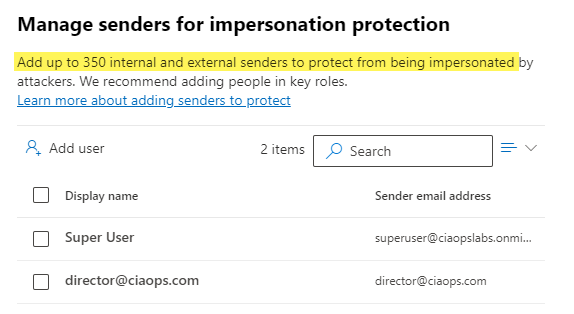
image

You can protect up to 350 unique email addresses and 50 unique domains, which is probably more that enough to cover everything a smaller business would need for internal and external users. Unfortunately, I rarely see this great capability enabled. It’s available if you have Microsoft Defender for Office 365 so go configure it and reduce the risk to the users in the tenant. Easy!

My podcasts 2024

desk-music-headphones-earphones

You can find the previous year’s selection here:

My podcasts 2023

I do spend a lot of time listening to podcasts, generally in between things, like travelling. However, there is a limit to how many you can consume in a week and that’s why I need to be very discerning about what I listen to.

Regulars

These podcasts are ones that I generally won’t miss an episode of.

Windows Weekly

The latest Microsoft news with some fun and entertainment along the way. Paul Thurrott’s musing make this podcast alone something worth listening to. I still miss Mary Jo Foley I will admit and the show just isn’t as good or enjoyable. It seems the new co-host in Richard Campbell really only talks about whiskey, which doesn’t interest me. Unfortunately, I’m find Windows Weekly to be much more ‘ranty’ than it used to be and largely just the Thurrott show.

The Tim Ferriss Show

Some really great advice, business insights and strategy. Also lots of life lessons that I have found work really well for me. A weekly must listen for me. Some, I do skip through and some can be quite tough to get through because they are so long, but a worthwhile investment of my time. I am finding these shows are getting longer and longer making them hard to squeeze in.

Hardcore History

These tend to be quite long, like reading a book, but a very good and very interesting. Luckily, they are not that frequent, so it can make a nice change from all the tech stuff. There hasn’t been much content here of late which is disappointing.

The Intrazone

All the latest news and information about SharePoint, OneDrive for Business, Teams and more directly from Microsoft. Pretty short, which makes it easy to consume. Can try a bit hard to be ‘fun’ at times but good way to stay up to date with the Microsoft collaboration news.

Sync Up

A podcast focused on the Microsoft files experience around OneDrive from Microsoft. More content has dropped but they seems to spend so much time at the beginning of the ‘learning’ about the guests and what do they like etc. I’d really prefer they just get into the content. I’m here for that not, not to take a deep dive into the personalities.

Darknet Diaries

Really well produced cybersecurity focused podcast. Has a nice variety of topics and the content is good and well researched. If you enjoy the security side of IT you’ll love these episodes. Seems to me that Jack has run out of content for these for the time being. recent episode have deviated away from main theme in my opinion. Less regular episodes and the topics are becoming broader, which isn’t necessarily a bad thing but the context has changed.

Once off podcasts

Think of these more of a book you’d read or a TV show you’d watch.

The Lazarus Heist

Another well produced podcast from the BBC that follows the trails of and attempt to steal and launder billions of dollars. Apparently, additional episodes are coming later this year. If you like Darknet Diaries, you’ll like this.

I churn through these mostly at 2x speed to allow me to get through as much content as possible. I do have a few other podcasts on my current podcasting app. I am always on the lookout for good podcasts business, technology, history, whatever. So if you can recommend something you like, I’m all ears. These days, if you have a topic of interested, you’ll find many podcasts you can listen to. Don’t be shy to try them and throw away ones that don’t suit you until you find what you like.

I’ve found that many podcasts have disappeared over the last year and I have been more judicious on what I spend my time listening to. It has to provide valuable information or be enjoyable to listen to and I have become much stricter on those criteria. I have a tried quite a few new podcast in the last year but none of them really stood up to my requirements.

Finally, of course, there is my own podcasting effort:

Need to Know podcast

which covers the Microsoft Cloud (typically Microsoft 365 and Azure) as well as business topics. I encourage you to have a listen and me know what you think. 2024 will be the fourteenth year that it has been available.

Hopefully, there is something of interest to you in what I listen to. Feel free to let me know as well as any recommendations you may have, as I said, I’m all ears!

On a side note, my preferred podcast app Castro has just died it seems, so now I’m the extended process of finding a replacement, which is proving painful.