
Here’s a handy way to get a list of attendees in Microsoft Teams using PowerShell. I have uploaded the script to do this here:
https://github.com/directorcia/Office365/blob/master/tms-attend-get.ps1
Before you run the script you’ll need to have the Graph PowerShell module installed.

You’ll also need to set some variable values for your own environment in the script. You can do this by locating $tenantid in the script as shown above, and setting that to your own tenant URL. Then find $meetingjoinurl and set that to the URL for that meeting. Finally, set $useremail to the email address of the user who created the meeting.
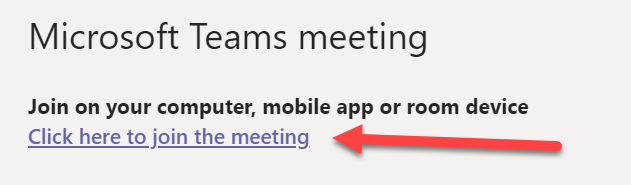
The meeting URL is the link people selected to join the meeting as shown above. You’ll also find it in the configuration for the meeting.

With all those settings updated, when you run the script it should look something like shown above. The script will connect to the Microsoft Graph with the scopes required to read the meeting details. You may be requested to login to the tenant and then potentially consent to these scopes during the connection phase. The required scopes are:
OnlineMeetingArtifact.Read.All
OnlineMeetings.Read
The script will get the GUID of the creator of the meeting from the email you specified followed by the meeting id from the meeting join link you specified, then the report id for that meeting and finally the report details for the meeting. It will then display the email address (if recorded) of attendees as shown above.
Of course, you can just download the CSV meeting report from the Teams page I know, but this process will be first step in eventually using Power Automate to get meeting attendees and send them an automatic follow up after the meeting. Stay tuned for details on that coming soon. This is simply proof of concept and a handy option if you do indeed just want to use PowerShell to get a list of meeting attendees.
 CIAOPS
Script does not work as written. I have the graph powershell module installed and it does not recognize the cmdlets used to run the script. If you come up with a working version of this please let me know as I have a great need for this.
LikeLike
Perhaps if you provide the error messages I can help?
LikeLike
I have just verified that the script does in fact work as expected. Ensure you are changing the variable items at the top of the to include the right tenant. Meeting id and user name. I have removed one line that did error but it works as expected.
LikeLike
When I run the script I get the below error. Can you assist.
$username = “username@domain”
$password = Get-Content “C:testtest.txt” | ConvertTo-SecureString
$cred = New-Object system.management.automation.pscredential -ArgumentList $username, $password
Connect-ExchangeOnline -Credential $cred
Connect-MsolService -Credential $cred
$Company = Get-MsolCompanyInformation | select -exp DisplayName
$InitialDomain = Get-MsolCompanyInformation | select -exp InitialDomain
$host.ui.RawUI.WindowTitle = “You are connected to: ” + $Company + ” (” + $InitialDomain + “) “
$Result=@()
$groups = Get-DistributionGroup -resultsize Unlimited | fl PrimarySMTPAddress
$totalmbx = $groups.Count
$i = 1
$groups | ForEach-Object {
Write-Progress -activity “Processing $_.DisplayName” -status “$i out of $totalmbx completed”
$group = $_
$Result += New-Object PSObject -property @{
GroupName = $group.DisplayName
Member = $member.Name
EmailAddress = $member.PrimarySMTPAddress
RecipientType= $member.RecipientType
}}
$i++}
$Result | Export-CSV “C:testAll-Distribution-Group-Members.csv” -NoTypeInformation
Get-DistributionGroupMember : Cannot bind argument to parameter ‘Identity’ because it is null.
At line:8 char:39
+ Get-DistributionGroupMember -Identity $group.Name -ResultSize Unlimit …
+ ~~~~~~~~~~~
+ CategoryInfo : InvalidData: (:) [Get-DistributionGroupMember], ParameterBindingValidationException
+ FullyQualifiedErrorId : ParameterArgumentValidationErrorNullNotAllowed,Get-DistributionGroupMember
LikeLike
Sorry copied wrong script.
LikeLike
This is the result of the script. Just to confirm where are you pulling the $tenanid from? What I call the tenant ID is a numerical value and can be found under properties in AAD. I did change the $ values as expected and got the below values.
Get Teams meeting attendees – start script
Connect to the Microsoft Graph
Get meeting creator GUID
Get meeting id
Get-MgUserOnlineMeeting : Could not load file or assembly ‘Microsoft.Graph.Authentication, Version=2.22.0.0,
Culture=neutral, PublicKeyToken=31bf3856ad364e35′ or one of its dependencies. The system cannot find the file
specified.
At line:48 char:1
~~~~~~~~~~~~~~~~~Get meeting report id
Get-MgUserOnlineMeetingAttendanceReport : Cannot bind argument to parameter ‘OnlineMeetingId’ because it is an empty
string.
At line:52 char:72
~~ception
eport
Get meeting report details
Get-MgUserOnlineMeetingAttendanceReportAttendanceRecord : Cannot bind argument to parameter ‘OnlineMeetingId’ because
it is an empty string.
At line:56 char:100
~~n
eportAttendanceRecord
Meeting attendees
Get Teams meeting attendees – end script
PS C:Usersthomj005Desktop>
LikeLike
For the tenantId I used the onmicrosoft.com value – $tenantid = “tenant.onmicrosoft.com”
LikeLike
Seems to me that you $meetingjoinurl is not correct. It needs to be in the format of what is in the code and unique for your meeting. From what I see at my end the script works and suggest the line with Get-MgUserOnlineMeeting is where the issue lies for you. I suggest you verify your $meetingjoinurl is the right format. The initial error is telling me that the command can’t find your meeting which suggest the URL is not correct. Just to confirm that script does indeed work here fine with the correct parameters.
LikeLike
I have triple checked the URL, verified that the meeting shows up in the admin center, used the URL to get into the meeting directly. I will paste the exact script I am using below this comment. If I am in error on anything please let me know.
$meetingjoinurl = ‘https://teams.microsoft.com/l/meetup-join/19%3ameeting_NmU3YmVhZmUtMDk4YS00N2EyLTk2NWItMzU2NTJiN2JkYTkw%40thread.v2/0?context=%7b%22Tid%22%3a%226a45ebac-e6aa-4731-95c0-610a9e2cdf00%22%2c%22Oid%22%3a%224c326529-9f1b-44df-ba65-f4016866ec7f%22%7d’SCROLLLOCK
LikeLike
## Variables
LikeLike
I am starting to think it has to do with the first error:
Get-MgUserOnlineMeeting : Could not load file or assembly ‘Microsoft.Graph.Authentication, Version=2.22.0.0,
Culture=neutral, PublicKeyToken=31bf3856ad364e35′ or one of its dependencies. The system cannot find the file
specified.
At line:48 char:1
~~~~~~~~~~~~~~~~~I have it installed but does not seem to be loading
PS C:Usersthomj005Desktop> Get-Module *graph -ListAvailable
Directory: C:Program FilesWindowsPowerShellModulesModuleType Version Name ExportedCommands
———- ——- —- —————-
Manifest 2.22.0 Microsoft.Graph
Manifest 2.21.1 Microsoft.Graph
LikeLike
Video walk through – https://www.youtube.com/watch?v=M0GBzGT3Igk
LikeLike