New Intune connection PowerShell script

image

I’ve uploaded a new connection to Intune script that is freely available on my Github repository. You’ll find it here:

https://github.com/directorcia/Office365/blob/master/Intune-connect.ps1

image

Once it has been run you can run commands like:

get-autopilotprofile

as shown above.

To allow this script to operate correctly you’ll need the following two modules installed:

WindowsAutoPilotIntune

and

Microsoft.Graph.Intune

Both of these will be installed as part of my o365-setup.ps1 and o365-update.ps1 scripts, which are also freely available.

image

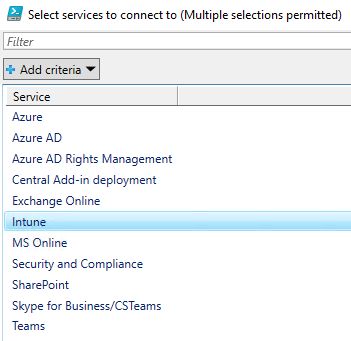
I’ve also added this Intune connection script to the connection selector script (c.ps1) in the same repository.

image

When intune-connect.ps1 runs you’ll be prompted for your credentials as normal.

image

Then you password and MFA if required.

image

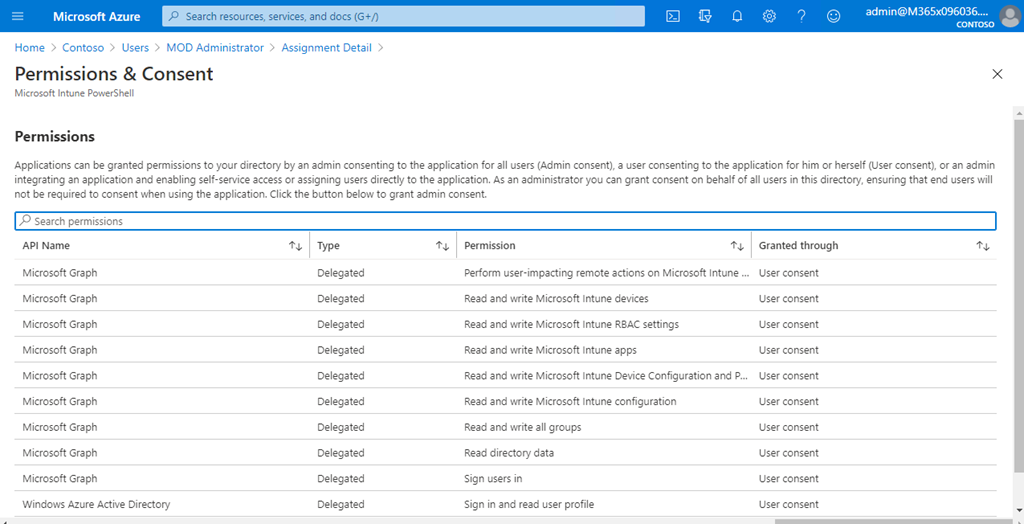
Because connection to Intune via PowerShell now uses the Microsoft Graph, you’ll need to allow the above permissions as shown once.

SNAGHTML95fe247f

You’ll find those permissions, when you accepted them, in Azure AD, User, Applications as shown above inside the Azure portal. In there will be an application called Microsoft Intune PowerShell as shown above.

image

If you select that Microsoft Intune PowerShell and scroll down to the bottom of the screen that is displayed, you can select a link View granted permissions as shown above.

image

You will then see all the permission granted to that user for accessing the Graph. You can also remove these if you ever want to as well here.

Having access to Intune and Autopilot via PowerShell will make automating device management much easier.

My Business Books – 2021

Check out my recommendations from last year:

My Business Books – 2020

Honourable mentions that I read last year:

– Indistractable: How to Control Your Attention and Choose Your Life – Nir Eyal, Julie Li

– Mastery – Robert Greene

– Atomic Habits: An Easy & Proven Way to Build Good Habits & Break Bad Ones – James Clear

– Thinking in Bets: Making Smarter Decisions When You Don’t Have All the Facts – Annie Duke

You can follow all the books I read and want to read over at Goodreads where I have an account. You can also view my activity via:

https://www.goodreads.com/director_cia

Here’s my current top business books in order:

1. The Art of War – Sun Tzu

The all time classic on strategy. As relevant today as it ever was. A very short read but very deep.

2. The Millionaire Fastlane – M.J. DeMarco

I love the brutal honesty of this book. It doesn’t mince words about what it takes to shift from a pay check to actually living the life you want.

3. The Tipping Point – Malcolm Gladwell

The world is all about not what you know but who you know. This book explains exactly how this works and how to use it to your advantage.

4. The Four Hour Work Week – Tim Ferriss

Many people believe this book is about shirking responsibility. It is in fact a blueprint for how to free up your time to do things you want and enjoy. It will challenge the way you look at your career.

5. Secrets of the Millionaire Mind: Mastering the Inner Game of Wealth – T. Harv Eker

The successful are defined by a different mindset. This mindset can be learned. It can be trained. This is a great book to show you how to do just that.

6. Talent is over rated: What Really Separates World-Class Performers from Everyone Else – Geoff Colvin

Demonstrates that the best comes from implementing a system. Having a system allows you to focus on the right thing and do that work that is required. If you want to take yourself to an elite level, beyond just good, then read this book.

7. Book Yourself Solid: The Fastest, Easiest, and Most Reliable System for Getting More Clients Than You Can Handle Even If You Hate Marketing and Selling – Michael Port, Tim Sanders

You can’t survive in business without a steady flow of customers. Selling to people is the wrong approach, you instead need to attract them to your business. This book helps you achieve exactly that.

8. Profit First: A Simple System To Transform Any Business From A Cash-Eating Monster To A Money-Making Machine – Mike Michalowicz

Business is about making a profit. This then gives you the freedom to do what you want with that profit. This book helps you focus on profit and setting up systems to make the most of the profit you generate.

9. Barking Up the Wrong Tree – Eric Barker

Conventional wisdom does not always apply and in some case can actually be detrimental. Challenging what is taken for granted should be in the play book of everyone who wants to achieve at the highest level. Important lessons can be learned in the strangest places and form the strangest people. Have an open mind and you might be surprised at what you have believed to be bad in fact turns out to get just what you need.

10. Unbeatable Mind: Forge Resiliency and Mental Toughness to Succeed at an Elite Level – Mark Divine

Another mindset book. Business is not always going to be easy or take the intended route. This is when you need to have the determination to see your plans through to success. This book shows you how to develop the mental toughness to make this happen.

11. Mastery – Robert Green

Excellent read with lots of great strategies to take away. Excellence is not a talent it is a skill. That means that it takes hard work to achieve, but hard work is available to everyone, yet few choose the path. There is no secret to Excellence, it is something only time and effort will reward you with and iof you choose that path you’ll be one of the few.

12. Tools of Titans – Tim Ferriss

There are few books that take the learnings for so many exceptional people and puts them at your fingertips. This is one such book that packs a lot of business and life learnings between the covers.

13. Predictably irrational: The Hidden Forces that Shape our Decisions – Dan Ariley

Although we like to think logic and rationality rule our world emotion is by far the more powerful influence. Understand this in the context of business and you are well on your way to understanding why people make the decisions they do and how to best profit from them.

14. Extreme Ownership – Jocko Willink and Lief Babin

Moving beyond blame is tough. This book illustrates the ownership of the problem and the environment is a key to success in the military or in business. It is a path few will elect to take voluntarily, however more may do so after reading this.

15. Peak Performance: Elevate your game, avoid burnout and thrive with the science of success – Brad Stulberg

Success is largely about developing a winning system. This book show you how to approach that pragmatically. If you want to see results use this book to help you build the system.

16. Blink: The Power of Thinking Without Thinking – Malcolm Gladwell

The older you get the more experience you get. This experience is aggregated in your ‘gut feel’. Trusting your ‘gut’ may not appear rational but this book will help you understand why it is in fact your best option in many cases.

17. The Now Habit: A Strategic Program for Overcoming Procrastination and Enjoying Guilt-Free Play – Neil A. Fiore

Plenty of great productivity learnings in here that help you take action. It shows you how to focus on the right stuff in the right priority. Even if you are not a major procrastinator there is plenty in this book that you can take away.

18. The One Thing – Gary Keller

Multi-tasking is a myth. Focus is the key to success to bringing all your resources to bear in unison makes a hell of a lot of difference. Most people can’t do it, so those that can stand a much greater chance of success.

19. Deep Work – Cal Newport

Distractions are wasted energy and time that you’ll never get back. You’d be amazed at how distracting the modern world is. If you can minimise these distractions you can focus more and be far more productive.

20. The E-Myth – Michael Gerber

The classic on ‘procedurising’ your business and creating a structure that doesn’t need you to survive. The simple secrets inside this book can transform any business from hardship to joy.

Let me know what you think. Do these work for you? What’s your top business reads? I’d love to hear.

CIAOPS Need to Know Microsoft 365 Webinar–January

laptop-eyes-technology-computer

We’re back for 2021 and for January we are going to cover a topic which remains a mystery to many – PowerShell. I’ll show you how to quickly set up PowerShell to use with Microsoft 365 and some handy things that you can do with it to make your life easy through automation. I’ll also have the latest news from Microsoft and as always there will be time for your questions.

You can register for the regular monthly webinar here:

January Webinar Registrations

The details are:

CIAOPS Need to Know Webinar – January 2021
Friday 29th of January 2021
11.00am – 12.00am Sydney Time

All sessions are recorded and posted to the CIAOPS Academy.

The CIAOPS Need to Know Webinars are free to attend but if you want to receive the recording of the session you need to sign up as a CIAOPS patron which you can do here:

http://www.ciaopspatron.com

or purchase them individually at:

http://www.ciaopsacademy.com/

Also feel free at any stage to email me directly via director@ciaops.com with your webinar topic suggestions.

I’d also appreciate you sharing information about this webinar with anyone you feel may benefit from the session and I look forward to seeing you there.

Enabling Play my emails on iOS

Play your emails on iOS has been with us for a while now. My experience is however that most documentation doesn’t tell you how to actually enable this if it is not already on.

To do so, ensure you have a Bluetooth connection to your iOS device. That could be a wireless headset or in your car.

image

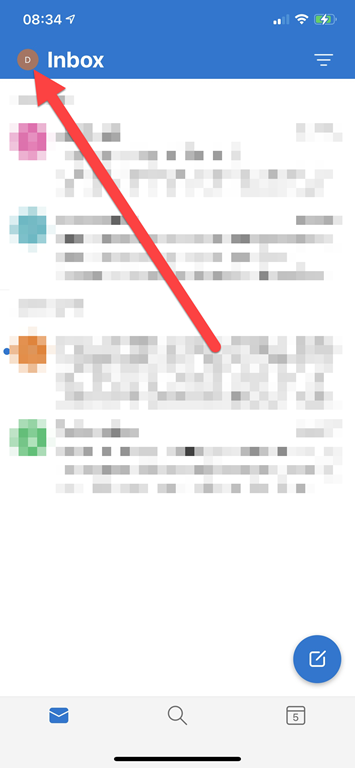
Click the icon in the very top right of you Outlook app once it is open as shown above.

image

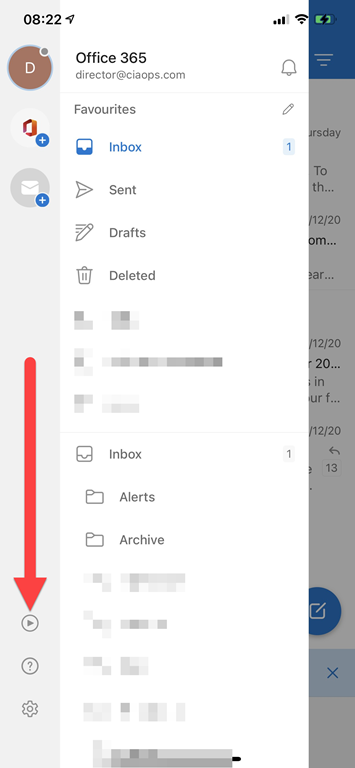
That should display the ‘back stage’ as shown above. Select the Play button on the left hand side towards the bottom as shown.

file

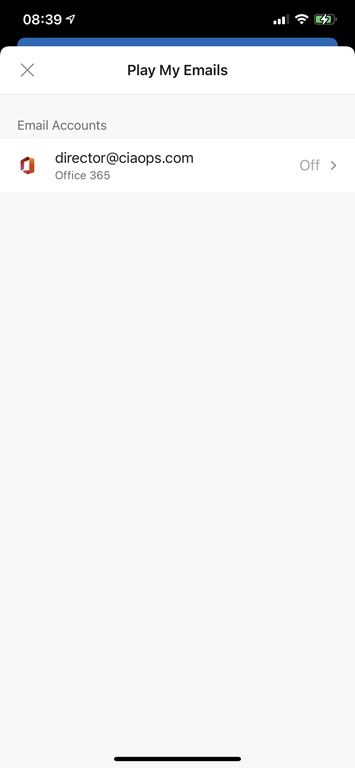
If the setting is Off then switch it On.

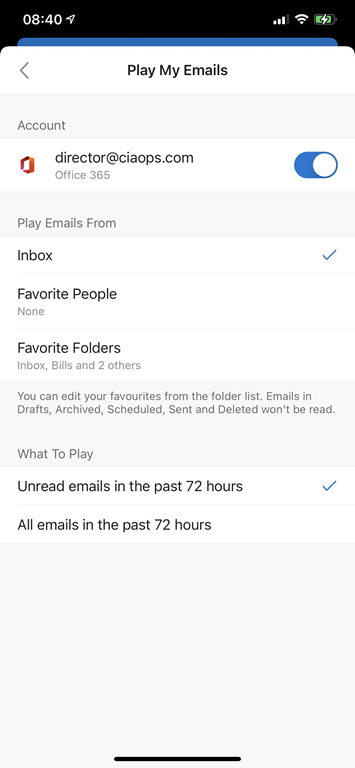
image

You can now make any adjustments to your configuration.

image

If you return to ‘back stage’ of the app and press the same Play button Cortana will appear and you’ll be able to have your emails read to you.

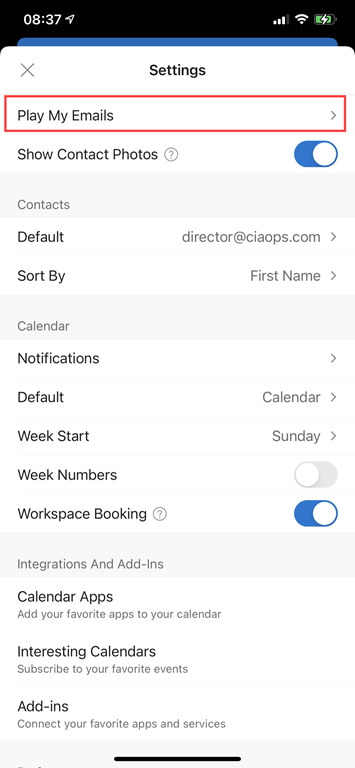
image

You can get back to the Play My Email configuration at anytime now via the app settings as shown above.

For more details on Play My Email in Outlook see:

Recovering a Deleted Stand Alone SharePoint site

Recovering a deleted stand alone SharePoint using the admin center is quick and easy. You’ll be able to do for up to 93 days after you delete the site. If you do delete a SharePoint site using the admin center be careful that it isn’t connected to other shared resources like Microsoft Teams. if it is, then use the recommended process for removing the whole Microsoft Team not just the SharePoint.

The above will will show the process of identifying a stand alone SharePoint site, the various ways that you can delete it using the web interface and the how to restore it. Remember, you have up to 93 days to do this if you need to but you can also immediately purge the site if you need to reclaim storage space as well. It is all pretty simple and the video will run you through that process.

Using a Microsoft Template for a new SharePoint Online site

It is now super  easy to add a really classy template to your SharePoint Site Collection, to make creating a high impact and engaging site really easy. All you need to do is firstly login to your Microsoft 365 environment as a global administrator and then visit:

https://lookbook.microsoft.com

Next, just select the template that you like and press the button to add it to your tenant. In less than five minutes you’ll have a stunning starting point for your collaboration site.

If you want to see that in action just watch the above video.

My Apps 2021

pexels-mohi-syed-50614

I am still not a big app user. I am very careful and selective about what I install on my device. Less is definitely more for me.

To see what I was using at the beginning of last year check out the article:

My Apps – 2020

My daily driver when it comes to a phone is an iPhone currently but I also have a Google Pixel as a backup. The other device that I use apps on is my iPad mini.

My most used apps on mobile devices over the last year were:

Castro on iOS to listen to all my podcasts on iOS.

Lastpass password manager and authenticator. for general password management.

Microsoft Authenticator – I use this for a number of select web sites as well as Microsoft 365.

Car Play – Connects to my daily drive to provide the ability to listen to podcasts as well as use Waze for navigation. Gotta say that it isn’t nearly as good as Android auto in my experience. However, since I’m spending an extended time in the Apple ecosystem I’ll be stick with this.

OneNote – is a must on every device I own. Syncs all my notes to every device. Allows me to not only truly have my information everywhere I am but also capture information quickly and easily.

OneDrive – This mobile app now not only allows me to manage my Microsoft 365 files but it also incorporates the more advanced Office Lens technology that scans and uploads, documents, whiteboards, etc.

Tripview – One of the few apps that I have happily paid for. I use this to let me know the Sydney train schedule to help me get around when I need to negotiate the ‘real world’. Although not much travel is happening at the moment, this app is super handy for negotiating local public transport.

Audible – If I can’t read my Kindle then I can normally always listen. This app allows me to listen to my audio books where ever I am. This and Castro on iOS are probably the most used applications on my devices.

Amazon Kindle – If I don’t have access to my Kindle then I can still read my books. In my case that will most likely be on my iPad. I also use the Kindle app on the iPad when the ebook has a lot of images that sometime don’t display well or are too small for the Kindle device.

The following as currently only iOS:

Oak – For mindfulness, breathing and meditation.

Zero – For fasting.

Rode Reporter – which I use for recording many of my presentations when I am out on the road, which ain’t so much these days but still a handy app to have.

Of course I have all the social media apps, such as Twitter, Linkedin and Facebook on my devices.

I also have all the Microsoft/Office 365 apps. The ones I use the most are probably To-Do, Outlook, SharePoint, OneDrive, Teams and Yammer, although Word and Excel also get used regularly. Just about every Microsoft Office 365 service has an app that you should have on your mobile device. On my Android I am also using Edge as the primary browser along with the new Edge Insider. I also have the Brave browser on my devices as do not use Chrome at all.

I’ve also added the Intune app to all my devices so they can be better managed.

I use the Microsoft Next Lock Screen on my Android device.

Some occasional ones I use include:

Get Pocket

Duolingo

– Uber

– Amazon music

I use the normal personal apps for things like Internet banking and so on. I also use Blockfolio for monitoring cryptocurrency. For casual entertainment and general interest I also have Minecraft Earth installed but really don’t use it much.

One my iPad, which also serves as a personal entertainment device, I have the streaming services Netflix and Amazon Prime Video.

The above are my used apps across my various mobile devices. My aim to try and keep the app standard across all the devices and as few as possible. I try and standardise as much as possible to use the Microsoft apps on all platforms. I certainly use a wide variety of apps on my devices by prefer the desktop versions if available simply because my finger are too fat and my patience too short to be productive for long stints on mobile devices. My kingdom, my kingdom for a full keyboard and screen I cry.