Need to Know podcast–Episode 230

We welcome back our co-host, Brenton Johnson, after his extended break. We catch up on all the news and events from the Microsoft Cloud. This is followed by an interview with Dave Sobel from MSPRadio.com taking about the transformation that many MSPs need to address to continue success in the light of the constantly changing cloud landscape.

This episode was recorded using Microsoft Teams and produced with Camtasia 2019

ake a listen and let us know what you think – feedback@needtoknow.cloud

You can listen directly to this episode at:

https://ciaops.podbean.com/e/episode-230-dave-sobel/

Subscribe via iTunes at:

https://itunes.apple.com/au/podcast/ciaops-need-to-know-podcasts/id406891445?mt=2

The podcast is also available on Stitcher at:

http://www.stitcher.com/podcast/ciaops/need-to-know-podcast?refid=stpr

Don’t forget to give the show a rating as well as send us any feedback or suggestions you may have for the show.

Resources

@mspradionews

@contactbrenton

@directorcia

Bye, bye basic auth

Updates to Threat Protection Reports

Microsoft’s Surface success

Microsoft’s failure to renew SSL certificates

User enrollment in Intune

Training modules for IT Pros

Introducing Conditional Access for Office 365

SharePoint next steps

Need to Know podcast–Episode 229

FAQ podcasts are shorter and more focused on a particular topic. In this episode I’ll talk about thehow you should be implementing Azure with every Microsoft 365 environment you create.

Take a listen and let us know what you think – feedback@needtoknow.cloud

You can listen directly to this episode at:

https://ciaops.podbean.com/e/episode-229-deploy-microsoft-365-and-azure-together/

Subscribe via iTunes at:

https://itunes.apple.com/au/podcast/ciaops-need-to-know-podcasts/id406891445?mt=2

The podcast is also available on Stitcher at:

http://www.stitcher.com/podcast/ciaops/need-to-know-podcast?refid=stpr

Don’t forget to give the show a rating as well as send us any feedback or suggestions you may have for the show.

Resources

FAQ 5 – FAQ 5 – Deploy Microsoft 365 and Azure together

CIAOPS Patron Community

Tell me your target audience

black-board-bright-bullseye-226569

One of the things I like to probe business owners about starts with the following statement, “Tell me your target audience and I’ll tell you about your business” because it generates some interesting replies.

In the majority of cases the reply goes something like this “Well, we work with accountants, lawyers, builders, schools, mechanics etc, etc”. It largely boils down to the fact that they will work with anyone who might pay them. In short there are simply too many targets, which means, there is no target. It means they are spraying their precious resources in multiple directions, typically in a hap-hazard way with poor results.

These style of responses indicate that the business in question lacks focus. You would think that the first thing that any business should get straight is who their target customers are. Don’t believe me? Next time you see a tradie van on the streets, take a look at what it actually says. Ones I have seen recently include “Commercial and domestic cleaners” and “Cleaners and exterminators”. If you have a think about both of these, they are pretty divergent in their target markets aren’t they? How can a business honestly say that they can do both of these tasks well? They are saying that they are both the same aren’t they which I sure the customers of either demographic would strongly disagree with. How can they say that they have invested in ensuring that they do those tasks better than anyone else on the market? They haven’t. They are broadening their aim in the hope of hitting revenue. Hope is not a strategy.

As the saying goes, “if you plan to be everything to everyone, then you are nothing to no one”. In short, you are a commodity and a commodity is not something a smaller business wants to be. Being divergent with your target market is something your customers soon being to learn about your business. They learn that you are not focused on their needs, you have divided attention, little real desire to go deep with the business needs. You largely see them as a source of revenue and the desire to maintain only a shallow relationship with That then gets returned in kind as customers screw their suppliers for every dollar they can and look to take every advantage of whatever is on offer. Soon the whole relationship becomes about ‘what’s in it for me’ from both sides.

A target should be exactly that, something you aim for. It should be something you can show easily. The target is never the outer ring of a dart board now is it? The bit most people are trying to hit on the dart board is the really small bit in the center! A defined target allows you to judge how close you are to your goal. Of course, you have to define your own unique bull’s eye first. So, if your target market is accountants and you come across an opportunity that involves lawyers, you now have an idea how far away from your target that is. Just because it isn’t your precise target doesn’t mean you shouldn’t consider the opportunity. However, having a target allows you to more easily evaluate how much additional work and effort maybe required and the diversion from your current focus it will demand. This allows you to make much more informed and pragmatic business decisions about that opportunity. Will it really generate the profit to justify its distance from the bull’s eye? Unfortunately, most don’t have a defined target and make decisions based purely on perceived revenue, which generally never turns out to be.

We have all experienced companies that are very focused on their customers and others that aren’t. This fact is most evident to me in restaurants. Some have very attentive and helpful wait staff that return regularly to see if there is anything further they can do. Others have staff that is next to impossible to get attention from, have their backs turned to you so they can’t see you and so on. I return to the places that provide me good service and are attentive to my needs and tell others NOT to go to other places AS WELL AS never returning there! Double whammy!

You can’t provide good customer service without knowing your customer intimately. This means a focus on understanding what their needs are so they can be serviced. Yes, this requires and investment of time. Yes, this requires an ongoing discipline to remain focused. It is far easier to maintain focus with a system. The system doesn’t have to be complicated. Define a target and then measure the opportunities from this target. Make decisions based on that not random acceptance of what you come across. That rarely results in business synergy.

Start your discovery of the importance of having a very focused target market by asking your peers or other businesses who they consider their target markets to be. Listen closely and you’ll soon discover what their business is really likely to be based on who they focus on. The broader the focus the less effort has been invested in finding the right customers. Then, take that learnings into your own business and don’t make the same mistake that most businesses make in believing that revenue is the same as profit. It ain’t!

Need to Know Podcast–Episode 228

No Brenton still but that doesn’t stop me bringing you the Microsoft Cloud news. For Brenton fans you’ll still hear him with the interview of Lorenzo Coppa about Gluh that is in the second part of this episode. Some aggressive moves by Microsoft in the default browser search space so make sure you are aware of what’s happening and listening along.

This episode was recorded using Microsoft Teams and produced with Camtasia 2019

Take a listen and let us know what you think – feedback@needtoknow.cloud

You can listen directly to this episode at:

https://ciaops.podbean.com/e/episode-228-lorenzo-coppa/

Subscribe via iTunes at:

https://itunes.apple.com/au/podcast/ciaops-need-to-know-podcasts/id406891445?mt=2

The podcast is also available on Stitcher at:

http://www.stitcher.com/podcast/ciaops/need-to-know-podcast?refid=stpr

Don’t forget to give the show a rating as well as send us any feedback or suggestions you may have for the show.

Resources

@contactbrenton

@directorcia

Gluh

New Year new browser

Microsoft will be carbon neutral by 2030

Microsoft Search in Bing through Office Pro Plus

Windows 7 support end

Setting Archive Tier on Azure storage

In my article

Moving to the Cloud – Part 2

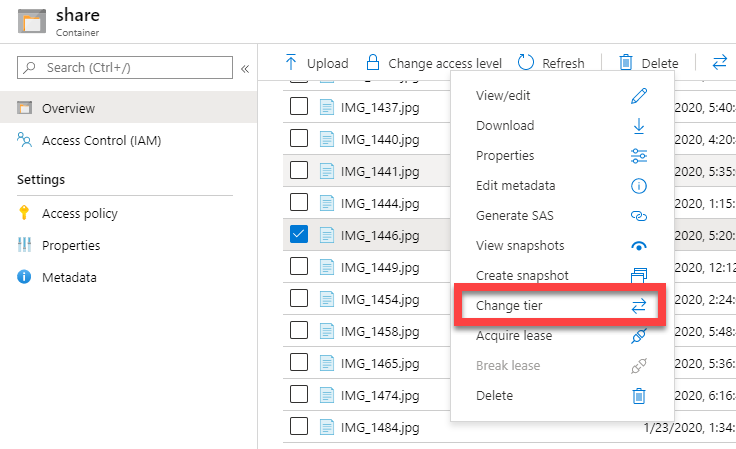
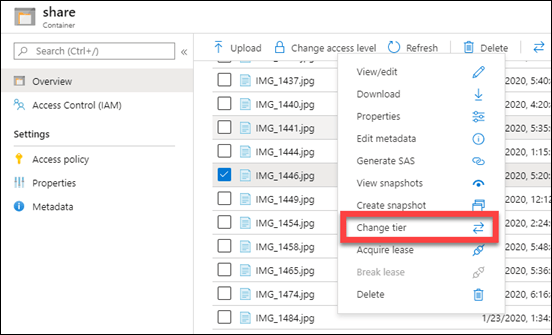
I spoke about using Azure Archive storage as a good location for long term data retention. The way that you configure this is basically to set up a storage account as usual and initially configure it as ‘Cool’ storage (since you can’t do Archive storage directly). You then upload files there (typically using Azure Storage Explorer). The final piece of the puzzle is to change the access tier from ‘Cool’ to ‘Archive’ by right mouse clicking on the item.
image

You can do the same using Azure Storage Explorer.

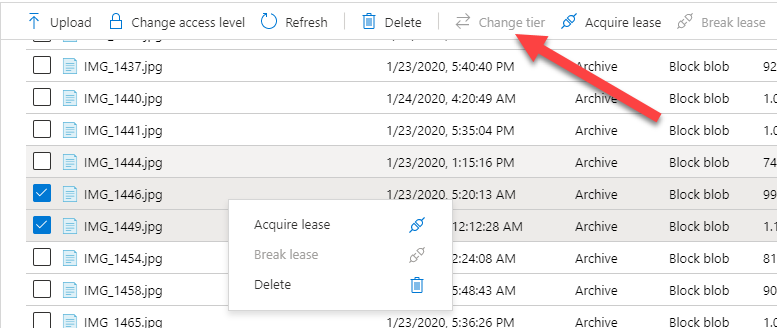
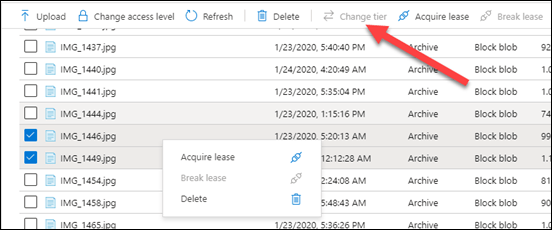
The challenge becomes when you want to do more than a single file at a time.
image

You’ll see that you now don’t get the option to set a tier any more once you have two items or more selected. The same happens with Azure Storage Explorer as well.

Thanks to Marc Kean who pointed me in the right direction, the solution lies in changing this programmatically. Marc has a script on his site and I found another on GitHub as well but decided to write my own anyway which you’ll find here:

https://github.com/directorcia/Azure/blob/master/az-blob-tierset.ps1

with mine you’ll need to set the following variable first at the top of the script:

$storageaccountname = “<your storage account name here>”

$storageresourcegroup = “<your storage account resource group name here>”

$storagetier = “<your desired storage tier level here>” # Hot, Cool or Archive

You’ll also need to connect to you Azure account beforehand which you can do with script of mine:

https://github.com/directorcia/Azure/blob/master/az-connect.ps1

My script will, get the storage account via:

$storageaccount = Get-AzStorageAccount -name $storageaccountname -ResourceGroupName $storageresourcegroup

Get the access for that account via

$key = (get-azstorageaccountkey -ResourceGroupName $storageaccount.ResourceGroupName -Name $storageaccount.StorageAccountName).value[0]

Get the context via:

$context = New-AzstorageContext -StorageAccountName $storageaccount.StorageAccountName -StorageAccountKey $key

get the actual container via:

$storagecontainers = get-azstoragecontainer -Context $context

It will then build an array of all the objects in that container. It will then cycle through all these items changing their tier level via:

$blob.icloudblob.SetStandardBlobTier($StorageTier)

This therefore effectively changes all the items in the container to the tier level you select. This is why I like to set up containers for specific tiers rather than intermingling.

Just remember to run this script AFTER you upload your files to swap them to the cheaper Archive tier. You could also use this script to swap them back at a later stage if you need.


Need to Know podcast–Episode 227

FAQ podcasts are shorter and more focused on a particular topic. In this episode I’ll talk about the recommended process for file migrations to Microsoft 365 collaboration.

Take a listen and let us know what you think – feedback@needtoknow.cloud

You can listen directly to this episode at:

https://ciaops.podbean.com/e/episode-227-wide-not-deep/

Subscribe via iTunes at:

https://itunes.apple.com/au/podcast/ciaops-need-to-know-podcasts/id406891445?mt=2

The podcast is also available on Stitcher at:

http://www.stitcher.com/podcast/ciaops/need-to-know-podcast?refid=stpr

Don’t forget to give the show a rating as well as send us any feedback or suggestions you may have for the show.

Resources

FAQ 4 – Your collaboration structure should be wide not deep

CIAOPS Patron Community

Azure AD Domain Services Cloud only user passwords

I have been creating a Windows Virtual Desktop (WVD) environment for internal testing. I’ll be sharing the process and tricks soon but this issue was one that I really didn’t know about for Azure AD Domain Services until someone pointed it out to me.  I am eternally grateful to gerry_1974 on the Microsoft Tech Community for this information that lead to the resolution. I thought I’d also share it here so others can avoid the oversight I made and prevent getting as frustrated as I did.

I recently wrote about setting up Azure AD Domain services for a cloud only environment

Moving to the Cloud – Part 3

The reason I needed to do this was to support my planned “cloud only” WVD test environment. Azure AD Domain Services is basically designed to create an ‘old style’ domain that WVD host machines connect to. That will change down the track, but for now WVD needs a traditional AD. Since I did not have an existing on premises domain, I planned to use Azure AD Domain Services.

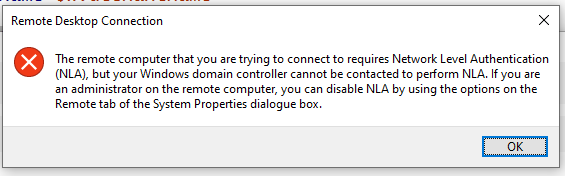
After getting things working eventually (more about that soon), I was able to successfully login to my WVD environment with a user who didn’t have Multi Factor Authentication (MFA) enabled. I then tried a user with MFA and received:

clip_image001

The remote computer that you are trying to you are trying to connect to requires Network Level Authentication (NLA), but your Windows Domain controller cannot be contacted to perform NLA. if you are an administrator on the remote computer, you can disable NLA by using the options on the Remote tab of the System Properties dialogue box.

I put the issue down to being about MFA but as it turned out, I was so wrong!

When you have cloud only users with Azure AD Domain Services, no password hashes in a format that’s suitable for NT LAN Manager (NTLM) are automatically generated! To force this generation for cloud only users, it is required that the cloud only user change their password per:

Enable user accounts for Azure DS

which says:

The steps to generate and store these password hashes are different for cloud-only user accounts created in Azure AD versus user accounts that are synchronized from your on-premises directory using Azure AD Connect. A cloud-only user account is an account that was created in your Azure AD directory using either the Azure portal or Azure AD PowerShell cmdlets. These user accounts aren’t synchronized from an on-premises directory.

and most importantly:

For cloud-only user accounts, users must change their passwords before they can use Azure AD DS. This password change process causes the password hashes for Kerberos and NTLM authentication to be generated and stored in Azure AD.

After having this brought to my attention, I understand why this is but would also say this could be a very painful process if you have a lot of users that are wanting access to something like WVD.

Thus, another little configuration tip to remember if you are setting up a cloud only environment that utilises Azure AD Domain Services. Before users can potentially use services that are dependent on Azure AD Domain Services (like Windows Virtual Desktop) they need to change their password so the NTLM password hash can be generated for use by Azure AD Domain Services.