
I received the not so helpful error code OXE0001462bukxq 19999 on an iOS device when trying to sync some OneNote notebooks.
This error I believed was the because I was mixing and matching identities on the device and inside OneNote. The result was that the notebooks would load into OneNote, I could see the sections but not any pages. I will also say that I was also playing with Intune app protection policies at the same time on the device, which probably really didn’t help.
To get rid of the error I figured that I needed to change the login credentials for each notebook. Problem was I couldn’t see how to do that within OneNote.
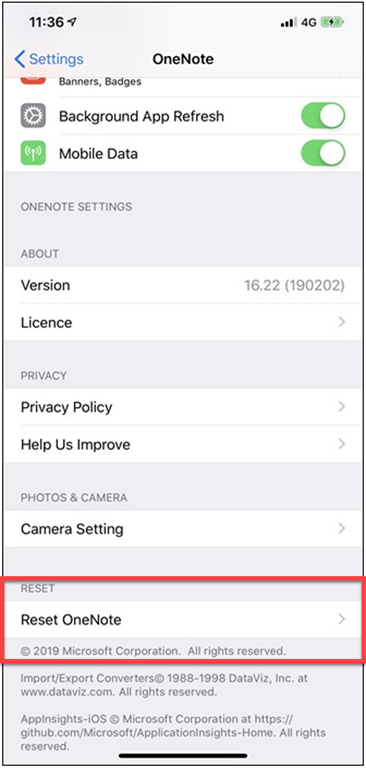
Turns out, what I needed to do was go into the iOS Settings, select OneNote and then down the bottom you’ll find an option to Reset OneNote as shown above.
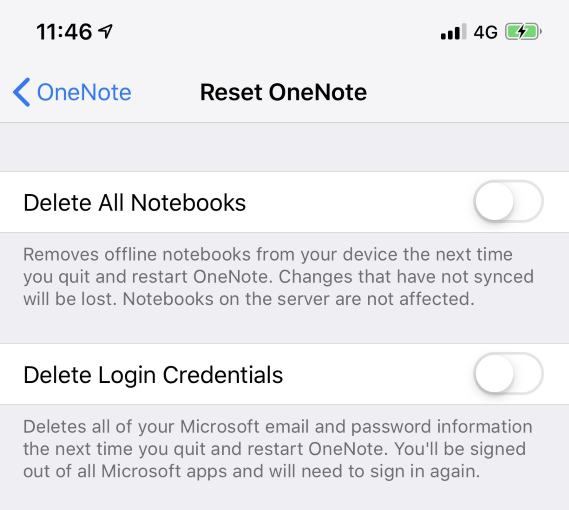
Once you select that you’ll see the above screen giving you the option to Delete all notebooks or Delete Login credentials, which is what I selected.
I then restarted OneNote and re-authenticated to the notebooks and I was away. An easy fix when you know how, just wish the error message was a little bit more helpful. However, in the end, problem solved and new lesson learned.
 CIAOPS
Any idea on how to resolve this error code on a Mac?
LikeLike
Sorry no. I’d do a reset on OneNote if possible, otherwise try closing and opening notebook
LikeLike
Here it is 2024 and I am having the same problem. I can see the notebook on my IPhone but it will not sync and I cant see the pages. By accident I learned that I could see a notebook SHARED with me so I went to my Online OneNote webpage and from there I could see all of my notebooks and their pages so I shared each notebook with myself and went back to my phone and was able to load all my notebooks with no problems.
LikeLike