
About 2 years ago I released a free PowerShell script that allowed you to check for email forwards on mailboxes in a Microsoft 365 environment. I wrote about that script here:
https://blog.ciaops.com/2018/07/05/powershell-script-to-check-outlook-mail-rules/
This is still the most comprehensive method in my books for checking for all the various type of forwards on a mailbox and I recommend you continue to use the script which you’ll find freely available at:
https://github.com/directorcia/Office365/blob/master/o365-exo-fwd-chk.ps1
As good as that script is, there are still challenges for many people actually using it I have found. This mainly revolves around getting an appropriate PowerShell environment running, installing the Exchange Online PowerShell modules, connecting to Exchange Online with PowerShell and so on. I have detailed how to do all that over the period here but I still find that many struggle to make use of the PowerShell script.
So a new approach is in order. In short, I have a new version of this script that is a single EXE file you can download and use here:
https://github.com/directorcia/Office365/blob/master/graph-mbx-rules.exe
It is important to note that this script does not make any changes to users or their mailboxes, it just reads and reports their mailbox rules using the Microsoft Graph. As yet, it can’t check more exotic things like direct mailbox forwarding or sweep rules, but you gotta start somewhere!
Let me show you how it works.

You’ll need a PC that is running a current version of PowerShell. A Windows 10 PC will work fine. You should also have the AzureAD PowerShell module loaded prior in your environment. To do that, all you need to do is run an elevated PowerShell console and type install-azuread. However, hopefully most people already have this loaded.
Download my new file from:
https://github.com/directorcia/Office365/blob/master/graph-mbx-rules.exe
and copy it anywhere on your machine as shown above. Double click to run the file.

You should now see a window like shown above.
The program will first check for the Azure AD PowerShell module. It will then prompt you to log into your tenant of choice.

You’ll go through your normal login process to a tenant as shown.

Including using MFA if required.

Once logged into the tenant, a new Azure AD application will be created in the tenant with a unique name as shown above. The name in this case is CIAOPS-20200415232309. With the app created in the tenant, appropriate permission are added to that app to allow it to do things like read the list of users, their mailboxes, etc.
After this app has been created and permissions applied to it to allow it to do its work, those changes need to be consented or approved by someone (typically the same user that initially logged into the tenant). Unfortunately, from what I can see, consent can only be managed via the browser. With that in mind, the required URL is copied to the clipboard and you are prompted whether you wish to open the default browser to complete this process. Copying the consent URL to the clipboard allows you to manually paste it to your browser session of choice. This is handy if you are working in multiple tenants currently.

You’ll now be prompted to login to the tenant again, but this time in a browser.

You should then see a list of requested permissions as shown above that you’ll need to accept for this process to complete.

If you look at the top of the dialog to see what is requesting permission you should see the name of the Azure AD application as noted previously. Here again that is CIAOPS-20200415232309.

Also note that there is only one write permissions requested, the majority are only read. Where do these permission come from? To use the Microsoft Graph, for example, to list the email folders for a user you use the command here:
https://docs.microsoft.com/en-us/graph/api/user-list-mailfolders?view=graph-rest-1.0&tabs=http
in which you’ll see to do this you need the permissions:
Mail.ReadBasic.All, Mail.Read, Mail.ReadWrite
I have tried to keep the rights requires as basic as possible but I am using what the Graph provides.
You’ll see that it needs a number of permissions to accomplish this. Basically, I have automated the process I detailed how to do manually before here:
https://blog.ciaops.com/2019/04/17/using-interactive-powershell-to-access-the-microsoft-graph/

After you Accept the permissions, you should be return to the home page of your tenant as shown. If for reason the consent page doesn’t appear or something else strange happens, just paste in the URL and try again. Sometimes web request don’t always work.

If you now return to the program you’ll see that it is prompting you to confirm that you have completed the consent stage. Type Y and press ENTER to continue.

Because the web consent step can take a short while to complete I now wait 10 seconds, just in case, for this to complete.

The program will continue, getting all the information it needs and then starting to report on user mailboxes as shown above.

Once all mailboxes have been checked the Azure AD application created to facilitate this process (here CIAOPS-20200415232309) is deleted from your tenant to leave zero touch.
If you then press any key, the program will complete.

If you now look in the source directory you will see two new text files as shown above.
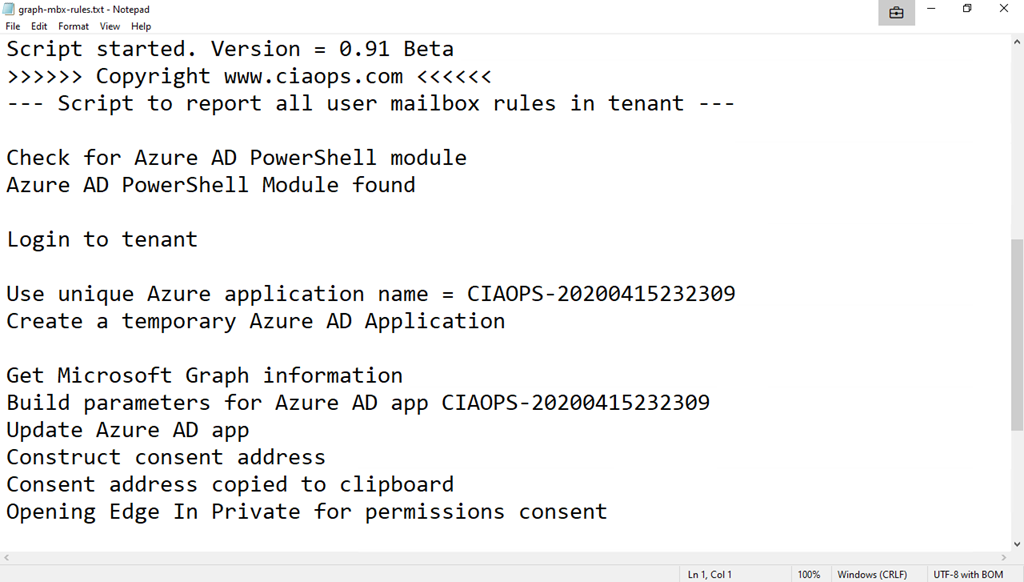
The first file, graph-mdx-rules.txt is basically a debugging log file that records what happens during the initialisation phase of the program.
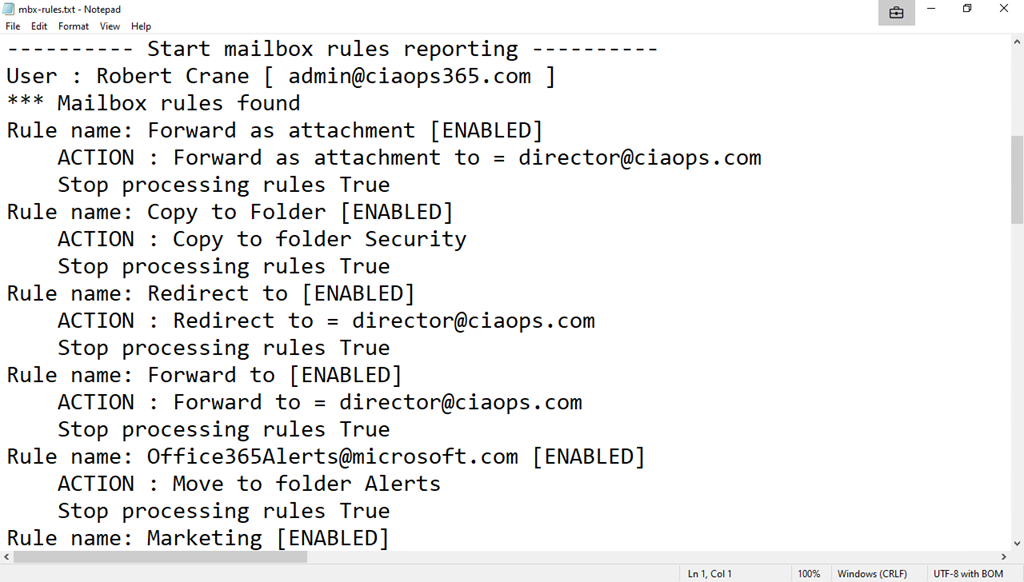
The file mbx-rules.txt is basically a copy of the results.
Note, both of these file get overwritten each time the program runs.
Hopefully, this new program makes it much easier to get the information your need. However, because much is automated and simplified, some may be concerned as to what is actually happening behind the scenes. Well, thanks to the wonders of Azure AD you can easily see.

To review the whole process, open you Azure portal and navigate to Azure Active Directory and then Audit logs as you see above.

In there you should find an entry that corresponds to the Azure AD application being added as shown above. Note the name corresponds to the one details previously, here CIAOPS-20200415232309.

You should then see entries where permissions have been added to Azure AD application as shown above.

A bit further along, you’ll see where consent was granted to the Azure AD application as shown above.

Lastly, you’ll also see where that Azure AD application is completely deleted from the environment leaving no fingerprint.
This is a new approach to automation that I believe will work well. There is still a lot of work that needs to be done and there are still some limitations but hopefully, this can be the first of many scripts I create and make available in this simplified way. Thus, I’d love you to try the program and tell me what you think. what works, what doesn’t? What would you like to see and how can it be improved? No matter what it is, I’d love to hear your thoughts, which you can send me directly via email director@ciaops.com.
Look out for more updates and new scripts at my GitHub repository – https://github.com/directorcia/Office365






 CIAOPS